Instagram isn’t just a photo-sharing app anymore; it’s a full-blown marketplace!
Over 200 million users tap on a shopping post or business profile every single day, and Instagram commerce generated around $37.2 billion in revenue in 2024 alone.
Whether you’re a small business owner, a creator, or someone just getting started, the opportunity here is massive. And the best part? You don’t need a big budget to get in on it.
Plenty of brands are figuring out how to sell on Instagram for free and are actually making it work. This guide breaks down everything step-by-step, from setting up your storefront to closing real sales.
But before we get into strategies, let’s start with the foundation: What exactly is Instagram Shopping?
What is Instagram Shopping?
Instagram Shopping is a built-in feature that lets businesses and creators tag products directly in their posts, Reels, and Stories, turning regular content into a mini storefront.
Instead of telling your followers to “check the link in bio,” they can tap on a product, see the details, and buy it right then and there.
The whole point is to make the buying experience as smooth and seamless as possible, without ever leaving the app. Think of it as your online shop, but living right inside Instagram.
How to sell products on Instagram (step-by-step)
Selling on Instagram sounds exciting, but jumping in without a full-fledged plan can cost you time and results. Here’s a clear, step-by-step breakdown to get your Instagram store set up properly and actually start making sales.
Step #01: Comply with Instagram selling policies
Before anything else, make sure your business actually qualifies to sell on Instagram. To sell through Instagram Shop, you need to meet Meta’s commerce eligibility requirements.
That includes:
- complying with their policies,
- representing your business and domain accurately,
- being in a supported country, and
- having a professional Instagram account.
On the product side, Instagram Shopping is designed for physical goods (think apparel, beauty products, home goods, and electronics). Digital products, services, subscriptions, and regulated items like weapons or adult products are not allowed.
It’s worth reading through Meta’s Commerce Policies before you get started, because violations can result in your shopping access being permanently removed. Not the most fun step, but skipping it can cost you everything later.
Step #02: Set up your account
Once you’re clear on eligibility, the next thing to do is switch your Instagram account to a “Business or Creator” account.
Here’s how to create an Instagram business account:
1. Open the Instagram app and go to your profile.
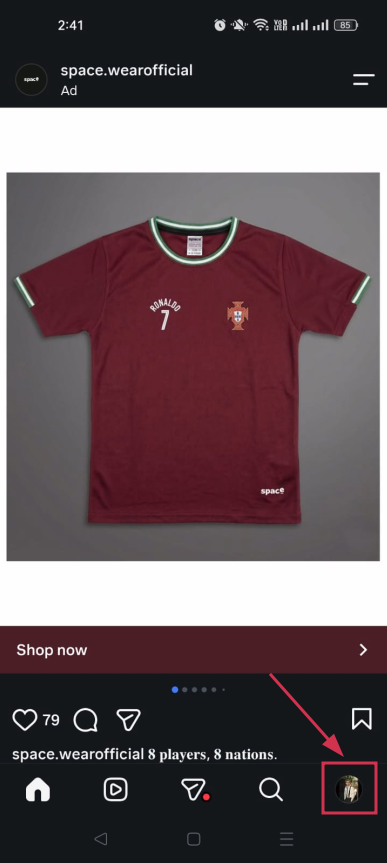
2. Here, tap the menu icon (≡) in the top right-hand corner.
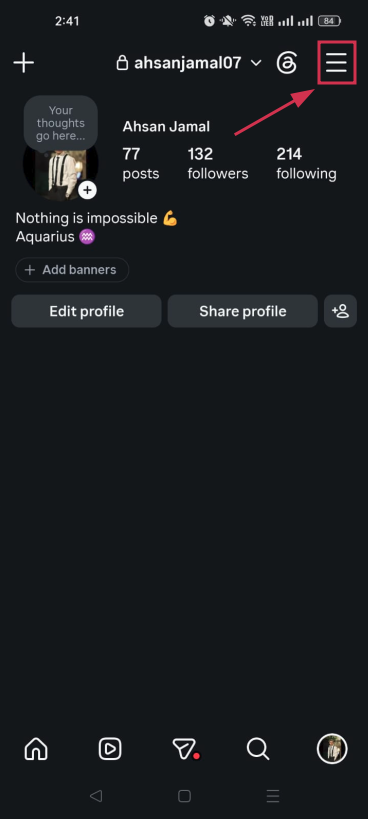
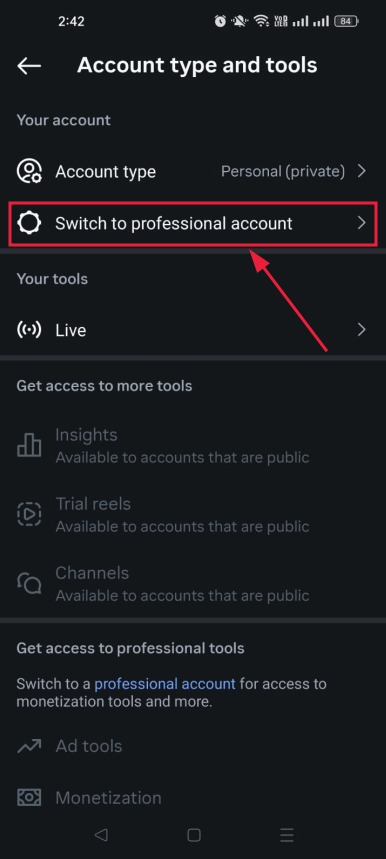
3. From the list of options, tap on “Account type and tools”.
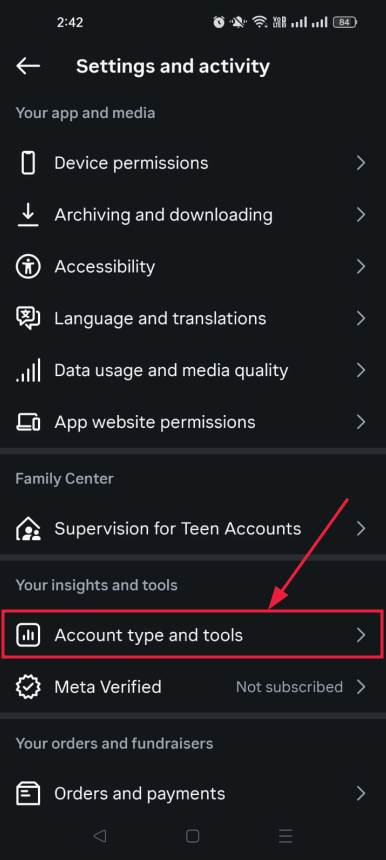
4. Now, tap on “Switch to professional account”.
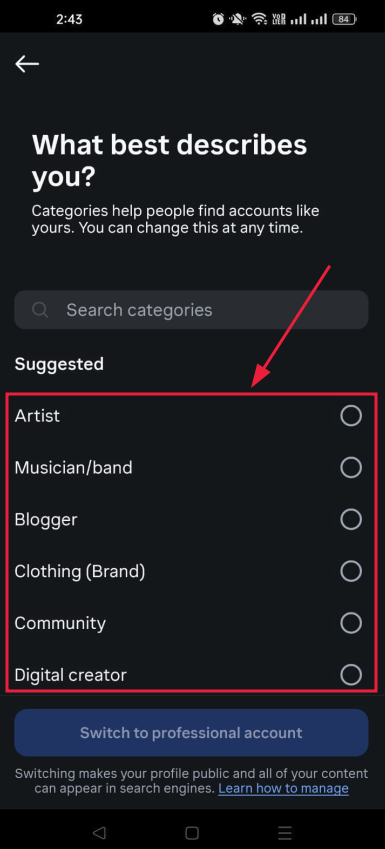
5. Pick a category that best describes your business (e.g., Clothing Brand, Restaurant, Digital Creator).
6. Finally, tap on the “Switch to professional account” button.
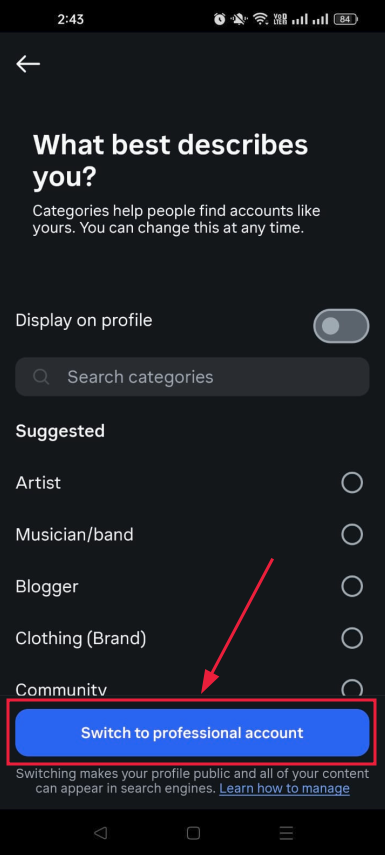
Note: All your photos, videos, and followers stay exactly the same after the switch. You won’t lose anything you’ve built.
After that, it’s time to optimize your Instagram bio. Your profile is often the first touchpoint for potential customers, so getting it right is critical.
- Use a high-quality, recognizable profile photo like your logo, and add a website link or landing page to direct traffic and drive conversions.
- Keep your bio tight and benefit-focused. Tell people what you do and why they should care, and always include a clear call to action phrase like “Shop Now” or “Check the link below”.
If you’re not sure how to craft the perfect bio, an Instagram bio generator can be a handy tool to help you put together something clean and compelling without spending too much time on it. Just make sure you personalize whatever it spits out. Your bio should sound like you, not a template.
You can also check out: 400+ best Instagram bio examples to stand out in 2026
Step #03: Connect to Facebook & create a catalog
To unlock Instagram Shopping features, you need to connect your Instagram account to a Facebook Page.
Here’s how to do it:
1. Open the Instagram app on your smartphone.
2. Tap on your profile icon in the bottom right-hand corner.
3. Tap the “Edit profile” button located right under your bio.
4. Scroll down to the “Public Business Information” section and tap “Page”.
5. Tap “Connect” or “Create” and then continue.
6. Tap “Log in to Facebook” and follow the prompts to sign in.
7. Finally, select the specific Facebook Page you want to connect.
Note: Make sure the Facebook Page is published and publicly visible, and that it matches your Instagram business branding (same name, same look).
Your catalog is essentially where all your product information lives. Connect your Instagram Business account to a catalog to enable tagging products in your posts. You can do this through Meta’s Commerce Manager.
If you’re on Shopify, WooCommerce, or BigCommerce, even better. You can install the Facebook and Instagram Sales Channel on your platform, which gives you one shared product catalog for Facebook Shop, Instagram Shopping, and Facebook Marketing. This way, your products sync automatically, and you manage everything from one place.
Step #04: Set up Instagram Shopping
Once your catalog is ready and your pages are connected, it’s time to turn on Instagram Shopping.
1. Head to your Instagram “Settings”.
2. Tap “Business”.
3. Then select “Shopping” and choose your catalog.
4. After selecting your catalog, submit your account for review.
Once your shop is submitted, Meta will review your account before enabling product tagging and shopping features. Meta’s review process can take anywhere from a few hours to a few days, so don’t panic if it doesn’t go live immediately.
Once you’re approved, you’ll be able to tag products directly in your content, and a “Shopping” tab will appear on your profile.
One important update to know: As of September 2025, Shops on Facebook and Instagram now use website checkout, so customers are redirected to your website to complete their purchase rather than buying inside the app. Make sure your website checkout is fully functional before you go live.
Step #05: Create shoppable content
This is where things get really fun. Once your shop is approved, you can start tagging products directly in your posts.
- For a single-image post, tag the obvious hero product. Don’t clutter the image with every possible item in frame; keep it focused on what the post is actually about.
- For carousels, you can tag different products across slides, which works especially well for fashion, beauty, and home décor brands.
Stories use interactive sticker-based tagging (up to 5 per Story), perfect for flash sales, new arrivals, and behind-the-scenes product reveals.
The 24-hour lifespan creates urgency, since users know the content will disappear, which psychologically accelerates purchase decisions. Just keep stickers neatly placed; don’t cover the product itself.
Reels with product tags convert 61% better than untagged ones, and product tags in Reels generate 37% more clicks to product pages than the same tags placed on static feed posts.
One important heads-up: In many regions, you can’t add product tags to a Reel after it’s already published, so always tag before you hit share.
Step #06: Link to your official website
Instagram only gives you one clickable link in your bio, so use it well. Point it to your website, a specific product page, or a landing page that drives conversions.
Since over a quarter of social users turn to Instagram to find their next purchase, having a smooth path from your profile to your website makes a real difference.
If you want to share multiple links (like a new collection, a blog post, and a contact page), tools like Replug or Linktree let you create a simple landing page with multiple destinations.
Also, since mid-2025, public posts from professional accounts can appear in Google search results, so a well-linked, keyword-rich profile now helps you get discovered beyond the app, too.
Step #07: Build an engaged audience & following
Having a shop on Instagram means nothing if no one’s watching. Building a real, engaged audience is what actually moves the needle.
Start with consistency! Accounts that post 3 to 5 times per week grow followers twice as fast and see 12% more reach per post, according to Buffer’s State of Social Engagement report.
Beyond posting regularly, focus on actually engaging.
- Reply to comments,
- Respond to DMs, and
- Jump into conversations in your niche.
Replying to comments alone boosts engagement by 21%, which signals to the algorithm that your content is worth pushing further.
And skip the shortcuts: Buying followers or using follow-unfollow tactics attracts low-quality accounts that never buy anything, and Instagram may flag the behavior altogether.
Step #08: Promote your products directly on Instagram
Organic reach is great, but combining it with paid promotion can really speed things up. You can run several types of Instagram ads through Meta Ads Manager (feed ads, Story ads, Explore ads, and Reels ads).
Reels ads are the most popular, with more than half of 2025 Instagram ads running as Reels. If you have a post that’s already performing well organically, boosting it is a quick and affordable way to get it in front of more people.
You can also use Meta’s targeting options to reach people by interest, age, location, and behavior, or even build lookalike audiences based on your existing customers.
Note: Meta suggests starting with a minimum of $5 and running your campaign for at least 6 days to see the best results.
Step #09: Drive traffic & engage
Random posting won’t get you far. Clear content pillars help you stay consistent without guessing what to post.
Pick three to five themes that support your brand (think education, storytelling, behind-the-scenes, testimonials, or product highlights), then brainstorm content ideas under each one. This keeps your feed focused and makes content planning a lot less stressful.
Driving traffic isn’t just about posting more; it’s about sparking real conversation. Use polls, question boxes, and countdowns in Stories to get people interacting.
Spend 10 to 15 minutes a day engaging with your ideal customers, commenting thoughtfully, responding to Stories, and nurturing real conversations.
The more people interact with your content, the more Instagram pushes it to new audiences, which means more eyes on your products.
Step #10: Measure outcomes
If you’re not tracking what’s working, you’re just mere guessing. Instagram’s built-in analytics, available on every Professional account, give you a clear picture of how your content and shop are performing.
Focus on engagement metrics like:
- Shares and saves, which are better indicators of value than likes.
- Reach and impressions, which show how far your content travels.
- Reel analytics, like watch time and retention rates, to refine your editing.
For a deeper look, Meta Business Suite and third-party tools like ContentStudio or Iconosquare can give you more granular data. Review your numbers at least once a week, spot the patterns, and double down on what’s actually converting.
How to sell on Instagram marketplace: Vital tips to follow!
Setting up your shop is just the first part. What actually drives consistent sales is how you show up every day (your profile, your content, your conversations, and your strategy).
Here are ten practical tips to help you sell better on Instagram:
Tip #01: Optimize your profile for sales
Think of your profile as your storefront; if it looks messy or unclear, people bounce.
- First, switch to a “Professional” or “Business” account to unlock analytics, ads, and shopping tools.
- Then craft a benefit-driven bio that leads with what you do and why it matters to your buyer.
- Finally, make your one clickable bio link count. Send people to a product page, a landing page, or a link-in-bio tool with multiple destinations.
Tip #02: Leverage Instagram shopping & product tags
Setting up an Instagram Shop is completely free; there’s no fee to get started. Once your shop is live, tag products directly in your posts, Reels, and Stories so people can tap and shop without extra friction.
Keep in mind that as of mid-2025, Meta dismissed native in-app checkout for most businesses. Purchases now complete on your own website, so make sure your checkout page is clean and fully functional.
Tip #03: Sell directly through direct messages (DMs)
DMs are one of the most underrated sales channels on Instagram. Use them to answer product questions, share links, and close sales in a real conversation.
You can automate responses to common questions using tools like ManyChat, so no lead falls through the cracks while you’re busy. But don’t let automation do all the work; jump in personally when someone’s genuinely interested.
Always remember, real conversations build trust, and trust is what gets people to actually buy.
Tip #04: Create high-converting content
Reels with product tags convert 61% better than untagged ones, so:
- lead with your product early,
- keep it under 30 seconds for quick hits, and
- always tag before you post
For Stories, use “Highlights” to keep your best-converting content alive beyond 24 hours. Organize them by product category, FAQs, or customer reviews so new visitors can find everything they need without having to dig deep.
Tip #05: Show your followers you care
People don’t buy from brands they feel ignored by. Reply to comments, respond to DMs, acknowledge people who tag you in their posts, and genuinely engage with your community.
Simply replying to comments boosts engagement by 21%, which tells the algorithm your content is worth showing to more people. Small gestures like a thoughtful reply or a quick “thank you” go a long way in building loyalty that actually translates into repeat purchases.
Tip #06: Establish partnerships with Instagram influencers
Keep in mind, you don’t need to go after mega-influencers with massive followings. Micro- and nano-influencers deliver higher engagement because of their niche, closely connected audiences.
Find creators whose followers match your ideal customer, and collaborate on content that feels natural, not scripted. A genuine product recommendation from a trusted voice in your niche will almost always outperform a polished ad from a brand nobody’s heard of.
Also read: Ecommerce influencer marketing: A complete guide
Tip #07: Offer Instagram-exclusive offers & run giveaways
Give people a solid reason to follow you and actually buy. Limited-time discount codes, flash sales, or “Instagram-only” offers create urgency and reward your most engaged followers.
Giveaways are also a great way to grow your audience fast. Ask people to follow, like, and tag a friend to enter. Just make sure to add a compliance note like “This giveaway is not endorsed by Instagram” to keep things above board.
Tip #08: Sell through IGTV & Instagram Reels
Longer-form IGTV content is great for detailed product demos, tutorials, or behind-the-scenes looks that build purchase confidence.
Reels, on the other hand, are your ultimate reach engine. They reach twice as many non-followers as static posts, making them perfect for product discovery.
Note: Use Reels to grab attention and IGTV to go deeper. Together, they cover both ends of the buyer journey, i.e., awareness and consideration.
Tip #09: Curate UGC & use Instagram SEO
User-generated content (photos and videos from real customers using your products) builds trust faster than any advertisement. Repost it, feature it in your Stories, and encourage it by creating a branded hashtag.
On the SEO side, since mid-2025, public posts from professional Instagram accounts can appear in Google search results, so treat your captions like searchable content. Use relevant keywords naturally, add descriptive alt text to your images, and write captions that actually say what the post is about.
Note: If writing winning captions feels like a challenge, let a top-tier Instagram caption generator do the hard work for you, coming up with engaging, keyword-rich copy tailored for maximum impact.
Tip #10: Join the Instagram creator marketplace
If you’re a creator or influencer, the “Instagram Creator Marketplace” connects you directly with brands looking for partnerships.
Through Meta’s affiliate commerce infrastructure, eligible creators can tag products from a brand’s verified Meta Commerce catalog directly within Reels, earning commissions when those tags lead to purchases.
It’s a solid way to monetize your audience without having to build and manage your own product catalog. You just create content you’d make anyway and earn from the sales you drive.
Why sell on Instagram in 2026?
Honestly, the numbers speak for themselves!
Instagram now has 3 billion monthly active users, and social commerce sales on the platform totaled $42.8 billion in 2025.
Roughly 200 million users tap on a shopping post or business profile every single day, and 81% of Instagram users use the app to research new products or brands. This means your potential customers are already on here, actively looking for things to buy.
US social commerce sales are expected to reach $100 billion in 2026, and Instagram sits right at the center of that growth. Add to that the fact that it’s completely free to set up a shop, and there’s really no reason not to be selling here.
No matter if you’re a solo creator or a small business owner, Instagram gives you a massive, ready-to-buy audience without the high cost of traditional retail.
Benefits of selling products on Instagram
Selling on Instagram isn’t just a trend anymore. It comes with some real, tangible advantages that most other platforms simply can’t match.
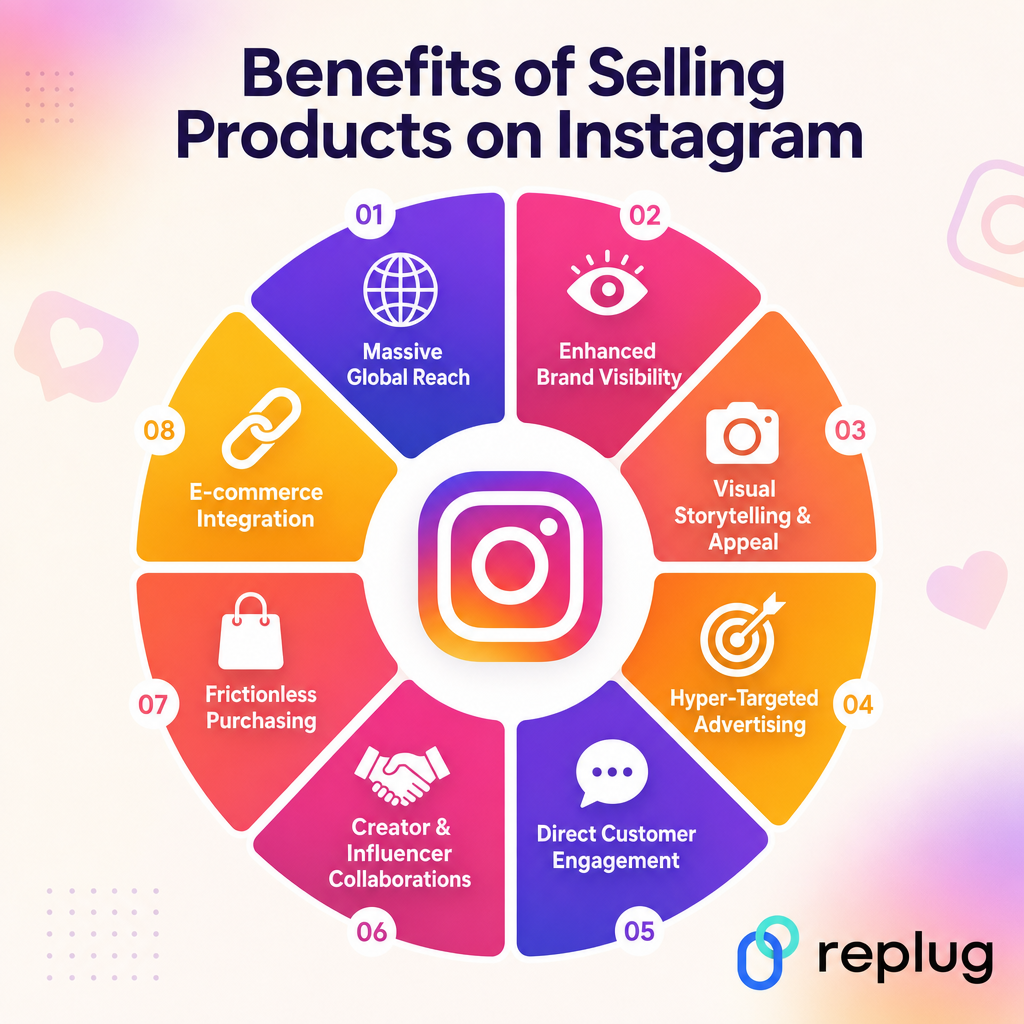
Here’s a quick look at what you’re actually getting when you set up shop here:
Massive global reach
With 3 billion monthly active users, Instagram gives you access to an audience that almost no other platform can offer. Whether you’re a local business or a brand trying to go global, your products can reach people across countries and time zones without spending a dime on traditional advertising.
Enhanced brand visibility
90% of Instagram users follow at least one business account, which means people are genuinely open to discovering and engaging with brands here. Consistent posting keeps you top of mind, and a well-optimized profile with a clear bio, quality visuals, and even a branded short URL in your bio link helps turn casual visitors into actual customers.
Visual storytelling & appeal
Instagram was built for visuals, which makes it the perfect place to show off your products in a way that plain text or listings simply can’t. A well-shot photo, a quick Reel, or a Story can communicate your product’s value far more effectively than a product description ever could.
Hyper-targeted advertising
Instagram’s ad platform (powered by Meta) lets you get incredibly specific about who sees your products. You can target by age, location, interests, behaviors, and even build lookalike audiences based on your existing customers, which means your ad budget goes toward the people most likely to actually buy.
Direct customer engagement
Instagram makes it easy to talk to your customers in real time through comments, DMs, Stories replies, and polls. That kind of direct back-and-forth builds trust, helps you understand what your audience wants, and turns one-time buyers into loyal, repeat customers.
Creator & influencer collaborations
Instagram’s creator ecosystem is massive, and partnering with the right influencer can put your product in front of a highly engaged, niche audience overnight. Micro- and nano-influencers especially tend to drive strong results because their followers trust their recommendations more than traditional ads.
Frictionless purchasing
Instagram Shopping lets users tap on a product tag and move toward purchase without ever leaving the app. That shorter path from discovery to checkout reduces drop-off and makes impulse buying a lot easier, which is exactly what you want when someone stumbles across your product mid-scroll.
E-commerce integration
Instagram connects seamlessly with major e-commerce platforms like Shopify, WooCommerce, and BigCommerce, so your product catalog syncs automatically and you manage everything from one place. Your Instagram shop essentially becomes an extension of your existing store; no need to rebuild anything from scratch.
Wrapping up
Selling on Instagram in 2026 is one of the smartest moves you can make for your business, and hopefully this guide has shown you exactly how to do it.
From setting up your shop and creating shoppable content to building a loyal audience and running targeted promotions, every step we’ve covered is designed to help you turn your Instagram presence into a real revenue stream.
The platform has billions of active users, the tools are mostly free, and the opportunity is genuinely massive. So stop waiting for the “perfect moment” and start taking action today.
Set up your profile, tag your products, and let Instagram do what it does best, i.e., connect the right people with the right products.
Frequently asked questions

Muhammad Ahsan Jamal