Looking for a way to connect with your customers and boost engagement without getting lost in crowded inboxes? SMS marketing is the accurate answer. It provides a direct, effective, and highly engaging way to reach your audience instantly.
But why stop there? By incorporating branded short links into your SMS campaigns, you can save valuable character space while gaining powerful insights into how your audience interacts with your messages.
Whether you’re a small business owner aiming to expand your reach or a marketer looking to supercharge your campaigns, SMS links can help you achieve your goals pretty well.
Let’s explore how these branded short links can transform your SMS strategy and drive measurable results!
Quick answer: Use a short link on a domain you own, such as go.yourbrand.com/fall, in every marketing text. It saves characters in a 160-character SMS, lets you count taps per campaign, and follows U.S. carrier guidance: the CTIA messaging best practices say a URL shortener in texts should use a web address dedicated to your business, and Twilio tells senders not to use shared public shorteners such as free Bitly or TinyURL links.
What are short links for SMS?
Short links for SMS are shortened URLs used in SMS marketing messages to conserve valuable character space and enhance tracking and analytics.
These links redirect people to the intended landing page or website and record each click (with country, device and time) on the way. Time on page and conversions come from your website analytics, so add UTM tags to the destination as well.
When sending SMS messages, businesses often have a limited number of characters to work with. By using short links, they can include more information in their messages while still maintaining a clear and concise message.
Short links also allow firms to track click-through rates and other valuable data that can be used to optimize their SMS marketing campaigns.
How to create a branded shortened link for SMS marketing
Getting started with crafting short links for SMS marketing is pretty straightforward. All you need is a reliable custom link shortener, and you’re ready to optimize your campaigns.
Here’s a step-by-step guide to help you set things up the right way:
Step #1: Use a dedicated SMS platform
Before you start shortening and sending links, it’s essential to have a dedicated SMS marketing platform in place.
These platforms are specifically designed for managing large-scale SMS campaigns. They offer features like audience segmentation, automation, compliance with SMS regulations, and message scheduling.
A good SMS platform ensures your messages are delivered efficiently and at the right time, helping you maximize engagement and ROI.
Replug doesn’t send texts itself; you paste your short links into any SMS platform, or create them automatically through Zapier (Scale and Agency) or the Replug API (Agency), per the Replug SMS links page. Some SMS platforms, such as Twilio, also offer built-in link shortening on your own domain.
Step #2: Choose a link-shortening tool
Once your SMS platform is ready, the next step is to pick and configure a link-shortening tool.
Replug is one option: it offers click tracking, custom domains (on every plan, including Free), retargeting pixels (from Essentials) and link analytics.
These capabilities help you monitor link performance, build trust with custom URLs, and ultimately drive better results from your SMS campaigns.
Whichever tool you pick, make sure it lets you use your own domain. Sign up for Replug free to try it.
Step #3: Create your shortened link
Let’s say you select Replug as your link-shortening tool. You can create a shortened link for your SMS campaign by pasting your original URL, with its UTM tags, into the shorten field on Replug’s Home screen and clicking Shorten.

Step #4: Use a custom domain
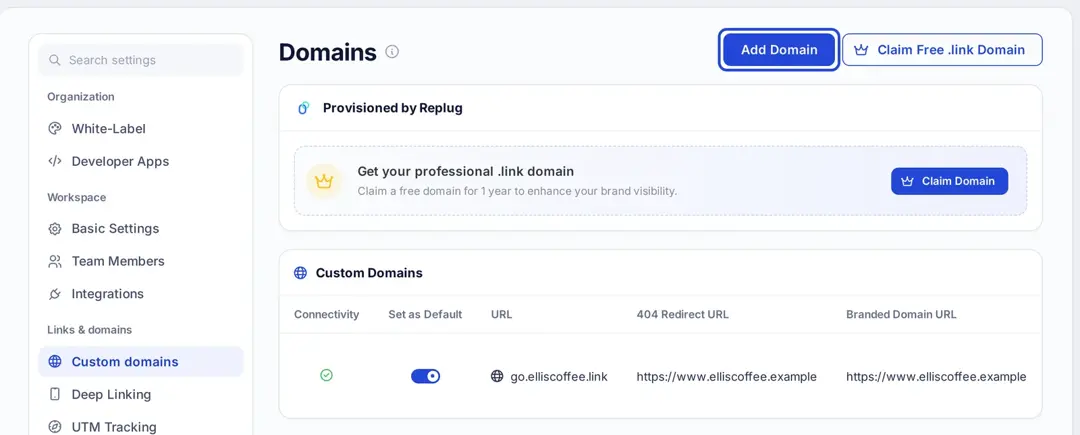
To strengthen brand consistency and recognition, personalize your short link with a custom domain. Instead of using a generic shortener domain, your SMS messages show your brand in the domain itself, such as go.yourbrand.com. In Replug, go to Settings > Custom domains and click Add Domain; every plan, Free included, can connect custom domains with automatic SSL. For texts to U.S. numbers this matters beyond looks; see the carrier rules below.
Step #5: Add link preview
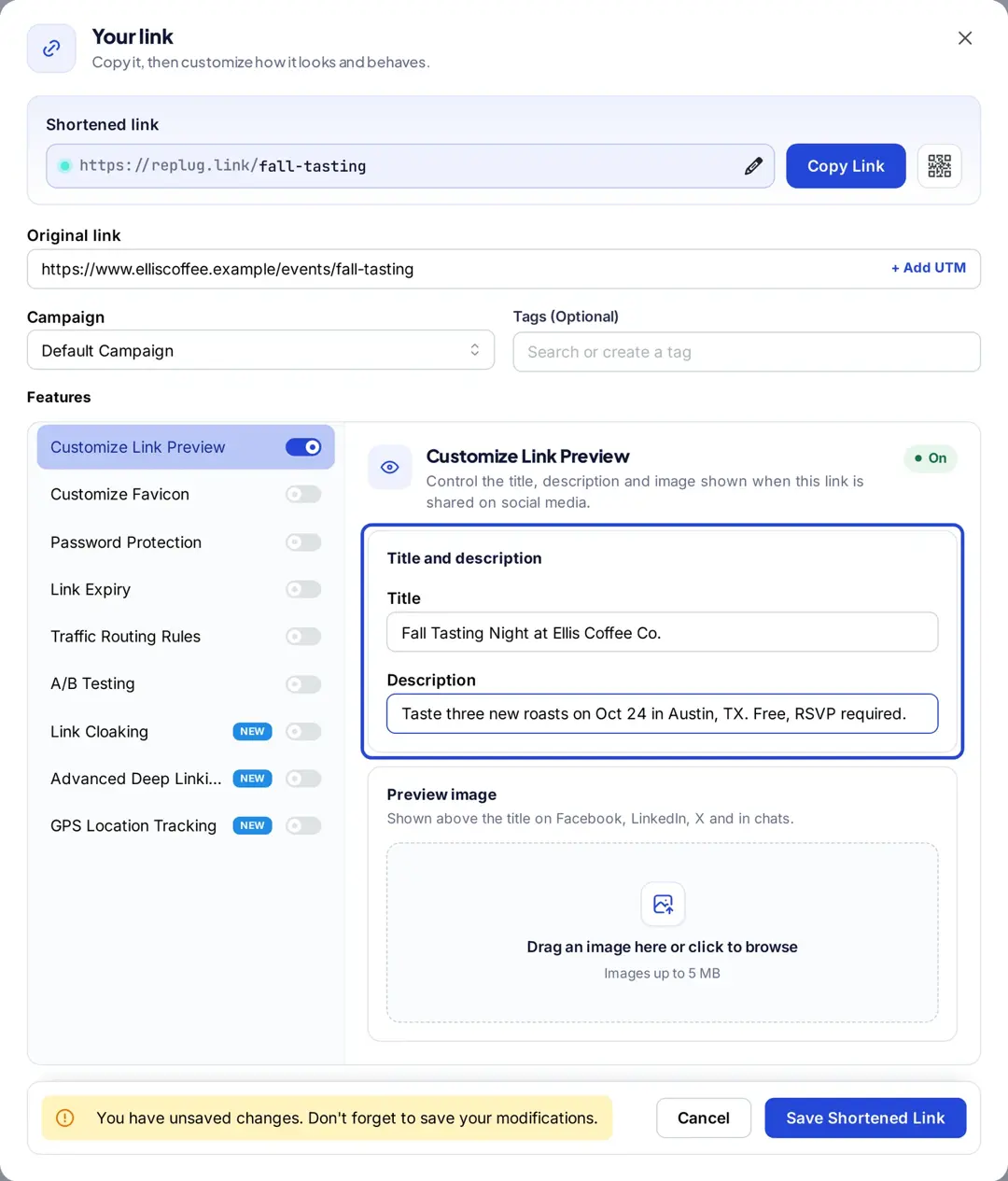
Some devices display a small link preview when a shortened link is shared. With Replug (Essentials and up), you can set the title, description and image of that preview. How iMessage, Google Messages and WhatsApp build those previews is covered in our guide to SMS link previews.
Step #6: Route links
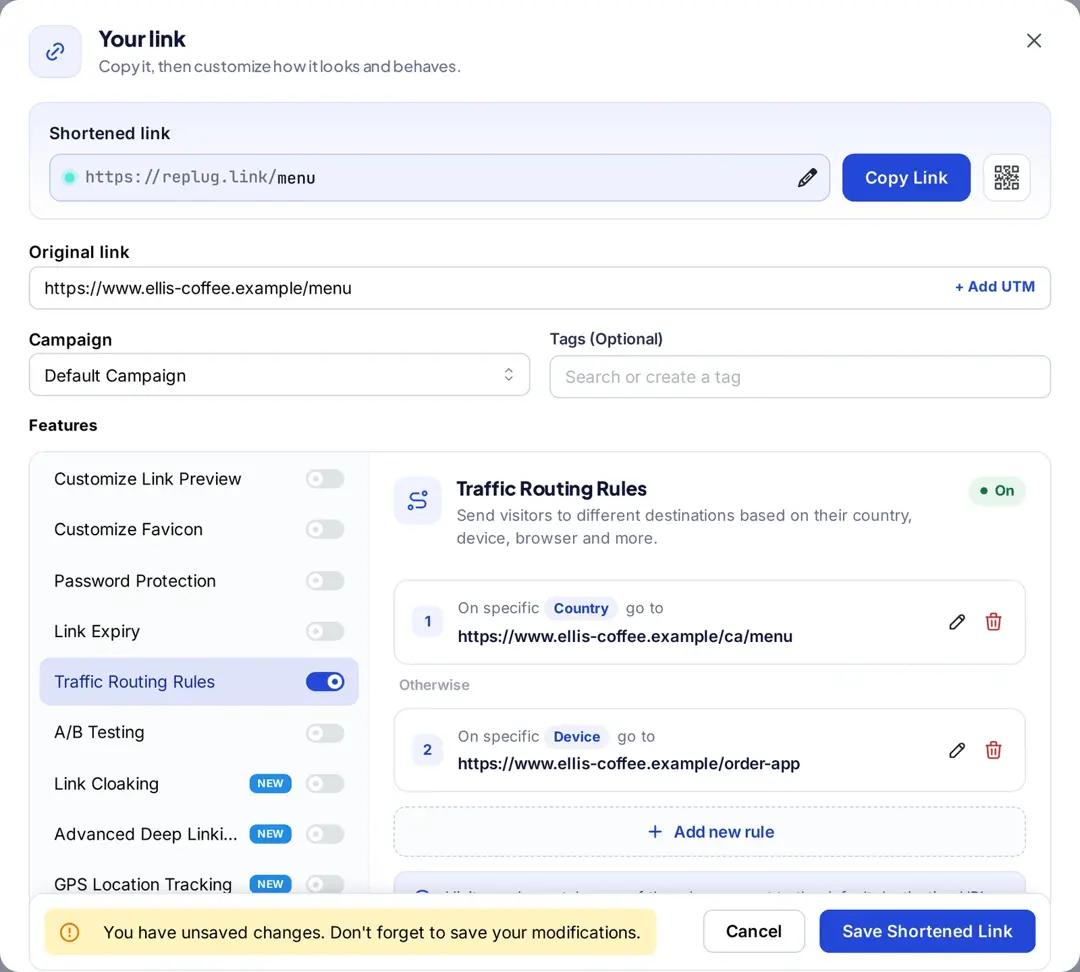
Replug traffic routing (Scale and Agency) sends different people to different destinations from one link, by country, city, device, operating system and more, with up to 10 rules per link. It’s useful for multi-location promotions or sending iPhone and Android users to the right app store. To split one audience between versions, use A/B testing instead.
Step #7: Include a strong call to action (CTA)
To encourage customers to click on your shortened link, include a clear call-to-action in your SMS message. For example: “Try our new pumpkin cold brew, 20% off today: go.elliscoffee.link/fall”. Say what happens when they tap, not just “click here.”
Step #8: Add deep links
Deep links allow you to send users directly to a specific page within your app or website, rather than just the homepage. This saves customers time. Deep links are on Replug’s Scale and Agency plans. For instance, an e-commerce brand can send shoppers straight to a product checkout page.
By following the steps outlined above, you can easily create a branded shortened link tailored for SMS marketing that promotes trust, engagement, and CTR.
Why use short links in SMS marketing?
Short links are a must-have tool for businesses seeking to upgrade their SMS marketing strategy. Here are some convincing reasons why you must utilize short links for SMS marketing.
To save space (character count limits)
A single SMS holds 160 characters, so every character counts. That drops to 70 characters if the message contains any character outside the basic GSM-7 set, such as an emoji or a curly quote, and longer messages are split into segments that are billed separately, according to Twilio’s guide to SMS length. Shortened links take up less space, giving businesses more room to communicate their message effectively.
For example, a retailer can send a message with a shortened link to a product page, allowing them to provide a brief description and the link in one message.
For click tracking & analytics
Shortened links can be used to track clicks and engagement, giving enterprises valuable data on the effectiveness of their campaigns.
For instance, a charity can send an SMS message with a shortened link to a donation page. By tracking clicks on the link, they can determine the success of the campaign and adjust future ones accordingly.
For an optimized mobile experience
Most people access SMS messages on their mobile devices, and shortened links can lead to a better user experience on these gadgets.
For example, an airline can send an SMS message with a shortened link to a mobile boarding pass. This makes it much easier for passengers to access and use the pass on their smartphones.
To increase brand recognition
Shortened links can be customized with branded domains, helping to increase brand recognition and trust.
For instance, a fashion brand can send an SMS message with a shortened link to a new collection, using a branded domain.
For seamless A/B testing
Shortened links can be used for A/B testing and optimization of SMS campaigns.
For example, an online retailer can send two different SMS messages with different shortened links to a product page and track which link receives more clicks. They can then optimize future campaigns for increased engagement.
To enhance trust & click-through rates (CTR)
Branded shortened links look cleaner than long URLs, and recipients can see who the link is from before they tap, which matters when people are wary of links from numbers they don’t recognize.
For instance, a coffee shop can send a text with a branded short link such as “go.elliscoffee.link/fall”, which shows the brand where a random string of characters would not.
For better deliverability
Shortening alone doesn’t help here; the domain does. U.S. carrier policies discourage shared public URL shorteners because spammers use them, and Twilio advises senders not to use free Bitly or TinyURL links but a short domain that belongs to the business (Twilio filtering help). A dedicated, branded short domain avoids that problem.
For example, a credit union sending account alerts should use its own short domain, never a free public shortener.
For additional data points
Shortened links can capture additional data, such as device type, operating system, country, city and time of click, providing deeper insights into audience behavior and preferences. This ultimately helps to refine future campaigns.
For instance, a restaurant chain can use shortened links in SMS campaigns to track which city or time slot gets the most reservations, tailoring promotions based on that data.
Also read: How to use shortened URLs for marketing
Carrier rules for links in text messages
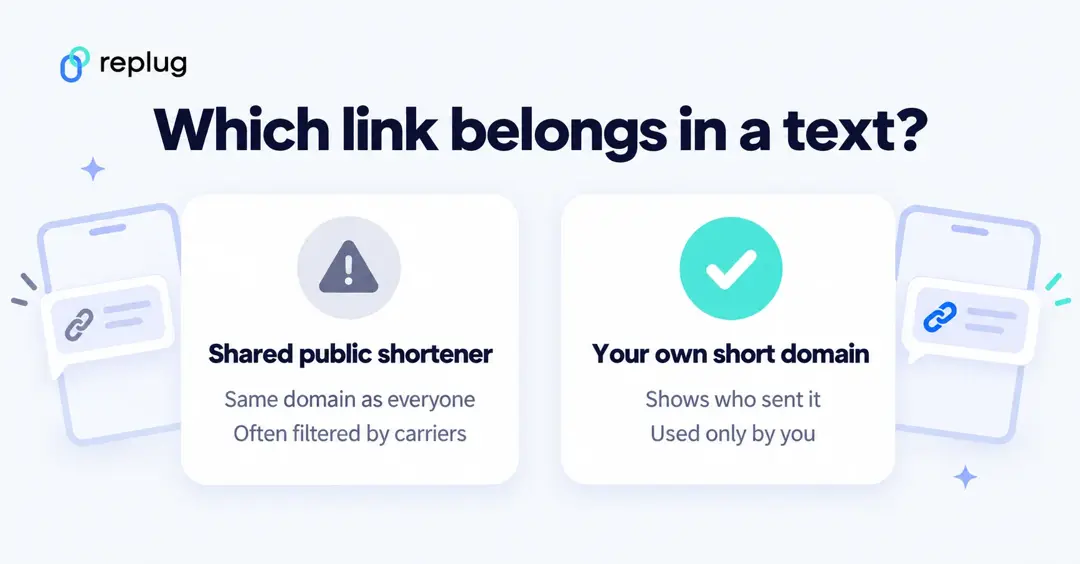
In the U.S., carriers follow the wireless industry group CTIA’s Messaging Principles and Best Practices (May 2023). On embedded links, section 5.3.2 says links “should not conceal or obscure the Message Sender’s identity,” and that where a URL shortener is used, senders should use one “with a web address and IP address(es) dedicated to the exclusive use of the Message Sender.” The site a link leads to should clearly identify the owner and include contact information, such as a postal address.
Twilio turns that into plain advice in its help article on sending shortened links: for texts to U.S. numbers, use a short domain that is proprietary (belongs to your business, not a free shared shortener) and properly branded (matches the sender named in the message).
- Connect a short domain you own, such as
go.yourbrand.comoryourbrand.link, and use it only for your own links. - Make the brand in the domain match the brand named in the text.
- Don’t send links from shared public shorteners (free Bitly, TinyURL or a shortener’s default domain such as replug.link) in marketing texts.
- CTIA also mentions dedicated IP addresses. A custom domain gives you a dedicated web address; if your SMS provider asks about IP addresses, check with your shortener’s support before you launch.
- Include opt-out wording. CTIA says senders should state in the message how to opt out and use standard “STOP” wording.
This is general guidance, not legal advice. Your SMS provider’s rules and local law (for example, U.S. consent rules for marketing texts) also apply.
How businesses use short links in SMS marketing: examples
Here are five common ways businesses put short links in texts. The businesses are fictional; the patterns are ones you can copy.
Coffee shop: weekly offer
Ellis Coffee Co. in Austin, TX texts members a weekly drink offer with go.elliscoffee.link/fall. A new link each week shows which offers get the most taps.
Restaurant: mobile coupon
A pizza place in Columbus, OH sends a coupon link that opens a mobile-friendly coupon page. Routing iPhone and Android users to the matching app store page gets more people to order in the app.
Retailer: new collection
A boutique in Denver, CO sends early access to a new collection. Separate short links for the VIP list and the general list show which group responds better.
Clinic: appointment reminders
A dental office in Raleigh, NC sends reminders with a short link to reschedule. Short, branded links keep the reminder in a single SMS and show patients who sent it.
Event: tickets and directions
A community theater in Portland, OR texts ticket holders a link to the venue map on show day. Clicks by city show how far people travel to attend.
Example of a good and bad SMS with shortened links
The way you incorporate shortened links in SMS marketing can significantly impact your campaign’s effectiveness. A well-crafted message with a shortened link should be clear, relevant, and aligned with your brand, encouraging trust and clicks.
On the other hand, a poorly written SMS with an unbranded or unclear link can confuse recipients, lower click-through rates, and even trigger spam filters.
Below is a precise example to illustrate the right and wrong ways to use shortened links in your SMS campaigns.
Good SMS Example:
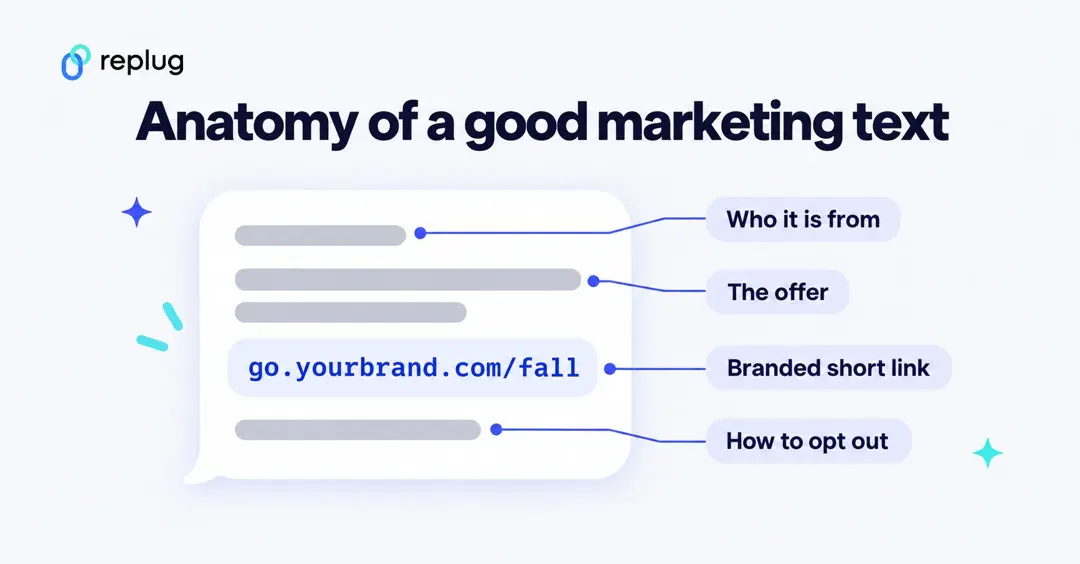
Ellis Coffee: Hi Sarah, our Fall Sale is live. 30% off all beans this week only. Shop now: go.elliscoffee.link/fall30 Reply STOP to opt out
Why it’s good:
- Says who it is from, then a personalized greeting
- Clear offer and urgency
- Branded short link on the sender’s own domain (adds trust and follows carrier guidance)
- Friendly, concise tone, no emoji, so it stays within one 160-character GSM-7 message
- Clear opt-out wording
Bad SMS Example:
SALE NOW ON! Click here for 30% off: bit.ly/3xY2zZq
Why it’s bad:
- All caps feel forceful
- No personalization
- Vague message
- Shared public shortener link: may seem suspicious and is discouraged by U.S. carriers
- No sender name and no opt-out wording
Wrapping Up
In conclusion, branded short links are a powerful tool for SMS marketing, offering enhanced brand recognition, improved click-through rates, and valuable analytics.
By creating concise, trustworthy, and trackable links, brands can optimize their campaigns and drive engagement effectively.
As shown through examples, well-crafted SMS with branded links resonate with audiences, while poorly designed ones risk losing trust.
By following the steps outlined to create and implement these links, businesses can strengthen their SMS marketing strategy. This ensures messages are impactful, professional, and aligned with their brand identity, ultimately facilitating stronger connections with customers in a competitive digital landscape.
Frequently asked questions

Muhammad Ahsan Jamal