

 6 minutes
Are you looking to make your website discoverable by millions of users across the web? Do you want to ensure that your content appears in Google’s search results?
If so, you’ve come to the right place! Submitting your URL to Google is an essential step in getting your website indexed and increasing its visibility online.
For marketers who care even more about both visibility and link performance, Replug.io provides an integrated way to shorten, brand, and manage all your shared URLs, so that every link counts.
In this guide, we will simplify the process and provide you with simple, easy-to-understand instructions on how to submit your URL to Google.
Let’s dive in and make your mark in the digital world!
Why submit URLs to Google?
Submitting URLs to Google is essential for several reasons:
- Enhanced Visibility: Submitting URLs ensures that your web pages are indexed and appear in Google’s search results, increasing visibility among your target audience.
- Faster Indexing: By submitting URLs, you expedite the process of indexing, allowing your content to be searchable sooner.
- Increased Organic Traffic: Indexed URLs have the potential to appear in search engine results, attracting organic traffic to your website.
- Control Over Search Results: URL submission allows you to prioritize your most valuable web pages in search results, giving you more control over your online presence.
- Recognition of Updates: Submitting URLs alerts Google to crawl and index your updated content, ensuring users have access to the latest version.
- Improved Rankings: Indexed URLs contribute to higher search engine rankings, boosting visibility and organic traffic.
Also read: How to Bookmark a URL in Google Chrome: Step-by-Step Guide
How to submit a URL to Google?
Method 1: Using Google Search Console
Follow these steps to submit a URL to Google using the Google search console:
Step 1: Open the Google search console
Go to Google Search Console (previously known as Google Webmaster Tools) and sign in or create an account if you don’t have one.
Step 2: Add property
Click on “Add Property” and enter the URL of your website. Follow the verification process to confirm ownership of the website.
Step 3: Access the URL inspection tool
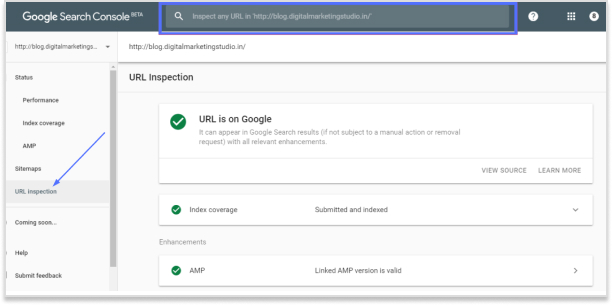
Once your website is verified, navigate to the left sidebar and select “URL Inspection” under the “Index” section.
Step 4: Enter the URL
In the URL Inspection tool, enter the specific URL you want to submit to Google in the search bar.
Step 5: Request indexing
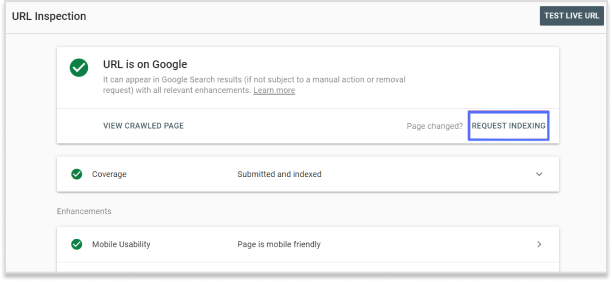
Click on “Request Indexing” to notify Google about the URL and request it to be crawled and indexed.
Step 6: Verification
Complete any additional verification steps prompted by Google, if required.
Step 7: Check status
You can check the status of the URL submission and indexing progress in the URL Inspection tool.
Also read: How to Automatically Shorten URLs in an RSS Feed?


Method 2: Submit an XML Sitemap
Follow these steps to submit an XML Sitemap:
Step 1: Submit your XML Sitemap
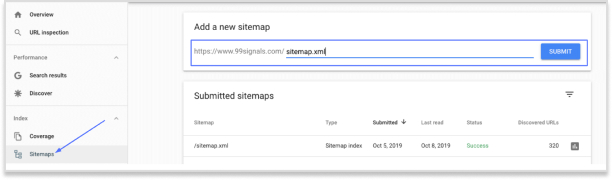
- On the Sitemaps page, click on the “Add/Test Sitemap” button.
- In the text field that appears, enter the filename or path of your XML sitemap. It should typically be named “sitemap.xml” and located in the root directory of your website.
- Click on the “Submit” button to add your XML sitemap to Google Search Console.
Step 2: Verify Successful Submission
- After submitting your XML sitemap, Google Search Console will display the status and details of the submitted sitemap. It may take some time for Google to process the sitemap and index the included URLs.
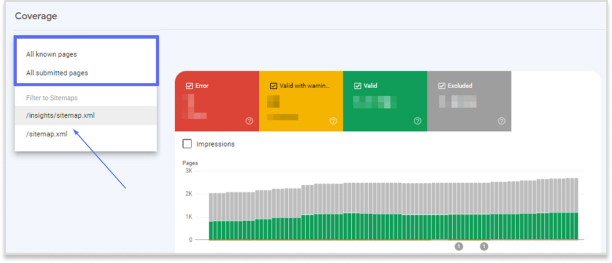
- Check the “Coverage” report in Google Search Console to ensure that the submitted URLs are being indexed properly. Monitor any errors or warnings that may require attention.
Also read: How to Save a URL to Desktop: Step-by-Step Guide
Final note
It’s important to note that Google’s crawling and indexing process may take some time. Submitting a URL doesn’t guarantee immediate inclusion in search results, but it improves the chances of your web page being discovered and indexed by Google.
Repeat this process whenever you have new content or make significant updates to ensure timely indexing and visibility in search results.
And when you’re sharing your newly indexed links, you can shorten them through an efficient link shortener to brand them and track clicks easily. This will ultimately result in making your SEO efforts more measurable and powerful.
Trending:
Unique URLs: What they are and how to use them?
FAQs

Arslan Jadoon
