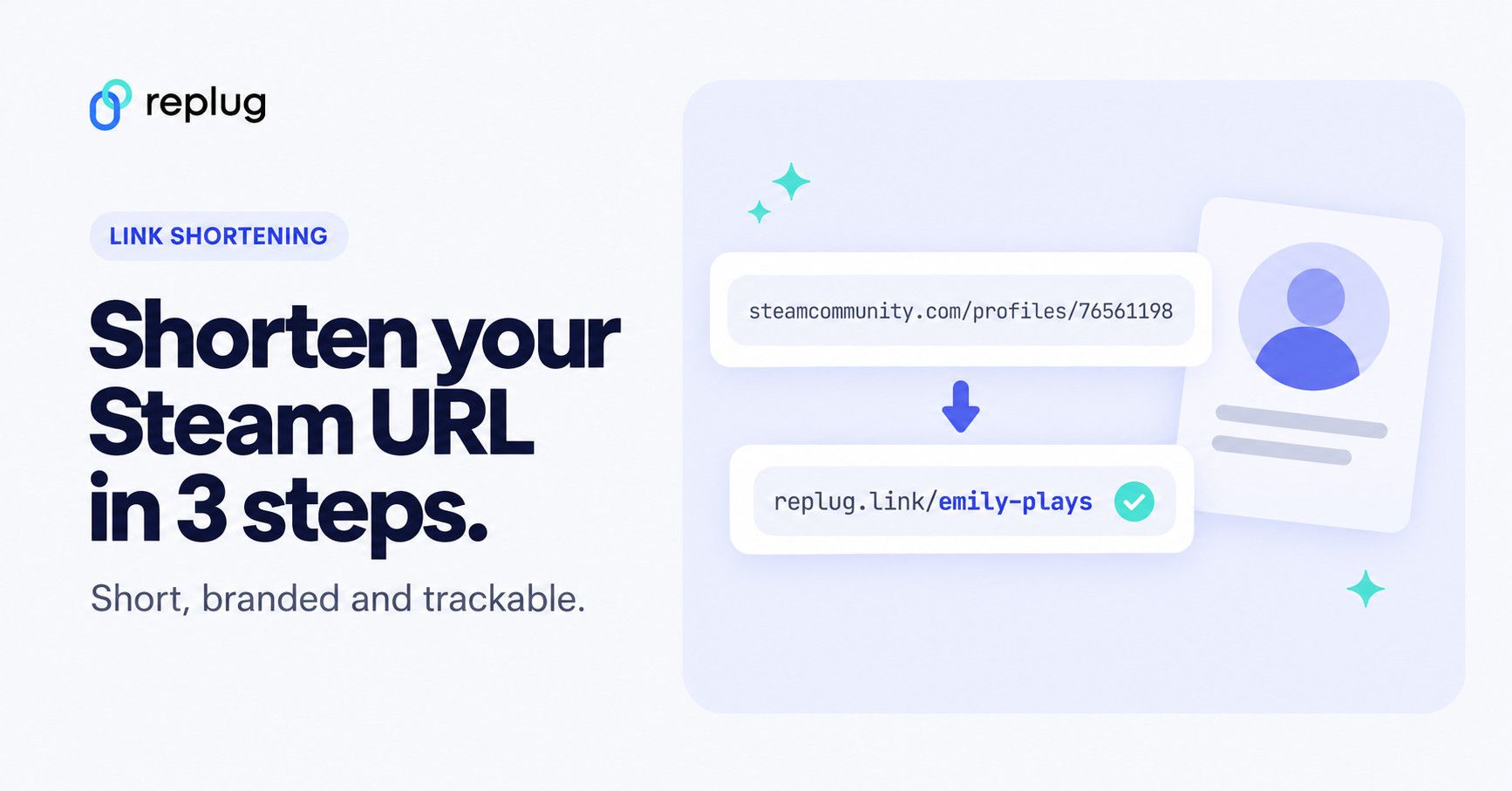
Quick answer: to shorten a Steam URL, copy your profile link from Steam (open your profile, right-click the page or use the share menu, and copy the address, such as steamcommunity.com/profiles/7656119… or steamcommunity.com/id/yourname), paste it into a link shortener such as Replug and save. You get a short link like replug.link/x7Kp2 that counts every click. Steam also lets you replace the long number in your profile address with a free custom URL (Edit Profile, then Custom URL), and on Replug’s Essentials plan and above you can pick your own short ending, such as replug.link/emily-plays.
Steam has redefined the gaming world, and it’s the go-to platform for PC gamers: when we checked Steam’s About page in October 2026, its live counter showed about 29.9 million people online at that moment. However, when it comes to sharing your Steam profile, a long URL can become hard to manage.
So, if you’re looking to make your Steam profile link more user-friendly and shareable, Replug is surely the way to go. Luckily, this process is quick and easy, and in this guide, we’ll walk you through how to do it step by step.
Let’s get shortening!
What a Steam URL looks like
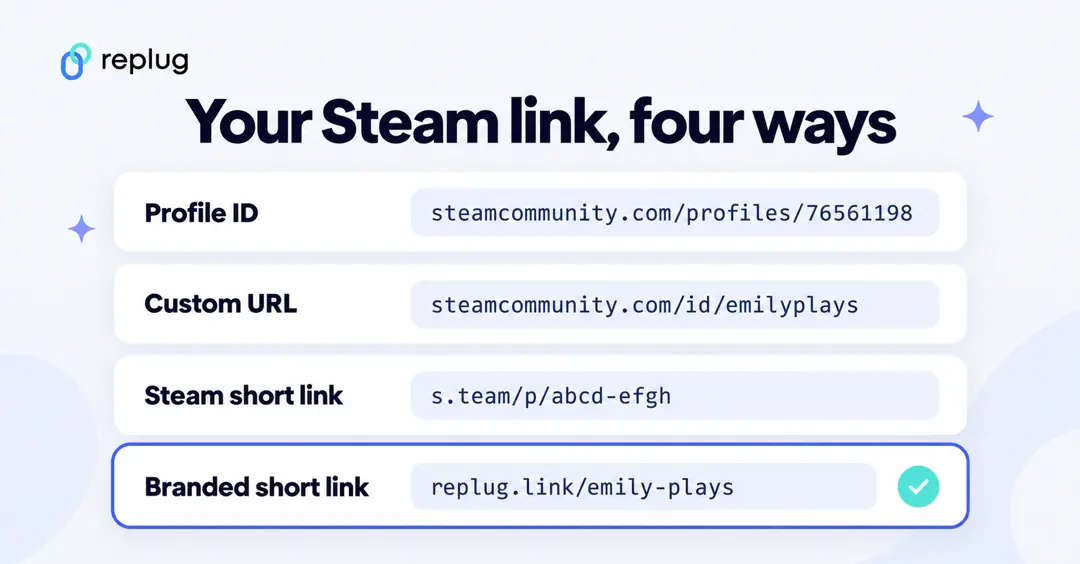
Steam uses a few different addresses, and it helps to know which one you are shortening:
| Link type | What it looks like | Good to know |
|---|---|---|
| Profile (default) | steamcommunity.com/profiles/7656119… | The long number is your SteamID. According to Steam Support, the 64-bit SteamID is a 17-digit number, and it can’t be changed. |
| Profile (custom URL) | steamcommunity.com/id/yourname | A name you choose under Edit Profile. You can change it or clear it later. |
| Store page | store.steampowered.com/app/<app ID>/… | The page for one game. The text after the app ID is optional. |
| Steam’s own short link | s.team/a/<app ID> or s.team/p/<friend code> | Steam’s official short domain. In our October 2026 test, s.team/a/ links opened the matching store page and s.team/p/ links opened a profile. |
Steam’s own options make a link shorter, but they don’t let you choose a branded ending or see how many people clicked. That’s where a link shortener helps. If you’re not sure where to copy your link from, see how to find your Steam URL on desktop and mobile.
Make your Steam URL shorter inside Steam (custom URL)
Before you use a shortener, you can swap the long number for a name. It’s free and takes a minute:
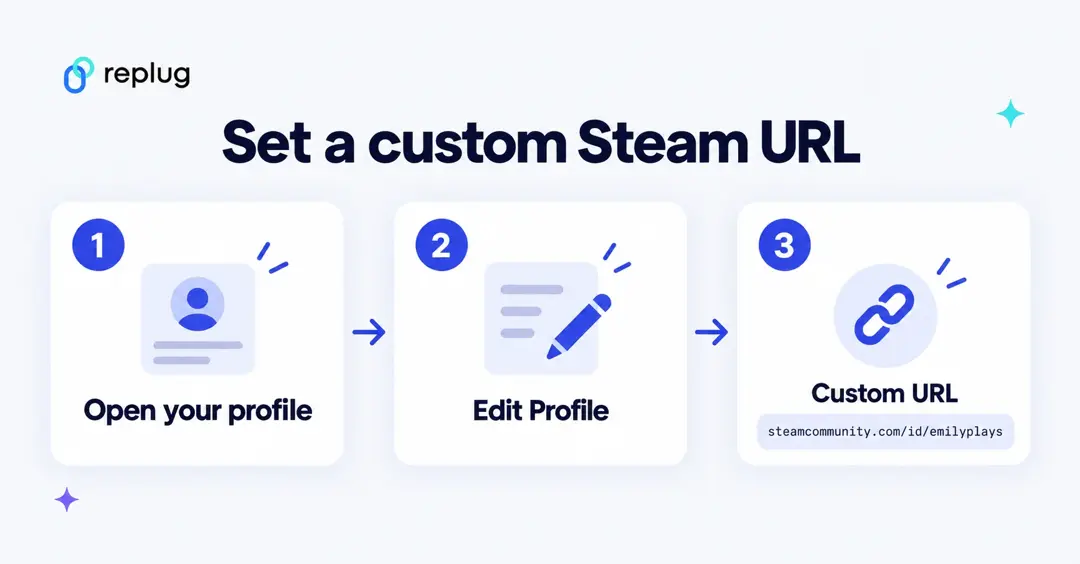
- Open your Steam Community profile in the Steam app or a browser.
- Click Edit Profile.
- Type the name you want in the Custom URL box (for example emilyplays) and save.
- Your profile now opens at steamcommunity.com/id/emilyplays.
Two things to keep in mind. Steam Support says that if you delete the text in the Custom URL box, your profile goes back to the 64-bit ID address, and that the SteamID itself never changes. So if you plan to change your custom URL later, shorten the /profiles/ address with the number: a short link pointing there keeps working whatever name you pick next.
How can you shorten a Steam URL using Replug?
Using a reliable custom URL shortener, you can quickly transform your long Steam URL into a neat, trackable, and short link. Let’s walk through the step-by-step process.
Here’s how you can shorten a Steam URL using Replug.
Step 1: Log in or create an account on Replug
Go to the Replug app and log in to your account. If you don’t already have an account, create one.
Step 2: Shorten Your Steam URL
Access your Replug dashboard and paste your Steam profile URL in the “Quickly shorten your link” bar. (In the current dashboard, it’s the shorten bar on the Home page; paste the link and click Shorten.)
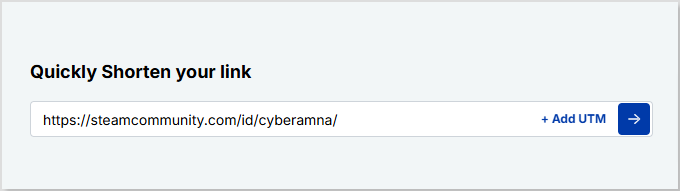
Step 3: Save and share
Once done, click on the blue next button. You’ll have an auto-generated Replug short URL. (In the current dashboard, a “Your link” window shows the new short link, such as replug.link/x7Kp2, with a Copy Link button.)
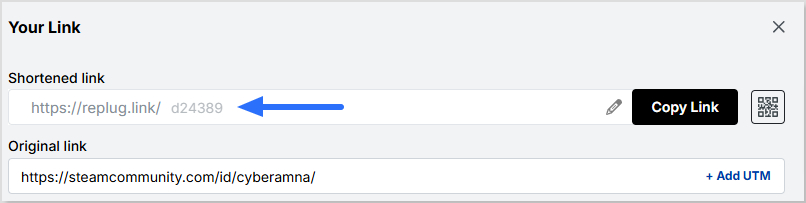
You can now save your short Steam URL and share it across multiple platforms!
Also read: How to find Steam URL: Step-by-step guide
What else can you do with Replug?
Replug does more than just shorten your Steam URL. Here’s what you can do with it:
Create a custom URL
With Replug, you can personalize your Steam URL, making it short, memorable, and branded. Choosing your own ending, such as replug.link/emily-plays, is on the Essentials plan and above; the free plan gives you an automatic ending. You can also connect your own domain on any plan, including Free.
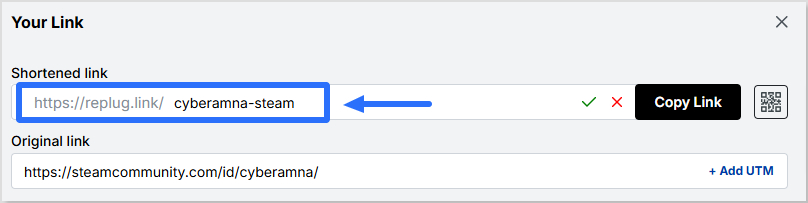
This custom URL makes your profile link more professional and easier to share across platforms.
Generate a QR code
Easily create a dynamic QR code for your Steam URL with Replug. You can easily edit and update this QR code even after creating it. (The free plan includes 10 smart QR codes. Every code runs through a short link and tracks scans; sending an already printed code to a new page is on the Scale and Agency plans.) You can also customize the look of your QR code.
This QR code can now be shared anywhere, allowing your circle to scan it and access your Steam profile in a heartbeat.
This QR code can now be shared anywhere, allowing your circle to scan it and access your Steam profile in a heartbeat.
Customize the link preview
Customize the title, description, and image that appear when sharing your Steam URL. (Custom link previews are on the Essentials plan and above.)
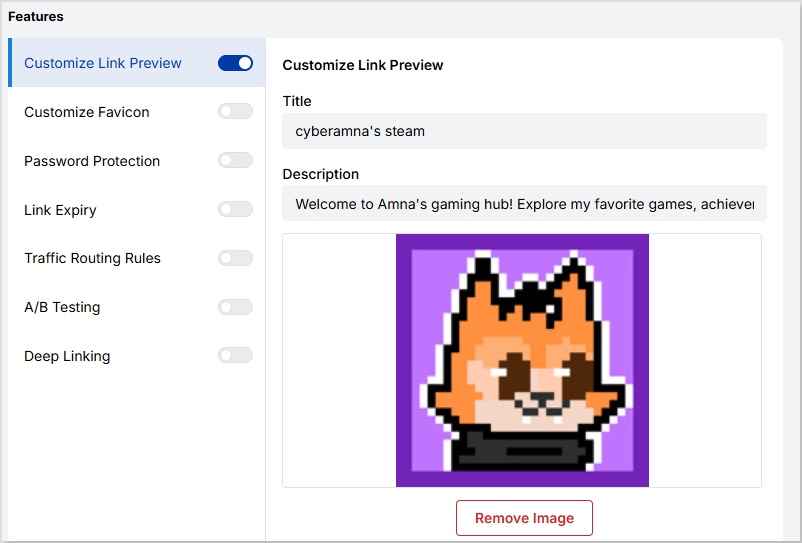
Creating a custom link preview using Replug makes your link look more authentic, engaging, and tailored to your Steam profile or content.
Track and monitor analytics
Replug provides in-depth analytics for your Steam link, including clicks, locations, and devices. You can also add UTM parameters to track the performance of your link.
A/B testing
Replug lets you A/B test up to 20 different URLs to see which one performs best. (A/B tests are on the Scale and Agency plans.)
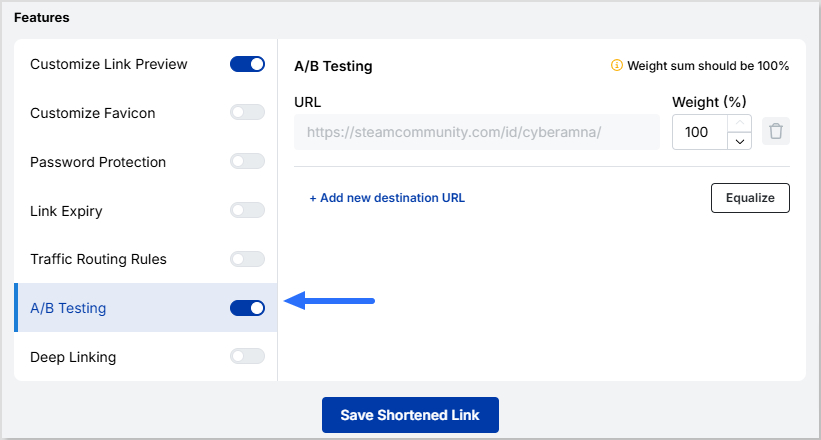
Compare various versions of your Steam profile URL to optimize your link’s engagement and traffic.
Where to share your short Steam link
- Discord and Steam chat: a short link is easier to paste and doesn’t fill the message with a long number.
- Twitch panels and YouTube descriptions: viewers can find your profile, wishlist page or group in one tap.
- TikTok, Instagram and X bios: space is tight, so a short, readable link fits better.
- Several links at once: if you also want to share your Twitch, YouTube and Discord server, put them on one bio link page and share that link instead.
See how many people open your Steam link
Steam doesn’t show who visited your profile from a link, and neither does a shortener: you see totals, not names. For every short link, Replug shows clicks, unique clicks, countries, cities, devices, browsers and the sites people came from. The free plan keeps 14 days of click history, Essentials 90 days, and Scale and Agency keep it without a time limit (per Replug’s pricing page, October 2026).
To compare where your clicks come from, make one short link per place (one for Discord, one for Twitch, one for your YouTube description), or add UTM tags with the built-in UTM builder, which is on every plan.
How to tell a real Steam link from a fake one
Fake Steam links are a common way to steal accounts. Before you click a link someone sends you, or sign in:
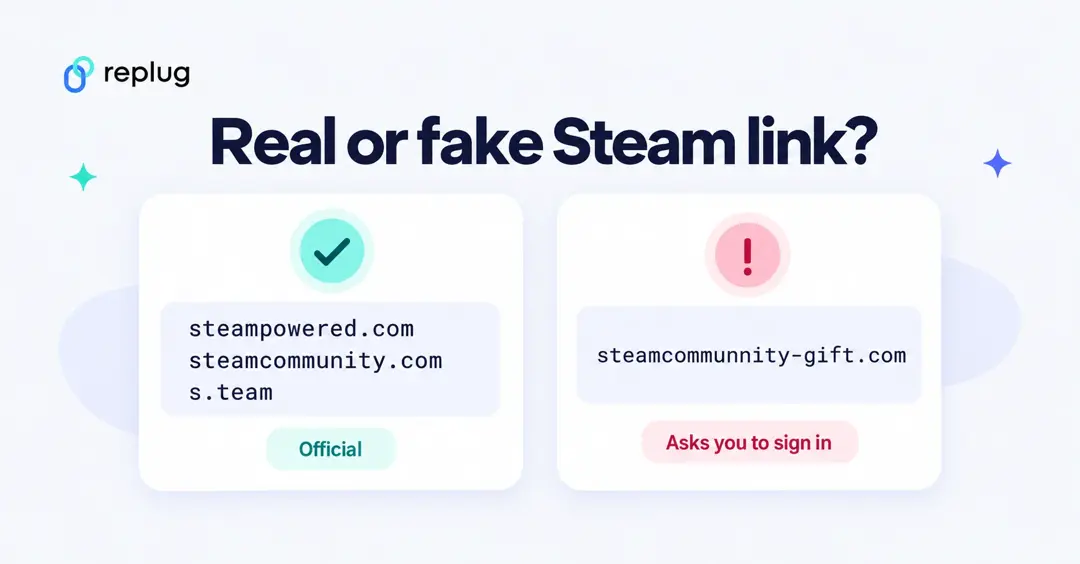
- Real Steam pages open on steampowered.com or steamcommunity.com. Steam’s own short links start with s.team and send you to one of those two sites.
- Look-alike spellings, extra words or odd endings in the domain are a red flag.
- If a link opens a Steam sign-in page you didn’t expect, close it and sign in through the Steam app or by typing the address yourself.
- Short links hide where they go until you open them. When you share your own, a branded link on a domain you control is easier for friends to trust than a random string, and you can tell people what it opens.
Short Steam link not working? Quick checks
- Profile is private: if your profile is set to private or friends only, people who aren’t your friends see a limited page. Check your privacy settings in Steam.
- Custom URL changed: a short link to /id/oldname no longer reaches you after you change the name. Point a new short link at your current address, or use the /profiles/ address with your SteamID.
- Wrong page opens: you may have copied a store, group or screenshot page instead of your profile. Copy the profile link again.
- Test it first: open the short link in a private browser window before you share it.
Why does your Steam URL matter?
Your Steam URL plays a key role in how easily others can find, access, and engage with your profile.
- Easier sharing of your Steam profile with friends, communities, or social media followers
- Professional appearance with a branded or shortened URL that looks polished for gaming streams or content promotion
- Improved accessibility, making short URLs easier to type, remember, and access across all devices
- Trackable engagement through a link shortener like Replug, allowing you to monitor clicks, locations, and device types for better insights
- Enhanced security and control, ensuring custom URLs reduce the risk of broken links or mistyped addresses, so your profile is always reachable
Conclusion
We know how long and complicated Steam URLs can make sharing your profile frustrating. With a custom link shortener like Replug, you don’t just shorten your Steam URL; you create a shortened Steam profile link online that is cleaner, branded, and trackable.
Take action today: shorten your Steam profile link with Replug, brand it, and share it with confidence! With the Replug Steam URL shortener, your Steam profile becomes more professional, engaging, and easier to share across platforms.
Frequently asked questions

Manahil