QR codes are literally everywhere, on restaurant menus, product packaging, billboard ads, and even your doctor’s office wall. And the numbers back it up!
People scan QR codes to see menus, pay, check in, read product details and open offers, often without thinking twice. That’s a lot of scanning.
But here’s something most people overlook: size matters more than you’d think.
A QR code that’s too small gets ignored or fails to scan. Too large, and it looks awkward and out of place.
No matter if you’re printing one on a business card, a storefront banner, or a product label, getting the size right can be the difference between a scan and a skip.
This guide breaks it all down for you. But first, let’s make sure we’re on the same page. What exactly is a QR code?
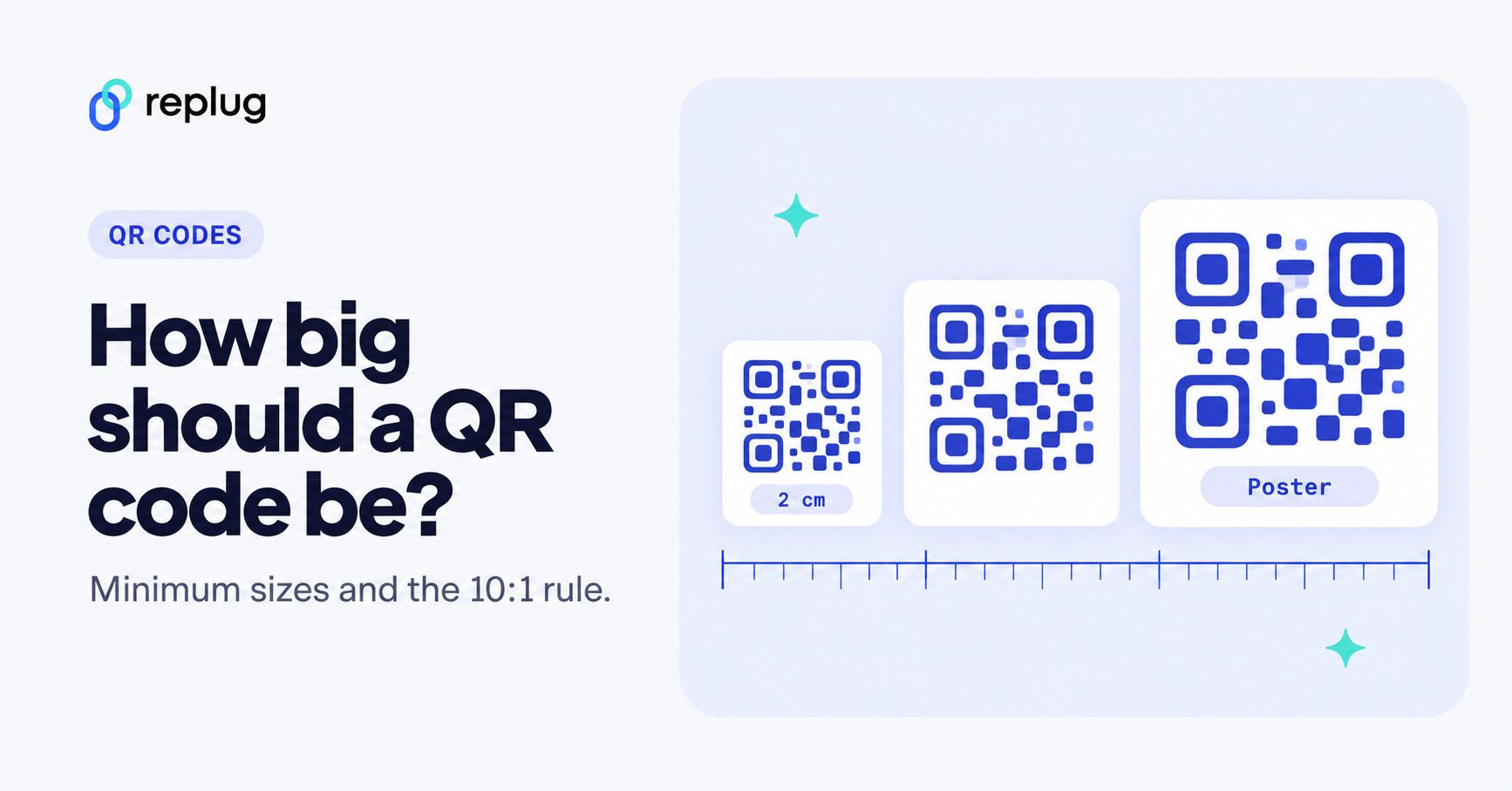
Quick answer: there is no single standard QR code size, because the right size depends on how far away people stand and how much data the code holds. As a starting point, print a QR code at least 2 x 2 cm (about 0.8 x 0.8 in) and make it about one tenth of the scanning distance (a 10:1 ratio), both from Bitly’s QR code size guide. Keep a blank margin four modules wide around it, as DENSO WAVE, the inventor of the QR code, requires, and test a printed proof at the real distance.
What is a QR code: A brief overview
QR stands for Quick Response, and the name pretty much says it all.
A QR code is a two-dimensional barcode that stores information (like a URL, contact details, or plain text) in a pattern of black and white squares. Point your phone camera at one, and within seconds, you’re taken exactly where it wants you to go.
The concept isn’t new. QR codes were actually invented back in 1994 by a Japanese company called Denso Wave, originally to track car parts during manufacturing. Fast forward to today, and they’re one of the easiest ways to bridge the gap between the physical and digital world.
The primary goal is simple: make information instantly accessible without any typing or searching.
Whether you’re a business owner looking to create a QR code for your menu or just someone sharing their Wi-Fi password with guests, QR codes get the job done in the most frictionless way possible.
Think of it as a shortcut. One scan, instant action!
Why does size matter for a QR code?
Size isn’t just a design choice; it directly affects whether your QR code actually works or not. Getting the QR code size requirements right from the start saves you from reprints, failed scans, and frustrated users.
Here’s what’s really at play:
- Scanning distance: The farther away someone is from your QR code, the bigger it needs to be. A general rule of thumb from Bitly: the distance-to-size ratio is about 10:1, so a code 1 inch wide can be scanned from roughly 10 inches away. It is a rule of thumb, not part of the QR code standard.
- Data density: The more information you pack into a QR code, the more complex its pattern becomes. Also, complex patterns need more physical space to remain scannable without errors.
- Physical constraints: Sometimes your printing surface decides the size for you. A business card has very different real estate than a billboard, so your QR code needs to fit the medium it lives on.
- QR code minimum size guidelines: Bitly’s guide recommends a minimum size of 2 x 2 cm (about 0.8 x 0.8 inches) for most QR code scanners. Anything smaller than that and most phone cameras will simply struggle to lock on.
What is the smallest QR code size?
For everyday use with phone cameras, the commonly recommended minimum is 2 x 2 cm (Bitly); anything smaller, and many phones start to struggle. The QR standard itself has no minimum print size: it depends on module size and printer. In DENSO WAVE’s worked example, a code holding 50 characters printed at 0.254 mm per module on a 400 dpi printer is only about 9.4 mm square including its margin, but that assumes a sharp printer and a reader held close.
There’s also a format called Micro QR Code, a compact version designed for smaller surfaces with limited data needs. According to DENSO WAVE, its largest version is 17 x 17 modules, it stores up to 35 numerals and it needs only a two-module margin. Many phone camera apps are built for regular QR codes, so test a Micro QR code with the readers your audience will use.
But if you really want to talk extremes, the world’s smallest QR code was created by researchers at TU Wien in Austria. According to TU Wien, it covers just 1.98 square micrometers and can only be read with an electron microscope; the university and its partner Cerabyte entered it in Guinness World Records.
So don’t expect to get that one on a product label anytime soon. Cool fact, but not exactly practical for your next marketing campaign!
What is the largest QR code size?
Technically, there’s no hard upper limit on how big a QR code can get. As long as it’s scannable, you’re good, and people have really pushed that boundary.
One famous example of a giant QR code is the Yuengling Stars and Stripes code in Farmland, Indiana. Yuengling announced it as the world’s largest QR code grown from crops: 1,721,344 square feet of real, live crops, planted in May 2022 with a local farm. Yes, you’d need a drone to scan it!
For real-world use, though, size large-format QR codes by viewing distance. Bitly suggests at least 10 x 10 cm for posters and at least 75 x 75 cm for billboards, preferably larger (whatever it takes to be scannable from the intended viewing distance).
What is the minimum QR code size for a business card?
Business cards are small, so space is tight, but your QR code still needs to be scannable.
The sweet spot for a business card QR code is 2 x 2 cm (about 0.8 x 0.8 inches), which is also the general minimum recommended size for any printed QR code. Don’t go smaller than that, or you’re just printing a decorative square that nobody can scan.
Since someone will typically be holding the card in their hand, the scanning distance is short, which works in your favor and means you don’t need to go much bigger than 3 x 3 cm either.
Related: How to create a QR code for a business card?
What is the minimum QR code size for print?
For print materials (think brochures, flyers, posters, or packaging), start from 2 x 2 cm (about 0.8 x 0.8 inches), the minimum Bitly gives for brochures and flyers, and size up when you have the space. That’s the baseline for phone scanning.
But honestly, bigger is usually better in print, because you can’t control how far away someone will be standing when they try to scan it. A flyer on a notice board needs a larger code than one handed directly to someone.
A good practical rule: aim for at least 3 x 3 cm for most standard print use cases, and always test a physical print before going to a full print run.
How to calculate the QR code size you need
Two numbers decide the size: how far away people will stand, and how many modules (the small squares) your code has. Work it out in three steps:
- Start from the distance. Divide the scanning distance by 10 (Bitly’s 10:1 rule of thumb). A menu read from about 12 inches needs a code at least 1.2 inches wide; a poster read from 6 feet needs about 7 inches.
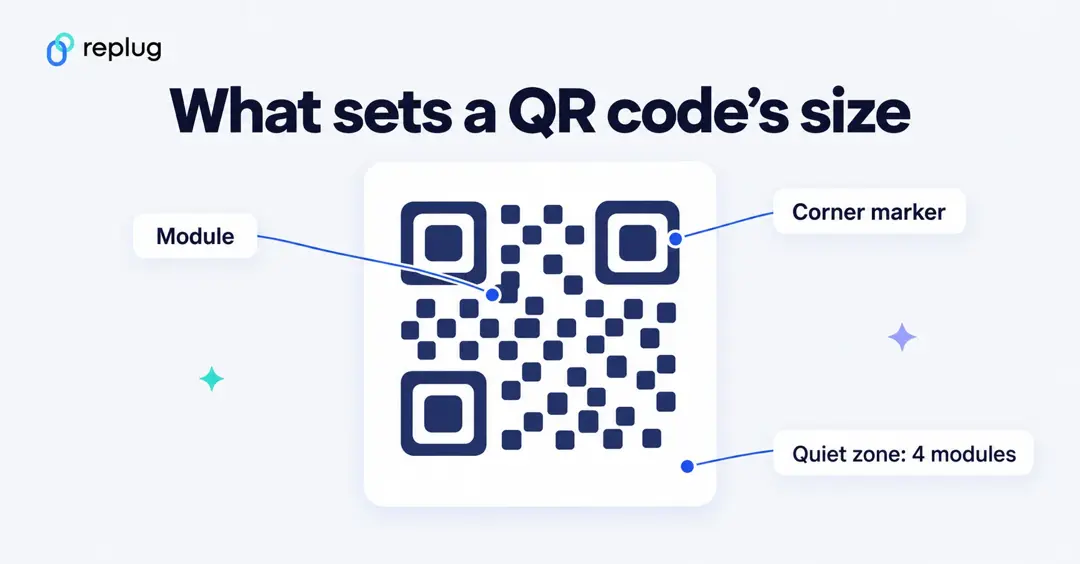
- Check the module size. A code’s width is its module count times the module size, plus a four-module margin on each side. QR codes run from Version 1 (21 x 21 modules) to Version 40 (177 x 177), and more data means more modules (DENSO WAVE). For retail packaging scanned at the checkout, GS1’s 2D barcode guideline sets the module size (X-dimension) for a QR code with a GS1 Digital Link at a minimum of 0.396 mm, a target of 0.495 mm and a maximum of 0.990 mm, with a quiet zone four times the module size.
- Take the larger result, then print a proof and scan it with an iPhone and an Android phone from the real distance, in the real light.
Worked example: Ellis Coffee Co. in Austin, Texas, wants a QR code on a window poster that people read from the sidewalk, about 6 feet (72 inches) away. 72 ÷ 10 = 7.2 inches, so the code should be at least 7 inches wide plus its margin. On the counter card, read from about a foot away, a 1.2-inch code is enough. Both point to the same short link, so the pattern stays simple at both sizes.
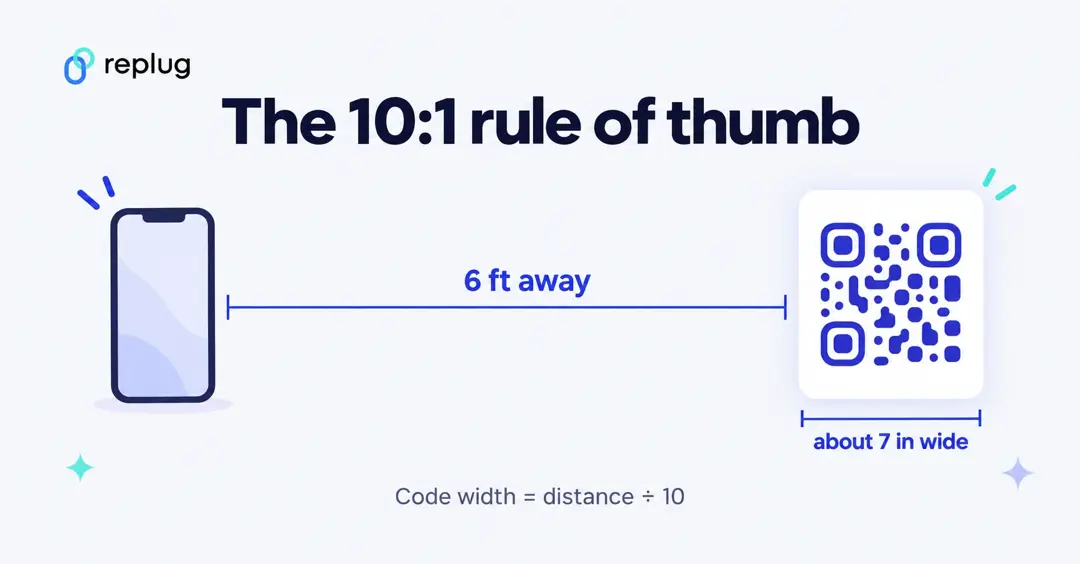
Shortening the link is the easiest way to keep any QR code small. A long URL with tracking parameters needs more modules, so each module gets smaller at the same print size. If your code prints soft or fuzzy at small sizes, see how to fix a blurry QR code.
Standard QR code sizes by use case
Different placements call for different sizes; there’s no one-size-fits-all answer here.
No matter if you’re running a QR code marketing campaign or just need a quick reference, this QR code sizes chart below breaks it down by use case so you can get it right the first time.
| Use case | Suggested size (Bitly) | About in inches | Typical scan distance |
|---|---|---|---|
| Business cards | At least 2 x 2 cm | 0.8 x 0.8 in | In hand |
| Flyers & brochures | Start at 2 x 2 cm, larger if space allows | 0.8 in and up | In hand |
| Product packaging | About 2 x 2 cm, up to 9 x 9 cm | 0.8 to 3.5 in | In hand or on a shelf |
| Event tickets | About 3 x 3 cm | 1.2 x 1.2 in | Handheld scanner or phone |
| Digital screens | 2 x 2 cm to 4 x 4 cm on screen | 0.8 to 1.6 in | Arm’s length |
| Email signatures | About 2 x 2 cm | 0.8 x 0.8 in | On screen |
| Posters | At least 10 x 10 cm | 4 x 4 in | A few feet |
| Billboards & large signage | At least 75 x 75 cm, preferably larger | 30 x 30 in and up | Many feet; use the 10:1 rule |
The sizes reflect real-world best practices practical enough to work, not so oversized that they dominate the design. They come from Bitly’s QR code size guidelines (October 2024); inch values are rounded conversions. Treat them as minimums for short links, and go bigger for long URLs, dense codes or glossy and textured materials.
QR code size in pixels for screens and files
Pixels only describe a file, not how big the code looks. What matters on a screen is the physical size the code ends up at, so use the same 2 x 2 cm floor for a code shown on a phone, laptop or TV, and the 10:1 rule for screens people view from across a room. For files, export SVG whenever you can, because a vector stays sharp at any size. If you need a PNG, export it at the final size you will use instead of enlarging a small image, and never stretch it out of square.
Points that play a significant role in QR code size
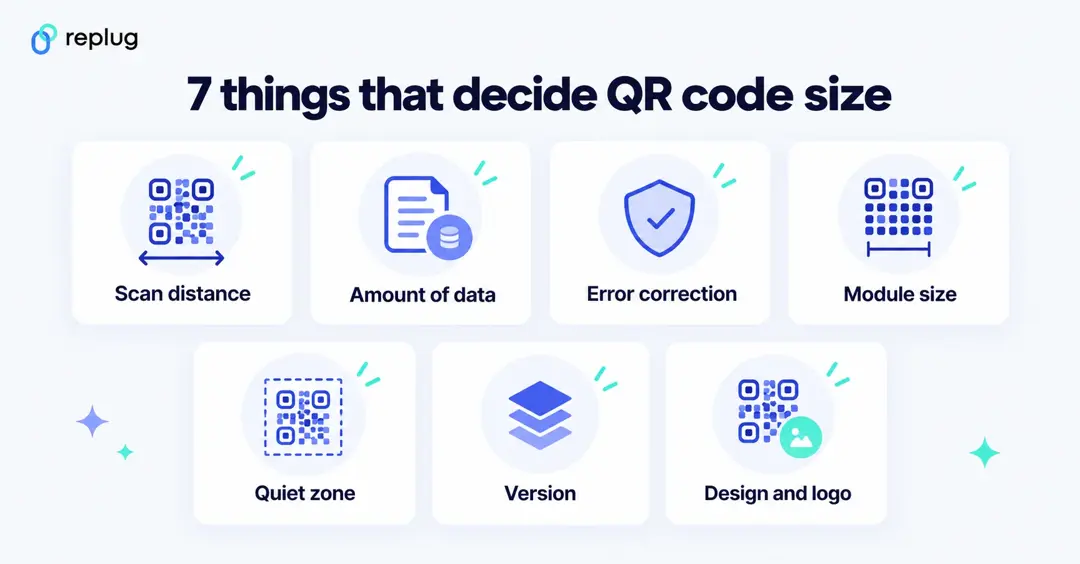
A few technical factors quietly influence how big or small your QR code needs to be, and ignoring them is usually why codes fail to scan. Understanding these helps you make smarter sizing decisions before you print or publish anything.
- Distance-to-size ratio: The farther away your audience is when scanning, the bigger the code needs to be. A simple rule: for every 1 inch of QR code size, expect a reliable scan from about 10 inches away (the 10:1 rule of thumb above).
- Data density (amount of information): More data packed into a QR code means more modules (the tiny squares), which makes a denser pattern. And, such a pattern needs more physical space to stay readable.
- Error correction level (ECL): QR codes have four error correction levels, i.e., L, M, Q, and H. Higher levels add redundancy so the code survives damage or dirt, but they also increase complexity, which might require a larger size.
- Module size & density: A module is the smallest square unit inside a QR code. If modules are too tiny to distinguish from each other, scanners struggle. Keeping modules at a legible size directly impacts the overall code dimensions.
- Quiet zone: This is the blank white border surrounding your QR code. It’s not decorative; scanners need it to identify where the code starts and ends. The standard quiet zone is 4 modules wide on all sides (DENSO WAVE), so always factor it into your total size.
- Symbol version: QR codes have 40 versions, with Version 1 being the smallest (21×21 modules) and Version 40 the largest (177×177 modules). The more data you store, the higher the version and the bigger the code needs to be.
- Level of customization: Adding colors, logos, or design elements to your QR code can interfere with scannability. The more customized it is, the larger it may need to be to maintain enough contrast and clarity for a reliable scan.
How to select the right QR code size for your needs: Key points to consider!
Picking the right QR code size doesn’t have to be guesswork. You just need to think through a few practical factors before finalizing your design or sending anything to print.
Here’s what to keep in mind:
- Scanning distance (10:1 rule): A reliable rule to follow! Your QR code should be 1/10th of the scanning distance. So if someone will be scanning from 10 inches away, your code should be at least 1 inch wide. Scale up from there accordingly.
- Data complexity: If your QR code stores a long URL, vCard, or multiple data fields, it’ll naturally be more complex. More complex codes need more space to stay scannable, so size up when you’re storing a lot of information.
- Minimum practical size: Don’t go below 2 x 2 cm for printed material that people scan with a phone; that’s the practical floor. Below that, many smartphone cameras struggle to lock on, even when the print is sharp.
- The quiet zone: Always leave a clean, white margin around your QR code, at least 4 modules wide on every side. Crowding the code edge-to-edge with other design elements is one of the most common reasons code fails in the real world.
- Material & quality: Printing on rough, textured, or dark surfaces can swallow up scannability fast. The lower the print quality or the trickier the surface, the larger and bolder your QR code needs to be to compensate.
Generate high-quality QR codes of all sizes easily with Replug!
If you’re looking for a reliable tool to create and customize QR codes without any hassle, Replug.io is worth checking out.
It’s an all-in-one link management platform that comes packed with amazing features like a free link shortener, bio links, retargeting pixels, and more. But where it really shines is its custom QR code generator.
With Replug, you can design QR codes that actually match your brand. It allows you to pick your colors and choose your style (Essentials and up), add your logo (Scale and Agency), and download in high-resolution formats like SVG, PNG or JPEG. Choose SVG for print so the code stays sharp at any size.
Whether it’s for a business card, a product label, or a billboard, the codes come out sharp and scan-ready at any size.
Plus, you get built-in analytics to track scans and unique scans by country, city, device, OS and browser, according to the Replug QR code generator page. Every Replug QR code runs through a short link, which keeps the pattern simple and the code easy to print small. The Free plan includes 10 QR codes. So you’re not just generating codes, you’re learning from them too.
Final words
Getting your QR code size right isn’t complicated anymore. It just takes a little thought up front.
No matter if you’re printing on a business card, a magazine, or a billboard, the right size can mean the difference between a seamless scan and a completely missed opportunity.
Keep the 10:1 scanning rule in mind, respect the quiet zone, don’t stuff in more data than necessary, and always test before you commit to a full print run. Once you nail the sizing, everything else falls into place.
And if you need a tool that makes the whole process easier, Replug has you covered, from creation to tracking, all in one place.
Frequently asked questions

Muhammad Ahsan Jamal