It is funny how very few people know about content remarketing. Some confuse it with usual content marketing, but it is actually a separate technique that has its own aims and practices involved.
Don’t worry, you are on the right foot steps as this walk-through and guide is what you need to begin with content remarketing.
What is content remarketing?
Content remarketing is a strategy of targeting to bring back and re-engaging with people who have already visited your website or have been past customers of your brand.
In practice, you tag the people who read or watched your content (with an ad platform’s pixel, a short link that fires your pixels, or your email list), then show them a next step: a related article, a guide, a demo or an offer, through ads, email or social posts.
What is the goal of remarketing?
With this strategy, marketers strive to capture the attention of your site’s visitors to make them come back to your website and complete an action they didn’t make during their first visit. This can be anything from purchasing your product to subscribing to your newsletter. Content remarketing is like that second chance you needed desperately.
What are the benefits of remarketing?
Remarketing helps you to:
- Increase brand recall and branded searches.
- Turn abandoners and bouncers into leads.
- Improve the repeat visitor rate and content engagement.
- Send returning readers to the content that ranks or converts best.
What’s the difference between remarketing and retargeting?
The two terms can confuse many as they are very interrelated.
In general, the goals of both are focused on targeting and converting potential clients that have bounced from your socials or website.
But what really makes remarketing different from retargeting?
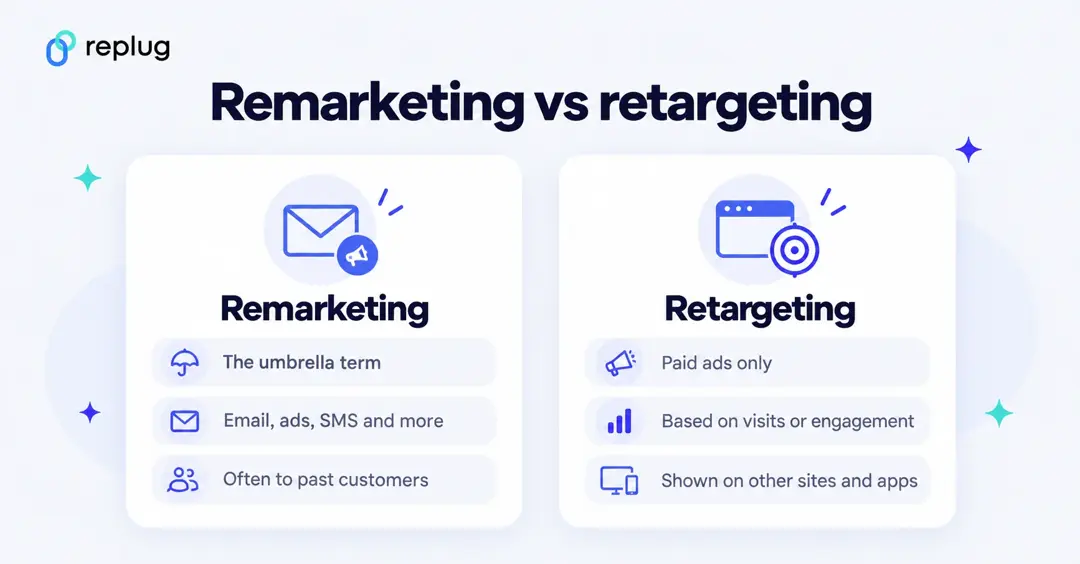
In the beginning, remarketing was thought of as sending just email campaigns to re-engage with customers to inform about discounts, trial expiry or to follow up potential clients, whereas retargeting involved paid advertising.
However, with the evolution of internet and social media both have evolved though the goal is still the same.
Retargeting still involves paid advertising to target and convert potential clients. While, remarketing involves reaching out or following up to past customers or potential clients through various channels that may be Instagram, Facebook, Email, SMS or Whatsapp etc.
Generally, the key medium of remarketing strategy is still email. Both strategies can be used in conjunction, where emails are sent with a paid advertisement.
Google Ads has dropped the word in its own product: what it used to call remarketing lists are now “your data” segments, built from website visitors, app users, YouTube viewers, lead forms and customer lists (Google Ads Help).
Further in-depth study of the both terms makes one thing clear that they are not the same.
According to Neil Patel, a famous digital marketing expert,
So it’s safe to say that retargeting ads and remarketing emails are actually two sides of the same coin. However, retargeting is more of a subset of remarketing which only targets website traffic, while remarketing is more concerned with getting back to past visitors using personalized content mostly confined to emails. The image below will develop a better understanding of the subject.
Now that the difference between the two is clear. Let’s move on further.
What are the different types of remarketing?
The common types of remarketing, using the names Google Ads and email tools use today (Google Ads Help), are:
- Standard remarketing (website visitors)
- Email remarketing (through your email tool, not an ad platform)
- Dynamic remarketing (ads showing the products people viewed)
- Video remarketing (people who interacted with your YouTube videos or channel)
- Your data segments for Search ads (formerly Remarketing Lists for Search Ads)
- Customer Match (ads to people on your uploaded customer list)
- App users (people who used your mobile app)
When to use remarketing?
- Content launches and follow-ups (send readers of one post to the next one)
- Up-selling products and services
- Cross selling
- Special offers
- Re-engagement campaigns
- Customer support campaigns
- Inventory update campaigns
- Follow ups such as cart abandonment or trial expiry etc.
The right tools and channels for content remarketing
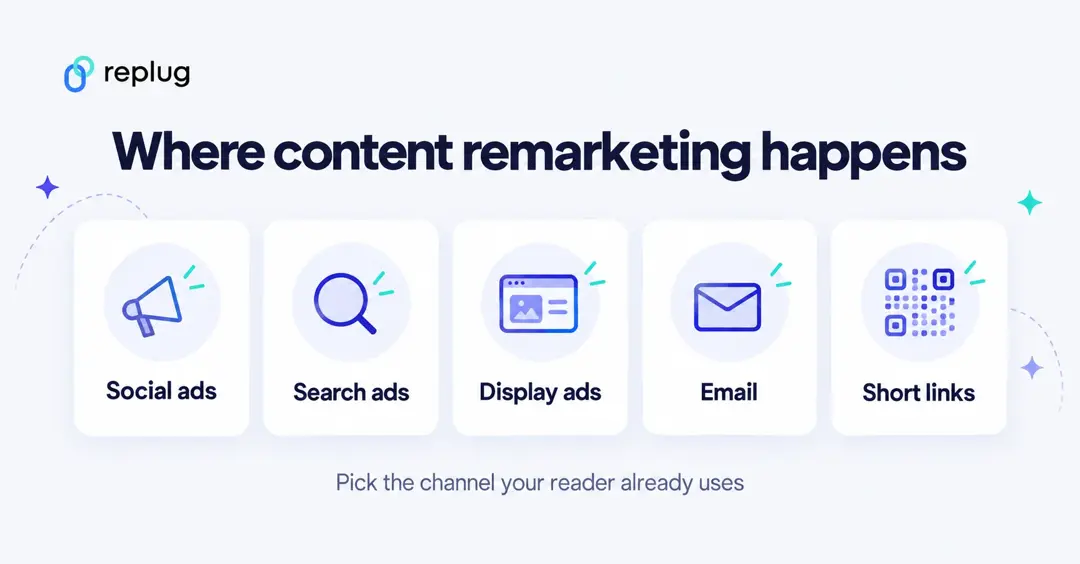
You can create personalized content using these different channels that can be used for remarketing are
Facebook ads
Meta ads (Facebook and Instagram) use the Meta Pixel, a snippet of code you put on your website. When someone visits, the pixel records the visit and events such as viewing a page or adding to cart. You can then build a website custom audience, for example everyone who read your blog in the last 30 days, and show them ads on Facebook, Instagram and Meta’s Audience Network (Meta Business Help).
For content remarketing, a simple setup is one audience per topic: people who visited your posts about one subject see an ad for your guide or product on that subject. You can also upload a customer list, which Meta matches to its users with hashed data (Meta Business Help).
Related: Getting Started with Meta Pixel: The Key to Successful Retargeting
Google ads
The Google Display Network is a web-based advertising network run by Google. The network allows advertisers to place text, image, video and Native ad units on websites and mobile apps.
One of the best things about using Google for remarketing is reach: Google says segments built from your data let you reach people across devices as they browse over 2 million websites and apps (Google Ads Help).
The first step in remarketing is to create an audience of users that you will be remarketing too. This can include people who visited specific pages on your website or read your blog, but you will have to group
them into separate audiences depending on your goals.
By grouping your tagged site visitors into audiences, you will be able to reach out to only certain people and persuade them to come back to you.
Another benefit of grouping your audience is that you can bid more aggressively. Consequently, this will lead to more impressions and higher ad positions. Some pages on your website such as the pricing or product pages are way more valuable than your blog. By selecting those who visited specifically your product and pricing pages, you can write follow up mails to them.
To define your audience, create a segment in Audience manager (under Tools) and choose which website visitors to include and exclude, for example people who visited your pricing page but not your thank-you page. The Google tag on your site handles the cookies.
Yet another great idea is to group your blog audience by the posts they read. So, for example, if you have articles on three different topics, create three remarketing lists for each of these topics’ visitors.
If you sell many products, dynamic remarketing shows people ads with the products or services they viewed on your site or app.
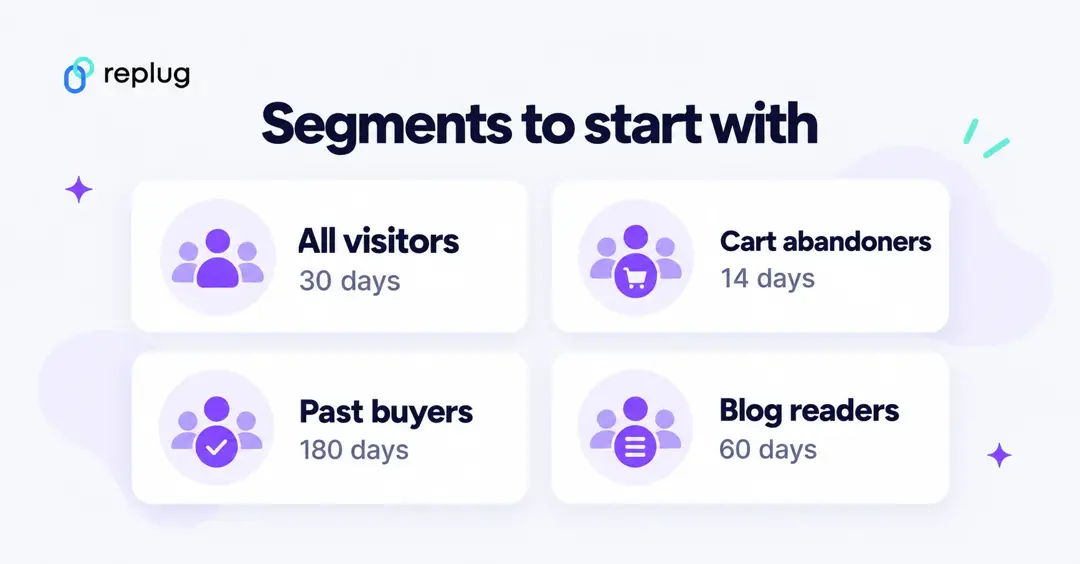
Once you have your segments set up, you must decide on your membership duration. In remarketing, this refers to the number of days you follow a user around. This means that setting your audience membership duration to 30 days will make your site visitors see your ads for, you guessed it, 30 days.
The problem with deciding on the “right” audience member duration is that there is such a fatigue which results in overly aggressive remarketing. Many experts believe that being too “creepy” with your ads may result in the loss of ROI of your campaigns or can even damage your brand. This is why so many marketers advocate for shortening audience membership duration, even though the reality seems to be different.
In practice, the right duration depends on your sales cycle: a few days for an impulse purchase, weeks or months for software or B2B services.
A practical approach is to start with a duration close to your typical sales cycle, cap how often people see your ads, and test a longer window against it. Watch frequency and results, and shorten the window if performance drops.
Related: Google retargeting: The ultimate guide for 2026
Email lists
Prior to Google ads and Facebook ads, emails were the original form of remarketing. With email remarketing, you can take advantage of existing customers who’ve visited your website and email them with targeted offers. By targeting specific segments of customers who have shown interest in your product or service, you can increase the likelihood of success with your campaign.
For example, you might use an email remarketing list to send out emails to past customers with discounts on flights or hotel stays.
You can also combine the two: upload your email list to an ad platform (Customer Match on Google, a customer list custom audience on Meta) to show ads to subscribers, or to exclude existing customers from ads meant for new readers.
Keep lists clean (only people who opted in), segment them by what people read or bought, and monitor results so you can adjust the message and timing.
Look at the example of Tarte Cosmetics remarketing email.
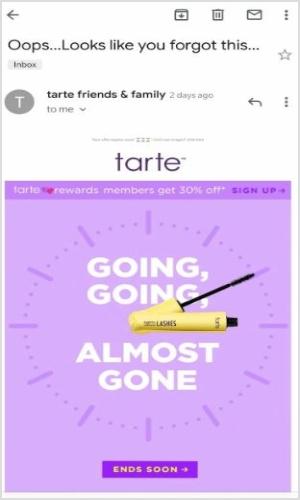
The “Ends Soon” call to action button creates a sense of urgency and persuades the customer to click and reach directly to the meaningful content.
Email remarketing is the practice of sending out an email to people who have previously expressed interest in your product or service. It’s a great way to reach out to customers who were previously interested in your brand, but may no longer be actively using it. Remarketing allows you to keep them in the loop and possibly re-engage with them. There are two types of remarketing lists:
1. Remarketing lists for customers who’ve already completed a purchase. These are referred to as Customer Lists.
2. Remarketing lists for people who have shown interest in your company in some way, but have never purchased from you (yet). These are referred to as Leads Lists. Remarketing is a very effective way to keep in touch with existing customers and generate new ones.
Related: How to Create an Email Marketing Strategy to Grow Your Business
Replug
In addition to GDN and Facebook, you can also use Replug (a reliable link management platform for URL shortening, tracking, optimization, and deep analytics) which is quite valuable for content remarketing. You can use other platforms as well to send personalized messages and ads to your past visitors on the respected platforms.
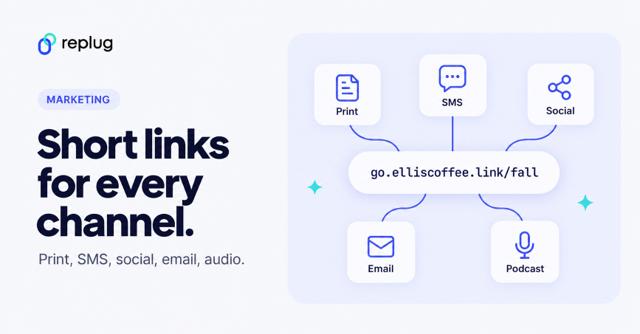
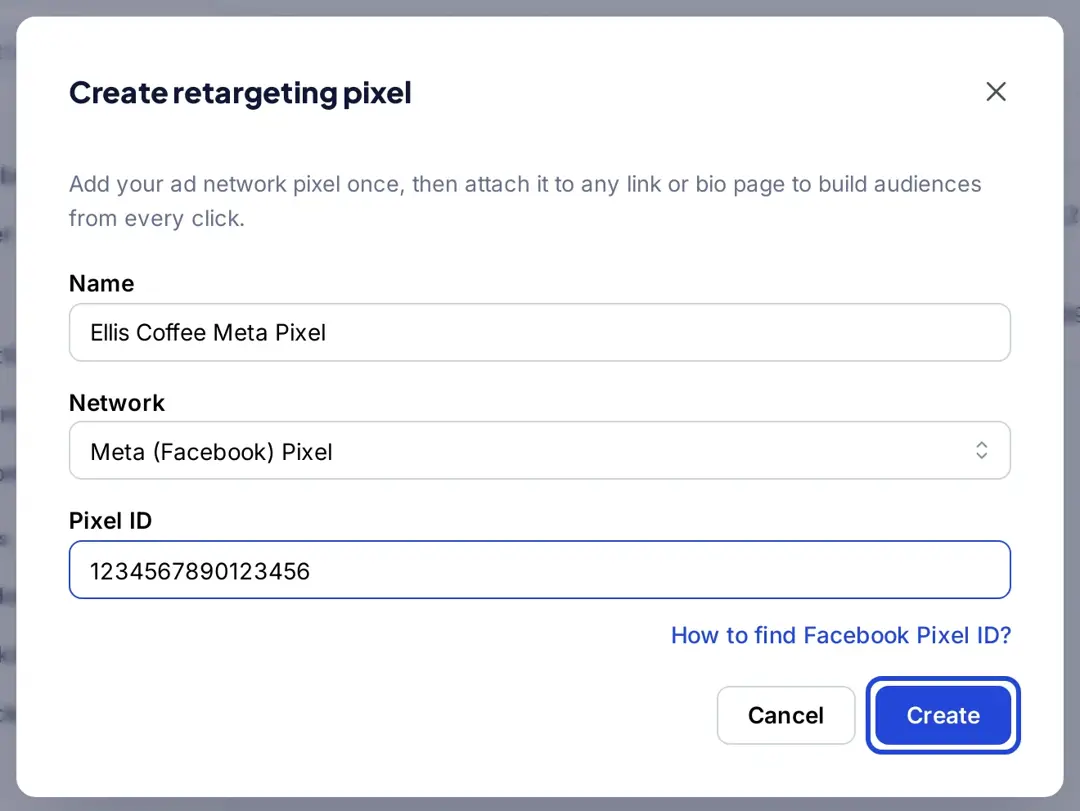
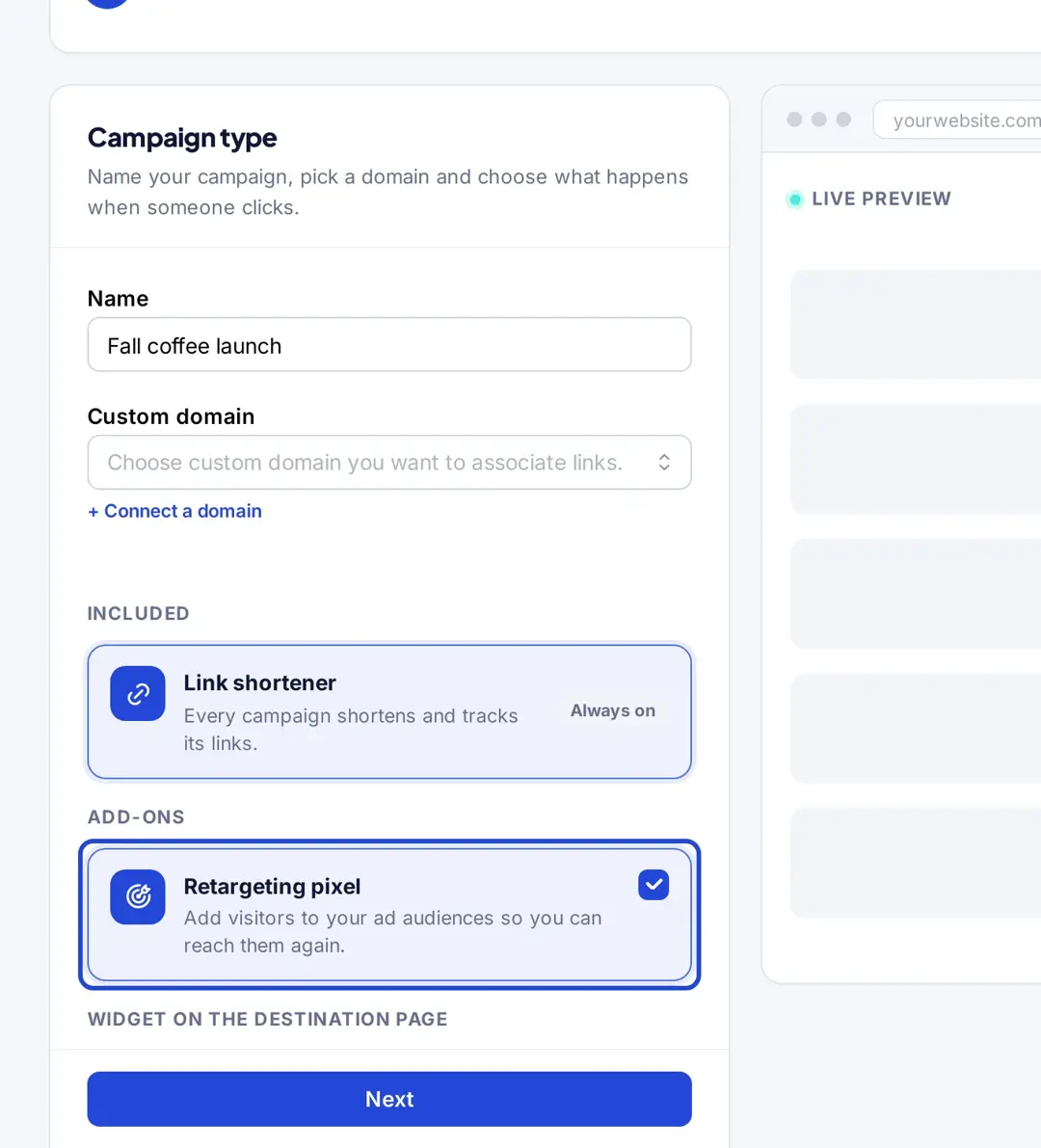
Using Replug’s custom URL shortener, you add your retargeting pixels to a campaign and every short link in that campaign fires them when clicked. That lets you retarget readers of content you share, even when it’s someone else’s article: add a pixel in Settings > Retargeting Pixels, create a campaign with the Retargeting pixel add-on, and shorten your links in that campaign. Retargeting pixels are included on Essentials (1 pixel) and Scale and Agency (unlimited), per Replug’s pricing.
Related:Retargeting Pixel Setup
Content remarketing best practices
How to set up a content remarketing campaign
- Pick the content and the next step. For example, readers of your “how to brew cold brew” post get an ad for your cold brew kit guide.
- Tag the readers. Install your ad platforms’ pixels on your site, and add the same pixels to the short links you share for content on other sites.
- Build one audience per topic. Website custom audiences on Meta, your data segments on Google, Website Traffic audiences on TikTok.
- Write the follow-up. Point to the next piece of content or the offer, not your homepage.
- Exclude people who already converted and cap frequency.
- Measure. Compare clicks and conversions per audience in your ad platform and analytics, and refresh creatives when results drop.
Here are the best practices in content remarketing for you to use:
Ads that push to “hard” offers: The best way to get your ads working is to promote your best offers. If you have a bestselling product, make an ad for it, because this will make it sell even better and will help you get your other products selling too.
Conversion path analysis: Do a conversion path analysis and figure out which pages the user usually visits before converting. Once you know what these pages are, target them with your ads.
Ads that push to content: Your content may be even more important to visitors than your products. This means that it may be better to target an article in your ad rather than promote a product page.
Social shares on your blog content: Analyze your blog content and see which content gets the most shares to social media. This will give you a general idea of what kind of content people are interested in and you will be able to target your ads at those articles on your blog.
Email segmentation: Segmenting emails lists depending on specific actions taken by the customer when making the purchase. Depending on the actions, you can send more information and a personalized email using CRM or email marketing software to target specific segments.
Reengage with inactive subscribers: There are a lot of people that subscribe to emails but remain inactive, reengaging with such potential customers by reminding them at the first place that why they subscribed the email. Adding an CTA within the email can encourage them to complete the journey.
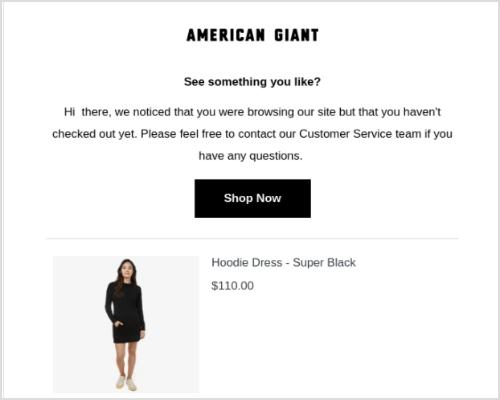
Below is an example of American Giant who sent an remarketing email to its subscriber by including the product they browsed previously.
20 tips for remarketing
Lastly, to give you more ideas about how to retarget your ads and remarket your content, here are twenty examples from the past:
1. The right link
One of the biggest mistakes you can possibly do is sending your customers to the wrong place. Imagine you posted a picture of one product, but linked to another one. The person who clicks on the link wants to see the product in the picture, but once they see something different, they quickly lose interest. Instead of doing this, act like Kelley Blue Book on X (then Twitter) – link the corresponding product that is in the image you attach to the post.
2. Customer buying window
A common misconception in remarketing is that you have to retarget potential buyers with ads for the product they haven’t bought. In reality, there are many customers who can’t afford certain products and have simply browsed through your catalogue before and viewed these very products. As Rob Weatherhead, the owner of Agent Wolf, says, you must retarget these individuals only for a certain amount of time while their interest is still present. If they don’t convert during this time, it means they either decided not to purchase your product or bought something similar elsewhere.
3. Separate landing pages
This is a mistake done not only by those who practice remarketing but also by many experienced marketers. Instead of linking their ads to separate landing pages, they simply link them to the homepage which is a big turnoff for many consumers. Neil Andrew, Marketing Manager at PPC Protect Limited, recommends creating separate landing pages for your ads and always linking to them.
4. Cheap alternatives
Philippe Côté-Léger, Marketing Director at Lab Urbain, believes that using Facebook and Google is not mandatory. You can follow suit and make use of cheaper alternatives that can prove to be just as effective as Google and Facebook. For example, a content discovery network like Outbrain offers inexpensive CPC.
5. Dynamic remarketing ads
This is one of the simplest yet overlooked tips. Using dynamic remarketing tips is essential for getting the best results.
For example, Ryan Scollon says that dynamic remarketing ads allow him to show ads with products that customers have viewed before. This makes the ads way more interesting instead of leaving them generic. The only thing to keep in mind when designing dynamic remarketing ads is that your imagery must be on point to capture the attention of your target audience.
6. Email promotion
Learning Success Systems has been implementing this technique into their strategy for quite a while now. They match their retargeting campaign with email promotion making it twice as effective. Seeing the same offer in the inbox and in an ad may simply make it easier to remember.
7. Reviews
Karen Sahetya, the founder of Brand Central Marketing, says that one of the best ways to build social proof is to use reviews for retargeting and remarketing. Those who viewed your products but didn’t make a purchase are more likely to buy once they see that others have had a positive experience with your brand and with some particular products of yours. It is the equivalent of someone considering buying a car in real life and a friend telling that person about their positive experience with this model.
8. Social proof
This is very similar to the previous example, but it is still quite different. Let’s look into this practice with the help of Birchbox. They have successfully integrated social proof into their retargeting ads. You can either send those who click on the ads to reviews of your products or include quotes from your past customers about your brand into the ads themselves among other things.
9. Audience segmenting
Audience segmenting is crucial for your digital remarketing campaign. Separating your targeted audience into those who have converted and those who haven’t will allow you to show corresponding ads to different individuals. This practice has been proven effective by many businesses that used it and Evoke Strategy LLC in particular. Its co-founder Devon Vocke says that audience segmenting has always helped them make their campaigns more effective.
10. Best offer
Displaying your best offer is essential for attracting the most attention. One of the best examples of this is Handy’s home cleaning retargeting banner that appears after a customer views other similar websites with home cleaning services. Making such ads catchy is also very important. They have to have bright colors, a promotional offer, and a call to action that stands out and speaks to the audience.
11. Prioritizing users
Joe Castro from Elevation says that prioritizing users that are close to completing a purchase is crucial for achieving more conversions. Those who added products to the cart or went as far as to get to the billing stage are more likely to purchase something than those who simply visited your homepage or product pages. Be ready to invest more in targeting the former ones and offer them free shipping or something similar to get them to convert.
12. Potential clients over sales
Instead of focusing on making a sale, nurture potential clients. Take WordStream, for example. The company offered a free assessment instead of a discount for their products. Consequently, many customers let their guard down because they weren’t pressured into purchasing. WordStream offered a service of value related to what their customers wanted based on what their remarketing “sensors” detected. Always think of customers first and sales second.
13. Urgency
Many marketers know of this simple characteristic that always works. Creating a sense of urgency will motivate your customers to complete the action you want them to faster. For example, Expedia uses urgency in their retargeting ads to prompt users to book travel from their site. Expedia has used last-minute deals in its retargeting ads, which play on the fear of missing out. Use urgency only when the deadline is real.
14. Interesting & relatable
It has been said before, but it will never be old: make your ads interesting and relatable. There is also a great example of this technique. Mazda and Merchenta worked together to create ads that would attract more potential customers to test drive their cars. Merchenta built customized ads that were based on geographic radius matching individuals to the nearest Mazda dealership. The ads displayed the nearest dealership houses that had the specific Mazda car models that customers viewed online. This, in turn, raised the chances of these people visiting the saloon and test driving the car.
15. Frequency cap
Using a frequency cap can prevent overexposure. As Kyna Garrett from Strike Social points out, social media ads are everywhere, so applying a frequency cap can prevent potential customers from being overwhelmed by your ads. In fact, overexposure can be very damaging to your brand, so it is important to determine the right frequency (which is also not that easy). Find the perfect balance by testing different frequencies and then use the one that works best.
16. Avoid spammy ads
Patric Kreidler from Power Digital Marketing talks about something very closely related to the previous example. Such ads as pop-ups, countdown ads, ads with sound on autoplay, and so on are seen as spam by many users and usually ignored. Moreover, they often lead to viewers associating them with a bad experience. Obviously, no brand would want that, so avoid using such ads at all costs.
17. Emotional connection
It has long been proven that ads that create an emotional connection in viewers are way more powerful than usual ads. For example, Think Engraved uses cute pictures in a combination with cute statements to draw a smile or make the viewer laugh. This draws in potential customers and hooks them onto what else the brand can offer. You can also add an extra something to such ads to make them even more appealing (e.g. a discount or a gift).
18. Videos & slideshows
What can be better than visuals that “speak” to the audience? Images are so common that most ads get lost even if they have a stunning design. This is why videos and slideshows are now becoming so popular. Many social feeds play video without sound by default, so add captions and make sure the message works on mute.
19. Relevant sites
Thomas Budnik from Auto Accessories Garage says that including only those sites that are relevant to your brand will ensure that you don’t waste your money for nothing and target only the relevant audiences. Before letting your remarketing campaign go live, check that only the relevant websites are included or the irrelevant ones excluded.
20. Content messaging
Last but not least, Robb Hecht has adopted a social content messaging strategy to help his remarketing efforts. This simply means that you use a special framework that breaks down your ads and serves them to customers at different stages of your sales funnel.
Bonus Tip: On auction-based platforms, ads that people find relevant tend to get better results for the same budget. Keep testing headlines and images, and use image ads that are designed for the format rather than text turned into an image.
Final thoughts on content remarketing
All in all, content remarketing is one of the most useful techniques in your online marketing strategy: you already paid to attract these readers, and remarketing gives them a reason to come back. Start with one topic, one audience and one follow-up, then expand.
FAQ
What is the difference between content marketing and content remarketing?
Content marketing attracts new readers with useful content. Content remarketing follows up with people who already read or watched that content, using ads, email or social posts to bring them back to a next step.
Is remarketing the same as retargeting?
They overlap. Remarketing is the broader term and often includes email; retargeting usually means paid ads shown to people based on their visits or engagement. Google Ads now calls its remarketing audiences “your data” segments.
Can I remarket to people who read content on another website?
Your pixel only runs on your own site, but you can add your pixels to a short link that points to the other page. When someone clicks it, they join your ad audiences.
How long should someone stay in a remarketing audience?
Match it to your sales cycle: days for impulse purchases, weeks or months for considered ones, and test against a shorter or longer window.

Wasiq Naeem