Most people who visit your website leave without buying. Google Ads retargeting gives you a second chance to reach them.
That’s what retargeting across social channels does for you as a marketer. The truth is; a lot of people never pay due attention to your product for the first time. In fact, they are staring at different options of solutions to their problem by visiting various sites and might not be in a hurry to make a decision. So it is pretty hard to win customer attention and convert them into your actual buyers.
This is certainly not meant to scare you. In fact, this is where a technique called retargeting comes into play. For this purpose, Google ads retargeting plays an essential role in helping you win customers.
Quick answer: Google Ads retargeting (Google calls it remarketing, and the lists are now called “your data” segments) shows your ads to people who already visited your website or used your app, while they browse Google Search, YouTube, Gmail and the Google Display Network. To set it up:
- Add the Google tag to every page of your site. In Google Ads, click the Tools icon, open Shared library, then Audience manager, and set up the tag under Your data sources (Google Ads Help).
- Create a website visitors segment with rules (for example, everyone who viewed /pricing) and a membership duration. The default is 30 days and the maximum is 540 days (Google Ads Help).
- Wait until the segment is big enough. Display, Search and YouTube each need at least 100 active visitors or users in the last 30 days before ads can serve (Google Ads Help).
- Add the segment to a campaign or ad group, write ads for that group of people, and set a budget.
- Respect consent: if you need visitor consent, use a consent banner with Google’s consent mode (Google Ads Help).
A link retargeting tool is a smart way to re-engage with the audience that has already visited your website at least once before. It helps you bring visitors back, improve brand recognition and stay in front of people who already showed interest.
What is retargeting? How does it work?
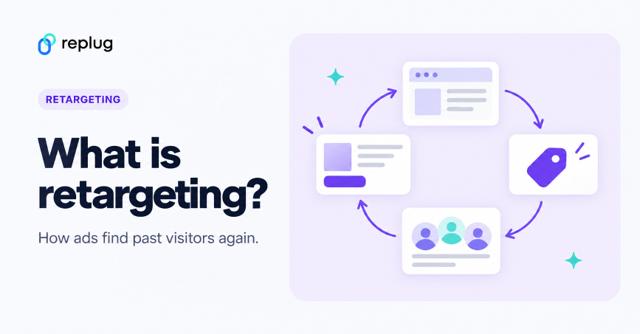
Retargeting also referred to as remarketing, is the process of tracking your online visitors and dropping a cookie to their browsers upon them leaving your website without converting into your customers. This cookie helps marketers retarget their visitors on other websites they visit while they’re online.
Have a look at the image below for a better understanding that how Retargeting works.
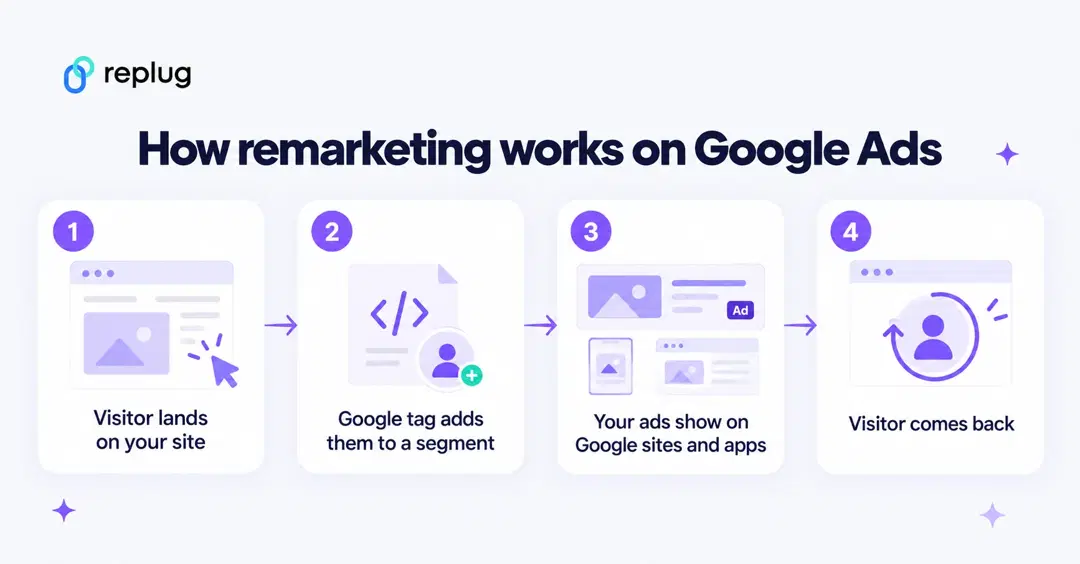
Remarketing can be cost-effective compared with ads aimed at strangers, because the people you reach already know your site and what you offer.
For example, a visitor on your site browsing credit card options may respond well to a remarketing ad that highlights exclusive cardholder benefits or limited-time promotions, an approach frequently used in credit card marketing.
There is no fixed price per click. What you pay depends on your bids, your budget and the competition for each placement. Google says there is no extra cost to use its auction and that automated bidding sets a bid for each auction (Google Ads Help: About your data segments).
Google Retargeting ads also gives you the liberty to be creative with making ads more personalized for your customers. For example, let’s suppose a buyer came to your website and added a few items to the cart but did not proceed with the checkout. You can run a separate set of ads for this audience who abandoned the cart by incentivizing the purchase by offering them limited-time free shipping or the discount code.
Another example of making retargeting ads more personalized for the people who have already bought something from you is upselling. You can create custom audience sets based on the category they shopped from. Once you have that set in place, you can retarget them other products and upsell those by offering a unique value to them.
Personalized retargeting ads often get more attention than generic ads, because they speak to something the person already looked at. Measure it in your own account: compare the click-through and conversion rates of your remarketing ad groups with your other campaigns.
Benefits of Google retargeting
- Get more ROI
- Affordability
- Customizable Retargeting
- Gain more quality traffic and a high conversion rate
- Reach a highly targeted audience
- Brand Exposure
- Increase brand awareness, visibility, and likeability with customized ad designs
- Check Google Analytics to understand the Ad performance and make a data-backed strategy
Do you also think Google is a great option for advertising and enhancing brand recognition in the industry?
Research says so. Google has dominated the most compelling search engine markets over the past decade and continues to do so. According to StatCounter Global Stats, Google had 89.94% of the worldwide search engine market in September 2026.
Google is also known as the advertising master of the internet. It is able to grant well-organized tracking and targeting tools to advertisers. It also assists the marketers to find more people to target, building brand awareness, and placing ads with the target keywords.
1. Get more ROI
Most visitors don’t buy on their first visit. Remarketing lets you reach them again with an ad that matches what they looked at, across Google’s reach and ad formats. Because you only pay to reach people who already know you, the budget goes to warmer prospects. Track conversions in Google Ads to see the return for each segment.
2. Affordability
You decide the daily budget and the bidding strategy, so you can start small, test one segment and add budget when it pays off. Prices per click vary by industry, placement and competition, so look at your own campaign reports instead of averages.
3.Customizable retargeting
Google ads are customizable according to different devices, geographical areas, apps and languages. The customization allows you to run remarketing campaigns at multiple levels. If you are selling dairy products, you can also place your ads on websites that share baking and cooking recipes.
4. Gain more quality traffic & high conversion rate:
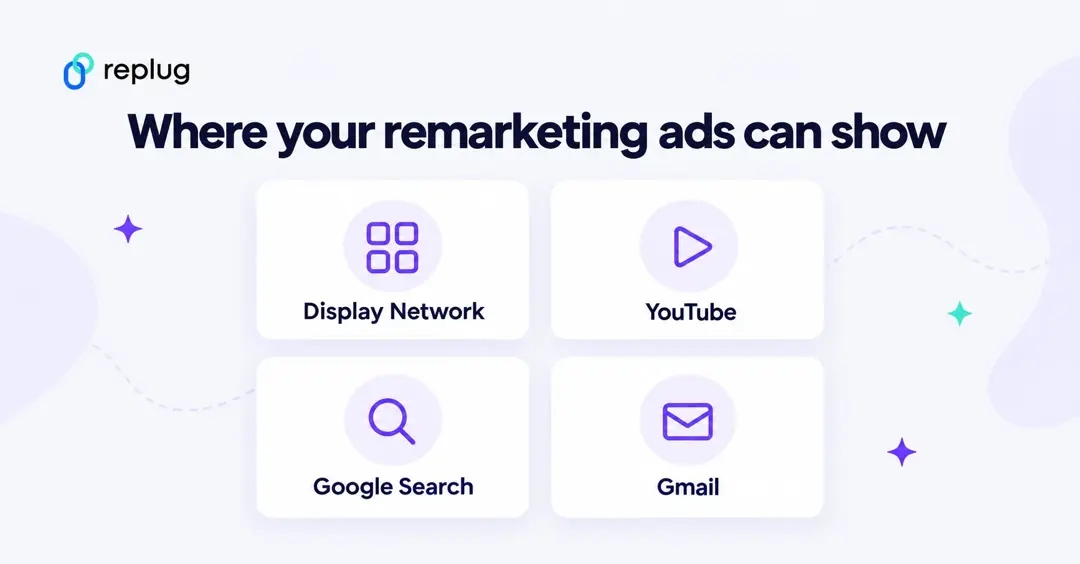
Depending on the capital you can choose social media ads or the Google Display Network. Social retargeting only reaches people while they use that social app.
Google’s data segments reach people across their devices as they browse over 2 million websites and mobile apps, and segments can also be used on YouTube, Gmail and Google Search (Google Ads Help).
5. Reach a highly target audience:
Google collects data about every visitor who comes on your website and interacts with the content on it. It does this by tagging those audiences. You can create custom audience sets with that data and can remarket the specific offerings based on their activity and where they are on their customer journey. Where consent is required, a consent banner collects your visitors’ choices and Google’s consent mode passes them on, so Google tags adjust what they store and send (Google Ads Help: About consent mode).
6. Brand exposure
Remarketing campaigns bring endless opportunities for brand exposure. When your potential customer sees your ad, it helps them associate the value they are getting from your brand. Brand recalling at the right intervals will help you occupy a space in your customer’s memory, and then they are more likely to consider your brand for the specific product and services need.
7. Increase brand awareness, with customized ad designs
Google gives you more flexibility over your digital marketing mix. The control enhances the brand image of your business both at the ads level and at the campaign level. The variety of formats, layouts, graphics, content, and positioning will help you get you to reach more eyeballs and digital consumer is more likely to recall a brand that offered an interactive and personalized experience through their ads.
8. Check Google Analytics to understand the ad performance
Google Analytics gives you a detailed understanding of where your audience is coming from, what are they looking at, what is their browsing behavior and much more. It also tells you about which ads are performing best and bringing in the most traffic, which channels and formats are working best etc. Using the data and analytics of your audience and ad performance, you can see where you need to put in more effort and how you can enhance the experience of your users the next time they’ll come back through retargeting ads.
Defining Google ads retargeting
If you want to advertise your brand on Google, then you must sign up for Google Ads (formerly Google AdWords). For remarketing you add the Google tag to your website, and Google adds visitors to your data segments based on the rules you set (Google Ads Help).
Google retargeting is a dominant technique to reconnect with the visitors and tempt them to make purchases by showing relevant brand ads on different web domains.
Is GoogleAdwords a great investment for marketers to generate more revenue?
It can be. Advertising is Google’s core business, and Google Ads gives you control over who sees your ads, how much you bid and which results you count. Whether it pays off depends on your margins and how well you target, so measure the return for each campaign.
It helps you receive more generous clicks against the branded ads from the audience. Therefore, it proves to be cost-effective to get more sales to your website, and eventually helps gain high ROIs. Adwords makes it extremely convenient for marketers to measure the performance of the ads that are viewed by the target audience and allows them to create customized campaigns respective to their re-marketing goals.
So, let’s discuss how you can set up a remarketing campaign in Google Ads.
You may also like: How To Utilize Replug for Facebook Retargeting Ads?
Steps to set up Google Adwords remarketing campaign:
Remarketing is no more a new concept. Not only is everyone in the field of marketing talking about it, but most experts are showing the amateurs how to get the hang of it.
These are the steps for remarketing with Google Ads. Google’s interface changes often; the menu names below match Google Ads Help as of October 2026.
Step 1# Set up the Google tag (formerly the global site tag)
You need to add the Google tag to every page of your website. It is a web tagging library that adds your visitors to your data segments; the global site tag (gtag.js) is now called the Google tag (Google Ads Help). In Google Ads, click the Tools icon, open the Shared library menu and click Audience manager. Then click Your data sources and, on the “Google Ads tag” card, click Set up tag.
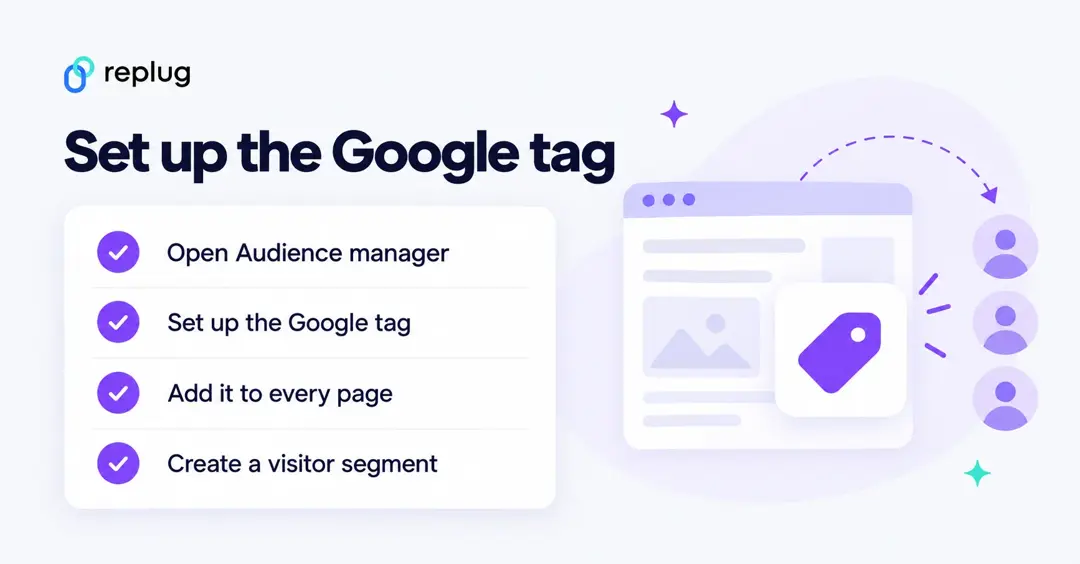
Choose what the tag collects (website visitors only, or specific attributes for dynamic remarketing), then copy the code. Paste it between the <head></head> tags of every page, or install it with Google Tag Manager. You need only one Google tag per Google Ads account, and if the Google tag is already on your site from Google Analytics, you add your Google Ads config line instead of a second tag.
The base tag looks like this, with your own tag ID (it starts with AW- for Google Ads) in place of AW-XXXXXXXXX (Google for Developers):
<!-- Google tag (gtag.js) -->
<script async src="https://www.googletagmanager.com/gtag/js?id=AW-XXXXXXXXX"></script>
<script>
  window.dataLayer = window.dataLayer || [];
  function gtag(){dataLayer.push(arguments);}
  gtag('js', new Date());

  gtag('config', 'AW-XXXXXXXXX');
</script>
Create a website visitors segment
- In Audience manager, open Segments and click the plus button, then choose Website visitors.
- Give the segment a descriptive name, such as “Pricing page visitors”.
- Under Actions, build the rule. The default is “Web page visit”; refine it with a URL condition such as “URL contains /pricing”.
- Pick a pre-fill option: add visitors from the past 30 days, or start with an empty segment.
- Set the membership duration: how long someone stays in the segment after their last visit. It defaults to 30 days and can go up to 540 days (Google Ads Help).
A new segment starts empty, and Google says it can take 48 to 72 hours to fill. Ads only serve once the segment has at least 100 active visitors or users in the last 30 days on the Display Network, Search or YouTube (Google Ads Help; steps from Create an audience segment that includes your website visitors).
Step 2 # Create retargeting campaigns
Google Ads lets you create a campaign under your own set of rules. While creating a campaign to retarget the audience; you set a goal, pick a campaign type (Display, Search, Video or Demand Gen, for example) and then add your data segment in the audience settings of the campaign or ad group.
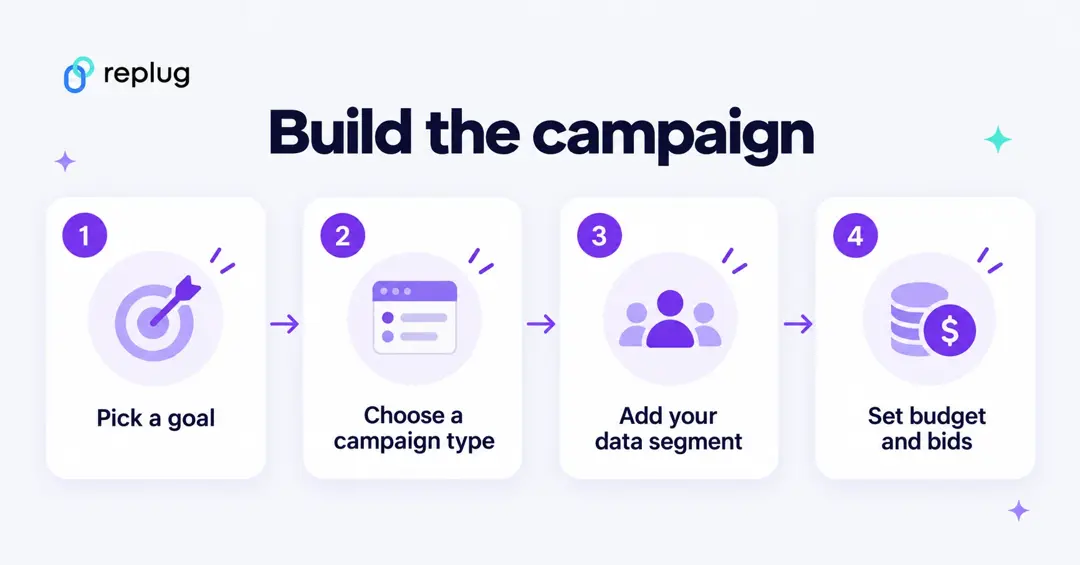
Then set the budget and bidding, create your ad group and write ads for the people in that segment, such as a reminder of the product they viewed or an offer for people who left the cart.
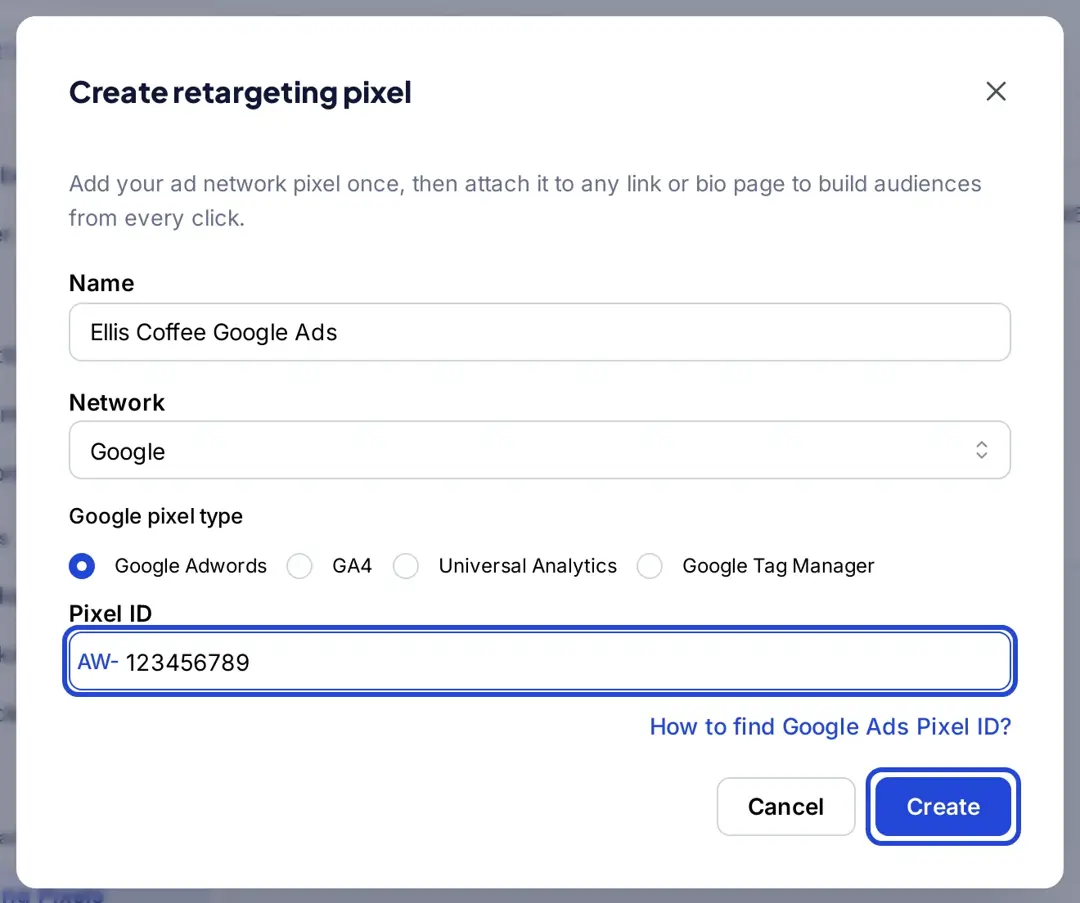
You can also build Google Ads audiences from the links you share, even when they point to a page you don’t own, such as a news story or a partner’s product page. In Replug, go to Settings > Retargeting Pixels > Add Pixel, choose the Google network and the Google Adwords pixel type, and enter the number from your Google tag ID (see how to find your Google Ads pixel ID). Add the pixel to a campaign, then shorten your links in that campaign: each click fires the pixel before the visitor reaches the destination (Replug link retargeting). Retargeting pixels are on paid plans: one pixel on Essentials and unlimited pixels on Scale and Agency (Replug pricing, checked October 2026). Make sure your own consent setup covers people who click your links.
Step #3 Link Google Analytics with Google Ads
In order to find quality data about the traffic, lead, and websites from visitors. Google Analytics is one of the most well-founded tools to help you out. You need to link Google Analytics with Google Ads to keep a record of the visitors who are retargeted with the product ads.
Linking these accounts will assist you to examine customers’ activities on your website after clicking on the ads. It gives the opportunity to fill the gaps by accumulating information about web traffic and the performance of the website or ads. These directions explain how you can link your Google Ads with Google Analytics. Once linked, you can also share Google Analytics audiences with Google Ads.
Now, let’s take another step further, and delve into some of the most effective Google Retargeting strategies being used by people across the digital marketing arena
Step#4 Best Google Ads retargeting strategies
Listed down are the Google Ads retargeting Strategies that work for almost everyone if done right:
1. Retargeting the existing customers
When it comes to advertising a new product or showing ads, then marketers should focus on existing customers because they have already purchased your product and also are aware of its quality. Keeping a customer usually takes less effort than winning a new one.
Retargeting existing customers speed up the sales cycle by associating with the brand or product and also helps conquer the barriers the customers are facing while purchasing the product. So it’s a bold approach to spend money, time, effort on existing customers to give a better position to the business.
2. Dynamic remarketing
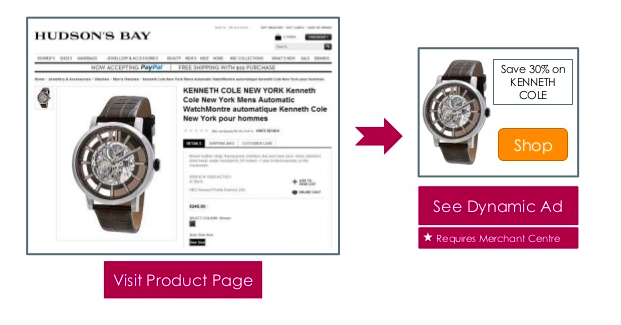
Dynamic remarketing is another strategy available in Google Ads. It helps the marketers to show customized ads of a particular product to those visitors who have previously seen it. In other words, we can say it reminds people about the product they have last seen.
Let’s take an example here.
Let say, a visitor came to your website and viewed the product there. Google Ads can then show that person an ad featuring the same product on other websites and apps.
To start with dynamic remarketing you need a feed of your products or services (ID, price, image and more) and the dynamic remarketing tag with custom parameters on every page. Retailers upload the feed to Google Merchant Center; other businesses upload it in the Business data section of the Shared library (Google Ads Help: About dynamic remarketing). As shown in the below image.
3. Segment your retarget audience
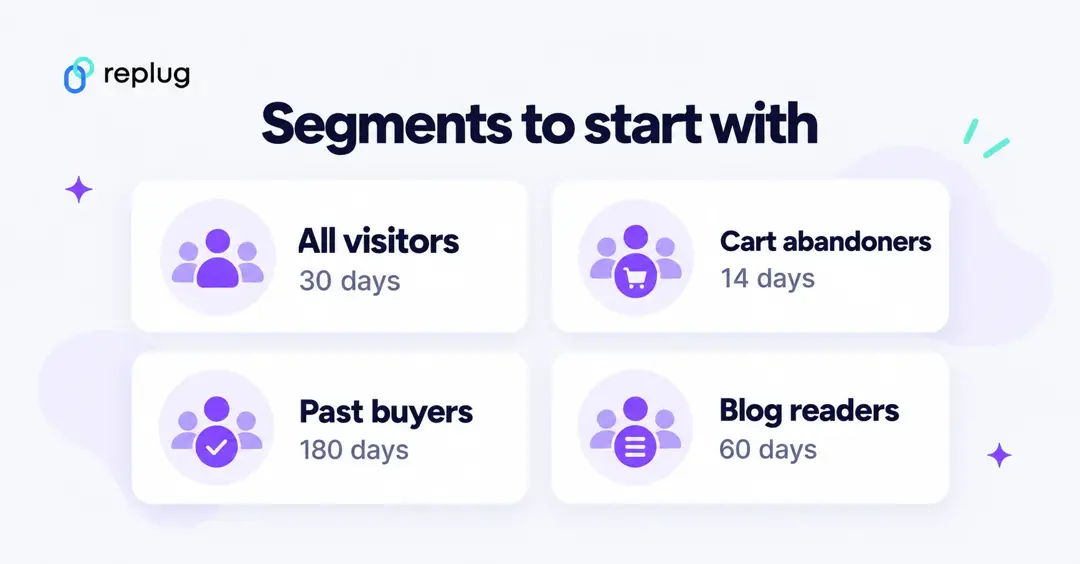
Perceiving the customer’s behavior is a critical aspect to reach the audience with the appropriate message and get the retargeting experience. Audience segmentation helps optimize the campaign for various web domains and leads to a massive no. of conversions.
If you genuinely want to be a successful marketer, then you have to segment the audience into a different group, based on different behavior such as preferences, interests, likes, or dislikes.
Keep in mind; every individual is different from others and unique in their own way.
Segmenting the audiences becomes an essential factor to target the right audience with the right ads at the right time for the conversion funnel.
Google Analytics helps you to create an audience from the segment to retarget the potential audience or existing audience with the Google ads campaign. It also supports marketers to think strategically and segment accordingly.
4. Use content remarketing
Google Ads lets you build remarketing ads that bring people back to content they showed interest in. After segmenting the audience, it would be so useful for the owner of the website to create the remarketing list to re-target the audience with a particular piece of content to get them back to the website.
You can also use an email marketing tool to create opt-in forms to capture visitors. Then you can send them emails and convert them into customers.
Google presents several tools to remarket your ads, but the Google display network is an exceptional choice while targeting potential customers. To create a tailored advertisement for a particular segment, GDN allows the marketers to display text, add images, or video ads, related to the product or brand.
Content remarketing has the competency to make the visitors curious about the product, assure them to repeat purchases, and interact with the company.
5. Retarget for up-selling and cross-selling
You can target customers who have already purchased from your website complementary products and services. Create a custom audience set of your converted customers and create customize the ads based on the products they have already bought.
Use the data segments for products and services your customer has already viewed. Retarget those customers with other related products through customized ads. For Example, if you are selling gifts through your online store on Christmas, you can retarget customers with wrapping papers and greeting cards through retargeting and upselling campaigns.
6. Retarget with product categories for personalization
Before pandemic digital personalization was a choice, now it’s a necessity. Retargeting campaigns are the best opportunity to add the flavour of personalization for your users since now you know them better than before.
You can create data segments and audience sets and then advertise product categories accordingly. You can also create custom URLs for separate category names.
For example, if someone has browsed the Sales category, you can show them more products in the retargeting ad by showing them specific category ad and linking it with branded URL of Sale (e.g. replug.io/SALE)
7. Change your ads for a non-converting audience!
Does the Audience matter? The answer is Yes, knowing your audience matters more than ever. Because it allows you to figure out what piece of content, solution, or idea they are hunting for.
As we heard before, We can’t please everyone with the same content. So don’t try to.
If you are showing the same retargeting ads or irrelevant ads over and over again, then the visitors get burned out for sure.
So, creating a different segment of the audience and retargeting ads accordingly, will get more clicks and traffic towards your website.
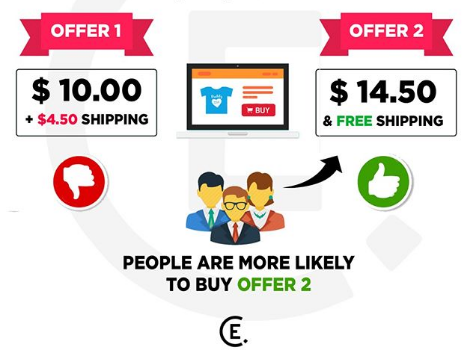
Using Google AdWords, you can tailor Google retargeting ads for each segment and connect with them solely. Marketers could give a fair overlook to their ads to drive the attention of retargeted customers. They can add images, make visitors laugh, and offer varying incentives such as price discounts, free shipping, etc.
Have a look at this image:
Use Customer Match for people who gave you their email
Customer Match lets you upload the contact details customers shared with you (such as email addresses) and reach them on Search, the Shopping tab, Gmail, YouTube and Display (Google Ads Help: About Customer Match). It is a good fit for re-engaging past buyers or newsletter subscribers who haven’t visited your site lately. Google notes that Customer Match memberships expire after 540 days, and that since March 2024 Customer Match lists can’t be used on Google partner inventory or third-party exchanges in the European Economic Area, the UK and Switzerland.
Privacy, consent and policy rules for Google remarketing
- Consent: Google’s consent mode doesn’t show a banner by itself. It reads the choices from your consent banner and tells Google tags what they may store. In the basic setup, tags don’t load until the visitor responds; in the advanced setup, tags send cookieless pings while consent is denied (Google Ads Help: About consent mode).
- Sensitive categories: advertisers promoting products and services in sensitive interest categories can’t use advertiser-curated audiences such as your data segments, and people under 18 aren’t eligible for personalized ads of any kind (Google Advertising Policies Help).
- Restricted pages: Google Ads doesn’t permit tags on pages related to policy-restricted offers (Google Ads Help).
- Opt-outs: you can turn off the collection of personalized advertising data for visitors who don’t want personalized ads (Google Ads Help).
Want the bigger picture? Our comparison of retargeting platforms covers Meta, LinkedIn, X, TikTok, Pinterest and Reddit as well.
How to create a dynamic remarketing App campaign?
- Log in to your Google Ads account.
- From the page menu, select Campaigns.
- Open the drop-down menu after clicking the + button and select a new campaign.
- Choose App marketing as your campaign objective.
- Choose a campaign subtype and a platform for your mobile app.
- Give your campaign a name, a bid strategy, a budget, start and end dates, and ad format.
- Select Show advanced options.
- Check the box next to “Attach a feed to improve targeting and enable ads that feature your feed items” in the “Data feed” section.
- Choose between a dynamic ad feed and a Google Merchant Center feed.
- Learn how to use feeds in your app marketing.
- Continue by clicking Save.
- Make your app advertisements. Learn how to create effective app campaign creative assets.
Final thoughts
Google Retargeting is a dominant technique to retarget those visitors who have enough interest in your product or brand and also a ridiculous way to move your business steadily and smoothly.
It’s not easy to persuade the audience to convert into loyal customers. Therefore marketers are required to spread the awareness of the brand or illustrate the brand’s active presence by showing ads repeatedly on the other websites which customers visit frequently.
Google Retargeting Faqs

Sadia Umer