If you searched for a Clickly alternative because your link shortener stopped working, the first job is to keep your links alive, and the second is to pick a tool that will last. As of October 2026 we couldn’t find a link shortener called Clickly that is still operating, so this guide covers both: what we found about Clickly, how to move your links safely, and how Replug fits as a replacement. Digital marketers and social media managers rely on SaaS tools like these every day, so a shutdown hurts.
Disclosure: this is Replug’s blog and Replug is our product. Replug facts come from replug.io/pricing and the Replug app, checked October 2026.
What happened to Clickly?
When this article was first written, Clickly was a link shortener that was shutting down. In October 2026, the names that come up for “Clickly” are unrelated products:
- Clickly at clickly.app is a visual builder for native mobile apps, not a link shortener.
- The clickly.co domain is listed for sale on a domain marketplace.
- If you mean ClickMeter, the link tracking tool: typing clickmeter.com now takes you to Rebrandly’s homepage (checked October 2026).
Whichever tool you used, the steps below help you move without losing clicks.
What to do when your link shortener shuts down
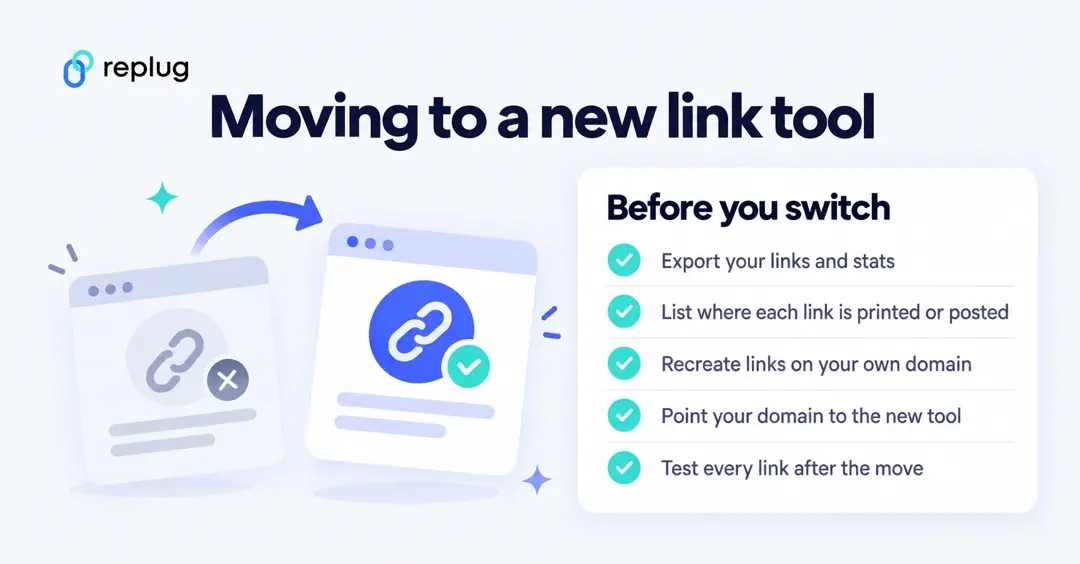
- Export what you can. Download your links, destinations and click history while the old tool still lets you sign in.
- Make a list of where each link lives. Social bios, email templates, ads, PDFs, packaging and printed QR codes all need checking.
- Check the domain. Links on the old tool’s own short domain stop working when it shuts down, and you can’t move them. Links on your own branded domain can be saved: connect that domain to the new tool and recreate the same back-halves.
- Recreate the links. Create each link again in the new tool, on your own domain if you have one, with the same slug where it matters (custom slugs need Replug Essentials or higher; bulk CSV import needs Scale or Agency).
- Update what you can’t redirect. Replace old short links in bios, templates and ads with the new ones, and plan a reprint for QR codes that used the old tool’s domain.
- Test every link. Open each new link on mobile and desktop before you announce the change.
Google’s own shortener went through the same thing: see why goo.gl links are shutting down for how Google handled it.
You may also like: Best Google URL shortener alternative
Pros and cons of Replug
| Pros | Cons |
|---|---|
| Free plan with 100 short links and 3 custom domains | Destination edits, A/B tests, routing and deep links need Scale or Agency |
| Bio pages, QR codes, CTAs and retargeting pixels in one tool | Tracked clicks are capped per plan (1,000 on Free to 250,000 on Agency) |
| Analytics for links, bio pages and QR codes, with exports and scheduled reports | API access only on Agency |
| White label for agencies |
Key considerations when choosing a URL shortener
| Important points to consider |
|---|
| 1. Reliability and uptime: Ensure a strong track record of uptime to avoid broken links. |
| 2. Customization options: Look for the ability to create branded or custom short links. |
| 3. Analytics and tracking: Evaluate the depth of analytics offered, including click counts and traffic sources. |
| 4. Security features: Confirm HTTPS support, link expiration options, and anti-spam measures. |
| 5. Integration capabilities: Check for compatibility with marketing tools and social media platforms. |
| 6. Cost structure: Consider pricing plans and any limitations in free tiers versus paid options. |
| 7. Ease of use: Assess the user interface for intuitiveness and simple link generation. |
| 8. Support and documentation: Look for comprehensive guides and responsive customer support options. |
| 9. API availability: Determine if an API is available for automated link management. |
| 10. Reputation and reviews: Research user feedback and industry reputation to gauge satisfaction and reliability. |
Why Replug is a strong Clickly alternative
Replug is not an ordinary link shortener; it’s a link management tool for marketers, creators and agencies. Here is what it offers, with the plan each feature needs.
Standout features of Replug
- Link retargeting (Essentials and up)
- Remove Replug branding (Scale and Agency)
- White-label solution (Agency)
- Bio links with ready-to-use themes
- RSS automation (Scale and Agency)
- QR code customizations and QR scan analytics
- Bridge page CTAs and summary pages (Essentials and up)
- Call to actions: buttons, links, forms, banners and pop-ups (Essentials and up)
- Advanced link tracking and analytics
- Integrations with email tools, ad pixels and Zapier
- Workspaces and team member management
1. Reliability and links that keep working
A shutdown is the worst case, but limits can break links too. Replug says your links keep working if you reach a plan limit, and links don’t expire unless you set an expiry date yourself. Put your links on your own domain so you can move them again later if you ever need to.
2. Feature-rich tool
Replug is a feature-rich tool that not only allows branded link shortening, but gives users plenty of options to market their brand using short links.
A few of the standout features of Replug are link retargeting, bio links and call to actions.
Link retargeting capability
Replug fires your Meta, Google, X, LinkedIn, Pinterest, TikTok or Quora pixel when someone clicks your link, so you can show ads to those visitors later. Essentials includes 1 pixel; Scale and Agency are unlimited.
Personalized bio links
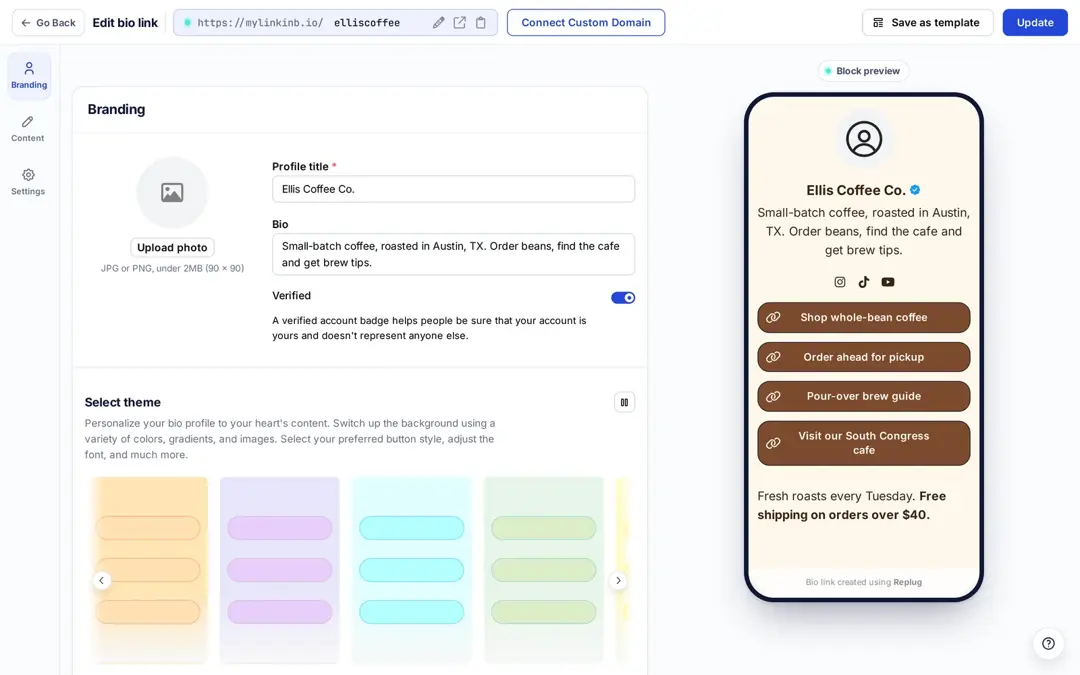
Replug lets you build a bio page that reflects your brand: profile, social icons, links, videos, text and a sign-up form, with themes and a live preview. The Free plan includes 2 bio links, Essentials 10, and Scale and Agency unlimited.
Compelling call to actions
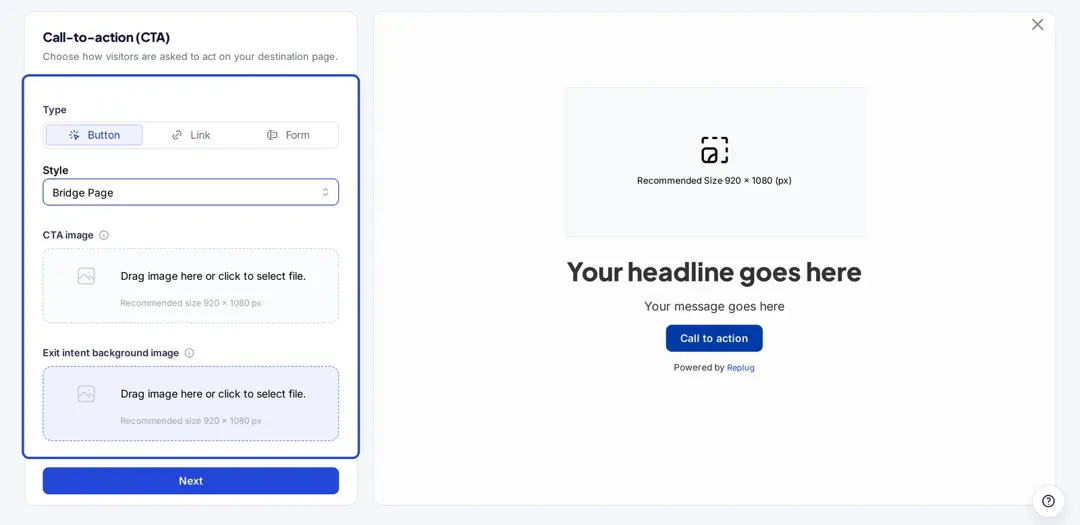
Call-to-actions (CTAs) show your own message on the pages you share through a short link: a button, link, form, banner, exit-intent pop-up or bridge page. CTAs start on the Essentials plan, and form CTAs can send sign-ups to your email tool.
Advanced QR codes and analytics
Replug provides customizable QR codes for your offline marketing that lead back to your short links or bio pages. Scans are counted separately from clicks, with location, device and referrer data, so you can see what print brings in.
3. Customization options
Replug lets you use your own domains (3 on Free, up to 50 on Agency) and custom back-halves (Essentials and up), so your links show your brand instead of a generic short domain.
Replug offers multiple ways to create your personalized bio pages, QR codes, CTAs and more.
It also offers a white-label solution on its Agency plan, so agencies can add their logo, favicon and domain and send branded reports and emails.
4. Pricing and free plan
Replug has a Free plan with no credit card, and a 14-day free trial on paid plans. Essentials costs $19 a month ($9.50 billed yearly), Scale $39 ($23.40 yearly) and Agency $99 ($79.20 yearly), according to Replug’s pricing page.
Replug’s tiered pricing plans accommodate everything from freelance marketers to agencies, so you can grow on one tool without switching again.
5. Easy to use
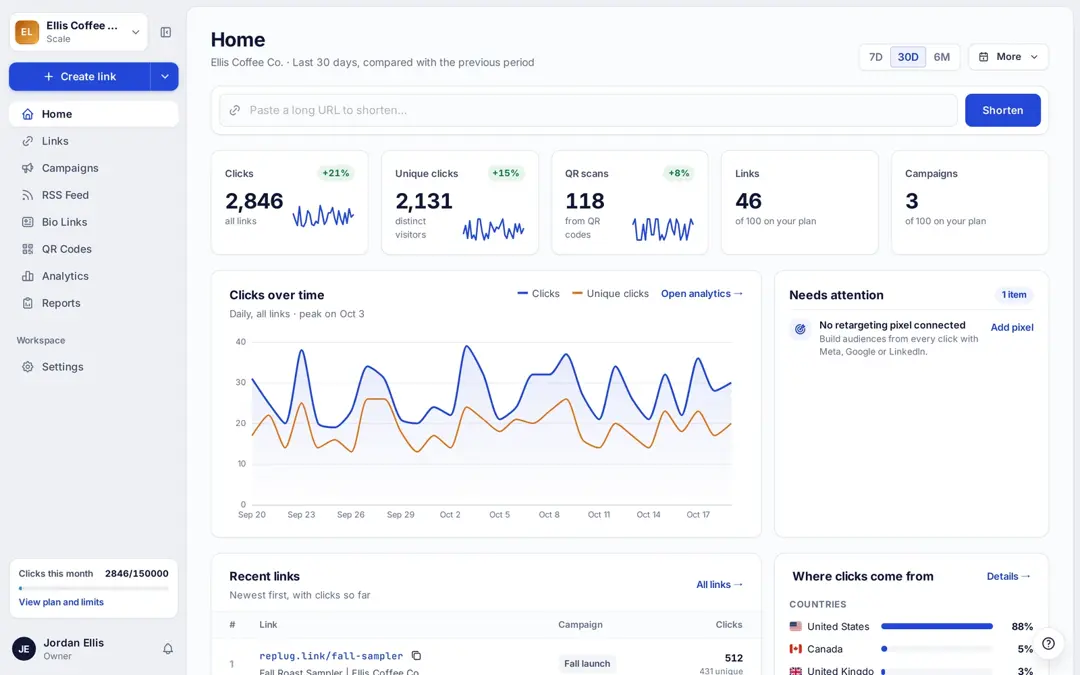
Replug’s Home screen lets you paste a long URL and shorten it right away, without setting up a campaign first.
Workspaces keep each client or brand separate (1 on Free and Essentials, 3 on Scale, 10 on Agency), so you can track performance for clients and teams at a glance.
6. Analytics and tracking
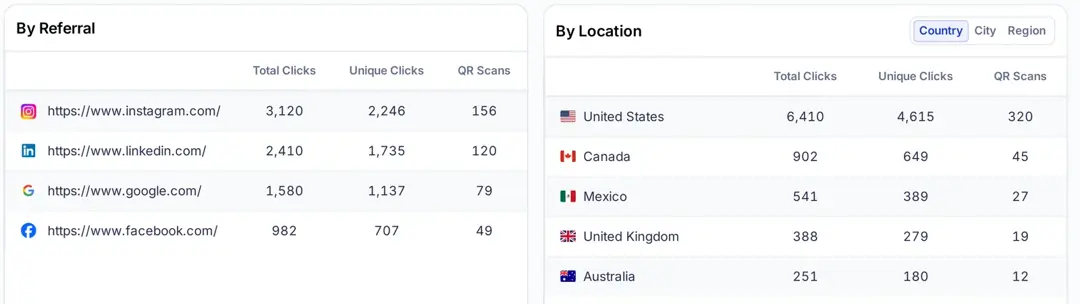
Replug shows clicks, unique clicks and QR scans, broken down by referrer, country, city, device, browser and operating system, with 14 days of history on Free, 90 days on Essentials and unlimited on Scale and Agency. Replug counts clicks, not sales.
7. Security features
Every Replug plan includes HTTPS, link virus scanning and click bot detection, according to its pricing page. Password protection and link expiry come with Scale and Agency.
This is crucial for maintaining brand reputation and user confidence.
8. Integration capabilities
Replug integrates with a variety of marketing tools: email platforms such as Mailchimp, ActiveCampaign and Kit for CTA and bio sign-ups, ad pixels, Zapier and a REST API (Agency).
9. Support and documentation
Every plan includes live chat, email support and the help center at docs.replug.io; onboarding calls and dedicated support come with Agency.
If your old tool shut down, start with a small set of links, check the steps above, and ask support if you need help moving a custom domain to this link optimization platform.
10. API availability
Replug’s REST API lets developers create and manage links from their own code, and Developer Apps let other tools connect through OAuth. API access is part of the Agency plan.
11. Comprehensive social media integration
Short links, bio pages and QR codes work on every social network, and Replug’s click tracking shows which channel each click came from, so you can compare platforms.
Is Replug the best Clickly alternative?
If you need a replacement for a link tool that shut down, Replug covers branded links on your own domain, bio pages, QR codes, CTAs, retargeting and analytics, with a free plan to start. If you only need simple short links, other tools may be enough; compare alternatives like Bitly or Rebrandly too.
Whichever you choose, put your links on a domain you own. Then a future change of tool means moving the domain, not reprinting every link.
FAQs on Clickly alternatives

Mustafa Niazi