Google’s goo.gl link shortening service was a trusted tool for condensing long URLs for years. On August 25, 2025, Google switched off the goo.gl links that had shown no activity in late 2024; links that people still used keep working, according to Google’s developer blog (updated August 1, 2025).
What does this mean? Some goo.gl links you created have already stopped working, and Google has not offered a way to edit, export or create goo.gl links for years, which could seriously impact websites, campaigns, and digital strategies relying on them.
Quick answer: goo.gl was Google URL Shortener, a free service Google launched in 2009 to turn long web addresses into short goo.gl/… links. Google stopped accepting new links in 2018 and closed the goo.gl console on March 30, 2019. On August 25, 2025, goo.gl links that showed no activity in late 2024 stopped working; actively used links were kept and still redirect. You can’t create, edit or export goo.gl links anymore, so any link you still depend on should be replaced with one you control.
If you’ve been using goo.gl for your business or personal projects, now’s the perfect time to explore new options.
The good news? There are plenty of great alternatives out there, like Replug, TinyURL, and Rebrandly. However, one standout solution is Replug, offering advanced features like link retargeting and detailed analytics.
In this blog, we’ll explain what goo.gl was and what happened to it, then walk you through the best alternatives to goo.gl and show you how to switch without breaking a sweat, ensuring your marketing efforts run smoothly.
| Why do you need to act now? Inactive goo.gl links stopped working on August 25, 2025, and the links that remain can’t be edited or tracked, so migrating to a platform you control sooner rather than later will save you from headaches down the road. Plus, modern URL shorteners offer tools like retargeting, branded links, and more detailed analytics than goo.gl’s basic click counts. |
What is goo.gl?
goo.gl is the short domain of Google URL Shortener. You pasted a long address into the goo.gl console and got back a short link such as goo.gl/xK29 that redirected to the original page. Google says it launched the service in 2009 “as a way to help people more easily share links and measure traffic online”. It also showed basic click statistics in the goo.gl console.
Some links that start with goo.gl were not made with the URL Shortener. Firebase Dynamic Links, the app-linking product Google recommended as the developer replacement in 2018, also used Google-owned short domains (page.link, and custom domains apps set up). Firebase Dynamic Links shut down on August 25, 2025, according to Firebase’s deprecation FAQ.
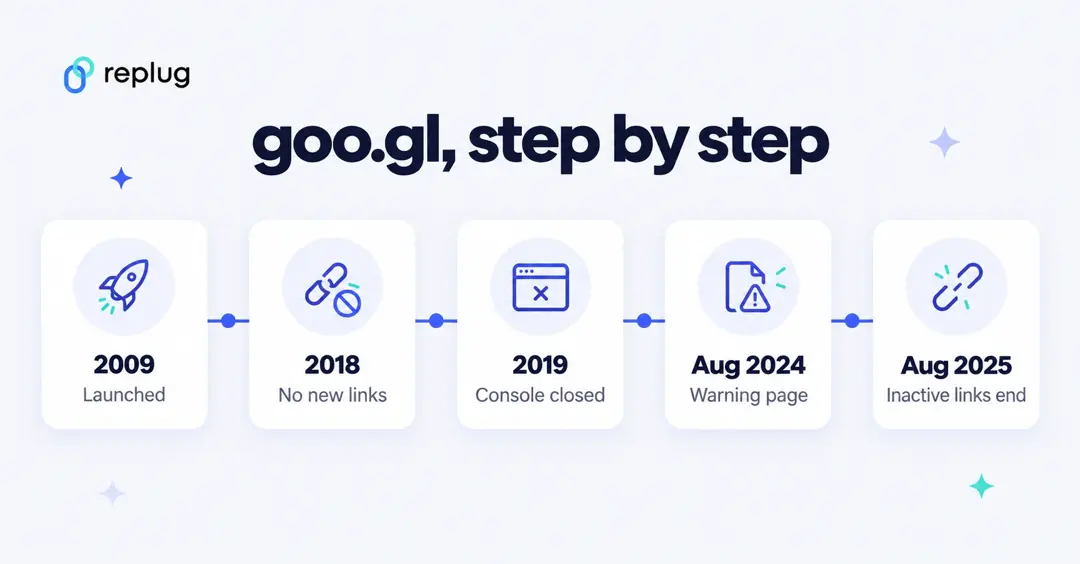
What happened to goo.gl? The timeline
| Date | What Google did |
|---|---|
| 2009 | Launched Google URL Shortener (goo.gl). |
| March 30, 2018 | Announced the deprecation. From April 13, 2018, anonymous users and people who had never created a short link could no longer create new ones. |
| March 30, 2019 | Closed the goo.gl console and the URL Shortener API. Existing links kept redirecting; links were not moved to Firebase. |
| July 18, 2024 | Announced that goo.gl links would stop working after August 25, 2025, noting that more than 99% of links had no activity in the previous month. |
| August 23, 2024 | Started showing a warning page (“This link will no longer work in the near future”) on some links before redirecting. |
| August 1, 2025 | Changed the plan: only links that showed no activity in late 2024 (the ones with the warning page) would be deactivated; all other goo.gl links would be preserved. |
| August 25, 2025 | Deactivated the inactive links. Firebase Dynamic Links shut down the same day. |
Sources: Google Developers Blog posts from March 30, 2018 and July 18, 2024 (updated August 1, 2025); Firebase Dynamic Links deprecation FAQ. Checked October 2026.
Do goo.gl links still work in 2026?
Many do. Google’s August 2025 update says that links which redirected without a warning message “will be preserved and will continue to function as normal”. When we tested on October 21, 2026, an active goo.gl link still sent us straight to its destination, while a goo.gl code that doesn’t exist returned a “Dynamic Link Not Found” error page.
Links that showed Google’s warning page before August 25, 2025 no longer work. To check a link, open it: if it takes you to the page without a message, it is one of the preserved links. Because you can’t edit or extend goo.gl links, a preserved link is still a link you don’t control: if its destination moves, you can’t point the goo.gl link somewhere new.
What to do with your old goo.gl links
- Find them. Search your website, help docs, email templates, PDFs, video descriptions and social bios for “goo.gl/”. There is no export: the goo.gl console that had one closed in 2019.
- Test each one. Open it. If it lands on the right page without a warning, it still works today; if it shows an error page, it is gone.
- Replace the ones you control. Swap each goo.gl link for the full URL or for a new short link from a service you have an account with, so you can see clicks and fix the link later.
- Mind printed links. A goo.gl link on a poster, package or business card can’t be edited. If it still works, leave it; for the next print run, use a short link or QR code whose destination you can change.
- Check app links separately. If your app used Firebase Dynamic Links (page.link or a custom domain), those links stopped working on August 25, 2025 and need a new deep-linking setup.
If you are choosing a replacement service, our comparison of Google URL shortener alternatives lists free and paid options with prices.
Best goo.gl links alternative of 2026
There are plenty of alternatives to goo.gl that not only replace the service but also offer enhanced features for better link management. Among them, Replug stands out as the top choice. It’s the ultimate solution to ensure your marketing efforts keep thriving in 2026 and beyond.
Replug – The all-in-one link solution
Best for: Agencies and marketers who need more than just shortened links.

Best features:
- Custom-branded URLs to elevate brand visibility and credibility.
- Password protection to keep your links secure and private (Scale and Agency plans).
- Retargeting visitors to supercharge ad campaigns and conversions (from the Essentials plan).
- Advanced analytics to track link performance and user behavior.
- Bio links are used to consolidate multiple social profiles into one convenient link.
- Personal domains for consistent, branded user experiences.
- Customizable link previews for social sharing.
- Deep links that send users to in-app content (Scale and Agency plans).
- Design unique calls to action that stand out and resonate with your audience.
- A/B testing to optimize your links based on performance data (Scale and Agency plans).
- Branded QR codes that are easy to scan and share, aligning with your branding.
- UTM tracking to monitor campaign performance with detailed insights.
- White-label dashboards are needed to rebrand the platform fully without the Replug logo showing (Agency plan).
Replug makes marketing smarter and easier without burning a hole in your budget. If you’re a SaaS company chasing growth, an agency managing campaigns, or an e-commerce brand using powerful ecommerce software to expand your audience, Replug has your back.
Get access to powerful features wrapped in a super intuitive interface, making it easy to use from day one. You can customize your links effortlessly, track performance in real-time, and get help from Replug’s support team when you need it.
Plus, it connects to tools you already use: ad pixels such as Meta and Google fire on your links from the Essentials plan, and Zapier and email-platform integrations come with Scale and Agency, according to Replug’s integrations page.
Why is Replug the best alternative to goo.gl?
Replug offers a wide range of features, making it an excellent replacement for goo.gl.
Here are some of the key reasons why you should consider switching to Replug:
1. Customizable links
One of the standout features of Replug is its ability to further customize a shorten link the way you like. Unlike goo.gl, which provides generic short links, Replug allows you to create branded URLs consistent with your business identity.
This makes your links look more professional and helps with brand recognition and trust.
You can connect custom domains on every plan, including Free, and add meaningful text (a custom slug, from the Essentials plan) to your short URLs, making them more clickable and relevant.
2. Advanced analytics
Replug doesn’t just shorten links—it also provides in-depth analytics to help you track the performance of your links. You can easily monitor the number of clicks, the geographic locations of your visitors, and the devices they use.
3. Retargeting features
Another major advantage of Replug is its ability to add retargeting pixels to your links. This feature is ideal for businesses and marketers who want to retarget visitors with ads on social media platforms like Facebook, Instagram, and Google.
Adding a retargeting pixel to a Replug link lets you track and reconnect with users who clicked on your link but didn’t take the desired action. This feature is a game-changer for improving conversion rates and driving sales.
4. Link management dashboard
Replug provides an easy-to-use link management dashboard that allows you to organize all your shortened links in one place. You can categorize links by campaign, monitor their performance, and edit or delete them if necessary.
In addition, the dashboard offers several powerful features to optimize your link strategy, such as creating link previews, customizing favicons, and running A/B tests. You can also change link destinations, rotate traffic, and bulk import or export links for greater efficiency (these need the Scale or Agency plan; link previews and favicons start on Essentials).
For added control, Replug enables you to set link expirations and password-protect your links on the Scale and Agency plans, ensuring both flexibility and security in your link management process.
5. Team collaboration
For businesses with multiple team members, Replug offers team collaboration features that allow users to manage and share links with colleagues.
This is particularly useful for agencies or marketing teams working on many campaigns, as it ensures everyone is on the same page and can access the necessary data.
How to migrate from goo.gl to Replug?
Migrating from goo.gl to Replug is a straightforward process. Here’s how you can do it in just a few simple steps:
1. List your goo.gl links and their destinations
Google’s goo.gl console, which let you download your link data, closed on March 30, 2019, so there is no export anymore. Instead, make your own list: search your pages, documents and campaigns for “goo.gl/”, open each link and note where it lands.
This list gives you a record of every long URL you still depend on, which can be crucial for making informed decisions moving forward. If you exported your data before 2019, use that file as your starting point.
2. Sign up for Replug
Visit the Replug website and choose the plan that best fits your needs.
You can start on the Free plan (100 short links, no card needed) to get familiar with the platform, or try a paid plan free for 14 days for more advanced capabilities (Replug pricing, checked October 2026).
3. Create custom links
Once you’ve signed up, you can start shortening your URLs with Replug. On the Home page, paste the long URL into the Paste a long URL to shorten… box and click Shorten. The Your link window opens with your new short link on replug.link (or on your own domain); click Save Shortened Link to keep your settings.

You can also change the link name to make it more relevant and memorable by adding keywords or your brand name.
4. Update old goo.gl links
If you have existing goo.gl links, it’s time to replace them with Replug links. If those links are already shared across websites, social media, or email campaigns, it’s important to update them to ensure that your audience is directed to the correct destination. Links you can’t change, such as printed ones, keep working only if Google preserved them.
You can also track these links with Replug’s analytics to see how they perform compared to the old goo.gl links.
5. Monitor link performance
Once your Replug links are live, use the platform’s analytics tools to track their performance.
Replug gives you detailed insights into how many clicks your links receive, where those clicks are coming from, and how they’re performing across different channels. This data will help you refine your campaigns and make necessary adjustments.
Benefits of switching to Replug now
With goo.gl closed to new links and its inactive links switched off in August 2025, it’s important to move your links to a more reliable and feature-rich link optimization platform.
Here are a few key benefits of making the switch now:
- No service interruptions: By moving to links you control, you don’t depend on Google keeping an old goo.gl link alive.
- Improved link management: Replug’s advanced analytics, retargeting features, and easy link management dashboard give you greater control over your links and marketing campaigns.
- Better branding opportunities: Customizable links allow you to build a stronger brand presence and make your links more memorable to your audience.
- Future-proofing: As digital marketing continues to evolve, Replug’s features will keep you ahead of the curve with new updates and tools designed to enhance your marketing efforts.
Final thoughts
Now that Google’s goo.gl link shortening service is retired, it’s essential to find a reliable alternative to keep your marketing campaigns on track.
Replug stands out as the best option with its powerful features, including customizable links, analytics, retargeting capabilities, and easy link management.
By migrating to Replug now, you can ensure a seamless transition and continue driving effective marketing campaigns long after goo.gl is gone.
Start using Replug today and experience the difference it can make to your link management and overall digital marketing strategy.
You may also like:
How to shorten Google Form link?
FAQs

Manahil