Quick answer: email marketing is sending planned emails, such as newsletters, offers, welcome series and reminders, to people who agreed to hear from you, in order to build relationships and drive sales. You collect subscribers with a sign-up form, send through an email service provider, follow the anti-spam rules (consent, a clear sender and an easy unsubscribe) and measure clicks and sales.
Email can feel old-school next to social platforms, but it is one channel you own: no algorithm decides whether your subscribers see your message. Marketers still rate its return highly. According to Litmus’s ROI of email marketing summary of its State of Email 2025 survey of nearly 500 marketers, 35% of companies get $10 to $36 back for every $1 spent on email and 30% get $36 to $50.
This guide covers what email marketing is, how to get started, the types of campaigns, benefits and challenges, how to write a marketing email, examples, best practices, tools, B2B tips and careers.
What is email marketing: A brief overview & history
“Email marketing” is a digital marketing strategy in which businesses send promotional, informational, or relationship-building messages to people via email.
Its primary objective is to:
- connect with audiences,
- promote products or services,
- nurture customer relationships, and
- encourage repeat purchases or engagement.
In simple terms, it helps brands stay in touch with their audience in a direct and personal way.
The roots of email marketing go back to 1978, when Gary Thuerk, a marketer at Digital Equipment Corporation, sent a mass promotional message to users of ARPANET, the network that preceded the internet. It is often cited as the first marketing email, and also as the first spam.
Over the 1990s and 2000s, the rise of webmail, HTML emails, and automation tools made campaigns more visually appealing and targeted.
Today, email marketing uses personalization, AI, and analytics to deliver smarter and more engaging campaigns.
Now that you know where it started, let’s explore the fundamental components of email marketing.
Key components of email marketing
Email marketing works best when several important elements come together. These components help businesses send the right messages to the right people while staying effective and compliant.

Permission-based subscriber list
This means sending emails only to people who have agreed to receive them (also called opt-in subscribers). Permission-based lists usually deliver better engagement, fewer spam complaints, and stronger ROI because the audience actually wants to hear from you.
Segmenting audiences for relevance
Segmentation means dividing subscribers into smaller groups based on factors like demographics, interests, behavior, or purchase history. This helps marketers send more personalized and relevant messages instead of generic emails.
Engaging content with strong subject lines
The subject line is the first thing people see in their inbox and plays a big role in whether they open the email. Clear, curiosity-driven, and relevant subject lines improve open rates and overall engagement.
Email platform
An email platform, or Email Service Provider (ESP), is a tool that helps businesses create, send, and track email campaigns. It usually offers templates, automation, list management, segmentation, and performance tracking features.
Privacy laws compliance
Email marketers must comply with privacy and anti-spam laws such as GDPR and CAN-SPAM. These rules require honest subject lines, valid sender details, and easy unsubscribe options to protect users and prevent spam.
Email visuals & design
Good design makes emails easier to read and more appealing. Mobile-friendly layouts, clear structure, consistent branding, and strong call-to-action buttons colors improve user experience and engagement.
Drip campaigns
Drip campaigns are automated email sequences sent over time based on user actions or timelines. They help nurture leads, onboard customers, and guide subscribers through their journey.
Important metrics tracking
Tracking metrics like open rate, click-through rate, conversions, bounce rate, and unsubscribe rate helps marketers understand what’s working and where improvements are needed.
How to get started with email marketing
Getting started with email marketing may seem stressful at first, but it becomes simple when you follow a clear, step-by-step process. Let’s break down the key steps you should focus on.
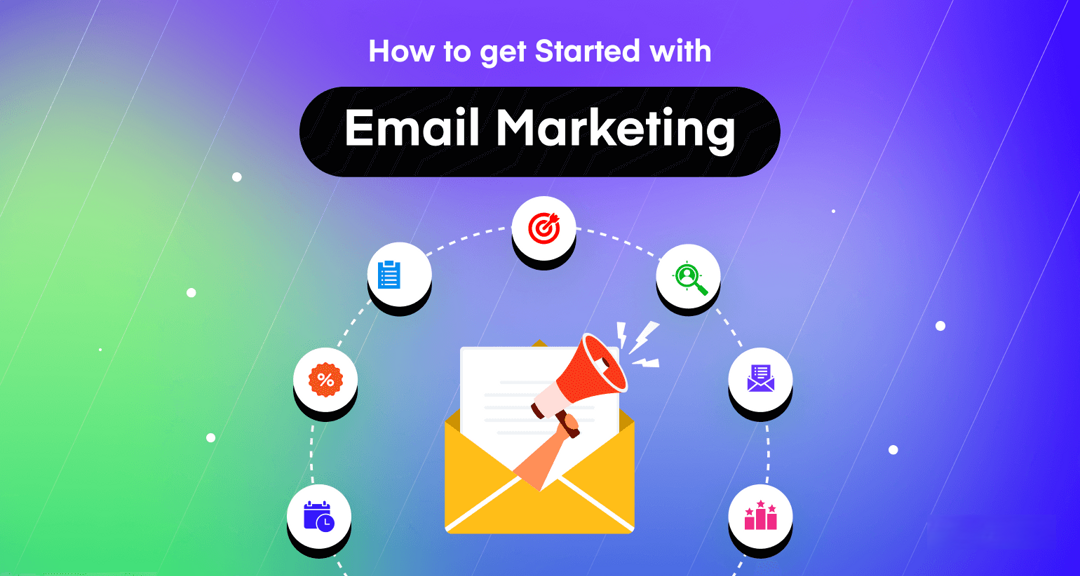
Here’s how to do email marketing:
1. Build an email list
Start by collecting email addresses from people who genuinely want to hear from you. You can use sign-up forms, landing pages, or free resources like ebooks or discounts to encourage subscriptions. A quality list is more valuable than a large but uninterested audience.
2. Pick the right platform/software
Choose a reliable ESP that helps you create, send, automate, and analyze campaigns hassle-free. Good platforms usually offer automation, segmentation, mobile-friendly templates, and reporting features to simplify your workflow.
3. Set primary goals & objectives
Before sending emails, decide what you want to achieve. Your goals might include increasing sales, growing your subscriber list, generating leads, or boosting engagement. Clear goals help you measure success and plan better campaigns.
4. Segment audience
Divide your subscribers into smaller groups based on interests, behavior, demographics, or purchase history. Segmentation helps you send more personalized emails, which usually leads to better engagement and stronger customer relationships.
5. Design & create campaign content
Create emails that provide immense value to your audience. Focus on clear subject lines, helpful content, on-point call-to-action phrases, and mobile-friendly design. The more relevant and engaging your content is, the better your results will be.
6. Optimize the email campaign
Test different subject lines, layouts, send times, and content styles to see what works best. Split-testing your links helps you improve performance and understand what your audience prefers over time.
7. Track critical metrics
Tracking performance helps you understand how your campaigns are doing. Important metrics include open rate, CTR, conversion rate, bounce rate, and unsubscribe rate, which show how recipients interact with your emails and whether your campaigns are driving results.
Open rates are less reliable than they used to be: Mailchimp’s email marketing benchmarks (average unique open rate 35.63% and click rate 2.62% across its users, data as of December 2023) note that Apple’s Mail Privacy Protection can affect open-rate accuracy. Clicks and what happens after the click are more dependable, so add UTM parameters to your email links; our guide to tracking emails with UTM parameters shows how.
Different types of email marketing campaigns
Email marketing isn’t just about sending one type of message. Businesses use different types of email campaigns depending on their goals, audience stage, and purpose.
Here’s a simple breakdown of the most common types.
| Email campaign type | Explanation |
| Welcome emails | These are the first emails sent to new subscribers or customers. They introduce your brand, set expectations, and help start the relationship on the right note. |
| Email newsletters | Regular emails that share updates, blogs, company news, or helpful content to keep subscribers informed and engaged. |
| Promotional emails | Emails designed to promote products, services, discounts, or special offers to encourage purchases. |
| Informational emails | These focus on educating subscribers by sharing guides, tips, updates, and product knowledge rather than direct selling. |
| Lead nurturing/automated emails | A series of automated emails sent over time to guide potential customers through the buying journey and build trust. |
| Transactional emails | Automated emails triggered by user actions like purchases, password resets, or account updates, mainly to provide important information. |
| Confirmation emails | Sent to confirm specific actions like subscriptions, bookings, or purchases to reassure customers that the process is complete. |
| Dedicated emails | Emails focused on a single message, product, or offer. Usually sent to a specific audience group. |
| Invite emails | Emails used to invite subscribers to webinars, product launches, or special events. |
| Interactive emails | Emails that include clickable elements like polls, quizzes, or image sliders to boost engagement. |
| Feedback/Survey emails | Emails sent to collect customer opinions, reviews, or satisfaction feedback to improve products or services. |
| Retention emails | Emails designed to keep existing customers engaged and loyal by offering value, updates, or exclusive offers. |
| Relational emails | Emails focused on building long-term relationships by sharing helpful resources, stories, or personalized content. |
| Milestone emails | Emails celebrating birthdays, anniversaries, or customer achievements to create a personal connection. |
| Re-engagement/Winback emails | Emails sent to inactive subscribers to encourage them to reconnect with your brand. |
| Seasonal marketing emails | Emails sent during special seasons like summer sales or back-to-school campaigns to promote relevant offers. |
| Cart abandonment emails | Automated emails reminding users about items left in their shopping cart and encouraging them to complete the purchase. |
| Announcement emails | Emails used to announce product launches, company updates, or new features. |
| Event emails | Emails that promote, remind about, or follow up on events such as webinars, conferences, or workshops. |
| Cold emails | Emails sent to potential customers who haven’t interacted with your brand yet. Usually for outreach or lead generation. |
| Holiday emails | Campaigns built around holidays like the New Year, Christmas, or Black Friday to promote festive deals and engagement. |
| Post-purchase follow-up emails | Emails sent after a purchase to thank customers, provide product guidance, or encourage repeat buying. |
Key benefits of email marketing
If you’re wondering why use email marketing, the answer lies in the wide range of benefits it offers. From building strong customer relationships to driving measurable business results, email remains one of the most reliable marketing channels available today.
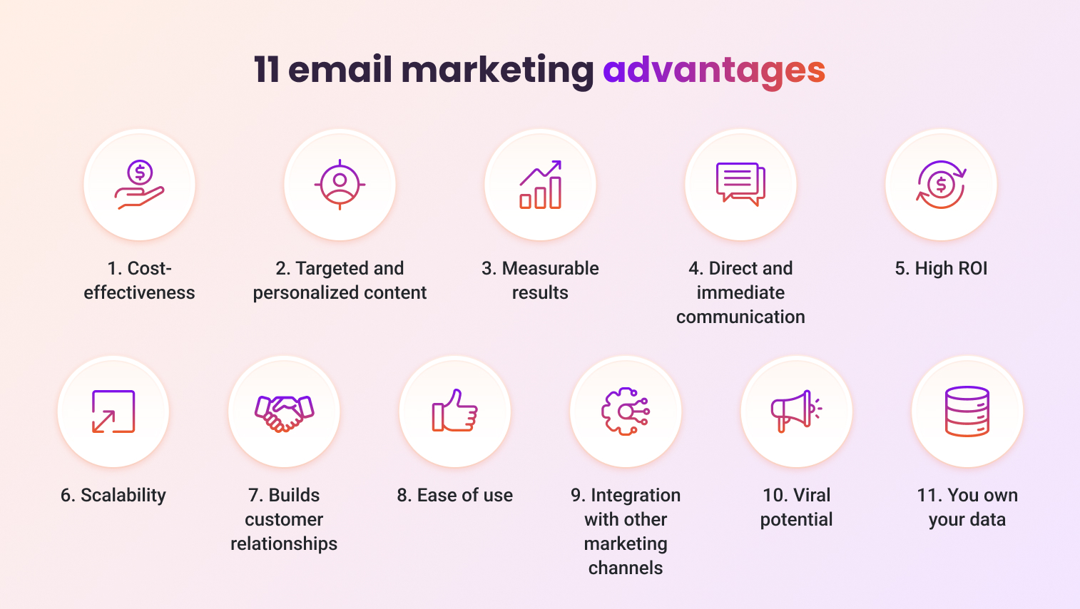
Advantages of email marketing:
Direct communication
Email allows you to reach people directly in their inboxes without relying on social media algorithms. This makes it easier to deliver messages, updates, and offers in a more personal and consistent way.
Targeted & scalable
Email marketing works for both small and large businesses. You can start with a small list and gradually scale your campaigns as your audience grows, while still maintaining relevance.
Segmentation & personalization
Modern email tools let you segment subscribers based on behavior, preferences, or demographics. Personalized emails tend to perform better because the content feels relevant to each reader; test it on your own list.
Relationship building
Regular, valuable emails help you stay connected with subscribers and build trust over time. This long-term connection often turns subscribers into loyal customers.
Measurable results & insights
Email marketing provides clear performance data such as open rates, click-through rates, and conversions. These insights help marketers understand audience behavior and improve and further optimize future campaigns.
Automation & efficiency
Automation allows you to send welcome emails, follow-ups, and reminders automatically. Once set up, automated emails keep working without manual sends, which makes marketing more efficient.
Offers more control
Unlike social media platforms, your email list is an owned asset. You control how and when you communicate with your audience, which makes your strategy more stable and reliable.
Drive traffic (clicks) & sales (conversions)
Email campaigns encourage users to visit websites, explore products, and complete purchases. Many businesses rely on email as a major or ultimate driver of traffic and sales.
Enhanced brand awareness
Consistent emails keep your brand identity fresh in subscribers’ minds. Even if recipients don’t buy immediately, regular exposure helps increase brand recognition.
Strengthen customer loyalty
By sharing useful content, exclusive deals, and personalized messages, email helps build long-term customer loyalty and repeat business.
Cost-effective & High ROI
One of the biggest reasons businesses use email marketing is its return on investment. In Litmus’s State of Email 2025 survey, most companies reported getting back between $10 and $50 for every $1 spent on email; measure your own ROI with the formula in the FAQ below.
Key challenges of email marketing
Email marketing is pretty effective, but it’s not always smooth sailing. Businesses often face several hurdles that can affect campaign performance, engagement, and overall ROI. Understanding these challenges helps marketers create smarter strategies and get better results.
Disadvantages of email marketing:
Deliverability issue
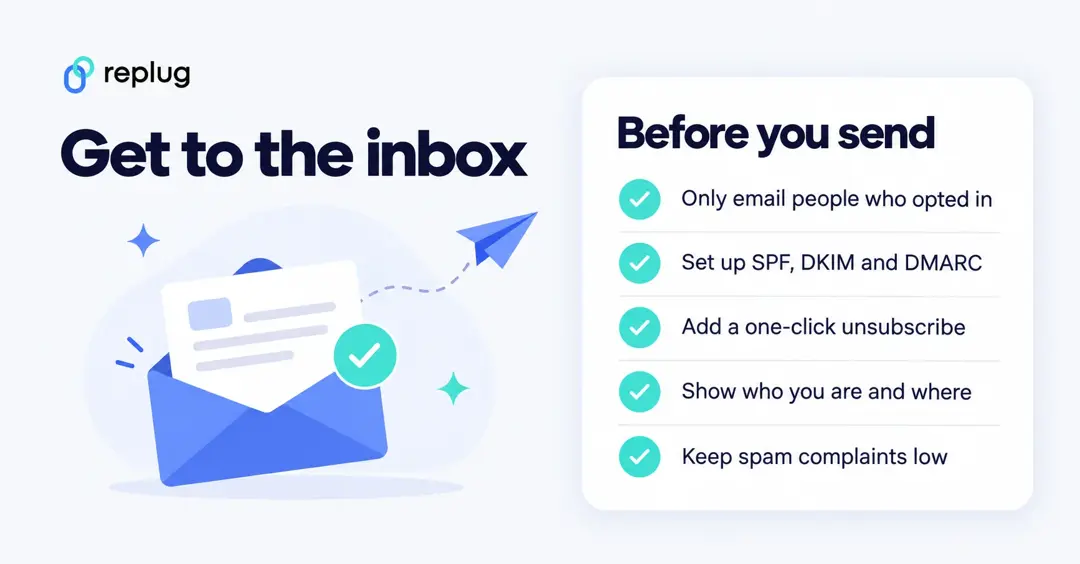
One of the most significant challenges in email marketing is ensuring your emails actually reach your audience’s inboxes rather than being blocked or bounced.
Deliverability can be affected by:
- Poor sender reputation,
- Outdated email lists,
- Low engagement rates, or
- Improper authentication settings
If emails don’t reach inboxes, even the best campaigns won’t perform. Maintaining clean email lists, using verified domains, and following the email marketing best practices below can significantly improve deliverability.
Spam filters
Spam filters are designed to protect users from unwanted or harmful emails, but they can sometimes block legitimate marketing emails too.
- Overusing promotional language,
- Adding too many links,
- Sending bulk emails without permission, or
- Lacking proper email authentication
can trigger spam filters.
To avoid this, marketers should focus on sending permission-based emails, writing genuine subject lines, and maintaining consistent sending patterns.
Mailbox providers now enforce some of these rules. Google’s email sender guidelines require every sender to Gmail personal accounts to set up SPF or DKIM, and senders of 5,000 or more messages a day to set up SPF, DKIM and DMARC and support one-click unsubscribe for marketing messages. Google also asks senders to keep the spam rate reported in Postmaster Tools below 0.10% and never reach 0.30%.
Competitive email competition
Most users receive dozens of marketing emails daily, which creates intense competition for attention. Your emails are competing with newsletters, promotions, and updates from other brands. If your emails don’t stand out, they may be ignored or deleted.
Creating personalized, relevant, and valuable content helps brands stay competitive and encourages recipients to open and engage with emails.
Content overload
People are constantly exposed to digital content across multiple platforms, and email is no exception. When subscribers receive too many messages or overly long emails, they may lose interest quickly.
To tackle content overload, marketers should keep emails concise, structured, and focused on delivering clear value rather than overburdening readers with too much information.
Attention span
Nowadays, audiences have shorter attention spans, especially when scrolling through emails on mobile devices. If your email doesn’t capture concentration within a few seconds, readers are likely to move on.
Strong subject lines, clear headlines, and easy-to-scan content can help grab and maintain attention for a longer period.
Design challenges
Creating visually appealing, responsive emails can be quite tricky. Emails must display properly across different devices, screen sizes, and email clients. Poor formatting, broken layouts, or slow-loading visuals can hurt user experience and reduce engagement.
Using mobile-friendly designs, simple layouts, and tested email marketing templates helps overcome these design challenges.
Email fatigue
When subscribers receive too many emails from the same brand, they may feel frustrated or annoyed, which can lead to lower engagement or unsubscribes.
Finding the right sending frequency and offering meaningful content is essential to avoid email fatigue and maintain a positive relationship with subscribers.
Cost considerations
While email marketing is often more cost-effective than other marketing channels, expenses can still add up.
Businesses may need to invest in email marketing tools, automation software, design resources, and list management services. Additionally, poor targeting or low engagement can reduce the return on investment.
Proper planning and data-driven strategies help businesses maximize value while controlling costs.
How to write a marketing email (step-by-step)
Writing a marketing email isn’t just about typing a message and hitting send. It’s about planning, structuring, and crafting content that speaks directly to your audience while guiding them toward a clear action.

Let’s break down the process step-by-step!
Step #01: Map out your email marketing strategy
Before you start writing, you need a clear plan. Ask yourself “why you’re sending the email” and “what you want readers to do” after reading it. It could be promoting a product, sharing updates, or nurturing leads.
- Start by identifying your target audience and segmenting them based on their interests, behavior, or purchase history.
- Then, decide your goal, such as increasing sales, driving website traffic, or improving engagement.
- Also, plan your email frequency and messaging tone so your communication stays consistent.
When you have a strong strategy in place, writing the actual email becomes much easier and more focused.
Step #02: Structure your marketing email
A well-structured email keeps readers engaged and helps them quickly understand your message.
Most effective marketing emails follow a simple flow:
- Header & branding: This includes your logo or brand name so readers instantly recognize you.
- Introduction: A short opening that connects with readers and sets the context.
- Main content: This is where you explain your offer, message, or value.
- Call-to-action (CTA): Clearly tell readers what to do next, like signing up, buying, or visiting a page.
- Footer: Add contact details, social links, and unsubscribe options.
Keeping your email organized makes it easier to read and increases the chances of getting responses.
Step #03: Use pre-designed, customizable email templates
Instead of designing emails from scratch every time, use ready-made email marketing templates. Templates save time and ensure your emails look professional and consistent with your brand.
Most email marketing platforms offer customizable templates where you can adjust colors, fonts, layouts, and images. Choose mobile-friendly templates since many people check emails on their phones.
Note: Templates help maintain design balance, ensuring your content looks clean and easy to scan. Use them to your advantage!
Step #04: Fine-tune your subject line, preheader, & preview text
These three elements decide whether someone opens your email or ignores it.
- Subject line: Keep it short, clear, and interesting. Focus on value or curiosity!
- Preheader text: This supports your subject line by giving extra context or highlighting benefits. It must be a good one!
- Preview text: This is the short snippet users see before opening the email, so make it relevant and engaging.
Note: Avoid misleading clickbait or overly salesy language. Instead, focus on delivering genuine value and clarity to build trust with readers.
Step #05: Develop clear & engaging email copy
Your email copy should feel natural, simple, and helpful. Talk to your readers like you’re having a friendly conversation. Focus on benefits rather than just listing features.
- Keep paragraphs short and easy to scan.
- Use bullet points when needed to highlight key information.
- Personalization, such as using the reader’s name or referencing their interests, can make your email feel more relatable.
- Most importantly, include a strong and clear CTA so readers know exactly what step to take next.
Top email marketing examples
The best way to learn is to sign up for brands you like and study what they send. Here is what ten well-known direct-to-consumer brands promise in their email sign-up forms (checked on their websites in October 2026), and the kind of email each promise sets up.

Little Sleepies’ community-focused welcome email
Little Sleepies, the pajama brand, asks visitors to sign up for new releases and sales and offers a discount on the first order, with a separate text-message option. That promise sets up the welcome email: deliver the code right away, then introduce the brand and its community.
Taylor Stitch’s browse abandonment automation
Taylor Stitch offers 20% off your first purchase for signing up to marketing emails and runs an Insiders newsletter. Clothing stores like this commonly follow up when a subscriber views products without buying, with a browse abandonment email showing the items viewed.
Chamberlain Coffee flash sale email
Chamberlain Coffee offers 5% off for joining its email list. Small, simple sign-up offers like this suit brands that send frequent promotions, such as time-limited flash sales with one clear button.
100% Pure FOMO (fear of missing out) campaigns
100% PURE promotes blog updates and exclusive discounts for subscribers, plus a subscription box and a refer-a-friend offer. Subscriber-only discounts work best with a deadline and an honest reason for it.
Brightland’s founder-signed thank-you note
Brightland, the olive oil brand, invites people to sign up for product launches, seasonal recipes and more. Content-led sign-ups like this make room for personal emails, such as a thank-you note from the founder after the first order.
July’s personalized Black Friday offers
July, the luggage brand, promises updates on collection launches and early access for subscribers. Early access is a strong reason to subscribe before big sale periods such as Black Friday.
Made In’s expert-led email content
Made In, the cookware brand, has a simple “Stay in touch” email sign-up on its site. Cookware lends itself to useful content emails, such as recipes and care guides that also show the products in use.
Pulp & Press’s targeted email automation
Pulp & Press, the juice company, promises updates on new products, cleanses and promotions and a 15% code for larger orders, and says you can unsubscribe at any time. Clear expectations at sign-up make later automated emails feel expected rather than intrusive.
Cuyana’s minimalist email design
Cuyana keeps its sign-up minimal, with a short consent line linking to its privacy policy and terms. A minimal sign-up fits a minimal email design: few words, strong product images and one call to action.
Email marketing best practices
Email marketing works best when it’s done thoughtfully and with your audience in mind. Following proven best practices helps improve engagement, boost deliverability, and keep your brand trustworthy and compliant with modern email standards.
Follow proper email etiquette
Treat emails like real conversations, not sales blasts. Use a clear sender name, keep the tone friendly, avoid misleading subject lines, and respect your subscribers’ time by sharing useful and relevant information.
Never buy email lists
Buying email lists may seem like a quick shortcut, but it usually leads to poor engagement and higher spam complaints. Purchased lists often contain outdated or fake addresses, which can damage the sender’s reputation and reduce deliverability.
Ensure compliance with regulations (GDPR & CAN-SPAM)
Privacy and anti-spam laws set the ground rules. In the US, the CAN-SPAM Act requires honest sender information and subject lines, a valid physical postal address and a working way to opt out, as the FTC’s CAN-SPAM compliance guide for business explains. In the EU and UK, GDPR and related rules generally require consent before you send marketing emails. Sending without permission or hiding the opt-out is one of the most common email marketing mistakes.
Use double opt-in signup forms
Double opt-in asks subscribers to confirm their email after signing up. This ensures that the address is valid and that the person truly wants to hear from you, helping improve engagement rates and reducing spam complaints.
Use compelling email marketing subject lines
Your subject line decides if someone opens your email or ignores it. Keep it short, relevant, and honest. Adding urgency, curiosity, or personalization can increase open rates when used naturally.
Ensure emails are optimized for mobile devices
A large portion of emails today are opened on smartphones on the go. Mobile-friendly designs with readable text, responsive layouts, and clear call-to-action buttons help improve user experience and engagement.
Make your emails accessible
An email everyone can read also works better on small screens and in dark mode. A few checks cover most of it:
- Alt text on every meaningful image, so screen readers (and inboxes that block images) still get the message; leave decorative images with empty alt text.
- Enough contrast between text and background: at least 4.5:1 for normal text and 3:1 for large text, the level-AA rule in W3C’s WCAG 2.2 contrast guidance.
- No fast flashing: animated GIFs shouldn’t flash more than three times in any one second, per W3C’s three flashes rule.
- Readable text: a comfortable font size, short paragraphs, left-aligned body copy, real text instead of text baked into images, and link text that says where it goes (“See the fall menu”, not “Click here”).
Only send when you really need to
Sending emails too frequently can annoy subscribers and increase unsubscribe rates. Focus on quality over quantity and send emails only when you have something valuable or relevant to share.
Segment your mailing list
Not every subscriber has the same interests. Segmenting your list based on demographics, behavior, or preferences allows you to send more targeted messages that resonate better with each group.
Personalize your marketing emails
Using subscriber names, purchase history, or browsing behavior makes emails feel more relevant. Personalized emails typically improve engagement because they address the subscriber’s specific needs or interests.
A/B test your email marketing content
A/B testing helps you compare different subject lines, designs, or calls to action to see which performs better. Testing small changes over time can lead to big improvements in engagement and conversions.
Test every email before you send it
Typos, broken links and layouts that fall apart on a phone are easy to miss. Before each send, use your email platform’s preview and send a test to yourself and a colleague, then check:
- the subject line, preheader and sender name as they appear in the inbox,
- the layout on a phone and on a desktop, in light and dark mode,
- that every link and button opens the right page (with your UTM tags, if you use them),
- that personalization fields such as the first name fill in, with a sensible fallback when they’re empty,
- that the unsubscribe link works.
There is no universal best day or time to send. Test send times on your own list (most platforms can split a send by time) and keep what your subscribers respond to.
Optimize email deliverability
To ensure emails land in inboxes instead of spam folders, maintain a strong sender reputation, authenticate your emails, and avoid spam-trigger words or misleading messaging.
Clean your email list regularly
Removing inactive or invalid email addresses improves deliverability and guarantees your campaigns reach engaged subscribers. Regular list cleaning also helps you maintain accurate performance metrics.
Before you remove people who haven’t opened or clicked in months, send them a short re-engagement (win-back) email or two asking whether they still want to hear from you. Keep the ones who respond, and remove the rest.
Make unsubscribing easy
Providing a clear unsubscribe option is both a legal requirement and a trust-building practice. It allows uninterested users to leave gracefully, reducing spam complaints and protecting your brand reputation.
Measure your success with email marketing metrics
Tracking metrics like open rates, click-through rates, bounce rates, and conversions helps you understand what’s working and what needs improvement. These insights allow you to refine future campaigns in a much better way.
Scale with email automation
Automation allows businesses to send timely emails, such as welcome sequences, reminders, and follow-ups, without manual effort. Automated workflows save time while maintaining consistent, streamlined communication.
Send a welcome email right away
A new subscriber is paying the most attention right after signing up, so set your platform to send a welcome email automatically. Keep it short:
- say who you are and what they’ll get from your emails, and how often,
- deliver anything you promised on the sign-up form, such as a discount code or a download,
- point them to two or three of your best articles, products or resources,
- tell them how to reach you, and how to change their preferences.
If you have more to say, spread it over a short welcome series instead of one long email.
Acquire & engage new subscribers
Growing your subscriber list should be a continuous effort. Offering valuable content, exclusive deals, or helpful resources encourages users to subscribe and stay engaged with your brand.
Connect email campaigns to other channels
Email works best when combined with other marketing channels, such as social media, SMS, or content marketing. Multi-channel strategies help reinforce your message and improve overall marketing performance.
10 best email marketing platforms online at present
Choosing the right email marketing software makes your campaigns easier to manage, automate and scale. Here are ten widely used platforms, with free-plan details from each vendor’s pricing page (checked October 2026; limits change, so confirm before you sign up).
| Platform | Best known for | Free option |
|---|---|---|
| Brevo | All-in-one email, SMS and automation for small and mid-sized businesses | Yes, free forever plan |
| Mailchimp | Beginner-friendly editor, templates and automation | Yes, a Free plan; 14-day trial of paid plans |
| ActiveCampaign | Advanced automation and CRM features | Free trial |
| Kit | Email for creators, bloggers and newsletters | See Kit’s pricing page |
| HubSpot | Email inside a full CRM and marketing platform | Free tools available; paid Marketing Hub plans |
| Klaviyo | Ecommerce email and SMS with customer data | Yes, free plan (up to 250 profiles, 500 emails a month) |
| Zoho Campaigns | Email marketing that connects with other Zoho apps | Yes, free forever plan (up to 2,000 contacts, 6,000 emails a month) |
| Sender | Budget-friendly email and SMS for small businesses | Yes, free forever plan (up to 2,500 subscribers) |
| Omnisend | Email, SMS and automation for ecommerce stores | Yes, $0 plan (500 emails a month) |
| GetResponse | Email, landing pages, webinars and automation | Free trial |
These platforms cover a wide range of needs, from beginners looking for free email marketing tools to businesses searching for advanced email marketing software with automation and personalization. The best choice really depends on your goals, budget, and technical comfort level.
How to do email marketing for a small business?
Email marketing is one of the most cost-effective ways for small businesses to build relationships, drive sales, and stay top of mind. The key is to keep it simple, targeted, and consistent.
1. Build a quality email list
- Create lead magnets: Offer something valuable (discounts, free guides, checklists) to encourage sign-ups.
- Use clear sign-up forms: Place forms on your website, blog, and checkout pages so people can easily subscribe.
- Enable double opt-in: Ask subscribers to confirm their email after signing up. This keeps your list clean and improves engagement.
- Focus on quality over quantity: A smaller, interested list performs better than a huge uninterested one.
2. Choose the right email service provider (ESP)
- Look for beginner-friendly tools: Pick an ESP that’s easy to use and fits your budget.
- Check automation features: Make sure it supports welcome emails, drip campaigns, and basic workflows.
- Prioritize deliverability: A good ESP helps your emails land in the inbox, not spam.
- Ensure analytics are included: You must be able to track opens, clicks, and conversions at any time to easily assess performance.
3. Segment & automate
- Segment your audience: Group subscribers by behavior, interests, or purchase history so emails feel relevant.
- Use behavioral triggers: Send emails based on actions (sign-up, purchase, abandoned cart).
- Set up basic automations: Welcome series, post-purchase emails, and re-engagement campaigns save time.
- Avoid over-automation: Keep messages human and helpful, not totally sounding robotic!
4. Create compelling content
- Balance value & sales: Mix helpful tips, updates, and offers. Don’t just sell in every email.
- Write strong subject lines: Keep them clear, benefit-driven, and to the point, so people actually open your emails.
- Keep it personal: Use names, simple language, and speak like a real person. Personalized emails drive higher engagement.
- Design mobile-first emails: Most people read emails on phones, so use short paragraphs and responsive layouts.
- Include one clear CTA: Tell readers exactly what action to take or what to do next.
5. Best practices for success
- Clean your list regularly: Remove inactive or invalid emails to protect deliverability.
- Ensure deliverability: Set up authentication (SPF, DKIM, DMARC) and avoid spammy language.
- Analyze performance: Track open rates, click rates, and conversions to see what’s working.
- Test & improve: A/B test subject lines, send times, and content, and optimize accordingly.
- Stay consistent: Send emails on a predictable schedule so subscribers know what to expect.
B2B email marketing tips
Selling to businesses changes a few things: longer buying cycles, several people involved in each decision, and work inboxes that filter aggressively.
- Segment by role and stage: a finance lead and an end user care about different things; so do a new subscriber and a trial user.
- Lead with useful content: guides, benchmarks, webinars and case studies earn attention over many weeks before a sales conversation.
- Send from a real person: plain, short emails from a named sender often read better in work inboxes than heavy designs.
- Respect the rules for cold email: commercial email to business addresses still falls under CAN-SPAM in the US, and many countries require consent first.
- Measure pipeline, not opens: tag links with UTMs and connect email clicks to demos and deals in your CRM.
Email marketing jobs and career paths
Email marketing offers clear career paths, from entry-level roles to senior lifecycle and CRM positions. Pay varies widely by country, company size and seniority, so check current job listings and salary surveys for your market. Here are the common roles:
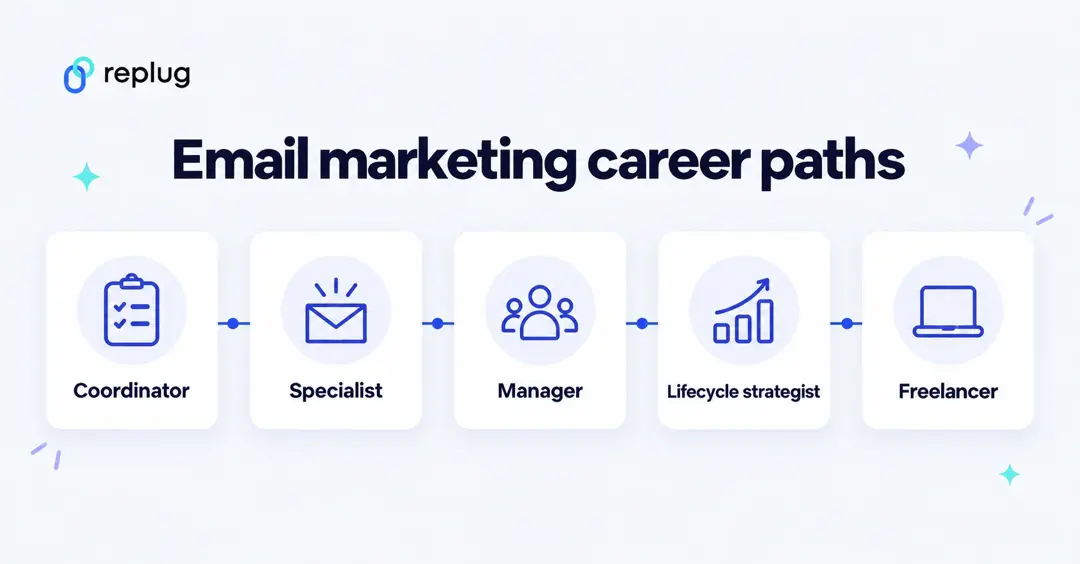
Email marketing coordinator
This is usually an entry-level role focused on assisting with campaign execution and managing email lists.
- Handles campaign setup, scheduling, and basic reporting
- Assists with templates and subscriber management
- Works closely with marketing teams
- Best for beginners with 0–2 years of experience
Email marketing specialist
A specialist takes more ownership of strategy, testing, and performance optimization.
- Builds and optimizes email campaigns
- Runs A/B tests and improves open/click rates
- Manages segmentation and basic automation
- Mid-level role (2–5 years experience)
Email marketing manager
Managers oversee the full email program and often lead a team to get the job done.
- Plans email strategy and campaign calendar
- Manages budgets and revenue tracking
- Supervises specialists and coordinators
- Senior-level position (5+ years experience)
Email marketing strategist
Strategists focus more on high-level planning and customer lifecycle growth.
- Designs long-term email and lifecycle strategy
- Aligns email with overall marketing goals
- Analyzes customer journeys and funnels
- Works cross-channel with paid, CRM, and content teams
- Ideal for experienced marketers who enjoy big-picture planning
Email marketing automation/CRM manager
This is a technical, high-demand role focused on advanced automation and customer data.
- Builds complex workflows and customer journeys
- Manages CRM platforms and integrations
- Handles personalization and behavioral triggers
- Ensures data hygiene and reporting accuracy
- Strong demand in SaaS tools and e-commerce companies
Email marketing freelance/contractor
Freelancers work with multiple clients and can scale their income based on their skills and reputation.
- Creates campaigns for different brands
- Sets up automations and audits accounts
- Often paid hourly or per project
- Great for remote work and flexible schedules
Email marketing glossary: Terms every email marketer must know!
If you’re getting into email marketing, you’ll keep seeing the same technical terms everywhere. Here’s a simple, no-nonsense glossary to help you understand what each one really means.
| Term | What it means (in simple words) |
| Acceptance rate | The percentage of emails accepted by the recipient’s server (not bounced). It shows how many of your emails successfully reached the mail system. |
| A/B testing | Sending two versions of an email (like different subject lines) to see which one performs better. |
| Automation | Emails that are sent automatically based on triggers (for example, welcome emails after signup). |
| Bounce rate | The percentage of emails that failed to deliver due to invalid addresses or server issues. |
| Campaign | A planned set of marketing emails sent with a specific goal (promotion, newsletter, launch, etc.). |
| Conversion rate | The percentage of recipients who completed the desired action (purchase, signup, download). |
| Call to action (CTA) | The button or link that tells readers what to do next (e.g., “Buy now,” “Download”). |
| Click-through rate (CTR) | The percentage of recipients who clicked a link in your email (a key engagement metric). |
| Delivery rate | The percentage of emails that were successfully delivered (sent minus bounces). |
| Email list | Your collection of subscriber email addresses who agreed to hear from you. |
| IP warming | Gradually increasing email volume from a new IP address to build sender reputation and avoid spam filters. |
| Lead magnet | A free resource (ebook, checklist, discount, etc.) offered in exchange for someone’s email address. |
| Nurture sequences | A series of automated emails designed to build trust and guide subscribers toward a purchase. |
| Open rate | The percentage of delivered emails that recipients opened. Often used to judge the performance of subject lines. |
| Opt-in/opt-out | Opt-in = someone agrees to receive emails. Opt-out = someone unsubscribes or withdraws consent. |
| Opt-in form | The signup form on your site where people enter their email to subscribe. |
| Personalization | Customizing emails using subscriber data (like name, location, or behavior). |
| Subject line | The main headline of your email! It is the foremost thing people see before opening. |
| Subscriber | A person who has given permission to receive your emails. |
| Segmentation | Dividing your email list into smaller groups based on behavior, interests, or demographics. |
| Unsubscribe rate | The percentage of recipients who choose to stop receiving your emails. |
How effective is email marketing: Why is it so important in 2026?
Email marketing is still one of the most reliable ways to reach and convert customers in 2026. Despite new channels popping up, email continues to deliver strong engagement, ownership, and ROI for businesses of all sizes.
- Strong ROI: in Litmus’s State of Email 2025 survey, 35% of companies reported $10–$36 back for every $1 spent and 30% reported $36–$50.
- Owned audience advantage: unlike social platforms, your email list is yours. No algorithm change can suddenly cut your reach.
- Measurable engagement: Mailchimp’s benchmarks put the average unique open rate across its users at 35.63% and the average click rate at 2.62% (December 2023 data); compare your own results with your industry’s row.
- Automation: welcome series, reminders and follow-ups keep working after you set them up.
Bottom line: In 2026, email marketing remains essential because it’s cost-effective, measurable, and gives you direct access to your audience, something very few channels can match.
How Replug helps with email marketing
Replug doesn’t send emails; your email service provider does that. Replug manages the links inside your emails, so they look trustworthy and you can see which ones people click.
- Branded short links: short links on your own domain (every plan, including Free, can connect custom domains) instead of long tracking URLs.
- UTM builder: add campaign, source and medium tags to every email link, so Google Analytics or your CRM can credit each visit (all plans).
- Click analytics: clicks, unique clicks, location, device and referrer for each link. Replug counts clicks, not sales; conversions show up in your analytics tool.
- Retargeting pixels: add Meta, Google or LinkedIn retargeting pixels to links, so subscribers who click can be reached with ads (Essentials and up).
- QR codes: turn a link, or your email address with the Outlook QR code generator, into a scannable code for print.
- Also useful: CTA overlays on pages you link to (Essentials and up), A/B tests between landing pages (Scale and Agency) and bio links, all in one dashboard.
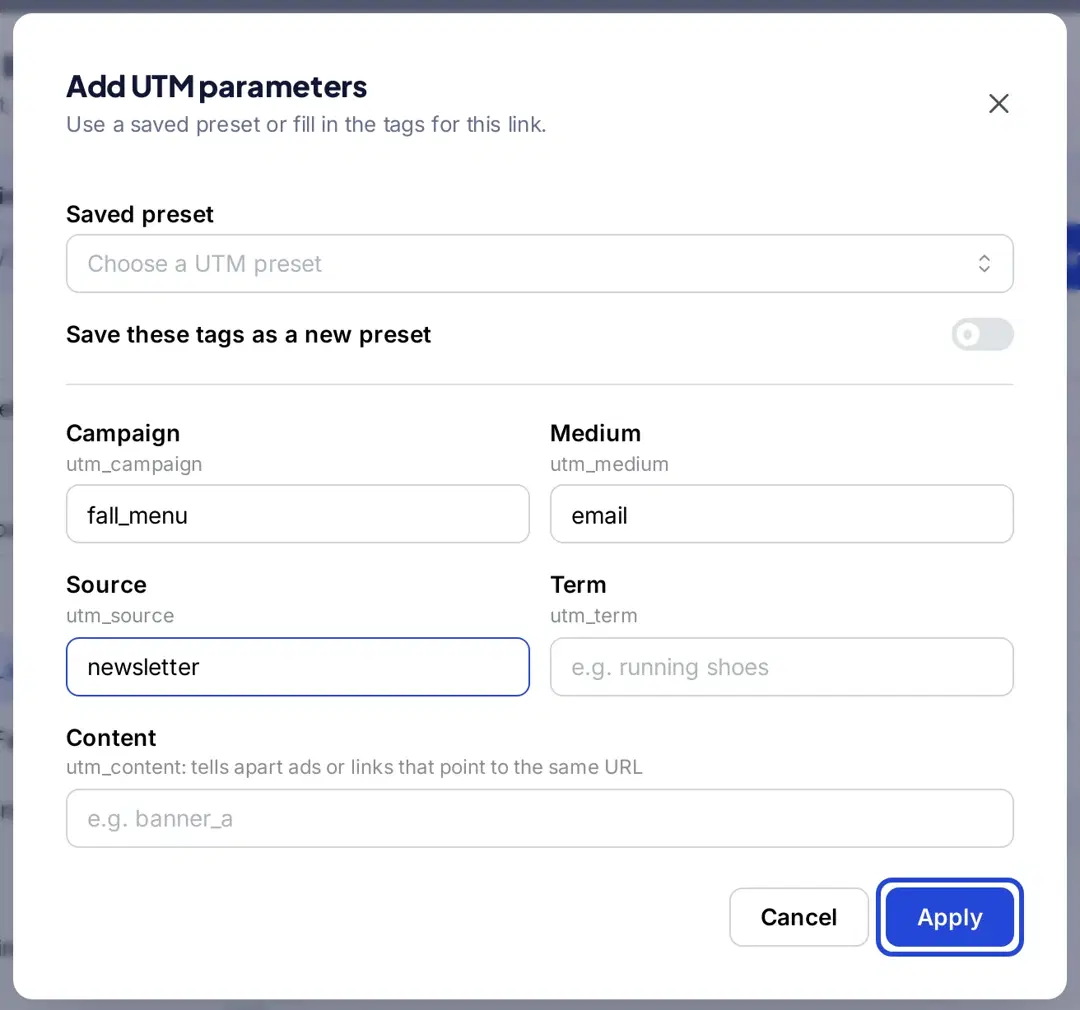
Plan details are from Replug’s pricing page. If you just need a quick branded link for your next newsletter, our online link shortener is a good place to start.
Summing up
To wrap things up, email marketing is still one of the smartest ways to connect with your audience and drive real results in 2026.
From the basics and campaign types to best practices, tools and career paths, you now have a roadmap. Start small: one sign-up form, one welcome email and one regular newsletter, then measure clicks and sales and improve from there.
Stay updated with the latest email marketing news, keep testing what works for your audience, and focus on building genuine relationships; that’s where the real growth happens.
And tag every link, so you know which emails actually bring people to your site.
Frequently asked questions

Muhammad Ahsan Jamal