Have you ever clicked on a link that looked something like /page?id=84721 and got zero idea what you were about to open?
Now compare that to /what-is-a-url-slug. Entirely opposite or totally unlike each other, right?
That little snippet sitting at the end of a web address is called a URL slug, and it’s doing more work than most people give it credit for.
A clear slug tells people what a page is about before they click, both in search results and when the link is pasted into a chat or an email.
Google’s SEO Starter Guide gives a concrete reason too: parts of a URL can be shown in search results as breadcrumbs, “so users can also use the URLs to understand whether a result will be useful for them” (Google Search Central).
No matter if you’re a blogger, a marketer, or just someone trying to get their website to rank, getting your slugs right matters.
So, let’s start from the very beginning: what exactly does “URL slug” mean?
What is a URL slug?
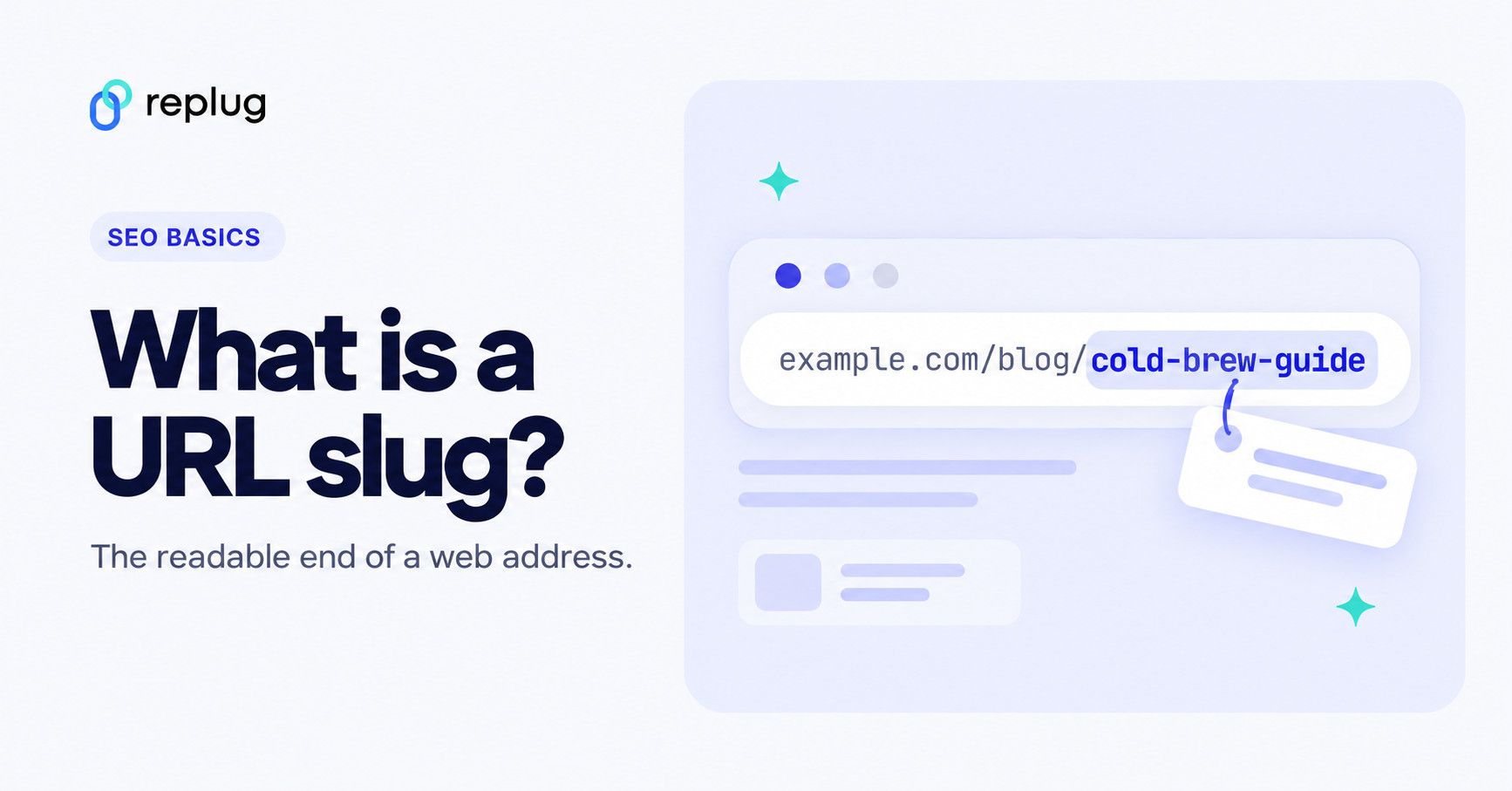
A URL slug is the last part of a web address (or a URL): the readable words that identify one specific page. WordPress defines a post slug as “a few lowercase words separated by dashes, describing a post and usually derived from the post title” (WordPress Glossary).
For example, in https://www.example.com/blog/coffee/cold-brew-guide, the slug is cold-brew-guide. The whole section after the domain, /blog/coffee/cold-brew-guide, is the path; the slug is its final segment.
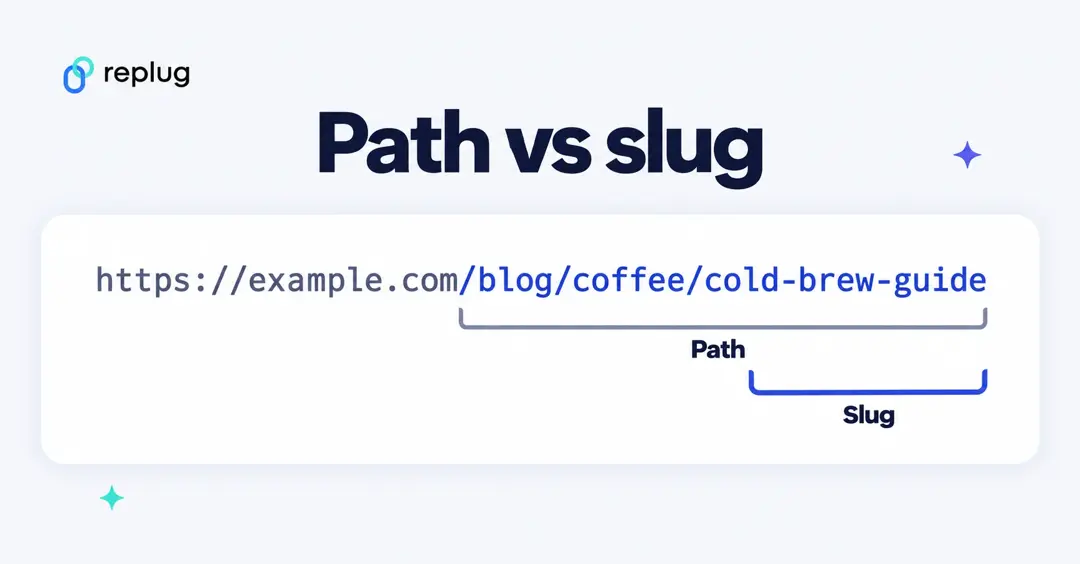
Think of it as the “name tag” of a webpage. Its primary job is to tell both users and search engines what a page is about, in plain, readable language.
Instead of a confusing string of numbers or random characters, a good slug gives instant context. It’s a small detail, but it plays a key role in how your pages are found, understood, and clicked on.
Why is it called a URL slug?
The word “slug” might sound a little odd in a web context, but it actually comes from the world of journalism. Reporters would assign a short, informal label to a story while it was still being worked on. That label was called a slug.
When the web came along, the term carried over. Just like a journalist’s slug summarizes a story in a few words, a URL slug does the same for a webpage, giving it a short, descriptive identifier within the full web address.
URL slug etymology
The URL slug’s meaning traces back even further than journalism, all the way to the printing industry. In old-school typesetting, a “slug” referred to a solid line of metal type. Printers and editors later borrowed the term to label stories in production.
Over time, as digital publishing took over, the word found its way into the world of URLs, where it stuck. So the next time you’re crafting URLs for your website, you’re actually using a term with roots in print publishing.
What is an example of a slug?
A slug is quite easy to understand when you actually see one in action. Let’s look at some real-world examples, both the kind you want to avoid and the kind you should be aiming for.
URL slug examples (Bad)
Bad slugs are usually auto-generated, messy, or just plain confusing. They give users and search engines no real clue about what the page contains.
- /page?id=48291
A random ID number tells nobody anything. It’s not readable, not memorable, and offers zero context about the page’s content.
- /the-top-10-best-ways-to-improve-your-websites-seo-rankings-in-2026
Way too long. Slugs like this get truncated in search results and are a nightmare to share or remember.
- /NEW-Article_SEO%20Tips!!
Uppercase letters, underscores, special characters, and encoded spaces! This slug breaks just about every best practice in the book.
URL slug examples (Good)
Good slugs are short, clean, and descriptive. They tell the reader exactly what to expect before they even click.
- /seo-tips
Short, clear, and straight to the point. Anyone seeing this in a URL instantly knows what the page is about.
- /best-project-management-tools
Descriptive without being wordy. It targets a clear topic and is easy to read, share, and remember.
- /how-to-make-cold-brew-coffee
A great example of a longer slug done right. Every word earns its place, and the meaning is immediately obvious to anyone who reads it.
Why is a URL slug important for SEO in 2026
URL slugs might seem like a minor detail, but they quietly influence how your pages perform in search. From how Google reads your content to how users decide whether to click, a well-optimized slug touches more parts of SEO than most people realize.
Improves search visibility
A clear, keyword-relevant slug helps search engines quickly understand what your page is about, giving it a better shot at showing up for the right queries.
Boosts click-through rates (CTR)
When users see a clean, descriptive slug in search results, they’re more likely to trust the link and click on it. A messy, long URL, on the other hand, can easily put people off.
Refines search engine understanding (keyword relevance)
Google doesn’t list slug words as a ranking factor in its documentation. What its SEO Starter Guide does say is to “try to include words in the URL that may be useful for users,” because Google learns breadcrumbs from the words in the URL and shows them in results. So a slug that names the topic helps readers first, and that is reason enough to include your main keyword.
Enhances user experience (UX)
A readable slug sets clear expectations before anyone even lands on your page. Users appreciate knowing what they’re clicking into, and that trust translates into better engagement.
Builds contextual understanding
A slug is often the only part of a link people read when it’s pasted into a chat, an email or a social post. Clear words there make the destination obvious wherever the link travels.
Reinforces site structure
Consistent, logical slugs across your website make it easier for search engine crawlers to map out your content hierarchy and understand how your pages relate to one another.
Key aspect of on-page optimization
A slug is one of the simplest on-page elements to get right. It complements everything else you’re doing (content, titles, meta descriptions, internal linking).
What Google says about URL slugs
Google’s URL structure best practices cover the whole URL, but most of the advice lands on the slug:
- Use descriptive URLs. Use words that mean something to readers, not long ID numbers.
- Use your audience’s language. Words in the language of the page, encoded as UTF-8 where needed, are fine.
- Separate words with hyphens. Google recommends “using hyphens (-) instead of underscores (_) to separate words in your URLs.”
- Mind the case. Google’s URL handling is case sensitive, so /APPLE and /apple are different URLs.
- Use as few parameters as you can. Trim parameters that don’t change the content.
Google also says that search engines “will likely understand your pages as they are right now,” so don’t rename old, working slugs just to match these rules (SEO Starter Guide).
URL slug best practices & formatting tips
Getting your slugs right doesn’t require a lot of effort, but it does require knowing some critical rules. Here are the best practices you should follow every time you create or update a slug on your website.
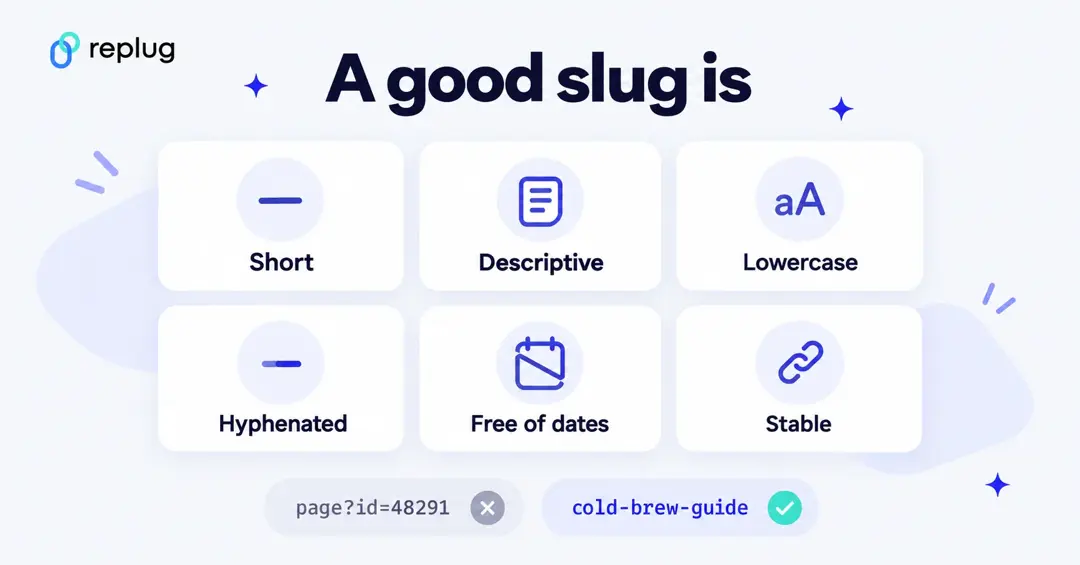
Top strategies to optimize your URL slugs:
Keep it short & concise
Keep it to a few meaningful words. Google doesn’t set a word or character limit for slugs, but short slugs are easier to read, remember, and share.
Include relevant target keywords
Work your primary keyword naturally into the slug so both users and search engines immediately understand what the page is about. Just don’t force in extra keywords to the point it looks spammy.
Use hyphens, not underscores
Google recommends hyphens because they help “users and search engines better identify concepts in the URL,” and adds that “for historical reasons, we don’t recommend using underscores” (Google Search Central). So /seo-tips beats /seo_tips.
Always use lowercase letters
Paths are case sensitive: Google treats /APPLE and /apple as distinct URLs (Google Search Central). Sticking to lowercase across the board avoids accidental duplicates.
Remove any stop words
Words like “a,” “the,” “and,” and “of” add length without adding value. Trimming them keeps your slug tight. So, /the-best-ways-to-improve-the-seo simply becomes /best-ways-to-improve-seo.
Make it descriptive
Your slug should give anyone reading it a clear idea of what the page covers, even without seeing the page title. If it doesn’t describe the content, it needs reworking.
Add trailing slashes
Google’s guidance is that a URL with and without a trailing slash can be two different URLs; either form is fine, as long as one version redirects to the other or both don’t return the same content (Google Search Central Blog). Pick one style for the site and stick to it.
Use 301 redirects
If you ever update an existing slug, always set up a 301 redirect from the old URL to the new one. Skipping this step can wipe out any rankings and backlinks the page had built up.
Avoid dates/years
Including something like “2026” in your slug makes the content look outdated the moment the year changes. Always stick to evergreen slugs that stay relevant long-term.
Avoid special characters
Characters like “%,” “&,” “#,” and “@” can break URLs or get encoded into unreadable strings. Keep your slugs limited to letters and hyphens only.
Avoid dynamic URLs
Auto-generated dynamic URLs like /page?id=5621&cat=3 are hard to read and offer no context. Static, descriptive slugs always perform better for both users and search engines.
Avoid using auto-generated URL slugs
Most CMS platforms generate slugs automatically from page titles, and they’re rarely optimized. Always take a moment to manually edit and clean up the slug before hitting the publish button.
What is a slug in WordPress?
WordPress makes it pretty straightforward to work with URL slugs. Every time you create a new page or post, WordPress automatically generates a slug based on your page title.
But as we’ve already covered, auto-generated slugs aren’t always the best option. The good news is that WordPress lets you edit them easily, giving you full control over how your URLs look.
How to change URL slug in WordPress?
Whether you’re setting a slug for a brand new post or cleaning up an old one, here’s exactly how to do it step-by-step:
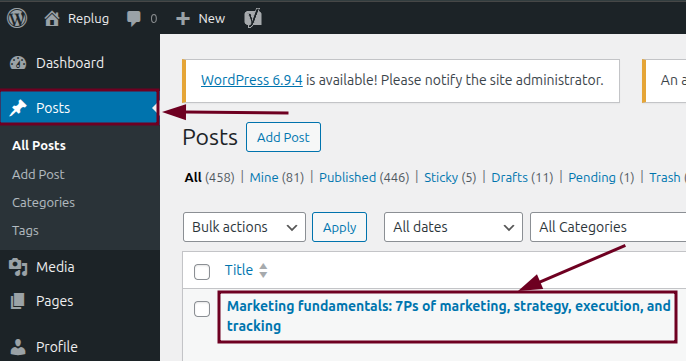
Step #01: Open your post
Log in to your WordPress dashboard and navigate to “Posts” from the left-hand menu. Click on the post whose slug you want to edit.
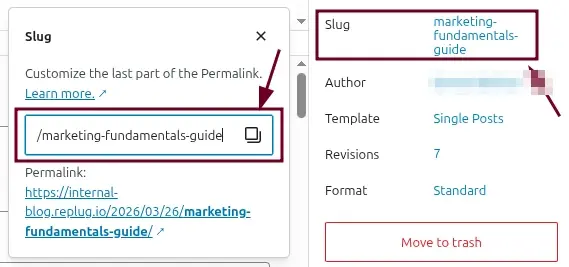
Step #02: Locate the slug field
Once you’re inside the editor, look at the right-hand settings panel. Click on the “Post” tab and look for the “Slug” option.
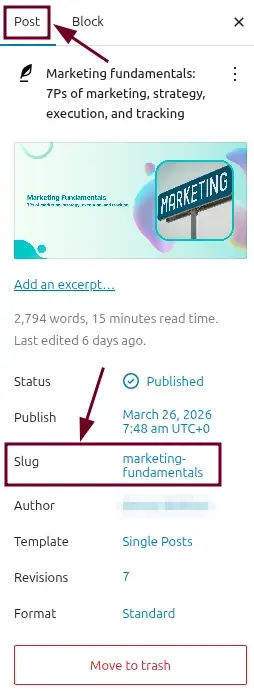
Step #03: Click and edit the slug
Click on the slug field and simply type in your new, optimized slug. Remember to keep it short, lowercase, keyword-relevant, and hyphen-separated. No special characters or spaces.
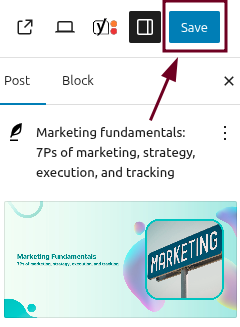
Step #04: Save the post
Once you’re happy with the new slug, click the “Save” button. It will be in the top right-hand corner of the screen.
Step #05: Check the redirect (for published posts only)
WordPress remembers a post’s old slug and redirects it to the current permalink on its own; the developer docs describe the function behind this as one that will “redirect old slugs to the correct permalink” (wp_old_slug_redirect()). If you edit a page rather than a post, or also change the folders in your permalink structure, add a 301 redirect yourself with your SEO plugin’s redirect manager or on your server. Google explains the redirect types in Redirects and Google Search.
Step #06: Verify the new URL
Visit your updated post in the browser and check that the new slug is showing correctly in the address bar. While you’re at it, make sure the old URL redirects properly to the new one.
💡 Quick tip: Always update your slug before publishing a new post if possible. Changing slugs on already-ranking pages comes with risks, so only do it when it’s genuinely necessary, and always use a redirect.
Common mistakes to avoid when generating URL slugs
Even small slug mistakes can quietly hurt your SEO and user experience over time. Here are the most common ones people make, and what you should do instead.
Using underscores instead of hyphens
Google recommends hyphens over underscores to separate words (Google Search Central), so /url_slug is harder for people and search engines to split into words than /url-slug. Always use hyphens.
Including stop words
Words like “the,” “a,” “and,” and “for” just add unnecessary length to your slug without contributing anything meaningful. Cut them out and keep only the words that actually matter.
Keyword stuffing
Fixing multiple keywords into a single slug, like /best-seo-tips-seo-guide-seo-strategies, looks spammy and unnatural. Stick to one primary keyword and keep it clean.
Not using lowercase letters
Uppercase letters in URLs can create case-sensitivity conflicts, leading to duplicate content issues. /SEO-TIPS and /seo-tips can be treated as two entirely different pages by some servers.
Including dates or temporary information
A slug like /best-seo-tools-2026 starts looking outdated the moment the year rolls over. Unless your content is strictly time-sensitive, keep your slugs evergreen so they stay relevant long-term.
Using special characters and spaces
Characters like “#,” “%,” “&,” and spaces don’t belong in slugs. Spaces get converted into %20, making your URL look messy and unprofessional, and some special characters can break the URL entirely. It’s best to avoid them entirely.
Relying on auto-generated slugs
CMS platforms like WordPress auto-generate slugs from your page title, which often results in long, cluttered URLs full of stop words. Always review and manually optimize the slug before publishing.
Changing slugs without redirects
Updating a slug on a live, ranking page without setting up a 301 redirect is one of the costlier SEO mistakes you can make. You’ll lose your backlink equity, your rankings, and send returning visitors to a dead “404” page.
Updating URLs frequently
Every change creates a new URL that has to be recrawled, and links shared earlier depend on your redirects. Get your slug right the first time and change it only when the page’s topic really changes.
Make your URL slugs SEO-friendly with Replug!
Managing your URL slugs manually across every page and campaign can get tedious fast. That’s where Replug comes in.
It is an all-in-one link management platform that helps marketers, bloggers, and businesses take full control of their links, from bio links and retargeting pixels to branded short links and beyond.
Short links have slugs too, often called the back-half: the part after the slash in a link like replug.link/how-to-shorten-a-link. In Replug’s link shortener, open the Your link window, click the pencil next to the shortened link, type a readable back-half, confirm it with the check mark and click Save Shortened Link.
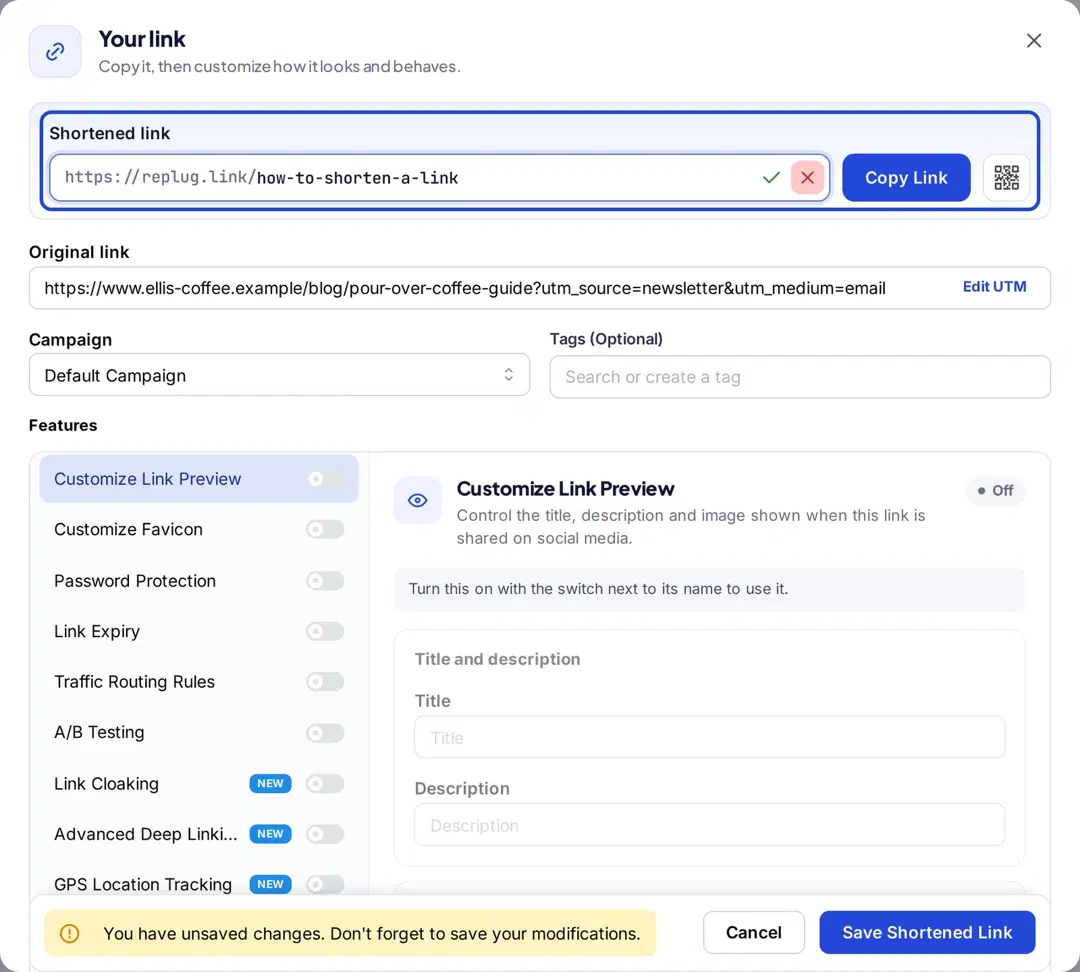
Custom back-halves are available on Essentials and above; Free plan links get an automatic one (Replug pricing). The same slug rules apply: short, lowercase, hyphenated and descriptive.
A readable back-half on your own branded domain makes a shared link easier to recognize and remember.
Wrapping up
URL slugs are one of those things that are easy to overlook, but once you understand how they work, you’ll never look at a web address the same way again.
From improving your search visibility and CTR to enhancing user experience and reinforcing your site structure, a well-crafted slug does a lot of heavy lifting for something so small.
The rules aren’t complicated either. Keep it short, make it descriptive, use hyphens, skip the stop words, and always redirect before changing a live URL.
Get these basics right from the start, and your slugs will quietly work in your favor for a long time to come.
Frequently asked questions

Muhammad Ahsan Jamal