A messy link can quietly kill clicks and, more importantly, conversions. One study of 11.8 million Google search results found that shorter, cleaner URLs tend to rank higher, and the first organic result gets about 28 percent of all clicks. That is a lot of traffic mounting on a simple web address.
The problem is that many marketing teams deal with confusing, long URLs full of numbers and symbols. These links are hard to read, hard to trust, and even harder to track. When campaigns span email, social, ads, and QR codes, link chaos grows fast. Replug lets you create a QR code for a URL from the same short link.
This guide breaks down dynamic and static URLs in simple terms, explains when each type helps, and provides useful examples. Next comes the base concept needed for everything else: what a dynamic URL actually is.
Let’s get right to it!
What is a dynamic URL
A dynamic URL is a web address that the server builds in real time when someone requests a page. Instead of pointing straight to a single fixed file or page, it includes instructions, often in the form of URL parameters, that tell the server which content to pull from a database. Changing those parameters changes what the visitor sees, even though the base script stays the same.

Dynamic URLs are common on ecommerce sites, news portals, SaaS dashboards, and anywhere content updates frequently or is personalized.
When someone applies filters, sorts items, or searches on a site, the link that appears in the browser bar is almost always a dynamic URL. This structure makes it easy for developers and marketers to create thousands of pages without creating an abundance of separate files.
Key characteristics of dynamic URLs
Dynamic URLs usually contain a question mark followed by a query string. That query string holds one or more key‑value pairs, which act like small instructions for the server. Keys describe what the parameter means, and values tell the server which record or option to show.
You will often see that dynamic URLs:
- Are generated by scripts written in languages such as PHP, ASP, or Node, with file endings like “.php”, “.asp”, or no extension at all.
- Contain characters such as “?”, “&”, and “=” instead of looking like a simple folder path.
- Use parameters like “product_id=123” to grab the right item from a database without needing a separate HTML file.
Because of this structure, the same base path can return numerous different views. A single dynamic script can display all products, but the parameters determine which category, brand, or sort order is shown. That power makes dynamic URLs very flexible for large sites.
Dynamic URL parameters
Dynamic URL parameters live after the question mark and provide the details a script needs. Each parameter usually has a name on the left and a value on the right, joined by an equal sign. Multiple parameters are joined with ampersands.
In practice, parameters cover several jobs:
- Content control: category=mens-shirts, product_id=123, page=3.
- Presentation control: sort=price-asc, view=grid, lang=en.
- Marketing tracking: UTM tags such as utm_source, utm_medium, utm_campaign.
Marketing teams often add tracking parameters, so analytics tools can see which campaign, medium, or ad sent the click.
Note: Parameters can also introduce problems if not handled with care. When different parameter orders or values yield the same content, search engines may see many URLs pointing to the same page. This is where things such as canonical tags, clean parameter design, and smart link management matter.
Dynamic URL example
Here is a simple dynamic URL for a store search results page:
“www.example-store.com/search.php?query=running+shoes&sort=price-asc&page=2”
In this case:
- The script “search.php” calls the search system.
- The parameter “query=running+shoes” tells the server what the visitor typed.
- The parameter “sort=price-asc” controls the sort order by price from low to high.
- And, the parameter “page=2” sends the visitor to the second page of results instead of the first one.
Change the search term or the sort setting, and the content changes without needing a new file. The base path stays the same, but the dynamic URL still gives a direct link to a very specific view that someone can share, bookmark, or track in campaigns.
Dynamic URL advantages & disadvantages
Dynamic URLs come with real strengths for growing sites. They let teams generate vast numbers of pages from templates, which is perfect for extensive catalogs, marketplaces, and user accounts. They react to user input, so filters, search, and personalized feeds all become possible. For developers, they keep code and content in sync with a central database.
Key advantages of dynamic URLs:
- Scalability: One template can serve thousands of product or article views.
- Personalization: Easy to show user‑specific dashboards, recommendations, or saved items.
- Interactivity: Filters, sorting, and search results can all be represented by direct links.
- Automation: New items added to a database appear automatically without manual URL setup.
Main disadvantages to watch:
- Messy appearance: Very long or confusing dynamic URLs can scare visitors away in emails, ads, and social posts.
- SEO challenges: Parameters that change order or add no real content change can create many versions of the same page, which can waste crawl budget and split link equity.
- Tracking confusion: If each parameter variation collects its own backlinks, signals get spread thin across many URLs.
From a marketing view, ugly dynamic URLs can also look spammy in ads or emails. People feel more comfortable clicking a clear, short, and descriptive link. This is why many teams wrap dynamic destinations in branded short links and use a clean URL slug that actually describes the content.
Dynamic URLs excel at
Dynamic URLs shine when content is large, changes often, or is based on user choices. Common use cases include:
- Ecommerce sites: Product filters, search results, carts, wish lists, and recommendations.
- Travel booking engines: Different combinations of dates, locations, and prices from live feeds.
- SaaS dashboards & account pages: Each user can see their own reports, settings, and content while the site still runs on shared templates and scripts.
- Community forums & news archives: Endless combinations of topics, tags, authors, and time ranges.
For content marketers, dynamic URLs make it easier to write SEO‑friendly URLs or links that include helpful slugs plus tracking parameters. When combined with a top-notch link management platform such as Replug.io, they support testing, segmentation, and personalization without changing the underlying page code.
What is a static URL
A static URL is a web address that points to fixed content. The file or route behind it stays the same unless someone manually edits or replaces it. When visitors load that link, they all see the same page, and the address itself rarely changes.

Static URLs often represent simple HTML pages, markdown files, or saved views inside a content management system. Think about core site pages such as “home”, “about”, “pricing”, or “a standard blog post”. These links tend to be short, readable, and easy to remember, which is why they are often used as the main public‑facing URLs.
Even though the word static suggests nothing can change, content on a static URL can still be updated. The key difference is that the address does not rely on URL parameters to fetch different versions for each visitor. That steady structure has strong benefits for SEO, branding, and user trust.
Key characteristics of static URLs
Static URLs usually look clean and folder‑based, while dynamic ones contain query strings and parameters. Static ones are often made of a domain, optional folders, and a clear slug at the end that describes the content. You might see file endings such as “.html” or clean routes without any extension at all.
They rarely include query strings, and they avoid symbols such as “?” and “&”. Instead of “page.php?id=45”, you will see a path such as “/blog/dynamic-vs-static-urls”. This format is friendly for humans and easy to scan in search results, emails, or social posts.
Because static URLs are stable, they are:
- Easy to cache on servers and CDNs.
- Easy to link from other sites and internal navigation.
- Less likely to break with minor system changes.
For you, that means better consistency for a given page over time, which helps with long‑term SEO performance.
Static URL parameters
Most static URLs do not use parameters in any case, which is part of their charm. The absence of a query string keeps them short and simple. That said, there are cases where a mostly static URL still includes parameters, for example, when you add UTM tags for analytics.
In those cases:
- The core URL remains static and represents the main content.
- The parameters handle tracking, not content changes.
This is a crucial difference from an actual dynamic URL, where parameters often change what is shown.
Note: From an SEO perspective, you still want one canonical version. So, if you attach tracking tags to a static page, it is good practice to mark the clean URL as “canonical”. This prevents search engines from treating the same static content as multiple pages just because it carries different tracking strings.
Static URL example
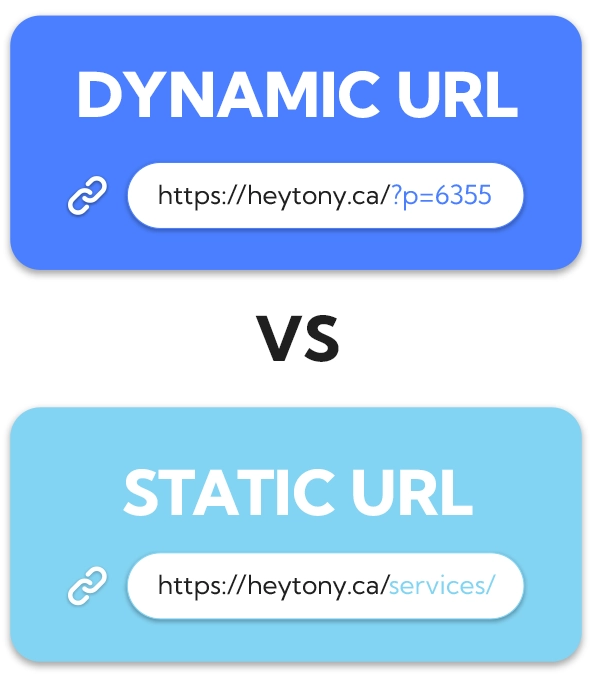
A classic static URL on a small business site might be:
“www.localstudio.com/services/web-design”
This link likely points to a single services page that talks about web design. The slug “web-design” clearly states the topic. There are no parameters to sort, filter, or change the view.
Notice that the URL is easy to read, share, or speak aloud. That clarity is why static URLs are widely used for content marketing purposes.
Static URL advantages & disadvantages
Static URLs are great for SEO and user experience because they are clear and predictable. They often include keywords in the URL slug, which helps both users and search engines understand the topic easily. Shorter links also fit better in email, print, and social posts, and they look more trustworthy.
Key advantages of static URLs:
- Clarity: Short, descriptive slugs show users what to expect.
- SEO value: Easy to include keywords naturally.
- Reliability: Less risk of parameter‑based duplicates in the index.
- Performance: Easier caching can speed up page loads.
Main disadvantages include:
- Less flexible for large catalogs: If every slight content variation required a separate static URL and file, managing large product sets would be pretty hard.
- Manual planning: Someone has to choose each slug and map it on purpose.
- Limited personalization: Static URLs alone do not handle user‑specific views well.
That is why complex sites mix static and dynamic URLs. Core pages stay static, while heavy data and filters use dynamic structures.
Static URLs excel at
Static URLs are especially suitable for evergreen and marketing‑focused pages. Great fits include:
- Homepages and key category hubs.
- Product detail pages that do not rely on filters.
- About, contact, and FAQ pages.
- Main blog articles and resource guides.
These pages benefit from a steady URL that can collect links and be reused across campaigns.
They also work well for landing pages and ads. When you run search or social ads, a short, static‑looking display URL can boost click‑through rates because it feels precise and professional. Many marketers create vanity URLs or branded short links that point to these static‑style pages.
For teams that use link management tools, static URLs pair nicely with branded domains. You can shorten a link for free to a static page into something like “go.brand.com/demo”, which looks sharp in every channel and still gives you full tracking and routing control behind the scenes.
Difference between a dynamic URL and a static URL
When people ask what the actual difference is in terms of URLs, they usually care about structure, SEO, and real use in campaigns. This comparison table sums up the main points for static link vs. dynamic link based on key features.
| Feature | Dynamic URL | Static URL |
| Structure | Built from a base script plus URL parameters in a query string, often using “?”, “&”, and “=” | Fixed path that rarely changes, usually clean folders, and a descriptive slug without a query string |
| Content | Pulls data from a database in real time, so content can change based on filters, search terms, or user profile | Shows the same core content to every visitor, unless the file or route is updated |
| SEO/User | Modern search engines can crawl them well when parameters are clean, but long strings can hurt click‑through rates and look messy | Very friendly for users and search engines. Easy to read, share, and include keywords in the slug for an SEO‑friendly URL |
| Performance | May need more server processing for each request, and can be harder to cache fully if the content changes often | Easier to cache on servers and content delivery networks, which can help pages load faster |
| Use case | Best for search results, filtered listings, user accounts, dashboards, and any view that changes often | Best for core pages, evergreen content, landing pages, and simple posts where you want one stable link |
| Best for | Large sites with many similar items, personalization, and advanced filters, where each view still needs its own distinct URL | Brand building, link sharing, printed materials, and long‑term SEO, where a stable, clean slug has real value |
Dynamic URLs vs Static URLs examples
Sometimes, the easiest way to understand dynamic URLs vs. static URLs is to see realistic examples. Below are simple, practical cases that mirror standard pages marketers work with every day.
5 best examples of a dynamic URL
1. Product list with filters on an online store
“www.store.com/products.php?category=mens-shoes&color=black&size=10&sort=price-asc”
Here, the script shows products, and the parameters control category, color, size, and sort order, so each change creates a new view from the same base path.
2. Internal search results on a content site
“www.news-site.com/search?query=ai+marketing&page=3”
This is a dynamic URL built from the visitor’s search term and the current page of results, allowing someone to share a particular set of articles.
3. Paginated blog archive
“www.blog.com/archive.php?year=2024&month=11&page=2”
The parameters tell the script which year, month, and set of posts to pull from the database.
4. User account dashboard view
“www.app.com/dashboard?user_id=4582&tab=reports”
The dashboard code is shared, but the parameters control which person and which part of the app appear.
5. Campaign tracking with UTM tags
“www.example.com/demo?utm_source=email&utm_medium=newsletter&utm_campaign=q4-launch”
The page content may be static, but the tracking parameters make this a dynamic URL variation that analytics tools read as a separate traffic source.
5 best examples of a static URL
1. Homepage of a brand
“www.brand.com”
It is the simplest form of a static URL. It never changes, carries the main branding, and appears on business cards, ads, and social bios, which makes it the anchor for all other links.
2. About page for a company
“www.brand.com/about”
This points to information that changes rarely. It is easy to remember, use in press mentions, and link from partner sites, which helps with SEO and trust.
3. Blog post with a descriptive slug
An article on URL best practices might live at:
“www.replug.io/blog/url-best-practices”
The slug clearly states the topic and makes the post easy to find again without needing to remember numbers or parameters.
4. Product detail page without filters
A single flagship product can sit at:
“www.store.com/products/blue-running-shoes”
The slug doubles as anchor text in some cases, and this clear static URL can be used consistently in ads, emails, and offline campaigns.
5. Campaign vanity URL created with a link tool
Using Replug, a marketer might shorten a long landing page link into something like:
“go.brand.com/free-trial”
This is still a static‑style URL on the outside. Behind it, you can route to any static or dynamic destination, while keeping the shareable link short and branded.
How does Replug help with dynamic URLs and static URLs?
Most marketers and business professionals deal with both static and dynamic URLs across email, ads, social posts, and QR codes. Replug sits on top of all that and turns every long URL into a clean, branded, and trackable asset that is easy to manage, no matter how messy the original link looks.
With Replug, you keep your existing site structure while gaining control over how links appear, where they send people, and how each click is tracked.
Here are key ways this excellent link optimization platform supports both dynamic and static URLs in daily work:
Shorten any URL
Replug shortens any long URL, including complex dynamic ones filled with parameters, into a simple branded short link on your own domain. This makes links easier to read in social captions, email copy, and ads while maintaining trust, since visitors still see your brand name rather than a random domain.
Custom slugs for clear messaging
The platform lets you customize the URL slug for each short link, creating a clear, SEO‑friendly URL for public use. Even if the destination is a long, dynamic URL, your audience sees a neat slug like “/new-report” or “/summer-sale”, which is far more shareable and easier to remember.
Consistent UTM tagging
Replug adds and manages UTM tags to links, keeping dynamic URL parameters for tracking consistent across campaigns. Instead of hand‑typing UTM codes and risking mistakes, you can standardize names for source, medium, and campaign, which makes analytics in tools such as Google Analytics or your CRM much more straightforward to trust.
Smart routing and link rotation
With dynamic link rotation, a single short link can redirect visitors to different static or dynamic URLs based on rules such as device, country, or time. This helps with personalization and testing without touching the website code, since you only update routing rules inside the Replug’s dedicated dashboard.
Built‑in A/B testing
Replug lets you split traffic from a single branded link across multiple landing pages and see which one converts better. You can split clicks 50/50 between a static page and a more dynamic experience, then shift traffic to the winner based on A/B testing data.
Deep links and dynamic QR codes
Replug supports deep linking and dynamic QR codes that point into apps or changing campaigns while keeping the printed code or base link the same. That means you can run print and offline promotions that still link into clear-cut static or dynamic screens without replacing materials each time.
Analytics for every click
Every Replug link, no matter where it points, comes with detailed click analytics, including location, device, and referrer. This turns each URL into a measurable asset and makes it easier to answer which static link vs. dynamic link performs better for a given audience or channel.
Wrapping up
To be very honest, dynamic URLs and static URLs are not enemies. They are tools that serve different parts of a marketing and product stack.
Static URLs win on clarity, branding, and long‑term SEO, while dynamic URLs power search, filters, dashboards, and personalization. The sweet spot is knowing when to use each and how to keep links short, clear, and trackable.
Replug.io helps by turning any long URL into a branded short link with smart routing, UTM tracking, QR support, and strong analytics.
Want to clean up your links and get more control over every click? Give this all-in-one link management platform a try today!
Frequently asked questions

Muhammad Ahsan Jamal