Imagine sending a link that not only directs people where you want, but actually makes them more likely to click it.
That’s the power of vanity URLs; those clean, branded web addresses that turn long, tangled links into a memorable call-to-action.
In an age where attention spans are short and trust is everything, studies show that branded links can lift click-through rates by ~34–39% compared to generic URLs. This is simply because they look more credible and meaningful to users.
Whether you’re promoting a campaign on social media, printing a URL on a flyer, or boosting email engagement, vanity URLs help your brand stick in people’s minds.
Ready to get started? Let’s kick things off with the basics, i.e., what exactly is a vanity URL?
What is a vanity URL?
A “vanity URL” is a custom, easy-to-remember web address that’s built to reflect your brand or the content you’re promoting instead of a messy, long URL or a link full of numbers and random characters.
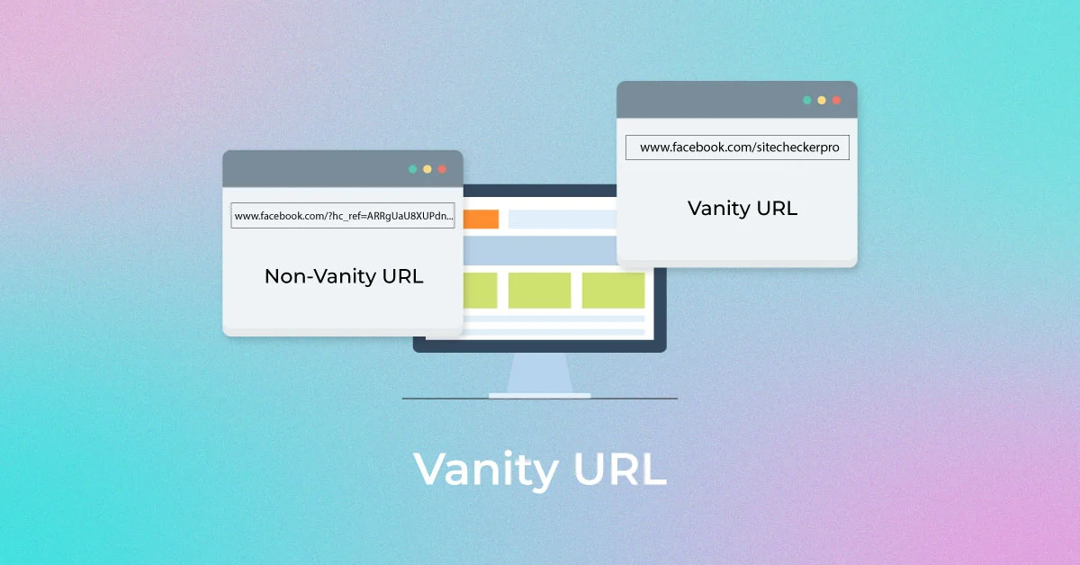
Unlike generic URLs that can be hard to read and forgettable, vanity URLs are short, descriptive, and often branded, making them far more user-friendly and trustworthy for your audience.
Every vanity URL is made up of three key parts:
- Brand name: The recognizable name or domain that ties the link to your business or content.
- TLD (Top-Level Domain): The extension, like “.com”, “.org”, or “.net” that follows your brand name.
- URL slug: The part after the slash that describes the specific page or offer (e.g., /summer-sale).
Put together, these elements create a link that’s not just functional but memorable and meaningful.
Key characteristics of a vanity URL:
- Memorable & short: Easy for people to recall without effort.
- Branded: Includes your brand name for instant recognition.
- Contextual: Gives users a clue about what they’ll see.
- Descriptive: The slug tells you the purpose of the link.
- Trustworthy: Looks safe and familiar, encouraging clicks.
- Quite easier to use: Simple to type, share, and promote.
What is the purpose of a vanity URL?
The major purpose of a vanity URL is to turn a long, awkward link into a short, branded, easy-to-remember web address that improves how people perceive, trust, and interact with your content.
By including your brand name or relevant keywords, vanity URLs make links more memorable and shareable, whether you’re posting on social media, sending emails, or using print ads.
This clarity boosts click-through rates, gives users confidence about where they’re headed, and helps you track engagement and strengthen your marketing message across channels.
Why use a vanity URL?
If you want your links to work harder for your brand and your marketing, using a vanity URL makes a big difference.
Here are the key reasons people use them:
- Build stronger brand recognition: Vanity URLs put your brand name front and center every time someone sees or clicks a link, reinforcing your brand identity.
- Boost trust & credibility: Clean, branded URLs look professional and reassuring, making users more likely to click than long, confusing links.
- Increase click-through rates: Studies show branded links often get higher engagement than generic or long URLs because users know what they’re clicking.
- Make sharing easier: Short, memorable links are simple to type, remember, and share across social media, email, ads, and print.
- Improve tracking & analytics: You can create unique vanity URLs for different campaigns and measure exactly which channels drive the most traffic.
- Support SEO indirectly: Clean, keyword-rich URLs can help with visibility and give search engines and users a clearer context.
In short, vanity URLs are more than just pretty links. They help you connect better with your audience and get more value from every campaign.
How a vanity URL works?
A vanity URL works in a simple but clever way. It gives you a clean, branded address that redirects to the real page you want people to visit.
Instead of sharing a long, messy link with tracking codes or confusing paths, you create a short, human-friendly URL that people can type, remember, and trust on the go.
When someone enters that vanity URL in their browser or clicks it, the web server or link service automatically redirects them to the actual destination page, usually via a redirect (e.g., a 301 permanent redirect). This sends the user seamlessly to the actual content without changing anything on their end.
Note: This redirection happens behind the scenes, so from the visitor’s perspective, the experience feels smooth and direct. Vanity URLs also help with branding and can improve trust and engagement because users know where they’re being taken before they click.
Why do you need a vanity URL?
You might wonder at times why anyone needs a vanity URL when regular links also get the job done. The difference lies in clarity, trust, and results.
A vanity URL free service or tool lets you create a custom, branded link without paying, which is great for beginners or small businesses trying to level up their online presence.
Branded URLs like “yourbrand.com/deal” are easier for people to remember and type than long, cluttered links, so they’re more likely to click and engage with what you’re sharing.
That simple tweak can boost click-through rates and give your campaigns a professional look, no matter if you’re posting on social media, sending emails, or printing a URL on a flyer.
Plus, these clean links build credibility because users instantly see something familiar instead of random characters, making them feel confident about where the link leads.
How to create a vanity URL: 6 simple steps to get one easily using Replug!
Creating a vanity URL helps you turn long, unorganized links into clean, branded, and memorable URLs. With Replug.io, the process is quick and beginner-friendly (no technical skills required).
Here’s how to do it:
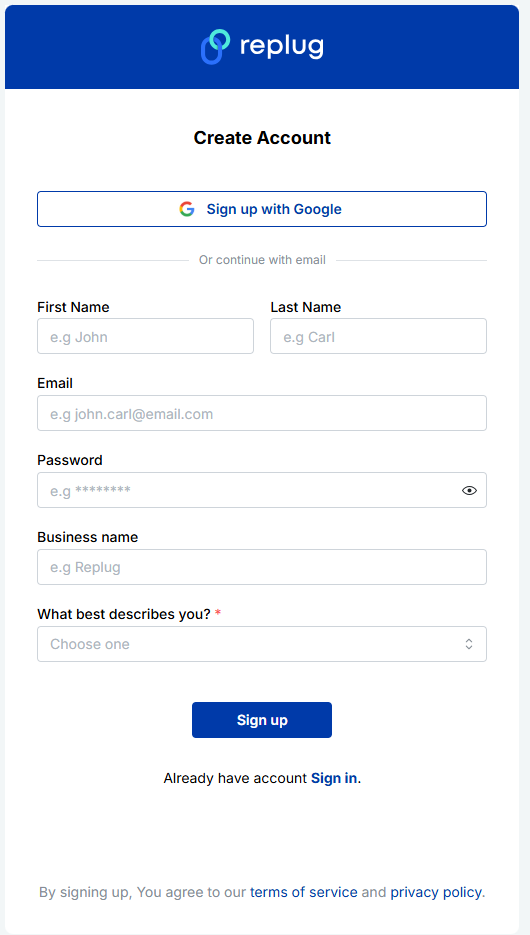
Step #1: Sign up or log in to Replug
Create a free Replug account or log in to your existing dashboard.
Step #2: Add or connect your custom domain
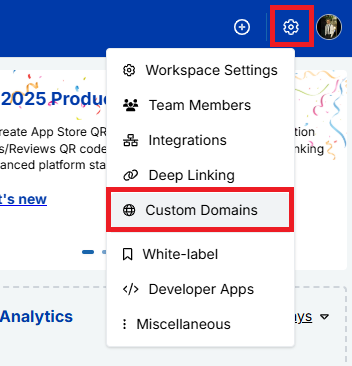
Next, navigate to “Workspace Settings” and, from the dropdown menu, click “Custom Domains”.
After that, connect your custom domain to use it as your vanity URL base. Follow the next snippets!
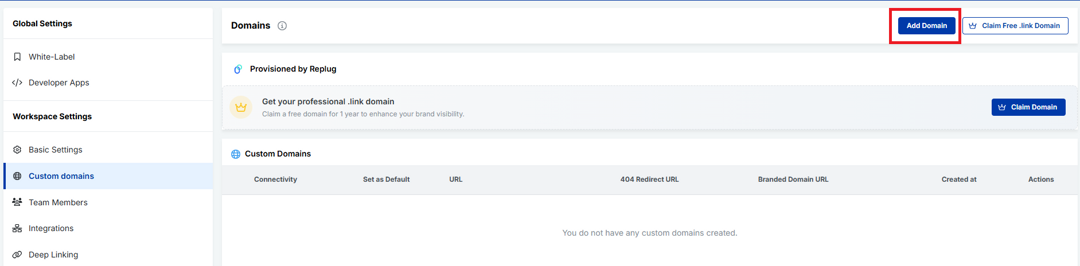
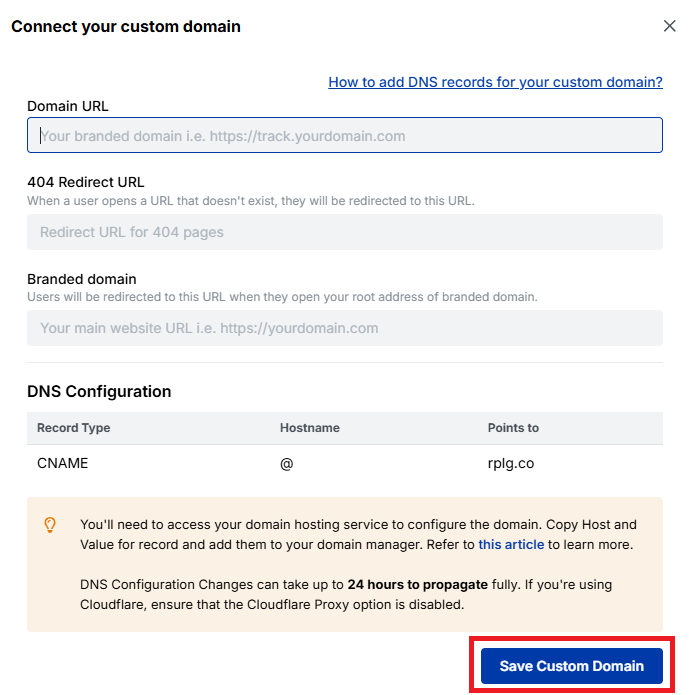
Fill the fields carefully, and click on the button labeled “Save Custom Domain”.
Step #3: Create a new short link
Now, paste your original long URL into the input field under “Quickly Shorten your link”. Then click the blue arrow button to generate your vanity URL automatically.
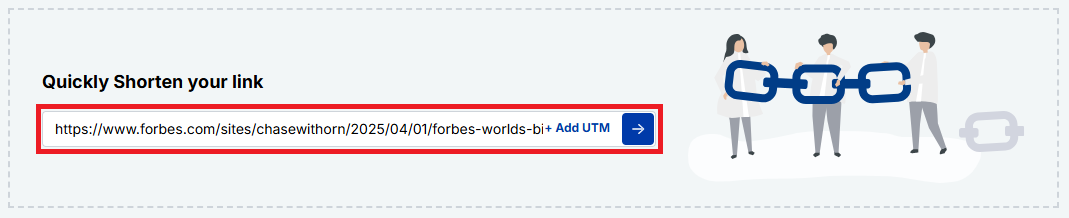
Step #4: Customize the URL slug
Your vanity URL will be generated within seconds.
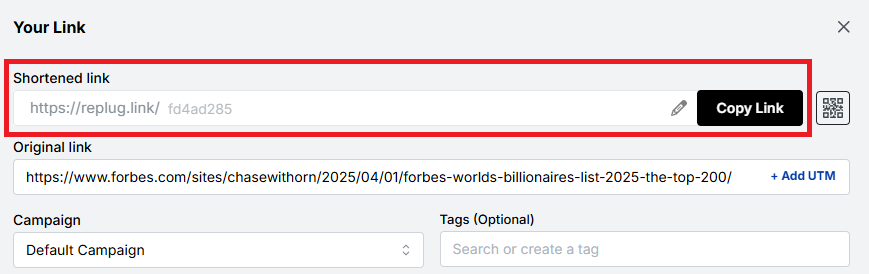
You can customize the URL slug using the “edit/pencil” icon to fit your needs. Edit the back-half of the link to make it branded, readable, and relevant to your content or campaign. Once done, click on the “tick” symbol.
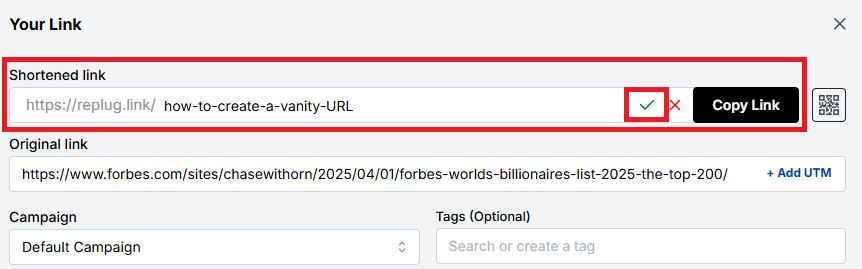
Step #5: Save, test, & share your vanity URL
Save the link by clicking the button “Save Shortened Link”. Test it to ensure it works correctly, and start sharing it across your marketing channels.
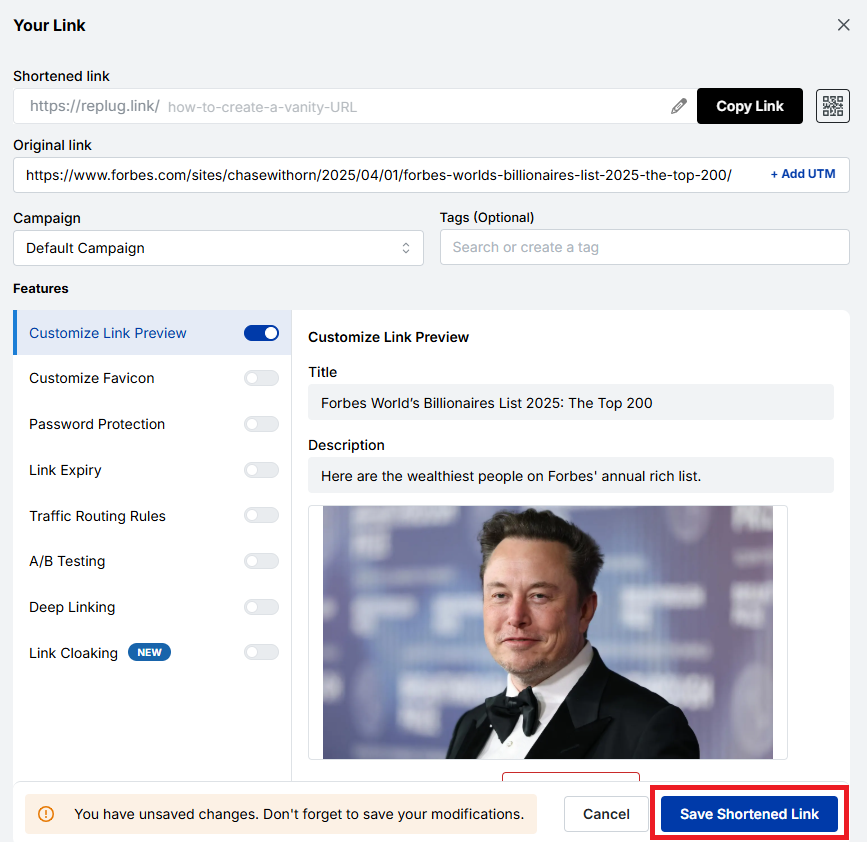
Step #6: Access your vanity URL hassle-free
Once saved, your vanity URL will appear in the “Recent Links” section of your Replug dashboard. From here, you can easily copy the link at any time and view detailed analytics to track its performance.
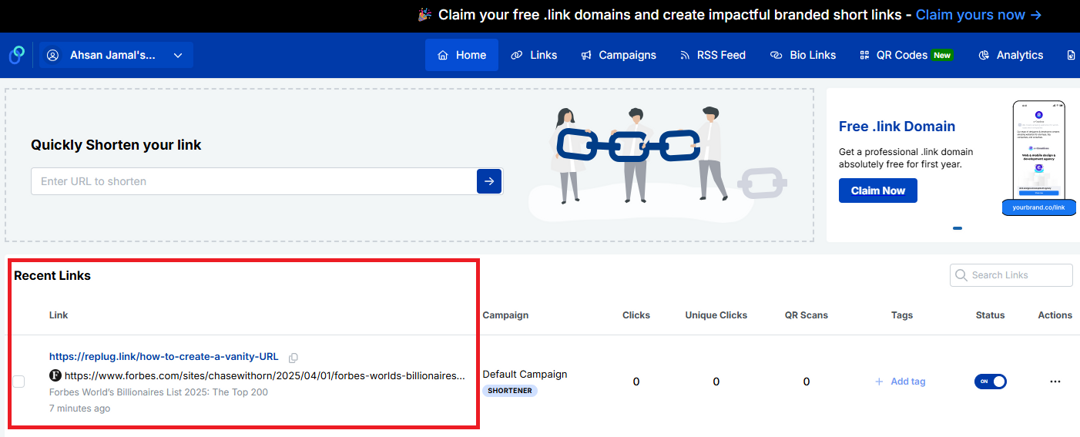
That’s all there is to it!
Note: Using Replug to create a vanity URL is a simple yet powerful way to strengthen your brand and improve link trust. In just a few steps, you can transform ordinary links into polished, professional URLs that stand out.
Common uses for vanity URLs
Vanity URLs are more than just pretty links; they make it easier for people to find, remember, and trust what you’re sharing. Because they’re short and branded, businesses and creators use them in lots of places where clarity and engagement matter.
Marketing campaigns
Vanity URLs help tie your campaign message to a memorable link, allowing your audience to quickly recognize what the offer or message is about and revisit the offer.
Print campaigns
On flyers, posters, brochures, or billboards, short branded links are much easier to read and type, unlike long, complex URLs.
Social media posts
Clean URLs look better in bios and posts than generic long links, improving engagement and click-through rates on platforms where space and clarity matter the most.
Digital ads
Using vanity URLs in your ads (such as display or banner ads) looks professional, builds credibility, and improves brand recall, while still making the destination clear and trustworthy to users.
Emails
Including a neat vanity link in your email content (newsletters or promos) makes messages feel more authentic and more likely to be clicked by recipients. This often results in higher open and click-through rates.
SMS marketing
Branded short links are essential for SMS marketing, where character limits are paramount and readability matters. These links feel more legitimate than prolonged, unbranded URLs.
Event promotions
From webinar registrations to live events, a specific vanity URL helps people remember and find event pages easily across channels, or learn more.
Influencer & affiliate marketing
Influencers and affiliates can use vanity URLs to share personalized, easy-to-read links that still track traffic source and support attribution. Custom-branded URLs assist the best in this situation.
Internal systems
Within a company or organization, vanity URLs can point employees to frequently used tools, pages, or internal resources without messy addresses, improving efficiency and productivity.
Lead magnets
If you’re offering freebies like e-books, checklists, guides, or downloads, a vanity URL makes it clear what people are signing up for and reduces friction when accessing or sharing the content.
Customer/Client support
Customer support pages or help articles are easier to share and remember when tied to short, branded URLs rather than long system links.
These everyday uses show how vanity URLs work across both digital and offline channels, helping you connect with your audience wherever they are easily.
Major benefits of vanity URLs
Vanity URLs deliver real benefits that improve how your links work across branding, marketing, and user experience. From being easier to remember to providing valuable data, here’s how they help.
Easy to remember, type, recall, & share
Because vanity URLs are short and precise, people find them easier to recall, type into a browser, and share with others (whether online or in person) compared with long, complicated links. This makes them more likely to stick in your audience’s mind.
Shows what works & what doesn’t
With branded links, you can track performance more clearly, seeing which campaigns or channels are driving traffic and which aren’t. Good link analytics help you double down on winners!
Strengthens brand trust & recognition
Seeing your brand name in the URL builds familiarity and trust. Users are more comfortable clicking links that look professional and recognizable, which also strengthens brand awareness over time.
Improves SEO & link visibility
Including relevant keywords in your vanity URL can give search engines extra context, potentially helping visibility in search results and making your content easier to find.
Enhances user experience & click-through rates (CTR)
Clean, descriptive links communicate what to expect, making people more likely to click, which often leads to higher CTR compared with generic URLs.
Empowers online & offline sharing
Vanity URLs work great everywhere, from social media and emails to print ads and business cards, because they’re easy to remember and look pleasing in any format.
Enables verbal sharing seamlessly
When you’re speaking at an event, on a podcast, or on video, a simple branded URL is much easier to say (and remember) than a messy link full of characters.
Assists with link retargeting & link management
Many vanity URL tools let you add UTM tracking or retarget users who click your links, letting you re-engage visitors and fine-tune campaigns hassle-free.
Offers tracking benefits
Beyond clicks, you can track where traffic comes from, what devices users use, and how campaigns perform, giving you data-driven insight to improve future marketing.
Together, these benefits make vanity URLs a smart choice for any brand or marketer looking to enhance performance and connect with audiences more effectively.
Real-world vanity URL examples
Vanity URLs aren’t just a mere theory; you see them every day on big sites and platforms where brands and individuals replace long, disorganized links with clean, easy-to-remember ones.
These real-world examples show how familiar names use custom URLs that help with branding, trust, and recall exceptionally.
Vanity URL YouTube
Creators and brands often get a custom YouTube vanity URL like youtube.com/@BrandName, making it way simpler to share and remember than the default long link your channel starts with.
Vanity URL Facebook
Instead of a numeric profile URL, you can claim a Facebook vanity URL, such as facebook.com/YourBusiness, which looks cleaner and more professional.
Vanity URL LinkedIn
LinkedIn lets you customize your public profile to something like linkedin.com/in/JohnDoe, perfect for sharing in resumes or email signatures.
Vanity URL Zoom
Companies can set up custom Zoom vanity URLs or Zoom domains, such as yourcompany.zoom.us, that reflect their brand when users log in or join meetings.
Vanity URL Steam
Steam community profiles often use a Steam vanity URL like steamcommunity.com/id/YourName, an easier-to-share version compared with auto-generated numbers (a form of custom profile URL).
Vanity URL Discord
Discord lets users customize invite links or server invites (e.g., discord.gg/YourServerTag), which are much nicer than random code links.
Vanity URL Dropbox
High-profile brands like Dropbox use clean URLs, such as dropbox.com/backup, or social-profile links, such as facebook.com/dropbox, for ease of use.
Vanity URL Slack
Slack’s site and its pages often use simple branded URLs like slack.com/get-started, making it easy to understand where the link goes.
Vanity URL AEM
While not as universally “profile-style”, platforms built with Adobe Experience Manager (AEM) usually employ neat custom URLs like example.com/campaign-page for specific campaigns.
Vanity URL Oracle
Oracle’s cloud services and docs use branded paths such as oracle.com/cloud/what-is-cloud, which is cleaner than deep-nested URLs.
Vanity URL Airbnb
Airbnb uses simple, descriptive paths like airbnb.com/host or airbnb.com/contact that clearly explain what the page is about.
These realistic examples show how vanity URLs make it easy for people to recognize, trust, and remember links, no matter if it’s for social profiles, services, or product pages.
Vanity URLs vs. generic URLs vs. domain URLs
Understanding the difference between vanity URLs, generic URLs, and domain URLs can make it much easier to choose the right type of link for your audience or campaign.
Below is a simple breakdown showing how these three compare in terms of branding, memorability, trust, and use cases, written in a friendly, easy-to-digest way.
| Type of URL | What it is | Branding | Memorability | Best for |
| Vanity URL | A custom, branded web address that’s short and meaningful, like yourbrand.com/sale, designed to be easy to remember and share. | ✔️ High: includes brand name or message | ✔️ Very easy to remember | Marketing, campaigns, social shares |
| Generic URL | A standard link that might be long or autogenerated, like example.com/page?id=12345. | ❌ Low: usually no brand visible | ❌ Harder to recall or type | Technical references, deep site pages |
| Domain URL | A base domain name itself (e.g., example.com). It is the main web address for a site. | ✔️ Represents your entire brand | ✔️ Easy at the top level | Homepage, business identity |
Note: Vanity URLs give you customized, friendly links that make people feel confident clicking and remembering what they saw. Generic URLs do the job, but don’t do much for your brand or recall. Meanwhile, domain URLs are simply the core web address of a site, strong for broad identity, but not always as user-friendly for specific campaigns or pages. Overall, vanity URLs sit in the sweet spot between branding and usability.
Vanity URL best practices
Before you start creating vanity URLs, it’s good to follow a few simple rules that make them actually effective and helpful for both users and your marketing goals.
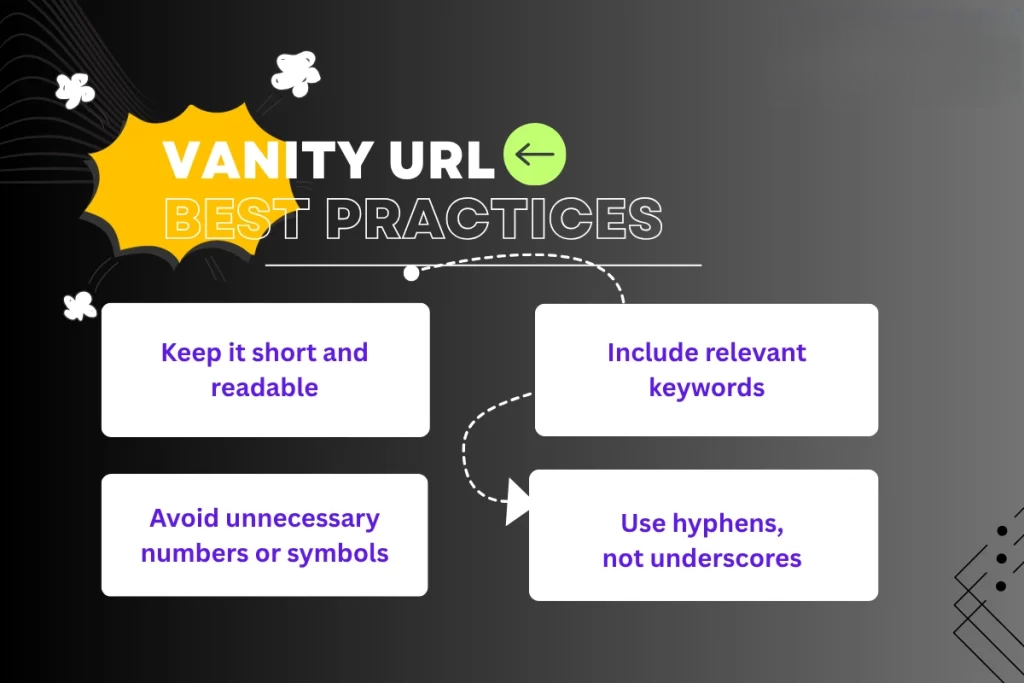
Here are the most promising conventions to keep in mind. Have a look!
Keep it short, clear, & memorable
Short URLs are easier for people to remember, type, and share, especially when spoken aloud or printed on marketing materials. Avoid long, complicated slugs and stick to a concise structure.
Make it descriptive & natural
Your vanity URL should give users a clear idea of what they’ll see when they click. A simple phrase like /summer-sale or /get-ebook helps set expectations and builds trust.
Prioritize contextual use
Think about where the link will be used (social media, email, print ads, or spoken mentions), and tailor your vanity URL so it feels natural in that context. This makes the link more effective and user-friendly.
Make it intuitive & use lowercase
Stick to lowercase letters, avoid spaces, and keep the wording intuitive so that users won’t mistype or misunderstand the link. Lowercase also helps prevent confusion, since URLs are case-sensitive in practice.
Use keywords strategically
Including one or two relevant keywords that reflect your content or campaign can improve clarity and indirectly support SEO and recognizability. However, just don’t overstuff or make it awkward.
Reflect your brand identity
Use your brand name or a distinctive abbreviation in your vanity URLs to reinforce your brand and make the link feel familiar and trustworthy.
Use 301 redirects to preserve SEO
When you set up a vanity URL that points to another page, use a 301 permanent redirect so search engines know the page has moved and that any SEO value is passed along properly.
Use a vanity URL, only when required
Don’t force a custom URL everywhere! If a standard link already works well and is clear, there’s no need to reinvent it. Vanity URLs are most useful when they add real value for users or branding.
Note: Following these tips helps ensure your vanity URLs do what they’re supposed to: make links easier to use, more on-brand, and more effective in your campaigns.
How to choose the right vanity URL
Selecting the correct vanity URL might seem small, but it plays a significant role in how people remember and click your links. A good vanity URL makes your brand look professional!
Here’s how to pick one:
Keep it short & relevant
Short URLs are easier to read, type, and share, especially on social media or in messages. Keep in mind, if your URL is clear and to the point, people are more likely to trust and click it.
Work on keywords (related to your brand or campaign)
Including a keyword that matches your brand, product, or campaign helps the audience instantly understand what the link is about. This also makes your URL more searchable and meaningful.
Avoid special characters, such as dashes & underscores
Special characters can make a URL look messy or confusing. They’re harder to read and can even lead to typos, so keeping things simple and clean is usually better.
Must be consistent with your branding
Your vanity URL should reflect your brand’s identity in the best possible manner (think tone, style, and words you usually use). This builds familiarity and trust with your audience brilliantly.
Should clearly indicate the destination
People should know what they’re clicking on just by looking at the link. If your URL gives a good hint of where it leads, users feel more comfortable and less likely to hesitate.
Always check for possible errors
Before you finalize, double-check spelling, grammar, and meaning. A tiny mistake can change the whole impression or lead users to the wrong place, and that’s not at all good for your brand!
Also read: What is an RSS feed URL & how to find it for any website
The advantages of using Replug for your vanity URLs
Using Replug for your vanity URLs makes managing and sharing links way easier and more effective than just dropping URLs everywhere.
Replug isn’t just a reliable link shortener; it acts as a powerful vanity URL generator that lets you create custom, branded links that are easy to remember and look more professional when you post them on social media, in emails, or on your website.
With this all-in-one link management platform, you can track how your links perform, add retargeting pixels or UTM tags for better marketing insights, and even boost engagement by turning every shared link into something that feels personal and trustworthy.
All of this helps your brand stand out, drive more clicks, and give you valuable data to improve your campaigns, without any tech headache.
Wrapping up
As you’ve seen, vanity URLs aren’t just a neat trick; they’re a smart way to make your links easier to remember, more trustworthy, and much more effective in connecting with your audience.
From boosting brand recognition and improving click-through rates to helping you track what works and what doesn’t, vanity URLs bring real value to your online presence.
Whether you’re running campaigns, sharing links on social media, or promoting events, the right custom URL can make a huge difference.
And if you want a simple, powerful tool to create branded short links, track performance, and even add CTAs or retargeting, you should give Replug a try today. It’s quick to set up and can really level up your link game!
Frequently asked questions

Muhammad Ahsan Jamal