
Mixpanel, Usermaven, Amplitude, Heap, Kissmetrics, and the list of product analytics tools go on…
Short answer: the best product analytics tools in 2026 are Usermaven (our overall pick), Mixpanel, Amplitude, PostHog, Heap, KISSmetrics, Pendo, Quantum Metric and Woopra. Mixpanel, Amplitude and PostHog have free plans you can start on today, PostHog bundles analytics, session replay, feature flags and experiments under one usage-based bill, and Pendo adds in-app guides. We checked every plan and price below on the vendor’s own pricing page in October 2026.
Can’t decide where to stop your search? Well, this blog might end your search for the best product analytics tool. We’ve got you covered with comprehensive discussions on all aspects of analytics software.
To ensure we recommend the best fit for you, we evaluated the product analytics platforms mentioned below through a multi-step process.
First, we analyzed user reviews and satisfaction scores on G2, a trusted platform for software reviews.
We then conducted hands-on testing, exploring features and user interfaces to assess their suitability for different needs and technical skill sets.
Finally, we created a detailed feature comparison to identify which tool excelled in areas like automated tracking, funnel analysis, and data visualization
Key Takeaways:
- Factors to consider:
- User interface, budget, scalability, customizable dashboards, free trials, reviews, integrations, and privacy.
- Top choice: Usermaven
- Usermaven stands out with its features, ease of use, automatic and cookieless tracking, and privacy compliance (GDPR and CCPA). It no longer lists public prices; plans are quoted after a demo.
Best product analytics platforms – comparative analysis
- Usermaven vs Mixpanel:
- Usermaven offers AI insights (Maven AI) and automatic event tracking; Mixpanel also has autocapture and GDPR tooling, so compare the reports you need.
- Usermaven vs Amplitude:
- Usermaven provides real-time data and personalized support; Amplitude has a free plan with 2M events a month.
- Usermaven vs Heap:
- Usermaven is beginner-friendly; Heap has a free plan for up to 10k monthly sessions.
- Usermaven vs Kissmetrics:
- Usermaven focuses on attribution and customer support; KISSmetrics has a free workspace up to 100k events a month.
- Usermaven vs Pendo:
- Usermaven offers a broader set of features and focuses on real-time data and AI insights.
- Usermaven vs Posthog:
- Usermaven is easier to use and excels in real-time data visualization.
- Usermaven vs Quantum Metrics:
- Usermaven offers detailed user journey mapping and other analytics.
- Usermaven vs Woopra:
- Usermaven provides AI-powered insights; Woopra starts at $999 a month for its Pro plan.
8 benefits of using product analytic tools
The above part was just a drop in the bucket. Now we’ll talk ‘business’. We’ll show you some of the best benefits of using product analytics tools.
- By utilizing this product analytics tool, product owners and managers, UX designers, product engineers, and marketers can significantly reduce the time required for their tasks.
- Real-time data measurement allows for precise ROI calculations.
- Strengthens the connection with your customers, building a more solid relationship.
- See where users abandon your product and optimize your funnel to improve conversion rates and increase revenue.
- Use historical data to predict user behavior and identify potential churn risks.
- Gain actionable insights from live data and make data-driven decisions that boost your bottom line. For campaigns, pair product analytics with tagged links: a link management platform such as Replug adds UTM parameters and counts clicks with link tracking, so campaign traffic arrives in your analytics already labeled. Replug counts clicks; sign-ups and purchases are measured in your analytics tool.
For instance, using a simple custom URL maker free online can shorten and customize your URLs and keep their UTM tags intact, so each channel shows up with the same campaign name in your analytics dashboard.
- Try out fresh features and assess feature adoption metrics to pinpoint the most optimal features for your product.
- Maintain a high user retention rate by taking proactive steps to keep them engaged and happy.
Product analytics vs web analytics: what is the difference?
Web analytics tells you who visits your website and where they come from: visits, pageviews, traffic sources and landing pages. Product analytics follows what signed-up users do inside your app: which features they use, where they drop out of a funnel, and whether they come back next week. Many teams need both, and several tools on this list cover both.

| Web analytics | Product analytics | |
|---|---|---|
| Main question | How do people find and use the site? | How do users adopt and keep using the product? |
| Typical unit | Sessions and pageviews | Events tied to a user or account |
| Typical reports | Traffic sources, top pages, campaigns | Funnels, retention cohorts, feature adoption, paths |
| Who reads it | Marketing and SEO | Product, growth and customer success |
| Examples on this list | Usermaven (also covers websites) | Mixpanel, Amplitude, PostHog, Heap, Pendo |
If your question is mostly about traffic and campaigns, a website analytics tool is enough. If it is about activation, retention and which features matter, you want product analytics.
9 best product analytics tools of 2026
| Tool | Free plan | Paid pricing (checked October 2026) | Standout features |
|---|---|---|---|
| Usermaven | No (demo) | Business and Enterprise, by demo; no public prices | Multi-touch attribution, automatic and cookieless tracking, Maven AI |
| Mixpanel | Yes, up to 1M events a month | Growth starts at $0 with the first 1M events included, then usage-based; Enterprise custom | Funnels, retention, session replay, experiments, autocapture |
| Amplitude | Yes, 2M events a month | Plus starts at $0 with the first 2M events free; Growth and Enterprise custom | Behavioral cohorts, session replay, experiments, autocapture |
| Heap (Contentsquare) | Yes, up to 10k monthly sessions | Growth and Pro quoted after you install the snippet | Retroactive analysis of autocaptured data |
| KISSmetrics | Yes, 100k events a month | Growth from $99 a month (500k events); 20% off yearly | Person-level tracking, AI-built metrics, autocapture |
| PostHog | Yes, monthly free tier (1M analytics events) | Pay-as-you-go after the free tier | Analytics, replay, feature flags, experiments and surveys in one product; self-host option |
| Pendo | Yes, up to 500 monthly active users | Base, Core and Ultimate on request (priced by monthly active users) | In-app guides, feature adoption, NPS and surveys |
| Quantum Metric | No | Through sales (demo) | Session replay, autocapture of 300+ metrics, error monitoring |
| Woopra | No (30-day Pro trial) | Pro from $999 a month (5M events); Enterprise custom | Real-time customer journeys and funnels |
Prices are in US dollars as each vendor’s pricing page showed them in October 2026: Usermaven, Mixpanel, Amplitude, Heap, KISSmetrics, PostHog, Pendo, Woopra. Quantum Metric doesn’t publish prices. Plans change often, so confirm on the vendor’s page before you buy.
1. Usermaven – A powerful product analytics tool
Packed with features, Usermaven is our top pick for product analytics. You get a fast, user-friendly interface, automatic event tracking and helpful customer support.
And if privacy is your top priority, then this platform is just perfect for you. It excels in this aspect by fully complying with GDPR & CCPA and ensuring the protection of user data.
What’s in it for you?
There’s a lot in it for you… Let’s start with the key features.
- Convenient dashboard
Gain instant clarity into key metrics with a user-friendly interface, allowing you to focus on what matters most. It pulls together all the key stats, like user acquisition by channel, DAU/MAU, feature usage, most engaged users, and much more.
- Automated event tracking
Automated event tracking makes life easier by automatically keeping track of what users are doing in your app. No need to manually set up tracking for every click or page view—it’s all handled for you.
- Funnel analysis
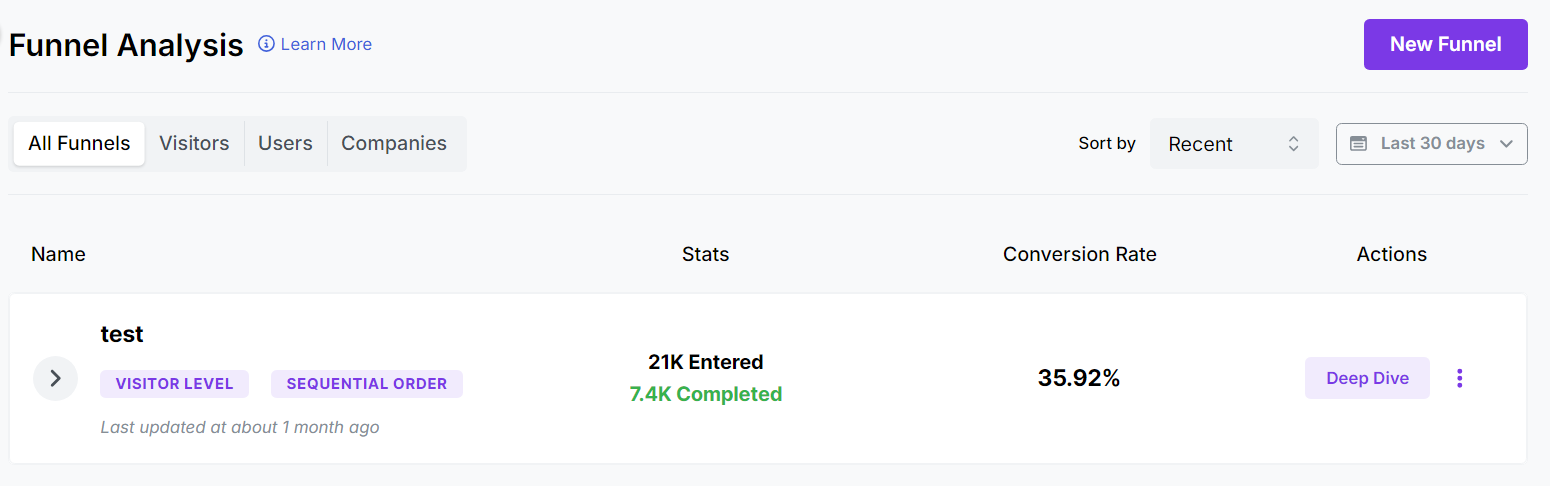
Usermaven’s funnel analysis breaks down the steps your users take to achieve a goal, like making a purchase or signing up. You can get a hold of conversion rate, average time spent, drop-off rate, etc.
- Granular attribution analysis
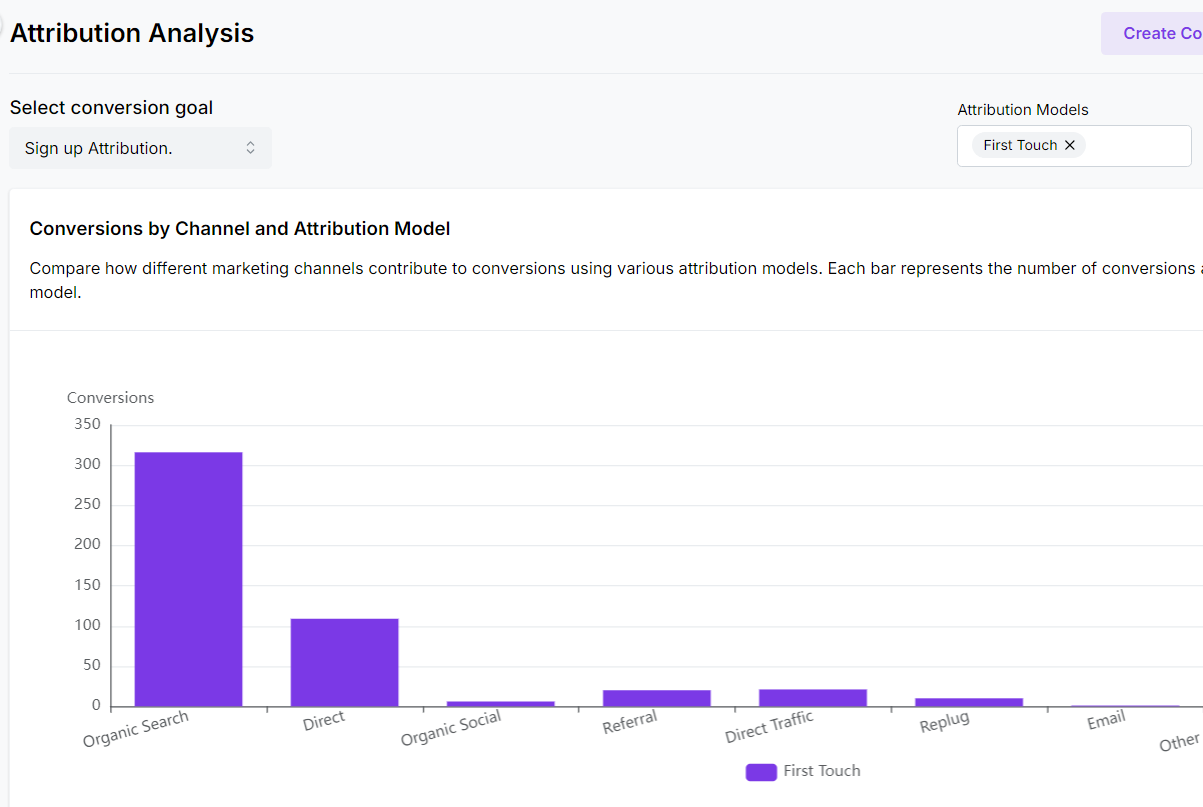
Multi-touch attribution helps you pinpoint which marketing channels are driving the most conversions. You can analyze data using the following attribution models.
| First touch | This credits the very first channel a user interacted with on their conversion journey. |
| Last touch | This assigns credit to the last channel a user interacted with before converting. |
| Linear | This acknowledges that users often interact with multiple channels before converting and assigns equal credit across those touchpoints. |
| U Shaped | This model gives 40% weightage to the first and last channel involved in conversions during the customer journey. |
| Time Decay | This model assigns more weight to touch points closer to the conversion and gradually reduces credit for earlier interactions. |
| First touch non-direct | This is just like the first touch attribution model, but it excludes the direct traffic channel if it occurs at the first touch. |
| Last touch non-direct | This is just like the last touch attribution model, but it excludes the direct traffic channel if it occurs at the last touch. |
- Cohort analysis
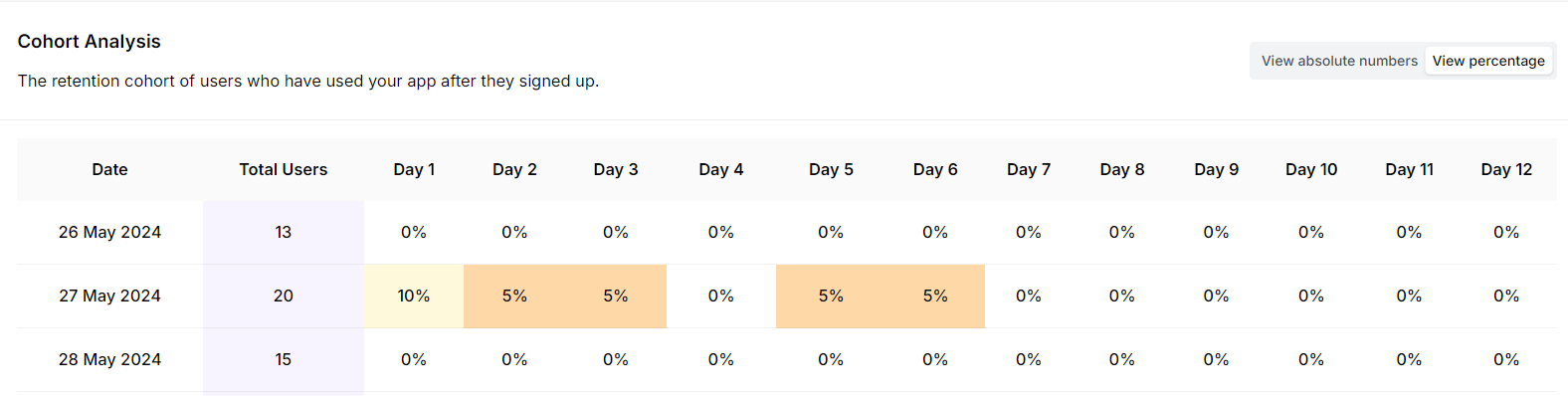
Compare the behavior of different user groups acquired at different times. This helps you understand user trends and measure the long-term impact of product changes.
- Feature adoption reports
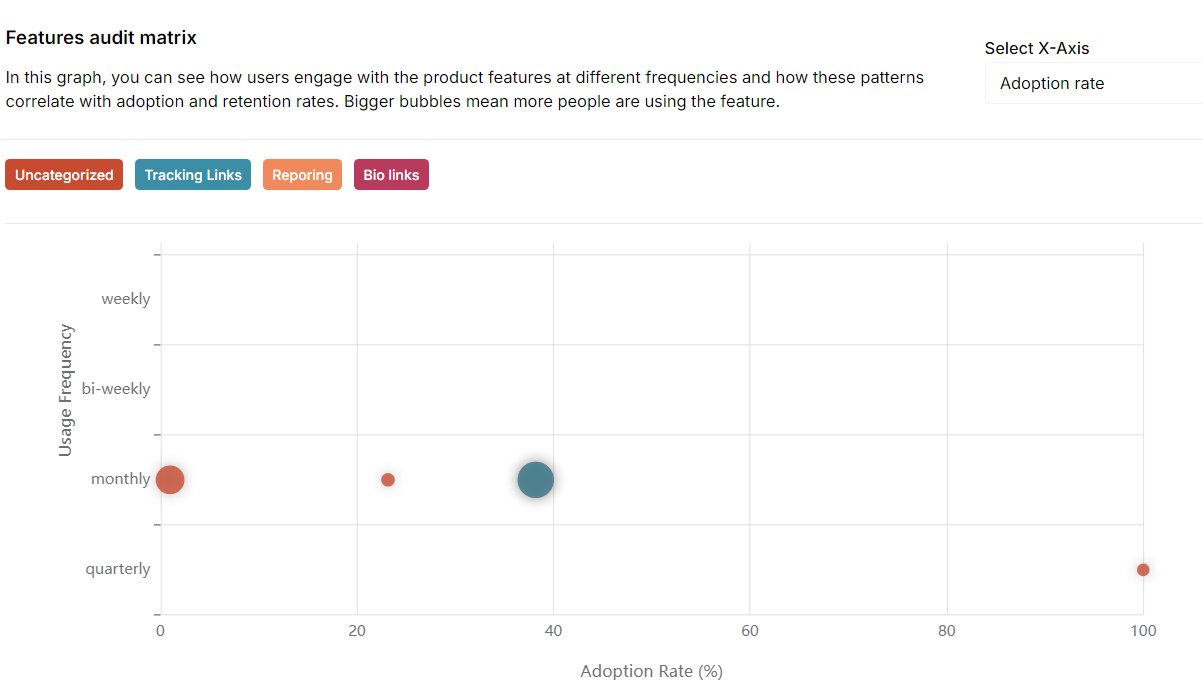
Feature adoption reports give you a clear picture of how new features are being used. They show you which features are hitting the mark and which ones need tweaking. With these insights, you can make informed decisions about future developments.
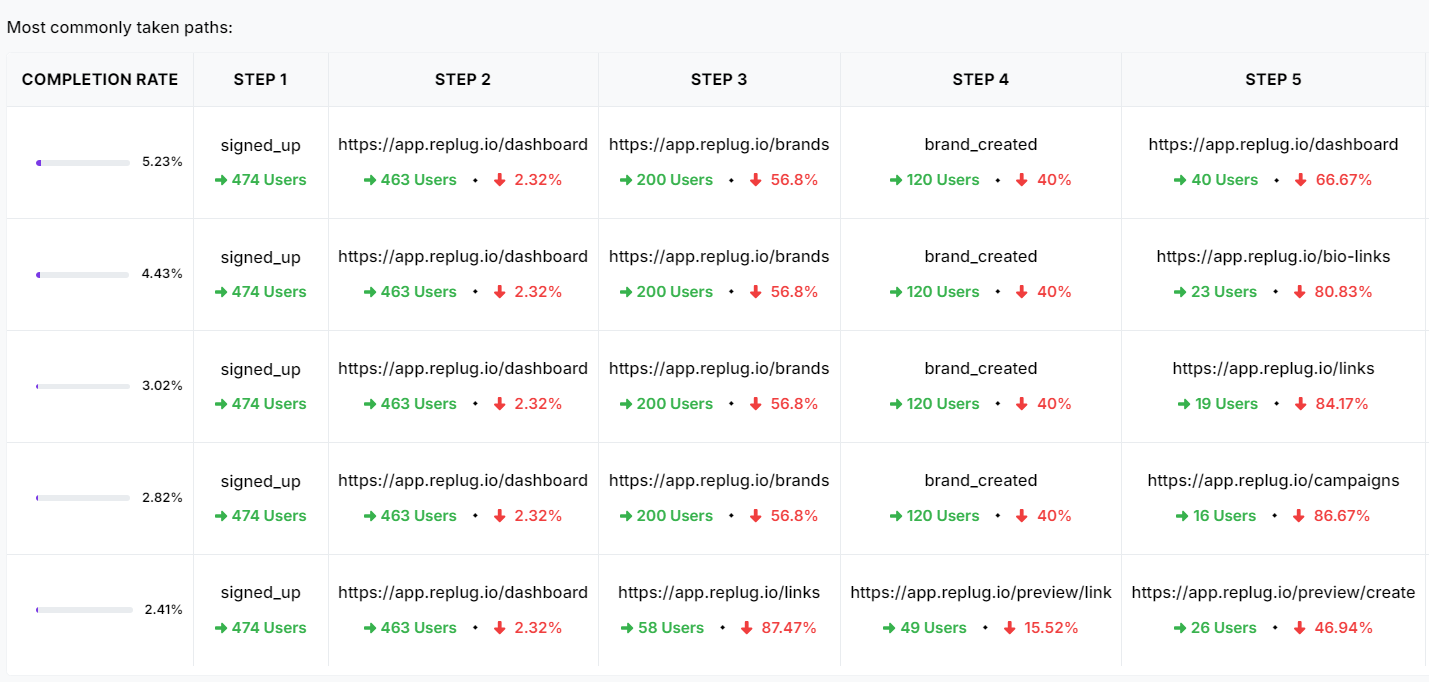
- Visualize the user journey.
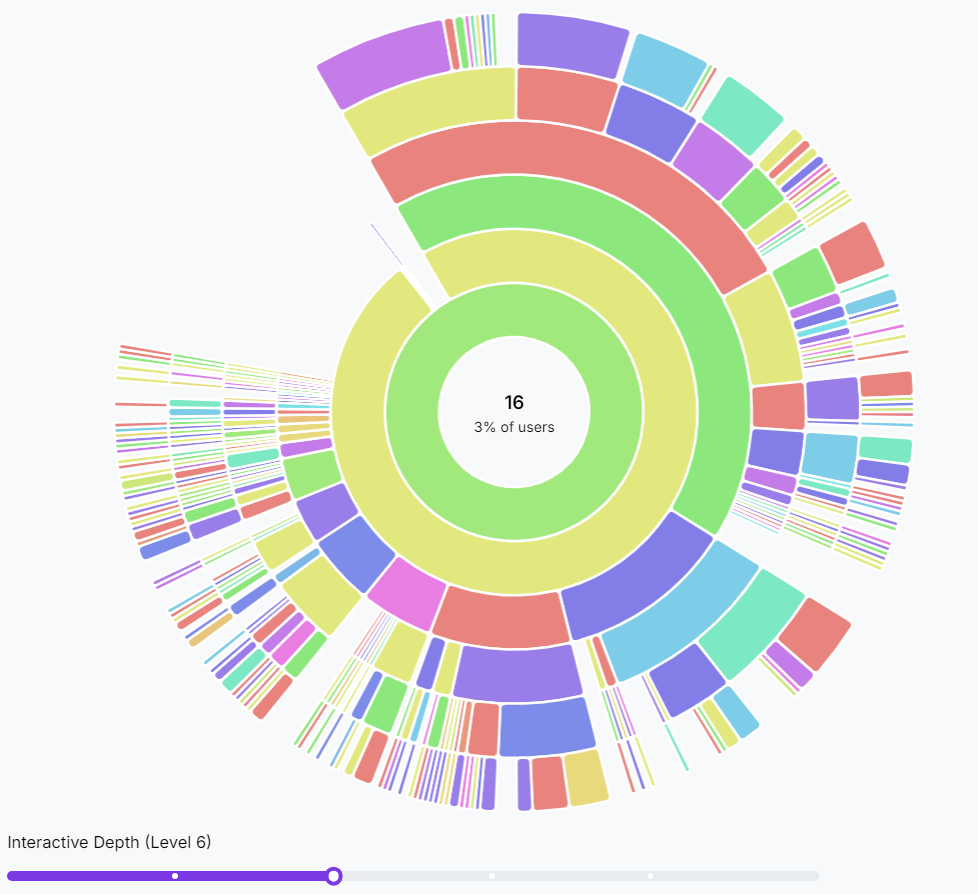
Visualizing the user journey is like mapping out the path users take through your product. It shows you the common routes they follow and highlights any spots where they might get confused or stuck.
- Retention data
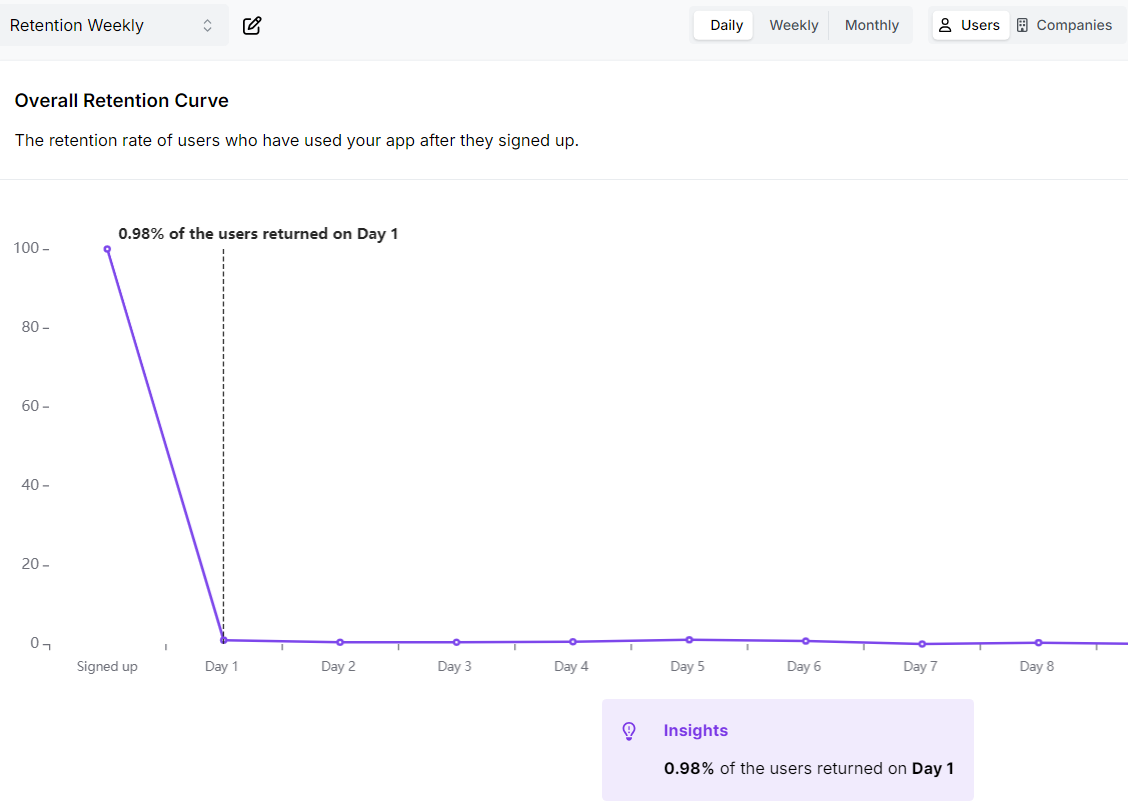
Retention data tracks how many users continue to use your product over time. It helps you understand the stickiness of your product and identify patterns in user behavior. By analyzing retention rates, you can determine what keeps users coming back and address issues causing churn.
- Engagement data
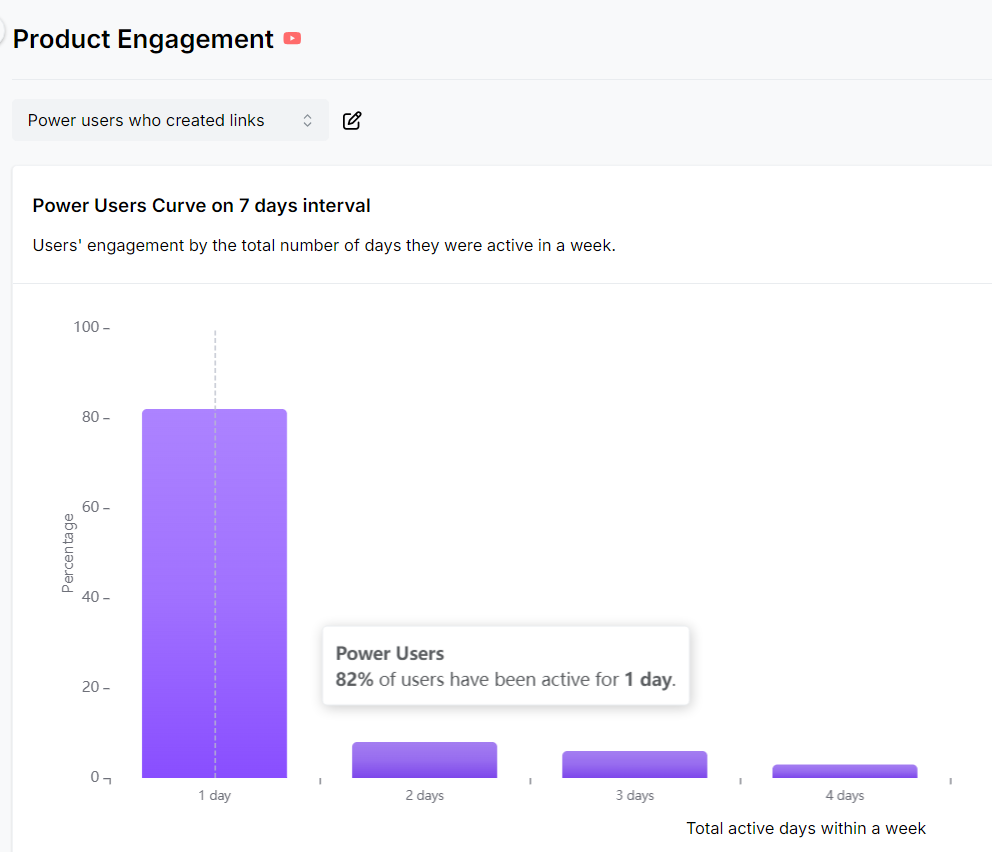
Engagement rate measures how actively users interact with your product. It includes metrics like session frequency, duration, and feature usage. This information helps you gauge user interest and identify which aspects of your product are most engaging.
- Smart AI insights
Go beyond basic data with Usermaven’s Maven AI tool, an intelligent data assistant. It provides actionable recommendations to optimize your SaaS analytics. Simply ask questions using natural language, and Maven AI delivers precise answers.

| What else? Forget fumbling with multiple tools – Usermaven is your one-stop shop for understanding how users interact with your product and website. See which marketing campaigns bring in the most visitors by tracking UTM parameters. Or set and conversion track goals for key actions like sign-ups, purchases, and downloads, so you know what’s working. Besides that, enjoy features like content tracking, bounce rate, first-party pixel connection, total sessions, total events, heatmaps, audience demographics, referral sources, and mobile vs. Desktop analytics. |
Let’s go through the pricing of Usermaven:
| Plan | What usermaven.com/pricing shows (checked October 2026) |
|---|---|
| Business | Book a demo. Multi-touch attribution, Maven AI, MCP for AI agents, paid ads attribution, analytics, customer journeys, funnels, dashboards, contacts and segments, retention analysis, reports and alerts |
| Enterprise | Book a demo. Adds custom integrations, data warehouse export, BigQuery, private cloud or on-premise deployment, SAML SSO, role-based access and audit logs |
| Every plan | Automatic event tracking, ad-blocker bypass, cookieless tracking, server-side tracking, unlimited websites, 30+ integrations |
| Add-ons | Onboarding and implementation, white-label analytics, additional workspaces |
Here’s what users say about Usermaven
| “This is one of the best tracking tools out there”David K.CEO |
| “Usermaven is 100 times easier than GA4!”Ferdinand M.Founder |
| “Uncomplicated Analytics Magic for Real-Time Insights!”Lori V. |
2. Mixpanel
Best for: Teams who prefer features like custom dashboards, custom event tracking, and quick reports.

Why choose this product analytics tool?
Mixpanel helps app creators understand the why of analytics! By tracking how users tap, swipe, and click, Mixpanel exposes what works and what flops and creates a product that your users will love.
- Custom event tracking: This allows you to set up custom events within your app to monitor specific user actions.
- User group targeting: Group users based on their behavior and tailor your app experience to keep them happy.
- Fast onboarding insights: See how well users navigate that initial app setup. Identify any onboarding roadblocks and smooth the way for new users.
- Feature adoption reports: Track how users engage with new features. This helps you see what’s working, what flops, and where to improve.
Mixpanel’s pricing page (checked October 2026) lists autocapture on every plan, GDPR, CCPA and SOC 2 Type II compliance, and US or EU data residency. The Free plan covers up to 1M events a month with 10K session replays; Growth starts at $0 with the first 1M events included and usage billed after that; Enterprise is custom. Costs rise with event volume, which is why some teams look at Mixpanel alternatives.
User reviews of Mixpanel
Users think that it’s great for startups:
“Great for startup product analytics”
Users think that the tool has data privacy issues.
“ The only downside is that there are data privacy concerns”
Mixpanel vs Usermaven summary
| Features | Mixpanel | Usermaven |
|---|---|---|
| Product analytics | Yes | Yes |
| Funnel analysis | Yes | Yes |
| Automatic event tracking | Yes (autocapture) | Yes |
| Cohort analysis | Yes | Yes |
| Session replay | Yes (10K a month on Free) | Not listed on pricing page |
| Experiments and feature flags | Yes | Not listed on pricing page |
| Multi-touch attribution | Not listed on pricing page | Yes |
| Default data retention | 2 years (custom on Enterprise) | Not stated on pricing page |
| Public pricing | Yes | No (demo) |
Mixpanel vs Usermaven: Pricing comparison
| Mixpanel | Usermaven |
|---|---|
| Free: up to 1M events a month, no credit card | Business: book a demo |
| Growth: starts at $0, first 1M events included, then usage-based | Enterprise: book a demo |
| Enterprise: custom pricing | No public prices listed |

3. Amplitude
Best for: Large teams and enterprises needing in-depth behavioral insights.

Why choose this product analytics tool?
Amplitude, an event-based analytics platform founded in 2012, stands out as a premier choice for businesses looking to deeply understand user behavior and optimize their digital products.
- Customizable dashboards and reports: With Amplitude, users can create customized dashboards and reports that suit their specific needs. The intuitive interface allows for easy visualization of key metrics, making it simple to track performance and share insights with stakeholders.
- Wide integration capabilities: The platform integrates seamlessly with a variety of other tools and platforms, such as Slack, Salesforce, and Google Analytics.
- Pathfinder reports: Pathfinder reports provide detailed insights into user behavior, helping businesses uncover hidden patterns and opportunities for improvement.
- Retention analysis: By analyzing retention data, product managers can identify which actions or behaviors lead to long-term engagement and customer loyalty.
User reviews of Amplitude
“Great tool for understanding user’s experiences”
Amelia S. (Product Analyst)
“I like amplitude because it helps to make the dashboard easy and fast”
Eduard V. (Product Manager)
Usermaven vs Amplitude summary
| Features | Amplitude | Usermaven |
|---|---|---|
| Product analytics | Yes | Yes |
| User journeys | Yes | Yes |
| Automatic event tracking | Yes (autocapture) | Yes |
| Custom events | Yes | Yes |
| Session replay | Yes (10K a month on Free) | Not listed on pricing page |
| Data retention | 2 years on Plus | Not stated on pricing page |
| Seats | Unlimited on every plan | Additional users on request |
Usermaven vs Amplitude: Pricing comparison
| Amplitude | Usermaven |
|---|---|
| Free: 2M events a month, no credit card | Business: book a demo |
| Plus: starts at $0, first 2M events a month free, credit card required | Enterprise: book a demo |
| Growth and Enterprise: custom, event-based pricing | No public prices listed |
4. Heap
Best for: Teams looking for a detailed user journey mapping.

Why choose this product analytics tool?
Heap, now part of Contentsquare (its pricing page includes Contentsquare’s AI assistant), is a cloud-based product analytics platform known for its retroactive analysis. It provides real-time analytics by tracking every user interaction on the web or app, highlighting the user’s digital journey which businesses can use to improve customer retention. Here are some important points:
- Complete user behavior visibility: Unlike traditional analytics tools that require predefined event tracking, Heap provides retroactive analysis. This means you can explore and analyze user behavior even if you didn’t set up tracking beforehand.
- Segmentation and personalization: It enables segmentation based on user attributes and behaviors, empowering you to personalize user experiences and target specific user groups.
- Collaboration and sharing: Heap facilitates collaboration by allowing team members to easily share insights and reports, fostering a data-driven culture across your organization.
Heap’s pricing page (checked October 2026) has a Free plan for up to 10k monthly sessions with 6 months of data history; Growth adds 12 months of history, CSV exports and email support, and paid prices are estimated after you install the snippet. Some reviewers mention a learning curve, so run the free plan on your own data first.
User reviews of Heap
“Heap is a great analytics tool”
Tyler J. (Small-Business-Owner)
“Great self-service user metrics tool”
Verified User in Real Estate Mid-Market
Usermaven vs Heap summary
| Features | Heap | Usermaven |
|---|---|---|
| Product analytics | Yes | Yes |
| Automatic event tracking | Yes (retroactive) | Yes |
| Funnel analytics | Yes | Yes |
| Retention report | Yes | Yes |
| Data history | 6 months (Free), 12 months (Growth) | Not stated on pricing page |
| Cookieless tracking | Not listed on pricing page | Yes |
Usermaven vs Heap: Pricing comparison
| Heap | Usermaven |
|---|---|
| Free: up to 10k monthly sessions | Business: book a demo |
| Growth and Pro: price estimated after you install the snippet | Enterprise: book a demo |
5. Kissmetrics
Best for: Businesses focused on improving user retention and conversion.

Why choose this product analytics tool?
Kissmetrics (styled KISSmetrics on its own site) is one of the older names in the category and tracks people rather than pageviews. It offers a range of features including:
- Funnel reports: With Kissmetrics, you can create and analyze conversion funnels to track user journeys through various stages of your sales or conversion process.
- Cohort analysis: It offers powerful cohort analysis capabilities, allowing you to group users based on shared characteristics or behaviors and track how these cohorts perform over time.
- Customer lifetime value (LTV) analysis: Kissmetrics helps businesses calculate and analyze the lifetime value of their customers.
- Wide integration capabilities: It offers integrations with a wide range of third-party tools and platforms, including CRM systems, email marketing software, and customer support platforms.
Its pricing page (checked October 2026) has a free workspace for up to 100k events a month with autocapture, AI chat and dashboards; Growth starts at $99 a month for 500k events, the price per event falls at higher volumes, and annual plans are 20% off.
User reviews of Kissmetrics
“A metrics and analytics solution to drive growth for any organization”
Brian E. (Senior Human Resources Generalist)
“Helped us to increase our conversions”
Nicholas D. (Marketing Professional)
Usermaven vs Kissmetrics summary
| Features | KISSmetrics | Usermaven |
|---|---|---|
| Product analytics | Yes | Yes |
| Automatic event tracking | Yes (autocapture) | Yes |
| Segmentation | Yes (populations on Growth) | Yes |
| Funnel reports | Yes | Yes |
| Cohort reports | Yes | Yes |
| AI assistant | Yes (AI chat and AI-built metrics) | Yes (Maven AI) |
Usermaven vs Kissmetrics: Pricing comparison
| KISSmetrics | Usermaven |
|---|---|
| Free: 100k events a month, no card | Business: book a demo |
| Growth: from $99 a month (500k events); Silver and Gold are the same product at lower per-event prices | Enterprise: book a demo |
| Above 5M events: custom pricing | No public prices listed |
6. Posthog
Best for: Teams needing full data control and customization.

Why choose this product analytics tool?
The next on our list is Posthog, an analytics tool that gives a strong challenge to Usermaven as both tools offer a comprehensive suite of features. Posthog is ideal for teams who need in-depth user insights and the ability to run experiments for optimization. Besides that, it also allows integrations with popular marketing and analytics platforms.
- Self-hosted or cloud-hosted options: PostHog gives you the flexibility to deploy it either on your infrastructure (self-hosted) or use their cloud-hosted service, depending on your preferences and requirements.
- Feature flags and A/B testing: It includes feature flags and A/B testing capabilities, allowing you to safely roll out new features and experiment with different variations to optimize user experience and conversions.
- API and integrations: It provides API and supports integrations with various third-party tools and platforms, allowing you to centralize your data and extend PostHog’s functionality as needed.
PostHog’s pricing page (checked October 2026) gives every account the same free allowance each month, including 1M analytics events, 5K session recordings, 1M feature flag requests and 1,500 survey responses, with 1 project and 1 year of data retention. Add a card and you pay only for usage above the free tier, with 6 projects and 7 years of retention.
User reviews of PostHog
“As a young startup founder, Potshog Analytics has helped me improve my product a ton!”
Tristan M. (CEO, Founder)
“So much better than Google Analytics”
Donald L. (FunnelHacker)
Posthog vs Usermaven: Summary
| Features | PostHog | Usermaven |
|---|---|---|
| Product analytics | Yes | Yes |
| Dashboard | Yes | Yes |
| Funnel reports | Yes | Yes |
| Track custom events | Yes | Yes |
| User paths | Yes | Yes |
| Session replay, feature flags, experiments, surveys | Yes, in the same product | Not listed on pricing page |
| Data retention | 1 year (free), 7 years (paid) | Not stated on pricing page |
| Self-hosting | Yes (open source) | On-premise on Enterprise |
Posthog vs Usermaven: Pricing comparison
| PostHog | Usermaven |
|---|---|
| Free tier every month (1M analytics events), no credit card | Business: book a demo |
| Pay-as-you-go above the free tier, with billing limits per product | Enterprise: book a demo |
| Annual plans and volume discounts through sales | No public prices listed |
7. Pendo
Best for: Teams focused on user onboarding, engagement, and collecting user feedback.

Why choose this product analytics tool?
Pendo offers a well-rounded product analytics suite with a strong focus on user onboarding, engagement, and feature adoption. In easier words, it excels at guiding users through product features with walkthroughs and tooltips and provides insights into feature usage.
- In-app surveys: Gather real-time feedback directly from users through customizable in-app surveys. Trigger surveys based on user behavior to collect targeted, relevant feedback.
- In-app guidance and messaging: Create step-by-step walkthroughs, tooltips, and banners to help users navigate your product. Enhance user experience and reduce support requests with proactive guidance.
- Feature adoption reports: Understand how users interact with your product’s features through detailed adoption reports. Identify popular features and areas needing improvement or additional guidance.
User reviews of Pendo
“Sadly not very customer-centric, multiple product glued together and missing a lot of features”
Pierre. (Head of Product)
“Scalable product insights and user guidence”
Robert R. (Vice President Product)
Pendo vs Usermaven: Summary
| Features | Pendo | Usermaven |
|---|---|---|
| Product analytics | Yes | Yes |
| Feature adoption | Yes | Yes |
| Auto event tracking | Yes | Yes |
| Filter by cohort | Yes | Yes |
| In-app guides | Yes, on every plan | Not listed on pricing page |
| Session replay | Yes (add-on or included, depending on plan) | Not listed on pricing page |
| Funnel analysis | Yes | Yes |
| Data history | Complete history from the day you install | Not stated on pricing page |
Pendo vs Usermaven: Pricing comparison
| Pendo | Usermaven |
|---|---|
| Free: up to 500 monthly active users | Business: book a demo |
| Base, Core and Ultimate: pricing on request, based on monthly active users | Enterprise: book a demo |
8. Quantum Metric
Best for: Teams focused on rapid product iteration and improvement.

Why choose this product analytics tool?
Quantum Metric is a digital analytics platform geared towards businesses with a large user base and development teams. It utilizes artificial intelligence to analyze vast amounts of user data, automatically pinpointing areas where users encounter friction or frustration. This focus on automation allows for quick identification of conversion roadblocks and usability issues.
Some of its prominent features include:
- Revenue attribution: Understand how different user groups and behaviors contribute to revenue.
- Error monitoring: Automatically detect and monitor errors that users encounter on your site or app. Quickly address and resolve issues to improve user experience and reduce frustration.
- Journey analysis: Visualize and analyze user journeys to understand the paths users take through your site or app.
- Session replay: Watch recordings of user sessions to see exactly how users interact with your site or app. This helps in understanding user behavior and identifying pain points.
Its site (checked October 2026) also lists autocapture of more than 300 metrics out of the box and a segment builder. Quantum Metric doesn’t publish prices; plans are quoted through a demo.
User reviews of Quantum Metrics
“Gives great insights, but set up is cumbersome”
Vikas M. (Product Manager)
“Opportunities for improvement but overall a great experience”
Verified User in Insurance
Quantum Metrics vs Usermaven: Summary
| Features | Quantum Metric | Usermaven |
|---|---|---|
| Product analytics dashboard | Yes | Yes |
| AI insights | Yes | Yes |
| Behavioral metrics | Yes | Yes |
| Segmentation | Yes | Yes |
| Session replay | Yes | Not listed on pricing page |
| Public pricing | No (demo) | No (demo) |
Quantum Metrics vs Usermaven: Pricing comparison
| Quantum Metric | Usermaven |
|---|---|
| Pricing through sales (demo) | Business: book a demo |
| No public plans or prices | Enterprise: book a demo |
9. Woopra
Best for: Organizations seeking to analyze user behavior across all digital channels to optimize customer experiences and drive growth.

Why choose this product analytics tool?
Lastly, we have Woopra renowned for its real-time customer analytics, enabling businesses to track and analyze user behavior as it happens.
- Real-time reporting: Get insights into user behavior as it happens. This allows you to identify and address any issues immediately, optimizing your product for maximum impact.
- Powerful funnels & journeys: Identify drop-off points within your sales or onboarding funnels. Woopra’s journey mapping helps you visualize the complete customer path and identify areas for improvement.
Woopra’s pricing page (checked October 2026) starts new projects on Pro from $999 a month for 5 million events, with a 30-day free trial and 24 months of data retention; extended retention comes with the Enterprise (AIRIS) plan. If you want AI-powered insights on a smaller budget, compare it with Usermaven.
Woopra vs Usermaven: Summary
| Features | Woopra | Usermaven |
|---|---|---|
| Product analytics dashboard | Yes | Yes |
| Custom event tracking | Yes | Yes |
| Funnel reporting | Yes | Yes |
| Attribution reports | Yes | Yes |
| User journey tracking | Yes | Yes |
| Cohort analysis | Yes | Yes |
| Real-time reporting | Yes | Yes |
| Cookieless tracking | Not listed on pricing page | Yes |
| Data retention | 24 months (extended on Enterprise) | Not stated on pricing page |
User reviews of Woopra
“Very useful insight”
Verified User in Professional Training & Coaching
“Very strong CDP platform that could help our company have more critical market insight”
Verified User in Media Production
Woopra vs Usermaven: Pricing comparison
| Woopra | Usermaven |
|---|---|
| 30-day free trial of Pro | Business: book a demo |
| Pro: from $999 a month (5M events) | Enterprise: book a demo |
| Enterprise (AIRIS): contact sales | No public prices listed |
Also worth knowing: Enterpret for customer feedback
Enterpret is not a product analytics tool. It analyzes customer feedback, and its site (checked October 2026) describes it as customer context for AI-native product teams. Some teams read it next to their product analytics to see why users behave the way they do.
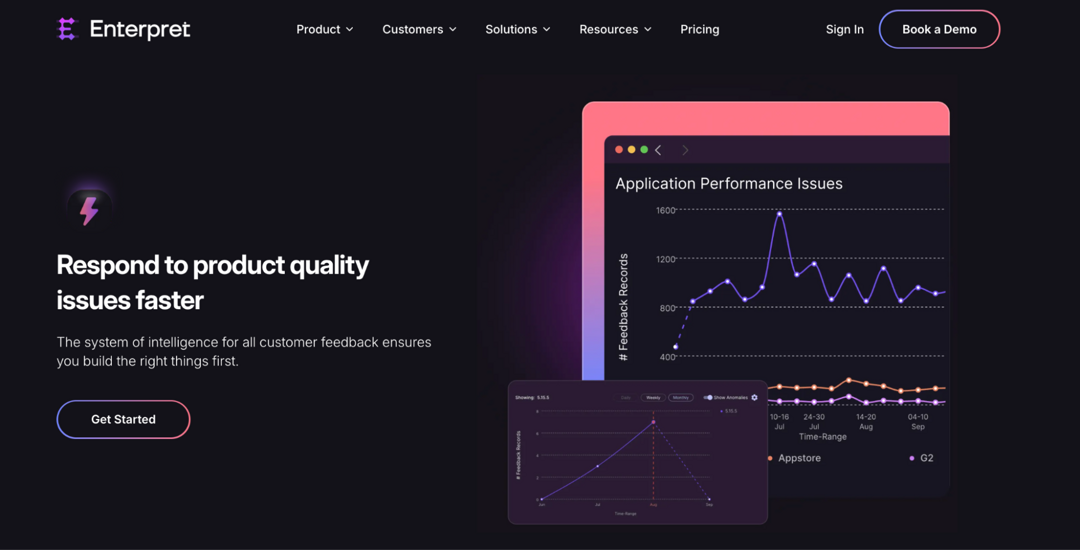
Key benefits:
- Detect trends in feature usage and user sentiment.
- Identify friction points and areas for improvement.
- Combine quantitative analytics with qualitative insights for smarter decisions.
Use it as a complement to a product analytics tool, not a replacement.
You may also like: 12 best web analytics tools for 2026
What is the best product analytics platform?
You might have heard that there isn’t one “best” product analytics platform since the perfect choice varies depending on your requirements and priorities.
However, we don’t think the same. Through extensive research and testing of analytics tools, we have concluded that Usermaven (a digital analytics tool offering website and product data) is undoubtedly a top choice among other analytics software.
How to choose a product analytics tool for your team
Most product analytics tools now cover funnels, retention and cohorts. The differences show up in what else comes in the same plan, how fast you get answers, and how pricing grows. Match the tool to the job you need done:

- Analytics, session replay and experiments on one bill: PostHog includes product analytics, session replay, feature flags, experiments and surveys in one product with a monthly free tier; Mixpanel and Amplitude also bundle session replay and experiments with analytics (per their pricing pages, October 2026).
- Fast time to value without engineering work: pick a tool with autocapture, so clicks and pageviews are recorded from the first day. Usermaven, Mixpanel, Amplitude, Heap, KISSmetrics and Quantum Metric all list automatic capture.
- Onboarding guides and in-app feedback: Pendo pairs analytics with in-app guides, NPS and surveys.
- Weekly business reviews: look for shared dashboards plus scheduled reports or alerts, so the same numbers reach the team every week. Usermaven lists reports and alerts; Amplitude Plus adds alerts.
- A tight budget: start on a free plan (Mixpanel, Amplitude, PostHog, Heap, KISSmetrics, Pendo) with your real data, then compare how the price grows with events or monthly active users.
- Strong support and onboarding: check what each plan includes. Usermaven sells onboarding and implementation as an add-on, Mixpanel reserves its dedicated success team for Enterprise, and PostHog offers a paid 30-minute onboarding call.
Whatever you pick, tag your campaign links with UTM parameters so acquisition data lines up with product data. A link shortener with a UTM builder, such as Replug, keeps the tags consistent across channels.
Must-have factors to look out for in product analytics tools
With a wide range of product analytics tools available, choosing the right one can be overwhelming. Here are some of the most important things to keep in mind.
| Key factors to consider | Description |
| User interface | Opt for an intuitive interface that makes it easy to explore and understand your data. A user-friendly design streamlines decision-making and analysis. |
| Tracking URL | Look for a tool offering link tracking to monitor where your traffic comes from, helping you measure performance and understand which campaigns or sources drive the most engagement. |
| Budget and scalability | Consider your budget and growth plans. Choose a tool with transparent pricing and scalable features that can grow with your business needs. |
| Customizable dashboards | Find a tool that lets you create dashboards tailored to your specific metrics and reporting needs. This way, you can focus on what matters most to your business. |
| Free plans, trials or demos | Take advantage of free trial periods to test the tool’s functionalities firsthand. Free trials allow you to assess compatibility with your business needs and evaluate ease of use before making a commitment. |
| Reviews and ratings | Research user reviews and expert ratings to gauge the tool’s performance, reliability, and customer support. Insights from other users provide valuable perspectives on real-world usability and satisfaction. |
| Integrations | Make sure the tool integrates smoothly with other platforms you use, such as CRM or marketing automation software. |
| Privacy focused | Prioritize tools that uphold robust data privacy and security measures. Look for compliance with industry standards (e.g., GDPR, CCPA) to safeguard sensitive information and build trust with users. |
Conclusion
As this comprehensive guide cuts through the confusion to reveal the ultimate solution for your needs. We’ve meticulously analyzed and compared top contenders, and guess what? There’s a clear winner!
Usermaven stands out for its comprehensive features and ease of use. Its advanced analytics, AI-powered insights, and strong data privacy compliance make it an excellent choice for businesses of all sizes.
Whether you’re a startup or a large enterprise, investing in a tool like Usermaven can greatly enhance your ability to make informed decisions.
Here are a few more that didn’t make the top list but are worth your consideration as an analytics tool.
- GA4
- Hotjar
- FullStory
- Indicative
- Userpilot
- LogRocket
- Simple analytics
- Baremetrics
FAQs related to product analytics

Manahil