What is the TikTok Pixel?
The TikTok Pixel is a piece of code you place on your website to share website events with TikTok. TikTok says you can use it to measure traffic on your website, measure ad campaign performance, and optimize your campaigns and find new customers (TikTok Business Help).
It works like the pixels other ad platforms use, such as the Meta Pixel. Once it’s installed, it records events from page views to purchases, and you can use them for reporting, conversion optimization and retargeting audiences.
Quick answer: to set up the TikTok Pixel, log in to TikTok Ads Manager, go to Tools > Events Manager, click Connect Data Source, select Web, enter your URL, and choose a partner integration (such as Shopify or Google Tag Manager) or manual setup. Then verify it with TikTok Pixel Helper, Test Events or the Diagnostics tab (TikTok Business Help).
Setting it up takes a few steps, and the menus have moved since TikTok first launched the pixel.
This guide covers what the TikTok Pixel does, what it collects, how to set it up and verify it, the standard events to track, and how to add your TikTok Pixel to links you share.
Whether you’re a seasoned digital marketer or new to TikTok advertising, this guide will provide the details and tools you need to set up TikTok pixel on your website. And you’ll be ready to start measuring your conversions in no time!
Why use a TikTok tracking pixel? What is the TikTok Pixel used for?

Well, there are several reasons.
- First and foremost, TikTok Pixel helps you with TikTok analytics and measures the effectiveness of your ad campaigns. Let’s say you’re running a TikTok ad campaign to promote a new product on your website. By using it, you can see how many people have clicked on your ad, visited your website, and how many of them made a purchase. This information can help you determine the ROI of your ad campaign and whether it’s worth continuing to invest in.
- Secondly, it allows you to optimize your ad campaigns. Using the data collected by it, you can identify which ads are performing well and which ones aren’t. For example, if you see users spending more time on a particular page of your website after clicking on an ad, you can use that information to create more ads that drive users to that page.
- Finally, it enables you to retarget users. Let’s say someone visits your website after clicking on a TikTok ad, but doesn’t make a purchase. With TikTok Pixel, you can retarget that user with a follow-up ad tailored to their interests. For example, you could show them an ad for the product they were looking at on your website.
Benefits of using TikTok Pixel
Here are some of the fantastic benefits that TikTok Pixel offers to advertisers.
Track Conversions
It allows you to track user actions on your website, such as purchases, form submissions, and downloads. This data can be used to measure your advertising campaigns’ effectiveness and identify improvement opportunities.
For example, a hotel chain can use TikTok Pixel to track bookings made by users who clicked on their ads, helping them to calculate the return on their ad spend.
Create Custom audiences
With TikTok’s Pixel, you can create custom audiences based on user behavior on your website. This allows you to target users who have already shown an interest in your product or service and are more likely to convert.
For example, a skincare brand can create a custom audience of users who have visited their website in the past 30 days but have yet to purchase it. They can then display ads to this audience on TikTok, promoting a special offer to incentivize them to buy.
TikTok requires 1,000 total matched users in a Custom Audience before you can use it in an ad group (TikTok Business Help), and you can have up to 400 custom audiences in an account (Website Traffic audiences).
Optimize campaigns
It allows you to optimize your campaigns for specific objectives, such as conversions or clicks. This means the platform will automatically adjust your campaign settings to deliver the best results based on your chosen goal.
For example, if you’re running a campaign to drive website traffic, you can optimize your TikTok ad delivery to show your ads to users who are likely to click through to your site.
Enhanced ad retargeting
It also enables you to retarget visitors who have interacted with your brand in the past, such as users who have visited your website or engaged with your TikTok ads. This helps to keep your brand top of mind and can increase the likelihood of conversion.
Let’s take Retargeting ad examples of a clothing brand that uses TikTok Pixel to track the pages a user visits on their website and use this information to display ads for specific products to that user on TikTok.
Attribution modeling
It allows you to attribute conversions and other user actions to specific advertising campaigns, ad groups, or even individual ads. This helps you to understand which of your campaigns are driving the best results and make data-driven decisions about where to invest your ad budget.
How does TikTok Pixel work?
The TikTok Pixel is JavaScript code on your website (apps use TikTok’s SDK or a measurement partner instead). It runs on every page where it’s installed and shares the events you set up with TikTok. According to TikTok Business Help, it collects:
- Ad and event information: the ad someone clicked or the event that was triggered.
- Timestamp: when the page view or purchase happened.
- IP address: used to determine the event’s geographic location.
- User agent: device make, model, operating system and browser.
- Cookies: third-party cookies are on by default; first-party cookies are optional and can be turned on in Events Manager (TikTok Business Help).
- Metadata and button clicks: page metadata, structured data, page performance and button clicks.
TikTok shows the data in Events Manager, where you can see events, test them and fix issues. TikTok recommends using Pixel Helper to check what data is sent, so you don’t share anything sensitive. If you add Advanced Matching, emails and phone numbers entered on your site are hashed with SHA-256 before they reach TikTok (TikTok Business Help).
How to set up your TikTok Pixel
These steps follow TikTok’s Set up and verify pixel guide (last updated June 2026). You need a TikTok Ads Manager account; if you don’t have one, create it from the TikTok for Business homepage first.

- Log in to TikTok Ads Manager and go to Tools.
- Click Events Manager.
- Click Connect Data Source and select Web.
- Enter your website URL.
- Choose Partner Integration (for example Shopify or Google Tag Manager) or Manual Setup.
- Create and name your pixel. TikTok suggests a name that matches your website or domain; the limit is 128 characters, including spaces.
- For manual setup, install the base code on your website, then set up your events with Event Builder or code.
Verify the pixel
TikTok lists three ways to check your setup:
- The TikTok Pixel Helper Chrome extension, which flags errors such as a pixel that isn’t in the header or an invalid pixel ID (Pixel Helper guide).
- Test Events in Events Manager.
- The Diagnostics tab in Events Manager.
Set up your events
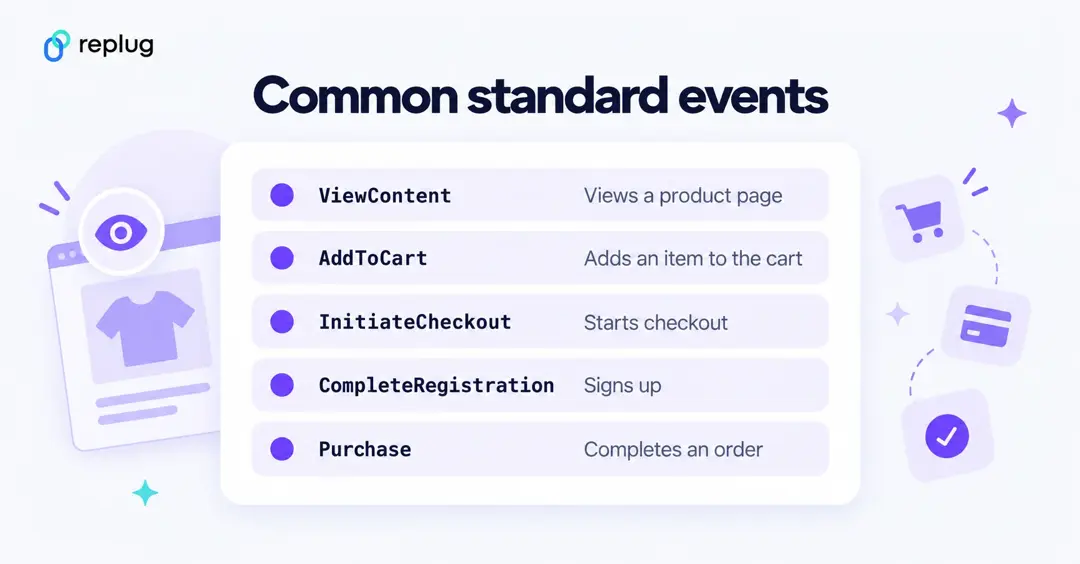
Events are actions on your site, like adding to cart or purchasing. TikTok’s standard events have predefined names that are used for reporting, conversion optimization and audiences, including ViewContent, AddToCart, InitiateCheckout, AddPaymentInfo, CompleteRegistration, SubmitForm, Subscribe and Purchase. TikTok recommends tracking events across the whole customer journey, and warns against sending sensitive data in event labels.
Add the Events API
TikTok recommends setting up the Events API together with the pixel, with event deduplication. The Events API sends events from your server or CRM, which helps capture conversions the browser pixel misses because of connection issues or browser differences. A pixel or Events API setup is required for TikTok’s Web Conversions objective.
How to install TikTok Pixel?
If you chose manual setup, you add the base code yourself. TikTok’s Pixel Helper guide says to place it as early as possible on the page, ideally between the <head></head> tags.
Here’s the step-by-step process to install the Pixel:
Step 1: In TikTok Ads Manager, go to Tools > Events Manager.
Step 2: Select your pixel. With manual setup, TikTok shows the base code in the setup flow.
Step 3: Copy the base code.
Your pixel base code will look like this:

Step 4: Add the pixel code to the header section of your website. Website headers start with the <head> tag and close with the </head> tag.
For example:
<head>
  <!-- Paste your TikTok Pixel base code here -->
</head>
Step 5: Save your changes.
And that’s it! Your Pixel Code is now installed on your website, and you can start tracking conversions.
How to uninstall TikTok Pixel?
If you want to uninstall TikTok Pixel, remove the pixel code from your website’s header section. Here are the steps:
Step 1: Go to your website’s code editor and navigate the header section.
Step 2: Delete the Pixel code.
Step 3: Save your changes.
And that’s it!
How to track TikTok Ads: TikTok Pixel VS Custom Tracking Solution
Some advertisers prefer a custom tracking solution, which can offer more flexibility and control over the tracking process. With a custom tracking solution, advertisers can track specific events unique to their business and tailor their tracking to their particular needs. This can be very useful for companies with complex sales funnels or multiple conversion points.
So which option is better – the TikTok Pixel or a custom tracking solution? The answer to this query will vary depending on various factors, including the size of your business, the complexity of your sales funnel, and your overall ad strategy.
One of the significant pros of using TikTok Pixel is that it’s an all-in-one solution that’s easy to set up and use. You don’t need technical skills to install it, and it works seamlessly with TikTok’s advertising platform. Once it’s installed, you can start tracking conversions right away. It also offers a variety of conversion events you can follow, such as add-to-cart, checkout, and registration, which gives you a comprehensive understanding of how users interact with your website.
By using the pixel, you can optimize your campaigns and ensure that you get the best possible results for your advertising efforts.
Add your TikTok Pixel to links you share with Replug
The TikTok Pixel only runs on your own site. If you send TikTok traffic to other pages, such as a YouTube video, a news article or a partner’s page, Replug’s link retargeting fires your TikTok Pixel when someone clicks your short link or bio page link, so those visitors can still join your retargeting audiences.
- In Replug, go to Settings > Retargeting Pixels and click Add Pixel.
- Name it, choose TikTok Pixel as the network, paste your pixel ID and click Create.
- Create a campaign with the Retargeting pixel add-on and select the TikTok pixel.
- When you create a short link, choose that campaign in the Campaign field.
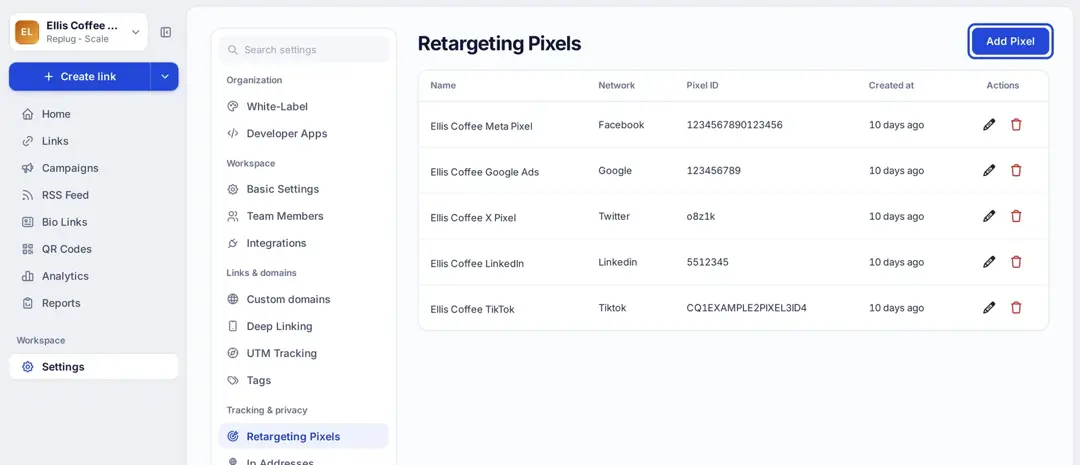
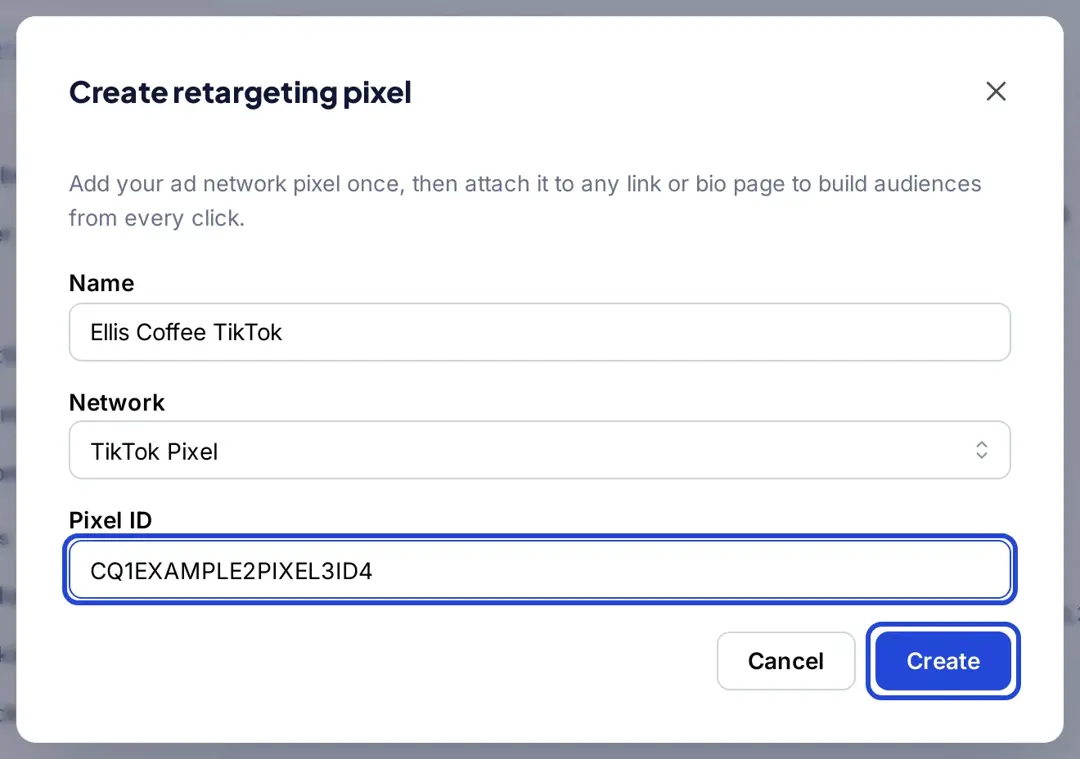
You can add multiple retargeting pixels to the same short link, for example TikTok and Meta. Retargeting pixels are on Essentials (1 pixel) and on Scale and Agency (unlimited), per Replug’s pricing. Replug fires pixels on clicks; it doesn’t track purchases, so keep the TikTok Pixel on your own site for conversions.
Why do websites use TikTok trackers?
When people talk about “TikTok trackers” on a website, they usually mean the TikTok Pixel (and sometimes embedded TikTok videos). Sites that advertise on TikTok add the pixel to measure which ads lead to visits and sales, to let TikTok optimize delivery toward people likely to act, and to build retargeting audiences.
Because the pixel uses cookies and sends data such as IP address and user agent to TikTok, treat it like any other ad pixel: say so in your privacy policy, ask for cookie consent where the law requires it, and don’t send sensitive data in events. TikTok itself recommends checking what the pixel sends with Pixel Helper.
Best practices for TikTok conversion tracking
If you’re looking to use TikTok conversion tracking, there are a few best practices you should keep in mind to ensure you’re getting the most out of your efforts. Here are a few points to help you get started:
- Set clear goals: Before you start tracking conversions on TikTok, you must have a clear idea of what you want to achieve. Whether you’re looking to drive more traffic to your website, increase sales, or boost brand awareness, having a specific goal in mind will help you to track and measure your progress more effectively.
- Use the right tracking tools: TikTok offers a range of tracking tools that can help you to measure your conversions and track the effectiveness of your campaigns. Be sure to use these tools to their fullest extent, and consider integrating them with your existing analytics and reporting tools for a more comprehensive view of your performance.
- Test and optimize your campaigns: Like any marketing campaign, TikTok conversion tracking requires testing and optimization to ensure you get the best results. Try experimenting with different ad layouts & formats, targeting options, & messaging to see what works best for your audience. Use the data from your tracking tools to inform your decisions.
- Monitor your metrics regularly: To get the most out of your TikTok conversion tracking efforts, it’s essential to monitor your metrics periodically and make adjustments as needed. Keep an eye on your click-through rates, conversion rates, and other key performance indicators, and use this information to make data-driven decisions about optimizing your campaigns.
- Consider working with a TikTok partner: If you’re new to TikTok conversion tracking or need help optimizing your campaigns, consider working with a TikTok partner. These companies specialize in helping businesses to achieve their goals on TikTok and can offer expertise in maximizing your efforts.
Interested in using TikTok Pixel in your marketing strategy?
We’ve covered a lot of ground, from what TikTok Pixel is, to how it works and the step-by-step guide to help you quickly get started.
If you also share links to pages you don’t own, consider Replug’s link retargeting pixels so those clicks count toward your TikTok audiences too.
With Replug, you can add retargeting pixels to short links, bio pages and QR codes and see clicks on every link you share.
FAQs

Mustafa Niazi