Picture this: a big campaign is due next week, there are ten tabs open with link tools, and the Rebrandly pricing page is right in front of you.
The features sound promising, but the mix of limits, add-ons, and per‑plan perks makes it hard to see what you would really pay as your clicks grow. One wrong call here can squeeze your budget or slow your team’s progress later.
Rebrandly has earned a strong name in branded link management. It offers custom domains, detailed analytics, and enterprise‑grade security, so it often appears on shortlists for marketing teams, agencies, and SaaS companies.
The hard part is not the feature list, though. The real question is how Rebrandly pricing lines up with what a team gets at each tier.
This guide walks through every Rebrandly plan, then weighs the pros and cons in plain language. From there, it compares Rebrandly pricing against Replug, a link management and marketing platform that often delivers more firepower for less spend.
By the end, it should be much easier to decide if Rebrandly is worth the cost for your situation or whether Replug is a better fit.
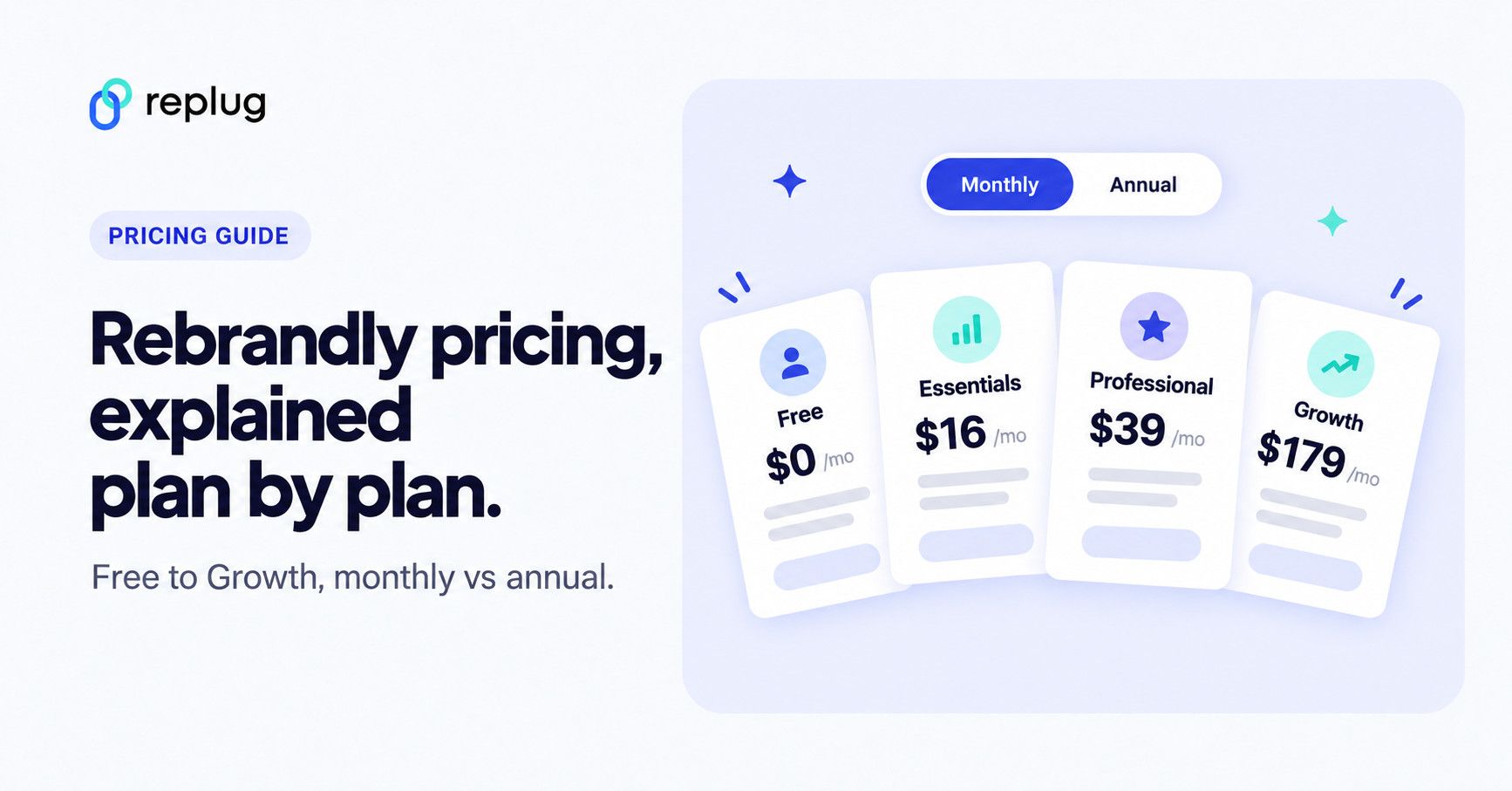
Short answer (prices checked October 2026): Rebrandly has a Free plan for $0 with 10 links and 10 QR codes a month. Paid plans cost $16 (Essentials), $39 (Professional) and $179 (Growth) a month on monthly billing, or $11, $32 and $149 a month billed annually. Enterprise is priced on request. These are the US dollar prices on Rebrandly’s pricing page; taxes and your local currency can change what you pay.
All Rebrandly pricing plans
Rebrandly uses a five‑tier structure aimed at everyone from solo creators to large enterprises. At the time of writing, the lineup includes Free, Essentials, Professional, Growth, and Enterprise.
Every paid plan has a Start free trial button, and annual billing saves up to 31% (Rebrandly’s help center mentions a free trial of the paid features but doesn’t state its length). When comparing Rebrandly pricing, it helps to see the tiers side by side first.
| Plan | Rebrandly pricing per month | Rebrandly pricing annually |
| Free | $0 | $0 |
| Essentials | $16/month | $11/month |
| Professional | $39/month | $32/month |
| Growth | $179/month | $149/month |
| Enterprise | Custom | Custom |
Here is what each tier actually includes in practice.
How much Rebrandly costs per year
Annual billing is where the savings sit. Rebrandly’s pricing page says you can save up to 31%, and most of that comes on the Essentials plan:
| Plan | Monthly billing for 12 months | Annual billing (12 × monthly rate) | Saving |
|---|---|---|---|
| Essentials | $192 | $132 | $60 (31%) |
| Professional | $468 | $384 | $84 (18%) |
| Growth | $2,148 | $1,788 | $360 (17%) |
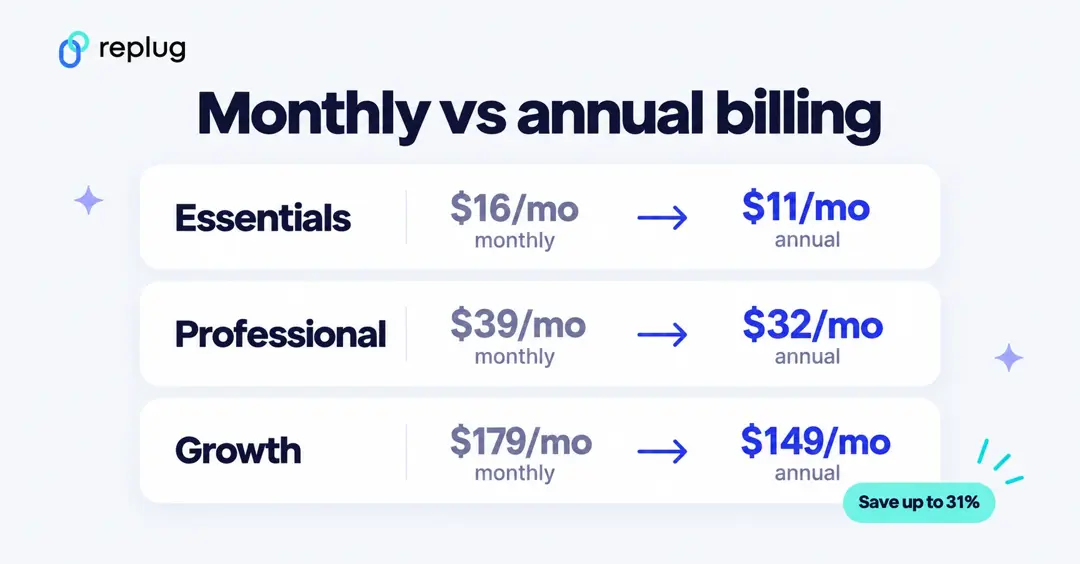
Prices checked on Rebrandly’s pricing page on October 13, 2026. Rebrandly’s help center also has an article about the plan changes it made around March 2025, so older reviews and AI answers often quote outdated numbers. Comparing it with Bitly too? Our Bitly pricing breakdown uses the same format.
Key features of the Rebrandly Free plan
- Up to 10 branded links and 10 QR codes per month
- 1 free
rebrand.lydomain - 1 custom
.biodomain - Custom back halves
- 1 link gallery
This tier works as a small test bed or for very light use. With only 10 new links each month and no collaboration, it breaks down fast for active campaigns or busy social feeds.
What the Free plan leaves out, according to the plan comparison on the pricing page:
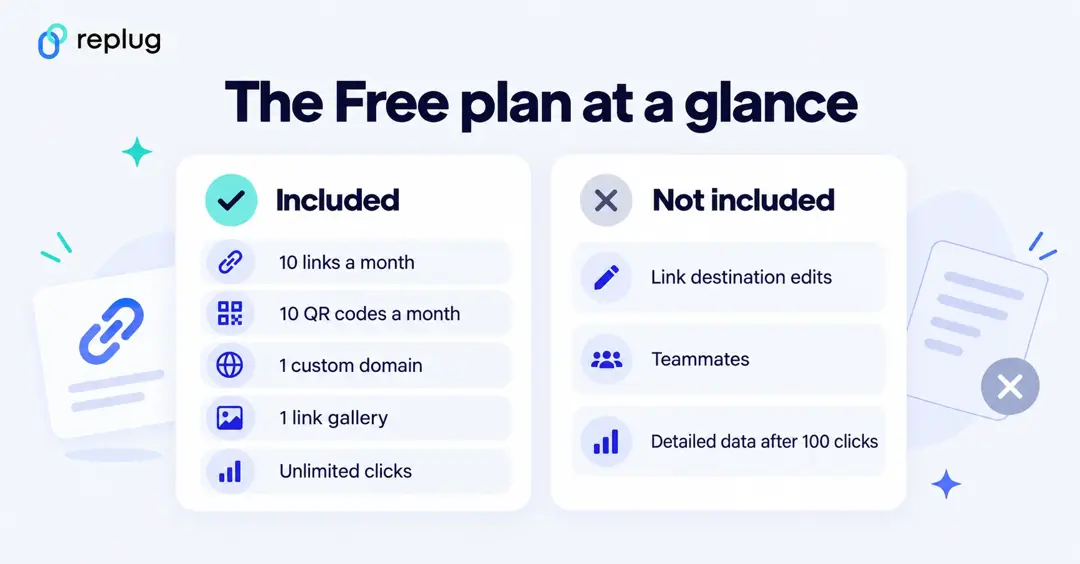
- Analytics on 100 clicks a month. Clicks and scans are unlimited, but detailed engagement data covers only the first 100 clicks each month. City, referrer, device and browser data start on paid plans.
- Watermarks. Free QR codes and the free link gallery (link-in-bio page) show Rebrandly branding.
- No link edits. You can’t change where a link or QR code points after you create it; destination edits start at 10 a month on Essentials.
- One workspace, no teammates. Teammates start on Professional.
- Self-serve support. The Free plan gets the AI chatbot and help center; email support starts on Essentials.
Key features of the Rebrandly Essentials plan
- 250 links and 250 QR codes per month
- Support for 2 custom domains
- 10 link destination edits per month
- Up to 3 link galleries
- Analytics for up to 10,000 clicks each month
- 5 AI scheduling suggestions per month
- Top-notch branding controls
- Unique clicks, time of day, language and device data; email support
The Essentials plan is the first paid step and is designed for creators, consultants, and small businesses that need more volume without team access. Rebrandly pricing at this level is still friendly, but collaboration features are not included.
Key features of the Rebrandly Professional plan
- 1,500 links and QR codes per month
- 3 custom domains
- 4 link galleries
- Traffic routing rules
- 50 link destination edits
- 2 teammates and 2 workspaces
- 50 password‑protected links and link expiration
- Analytics for up to 25,000 clicks per month, plus 3 scheduled data exports
- Conversion tracking (6 months of data), link retargeting, city-level data and social media link previews
This is the most popular (recommended) tier, and where Rebrandly starts to feel like a true team tool. It is the first real fit for small marketing teams or agencies that need shared workspaces and stronger control over each link.
Key features of the Rebrandly Growth plan
- 3,500 links and QR codes per month
- Up to 10 custom domains
- 150 destination edits
- 11 link galleries
- Mobile deep linking
- Advanced role permissions
- 150 password-protected links
- 5 workspaces with 5 teammates
- Analytics on up to 150,000 clicks per month
- Conversion tracking (1 year of data), 10 data exports and 5 webhooks
The Growth plan suits scaling businesses that manage many brands or have higher traffic. It adds more link-management power and capacity but comes with a clear jump in Rebrandly pricing.
Key features of the Rebrandly Enterprise plan
- Custom volumes of links, domains, QR codes, workspaces & teammates
- Custom deployment options, including dedicated infrastructure
- Compliance with HIPAA, GDPR, and SOC II Type 2
- Role-based access & workspace-level controls
- High‑volume API access (up to 100,000 calls per second)
- Dedicated customer success manager
- Single Sign‑On (SSO) (SAML)
- White glove support
- 99.99% uptime
The Enterprise tier is fully custom. For Essentials, Professional, and Growth customers, Rebrandly pricing can increase further through add‑ons such as:
- Extra custom domains
- Additional link edits
- More teammates and workspaces
- Higher analytics and API data caps
This structure makes it easy to understand where you sit, but it also means costs can rise quickly when you need just one or two features from the next tier.
Rebrandly High Volume plans
According to Rebrandly’s pricing page (checked October 2026), next to the standard plans Rebrandly sells High Volume plans for teams that create links in bulk through the API, for example for SMS or app messages. They are priced per year by link volume, from 250,000 links a year, with discounts that grow with volume (23% off from 500,000 links up to 69% off from 5 million). Every High Volume plan is an annual prepay and includes API link creation up to 50 calls per second, 2 teammates and 2 workspaces, 5 custom domains, standard click analytics, bulk edits and scheduled link expiration. Rebrandly positions it as a lean plan for API senders; the standard plans keep the extra analytics and collaboration features.
Rebrandly plans compared side by side
This table pulls the limits that most often decide the plan from Rebrandly’s detailed plan comparison (checked October 2026). “–” means the plan doesn’t include it.
| Feature | Free | Essentials | Professional | Growth | Enterprise |
|---|---|---|---|---|---|
| Price (monthly / annual billing) | $0 | $16 / $11 | $39 / $32 | $179 / $149 | Custom |
| Links per month | 10 | 250 | 1,500 | 3,500 | Custom |
| QR codes per month | 10 | 250 | 1,500 | 3,500 | Custom |
| Custom domains | 1 | 2 | 3 | 10 | Custom |
| Link destination edits per month | – | 10 | 50 | 150 | Custom |
| Link galleries (link-in-bio) | 1 (watermark) | 3 | 4 | 11 | Custom |
| Clicks with detailed analytics per month | 100 | 10,000 | 25,000 | 150,000 | Custom |
| City, referrer and browser data | – | – | Yes | Yes | Yes |
| Password-protected links per month | – | – | 50 | 150 | Custom |
| Link expiration | – | – | Yes | Yes | Yes |
| Traffic routing (location or device) | – | – | Yes | Yes | Yes |
| Link retargeting | – | – | Yes | Yes | Yes |
| Conversion tracking (data kept) | – | – | 6 months | 1 year | 2 years |
| Mobile deep linking | – | – | – | Yes | Yes |
| Workspaces | 1 | 1 | 2+ | 5+ | Custom |
| Teammates | – | – | 2+ | 5+ | Custom |
| API rate limit | 100 calls/min | 300 calls/min | 600 calls/min | 1,000 calls/min | Up to 100k calls/sec |
| Email support | – | Yes | Yes | Yes | Yes |
Every plan includes unlimited clicks and scans, custom back-halves, the rebrand.ly domain, the UTM builder, 301 redirects, HTTPS, two-factor authentication, the mobile and desktop apps and the browser extension.
Which Rebrandly plan should you choose?
- Free: you share a handful of links a month and only need total click counts.
- Essentials: you want two branded domains, a few link edits and real analytics on up to 10,000 clicks a month, on your own.
- Professional: you need a teammate, password-protected or expiring links, routing, retargeting or conversion tracking.
- Growth: you manage several brands or clients (10 domains, 5 workspaces), need mobile deep links or more than 1,500 links a month.
- High Volume or Enterprise: you create links by the hundreds of thousands through the API, or need SSO, HIPAA agreements and a dedicated manager.
Rebrandly pricing: Pros, cons, and where it falls short
Once the tiers are clear, the next step is to assess how fair Rebrandly’s pricing feels for what a team actually receives.
What Rebrandly gets right
- The Free plan is more generous than many rivals because it allows a custom-branded domain, even if it is a
.bioone. - All plans share strong security standards, including HTTPS, two‑factor authentication, and major compliance badges.
- The interface is friendly, the learning curve is short, and onboarding new teammates is simple.
- Developers often praise the API for its speed and clear documentation.
- A free trial on paid plans gives teams a low‑risk way to test features before paying.
Where Rebrandly pricing feels limiting
- The jump from Essentials at $11 per month to Professional at $32 per month (billed annually; $16 to $39 on monthly billing) is steep, especially if you only need one or two of the added features.
- Ten links per month on Free and 250 on Essentials restrict how far smaller teams can go without upgrading.
- Features many businesses view as basic, such as link expiration, password protection, and collaboration, all sit behind the Professional paywall.
- Standard plans come in fixed tiers. Rebrandly sells add-ons for extra custom domains (from Essentials) and for destination edits, workspaces, teammates and click data (from Professional), but extra bundles of branded links are only offered on Growth and Enterprise, so more links usually means a bigger plan.
- Rebrandly’s pricing page lists 50+ app integrations, but webhooks start on Professional (1) and Growth (5). Check that the tools you use are covered before paying for a bigger plan or middleware.
- Link retargeting starts on Professional, and A/B split testing and custom call‑to‑action overlays aren’t listed on Rebrandly’s pricing page, so teams that want those performance features may need another tool.
This is where it makes sense to compare Rebrandly with a more marketing‑focused platform like Replug, which bakes those extras into its core plans.
Replug: A smarter, more affordable alternative to Rebrandly
Rebrandly deserves credit for strong branding features and solid security, and for many teams, that may be enough. Still, when you line up Rebrandly pricing against what you get from Replug, a pattern appears.
Replug is built not only for link shortening and branding, but also for turning every click into a measurable marketing opportunity. For a feature-by-feature view, see a full Rebrandly comparison.
Here is a quick look at how plan costs compare:
| Plan | Rebrandly pricing | Replug pricing |
| Free | $0/month | $0/month |
| Essentials | $16/month | $19/month |
| Professional/Scale | $39/month | $39/month |
| Growth/Agency | $179/month | $99/month |
How those plans fit different teams:
Replug’s own plans, from replug.io/pricing (checked October 2026):
| Replug plan | Monthly billing | Annual billing | Short links | Custom domains | Tracked clicks per month |
|---|---|---|---|---|---|
| Free | $0 | $0 | 100 | 3 | 1,000 |
| Essentials | $19/month | $9.50/month ($114 a year) | 1,000 | 5 | 10,000 |
| Scale | $39/month | $23.40/month ($280.80 a year) | Unlimited | 15 | 50,000 |
| Agency | $99/month | $79.20/month ($950.40 a year) | Unlimited | 50 | 250,000 |
Replug counts link limits in total rather than per month, and your links keep working if you reach a limit. The Free plan needs no card, and paid plans have a 14-day trial.
- Replug Essentials: Great for solo marketers and small teams that want branded links, bio pages, analytics, and QR codes in one place.
- Replug Scale: Stands out because it offers many agency‑level features for about the same price as Rebrandly’s Professional tier.
- Replug Agency: Adds white‑label options for client work while still undercutting high‑end Rebrandly pricing for similar or better volumes.
Where Replug really pulls ahead is in its marketing features. On top of link shortening and branding, Replug includes:
- Link retargeting for platforms such as Facebook, Twitter, and Quora directly on your links, so every shared article or video helps build warm audiences.
- Custom call‑to‑action overlays on any link, sending visitors to an email list, free trial, or store, even when the content lives on someone else’s site.
- Built‑in split testing that lets you route traffic across up to 20 URLs behind one link so you can see which content performs best.
- Bio link pages, link rotation, and traffic routing based on rules like location or device.
- Agency‑grade white‑label branding across domain, dashboard, emails, and analytics, so client reporting looks fully on‑brand.
Rebrandly itself says on its branded links page (checked October 2026) that branded links get 39% more clicks than generic short links, though it doesn’t publish the study or data behind that number. Replug links can use your own branded domain too, and paid plans come with a 14‑day free trial, so teams can measure their own click-through rates before they pay.
To make the feature gap clearer, compare Replug Scale and Rebrandly Professional:
| Feature | Replug Scale ($23.40/month billed annually) | Rebrandly Professional ($32/month billed annually) |
| Branded short links | Yes (unlimited) | Yes (1500/month) |
| Custom domains | Yes (15 in total) | Yes (3 in total) |
| Retargeting pixels | Yes (unlimited) | Yes (link retargeting) |
| Custom CTAs | Yes | Not listed |
| A/B testing | Yes (up to 20 URLs) | Not listed |
| Bio links | Yes (unlimited) | Yes (4 link galleries) |
| Link rotation/routing | Yes | Yes |
| White‑label (agency) | Agency plan (Scale removes Replug branding) | Not listed |
For teams that care about performance marketing as much as they do about clean branding, this balance of features and pricing makes Replug a very strong alternative to Rebrandly. You spend closer to what you would pay for mid‑tier Rebrandly pricing, but gain tools that help you build audiences, test offers, and drive conversions from every click.
Is Rebrandly really worth it? Make the right choice for your money & business
Rebrandly is a capable link management tool, especially for teams that want clean branded links, good analytics, and serious security in one place. Its free tier is handy for testing, and the higher plans serve brands that care a lot about compliance and uptime.
The challenge comes when Rebrandly pricing rises quickly as a team starts to need link controls, collaboration, and more advanced use cases.
A simple way to think about the choice:
Rebrandly is a good fit if you:
- Need reliable branded short links and basic analytics
- Work in fields where compliance badges and SLAs are non‑negotiable
- Do not need retargeting, custom CTAs, or agency‑style features
Replug is a better fit if you:
- Want retargeting pixels attached to every shared link
- Care about A/B testing and performance‑driven campaigns
- Run an agency or manage multiple brands and need white‑label options
- Prefer getting more marketing power at a lower or similar price point
If all you need is steady, compliant link shortening, Rebrandly can still be a solid pick. For marketers, agencies, and SaaS teams that also want retargeting, custom CTAs, A/B testing, and white‑label options at a stronger price point, Replug offers more marketing value per dollar.
Start your free 14‑day trial with Replug and see what every link can do when it works harder for your business.
Frequently asked questions

Muhammad Ahsan Jamal