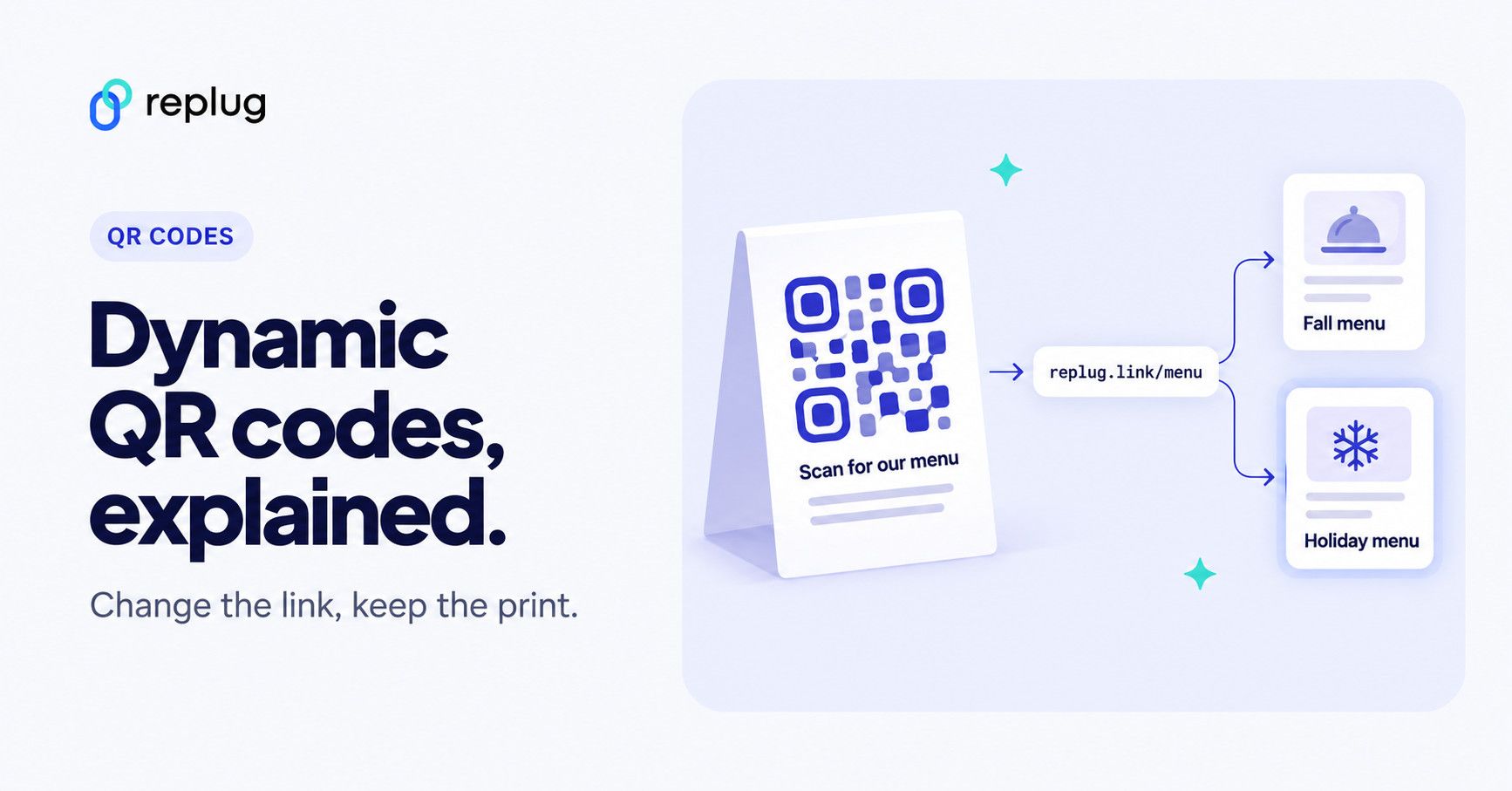
Quick answer: a dynamic QR code is a QR code that stores a short redirect link instead of the final web address. When someone scans it, their phone opens the short link, the QR provider’s server looks up where that link currently points and forwards the visitor there, counting the scan on the way. Because the printed pattern only holds the short link, you can change the destination later and see scan data without reprinting the code. The catch: the code depends on the provider’s redirect service, so it only keeps working while that service (and usually your account) does.
QR codes come with more tricks than a magician’s hat. A Dynamic QR code is all about redefining how you connect with information.
Usually, a QR code is printed on the packages or product boxes to access the product details specifications, or other information regarding the product.
However, the dynamic QR code is something most of you haven’t heard of before. You’ll be amazed at how these codes are changing the game for businesses, educators, and more.
So let’s dive deep into it and learn more about this specific type of QR code.
What is a dynamic QR code?
A dynamic QR code is a flexible, adaptable code that can be edited, replaced, and updated after its creation, enabling real-time information updates and tracking of user interactions.
The core purpose of a QR code is to direct visitors to a specific website page or information linked to it. These codes are not your standard QR codes; they transform, adapt, and offer unparalleled tracking and customization.
How does dynamic QR code work?
Dynamic QR codes are made using specific software or online tools. Users input the content they want the QR code to show, like a website link or text. The QR code generator then produces a QR code that links to a server or database where the content is kept. You can change the content even after making the QR code.
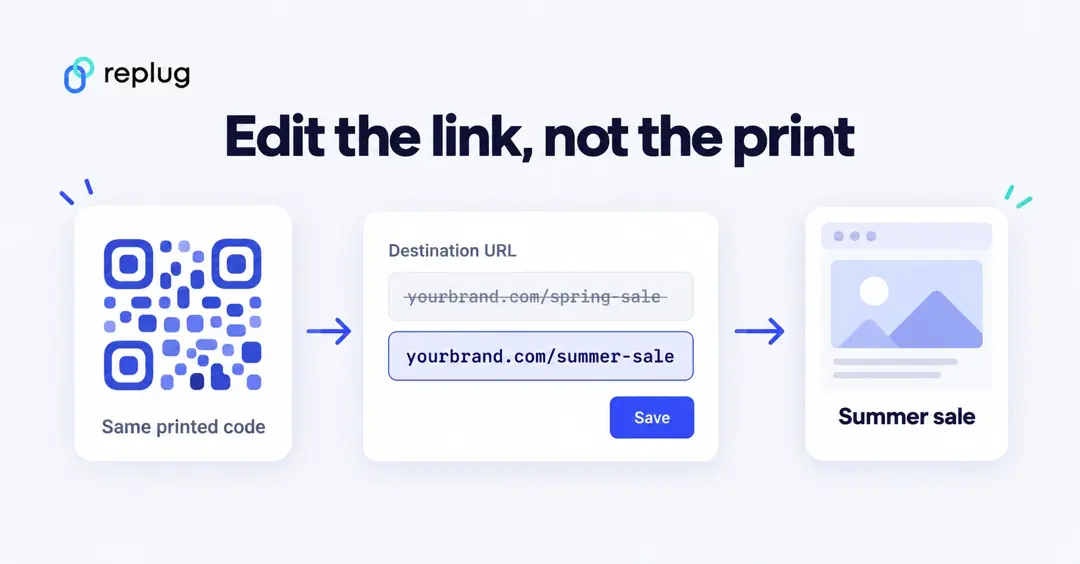
Dynamic QR codes are responsible for showcasing the QR code analytics for tracking purposes. It also provides an option to edit or alter the destination URL or link information to the QR code. Therefore, the users don’t have to generate new QR codes in case of a change in the information, such as website URL, email address, or phone number.
Moreover, a dynamic QR code also integrates with several third-party tools and softwares to analyze the digital marketing campaign performance. So that’s why it’s important for brands and entrepreneurs to embrace the effectiveness of the dynamic QR codes.
The key steps in how dynamic QR codes work are:
- Creation: A dynamic QR code is generated using a QR code generator or software. During this process, a URL (web address) pointing to the server or database is typically included in the QR code.
- User Scanning: When a user scans the dynamic QR code using a smartphone or QR code reader, the app decodes the code and sends a request to the included URL.
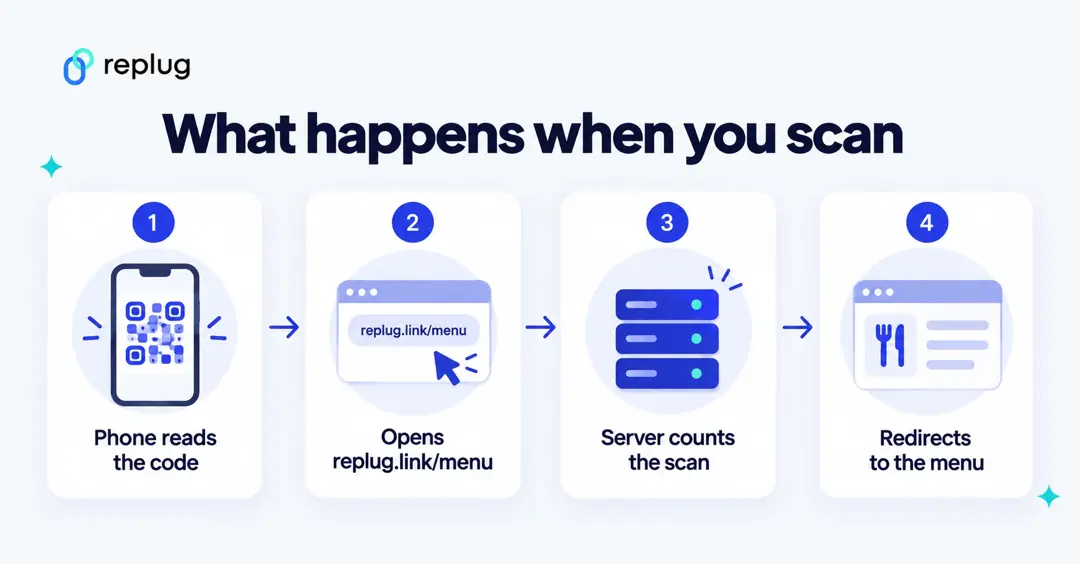
- Server Interaction: The server receives the request, looks up the destination currently saved for that short link, records the scan and redirects the phone there. The destination could be a webpage, a PDF, a menu, an app store listing or any other online content.
- Content Display: The server then sends the content back to the user’s device, which displays the updated information.
- Tracking (Optional): Dynamic QR code systems often include tracking capabilities, allowing the QR code owner to collect data on how often the code is scanned.
A dynamic QR code scan, step by step
Say Daniel Brooks, who runs a coffee shop in Austin, prints a dynamic QR code on his table tents. The code contains only a short link such as replug.link/menu.
- A customer points their phone camera at the code, and the phone reads replug.link/menu.
- The phone opens that short link, and the request goes to the QR provider’s server.
- The server checks which page replug.link/menu points to today (say, the fall menu), counts the scan with the country, device and time, and redirects the phone.
- The customer lands on the fall menu. In December Daniel changes the destination to the holiday menu in his dashboard, and the same printed code now opens the new page.
Static QR code vs. dynamic QR code
Most businesses have been using static QR codes for a while without fashioning the innovation in the process. Therefore, it’s vital to discuss the core differences between a static and dynamic QR code to bring clarity to the readers’ minds.
Let’s do a side-by-side comparison of static and dynamic QR codes to give you perspective on capitalizing on this fantastic marketing and engagement
opportunity:
| Static QR Codes | Dynamic QR Codes |
|---|---|
| Permanent | Editable |
| Non-Trackable | Trackable |
| No Retargeting Capability | Retargeting Capability |
| Long Clunky URL | Short URL |
| Denser pattern when the encoded URL is long | Simpler pattern (only a short link is encoded) |
Why the pattern size matters: according to DENSO WAVE, the company that invented the QR code, QR codes come in versions from 21 × 21 modules (the black and white dots) up to 177 × 177, and the more data you encode, the more modules the code needs. A dynamic code only stores a short link, so it usually needs fewer modules than a static code holding a long URL, which helps when you print it small. The trade-off is that every scan makes an extra trip through the provider’s redirect.
| Static QR code | Dynamic QR code | |
|---|---|---|
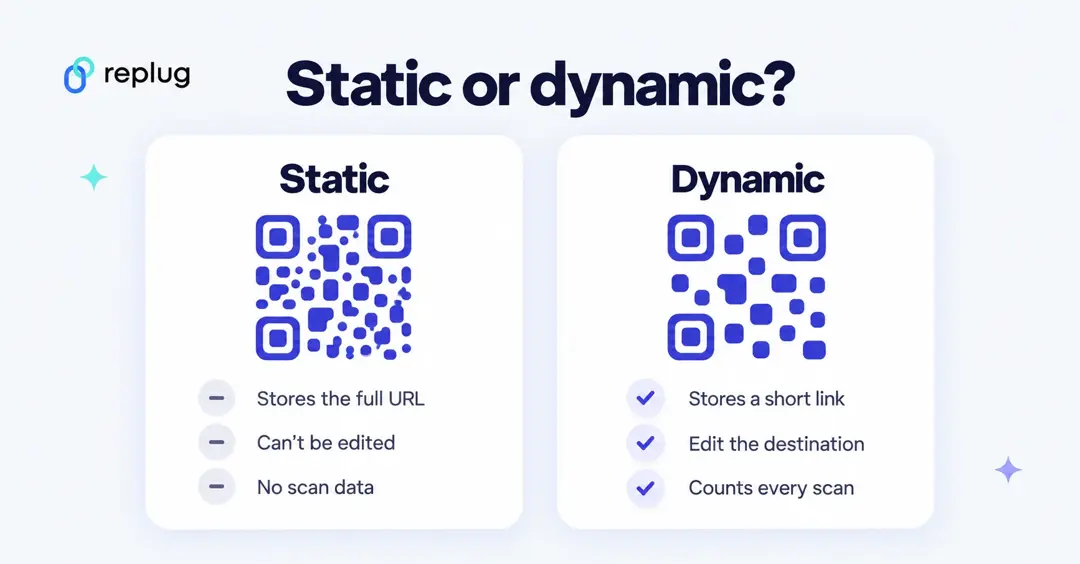
| What the code stores | The final content itself (a URL, text, WiFi details) | A short redirect link |
| Change the destination after printing | No, you have to print a new code | Yes, in the provider’s dashboard (on Replug: Scale and Agency plans) |
| Scan tracking | No, unless the destination page tracks visits itself | Yes, scans by date, place and device |
| Depends on a provider | No, it keeps working as long as the destination exists | Yes, the redirect service must keep running |
| Typical cost | Usually free to create | Often part of a free tier or a paid plan |
Static QR Code
- Static QR codes are permanent and cannot be edited, which is the key difference between both types of QR codes
- The data linked to a static QR code remains unchanged indefinitely no matter what QR software is used to create the code
- One of the factors of static QR codes is that they can’t be tracked regardless of the QR code generator
- A huge perk of creating a static QR code is that it’s free to use and the users don’t need a subscription to create a QR code
- Static QR codes are compatible with both Android and iOS devices
Dynamic QR Code
- The biggest perk of the dynamic QR codes is that they are editable and trackable, making them ideal for businesses to alter the stored information going forward
- Dynamic QR codes flawlessly redirect users to various types of information, such as website pages, videos, podcasts, and other information sources
- Users can easily store rich media content like videos, images, audio, or custom webpages using dynamic QR codes
- Dynamic QR codes are easy to create and alter anytime a user wants to update the information
- Analytics help marketers analyze the performance of their content or product. The performance of the dynamic QR codes can be tracked to analyze the campaign outcome
- A dynamic QR code campaign can provide access to detailed reports, showcasing information about the total number of scans, scan locations, scan times, and the scanning device
- Dynamic QR code allows users to integrate the QR code with third-party tools, such as Google Analytics, Zapier, and other SAAS products
Examples of QR codes
QR codes are a rapidly growing trend without a doubt. Businesses of all sizes are adopting QR codes for marketing and engagement purposes.
Let’s shed some light on the diverse use cases of QR codes to understand the acceptability of this innovation:
i. Netflix: Household verification
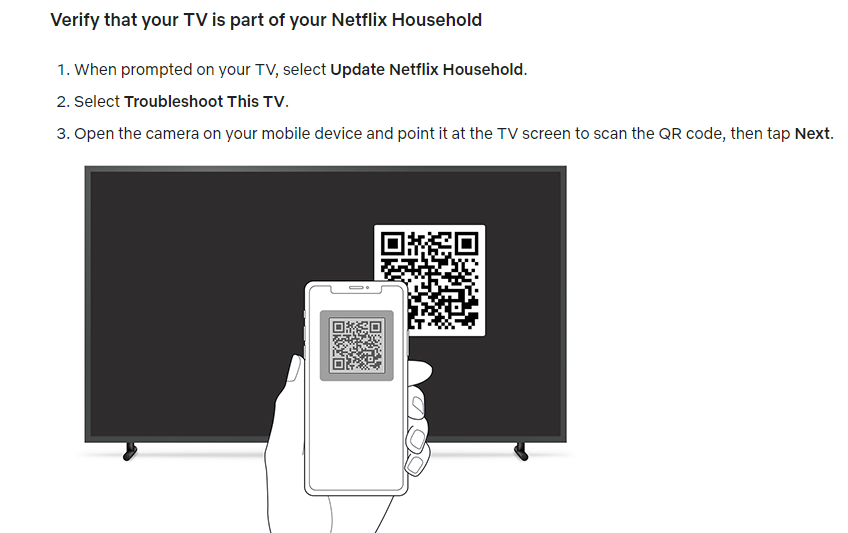
Netflix is a popular OTT streaming service that has millions of users globally. The streaming platform recently implemented a household user verification system through QR codes.
Netflix asks the users to verify their identity to ensure that the subscription is in the same household when the user logs in on a different device or through a different internet connection.
The users are required to scan the QR code using their smartphone’s camera and then they’re redirected to the Netflix app once it’s verified.
Key takeaways:
- Streamlined sign-up process, reducing friction for new users.
- Enhanced user engagement and personalized recommendations for existing users.
- An intuitive and convenient way to access the app’s features using a smartphone’s camera.
ii. AliExpress triggers app installations through the dynamic QR codes
AliExpress is a well-known Chinese e-commerce platform with customers across the globe.

This e-commerce giant has been using the QR code to direct the audience toward their respective mobile app store.
The iPhone users are redirected to the App Store, whereas the Android users are redirected toward the Google Play Store.
So it’s yet another use case of QR code that’s worth noticing. Brands could elicit this strategy and use the QR code to increase their mobile app downloads for more sales and engagement.
Key takeaways:
- Dynamic QR codes offer a streamlined and efficient way for e-commerce platforms.
- Brands could elicit this strategy and use the QR code to increase their mobile app downloads for more sales and engagement.
Use cases & uses of QR codes
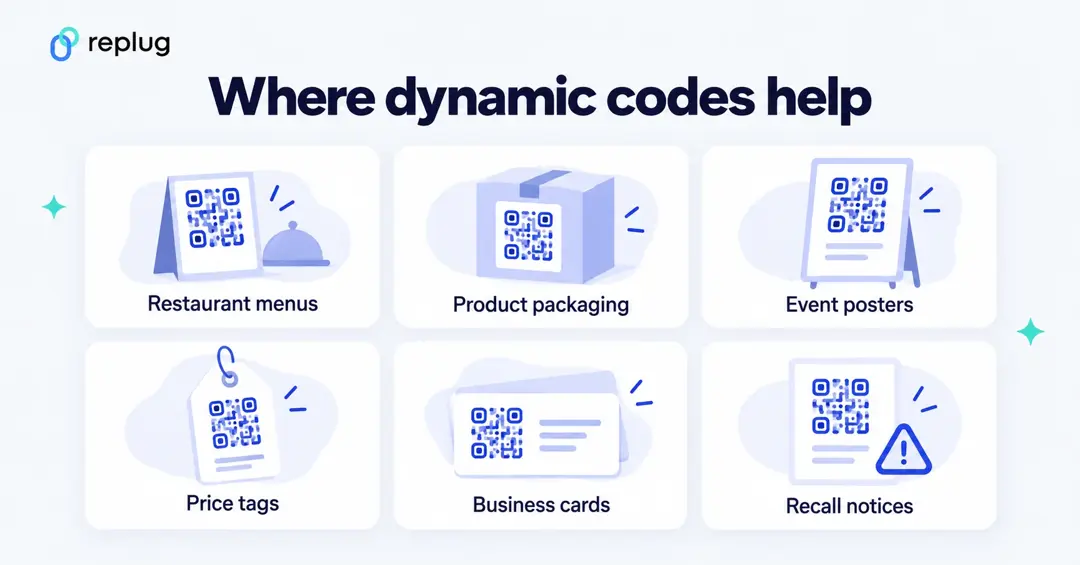
Now that we have seen some popular examples of dynamic qr codes. But the story does not end there, as there are a number of ways you can use QR codes.
Let’s have a look at the use cases below where dynamic QR codes can be valuable.
i. Marketing Campaigns:
A company runs a marketing campaign with dynamic QR codes on promotional materials. Using it, they can monitor how many times the QR code is scanned, where and when scans occur, and the conversion rate to gauge the campaign’s success.
ii. Contactless Payments:
Dynamic QR codes are employed for contactless payments, where customers can scan the code to make payments at stores, restaurants, or for online purchases.
iii. Retail price updates:
Retailers can update the pricing information on their products by utilizing dynamic QR codes on price tags. This is especially useful during sales or when price changes are frequent.
iv. Inventory tracking in a warehouse:
Warehouse staff can update the QR code to indicate changes in the contents of a shelf or aisle. This allows for accurate and up-to-date inventory tracking without the need for manual record-keeping.
v. Product recalls:
If a product recall is necessary, the company can update the QR code to provide consumers with recall instructions, replacement options, or safety information. This ensures that consumers have access to the most current and critical information.
vi. Restaurant menus:
Restaurants use dynamic QR codes on printed menus to provide customers with access to digital menus. These menus can be updated in real-time to reflect daily specials, pricing changes, or new dishes.
vii. Emergency contact information:
In case of an emergency, first responders can scan the QR code to access the person’s medical history and emergency contacts. The individual can update this information as needed, ensuring accurate data is available during critical situations.
The above cases are just to name a few. These codes can be further utilized in various services departments like travel, real-estate, event management etc. These codes essential in making life easier through real-time updates and convenient processes.
When it comes to QR codes, the benefits are greater than we think. Let’s dive in further to learn about the key benefits.
Benefits of using a dynamic QR code
Dynamic QR codes have relatively broader capabilities as compared to static QR codes. No wonder top brands, marketing agencies, and social media influencers prefer dynamic QR codes for marketing and user engagement.
Let’s take a look at some of the benefits of using a dynamic QR code:
i. Easily editable
The first and foremost benefit of a dynamic QR code is that it can be edited going forward. The information attached to a dynamic QR code can be altered if needed. On the contrary, the static QR codes can’t be edited once created. The QR code is editable, which makes the dynamic QR code a clear choice for most brands and companies. It’s one of the differentiators between dynamic and static QR codes.
ii. Track performance
Static QR codes aren’t trackable, whereas dynamic QR codes can be tracked. Performance tracking makes dynamic QR codes more effective from the data and analytical standpoint. Brands and e-commerce websites use dynamic QR codes so that they can track their products’ reach, engagement, and sales.
iii. Fast processing
Dynamic QR codes can be quicker to scan. Because they only encode a short link, they usually need fewer modules than a static code that holds a long URL (see the DENSO WAVE note above), so phones can read them more easily when they are printed small or viewed from a distance. Each scan does pass through the provider’s server before the destination opens, so a reliable provider matters. Static QR codes are generally free to create, while dynamic codes are often part of a paid plan or a limited free tier.
iv. Third-party integrations
Third-party tools integration takes any tool or service to the next level. When it comes to dynamic QR code generators, they seamlessly integrate with other tools for marketing and management. Marketers and brands may want to connect their QR codes with analytics tools to keep track of their QR codes’ performance.
v. Retargeting capability
One of the benefits of dynamic QR codes is that they can be used for retargeting the audience through ad networks such as Facebook ads and Google ads. The marketers can launch a retargeting campaign targeting the visitors who scanned the dynamic QR code and increase the likelihood of a conversion.
The catch: what to check before you print a dynamic QR code
- What happens if you stop paying. A dynamic code only works while the provider keeps the short link redirecting. Before you print thousands of flyers, read what your provider does with codes when a trial ends, a plan is downgraded or an account is closed. On Replug, links keep working if you reach a plan limit (replug.io/pricing, checked October 2026).
- Expiry settings. Some tools let you set an expiry date on purpose (on Replug, link expiry is a Scale and Agency feature). Make sure nobody sets one on a code that is already printed.
- Use your own domain if you can. If the short link inside the code is on your own domain (Replug supports custom domains on every plan, including Free), the address belongs to you, and you could set up the same paths with another service later instead of reprinting.
- Security. The FBI has warned that criminals tamper with QR codes, for example by putting stickers over real codes, to send people to sites that steal login or payment details. Check printed codes in public places, and tell customers what web address they should expect to see after scanning.
- Test before printing. Scan the final printed proof with an iPhone and an Android phone, in the light where it will hang.
How to create a dynamic QR code
Most dynamic QR generators follow the same three steps. In Replug’s QR code generator (checked October 2026):
- Choose what it opens. Pick a website, a short link, a Bio Links page or one of about 25 other content types such as a vCard, WiFi login or PDF. Website, short link and Bio Links codes are on every plan; the other types start on Essentials.
- Make it look like your brand. Start from a template, then change shapes, colors and frames (Essentials and up) and add your logo in the middle (Scale and Agency).
- Download, print and track. Download PNG or JPEG for screens and SVG or PDF for print. Every scan shows up in your analytics: scans and unique scans by country, city, device, OS and browser.
For a full walkthrough with screenshots of the current Replug app, see the steps under “Add a dynamic QR code to your website using Replug” below.
How to edit a dynamic QR code
You never edit the printed pattern. You edit the short link behind it: open the code or its short link in your QR tool, change the destination URL and save. The next scan goes to the new page. On Replug, changing a printed code’s destination is part of the Scale and Agency plans; on Free and Essentials the destination stays the one you set. More detail is in our guide to editing a QR code.
Add a dynamic QR code to your website using Replug
Adding a dynamic QR code to your website, landing page, or app would be a game-changer in engaging prospective customers or new visitors from a standpoint.
Since the QR code makes it easier for the visitors to access the stored information, the visitors would be able to access the URL or other information swiftly.
Replug is one of the best URL shortening and link management tools out there. You can use its free URL changer to create trackable, shortened links that enhance your campaigns with powerful analytics and seamless management.
One of the most significant features of Replug is QR code generation for the shortened URLs. Here’s how you can add a dynamic QR code to your website link using Replug:
Replug QR plans, checked October 2026: according to replug.io/qr-code-generator and replug.io/pricing, every Replug QR code runs through a branded short link, on your own domain if you add one, so every code is dynamic and tracked. The Free plan includes 10 smart QR codes, Essentials 100 and Scale and Agency unlimited. Scan history is kept for 14 days on Free, 90 days on Essentials and without a limit on Scale and Agency. Changing a printed code’s destination and adding a logo are Scale and Agency features. The steps below show the current Replug app.
Step 1: Log in to your Replug account
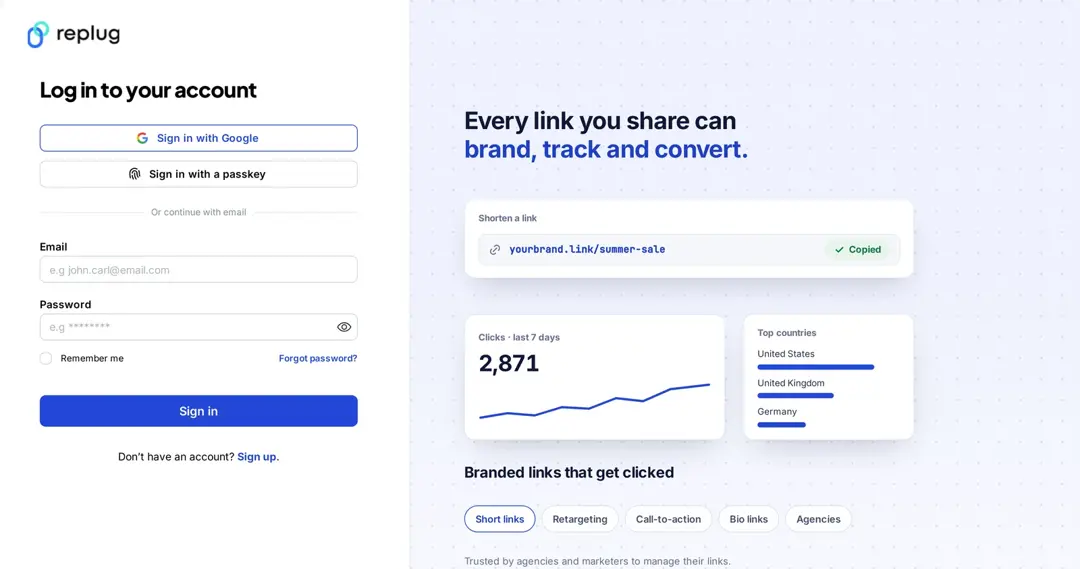
Start by logging in to your Replug account using your credentials.
Create a free account if you haven’t tried it yet. Replug has a Free plan with 10 smart QR codes, and a 14-day free trial on paid plans.
Step 2: Generate a short link
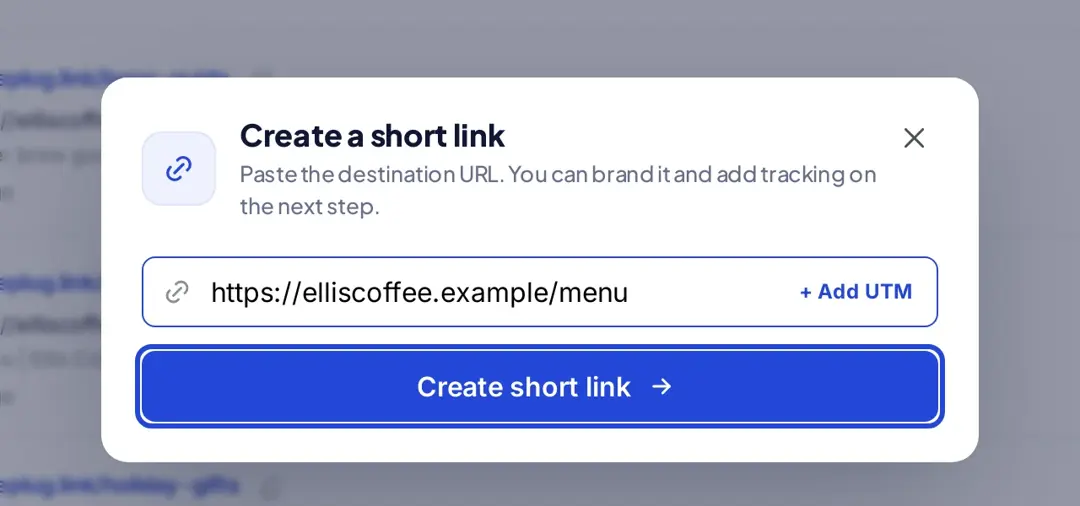
After logging in, the next thing you should do is to generate a short link that you want to associate with a QR code: click “Create link”, paste a link to your website, content, or any other online resource, and click “Create short link”. Every short link can get its own QR code.
Step 3: Open the “Links” page
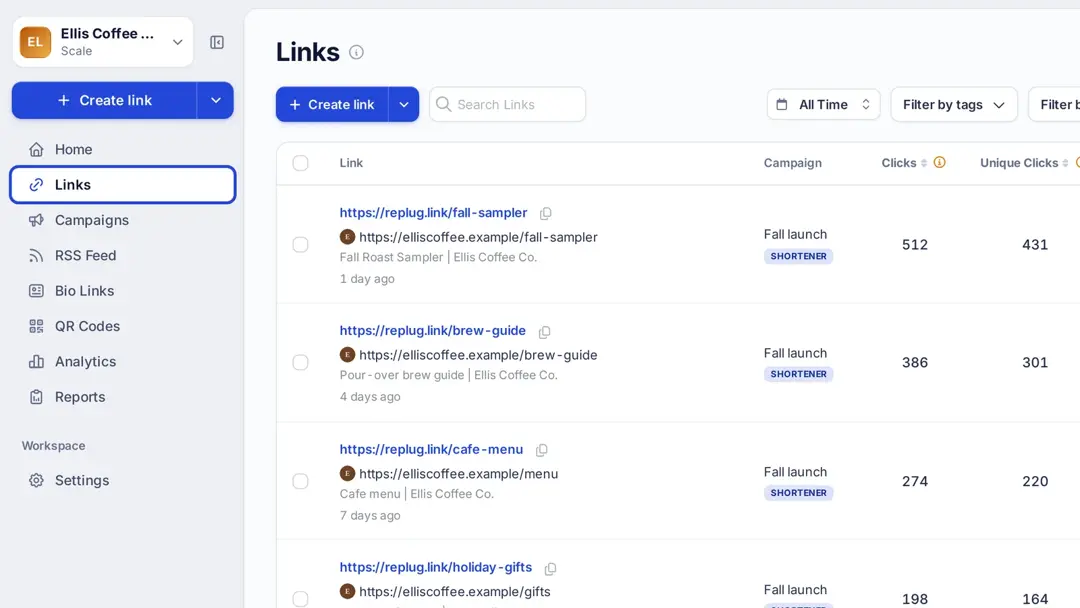
Once a short link is created, click “Links” in the left sidebar to see all your short links.
Step 4: Locate the link
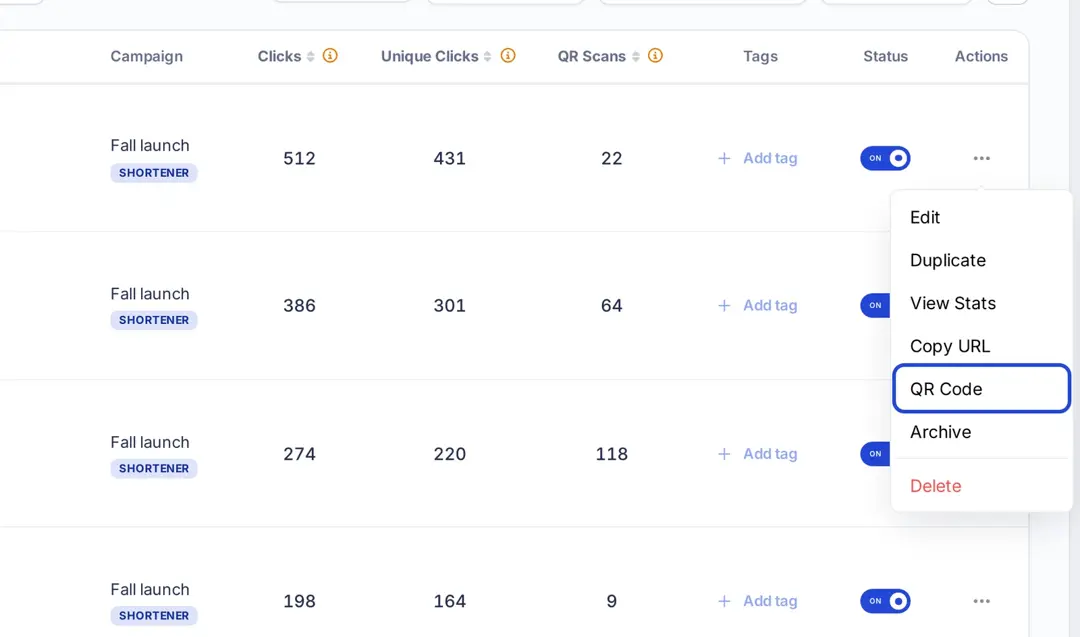
Now locate the specific link you want to download the QR code for to proceed. To get the QR code for the short link you generated, open the actions menu by clicking the three-dot icon in the Actions column of that link.
Step 5: Download the QR code
Upon clicking on the three-dot icon, a menu would appear. Click on the option that says “QR Code.” Replug opens the QR code editor for that short link, where you can pick colors and a shape. Click “Create QR Code”, then open the “Download” menu and choose SVG, PNG, JPEG or WEBP.
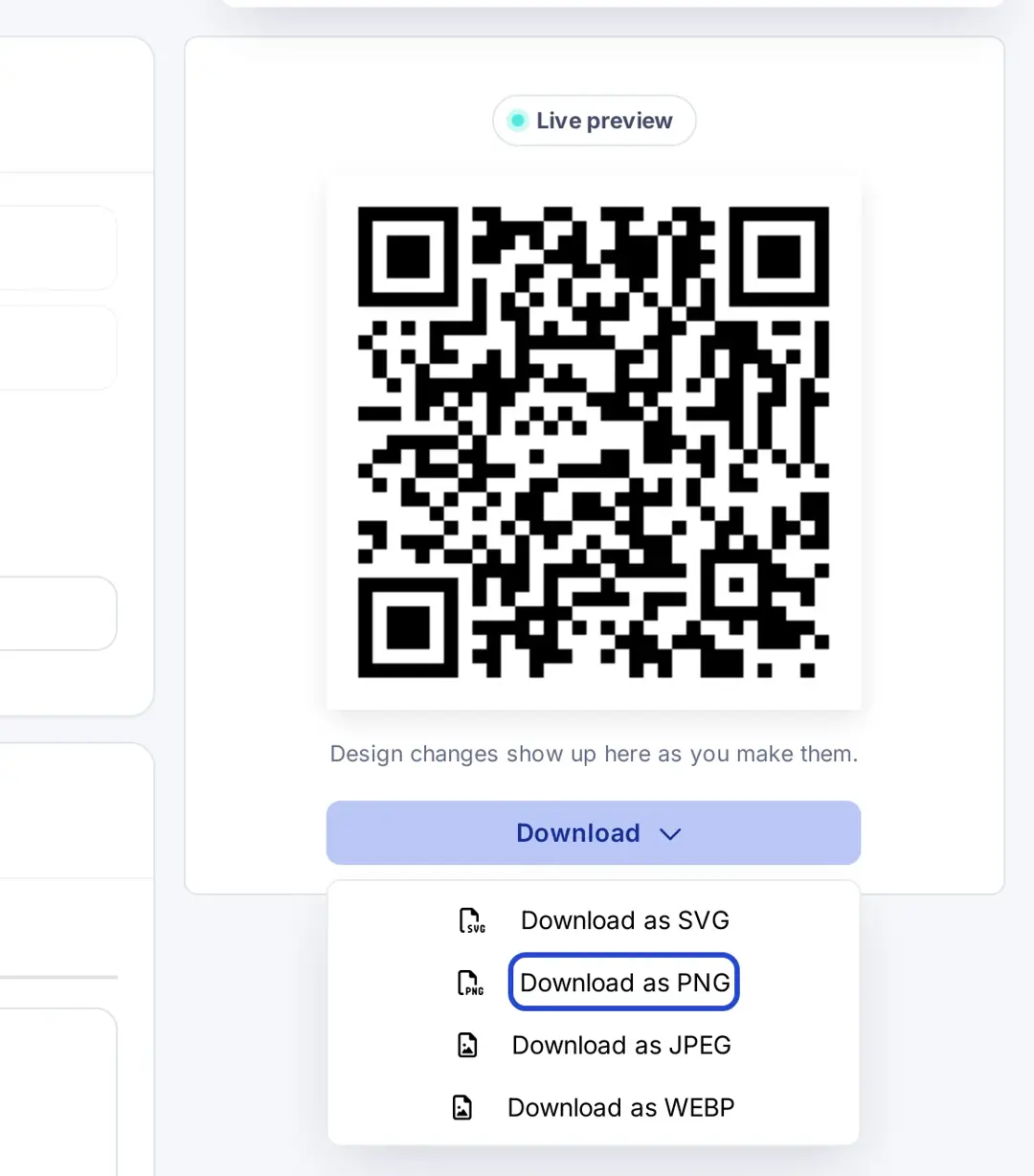
Once you’ve picked a format, the image of the QR code will be saved to your device. That will be your dynamic QR code for that specific link.
That’s it!
Let’s take a look at some of the commonly asked questions about QR codes:
FAQs about QR codes

Muhammad Ahsan Jamal