Social media management tools let you plan, publish, answer and measure posts for many accounts from one place. The audience is huge: according to DataReportal’s social media statistics, there were 5.81 billion social media user identities at the start of October 2026, close to 7 in 10 people on Earth. Choosing between the best social media management tools can help you reach them by streamlining your workflow, maintaining a consistent presence, and boosting social media engagement.
With social media being an ever-evolving space, it is vital to use reliable social media management tools and remain at the forefront of the AI-driven digital era.
Social media management tools and apps are meant to streamline the processes involved in managing digital presence across numerous social media platforms.
In this guide, we compare 14 social media management tools available in 2026, with prices checked on each vendor’s own pricing page in October 2026, explain why teams use them, and share tips for choosing the right tool for your needs.
Quick answer: the best social media management tool depends on your budget, how many accounts you run and who works on them. Buffer, CoSchedule and Agorapulse have free plans for getting started; Sendible, SocialPilot and CoSchedule are built around agency work with client workspaces and white-label reports; Sprout Social, Hootsuite and Sprinklr target larger teams that need listening, approval chains and enterprise support.
Quick overview of the best social media management tools
Let’s look at the summarized differences between the 14 social media management tools in this guide.
| Tools | Key features | Starting price (checked October 2026) | Best for | Social analytics | Collaboration features |
|---|---|---|---|---|---|
| ContentStudio | Content curation, bulk scheduling, analytics, detailed reports | $19/month (Standard, billed annually) | All-in-one social media management and marketing for individuals and businesses | Advanced analytics | Team workflows, approval process |
| Buffer | Simple scheduling & analytics | Free plan; paid from $5 per channel/month (billed yearly) | Individuals and small teams | Post-performance metrics | Approval workflows on the Team plan |
| Hootsuite | Multi-platform management & social listening | €99 per user/month (billed annually) | Large teams and agencies | Advanced reports, ROI tracking | Team assignments, permissions |
| ContentBridge | Frontline content capture, multi-level approvals, audit trail | From $499/month for up to 100 users | Large organizations with frontline teams | Post audit trail | Multi-level approval workflows |
| Sprout Social | Advanced analytics, CRM features, social listening | $79 per seat/month (Essentials, billed annually) | Enterprise social media management | Comprehensive analytics, competitive analysis | Task assignment, workflow tools |
| Agorapulse | Inbox management, reporting, team collaboration | Free plan; paid from €79 per user/month | Medium and large-scale businesses | Custom reports, ROI calculation | Shared calendars, team roles |
| Sendible | Custom reporting, content suggestions, CRM | From €31/month, unlimited users | Agencies and multi-client management | Branded reports, sentiment analysis | Client management, team workflows |
| SocialPilot | Bulk scheduling, content curation, white-label reports | €24.65/month (billed annually) | Small to medium businesses | Basic analytics, white-label reports | Client management, team roles |
| CoSchedule | Marketing calendar, workflow management | Free plan; paid from $29/month (billed annually) | Content marketing and team coordination | Basic social analytics | Task management, team calendars |
| Later | Visual content planning, user-generated content tools | $18.75/month (billed yearly) | Instagram focused marketing | Post-performance metrics | Collaboration and approvals from the Growth plan |
| MeetEdgar | Content recycling, category-based scheduling | $24.91/month (billed annually) | Evergreen content management | Basic engagement metrics | Up to 20 team members on every plan |
| HubSpot Marketing Hub | Social publishing, keyword monitoring, CRM-linked interactions | See HubSpot’s pricing page | Teams already using HubSpot | Social reports in Marketing Hub | Shared HubSpot CRM |
| Soshie by Sintra AI | AI assistant that drafts, designs and schedules posts | Included in Sintra AI plans | Small businesses that want an AI helper | Not its focus | Not its focus |
| Sprinklr Social | Listening, publishing, engagement, governance | Custom pricing | Enterprises with many brands or markets | Advanced analytics | Approvals and governance |
Prices were checked on each vendor’s own pricing page in October 2026. Some pages showed us prices in euros (€); prices in your country may differ and taxes are extra, so confirm on the vendor’s site before you buy.
What is a social media management tool?
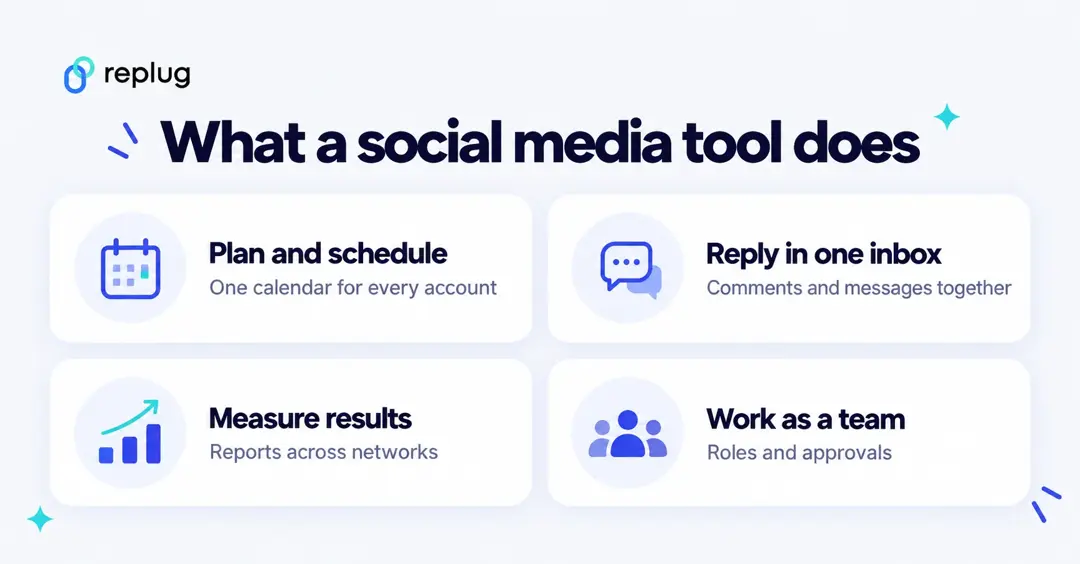
A social media management tool helps users connect and manage multiple social media accounts from a single platform. These tools offer comprehensive features to streamline and enhance social media marketing efforts.
Key features often include post scheduling, competitor analysis, and social media analytics—each playing a vital role in optimizing campaign performance. Many of these tools also integrate with third-party apps to boost content effectiveness. For example, pairing your scheduling platform with a URL shortener like Replug enables you to track link performance, optimize engagement, and create short URLs that strengthen brand identity.
When choosing a social media management tool, consider factors like user-friendliness, integration options, analytics capabilities, collaboration features, and scheduling flexibility to find the best fit for your needs.
While we will be discussing this criterion in great detail later, let’s dive straight into the best social media management platforms you should explore in 2026.
14 best social media management tools
- ContentStudio
- Buffer
- Hootsuite
- ContentBridge
- Sprout Social
- Agorapulse
- Sendible
- SocialPilot
- CoSchedule
- Later
- MeetEdgar
- HubSpot Marketing Hub
- Soshie by Sintra AI (Bonus tool)
- Sprinklr Social
1. ContentStudio

ContentStudio comes at the very top of the list of best social media management tools. It can connect with all major social media platforms, including Facebook, Twitter, Instagram, TikTok, LinkedIn, Meta Threads, Tumblr, Google Business Profile, Pinterest, YouTube, and Bluesky.
Moreover, ContentStudio also supports integration with the top URL shorteners, image editing platforms, and carousel generator, enhancing your social media content creation process.
The versatile features of ContentStudio, including content discovery, scheduling, detailed analytics, automation, and an AI-powered content generator, make it a great platform for end-to-end social media management.
Moreover, ContentStudio has a built-in ‘best time to post’ mechanism that allows you to post your content at the perfect time and reach more people. Most importantly, you don’t have to break the bank in social media management with ContentStudio, as its Standard plan costs $19 per month billed annually.
Key features
- An intuitive and user-friendly interface makes it easy to explore and use different features of ContentStudio.
- An aggregated social inbox allows you to view, manage, and respond to all the comments, mentions, and messages on social media accounts from the same place.
- Comprehensive automation options include bulk upload, converting RSS feeds to social media, and recycling evergreen content.
- AI-powered writing assistant to help users speed up the process of writing social media captions, hashtags, social media posts, and even images before scheduling and publishing them.
Price
According to ContentStudio’s pricing page (checked October 2026), Standard costs $19 per month, Advanced $49 per month and Agency Unlimited $99 per month, each billed annually, with a 7-day free trial.
2. Buffer

Buffer is a highly user-friendly social media management tool. It enjoys massive popularity among small businesses and individuals due to its affordability and ability to perform the most necessary functions.
It offers several features to streamline social media management, including regular post scheduling, engagement analytics, and landing page creation. Moreover, Buffer’s collaborative features make it a reliable tool for brands with multiple social media team members.
Buffer also includes Start Page, a simple landing page with links to your content. On Buffer’s pricing page, a Start Page counts as one channel toward your plan.
Buffer’s Free plan comes with basic Insights, while the Essentials and Team plans add advanced analytics. Teams that need social listening or custom reports usually look at the bigger tools below.
Key features
- Create generic social media posts or platform-specific posts to reach more people on social media.
- Buffer has a built-in AI assistant that generates a lot of social media content ideas within a few seconds.
- Insights on the Free plan and advanced analytics on Essentials and Team.
Price
Buffer pricing model is quite flexible as it is dependent on the number of channels you want to manage through the platform.
On Buffer’s pricing page (checked October 2026), the Free plan covers up to 3 channels with 10 scheduled posts per channel. Essentials costs $5 and Team $10 per channel per month, billed yearly ($60 and $120 per channel per year), and both come with a 14-day free trial.
3. Hootsuite

Hootsuite is one of the most popular social media management tools. It has made its mark by being an all-in-one platform for creating and scheduling content for all major social media platforms. In addition to organic social media marketing, Hootsuite also supports running social media ads.
Like most other tools, Hootsuite has integrated AI (it calls it Wisdom) to draft content and social media posts. It is a strong fit for well-established brands with many social media accounts. The only disadvantage, however, is that Hootsuite is quite complicated for beginners to understand and use.
Key features
- Schedule unlimited posts from one calendar: the Standard plan covers up to 10 social accounts, Professional and above cover unlimited accounts.
- It supports integration with many third-party apps, such as Canva and Dropbox, to improve your social media management strategies.
- View the messages and mentions and respond to them from Hootsuite’s inbox.
Price
Hootsuite’s pricing starts at €99 per user per month on the Standard plan, billed annually (Hootsuite showed us euro prices in October 2026), making it an expensive option that is mainly suitable for medium- and large-sized companies.
According to Hootsuite’s plans page (checked October 2026), Standard costs €99, Professional €199 and Advanced €399 per user per month billed annually, Enterprise is priced on request, and every plan starts with a 14-day free trial.
4. ContentBridge
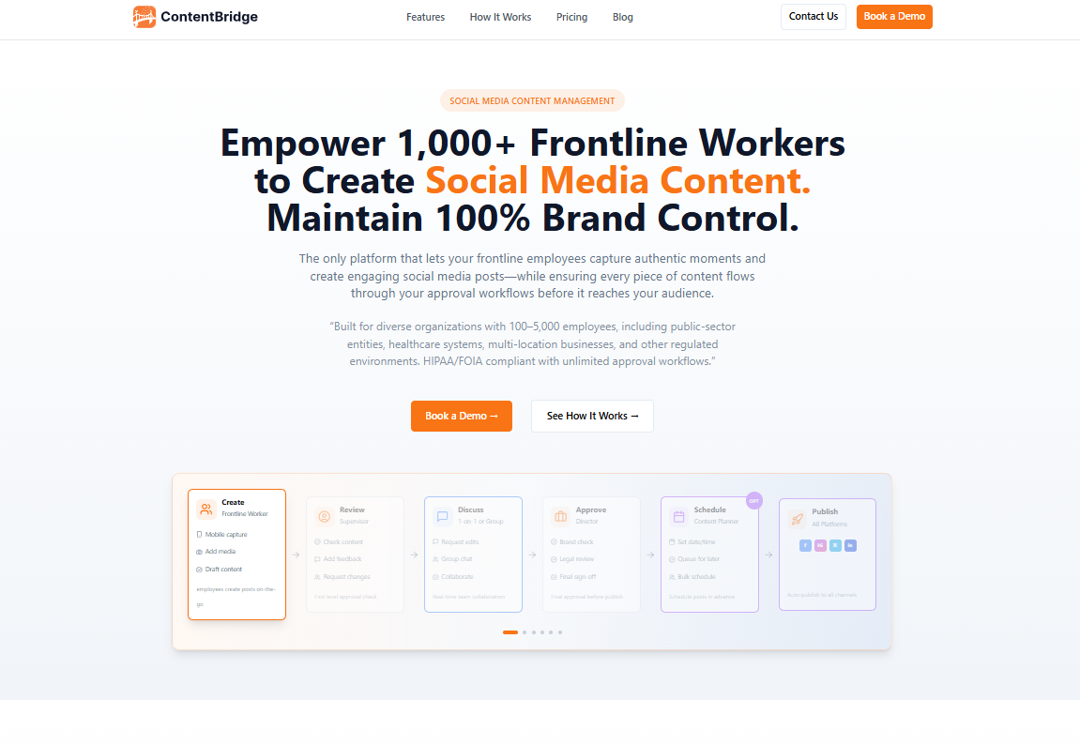
ContentBridge is a social media management platform for large organizations with a distributed workforce. Frontline employees capture photos, draft posts and submit them from iOS and Android apps, and a multi-level approval chain decides what gets published, so nobody shares the passwords to the official accounts.
According to its site (checked October 2026), it publishes to Facebook, Instagram, X and LinkedIn, keeps an audit trail of every action, and was accepting pilot organizations. It isn’t aimed at small teams or solo creators.
Key features
- Customizable multi-level approval workflows to maintain brand consistency across distributed teams.
- Native iOS and Android apps for real-time content capture and submission from the field.
- Optional AI assistance for captions, tone and hashtags.
- An audit trail for every post, exportable to CSV, PDF and Excel.
Price
Price: From $499 a month for up to 100 users, with a 14-day free trial (ContentBridge’s site, checked October 2026).
5. Sprout Social

Sprout Social is an all-in-one social media management platform most suitable for medium and large-scale businesses. Its features include automated posting, detailed analytics, and wide-ranging connectivity with social media platforms like Facebook, Pinterest, YouTube, and X (Twitter).
Moreover, Sprout Social also offers third-party integration with tools like UserVoice and Zendesk to streamline social media management processes. Sprout Social is priced for established teams: its Standard plan costs $199 per seat per month.
Key features
- Post your content on social media with the highest chances of engagement via ViralPost.
- A comprehensive inbox to manage communication on all social media platforms from the same platform.
- Measure and track the performance of all your social media marketing campaigns with thorough reports.
Price
On Sprout Social’s pricing page (checked October 2026), the Essentials plan costs $79 per seat per month billed annually ($99 billed monthly) for up to 5 social profiles. Standard costs $199, Professional $299 and Advanced $399 per seat per month on annual billing, Enterprise is custom, and there is a 30-day free trial.
6. Agorapulse

Agorapulse is another app for social media management that focuses on building a robust online community with the help of constant competitor analysis and monitoring. Its user-friendly interface makes managing your social accounts and running marketing campaigns from a single platform easy.
Agorapulse prices its plans per user, so the cost grows with your team. It also has a free plan and a 30-day free trial with no credit card required.
Key features
- Multiple tools to curate content for different social media platforms.
- Optimize the existing as well as new content to increase engagement.
- Comprehensive performance analysis to track the progress of your social media campaigns.
- AI-powered writing assistant to write captivating captions and posts.
Price
According to Agorapulse’s pricing page (checked October 2026; shown to us in euros), Standard costs €79, Professional €119 and Advanced €149 per user per month on annual billing, and a Custom plan is available for large teams.
7. Sendible

Sendible is built for agencies and brands that manage several clients or locations, and every plan includes unlimited users. Its Core plan, for one or two brands, covers the basic social media management needs of an individual or a startup.
It covers scheduling to the major networks, monitoring and replying, and reports. Custom branded reports start on the Premium plan, and white label is available as an add-on on the Elite and Enterprise plans.
Key features
- A comprehensive shareable calendar to facilitate communication and collaboration among the social media and content team.
- Performance analytics to analyze the key metrics of your social media and tweak the marketing strategies for better results.
- Provide recommendations about optimum posting times to help users post at a perfect time and reach more people.
Price
According to Sendible’s pricing page (checked October 2026; shown to us in euros), Core costs €31, Plus €85, Premium €175, Elite €275 and Enterprise €675 per month, with a 14-day free trial and no card required.
8. SocialPilot

If you are looking for an app for social media management with impressive collaboration features, you should check out SocialPilot. Its user-friendly interface also makes it a reliable tool for beginners and small businesses.
Whether you are looking for content curation, thorough performance analytics, or a centralized dashboard to manage all social networks, you will get these features in SocialPilot.
Key features
- Connect up to 50 social media accounts on SocialPilot’s Ultimate plan.
- A built-in AI assistant to help you write and generate captions, hashtags, and the overall content of your social media accounts.
- An extensive library to help you generate content for various industries like tech, education, and health.
Price
SocialPilot’s plans page (checked October 2026; shown to us in euros) lists Essentials at €24.65, Standard at €40.80, Premium at €80.75 and Ultimate at €161.50 per month billed annually, with a 14-day free trial. White label reports start on Premium.
9. CoSchedule

CoSchedule is quite different from the other social media management tools on this list. It has a special focus on planning a comprehensive social media content calendar. You can use this drag-and-drop calendar to schedule, organize, and publish your social media posts across Facebook, Instagram, X, YouTube, LinkedIn, Tumblr, and Pinterest.
A user-friendly calendar provides an overall view of your social media content strategy, making it easier to plan and execute campaigns effectively. CoSchedule can also promote other types of content, such as blog posts or upcoming events.
Key features
- Create your own social sharing templates and plan so you can reuse them and save time.
- Use the ReQueue feature to repost your top-performing social media posts and get more engagement.
- Use a CSV file import to upload and schedule all your social media posts in bulk across multiple social media platforms.
Price
CoSchedule has a free plan for 15 scheduled posts on 1 profile. Starter costs $29 and Professional $49 per month billed annually ($39 and $59 billed monthly), Suite plans start at $69 per month, and Starter and Professional come with a 14-day free trial (CoSchedule’s pricing page, checked October 2026).
10. Later

Later was initially an Instagram scheduling tool. It has now rebranded itself into a full-fledged social media management tool. The platform has a centralized dashboard through which you can connect and manage your social media accounts.
The user-friendliness of Later means anyone can learn its usage quickly. Other than agencies and growing businesses, individuals can also use Later to grow their presence on social media. The tool still has many features specific to Instagram, so Later is a great platform for people focused on growing their Instagram accounts.
Keep in mind that the Starter plan includes one user and one social set; Later’s Growth plan adds collaboration and faster approvals.
Key features
- An intuitive drag-and-drop calendar to make scheduling social media posts easy for the users.
- Make the links trackable to monitor the landing page’s performance and social media metrics.
- View all comments, brand mentions, and messages in the same section to produce relevant responses.
Price
Later’s pricing page (checked October 2026) lists Starter at $18.75, Growth at $37.50 and Scale at $82.50 per month billed yearly, each with a 14-day free trial.
11. MeetEdgar

MeetEdgar is a highly automated social media management tool. It allows you to schedule your social media posts in advance and repeat your top posts occasionally to reach more people. This feature of automatically filling your queue with evergreen posts is unique in MeetEdgar.
The overall interface and organization settings of MeetEdgar are also quite impressive. You can categorize your content into different categories for posting at suitable times.
MeetEdgar focuses on scheduling and recycling posts rather than listening or in-depth reporting, so teams that need those usually pair it with another tool.
Key features
- Create a large, personalized content library to save time when posting on social media.
- Automate the posting process by either scheduling new posts or reposting your evergreen content.
- MeetEdgar includes an AI assistant called Inky to help users generate social media post captions and hashtags.
Price
MeetEdgar’s pricing page (checked October 2026) lists the Eddie plan at $24.91 per month ($299 billed annually) and the Edgar plan at $41.58 per month ($499 billed annually). Every plan includes 20 team members and a 30-day free trial; there is no free plan.
12. HubSpot Marketing Hub
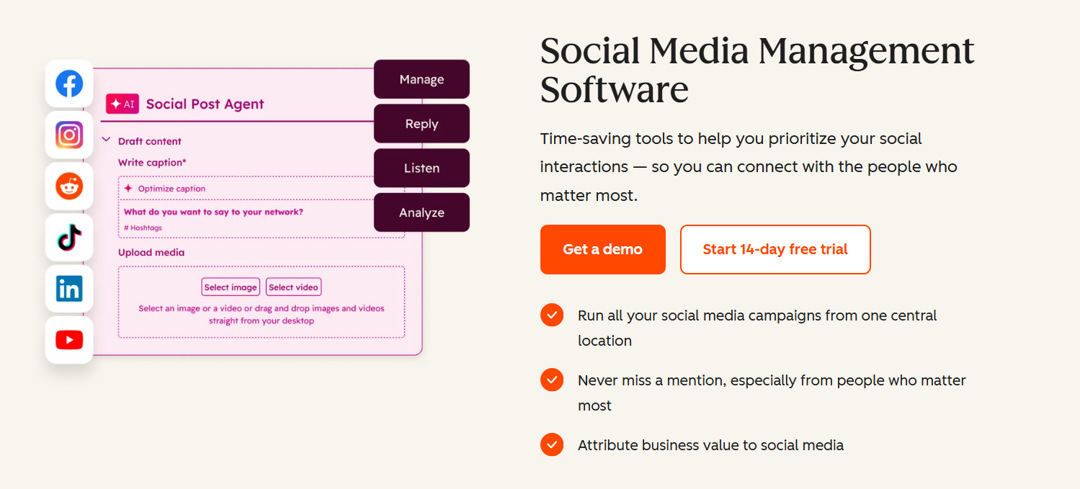
HubSpot’s social media management tools are part of Marketing Hub. According to HubSpot’s social media software page (checked October 2026), you can draft posts with its AI social post generator (in beta), publish to LinkedIn, Facebook, Instagram, TikTok, Reddit and X, get suggested posting times, monitor keywords and mentions, and connect social interactions to the HubSpot CRM to report on results.
It makes most sense for teams that already run email, ads and their CRM in HubSpot and want social media in the same place. If you only need a scheduler, the dedicated tools above are simpler.
Key features:
- AI social post generator (beta) for drafting posts.
- Publishing to LinkedIn, Facebook, Instagram, TikTok, Reddit and X.
- Keyword and mention monitoring.
- Social interactions linked to contacts in the HubSpot CRM.
Price:
Social tools come with Marketing Hub, which has a 14-day free trial. HubSpot’s pricing page did not load its prices for us in October 2026, so check the current Marketing Hub tiers on HubSpot’s site.
13. Soshie by Sintra AI (Bonus tool)
Soshie is the social media “AI employee” from Sintra AI. According to Sintra’s Soshie page (checked October 2026), it plans, writes and designs posts, learns to write in your tone, and schedules posts on Instagram, Facebook, LinkedIn and more.
Soshie is not a team publishing platform like the tools above; it is an AI assistant for small businesses that want help producing posts. It is part of Sintra’s AI team and is included in all Sintra AI plans.
Key features:
- Plans campaigns and drafts captions and posts.
- Designs images for posts.
- Learns your brand’s tone of voice.
- Schedules posts on Instagram, Facebook, LinkedIn and more.
Price:
Soshie is included in all Sintra AI plans; see Sintra’s pricing page for current prices.
14. Sprinklr Social
Sprinklr Social is Sprinklr’s enterprise social media management platform. Sprinklr describes it as one platform for social listening, publishing, engagement, commerce, advertising, customer service and advocacy, with governance across teams, markets and brands.
Beyond scheduling, Sprinklr Social combines AI-powered content assistance, a unified inbox, approval workflows, and advanced analytics to simplify day-to-day social operations. Its reporting and governance capabilities make it particularly useful for organizations managing multiple brands, markets, or regional teams. The tradeoff is that the platform offers a broader enterprise feature set than many SMB-focused tools, so it may require more setup than lightweight schedulers.
Key features
- Schedule and publish content across multiple social media platforms from a centralized dashboard.
- Manage messages, comments, and customer interactions through a unified omnichannel inbox.
- Measure campaign performance with AI-powered analytics, customizable dashboards, and executive-ready reports.
- Streamline collaboration with approval workflows, user permissions, and governance controls.
- Generate AI-powered captions, images, and videos directly within the publishing workflow to accelerate content creation.
Price
Custom pricing: Sprinklr does not publish prices and offers a call with its team instead (checked October 2026).
Importance of social media management tools
Most businesses, organizations, and individuals have multiple social media profiles across different platforms. It is not always easy to manage these accounts from a social media platform’s built-in tools with limited functionalities. As a result, using third-party social media management tools like the ones discussed above is important to get the following benefits:
- Manage your social media content and campaigns across multiple channels.
- Streamline the social media management processes, including content creation, automation, scheduling, and publishing posts at the most suitable times.
- Track the performance of your overall social media account and individual posts to measure your progress in real-time.
- Keep up with the continually changing social media trends to ensure your content aligns with the new industry trends.
- Enhance your engagement with the audience through consistent posting.
In short, using a comprehensive social media management tool is important for end-to-end social media management.
Key features to look for in a social media management tool
Now that you are familiar with the best social media management platforms available in 2026, you are probably wondering how you can choose the best tool in the first place. You can do it by looking for the following features in these tools:
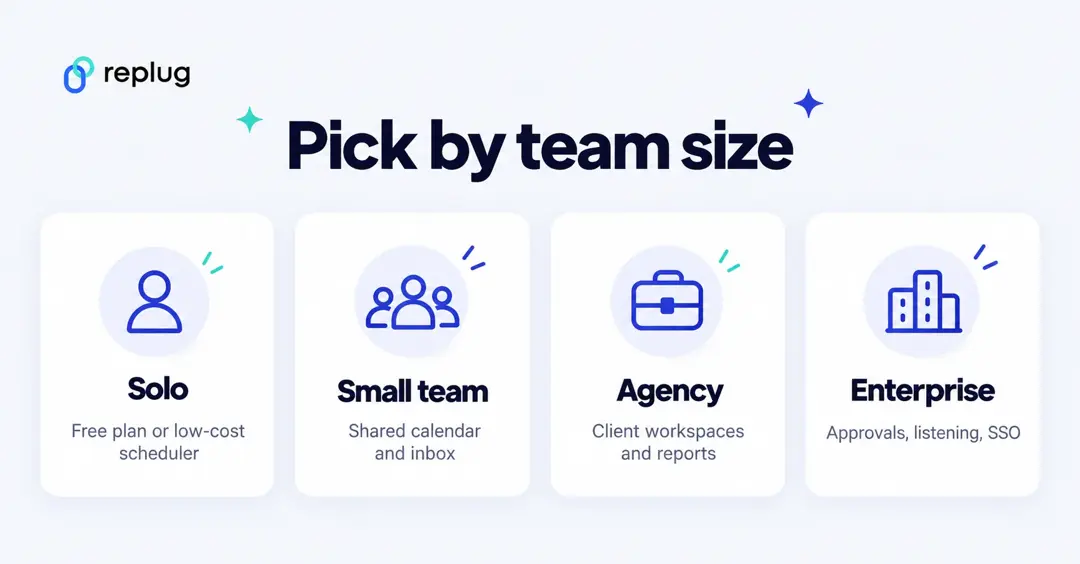
Start with who will use the tool:
- Solo creators: a free plan (Buffer, CoSchedule, Agorapulse) or a low-cost scheduler is usually enough.
- Small teams: look for a shared calendar, one inbox and approvals (Buffer Team, Later Growth, SocialPilot Standard).
- Agencies: look for client workspaces, client approvals and white-label reports (Sendible, SocialPilot Premium, CoSchedule Professional).
- Enterprises: look for approval chains, social listening and single sign-on (Sprout Social, Hootsuite Enterprise, Sprinklr).
Then check the features below.
Dashboard usability
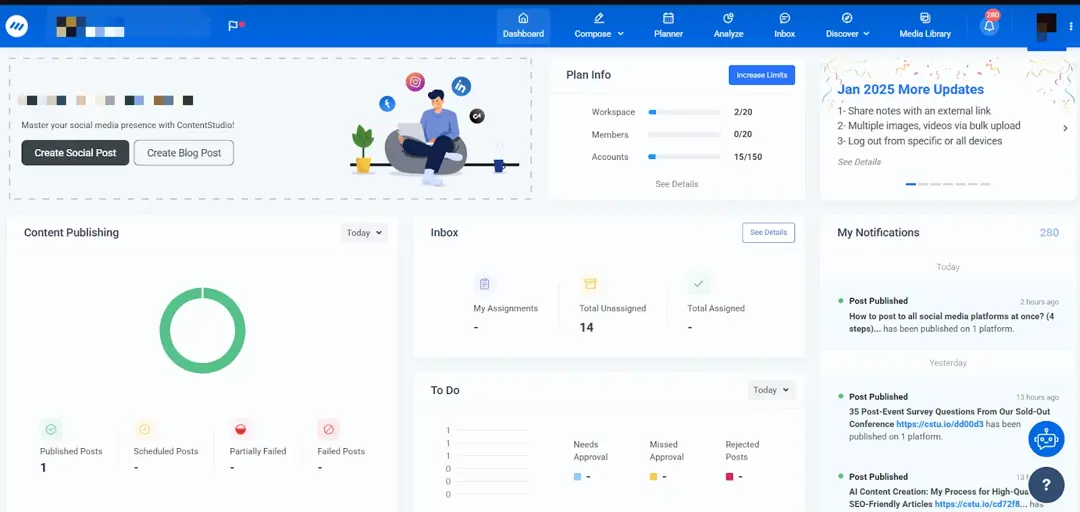
The first thing you must look for in a social media management tool is its dashboard usability. Since a tool is meant to manage and analyze multiple social media accounts, the tool’s dashboard should be simple and efficient for juggling all social accounts.
Integration capabilities
Considering the integration capabilities is another important factor. Generally, a social media management tool should be capable of connecting with all major social media sites, such as X, Facebook, Instagram, TikTok, LinkedIn, YouTube, Tumblr, and new social media platforms like Threads and Bluesky.
It is always a good idea to analyze your specific requirements and list the platforms you are using to ensure you can manage them with a social media management app. Having multiple integration options means you can schedule and post your content across multiple platforms from the same dashboard.

Comprehensive analytics and reporting tools
Making sure your content is relevant and engaging enough for your target audience is vital to continually grow your business. At the same time, it is not always easy to determine what kind of content is performing well across different social media platforms.
This is where using a social media management platform with comprehensive analytics and reporting tools becomes integral for your social media success.
Analyzing the key performance metrics of your social media posts will help you determine the effectiveness of your current social media strategies. Moreover, you can use such information to make any required changes to your social media and optimize your content for better reach.

Advanced scheduling and publishing features
An ideal social media management tool has advanced scheduling and publishing features. Keep in mind that most social media platforms do provide built-in schedulers, but they have very limited functionalities.
Therefore, you should go for a powerful social media content scheduler that has a user-friendly method of curating a content calendar. Moreover, with the rising use of AI, you should look for a tool equipped with a modern AI writing assistant to help you speed up writing captions and hashtags before scheduling such posts.
Effective social media engagement features
According to DataReportal, close to 7 in 10 people on Earth used social media at the start of October 2026. Reaching and answering that audience involves using a suitable social media management app. Ideally, it should have features to manage messages, comments, and mentions from the same platform. This ultimately improves communication and audience engagement.
Related: Social media retargeting: What is it & how it works?
Collaboration and team management options
Handling multiple social media platforms and curating different types of content can be quite overwhelming, especially for new and growing businesses. As a result, it is common to have multiple team members handling social media.
Therefore, it is important to choose a social media management platform that offers good collaboration and team management options. Collaboration features make it easy for multiple team members or even departments like sales, content curation, and marketing to work together and manage social media accounts.
Related: Content marketing best practices
Find your perfect fit
The bottom line is that social media management tools are available online with varying features to cater to different businesses, individuals, and social media accounts. Ideally, the tool of your choice should be user-friendly, affordable, and have comprehensive features like ContentStudio.
As you explore the best social media management tools, it’s important to choose one that aligns with your goals and workflow. Whether you prioritize scheduling, analytics, or collaboration, selecting the right platform can streamline your social media efforts and boost engagement.
No matter which social media management tool you choose, integrating additional optimization tools can make a difference. Replug, for example, is an all-in-one link management platform that gives you branded short links for your posts, click analytics for every tracked link, and retargeting pixels on the links you share so you can retarget audiences who clicked.
By combining a powerful social media management tool with the right enhancements, you can create a well-rounded approach that improves efficiency, engagement, and results.
FAQs for the best social media management tools

Manahil