What is campaign tracking?
Campaign tracking is setting up your marketing links and assets so every visit, click or sale can be traced back to the campaign, channel and message that produced it. In practice that means tagging links with UTM parameters, giving each channel its own short link or QR code, and adding the ad platforms’ pixels or tags, so your analytics can tell campaigns apart.
Quick answer: the core of campaign tracking is three UTM parameters on every link you share: utm_source, utm_medium and utm_campaign, which Google says to always set (Analytics Help). Add a separate short link or QR code per channel to count clicks and scans, pixels or tags for ad platforms, and promo codes where links can’t go. Then read the results by campaign in your analytics.
This guide is about the setup. To decide which metrics to report and how to judge the results, see how to measure campaign performance.
Digital marketers and SEO experts track campaigns to analyze the quality of the marketing channels, traffic sources, and content strategies.
Conversion optimization is a vast area to manage and campaign tracking is an important part of it. To track marketing campaigns, most marketers use URL shortening tools with URL tracking and analytics features.
Campaign tracking methods
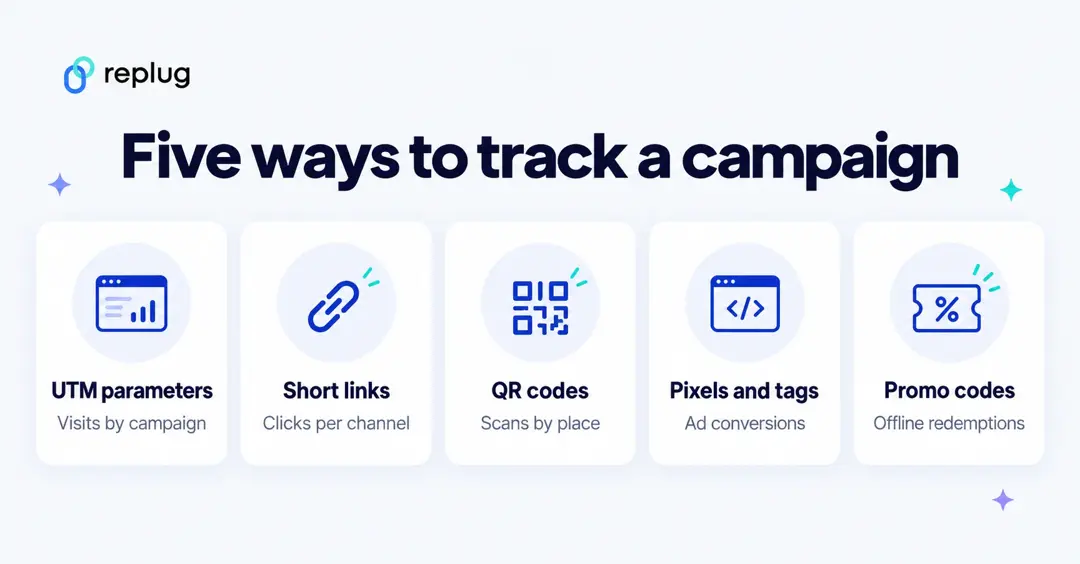
Most campaigns use two or three of these together. Each answers a different question:
1. UTM parameters
Tags added to a link, such as ?utm_source=weekly-newsletter&utm_medium=email&utm_campaign=fall-menu-2026. Your web analytics reads them when the visitor lands, so you can see sessions, engagement and key events per campaign. GA4 also uses the medium to sort traffic into channels such as Email or Paid Social (default channel group).
2. A short link per channel or placement
Give the same campaign a different short link for the newsletter, the Instagram bio and the podcast mention. Your link tool counts clicks, unique clicks, referrers, locations and devices for each, even when the destination is a site whose analytics you can’t see.
3. QR codes for print and places
A dynamic QR code points to a short link, so every scan is counted and the destination can carry UTM tags. Use a different code per flyer, poster or store to compare them.
4. Pixels and ad platform tags
Ad platforms (Meta, Google Ads, LinkedIn, X, TikTok and others) give you a pixel or tag for your site to record visits and conversions for their reports and audiences. Google Ads also tags ad clicks for you: with auto-tagging on, it adds a GCLID parameter to the landing page URL (Google Ads Help). If your links redirect, make sure parameters like this reach the final page.
5. Promo codes, unique URLs and phone numbers
For radio, TV, podcasts or word of mouth, where people may type an address instead of clicking, use a campaign-only discount code, a short vanity URL or a dedicated phone number, and count redemptions, visits or calls.
| Method | Best for | What it measures |
|---|---|---|
| UTM parameters | Every link to your own site | Sessions, engagement, key events, revenue by campaign |
| Short link per channel | Social, email, SMS, bios, partners | Clicks, unique clicks, referrers, locations, devices |
| QR codes | Print, packaging, events, stores | Scans by code, place, city and device |
| Pixels and ad tags | Paid ads | Ad conversions, audiences for retargeting |
| Promo codes and unique URLs | Audio, video, offline | Redemptions or visits per code |
Why should a company set up campaign tracking?
Campaign tracking is a vital analytics tool. It allows marketers to see which campaigns are performing well and which ones need improvement. Without campaign tracking, it would be difficult to know which marketing strategies are working and which ones are not. There are several aspects of campaign tracking to consider when tracking URLs that an average Joe doesn’t come across every day. Campaign tracking is a URL tracking system to analyze marketing efforts by keeping an eye on the website traffic through specific URLs. Here are the reasons why a company should set up campaign tracking:
- To track the clickability and conversion rate of a marketing campaign. When brands and marketers run ad campaigns, they usually add a UTM parameter to the call-to-action button to track clickability and conversion from the specific campaign.
- To measure the effectiveness of the channel, meaning campaign tracking comes in handy when the user wants to analyze the performance of a traffic medium, for instance, a banner ad on a popular blog.
- To A/B split test two marketing channels. A/B Testing is crucial to finding the best solution in digital marketing. Therefore, marketers compare different tactics to see what works best for them.
- To assess the ROI of the marketing campaign, it’s vital to have campaign tracking. It gives brands a deep dive into the quality of the traffic sources.
What are campaign parameters?
Campaign parameters are query parameters added to the end of a page URL, after a ?, to identify the traffic source and campaign. They don’t change the page; your analytics reads them. Google Analytics recognizes six: utm_source, utm_medium, utm_campaign, utm_content, utm_term and utm_id (Analytics Help).
A lot of brands start advertising and promotions during the holiday season. Most of these brands use campaign tracking to see where most buyers are coming from during the campaign.
These campaign parameters help them figure out:
- The impact of the marketing campaign
- What are the number of visitors that the campaign brought?
- How engaged those visitors were?
- How many visitors converted into paying customers?
Why are campaign tracking parameters important?
Most first-timers wonder why campaign parameters are important when they’re setting up a retargeting campaign or an ad campaign on social media.
The answer is that campaign parameters provide marketers with crucial campaign information that helps them make important decisions going forward.
Brands usually track their CTAs on the landing pages or short URLs shared on social media to see what’s working for them.
Here are four reasons why campaign tracking is important in digital marketing:
- Help track campaign results – whether it’s a social media post that contains a short URL with a slug or an online ad, campaign parameters are included to track campaign results.
- Separate multiple campaigns and make them identifiable. Otherwise, it won’t be possible to differentiate multiple campaigns in a dashboard.
- Gather clicks and conversion data, which is crucial to the campaign analysis. Without click and conversion data, you can’t tell whether the campaign worked.
- Make performance reporting possible for brands and marketers. A lot of experts use URL shorteners to generate short URLs for social media to ensure that performance reporting becomes possible. Replug offers a powerful free link shortener and tracker for creating, managing, and tracking vanity URLs for social media, online advertising, and email newsletters.
Also read: How to use UTM parameters for traffic attribution in GA4
Set up campaign tracking URLs with Replug
Replug.io is an all-in-one link management tool for marketers, social media experts, influencers, and bloggers. It helps users with URL shortening, branded short links, UTM tracking, bio links, retargeting, and lead generation. You can track various campaigns using it, i.e. :
- Click tracking per short link and per campaign
- UTM tracking
- Call-to-action campaigns on your links (Essentials and above)
- Retargeting pixels on links (1 on Essentials, unlimited on Scale and Agency)
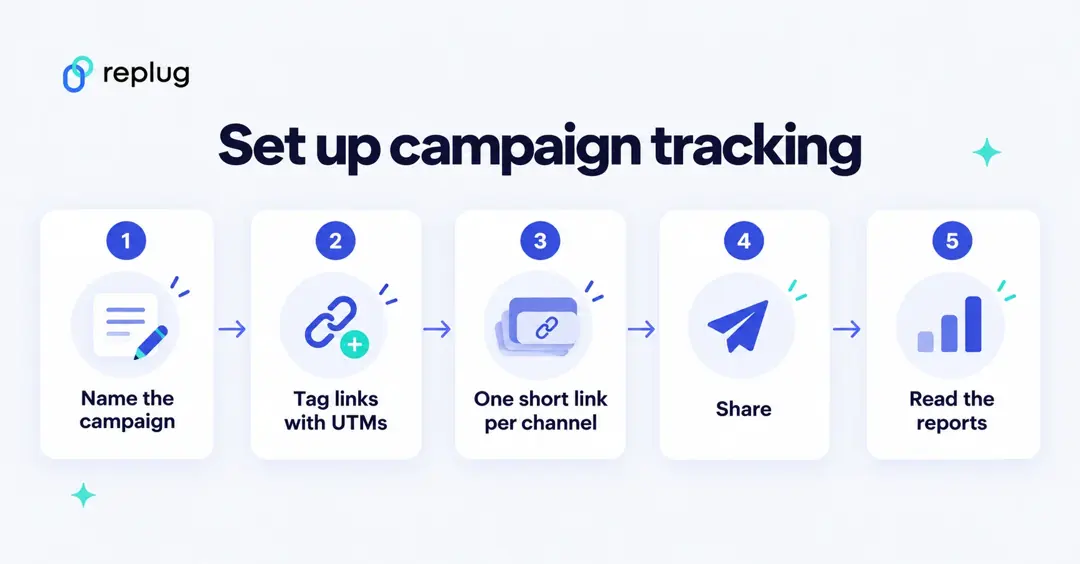
Here’s how to set up campaign tracking links with Replug:
Step #1: Log in to your Replug account
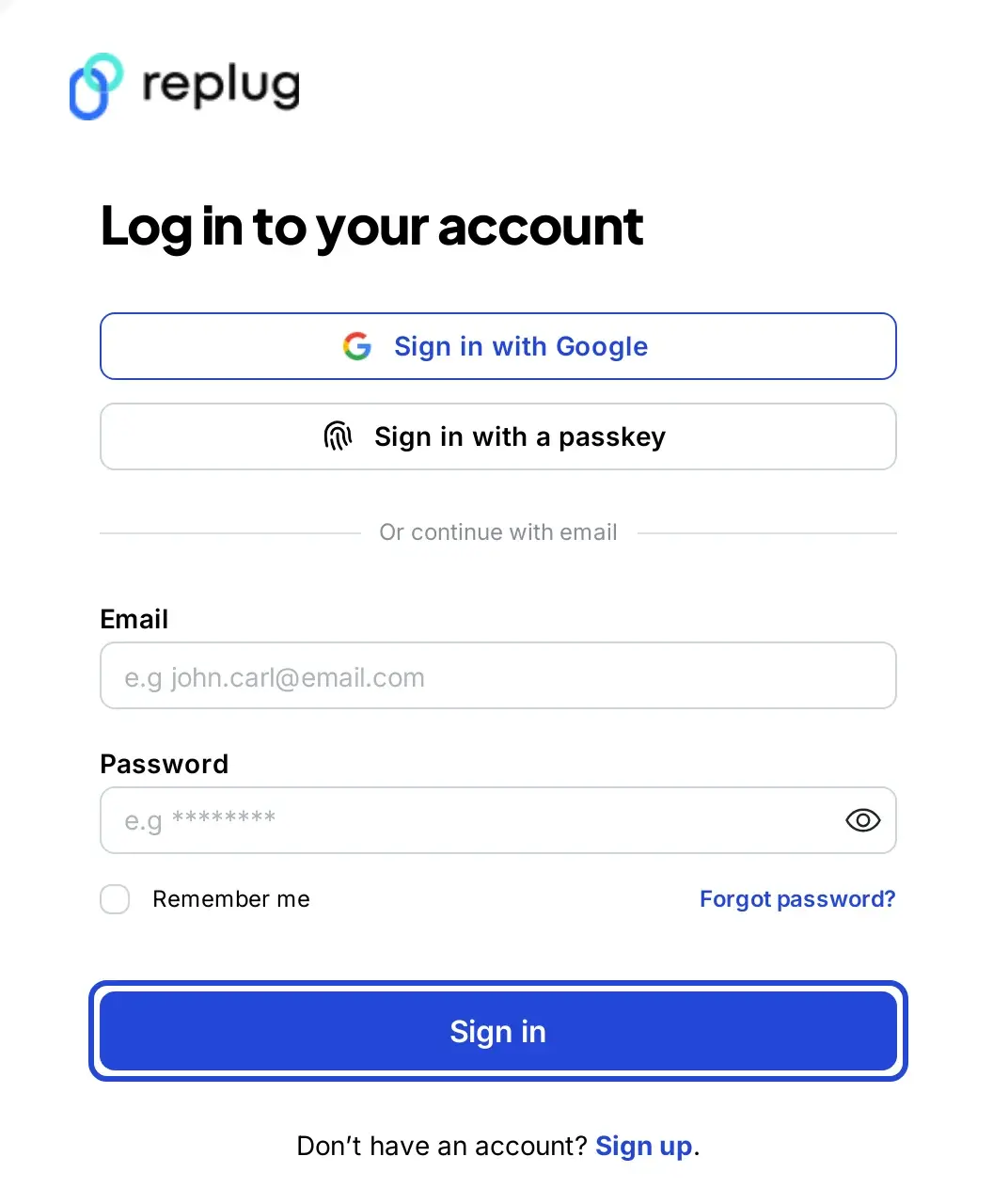
Log in to Replug. If you don’t have an account yet, create a free account: the Free plan needs no card and includes one campaign; Essentials has 5 and Scale and Agency unlimited (pricing).
Step #2: Create a campaign
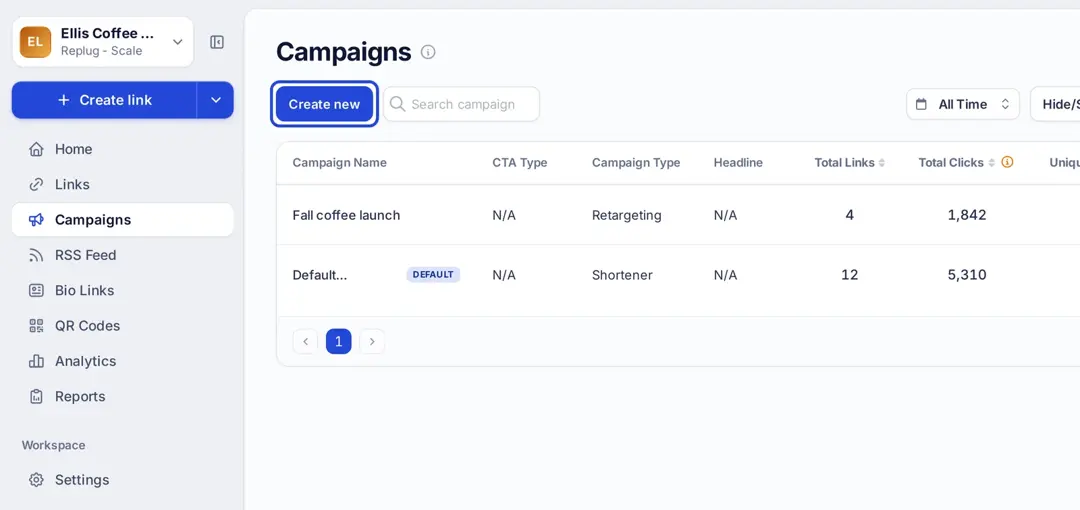
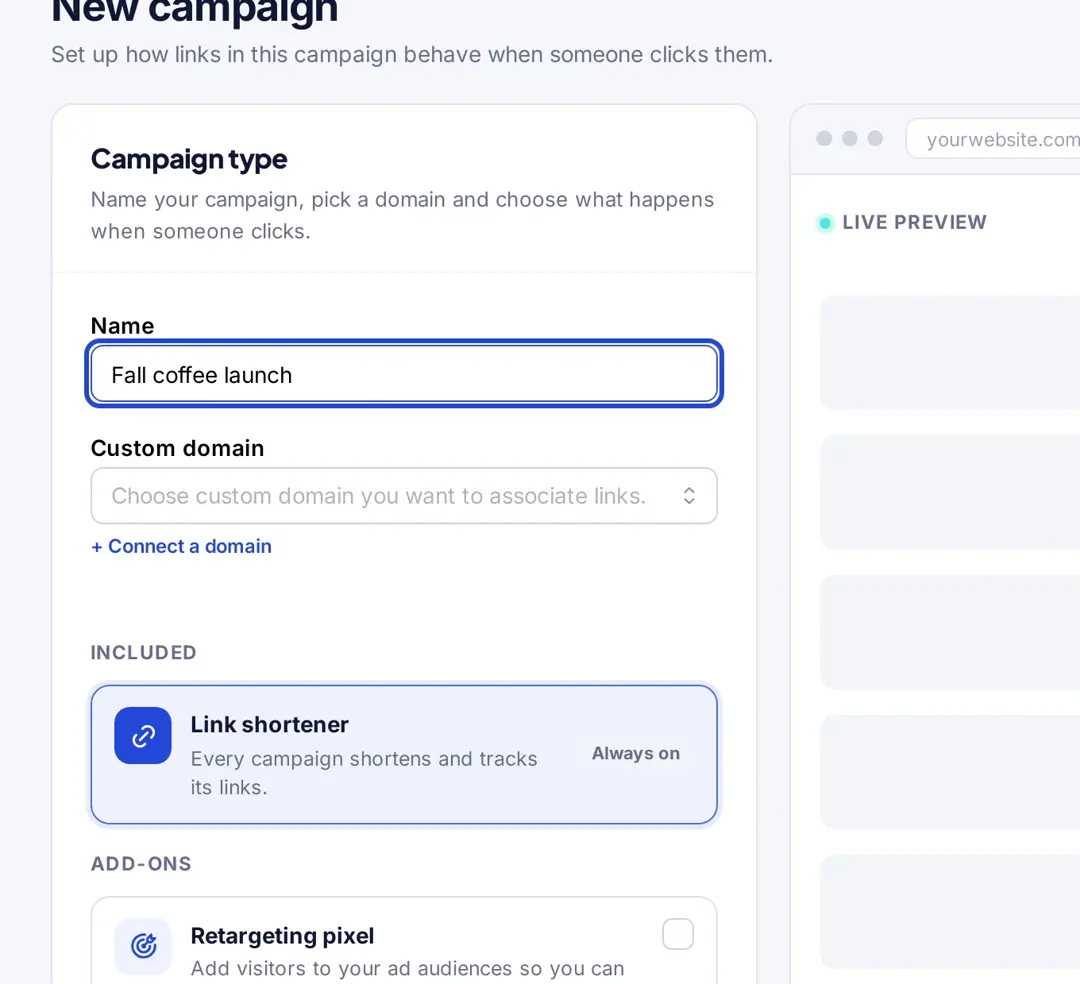
Click Campaigns in the left menu, then Create new (Replug’s help center explains how to create a campaign). Give it the same name you use in utm_campaign so reports line up. A campaign can also carry a retargeting pixel or a call-to-action, from Essentials up.
Step #3: Create a short link with UTM tags
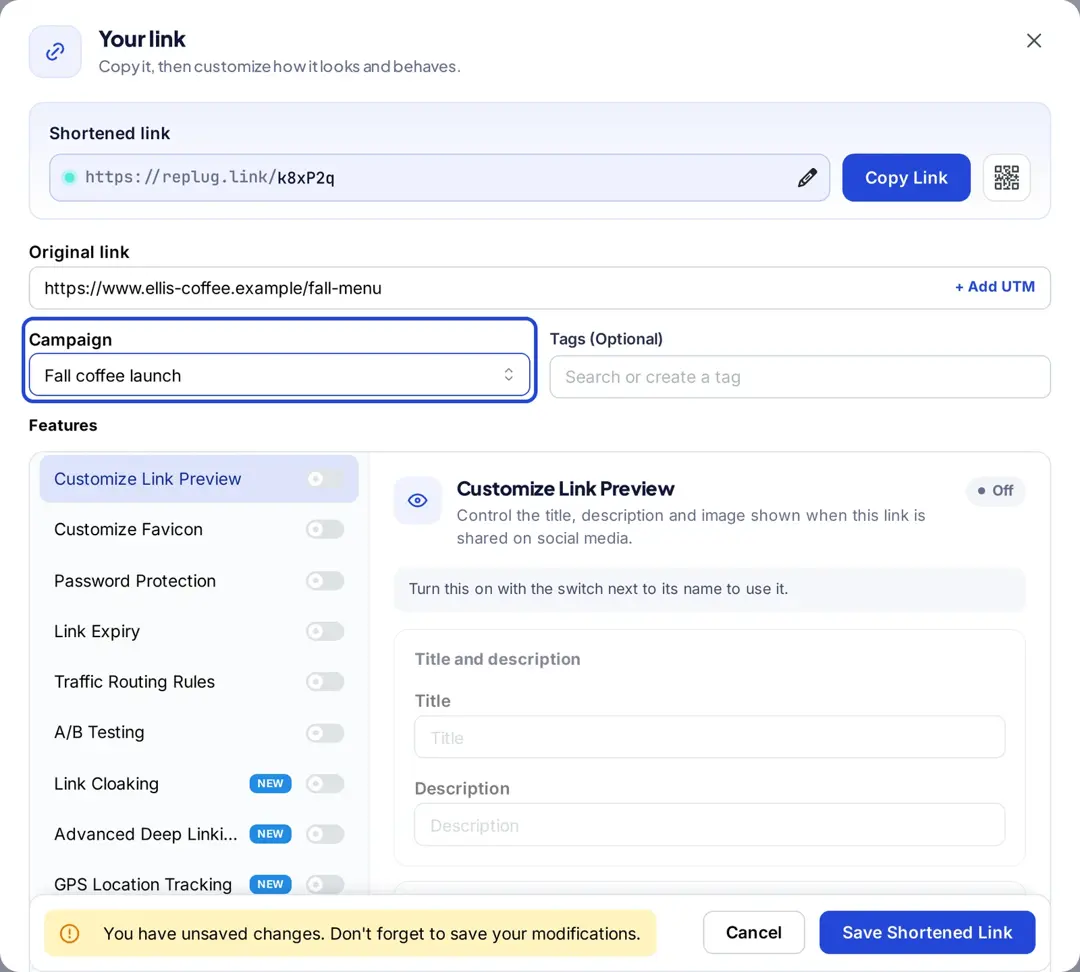
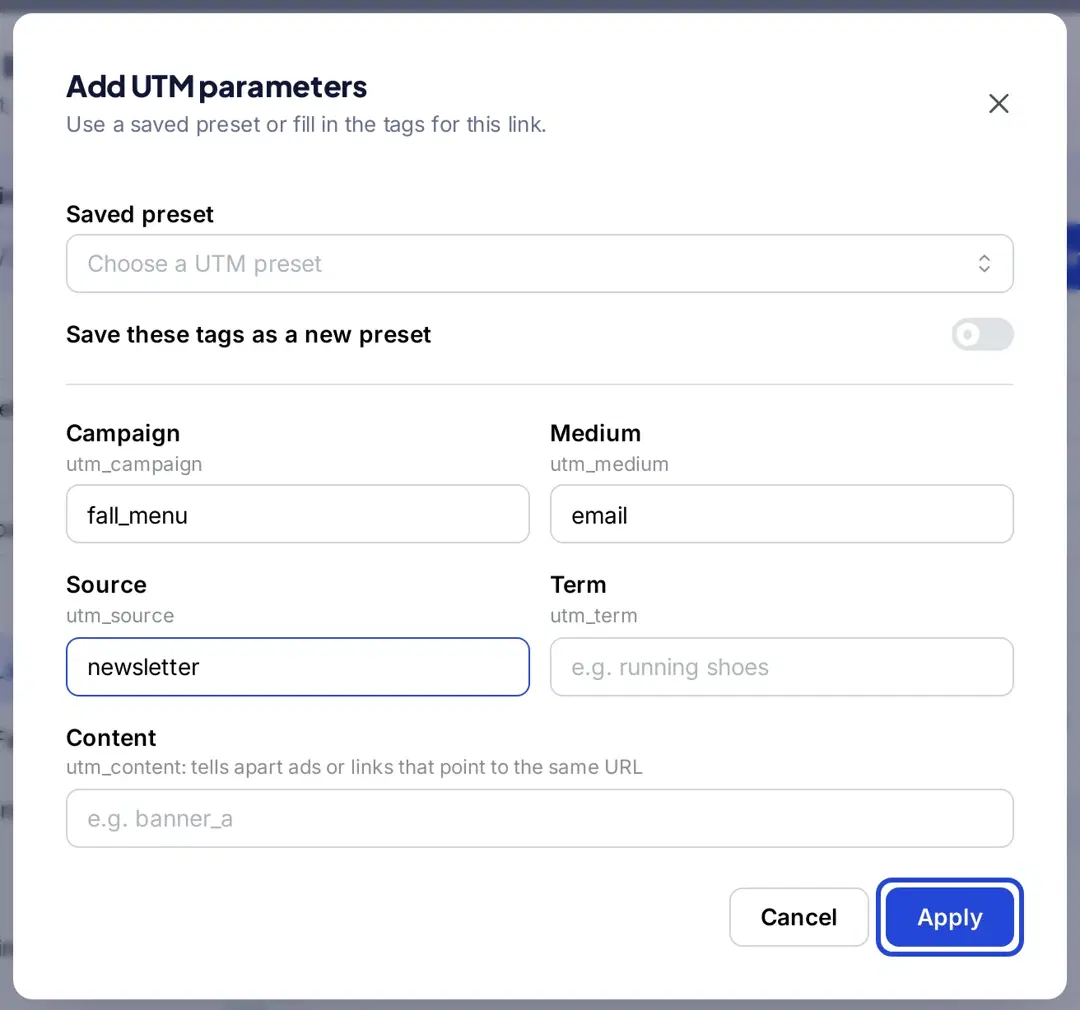
On the Home screen, paste the page URL and click Shorten. In the Your link window, choose your campaign in the Campaign field, click + Add UTM and fill in campaign, medium and source. Edit the back-half if you like (Essentials and above), then click Save Shortened Link. Make one link per channel, for example one for the newsletter and one for Instagram.
Step #4: Track the campaign in Replug Analytics
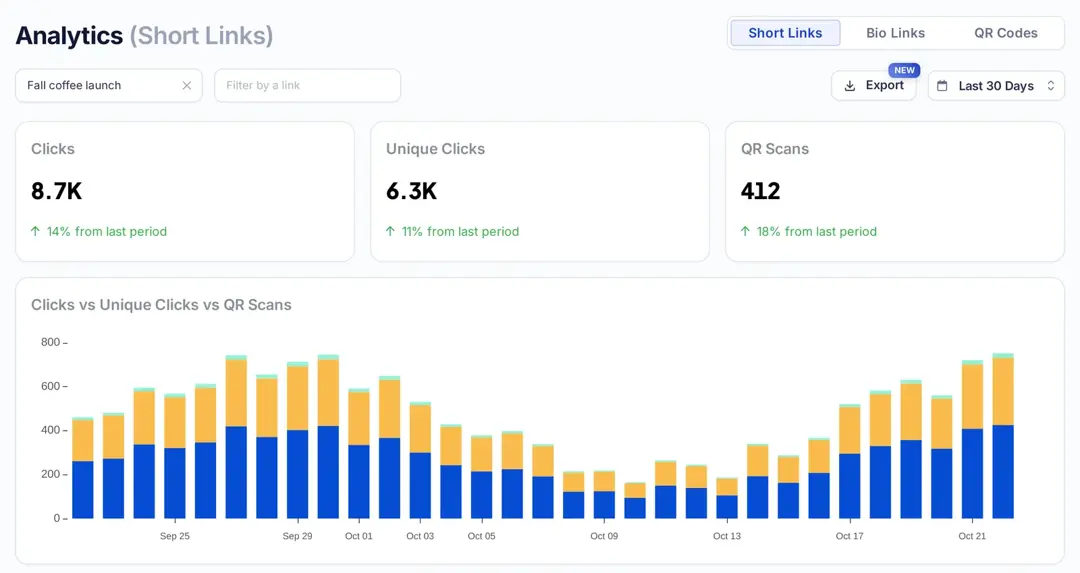
On the Campaigns page, open the ⋯ menu of your campaign and click View Stats. Analytics shows the campaign’s clicks, unique clicks and QR scans, a daily chart and tables by referral, location, browser and operating system. Replug counts clicks; it doesn’t track conversions, so measure sign-ups or sales in your web analytics through the UTM tags.
Campaign tracking in Usermaven

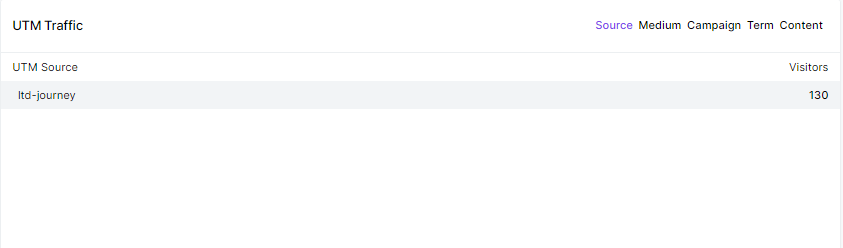
Marketing campaigns are only beneficial when they are producing the results you aimed for. With Usermaven’s campaign tracking, you can stop guessing your campaigns’ performance and start analyzing it through data to increase ROI. All you have to do is use UTM tags to analyze which source, content or campaign is producing results and then tweak your marketing campaigns to increase conversion and reach your business goals.
Here’s a preview UTM traffic in Usermaven
What are Google UTM campaign tracking parameters?
Google Analytics reads campaign parameters from your URLs, and Google offers a free tool to build them.
As far as campaign tracking is concerned, Google recommends a tool called Google Analytics Campaign URL Builder. You can also check out Google’s help page on collecting campaign data with custom URLs.
The benefit of using this tool is that users can add campaign parameters to URLs and measure custom campaigns in Google Analytics.
The following are the parameters to be entered to generate a campaign tracking URL:
- Website URL: The page you want to track, as a full address including https.
- Campaign ID:
utm_id, the campaign ID from your ad platform or your own campaign data. - Campaign source:
utm_source, the referrer, such as google or newsletter. - Campaign medium:
utm_medium, the marketing medium, such as cpc, banner or email. - Campaign name:
utm_campaign, the product, promotion or slogan, such as spring_sale. - Campaign term:
utm_term, mostly used for paid search keywords. - Campaign content:
utm_content, used to tell apart ads or links that go to the same URL.
The builder marks website URL, source, medium and campaign name as required; Google recommends always setting source, medium and campaign.
Let’s look at the steps involved in tracking a custom campaign through Google Analytics.
How to track a custom campaign using the Campaign Builder tool?
Go to the campaign URL builder
Access the Campaign URL builder to generate the campaign tracking URL. Make sure the Web tab is selected (the Play tab is for Google Play app campaigns).
Use it with GA4
The builder works for Google Analytics 4. You don’t need to choose a version anymore: standard Universal Analytics properties stopped processing data on July 1, 2023, and all Universal Analytics data became inaccessible starting the week of July 1, 2024 (Analytics Help).
Fill in the campaign builder form
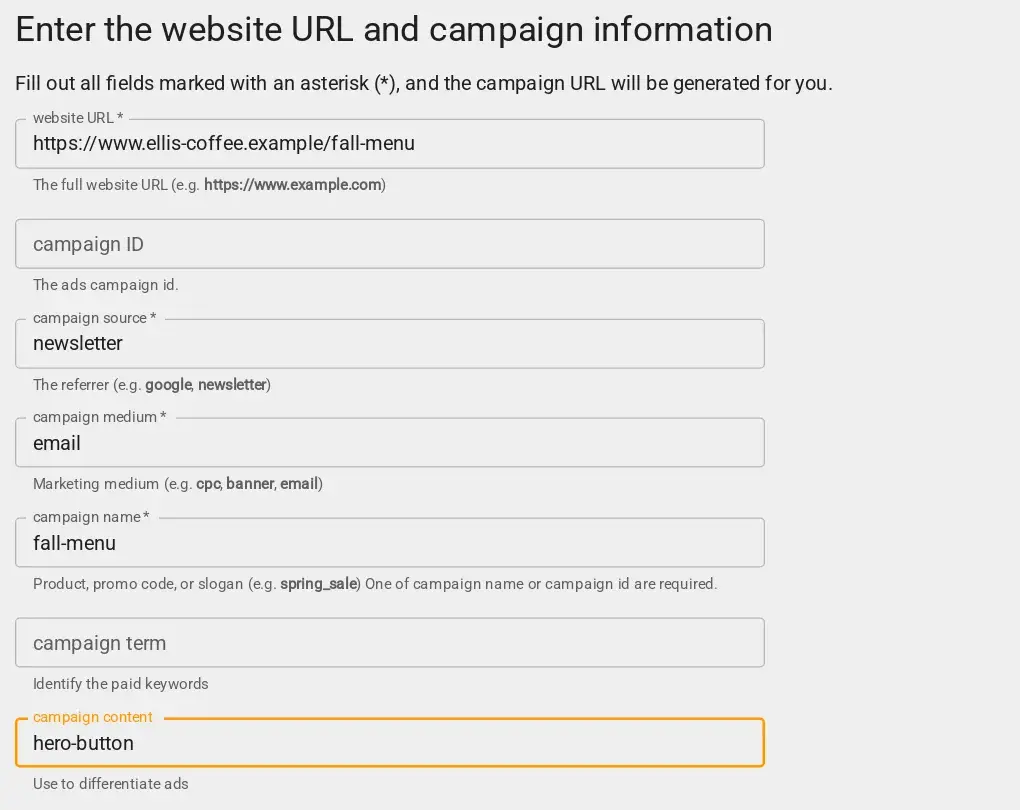
Fill out the form using the parameters explained above. The example uses source newsletter, medium email and campaign fall-menu.
Grab the generated URL
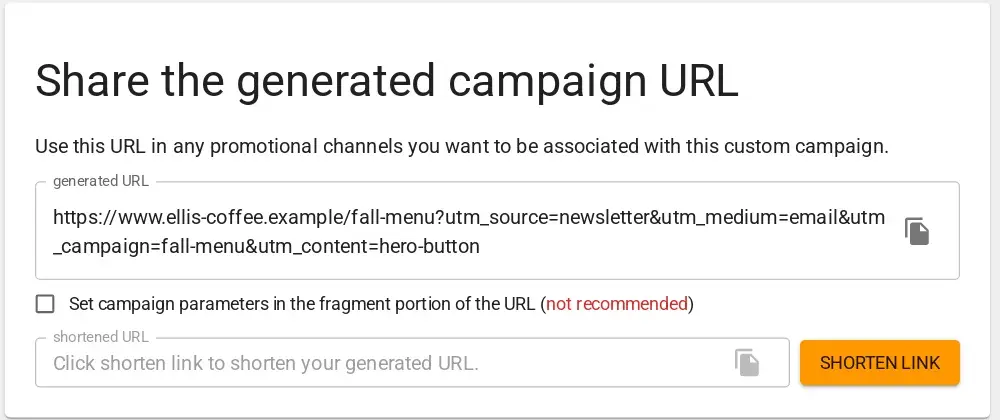
As you fill in the form, the campaign URL appears under Share the generated campaign URL. Copy it with the copy icon, or paste it into your link shortener to make a short link that keeps the tags.
Track via Google Analytics
The last step is to track the campaign URL in Google Analytics. Start with logging in to your Google Analytics account. Go to the Reports > Acquisition > Traffic Acquisition > Source/Medium.
The table lists each source and medium pair.
Look for your own values, for example newsletter / email, rather than “referral”: tagged visits are reported under the source and medium you set, and you can switch the dimension to Session campaign to see the campaign name (Analytics Help).
How to view your URL campaigns in Google Analytics?
A link or CTA tells you little unless you can see the clicks and what happened after them.
No wonder all major URL shorteners or email marketing services have analytics sections for users to analyze the data.
Also read: CTA in marketing: What it means and why it matters
If you have been playing around with custom short URLs, then you must have thought about viewing the URL campaigns in Google Analytics at some point.
Here’s where to find tagged campaign traffic in GA4.
Here are the steps involved in retrieving the URL campaigns in Google Analytics to see how they’re doing:
Log in to your Google Analytics account
First things first, log in to your Google Analytics account to get started with the viewing process. Make sure that you’re logging in to the correct Google Analytics account.
Go to the reports section
Once you’ve logged in, go to the reports section. It is the area where you see the site performance through reports. If you can’t find the reports option, hover your cursor on the left sidebar or click on the second option from the left – you’ll find the report button.
Open the acquisition area
Go to the Acquisition section from the reports area in the Google Analytics dashboard. It’s the section that provides users with all the information about how a site acquires visitors. The next step will further explain the process.
Access the traffic acquisition
After clicking on the Acquisition option, look out for the Traffic Acquisition option underneath the Acquisition option.
Select the campaign source
The source selection is crucial to the whole process. Click on the session drop-down menu right above the data table on the Traffic Acquisition page and choose source/medium.
Search for the campaign
Type your campaign’s source, medium or campaign name (not the full URL) into the search box above the table and press Enter. Google’s own example is searching “google / organic” to see organic Google Search traffic.
This is how you can view campaign URLs in your Google Analytics account.
Let’s conclude: URL campaign tracking summary
This article is written around the importance of campaign tracking, which is essential in digital marketing.
If you haven’t had a chance to learn about campaign tracking, then here’s a quick recap for you: it’s a process of analyzing the performance of the URLs using the tracking parameters that are added to the URLs.
UTM tracking system plays a vital role in tracking URL performance. Replug is a URL shortener and my go-to tool for link tracking along with generating short URLs; it counts clicks per link and per campaign, and your web analytics measures what happens after the click.
Furthermore, this article goes deep into converting website or blog post URLs into traceable URLs using Campaign URL builder. Plus, I also covered how you can track those campaign URLs using Google Analytics.
Moreover, I cracked open how you can utilize Replug to create tracking URLs for your marketing campaigns. The step-by-step process of creating tracking URLs using Replug would help many readers, especially the beginners.
Digital marketers, social media experts, and content marketers rely heavily on organic traffic, email marketing, and social media marketing.
Therefore, it is essential for them to track campaigns to figure out what is working for them.
Campaign tracking shows which channel and message get attention, which is the starting point for improving conversions.
Frequently asked questions

Muhammad Ahsan Jamal