Ever bought something after clicking an ad and landed on a “thank you” page? That page is often where a conversion pixel fires and tells the ad platform the sale happened.
That signal is how advertisers know which ads lead to sales, sign-ups or leads, and how ad platforms learn whom to show ads to next.
Quick answer: a conversion pixel is a snippet of code from an ad platform that fires when someone completes a valuable action on your site, such as a purchase or a sign-up, and reports it back to the platform. Meta describes conversion tracking as using its pixel to track “your website visitors’ actions,” which then appear in Ads Manager and Events Manager so you can “calculate your return on ad investment” (Meta for Developers).
Below: how a conversion pixel works, how it differs from a retargeting pixel, and how to set one up with Meta and Google Analytics 4.
What’s a pixel?
Pixel is a code inserted into a website, mobile app, or email. The purpose behind adding a pixel to a website or any other online real estate is to track a user’s activity.
The pixel observes the user behavior and reports back to the main source. Thus, it opens up a floodgate of opportunities for digital marketers, online businesses, and e-commerce stores to reach out to the same audience through retargeting.
What is retargeting?
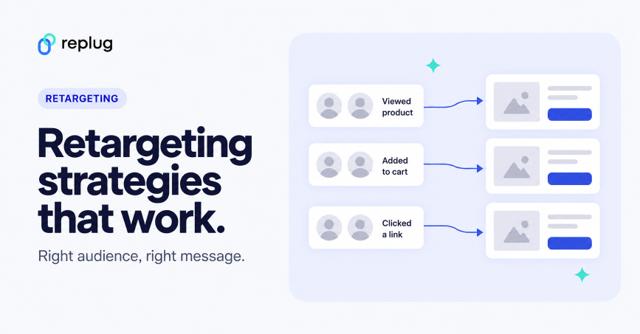
Retargeting is an advertising strategy that allows brands and entrepreneurs to remarket the products or services to the audience that has visited their websites or used their apps. All this becomes possible due to the pixel.
Almost all major social media platforms provide pixels for advertisers. It helps marketers track website visitors and better understand how they interact with the products and content.
What’s a conversion pixel?
A conversion pixel is a piece of code placed on e-commerce websites and apps to record conversions on websites, landing pages and checkout pages.
When the conversion happens, the pixel sends an event to the ad platform, which matches it to the ad click or view that came before it. That’s how Ads Manager or Google Ads can show which campaigns produced sales or leads.
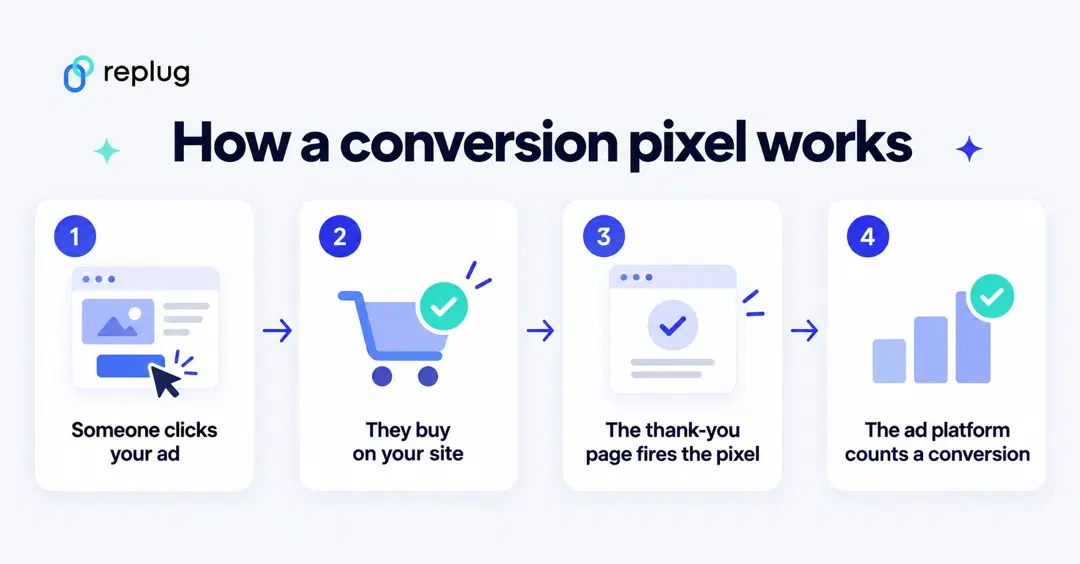
The base code usually goes on every page, and the conversion event fires on the “payment successful” or “thank you” page, or when someone clicks a button such as Purchase. Meta’s documentation shows a purchase event like this:
fbq('track', 'Purchase', {currency: "USD", value: 30.00});Meta tracks conversions in three ways: standard events (predefined actions such as Purchase), custom events you name yourself, and custom conversions, which count visits to URLs such as a page containing /thank-you (Meta for Developers).
If you ever run a Facebook ad campaign for generating sales on your website, the Meta Pixel is used to track the sales.
Note that a sale isn’t the only conversion metric used by advertisers. In some cases, a successfully generated lead or a downloaded file through an ad is also considered a conversion.
Conversion pixel vs. retargeting pixel
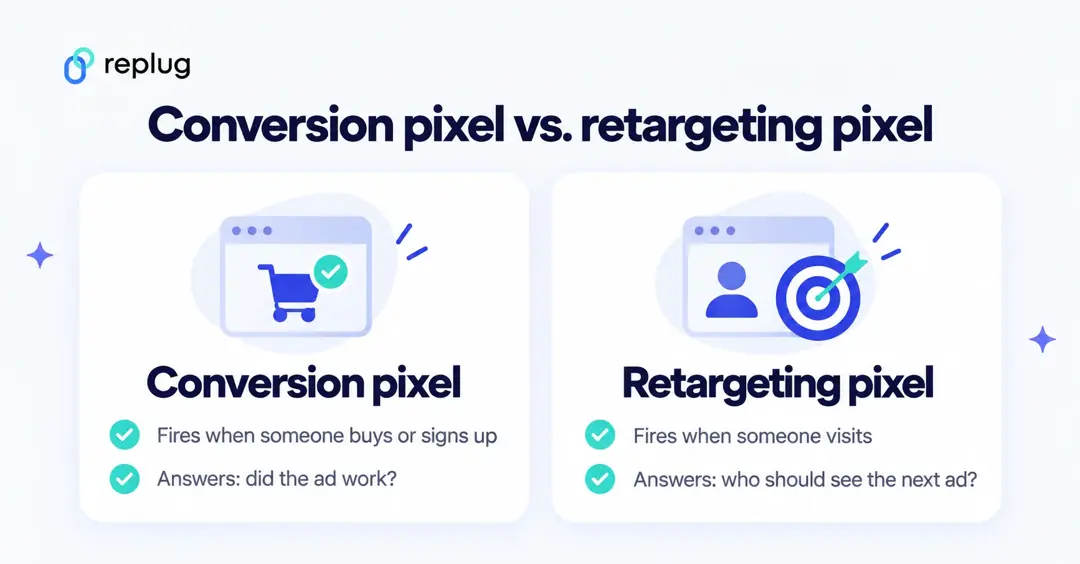
A conversion pixel answers “did the ad work?”: it fires on a purchase, sign-up or lead. A retargeting pixel answers “who should see my next ad?”: it fires when someone visits, so the platform can add them to an audience.
Today these are usually the same code. The Meta Pixel, Google tag, LinkedIn Insight Tag, X Pixel and TikTok Pixel each record visits for audiences and conversion events for reporting. What changes is the event you fire and how you use it.
One thing worth knowing if you use a link tool: Replug fires your retargeting pixels when someone clicks a short link, so the click can join your ad audiences. It does not track conversions; to count sales or sign-ups, use the conversion pixel or analytics on your own site.
Why use a conversion pixel?
While the primary goal of using a conversion pixel is to keep track of the ad campaign’s performance, there’s more to the story.
Advertisers must know that conversion pixel is imperative to understand the performance of ad units, call-to-actions, and landing pages. Moreover, it doesn’t end here.
Here are four key reasons why to use a conversion pixel:
i. Measure conversion rate
The key benefit of injecting a conversion pixel on your website or landing page is to keep track of your conversion rate, especially after the conversion optimization tactics have been applied. Low or zero conversion is indicative of wrong tactics.
ii. A/B testing Ad strategies
When a conversion pixel is embedded into the website code, it’s pretty clear that the conversions are being closely analyzed. Therefore, it allows advertisers to test out different ad designs, ad copies, and color schemes to see what works the best.
iii. Analyze conversion cost
One of the most underrated metrics is the conversion cost. Some digital marketers pay attention to analyzing the conversion cost, especially if they’re running different marketing campaigns, such as social media advertising and influencer marketing campaigns. It helps them understand which one is outperforming the other one.
iv. Optimize campaigns
When the data of an ad campaign comes up — usually at the end of the campaign — it’s the time to reflect on the situation. Moreover, marketers could optimize campaigns based on the previous ad campaign’s data. This data analysis wouldn’t have been possible without placing the conversion pixel on the site or landing page to track performance.
Use cases for using a conversion pixel
Since conversion pixel provides valuable insights into visitor engagement, it assists brands make data-driven marketing decisions, optimize their digital marketing campaign, and skyrocket the conversion rate.
Here are different areas where marketers can use conversion pixels:
i. Email marketing
Email platforms use a different, open-tracking pixel to count opens. To count conversions from an email, add UTM parameters to the links and let the conversion pixel or your analytics on the site record the purchase or sign-up that follows the click.
ii. Online advertising
Running online ad campaigns without any check-and-balance might be a huge mistake. It’s essential to track the performance of an ad campaign. One of the easiest campaign measurement techniques is to place a conversion pixel in the website or landing code.
When advertisers utilize conversion pixels, it assists them track, record, and analyze the output of the ad campaign. As a result, it helps them make informed decisions based on the ROI.
iii. Affiliate marketing
An affiliate marketing campaign would fall flat if there is no conversion tracking available or the conversion pixel isn’t working properly.
The way affiliate marketing works is that an affiliate promotes a product of a merchant and when a web visitor makes a purchase through the affiliate partner’s link, the affiliate earns a commission.
However, the merchant uses the affiliate tracking software to keep track of the affiliate conversions so that the affiliate partners could be paid for their referrals.
iv. E-commerce sales
The most common use case of the conversion pixel is in the e-commerce industry. It assists e-commerce businesses track e-commerce sales.
All they need to do is to place a conversion pixel on their “thank you” or “order confirmation” page to trigger the successful sale signal.
It significantly helps users measure the sales numbers from online ads or any other marketing campaign. More importantly, it’ll give insight into which of the online campaigns or ad platforms are driving the most sales.
v. Mobile app installs
App installs work differently: there is no web page to put a pixel on. Ad platforms measure installs and in-app actions through an SDK or a mobile measurement partner, and Google Ads records Google Play installs and in-app purchases without a tracking code (Google Ads Help).
Once installs are reported, you can compare which campaigns or channels drive the most of them.
vi. Lead generation
Lead generation is a process of gathering user details, such as name, phone, and email through a lead magnet or sign-up form.
Businesses and organizations can track the performance of their event registrations landing pages, whether they’re hosting a webinar or a physical event.
Most brands and entrepreneurs use opt-in bribes to generate leads whether it’s access to an email course or a downloadable content.
The conversion pixel comes in handy in lead generation. Without placing a conversion pixel, it won’t be possible to track the conversion of a specific campaign or platform.
For example, if you run a Quora ads campaign, you place the Quora Pixel on your website to measure the campaign’s effectiveness.
With the pixel firing on the thank-you page, you can compare lead costs by campaign, ad copy and landing page.
Where conversion pixels come from
Each ad platform gives you its own pixel or tag, and the conversion events you set up with it:
- Meta: the Meta Pixel plus the Conversions API (Meta conversion tracking).
- Google Ads: the Google tag or conversions imported from Google Analytics key events (Google Ads Help).
- LinkedIn: conversions built on the LinkedIn Insight Tag (LinkedIn Help).
- X: the X Pixel with events set up in Events Manager (X Help).
- TikTok: the TikTok Pixel and Events API (TikTok Business Help).
If you want one place to compare conversions across channels, or attribution beyond a single ad platform, see our list of conversion tracking tools, which compares analytics and attribution tools with prices checked on each vendor’s site.
How to set up conversion tracking pixel for your website?
Conversion pixels are a must-have tool for measuring the effectiveness of your online advertising efforts and digital marketing campaign.
Let’s shed some light on how to set up a conversion pixel for your website:
1. Create a Conversion Pixel
Using Meta as the example, Meta Business Help describes two parts: create the pixel and install its base code, then set up events such as Purchase. To create it, go to Meta Events Manager, click Connect data, select Web and click Connect.
Other platforms follow the same pattern: create the tag in the ad account, install the base code, then define the conversion events.
2. Choose a name for the pixel
Enter a name for the pixel and click Create pixel, which creates the pixel ID. Then enter your website URL and click Check to see if a partner integration (for example your store platform) can install it for you.
3. Generate the pixel code for your website
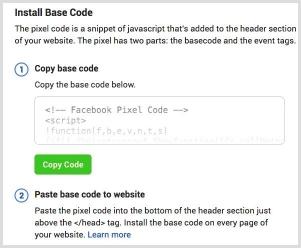
If there’s no partner integration, choose Do it yourself, then Meta Pixel only or Conversions API and Meta Pixel, and pick Install code manually to copy the base code. You can also email the instructions to a developer.
4. Add the pixel code to your website
Add the base code to every page of your site, in the header. On WordPress, use your theme’s header-code setting, a header-and-footer code plugin or your platform’s Meta integration.

In some cases, you might have to manually inject the code into the website source. Make sure the code is in the right place on your page, such as the header or footer. Once it’s done, go ahead and connect it with your site.
Then add the event code, such as the Purchase event above, on the page or button where the conversion happens.
To test it, use Meta’s free Chrome and Edge extension, Meta Ads Data Advisor (formerly Meta Pixel Helper). It shows how many pixel events fire on the page you’re viewing.
Add the Meta Conversions API
Browser pixels can miss events, for example when a connection drops or a browser limits tracking. Meta’s Conversions API sends events from your server, website platform, app or CRM straight to Meta, and Meta recommends using it alongside the pixel.
- In the pixel setup above, choose Conversions API and Meta Pixel.
- Pick a setup method: a partner integration, Meta-enabled web-only Conversions API, or a manual setup with personalized instructions.
- Send the same event from both the browser and the server with a shared event ID, so Meta can deduplicate it and count it once.
The same idea exists elsewhere: TikTok has the Events API, LinkedIn and X have their own Conversions APIs.
Conversion tracking using GA4 (key events)
Google Analytics 4 now calls conversions key events. You don’t install a separate pixel: you create an event from data the Google tag already collects, then mark it as a key event (Analytics Help).
Step 1: Create an event for the confirmation page
- In GA4, open Admin and, under Data display, click Events.
- Click Create event and enter a name such as thank_you.
- Turn on Mark as key event if you want to count it right away.
- Choose Create without code, pick page_view, and enter the confirmation page URL, for example https://www.example.com/thank-you.html.
- Click Create.
Google warns not to modify the page_view event itself, since every pageview would then count as the key event (Analytics Help).
Step 2: Mark the event as a key event
For an event GA4 already receives, go to Admin > Data display > Events and click the star next to it. Standard properties can mark up to 30 events as key events, and GA4 marks purchase as a key event by default. Changes apply from the time you mark them and can take up to 24 hours to show in reports.
To use the key event for bidding in Google Ads, link the accounts and import it; Google says the import option can take 24 to 48 hours to appear (Google Ads Help).
This video walks through events and conversions in GA4. It was recorded in 2022, so it still says “conversions” where GA4 now says “key events.”
Set up one conversion first, the action that matters most to you, test it, and then add the rest of the funnel.
Let’s answer some of the frequently asked questions about conversion tracking:
FAQs about Conversion Tracking Pixels

Muhammad Ahsan Jamal