LinkedIn retargeting shows your LinkedIn ads to people who already interacted with you: visitors to your website, people who watched your video ads, opened your Lead Gen Forms or engaged with your Company Page or events.
If you also share links to pages you don’t own, Replug’s link retargeting tool can add your LinkedIn pixel to those links, so clicks build your audience too (more on that below).
Quick answer: to retarget on LinkedIn, add the LinkedIn Insight Tag to your site, then in Campaign Manager go to Plan > Audiences > Create audience > Matched Audience, pick a source such as Website, and use that audience in an ad set. An audience needs at least 300 member accounts before it can be used, per LinkedIn’s Marketing Solutions Help.
What is retargeting?
Retargeting, also known as remarketing, is a strategic advertising technique that allows you to reconnect with users who have previously interacted with your brand or website. It involves targeting ads specifically to individuals who have shown interest in your products or services, but may not have completed a desired action, such as making a purchase or filling out a form.
When someone visits your website, a tracking pixel or tag on the page sets cookies in their browser. That lets the ad platform recognize the visitor later and show them your ads on its own sites and apps.
By using a dedicated tool to shorten LinkedIn links, you can ensure your URLs stay clean and manageable, while still having the retargeting pixel attached and ready to gather visitor data.
The goal of retargeting is to stay top-of-mind with potential customers, reminding them of your brand and enticing them to return to your website to complete the desired action. By targeting individuals who have already shown interest, retargeting allows you to maximize your advertising budget and increase the chances of converting leads into customers.
What is retargeting on LinkedIn?
Retargeting on LinkedIn means showing LinkedIn ads to member accounts that visited your website or engaged with your content on LinkedIn. LinkedIn calls itself the world’s largest professional network, with more than 1 billion members in more than 200 countries and territories (About LinkedIn), which is why B2B advertisers use it to reach people by job, company and industry.
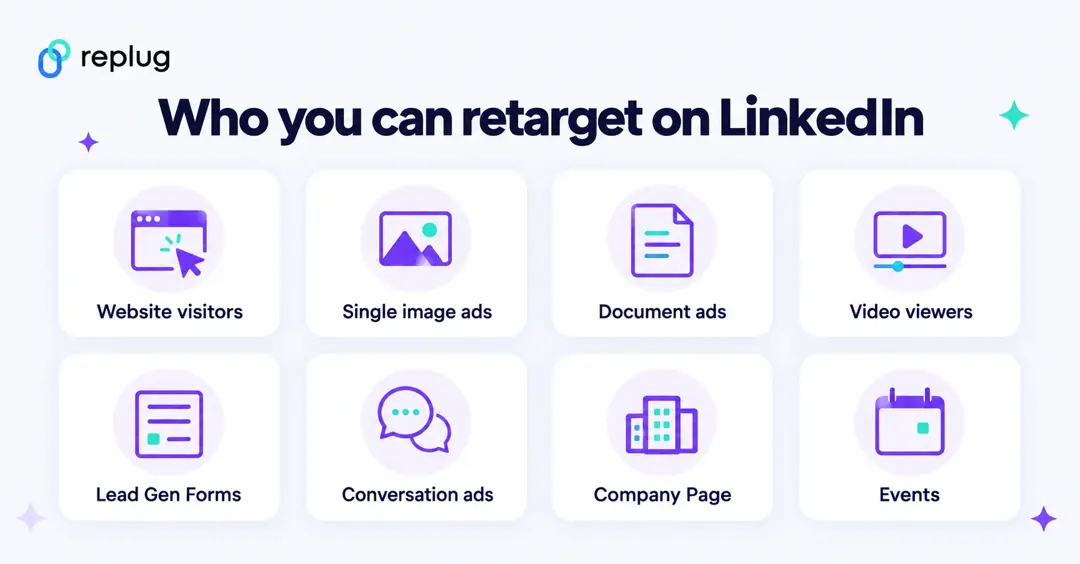
Through Matched Audiences, LinkedIn lets you retarget member accounts that (LinkedIn Help):
- Visited a page on your website (needs the Insight Tag)
- Engaged with a single image ad or a document ad
- Viewed 25%, 50%, 75% or 97% of a video ad
- Opened or submitted a Lead Gen Form
- Opened a conversation ad or clicked one of its buttons
- Viewed or clicked a call-to-action on your Company Page
- Responded to or engaged with your LinkedIn Event
- Were sent to LinkedIn through the Conversions API
Website retargeting uses the LinkedIn Insight Tag, a piece of JavaScript you add to your site. LinkedIn says the tag lets you track conversions, retarget website visitors and view Audience Insights on member accounts that visit your website. For engagement audiences such as video or Lead Gen Form audiences, you can choose a lookback window from 30 to 365 days.
With LinkedIn retargeting, you show ads to people who already know your brand. The ads run in the formats you choose for the ad set, such as single image, video, document or conversation ads.
Also read: A step-by-step guide on Tiktok retargeting using Replug
Retargeting on LinkedIn: How does it work?
LinkedIn retargeting works by utilizing the LinkedIn Insight Tag, a code snippet placed on a website to track visitor behavior and collect valuable data. Here’s a step-by-step overview of how LinkedIn retargeting works:
Implement the LinkedIn Insight Tag:
To start using LinkedIn retargeting, you need to place the LinkedIn Insight Tag on your website. This tag is a small snippet of code provided by LinkedIn that needs to be added to the pages of your website.
Capture Visitor Data:
Once the Insight Tag is installed, it creates cookies and a first-party identifier (the LinkedIn Ads ID) in visitors’ browsers, which lets LinkedIn match visits to member accounts. LinkedIn says the Ads ID only applies to traffic from outside the EU, EEA, Quebec and the UK (LinkedIn Help). In those regions, matching also depends on members’ consent settings.
Create Audience Segments:
You then create a website audience from the pages people visited or the actions they took (Website Actions). LinkedIn lets you narrow it with professional categories from member profiles, such as visitors who are lawyers in Boston, but website audiences can’t be combined with member interests and traits (LinkedIn Help).
Set Up Retargeting Campaigns:
With your audience segments defined, you can create retargeting campaigns on LinkedIn’s advertising platform. These campaigns enable you to display targeted ads to the specific audience segments you have defined. The ads can appear on various LinkedIn placements, including the LinkedIn feed, sponsored content, and messaging.
Display Tailored Ads:
When a visitor who has previously been on your website visits LinkedIn, the LinkedIn platform recognizes them through the Insight Tag and displays your tailored ads to them. This ensures that your ads reach the right people at the right time, maximizing their effectiveness.
Drive Engagement and Conversions:
Through retargeting, you can engage with visitors who have already shown interest in your brand. By delivering relevant and personalized ads, you can encourage them to take desired actions, such as signing up for a newsletter, requesting a demo, or making a purchase. Retargeting allows you to nurture these leads and guide them through the customer journey.
How to set up Linkedin retargeting ads?
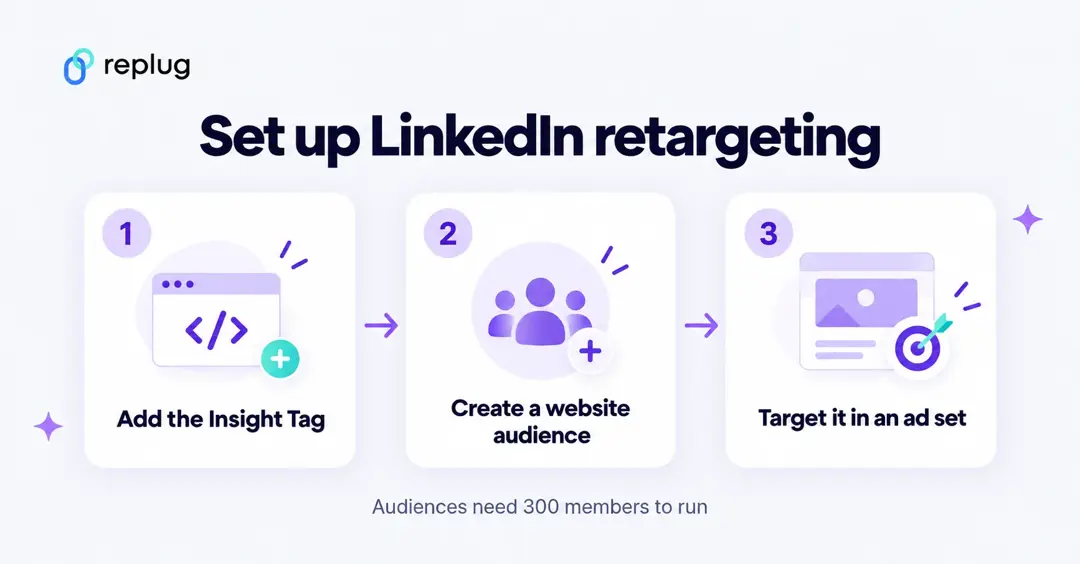
Setting up LinkedIn retargeting ads takes three steps: install the Insight Tag, create the audience, then target it in an ad set.
Install the LinkedIn Insight Tag
- In Campaign Manager, click Measure on the left menu, then Signals manager.
- Click Insight Tag, then I will install the tag myself (or choose to send it to a developer or use a tag manager).
- Copy the code and add it to every page on your domain, preferably right before the end of the <body> tag in the global footer.
- Don’t add it to pages that collect sensitive data, such as consumer pages about medications or online banking pages.
LinkedIn checks the tag once a page with it loads; it can take from a few minutes to 24 hours for the domain to be validated (LinkedIn Help).
Create a website retargeting audience
Once the Insight Tag is installed, follow LinkedIn’s website retargeting steps:
Step 1: Sign in to LinkedIn Campaign Manager.
Step 2: If needed, switch to the correct account by clicking on the account name in the upper-left corner and selecting the desired account from the dropdown.
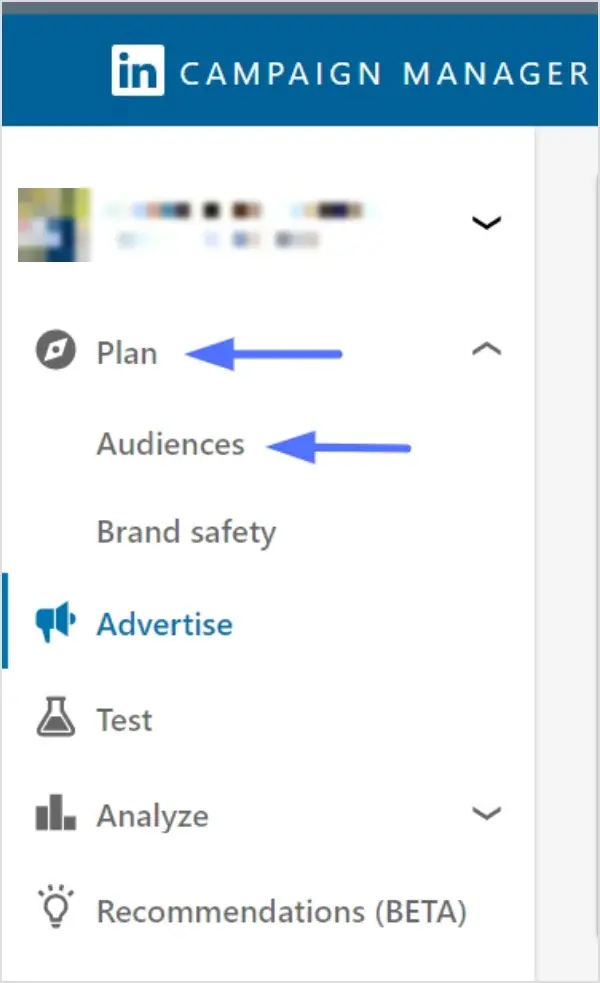
Step 3: Click on “Plan” in the left menu and select “Audiences”.
Step 4: Click Create audience, then select Matched Audience.
Step 5: Select Website, then click Next.
Step 6: Give your audience a name.
Step 7: Use the When did they engage? dropdown to pick how far back the audience should look.
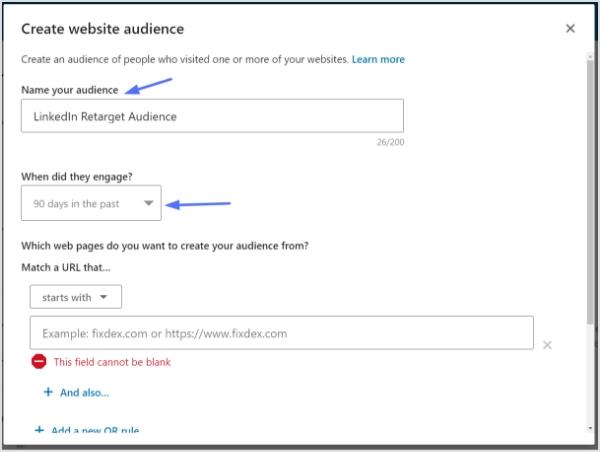
Step 8: Choose how to build the audience. With Website Actions, click Buttons or Pages and tick the actions the Insight Tag already collects (button clicks, page visits, form submissions). To enter URLs instead, click Manually enter page URLs and choose whether the URL starts with, equals or contains your value.
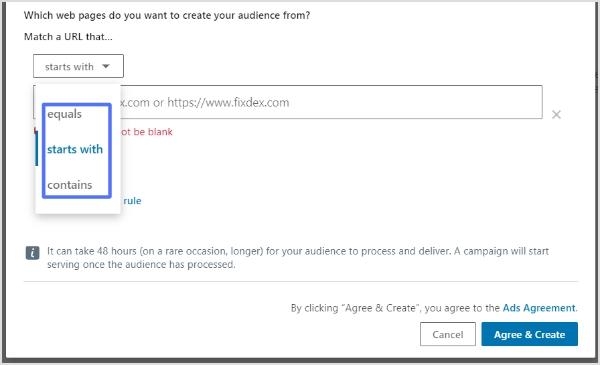
- “Starts with” is useful for URLs with dynamic parameters at the end.
- “Equals” is used when you want to match a specific URL.
- “Contains” allows you to target URLs that contain specific keywords or phrases.
- You can click “+ And also” below a URL to narrow which pages count, for example a URL that starts with example.com and contains thank-you.
Use “+ Add a new OR rule” if you have multiple URLs contributing to the audience.
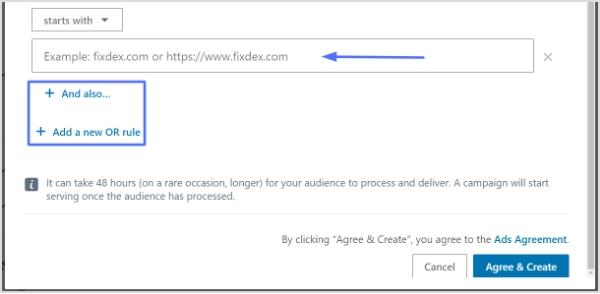
Step 9: Click Next step, review the audience, then click Agree & create.
Important Note:
Your audience must match at least 300 member accounts before it becomes active, which can take longer than the lookback window you chose. It starts building on the day you create it and doesn’t include visits from before that date. Processing can take 48 hours, rarely longer (LinkedIn Help).
Keep in mind that website retargeting audiences can’t be used with member interests and traits when you pick targeting for the ad set. LinkedIn also discontinued lookalike audiences on February 29, 2024 and recommends predictive audiences instead (LinkedIn Help).
Retarget LinkedIn clicks on links you share
The Insight Tag only runs on your own site. To add people who click links to other pages, such as a news story about your company, a partner’s landing page or a webinar platform, put your LinkedIn tag on the short link. Replug fires the pixel when the link is clicked, then sends the visitor on.
- Copy your LinkedIn partner ID: in Campaign Manager, go to Measure > Signals manager > Insight Tag, open the I will use a tag manager dropdown and click the partner ID to copy it (LinkedIn Help).
- In Replug, go to Settings > Retargeting Pixels > Add Pixel, choose LinkedIn Pixel, paste the ID and click Create.
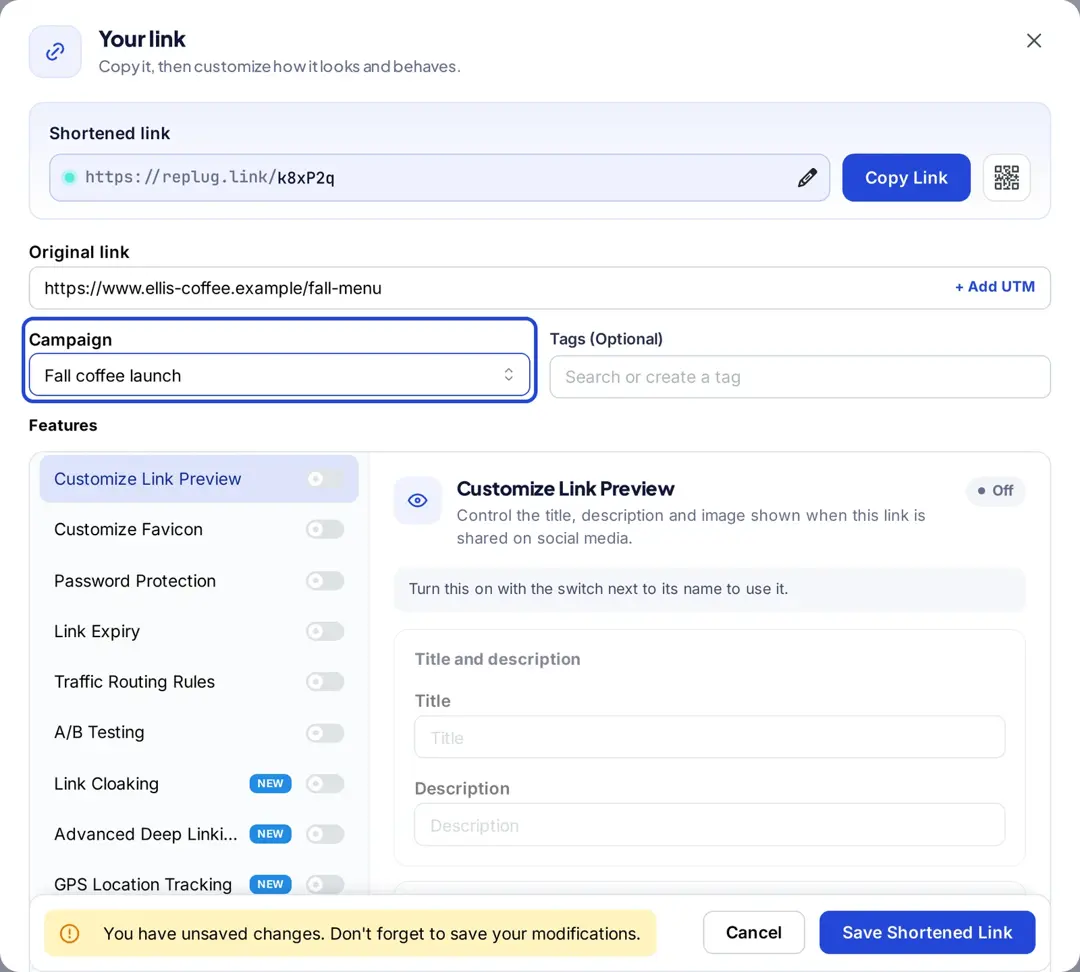
- Create a campaign with the Retargeting pixel add-on and select the LinkedIn pixel.
- Shorten your links and pick that campaign in the Campaign field.
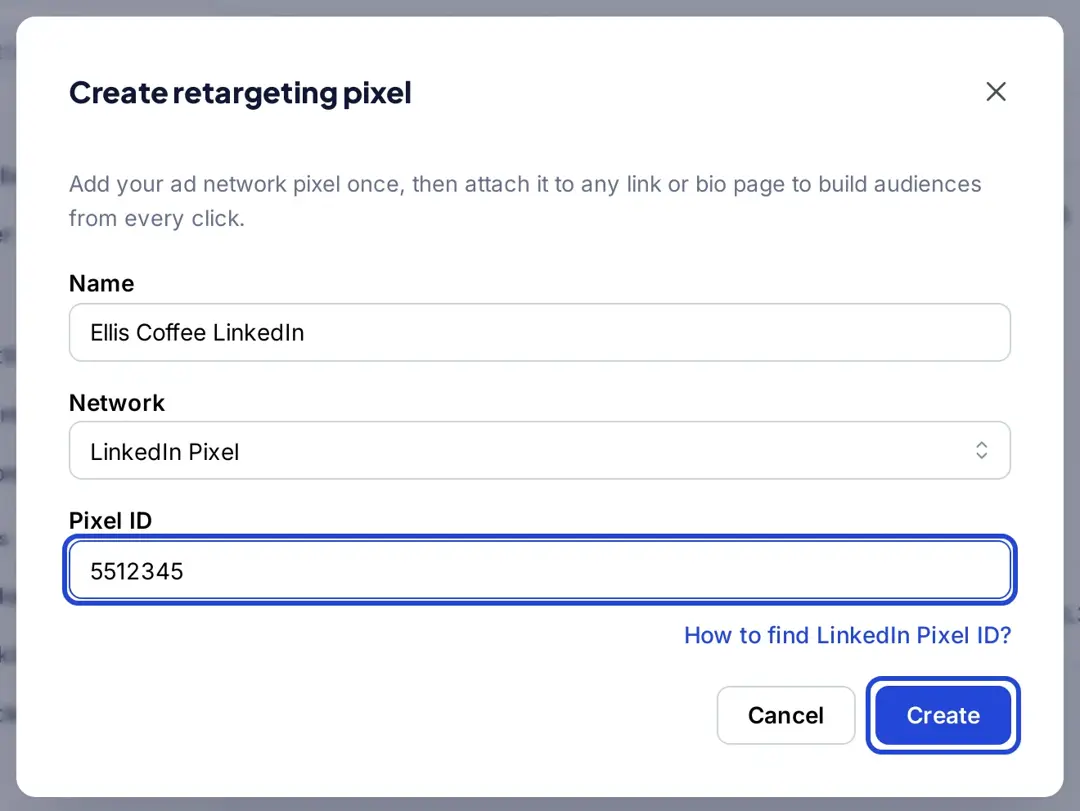
Retargeting pixels are included on Essentials (1 pixel) and on Scale and Agency (unlimited), per Replug’s pricing. For other networks, see our comparison of retargeting platforms.
Benefits of retargeting on LinkedIn:
The benefits of LinkedIn retargeting are numerous and can significantly enhance your customer acquisition efforts. Here are some key advantages of utilizing LinkedIn retargeting in your marketing strategy:
Enhanced Customer Acquisition:
LinkedIn’s extensive user database and professional targeting options allow you to reach highly relevant audiences. By retargeting individuals who have previously visited your website, you can reconnect with potential customers who have already shown interest in your brand. This familiarity increases the likelihood of engagement and conversion, ultimately driving customer acquisition.
Increased Engagement:
Retargeting lets you engage visitors who have already interacted with your brand. They already know who you are, so your ad can pick up where their visit left off, for example with a case study, a demo offer or the next step of a webinar series.
Integration with Paid Traffic Acquisition:
Retargeting works synergistically with paid traffic acquisition efforts. By broadly targeting website pages through paid ads, you can capture initial awareness and generate new traffic. Then, through retargeting, you can focus on those visitors who landed on your pages but did not convert on the first visit. This keeps your brand top of mind as they continue to browse the internet, maximizing the impact of your advertising investment.
Augment Organic Traffic Strategies:
In addition to paid traffic, retargeting can complement your organic traffic strategies. By retargeting visitors who came to your website through search engines, social media platforms, or referral channels, you can reinforce their interest in your brand and encourage them to take further action. This amplifies your organic traffic efforts and increases the likelihood of conversions.
When to launch a LinkedIn retargeting campaign?
Launching a LinkedIn retargeting campaign can be a powerful strategy to maximize your marketing efforts and drive better results. While there is no fixed rule on when to start, it is generally recommended to consider a few factors before launching your campaign.
Minimum visitor requirement:
Firstly, you need enough traffic to fill an audience. There is no official monthly visitor threshold, but a website audience only becomes active once it matches 300 LinkedIn member accounts, and only members who visit after you create it count.
If your site gets little traffic, use a longer lookback window or retarget LinkedIn engagement (video viewers, Lead Gen Form openers) instead, since those audiences build from people already on LinkedIn.
Maximizing returns on high-converting pages:
Additionally, it’s beneficial to launch retargeting campaigns when your traffic acquisition efforts have scaled and are consistently targeting pages that convert visitors into paid customers. By focusing on pages that have a higher conversion rate, you can maximize the effectiveness of your retargeting campaigns and achieve better returns on your investment.
Timing is the key:
Timing is key when it comes to retargeting. While launching retargeting early in the traffic acquisition lifecycle has its advantages, such as building brand familiarity and engaging with visitors who have already shown interest, it’s essential to align your retargeting efforts with the stage where your traffic acquisition is scaled and generating consistent conversions.
Retargeting vs Remarketing: What is the difference?
Remarketing and retargeting are two distinct methods of marketing to existing leads, often used interchangeably but with subtle differences.
Retargeting:
Retargeting involves serving paid ads to previous visitors across various platforms to re-engage them and prompt them to take desired actions. It utilizes tracking pixels and JavaScript codes to capture visitor data and display tailored advertising.
Retargeting focuses on reaching out to visitors who have shown interest but may not have converted yet. It helps increase brand visibility, engagement, and customer acquisition.
Remarketing:
On the other hand, remarketing uses the retargeting pixel to serve ads specific to existing customers and leads who have provided their email addresses. With access to the visitor’s email address, businesses can leverage email marketing to deliver personalized offers and messages.
Remarketing allows for more targeted and personalized communication, such as sending subscription renewal reminders, re-engaging cold subscribers, or offering targeted up-sells and cross-sells based on purchasing behavior.
It provides an opportunity to tie behavioral data to action and deliver offers in a more personal environment.
Conclusion:
LinkedIn Retargeting offers a powerful means to re-engage with past website visitors, leveraging the platform’s extensive user data and advanced advertising capabilities. By implementing effective retargeting campaigns, businesses can boost engagement, increase conversions, and drive revenue growth. With its unique features and the ability to tailor content based on visitor insights, LinkedIn Retargeting stands out as a valuable tool in any comprehensive customer acquisition strategy.
Remember, successful LinkedIn Retargeting campaigns require careful planning, audience segmentation, and ongoing optimization to yield optimal results. By harnessing the potential of LinkedIn Retargeting, businesses can connect with their target audience on a more personalized level, nurturing valuable relationships and achieving their marketing objectives.
Frequently asked questions

Arslan Jadoon