TikTok’s skyrocketing popularity has opened up exciting new opportunities for businesses to reach fresh audiences and measure the success of their campaigns. One of the best ways to track your marketing efforts on TikTok is by using UTM tags.
Creating UTMs by hand is easy to get wrong, and many teams end up juggling them in a spreadsheet. Replug has a free UTM builder that turns a URL and your campaign details into a tagged link, and the Replug app adds UTMs to a short link as you create it.
In this guide you’ll see which UTM values to use for TikTok, how to add them to TikTok ads in Ads Manager (TikTok can fill them in for you), and how to put a tagged short link in your TikTok bio with Replug.
Quick answer: use utm_source=tiktok on every TikTok link, a medium that tells organic and paid apart (for example social for your bio and paid_social for ads) and a utm_campaign name. For ads, add them in TikTok Ads Manager under Build URL parameters or turn on Auto-attach, per TikTok Business Help. For your bio, create a short link with the UTMs in Replug and paste it into Edit profile > Links.
What are UTM parameters?
UTM parameters, also known as UTM tags or UTM codes, are snippets of text appended to a URL to track the source, medium, campaign, term, and content of a marketing link. These parameters help marketers understand where their website traffic is coming from and how users interact with their marketing campaigns.
Here’s a breakdown of the five UTM parameters:
- Source (utm_source): This parameter identifies the specific source of the traffic, such as the platform or website where the link was clicked. For example, if you’re running ads on TikTok, the source would be “tiktok”.
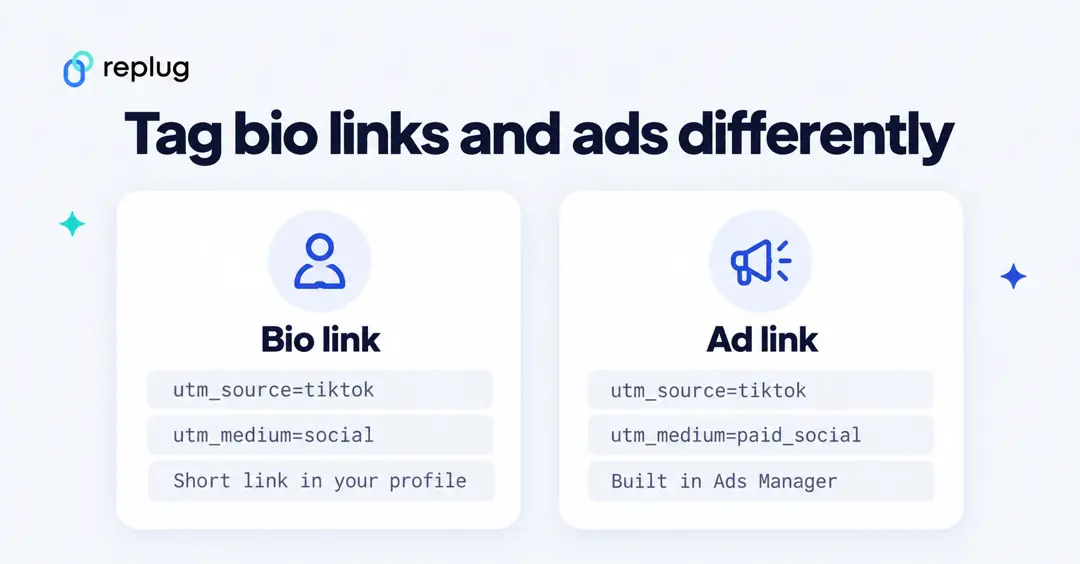
- Medium (utm_medium): The medium parameter describes the marketing medium or type of traffic, such as email, social, or CPC (cost-per-click) advertising. TikTok’s own Auto-attach option uses “Paid” for ads; pick one value and use it every time, for example
paid_socialfor ads andsocialfor your bio. - Campaign (utm_campaign): This parameter specifies the name of the marketing campaign associated with the link. It helps differentiate between different campaigns running simultaneously. For example, if you’re running a summer sale campaign on TikTok, the campaign name could be “summer_sale”.
- Term (utm_term): This parameter is typically used for paid search campaigns to identify the keywords associated with the ad. For TikTok ads, TikTok suggests using it for your own string, such as the ad group name or targeting.
- Content (utm_content): The content parameter allows you to differentiate between different elements within the same campaign. For example, if you’re testing two different ad creatives for your TikTok summer sale campaign, you could use “video_ad1” and “video_ad2” as content identifiers.
Put together, a tagged link for a TikTok bio looks like this (copy it and swap in your own URL and names):
https://www.example.com/fall-menu?utm_source=tiktok&utm_medium=social&utm_campaign=fall_menu&utm_content=bio_linkGoogle Analytics treats these values as case-sensitive, so TikTok and tiktok show up as two different sources, per Google Analytics Help. Pick lowercase and stick to it.
Why should you use UTM tags on TikTok?
Using UTM tags on TikTok offers several important benefits for marketers:
Track campaign performance:
UTM tags let your analytics tool separate TikTok traffic from everything else. With UTMs on your ad and bio links, you can see sessions, engagement and conversions for each campaign, source and medium in the tool you already use, such as Google Analytics.
Identify traffic sources:
With UTM tags, you can pinpoint the exact sources driving traffic to your website from TikTok. Whether it’s from organic posts, paid ads, or influencer collaborations, UTMs help you understand which channels are delivering the most value.
Measure ROI:
By tracking the performance of your TikTok campaigns using UTMs, you can calculate the return on investment (ROI) more precisely. This data allows you to assess the cost-effectiveness of your marketing efforts and allocate your budget more effectively in the future.
Optimize campaigns:
UTM-tagged URLs provide valuable insights into user behavior and preferences. By analyzing UTM data, you can identify trends, determine which content resonates best with your audience, and optimize your TikTok campaigns for better results.
Enhance reporting:
UTM parameters make it easier to generate detailed reports on your TikTok marketing activities. Whether you’re reporting to clients, stakeholders, or your team, UTMs provide clear and granular data that can support your analysis and decision-making.
Facilitate A/B testing:
UTMs let you compare variations of your TikTok ads or content. Give each version its own utm_content value and compare their results in your analytics tool to see which one brings visitors who stay and act.
Two places to add UTMs on TikTok
Most TikTok traffic to your site comes from two places, and each needs its own tags so your reports can tell them apart: the link in your profile (organic) and the links in your ads (paid).
How to add UTM parameters to TikTok ads in Ads Manager
TikTok Ads Manager has a URL parameter builder, so for ads you don’t need an outside tool. Per TikTok Business Help (checked October 2026), there are two ways:
- Auto-attach: when you add a destination URL in the Ad details section, TikTok adds the campaign source (TikTok), medium (“Paid”), campaign ID and name for you. Toggle it under Edit below the Preview button.
- Manually: after entering your destination URL, click Edit under Preview, then Build URL parameters. Enter values in the UTM parameter fields, add your own under Custom parameters if you need them, check the preview and click Apply.
TikTok also offers macros that fill in names and IDs automatically when the ad runs, per its UTM parameters article:
| Macro | Expands to |
|---|---|
__CAMPAIGN_NAME__ | Campaign name |
__CAMPAIGN_ID__ | Campaign ID |
__AID_NAME__ | Ad group name |
__AID__ | Ad group ID |
__CID_NAME__ | Creative name |
__CID__ | Creative ID |
__PLACEMENT__ | Placement (TikTok, Pangle) |
A parameter string you can paste into the builder (adjust the medium to your own naming):
utm_source=tiktok&utm_medium=paid_social&utm_campaign=__CAMPAIGN_NAME__&utm_term=__AID_NAME__&utm_content=__CID_NAME__Tips from TikTok’s best practices for UTM parameters:
- Don’t put a # in the URL before your parameters; everything after # is dropped.
- Don’t repeat a parameter. If utm_source appears twice, analytics tools may keep only the last value.
- Don’t swap source and medium: the source is where (TikTok), the medium is how (paid or organic).
- Preview the ad and click through once to check that the landing page loads and the parameters are there.
TikTok also adds its own click ID, ttclid, to landing page URLs from ads; it doesn’t change your custom parameters, per TikTok Business Help. Because Ads Manager adds UTMs, macros and the click ID to the destination URL itself, use your full landing page URL in ads, and save Replug short links for the places TikTok doesn’t tag for you.
How to create a UTM link for your TikTok bio using Replug
A short link with UTMs is handy where TikTok doesn’t add parameters for you: your profile link, a bio link page, links you send to creators you work with, and anywhere else you promote your TikTok content. Here’s how to make one with Replug’s link shortener. The UTM builder is included on every plan, including Free, per replug.io/pricing.
Step 1: Sign in to Replug
Visit the Replug app and sign in to your account. If you don’t have an account, you can sign up for free; no card is needed for the Free plan.
Step 2: Paste your URL and click Shorten
On the Home page, paste the page you want people to visit into the shorten field and click Shorten. (You can also click Add UTM right in that field.)

Step 3: Configure UTM parameters
In the Your link window, click + Add UTM next to the original link. Fill in Campaign (utm_campaign), Medium (utm_medium), Source (utm_source), and optionally Term and Content. To reuse the same tags later, pick a Saved preset or turn on Save these tags as a new preset. Click Apply.
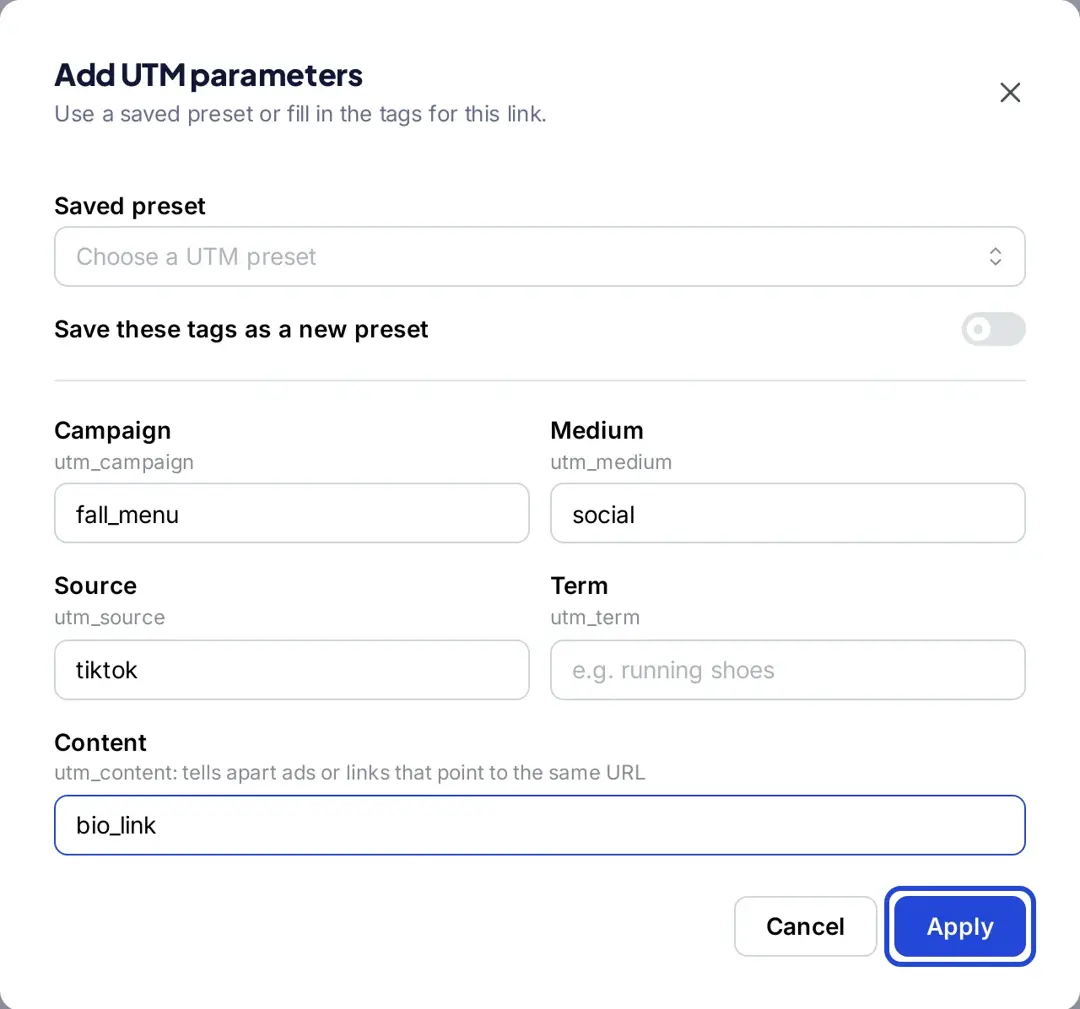
For a TikTok bio link, use tiktok as the source, social as the medium and a content value such as bio_link, so it doesn’t mix with your ad traffic.
Step 4: Check the tagged link
The original link now shows your UTM parameters, and the short link sends visitors to that tagged URL. Click Save Shortened Link when you’re done with the other settings.
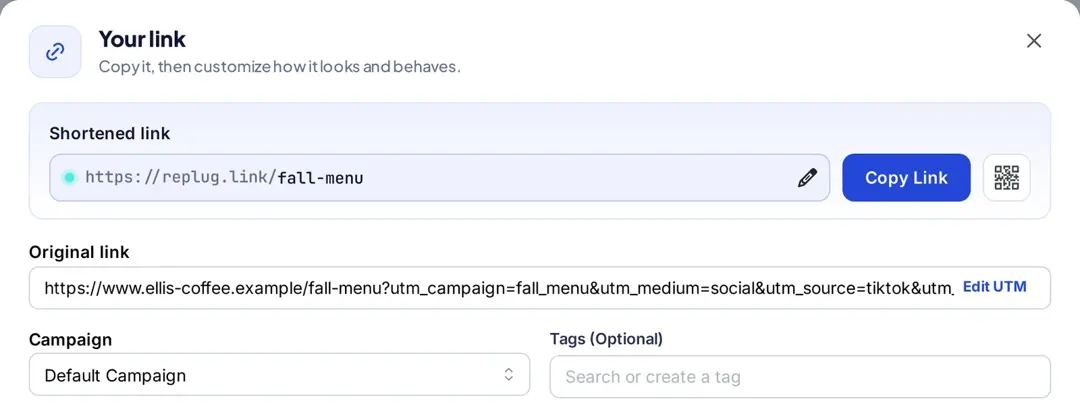
Step 5: Customize the URL slug
Click the pencil icon on the shortened link to change the random back-half to something readable, such as fall-menu. Custom back-halves are on the Essentials plan and above; on Free, Replug creates the back-half for you, per replug.io/pricing.
Step 6: Add the link to your TikTok profile
Click Copy Link. In the TikTok app, go to Profile > Edit profile > Links, tap Add and paste the link. Per TikTok Support, the Links option needs a Verified Business Account or at least 1,000 followers, and TikTok recommends direct links rather than chains of redirects in its in-app browser.
Step 7: Track performance
Replug shows clicks and unique clicks on the short link with countries, devices, browsers and referrers. Your analytics tool shows what those visitors did: in Google Analytics, open Reports > Acquisition > Traffic acquisition and look for the tiktok source and your campaign name, per Google Analytics Help. For naming conventions and attribution in GA4, see UTM parameters for traffic attribution.
More on building tagged links in general: what a tracking URL is and how to build one, and UTM parameters for email.
Final Note
UTM tags make TikTok traffic easy to find in your analytics. Tag ads in TikTok Ads Manager with its builder and macros, tag your bio link with a short link, keep the names lowercase and consistent, and compare the results by medium and campaign.
FAQs

Arslan Jadoon