What is a tracking URL?
A tracking URL is a normal link with extra information added so you can see where each visit came from. Most add UTM parameters after a question mark (?utm_source=newsletter); ad platforms add click IDs such as gclid; and short links record the click before they redirect.
URL tracking is how marketers tell which email, ad, post or QR code sent a visitor. The link carries a label, your analytics tool reads it, and every visit, sign-up or sale is credited to the right campaign.
Ever noticed a link in a newsletter that ends with ?utm_source=…&utm_medium=email?
That is a tracking URL at work. Below: what each part means, a copyable template, the three ways links get tracked, and how to build one in Google’s URL builder or Replug.
Tracking URL example
Here is a tracking URL for a fall menu email from a fictional coffee shop in Austin, TX:
https://www.ellis-coffee.example/fall-menu?utm_source=newsletter&utm_medium=email&utm_campaign=fall_menu&utm_content=hero_button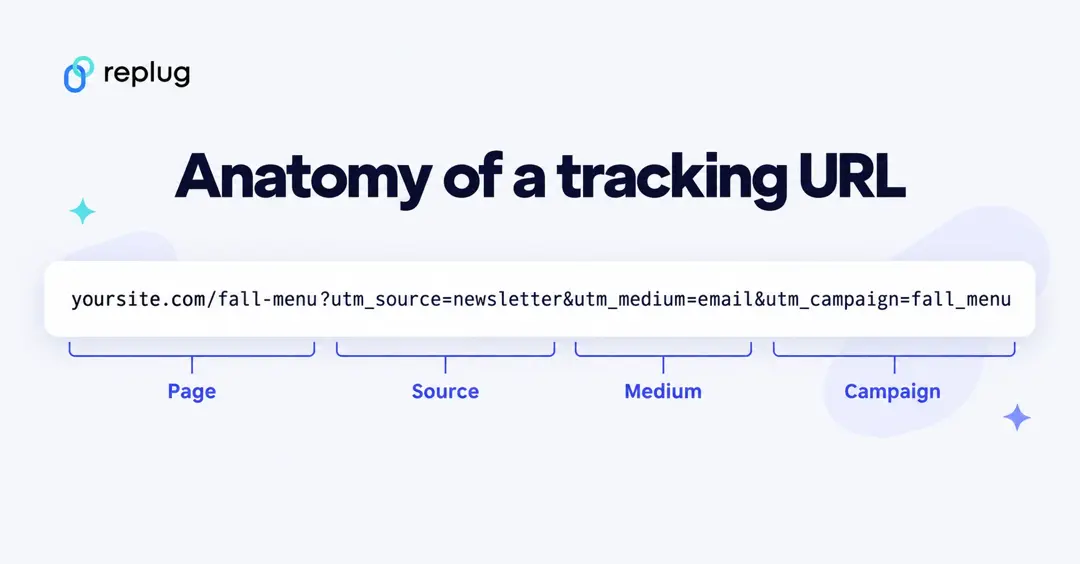
Everything before the question mark is the page. Everything after it is tracking: pairs of name=value joined with &. The page loads the same with or without them; your analytics tool reads them and files the visit under “newsletter / email / fall_menu.”
Copy this template and replace the values in capitals:
https://YOURSITE.COM/PAGE?utm_source=SOURCE&utm_medium=MEDIUM&utm_campaign=CAMPAIGN&utm_content=CONTENTWhy is URL tracking important?
URL tracking is an essential process in online marketing that helps marketers in analyzing the overall performance of the URLs. It includes factors such as number of clicks and conversions.
The reason why the URL tracking process is important for bloggers, affiliate marketers, and digital marketers is that it assists users in determining the link performance in an article or on a website page.
It’s nearly impossible to track affiliate sales without URL tracking. Almost every affiliate network or affiliate marketing software uses URL parameters in the product links to track the clicks and conversions.
Digital marketing experts use UTM parameters to track their website visitors and understand the source of the traffic. They set separate UTM parameters for Google ads, Facebook ads, social media, landing pages, etc.
To sum it up, the reason why URL tracking is important in the digital marketing world is that it provides users with insights into link performance, conversion rate, and tracking clicks data.
How does the URL tracking work?
URL tracking is an online marketing strategy that monitors the impact of the marketing campaigns through link performance. Following are the activities that can be tracked with URL tracking:
- Clicks
- Conversion
- Affiliate commissions
- Click-through rate
- Traffic sources
- Leads generated
Three ways a link gets tracked
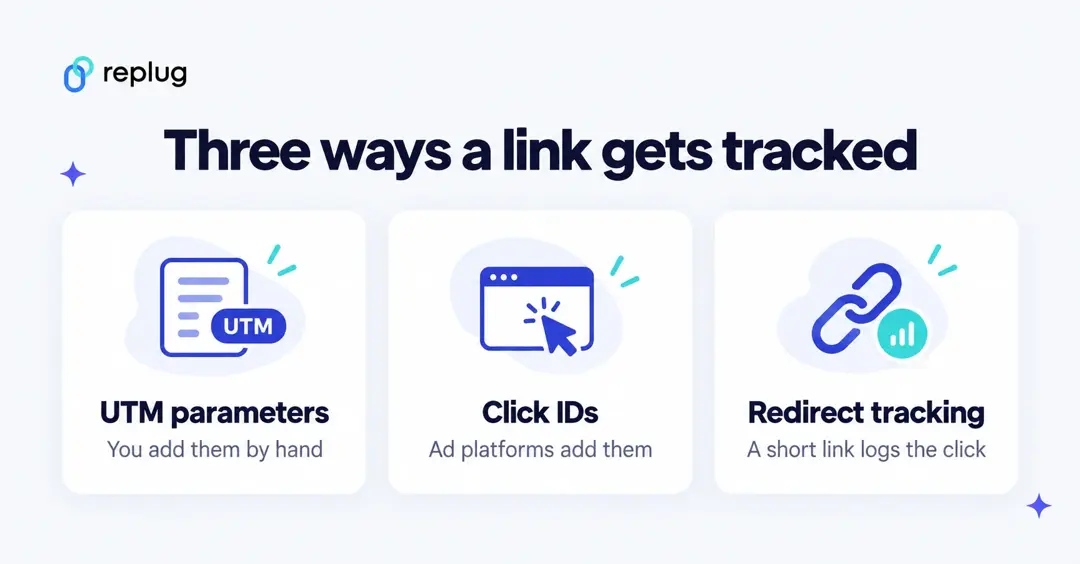
- UTM parameters. Labels you add to the URL yourself: source, medium, campaign and optionally term, content and ID. Google Analytics reads them for every visit (see Google’s URL builders help page).
- Click IDs. Unique IDs that ad platforms add on their own. Google Ads auto-tagging adds a
gclid(“Google Click Identifier”) to each ad click, per Google Ads Help. Meta addsfbclidto links clicked on its apps, which its pixel can store as the_fbccookie, per Meta’s developer docs. - Redirect tracking. A short link, like the ones from a link tracker, records the click (time, country, device, referrer) on its own server and then sends the visitor on. It works even when the destination is a site you don’t control, and you can still add UTMs to the destination.
Most campaigns combine them: UTMs for your own analytics, click IDs for the ad platform, and a short link so you can count clicks wherever the link is shared.
URL tracking process
- Define the purpose of URL tracking:
Bloggers and marketers don’t vaguely start tracking random URLs. Instead, there is always an agenda behind the tracking.
- URL selection:
Pinpoint the URLs that you can track over the next few weeks or months.It’s almost impossible to manually track hundreds of thousands of URLs.
- Opt for the most suitable UTM parameters:
Opt for the most suitable UTM parameters to insert in the URL to track. A UTM parameter is a short label added to the URL that tells your analytics tool where the visit came from.
- Tracking the UTM parameters:
The last and most important part of the URL tracking process is tracking the UTM parameters. Track UTM parameters through Replug or also can use Google Analytics.
When should I use a tracking URL?
There are several use cases for tracking URLs. Once you have figured out what tracking a URL means, it gets easier to apply the tactics.
Here are different scenarios when you should use a tracking URL:
- Record the clicks on the links:
Whenever you want to know how many clicks a link has gotten, the easiest way to track the clicks is by using a tracking URL.
- Track sales and conversions:
E-commerce stores and online businesses track sales and conversion through a tracking URL. It usually comes in handy when businesses want to know where the sale or conversion has come from on their website.
- Identify the top-performing pages:
When there are multiple sales pages with unique UTM parameters, it’s easier to identify the top-performing sales page.
- Study the performance of the links on a site:
There are site-wide links available on every blog or website. Tracking URLs help admins understand the overall link performance on the website.
- Allot the affiliate commissions appropriately:
Tracking URLs are imperative in affiliate marketing. No wonder the affiliate product links are long and clunky. The affiliate networks use URL parameters to identify and allot the affiliate sales to the appropriate affiliate account.
- Find the traffic sources for a landing page:
When marketers create a new landing page for a new product, they share the landing page link across all channels, such as social media, email newsletter, blog sidebar, etc. Therefore, the source of the website visitor is easily traceable with a tracking URL.
- Trace the footprints of the generated leads:
Lead generation means when a visitor signs up for a trial account or downloads a freebie. Marketers insert a UTM parameter that explains where the lead came from.
Types of URL tracking
There are three types of URL tracks that are being used:
1. Auto-tagging
Auto-tagging is done by the ad platform. In Google Ads, auto-tagging adds a gclid parameter to the URL people click, and Google Analytics uses it to import campaign and cost data when the accounts are linked. You don’t add anything by hand, but if your site redirects, make sure the parameter reaches the final page, as Google Ads Help notes.
2.Manual tagging for backend systems
Google Ads also offers ValueTrack parameters: placeholders in a tracking template that Google fills in at click time, such as {lpurl} for your final URL, {keyword}, {device} or {campaignid}. A template that combines them with UTMs looks like this:
{lpurl}?utm_source=google&utm_medium=cpc&utm_campaign={campaignid}&utm_term={keyword}3.Manual-tagging
In manual tagging, you add UTM parameters yourself, usually with a URL builder: a form where you fill in source, medium and campaign and copy the finished link. Google’s free Campaign URL Builder and Replug’s UTM builder both work this way.
How to track URLs with UTM parameters?
Are you wondering about tracking URLs with UTM parameters?
Here are four steps to follow:
#1. Select the URLs to track
The URL tracking process begins with selecting the URLs to track. Most experts start with choosing the UTM parameters and bypassing step no. 1, which doesn’t make sense. So start with the URL selection and then get to the UTM parameters afterward.
Usually, digital marketing experts use UTM parameters on the call-to-action buttons in email newsletters, landing pages, discount offer pages, and Facebook or Google ads.
#2. Choose appropriate UTM parameters
The next up is to choose the suitable UTM parameters to add to your URL. Digital marketers who run Google ads or Facebook ad campaigns know the effectiveness of these UTM parameters.
Moreover, a campaign’s URL could have multiple UTM parameters doing their specific jobs. The most common UTM parameters are mentioned below:
Google Analytics recognizes these parameters (definitions from Google’s URL builders help page):
| Parameter | What it identifies | Example |
|---|---|---|
utm_source (required) | The referrer: the site, newsletter or platform sending traffic | google, newsletter, billboard |
utm_medium (required) | The marketing medium | cpc, banner, email |
utm_campaign (required) | The product, slogan or promotion | spring_sale |
utm_id | A campaign ID, matching the IDs you use when importing campaign data | fall_2026_01 |
utm_term | The paid keyword | pour over kettle |
utm_content | Which creative or link was clicked, such as two buttons in one email | hero_button |
utm_source_platform | The platform that directed the traffic, such as a buying platform | dv360 |
Google says to always include utm_source, utm_medium and utm_campaign. Its best practices also ask for one consistent value per platform and channel, and consistent lowercase spelling, so a single campaign doesn’t split into several rows in your reports.
#3. Place the UTM parameter tracking
You don’t need to edit code to add UTMs. Paste your page URL into a builder such as Google’s Campaign URL Builder, fill in the fields and copy the result, or add them in Replug when you shorten the link (steps below). If you tag QR codes, the same parameters work there too; see how to add UTM tags to your QR codes.
#4. Analyze the results
Once visits come in, check them in Google Analytics 4: from the left menu select Reports, then Acquisition > Traffic acquisition, per Google’s Analytics Help. The report groups visits by Session default channel grouping; change the dimension to Session source / medium or Session campaign to see your UTM values.
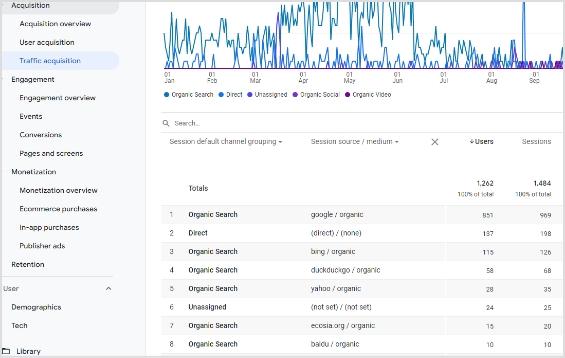
You’ll see each channel with its users, sessions and engagement.
Your campaign appears under the source / medium and campaign values you used, so consistent naming pays off here.
How to get a tracking URL?
UTM parameters are most useful in places where your analytics tool can’t tell the source on its own: email, social posts, paid ads, QR codes and links shared in apps or messages.
Have you ever hovered over a link in an email that includes various terms such as source or medium? The reason is that these are types of UTM parameters that facilitate to track the performance of the email marketing campaigns.
You can type the parameters by hand, use a free URL builder, or let your link tool add them when it shortens the link.
Add UTMs with Replug
Replug is an all-in-one link management platform for creating, managing and tracking vanity URLs for social media, online advertising, or email newsletters. Its custom URL shortener free tool allows users to shorten the long URLs so that they appear clean anywhere you share them.
Replug’s pricing page lists a UTM builder and parameter forwarding on every plan, including Free, plus retargeting, bio links, QR codes, deep linking and more. The short link also records each click, so you get click counts in Replug and sessions in Google Analytics.
Here’s how to build a tracking URL in Replug:
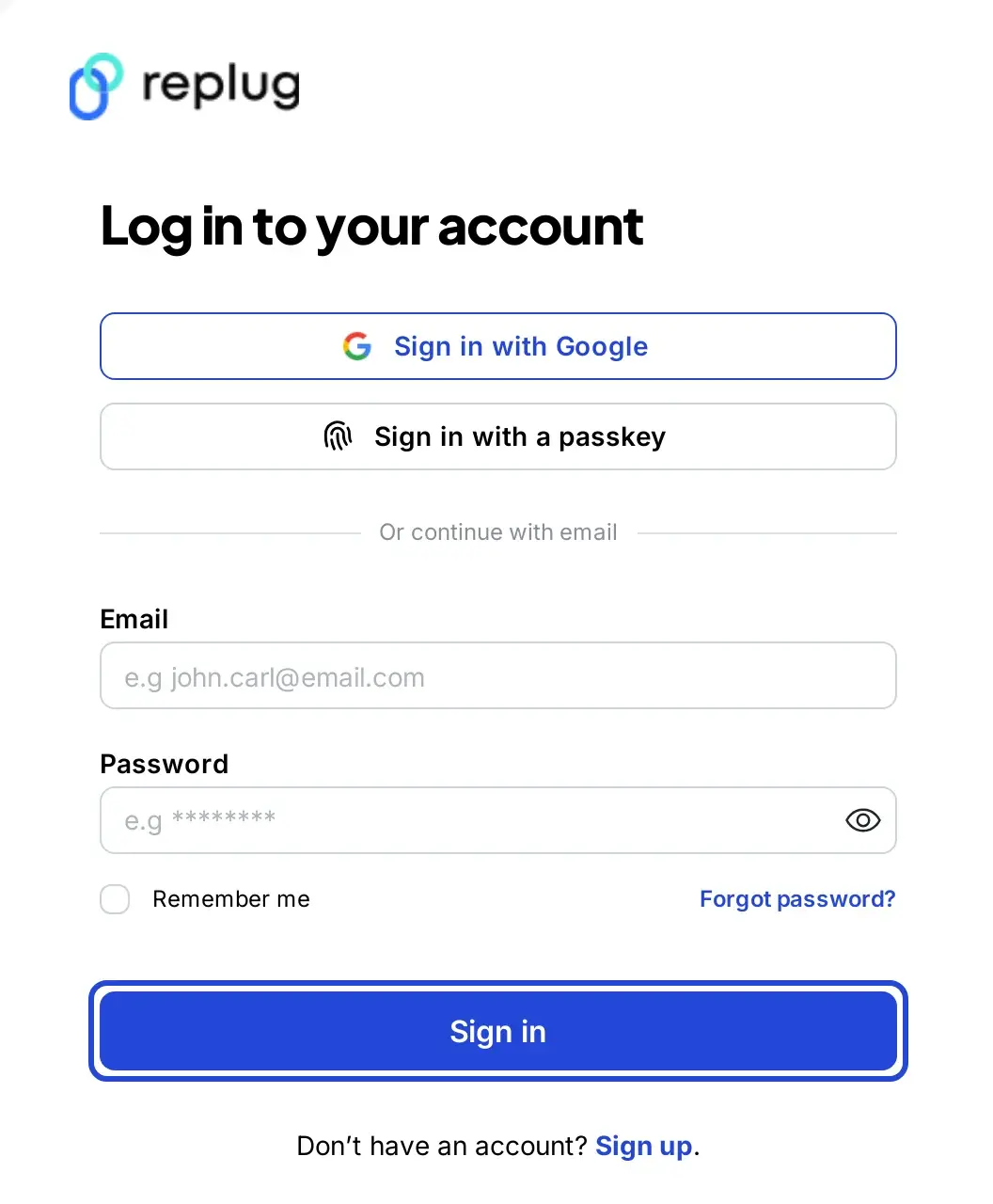
Step 1: Log in to your Replug account
Go to the Replug app and log in, or create a free account.
Step 2: Paste the URL you want to track
On the Home screen, paste the page URL in the Paste a long URL to shorten… field and click Shorten.

The Your link window opens with your new short link. Next to the Original link field you’ll see + Add UTM.
In the same window, the Campaign field files the link under a campaign. Put every link for one promotion (the email, the social posts, the flyer QR code) in the same campaign, and you can later filter your analytics by that campaign to see how the whole promotion did, then by link to see which channel brought the clicks.
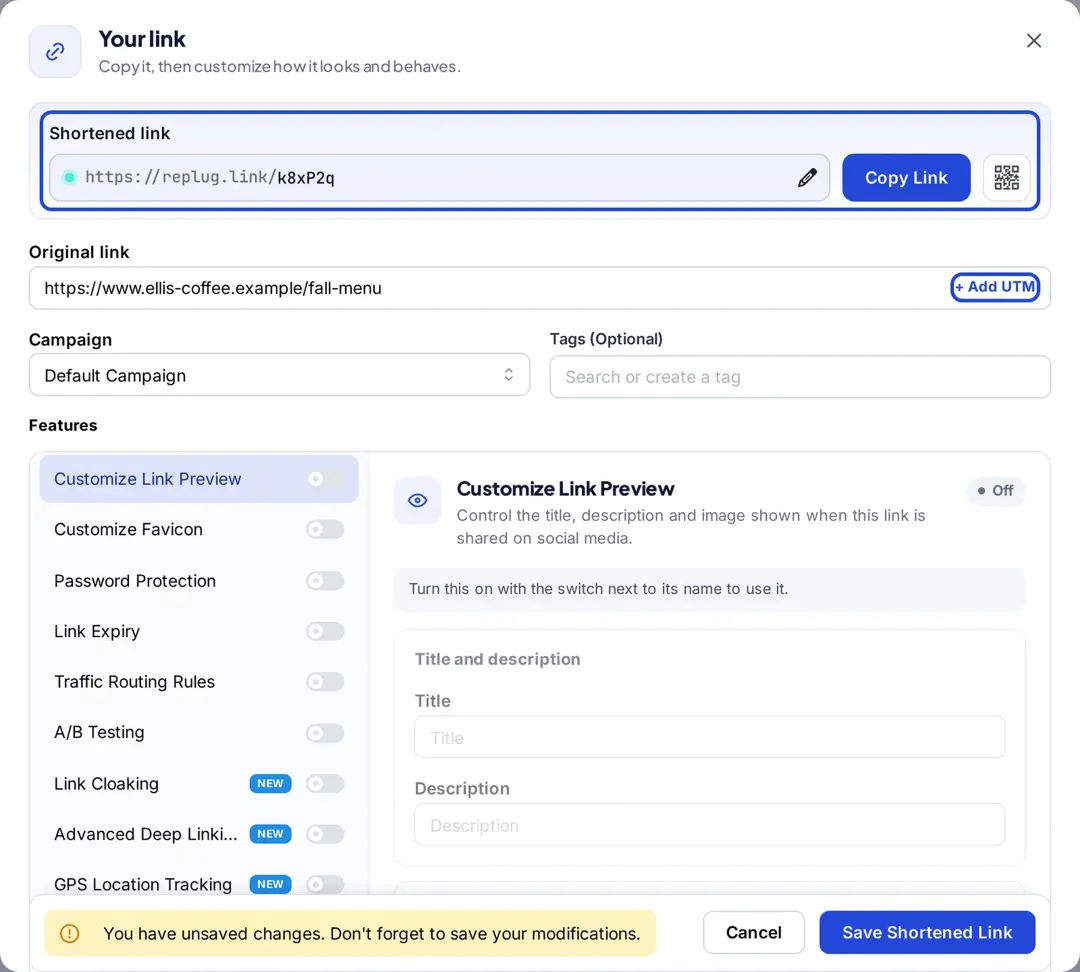
Step 3: Add UTM parameters
Click + Add UTM. In the Add UTM parameters window, fill in campaign, medium and source (and term or content if you need them), or load a saved preset.
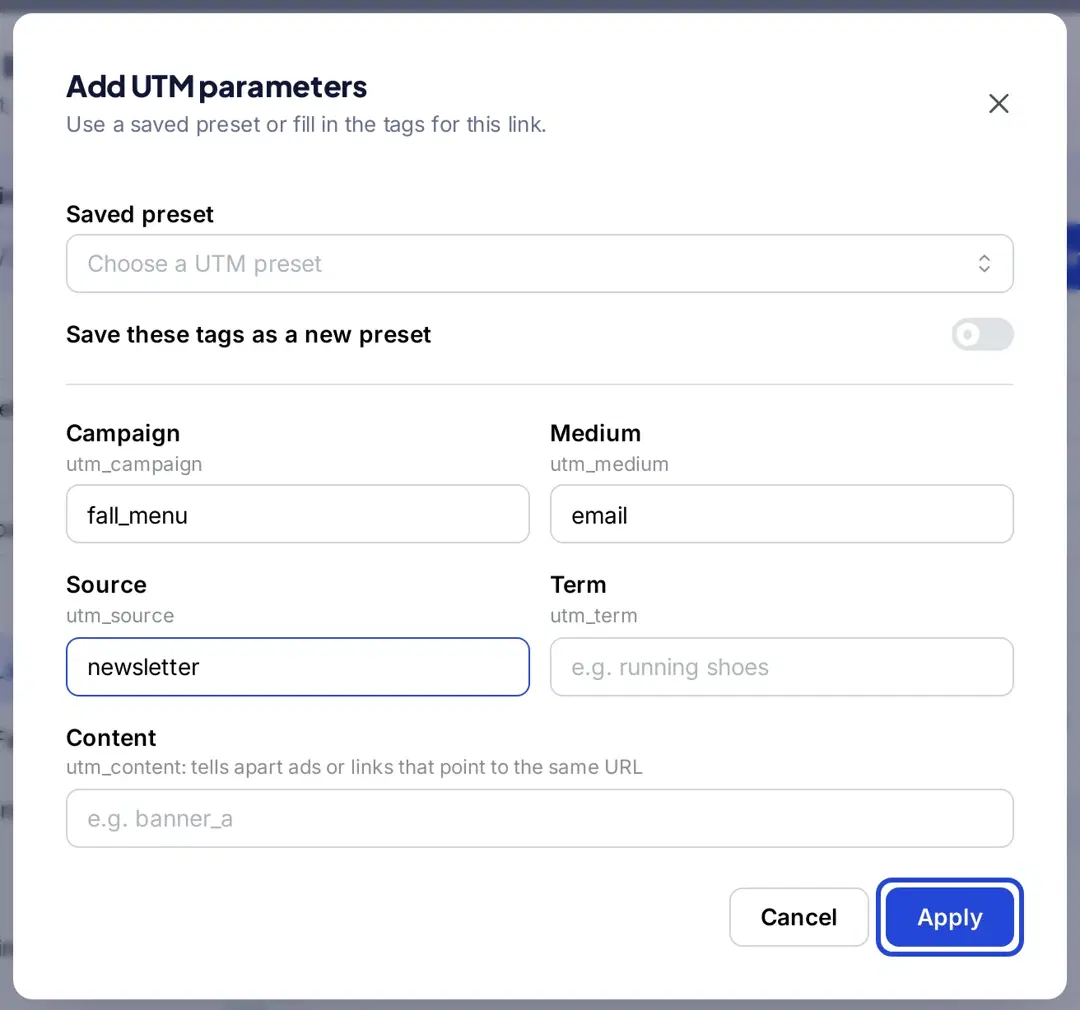
Turn on the preset switch if you want to save these values for the next link, then click Apply.
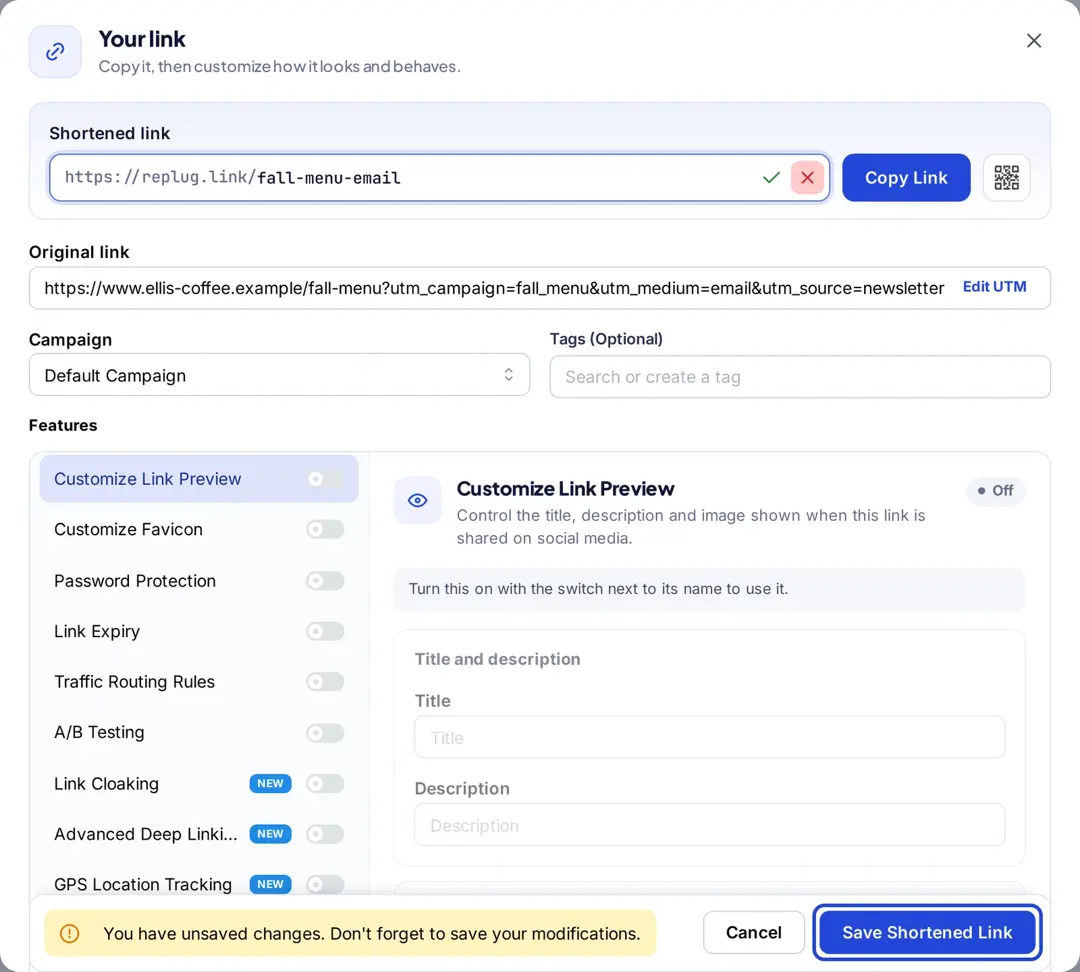
The parameters are added to the original link, so every click on the short link arrives in Google Analytics with your UTM values.
Check the spelling of each value before you save: Google Analytics treats different spellings as different campaigns.
Step 4: Save and share the short link
Optionally edit the back-half of the short link with the pencil (Essentials and up), then click Save Shortened Link. Share the short link; Replug counts the clicks and Google Analytics records the visits under your UTM values.
Step 5: Check the clicks on your tracking link
Open Links to see each short link with its Clicks, Unique Clicks and QR Scans, or choose View Stats from a link’s menu. For more detail, open Analytics, stay on the Short Links tab, and use Filter by a campaign or Filter by a link with a date range.
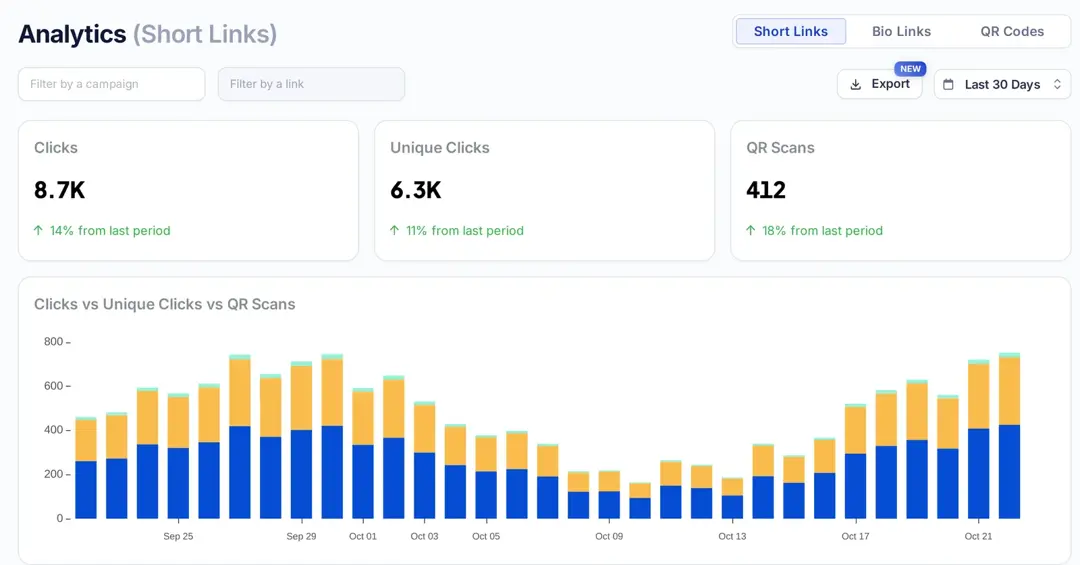
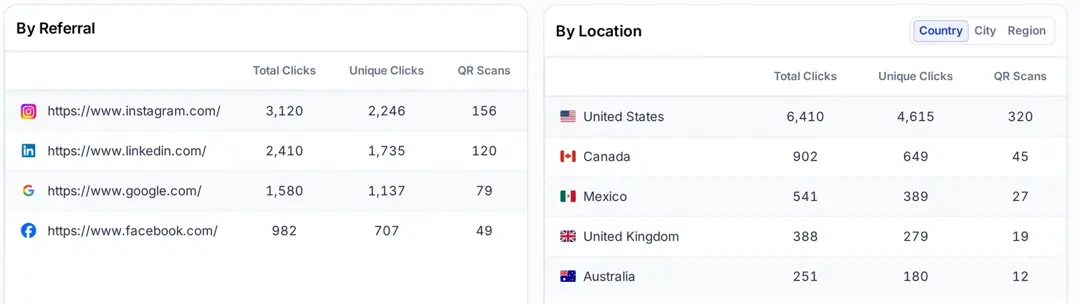
Below the chart, the same page breaks the clicks down By Referral, By Location (country, region and city), By Browser and By Operating System. How far back you can look depends on your plan; see the pricing page.
Start Tracking
A tracking URL works the same whether you build it in Google’s URL builder or a link shortener: consistent UTM values tell your analytics where visits came from, and a short link adds click counts for places your analytics can’t see.
For more on what a click record contains, see how click tracking works or Replug’s link tracking features.
Frequently asked questions

Muhammad Ahsan Jamal