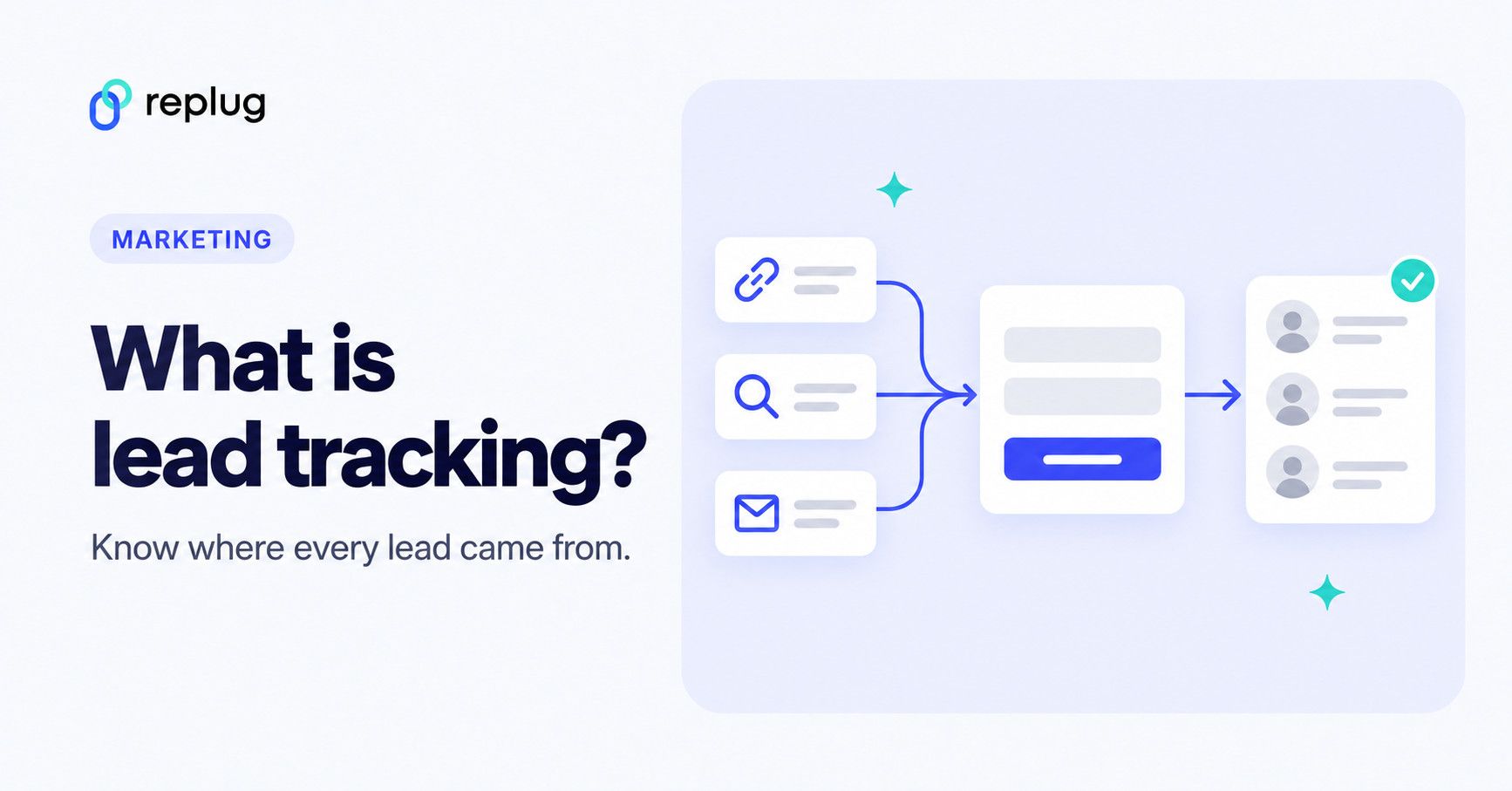
Lead tracking is the process of recording where each potential customer came from, what they did before they got in touch, and where they are now in your sales pipeline, from first click or form fill to won or lost deal. Marketers, bloggers and SEOs strive to get readers’ attention through different means, and lead tracking tells you which of those means bring real prospects.
One of the key indicators of readers’ interest in the content is lead generation.
This can be seen through actions such as clicks on CTAs, downloads of opt-in incentives, or sign-ups for a free trial.
However, the challenge that occurs is how to track those leads.
Without leads tracking, it’s impossible to determine where these leads are coming from or what’s working best for the campaign.
That is the hard part of lead generation: you can only improve the channels you can attribute leads to.
Let’s explore the idea of lead tracking and try to comprehend the processes behind tracking leads effectively.
What is lead tracking?
Lead tracking is a process of monitoring the stage of the leads during their conversion journey, understanding where they are in the funnel, and ensuring a smooth transition for the conversion.
Most prospects don’t convert right away; they take some time before they press the buy button.
Therefore, companies come up with a system to follow up with potential customers regularly until the deal is closed.
Simply put, it’s about understanding the behavior of potential customers and keeping an organized record of their engagements, requests, and actions.
In practice, lead tracking has two halves: lead source tracking (which channel, campaign or link brought the lead) and pipeline tracking (what stage the lead is at and who follows up). Your website analytics usually covers the first half and your CRM the second.
Why is it important to track leads?
A well-designed leads tracking mechanism helps marketers and brands analyze the effectiveness of their lead generation funnel.
Sometimes, a potential customer is willing to buy the product but can’t figure out something tiny – it could hinder the transactional part of the purchase. The lead tracking system can identify where the prospect is stuck and fix what’s stopping the potential customer from converting.
Therefore, lead tracking activity can provide a sense of understanding to the seller what these potential customers might want to know or what might be the appropriate action to take right now.
5 Benefits of tracking marketing leads
To truly understand the importance of tracking marketing leads, it’s vital to go through its benefits to comprehend the effectiveness of this course fully:
1. Improved conversion rates
The first and foremost benefit of tracking leads is the improved conversion rate. By monitoring prospects or lead behaviors, marketers can identify which strategies and touchpoints are most effective in converting leads to customers.
Such an action assists marketers in understanding the situation, allowing optimization of sales efforts and improving the conversion funnel.
2. Enhanced sales forecasts
Lead tracking helps brands come up with valuable data that allows brands to predict future sales trends with more precision.
Tracking leads assists sellers in understanding the journey of leads through the sales funnel and provides an opportunity for businesses to make informed decisions on resource allocation and strategy adjustments.
3. Customer insights
Marketers are keen to know where the potential customers stand after inquiring about the product clicking on the ad or filling up the sign-up form. Lead tracking provides a whole heap of useful data about potential customers’ preferences, behaviors, and pain points.
These insights can help brands and marketers create tailor-made offers to meet the customers’ expectations and eliminate the ambiguities in the customers’ minds.
4. Streamline sales system
One of the benefits of lead tracking is that it helps businesses identify and eliminate bottlenecks and streamline sales processes, ensuring a smoother journey from lead to customer.
Once the sales process is streamlined, the sales cycle is faster and more efficient.
5. Data-driven targeting
Lead tracking revitalizes lead conversion by implementing effective engagement techniques. A significant advantage of tracking such campaigns is that it enables marketers to segment leads based on demographics, behavior, and their stage in the buyer’s journey. This segmentation allows for the creation of more personalized and targeted marketing campaigns, leading to improved results.
Campaign tracking, therefore, is essential for brands and marketers to optimize their lead generation funnel and enhance overall lead conversion. These are just some of the many benefits of lead tracking that marketers should leverage to drive better outcomes.
How does lead tracking work?
Lead tracking is an integral tool in digital marketing that helps companies gather the necessary information to close deals and boost revenue. It involves identifying the sources and locations of potential customers and taking every step necessary.
A crucial aspect of lead tracking is data collection, where marketers gather useful information on the leads. The data enables digital marketers and conversion experts to improve their campaigns, customize offers, expand their customer base, and eventually drive more sales.
Lead tracking also shows campaign outcomes in numbers: which source brought each lead, how many became customers, and what each lead cost.
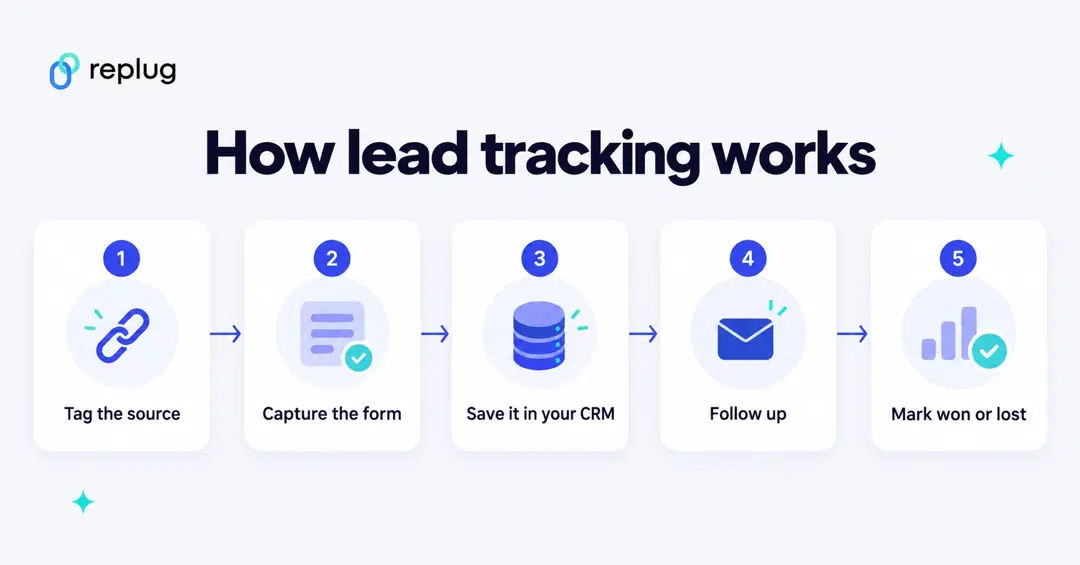
Here is what happens behind the scenes:
- The source is tagged. Campaign links carry UTM parameters (utm_source, utm_medium, utm_campaign), which Google Analytics reads to credit visits to a campaign, according to Google Analytics Help. Ads add click IDs too: with Google Ads auto-tagging, a GCLID parameter is added to the landing page URL, per Google Ads Help.
- The form records the lead. When someone submits a form, your site sends the contact details, plus the source values, to your CRM or email tool. In Google Analytics 4 you can log this as the recommended generate_lead event, which measures “when a lead has been generated (for example, through a form)”, per Google’s event reference, and mark it as a key event.
- The CRM tracks the stage. Each lead gets an owner and a stage (new, contacted, qualified, won, lost), so sales can follow up and you can report on what each source produced.
More importantly, lead tracking allows marketers to go deep into the sales and marketing insights and capture useful information that otherwise would have been kept in the box. Businesses and marketers can use this crucial information to increase marketing campaigns and organizational efficiency.
It’s safe to say that by implementing an efficient lead-tracking system, businesses can improve customer retention, evaluate the effectiveness of their marketing tactics, and optimize their customer acquisition process.
5 Steps of lead tracking process
Take a look at the essential steps involved in tracking leads:
- Plan the campaign: First things first, map out the plan of the lead tracking process. Determine what you want to achieve and why it’s important for success.
- Identify a “good” lead: Before diving deep into the process, be clear on the concept of a good lead. Every lead is different, so try to optimize the process to generate high-quality leads.
- Pick a lead-tracking software: Opt for an affordable, easy-to-use CRM tool that offers lead-tracking service. There are several types of lead tracking softwares that differently, but the idea is the same.
- Capture and nurture leads: Once the lead generation process starts to capture leads, build strategies to nurture leads. Don’t bombard your leads with offers to convert – give them some time. Free courses, tutorials, and workshops often help push the leads convert into customers.
- Track leads conversion: Finally, step up to track leads conversion using the lead tracking tool. Conversion tracking would give you an inside-out report on the effectiveness of the lead tracking process.
8 Elements of lead tracking
Here are the essential lead-tracking elements that one should be tracking:
- Name: The names of the leads help marketers or brands identify, communicate, and sort them through if needed. Without a unique name, it might not be possible to manage and organize the leads.
- Company name: The company name is the workplace where this person works. Stating the company name ensures that the marketer or brand can find out about the employment status.
- Job role: A job role tells about the designation and the job description of the lead. It’ll be useful to know what role this person plays at a company.
- Phone number: The phone number ensures that the marketer or brand can reach out to this person via telephone.
- Email address: The email addresses of the leads help marketers send out necessary emails, such as discount offers, follow-up emails, and order confirmations.
- Postal address: A postal address is mandatory if the business is selling a physical product. Without a postal or mailing address, the brand might not be able to mail stuff.
- Lead source: The channel, campaign and link that brought the lead, for example the UTM values or the ad click ID captured with the form. Without it you can’t tell which marketing works.
- Stage and owner: Where the lead is in your pipeline and who is responsible for the next step, so no lead waits without a follow-up.
So, this is the list of data items to track when setting up a lead-tracking campaign.
6 Best ways to track leads
Let’s take a look at some of the best ways to track leads:
1. Capitalize on UTM parameters
UTM parameters are tags you add to the end of a URL, such as ?utm_source=newsletter&utm_medium=email&utm_campaign=spring_demo. Analytics tools read them to tell you which source, medium and campaign sent each visit, per Google Analytics Help. That makes them useful for tracking clicks and visits by campaign; to tie them to a lead, you also have to save them with the form.
By incorporating UTM parameters in your URLs, you can identify which marketing campaigns are driving the most traffic and conversions. Thus, a detailed tracking link allows for precise adjustments in link strategy, enhancing overall marketing effectiveness.
Pass UTM values into hidden form fields
Analytics tools show which campaigns bring visits, but your CRM only knows the source of a lead if the form sends it. The usual fix is a hidden field for each UTM value: an input of type “hidden” that visitors don’t see but that is submitted with the form. Most form builders and CRMs support hidden fields; check your tool’s help for how to fill them from the URL.
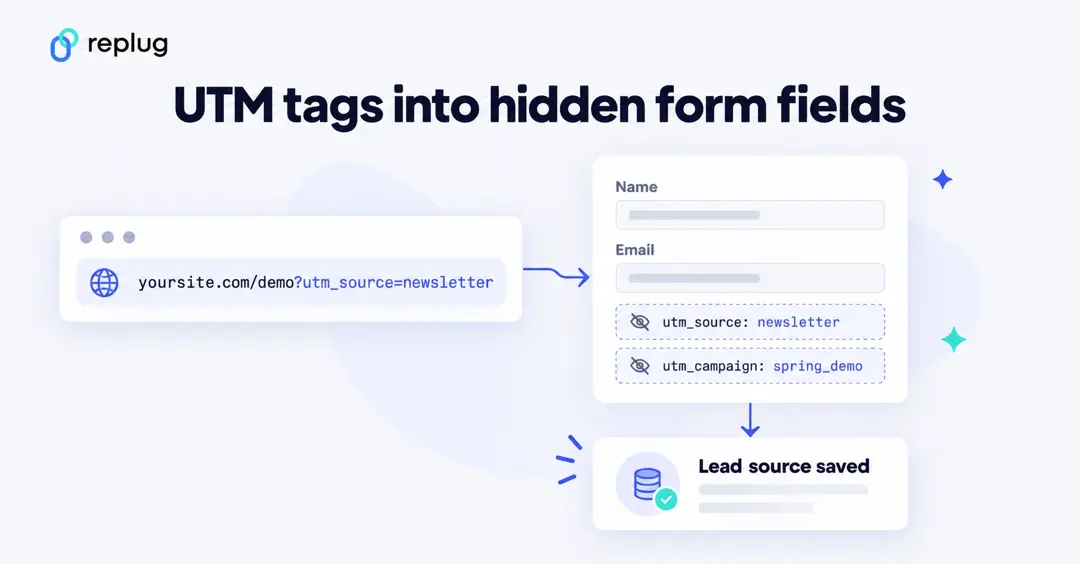
If your form is plain HTML, a few lines of JavaScript can copy the UTM values from the page address into the hidden fields:
<form action="/demo-request" method="post">
  <input type="email" name="email" required>
  <input type="hidden" name="utm_source">
  <input type="hidden" name="utm_medium">
  <input type="hidden" name="utm_campaign">
  <button type="submit">Book a demo</button>
</form>
<script>
  const params = new URLSearchParams(window.location.search);
  ["utm_source", "utm_medium", "utm_campaign"].forEach((key) => {
    const field = document.querySelector(`input[name="${key}"]`);
    if (field && params.get(key)) field.value = params.get(key);
  });
</script>
Visitors often browse a few pages before they fill in the form, so many teams also save the first UTM values in a cookie or local storage and fill the fields from there. Test the form with a tagged link and check that the values arrive in your CRM.
The following are the best tools to add UTM parameters to a link:
Replug
Replug allows you to effortlessly create UTM parameters for your links, enabling detailed link tracking of your marketing campaigns. The UTM builder is included on every plan, including Free, and each short link records clicks, unique clicks, countries, devices and referrers. Replug counts clicks, not leads or conversions: the leads themselves are recorded by your form, CRM or analytics tool.
Usermaven: Free UTM Builder
Usermaven’s free UTM builder is another powerful tool that helps you generate UTM parameters quickly and efficiently.
2. Use a powerful CRM tool
A CRM tool refers to a customer relationship management tool – it’s a dashboard that administers the engagement, collaboration, and communication between a company and the customer. Using an efficient and reliable CRM tool can come in handy in tracking leads.
Moreover, a CRM not only tracks interactions but also integrates with other tools and platforms, such as your forms, email tool and ad accounts, offering a broader view of all customer activities. This integration aids in identifying potential leads and nurturing them through personalized communication and targeted marketing efforts.
Try the following CRM tools to help start customer engagement:
3. Utilize an analytics tool
Digital analytics tools are crucial to keeping track of business performance. It’s vital for a business to keep track of every bit of detail about its prospects and customers. An analytics tool assists with monitoring and tracking different engagement and conversion metrics. It sure is one of the best ways to track leads.
Analytics tools offer insights into user behavior, helping businesses understand what works and what doesn’t. By digging deeper into the data, such as page views, session duration, and bounce rates, companies can refine their strategies to improve lead generation and conversion rates.
In Google Analytics 4, for example, you can mark the event your form sends (such as generate_lead) as a key event; GA4 then shows how many users completed it and which channels led them there.
These are two of the best analytics tools on the market:
4. Set up promo codes
Promo codes are given to the customers by merchants to avail of a special discount offer – usually, such discount offers are for a limited period. It turns out, promo codes can also track leads and conversion.
All merchants have to do is track the specific promo code and fetch all the transactions that happened using the promo code. As a result, businesses can determine the effectiveness of their marketing campaigns.
This tracking method also helps in identifying which customer segments are most responsive to promotional offers, enabling opportunities for more accurate and targeted campaigns in the future.
Here are two promo code tools to try out:
- Coupon X
- Reveal Button
5. Follow-up in person
Follow-up in person is a common way to track leads. Marketers and sales representatives often follow up with prospects who inquire about the product or use the trial version.
A sales representative can reach out to the prospect and inquire about the plan for converting into a paid customer.
In-person follow-ups create a more direct and meaningful connection with potential customers. Not only does it help in gathering feedback but also in addressing any concerns or objections the prospect might have, increasing the likelihood of conversion.
Here are two ways to track leads in person:
- Text message
6. Setup custom CTAs & shortened links
Short links and call-to-action overlays don’t track leads by themselves, but they help you see where interest comes from. Give each channel its own branded short url shortener link with UTM tags, and you can compare clicks per channel next to the leads in your CRM.
Replug doesn’t record or score leads; it records clicks. It can help you collect them, though: a CTA form on the pages you share, or a sign-up form block on a bio page, sends email addresses to the email tool you connect.
Here is how to set up a CTA form in Replug and follow the results:
How to collect leads with a Replug CTA form
Lead tracking comes in different shapes and forms.
One way to collect leads is a call-to-action form on the content you share. Replug shows a small form over the page your short link opens, and sends each email address to your email marketing tool. Let’s see how to create custom CTAs in Replug. CTAs are included on the Essentials plan and up, according to Replug’s pricing page.
Step #1: Sign up for a Replug account
Start by signing up for a Replug account. There’s a free plan with no card required, and paid plans come with a 14-day trial. Then log in.
Step #2: Connect your email tool
Go to Settings, open Integrations and connect the email marketing tool where you want the sign-ups to go. The CTA form will offer the tools you connect here.
Step #3: Create a CTA campaign
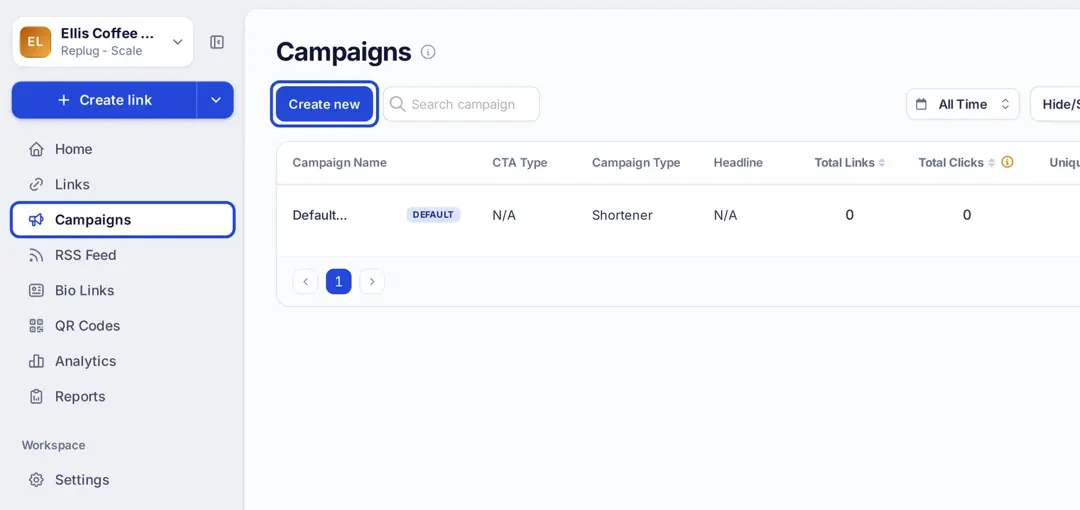
Click Campaigns in the left menu, then Create new.
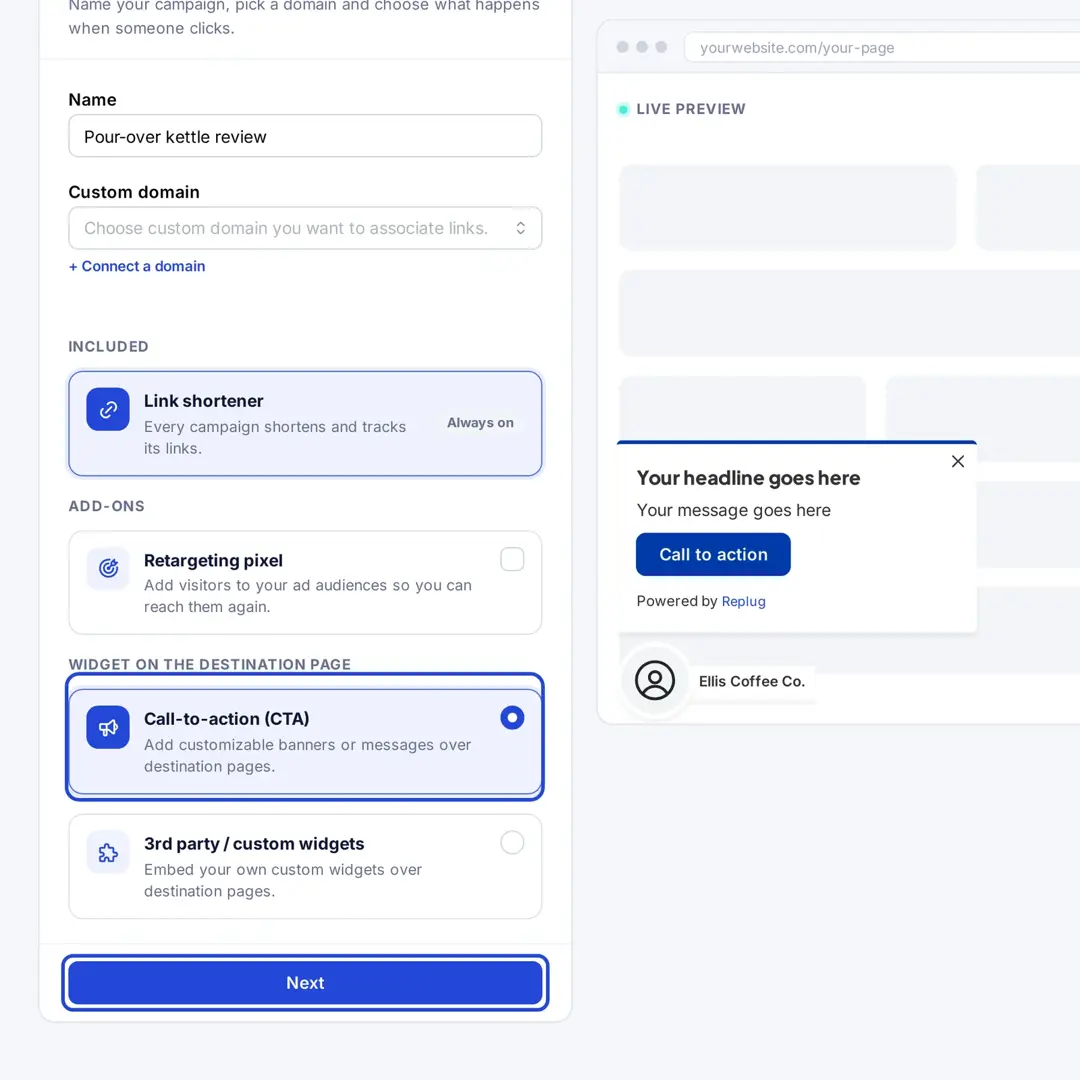
Give the campaign a name, choose the Call-to-action (CTA) widget and click Next.
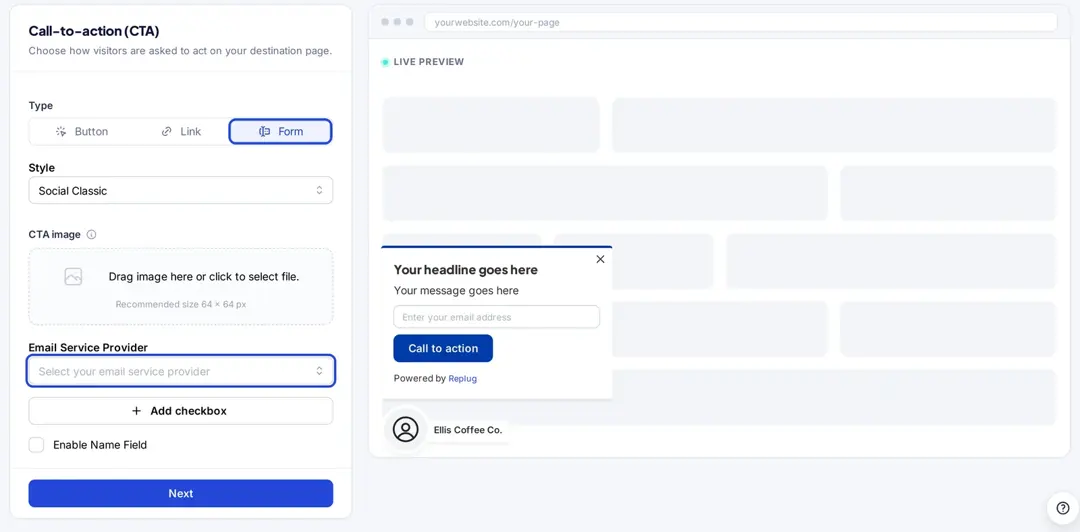
Step #4: Choose the Form type and your email tool
Under Type, choose Form, pick a style (such as Social Classic, Banner or Popup) and select your tool under Email Service Provider. You can also add a checkbox, for example for consent, and turn on a name field.
Click Next to write the headline, message and button text, then set colors and position in the Customization step, and save the campaign. Our guide on how to create a CTA campaign covers every option.
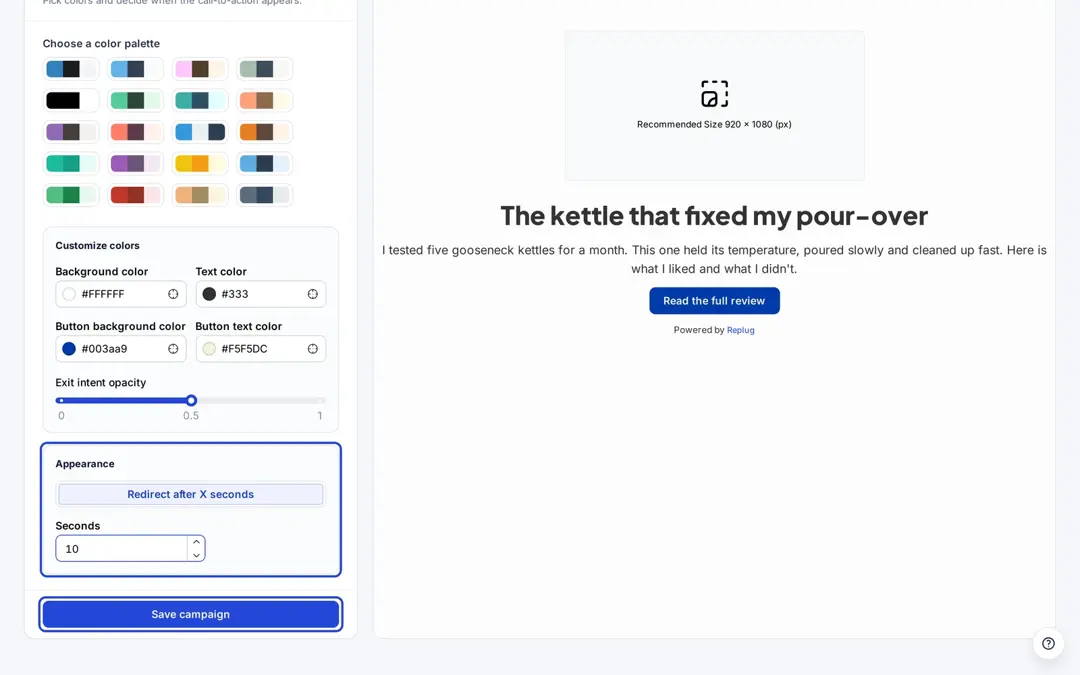
Step #5: Use the campaign on your links
When you shorten a link, select this campaign in the Campaign field. Everyone who opens the link sees your form over the page.
Step #6: Follow the results
The email addresses arrive in the list you chose in your email tool, where you can tag them by campaign and pass them to your CRM. In Replug, open Analytics to see clicks, unique clicks, countries and referrers for the campaign’s links.
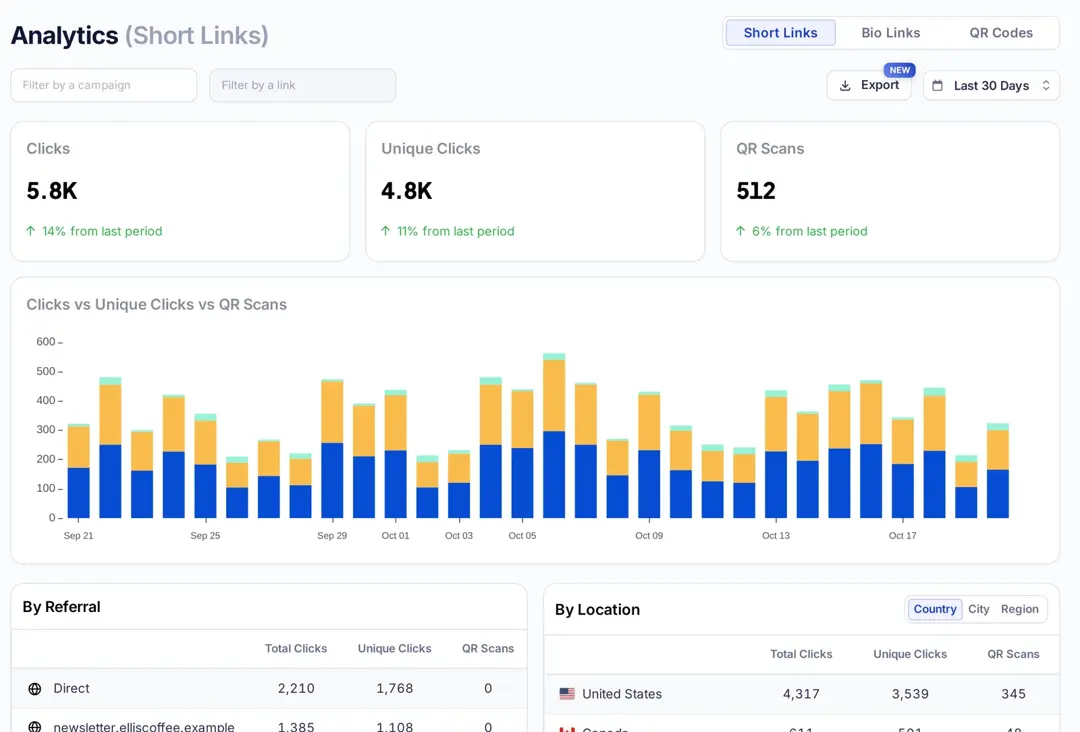
Give a campaign a couple of weeks before you judge it, and compare the sign-ups in your email tool with the clicks in Replug to see how many visitors filled in the form.
Track leads using digital analytics tools
Digital analytics tools refers to any website and app statistics tools that reports on the performance metrics, such as page views, unique visitors, unique clicks, conversion rate, referrals, etc. These analytics tools can be used to track leads now.
Usermaven is a state-of-the-art website and app analytics tool that provides a handful of engagement and conversion statistics. It’s a complete analytics toolkit for tracking unique hits, page views, events, conversions, etc.
Here’s how you can track leads using the Usermaven tool:
Step #1: Log in to your Usermaven account
First things first, sign up for a Usermaven account if you still need to do so. Once you’ve signed up, you’re all set to log in to your account.

Use your login credentials to sign in.
Step #2: Create a conversion goal
Now, go to the Attribution section from the sidebar and look out for the conversion goal feature.
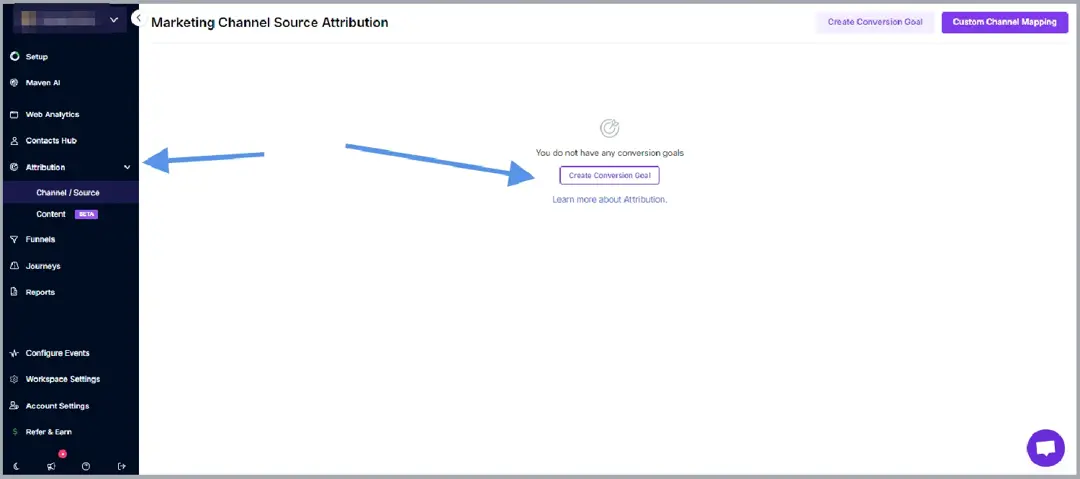
You’ll land on the conversion goals page – click the Create Conversion Goal button to start creating your first conversion goal.
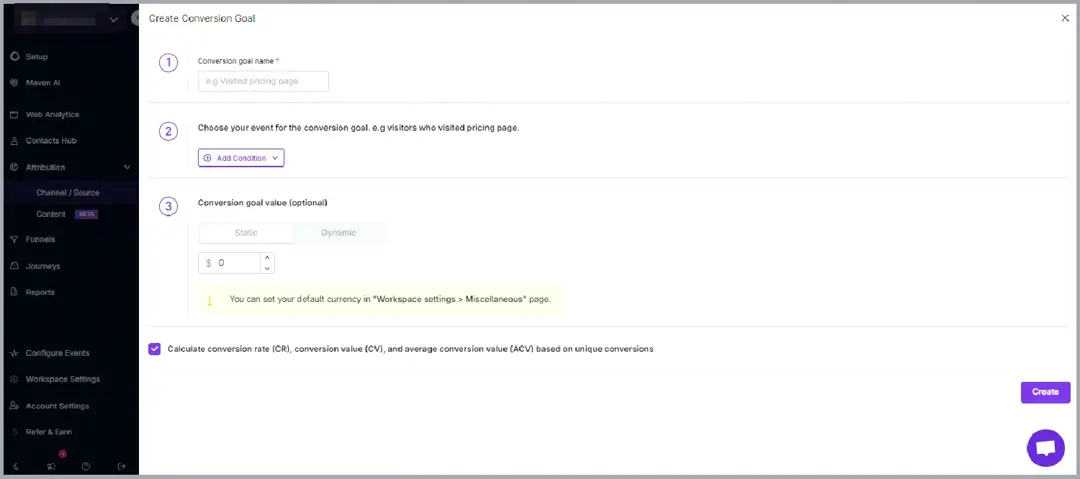
The conversion goal creation page will appear now.
Choose a conversion goal name and select the event. For instance, In this case, where you’re tracking leads for a request submission form, you can choose the Page URL option.
The next bit is very important: you can simply add the condition “is” and provide the “Successful submission” page URL.
What it means is that the conversion is recorded when a visitor lands on the “Successful submission” page – the visitors are supposed to visit the “Successful submission” page only after submitting the request form.
Therefore, the conversion goal would be completed.
Fill up the form and finish creating the event.
Step #3: Track conversion goal
Give your conversion goal a good few weeks before hopping on the analytics section.
Access the Usermaven account for at least three to four weeks.
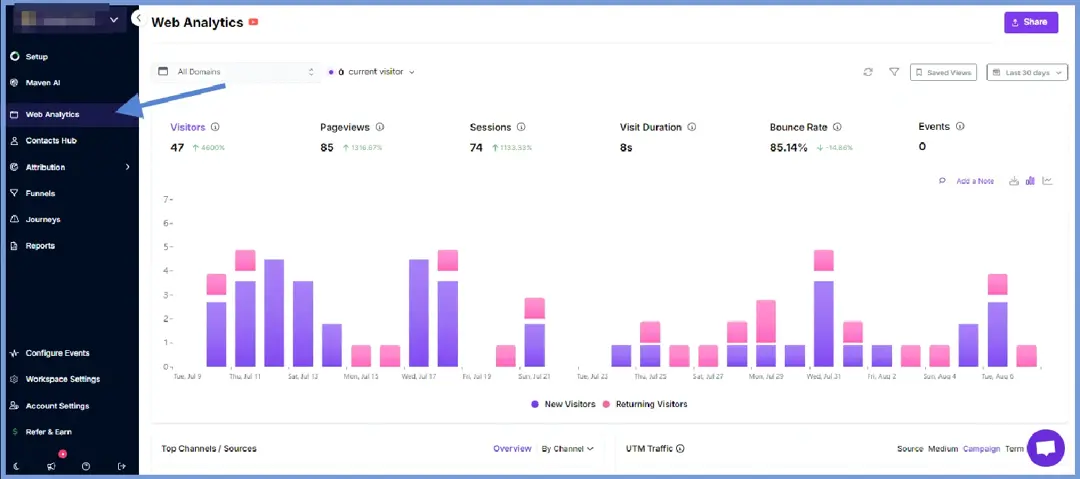
Once logged in, go to the Web Analytics section and look out for the conversion goal section – you’ll see the conversion goal data.
So, that’s how you can track leads using Usermaven.
Lead tracking best practices
Here are some of the best lead-tracking best practices:
- Fine-tune your lead sources to generate more leads by focusing on the channels that yield high-quality prospects. Avoid spreading your efforts thin across every possible channel, especially if your target audience doesn’t frequent those channels.
- Set crystal clear goals to steer your marketing and sales strategies. Your approach will be shaped by whether you aim for more customers, higher sales per customer, or sales of higher-margin products.
- Map out your process, even if it seems informal. Whether you use sticky notes, email folders, old spreadsheets, or rely on someone with an excellent memory, recognizing and organizing your current process is crucial.
- Prepare a tailored message for the targeted audience. Understand the needs of leads at various stages to develop a relevant strategy. Simply sending a monthly email blast won’t effectively nurture your prospects toward a purchase.
- Create customer segments to benefit marketing, sales, and customer service teams. Create content and messaging tailored to each segment’s needs to enhance engagement and effectiveness.
- Nurture your captured leads effectively by tracking their position in your pipeline and sending content that matches their current needs. Keep leads engaged with personalized emails that guide them toward a purchase, such as cart abandonment reminders or sales demo offers.
5 best lead tracking tools
Let’s take a quick look at some of the best lead-tracking tools:
| Best lead tracking tools | Descriptions |
| Replug | A powerful link management tool for branded short links, click tracking, UTM building, CTA forms and bio pages. It doesn’t track leads itself; it shows which links and channels get clicks, and its CTA and bio sign-up forms send emails to your email tool. It allows users to create and track short URLs for social media, PPC ads, email marketing, and other marketing campaign. |
| Usermaven | Usermaven is an advanced website and app analytics tool that assists SAAS and online businesses in monitoring their website or app statistics and data.A powerful analytics tool gives an inside-out report on the keywords, rankings, page views, unique hits, and other essential website tracking metrics. |
| Hubspot | Hubspot is a powerful CRM tool that offers a complete suite for customer management. It has a lead-tracking system that allows businesses, agencies, and entrepreneurs to track leads. |
| Pipedrive | Pipedrive is a comprehensive lead management tool that keeps track of the leads using its advanced CRM products. |
| Freshworks | Freshworks offers CRM software for sales teams, with contact and deal management. |
Mistakes to avoid when tracking leads
Here are some of the common mistakes when tracking leads:
- The lack of categorization in lead generation often causes confusion and inefficiency in follow-ups and tracking.
- Keeping the recorded lead data is crucial to the follow-ups. Failing to update lead information regularly can result in outdated and inaccurate data, which could hinder the lead-tracking process.
- Lead tracking sources are vital to the whole process. Overlooking lead source tracking makes it difficult to evaluate the effectiveness of marketing campaigns.
- Every lead is different than the other. Ignoring inactive leads instead of nurturing them can lead to missed opportunities.
- A huge mistake beginner marketers make is that don’t set reminders for the follow-ups, which can result in lost leads due to delayed responses.
- Utilizing effective lead generation and tracking software gets the job done quite well. Relying solely on manual tracking increases the risk of human error and data loss.
- It’s necessary to prioritize the leads based on their potential. Failing to prioritize leads based on their potential value can waste time on low-value prospects.
- CRM integration helps the lead-tracking process. Unable to configure the lead tracking campaign with a CRM system can lead to fragmented and incomplete data.
Get started with lead tracking
SAAS companies, software houses, online website-based tools, and Shopify plugin developers should pay close attention to lead tracking.
One of the reasons why these businesses should adopt lead tracking is that their competitors might already be doing it. As a general rule of thumb, if your competitors are doing something, you shouldn’t ignore it either.
Are you ready to get started with lead tracking? We hope this piece of content will help you step on the right foot.
Allow us to answer some of the frequently asked questions about the lead track:
FAQs about lead tracking

Manahil