If you’re still running ads that drop people straight onto an affiliate product page, we need to have a talk.
It’s like texting someone and saying, “Hey nice to meet you! Wanna buy this $300 course?”
No context. Minimal warming up. Zero chance it’ll go well.
Because here’s the deal: When you’re an affiliate marketer, you don’t control the product page. You can’t tweak the copy, add testimonials, or even change a single headline. All you can do is hope that random visitors magically feel convinced enough to buy.
And let’s not forget: ad platforms check where your ad leads. Google Ads disapproves destinations that exist mainly to show ads or that copy another source without adding original content, and Meta requires the product in your ad to match the one on the landing page (see Google Ads destination requirements and Meta’s Advertising Standards). A page that adds your own review and context gives both something to approve.
So, what do smart affiliate marketers do?
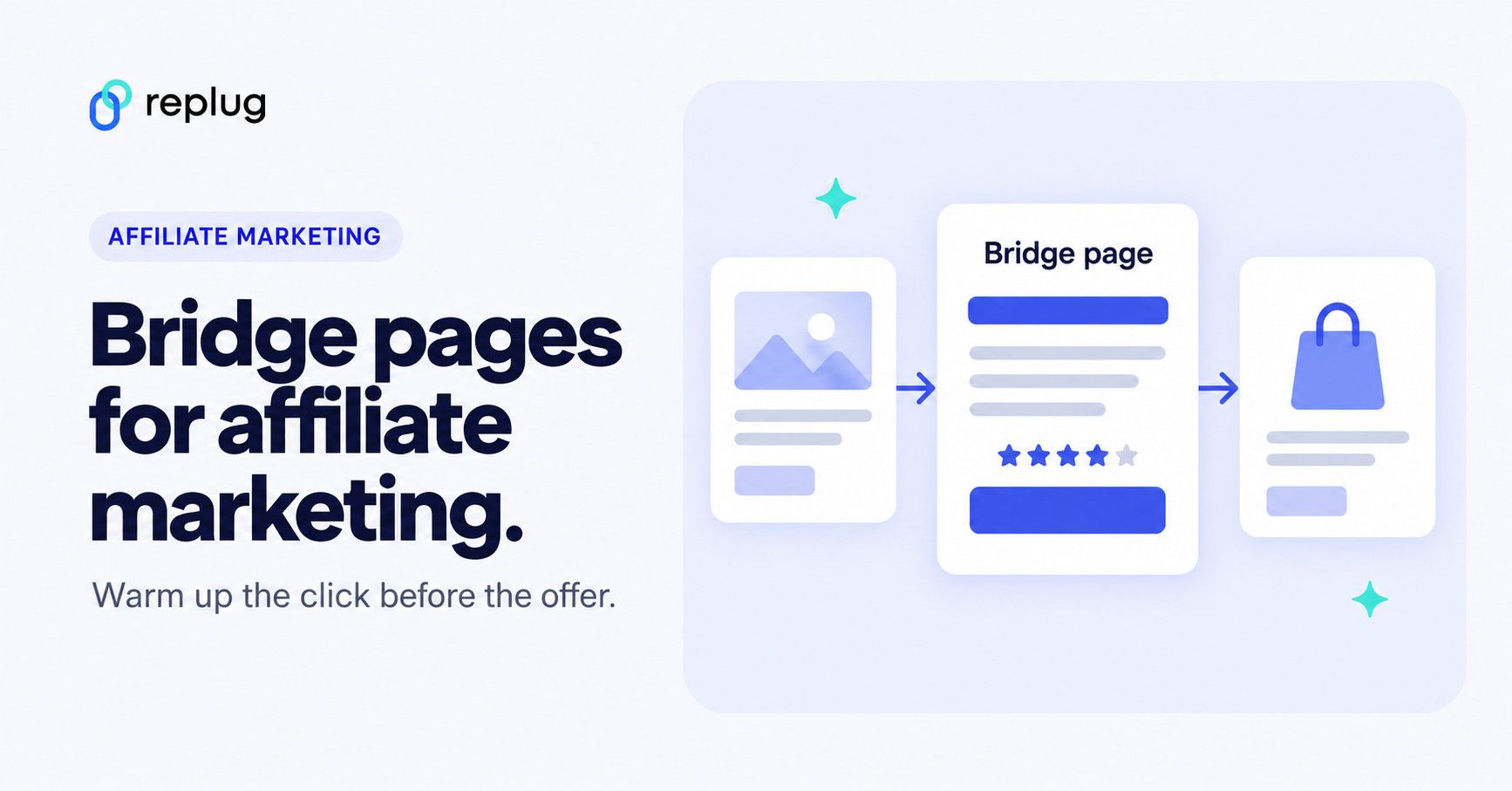
They build something in between: a bridge page, also known as a pre-sell page, warm-up page, or primer page.
Quick answer: a bridge page is a short page you control that sits between your ad, post or email and the affiliate offer. It says why the product is worth a look, discloses that you earn a commission, and sends the visitor on with one clear button. You can build one on your own site or in a landing page builder, or show one on a short link with Replug’s Bridge Page call-to-action (Essentials plan and up).
In this guide, you’ll learn:
- What exactly a bridge page is (without the jargon)
- Why it works so ridiculously well
- Different ways to set it up
- Real-life examples
- The rules ad platforms, affiliate networks and the FTC set for these pages
- And finally, how to build one on your own site or with Replug, an all-in-one link management platform, without code
Let’s break it down.
What is a bridge page?
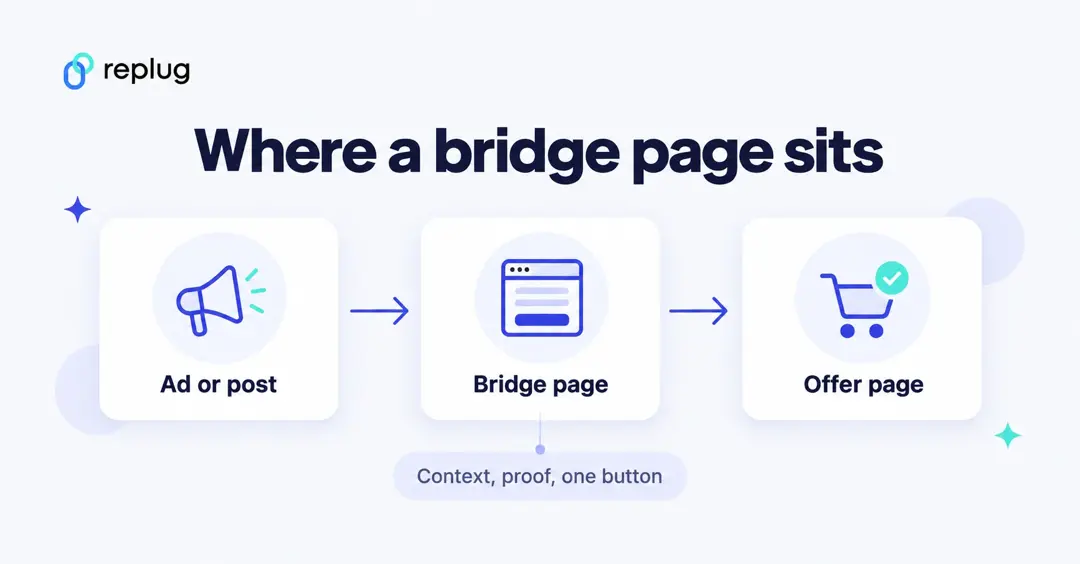
At its simplest, a bridge page is an intermediate landing page between your ad (or traffic source) and the final affiliate offer.
But, it’s more than that.
It’s your chance to:
- Tell a story
- Build trust
- Address objections
- Qualify your leads
- And most importantly, prime visitors to buy
That’s why people also call them:
- Pre-sell pages (because you’re selling the click, not the product… yet)
- Warm-up pages (because you’re taking cold traffic and making them toasty)
- Primer pages (focusing on mental “priming”)
- Transition pages (guiding traffic smoothly to the offer)
- Affiliate landing pages (if it feels more natural in your niche)
Whether you’re an Amazon affiliate trying to boost your commissions or promoting high-ticket digital offers, the goal is the same: create an intentional step that makes people care before they see the price.
Bridge page vs. landing page vs. sales page
The three terms overlap, so here is how marketers usually separate them:
| Bridge page | Landing page | Sales page | |
|---|---|---|---|
| Who owns it | You, the affiliate | Whoever runs the campaign | The merchant |
| Job | Warm up the visitor and pass them to the offer | Get one action: sign-up, download or sale | Close the sale |
| Length | Short: a headline, a story, proof and a button | Short to medium | Often long, with pricing and checkout |
| Where the click goes | To the merchant’s page through your affiliate link | Stays on the page (form or checkout) | To the cart |
In other words, every bridge page is a landing page, but its goal is the next click, not the purchase itself.
Why bridge pages work: the psychology behind them
Bridge pages (and the broader bridge funnel strategy) tap into a powerful psychological principle: priming.
When you show someone a persuasive copy, engaging content, or even a quick quiz before asking them to buy, you do more than just inform them; you change their mental state.
Instead of landing cold on a product page and wondering:
“Do I really need this?”
They arrive already thinking:
“Wow! This actually fixes a problem I have.”
That’s the beauty of a bridge page: You’re not selling right away. You’re setting the stage so the sale becomes the next logical step.
Why bridge pages work: a quick example
Let’s say you’re running an affiliate ad for a high-ticket coffee machine. If someone clicks and lands straight on Amazon or the brand’s sales page, what happens?
They see a price tag, specs, and maybe some reviews; but no context. No storytelling. No reason why this coffee machine should matter to them.
Result? They bounce.
A bridge page fixes this.
It adds a warm-up step in between:
- Your ad
- A bridge page you control (with persuasive copy, testimonials, benefits)
- The affiliate offer page
Instead of asking cold traffic to buy right away, you guide them, answer objections, and prime them to click “buy.”
That’s the “bridge”: You move people from just being curious to actually wanting the product.
Now let’s look at what goes on the page, the rules it has to follow, and how to build one.
What to put on a bridge page
Most bridge pages that hold up with readers and ad reviewers have the same five parts:
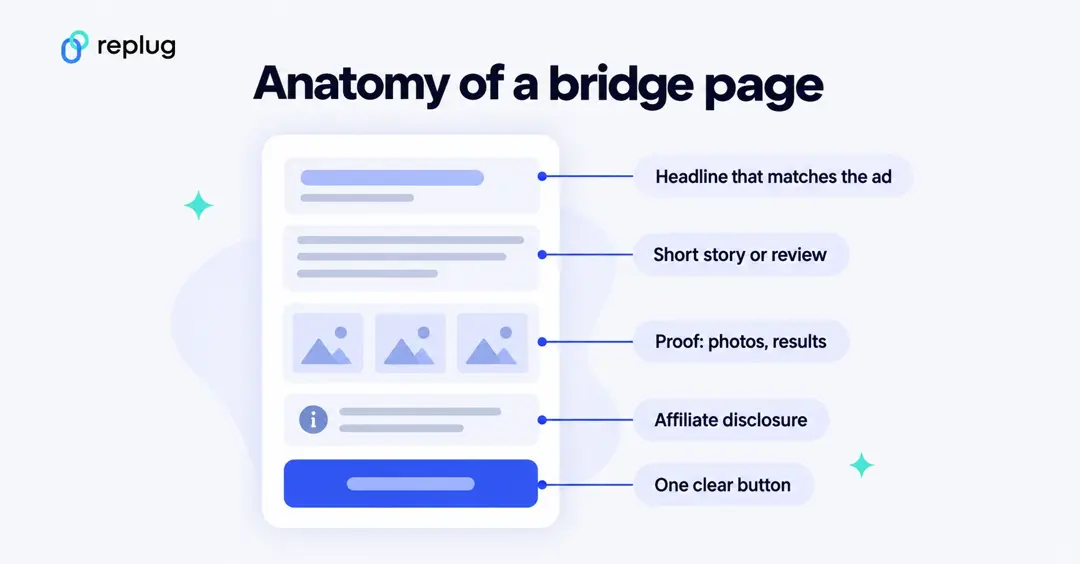
- A headline that matches the ad. If the ad promises “the kettle that fixed my pour-over,” the page should open with that, not with a different product.
- A short story or review in your own words. What problem you had, what you tried, what changed. This is the original content that separates a bridge page from a copy of the merchant’s page.
- Proof you can stand behind. Your own photos, test results or a short video. Only quote results you actually got.
- An affiliate disclosure near the top. For example: “I earn a commission if you buy through the button below.”
- One clear button. “See the price,” “Read the full review” or “Get the guide.” One action keeps the page honest and easy to measure.
Keep it fast and readable on a phone, since that is where most social and ad clicks open.
Bridge page rules: ad platforms, networks and the FTC
A bridge page is not a loophole. The platforms that send you traffic and the programs that pay you each have rules about where clicks land. These are the ones affiliates hit most often (all checked October 2026):
Google Ads
Google’s destination requirements list “Insufficient original content” as a reason for disapproval: destination content “designed for the primary purpose of showing ads,” or content copied from another source “without adding value in the form of original content or additional functionality.” A bridge page with your own review, photos and comparison is the kind of added value that rule asks for. For organic search, Google’s spam policies make the same point about thin affiliate pages that copy merchant descriptions without original reviews or testing.
Meta (Facebook and Instagram ads)
Meta’s Advertising Standards say the products and services in an ad “must match those promoted on the landing page.” Its spam policy also lists deceptive redirect behavior, including pages that “automatically redirect users to a substantially different domain without any user action,” and cloaking that shows reviewers different content than users. If you run Meta ads to a bridge page, let the visitor choose to continue with a button and don’t rely on an automatic redirect.
ClickBank
ClickBank’s Promotional Guidelines apply to affiliates as well as sellers. They require truthful claims, typical results, and disclosures that are “clear and conspicuous,” placed close to the claims they relate to. That covers the copy, testimonials and videos on your bridge page.
Amazon Associates
If you promote Amazon products, read Amazon’s Associates Program Policies before you build anything. Purchases referred through a link that sends people to Amazon via an intermediate site “without requiring the customer to click on a link or take some other affirmative action on that intermediate site” don’t earn commission, and Amazon doesn’t allow link shorteners or cloaking that make it unclear a link goes to Amazon. Put your Amazon links on a page on your own site, in plain view, and let the reader click them.
FTC disclosure
The FTC’s Endorsement Guides FAQ says to disclose an affiliate relationship clearly and conspicuously, as close to the recommendation as possible, with wording people understand, such as “I get commissions for purchases made through links in this post.” It also notes that “affiliate link” alone or a “buy now” button may not be clear enough. On a bridge page, put that sentence above or right next to the button.
How to create a bridge page for affiliate marketing?
You have two practical routes:
- A page on your own site or landing page builder. Create a new page in WordPress, Google Sites or the landing page tool you already use, add the five parts above, and link the button to your affiliate link. This is the right route for Amazon links and for anything you want search engines to index.
- A bridge page on a short link with Replug. Replug’s Bridge Page call-to-action shows a page with your image, headline, message and button on your short link before the visitor moves on. You don’t need a website, and every click on the short link is tracked.
Replug doesn’t track sales or conversions; you see clicks on the short link in Replug and sales in your affiliate dashboard. If you want people to recognize the link, use your own domain for the short link (every plan, including Free, can connect a custom domain).
Here is how to set up the Replug route. Call-to-action campaigns, including the Bridge Page style, are part of the Essentials plan and up on Replug’s pricing page; the Free plan doesn’t include them.
How to create a bridge page in Replug (step by step)
Step 1: Sign in or create an account
Sign in to Replug, or create an account. Paid plans start with a 14-day free trial, and the Bridge Page call-to-action needs the Essentials plan or higher.
Once you’re in, you’ll have everything you need to build, brand, and track your bridge page.
Step 2: Create your campaign
In Replug, open Campaigns in the sidebar and click Create new.
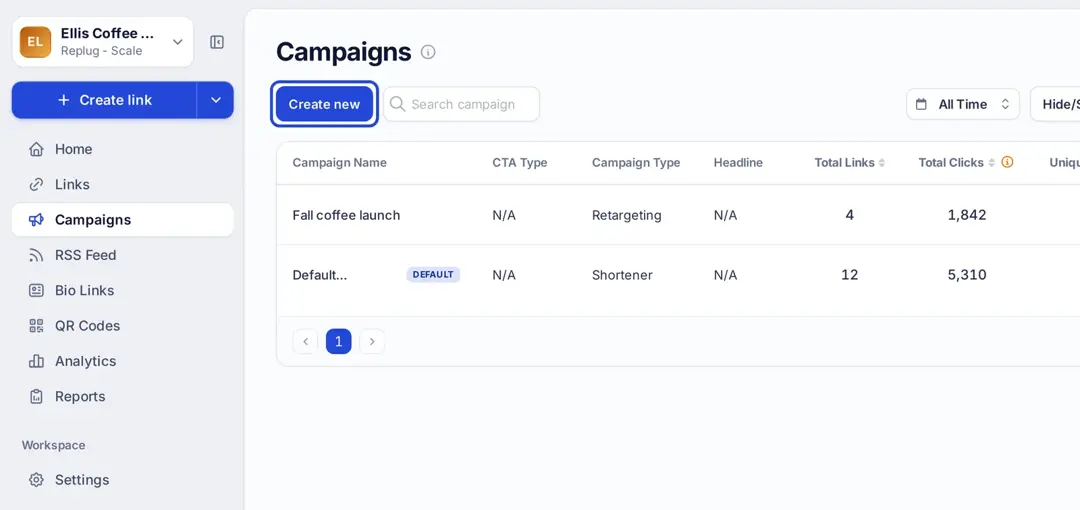
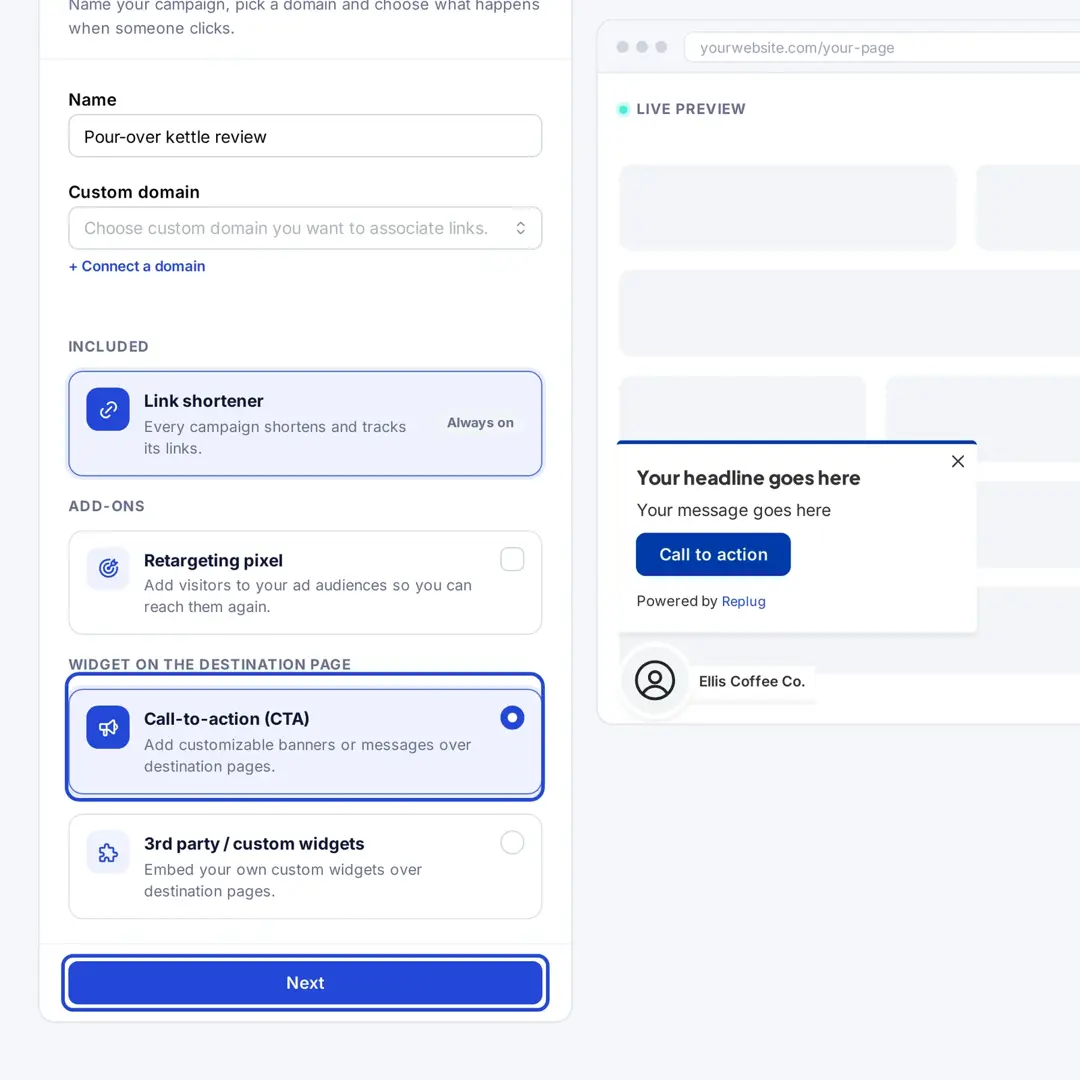
- Give the campaign a name, then under Widget on the destination page choose Call-to-action (CTA) and click Next.
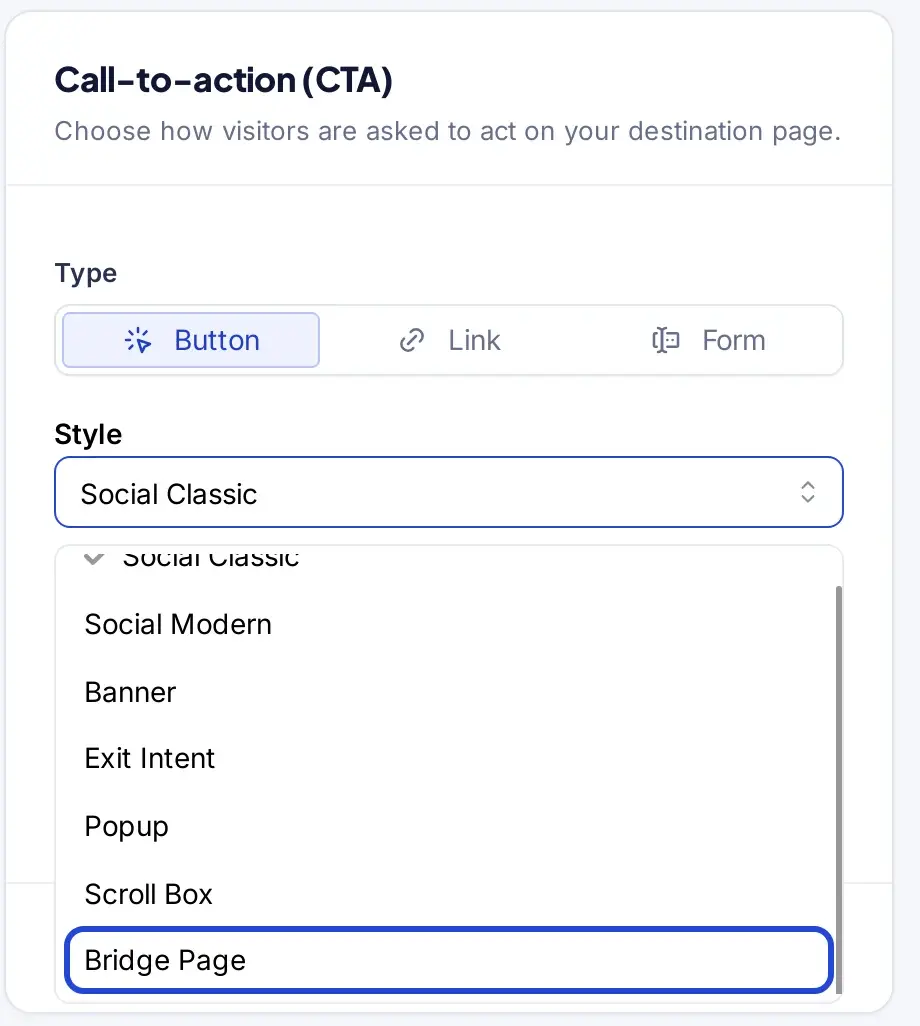
- Open the Style list and select Bridge Page. This shows a full page with your message before the visitor moves on, instead of a small overlay. You can choose from CTA button, link, or form as your preferred CTA type. It’s your call!
- Add your CTA image and Exit intent background image (Replug recommends 920 × 1080 px for both), then click Next.
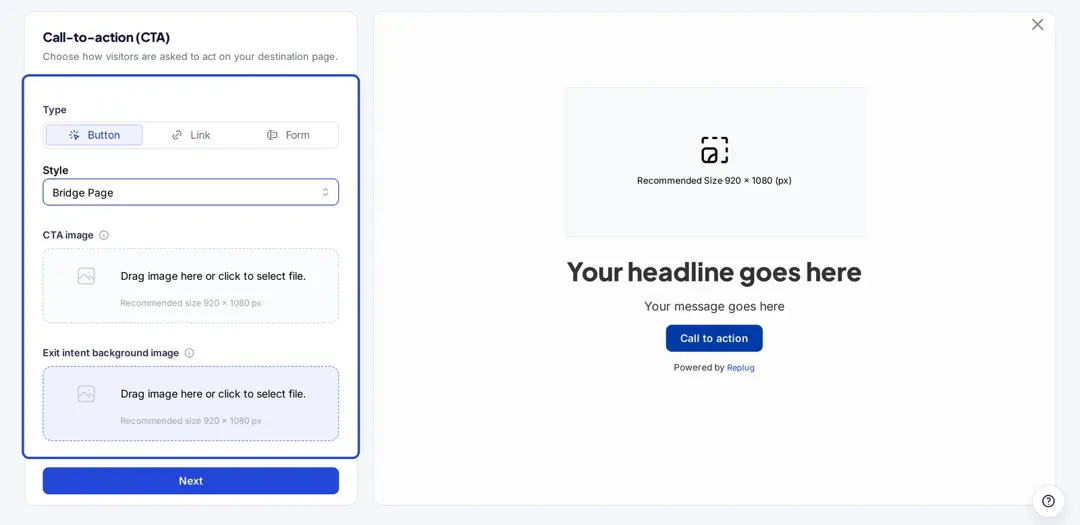
Tip: If you want to create a squeeze page, you’ll simply choose “Form” as your call-to-action type. This lets you capture emails right on your bridge page and build your list while warming up leads.
You may also like: CTA in marketing: What it means and why it matters
Step 3: Craft your message
Now it’s time to create a compelling copy for your bridge page. Here’s what to do:
- Write a clear, attention-grabbing headline that makes people want to click
- Add a short message or story that explains why the product matters
- Write a catchy call-to-action button text
- Finally, add the affiliate link for the product you’re promoting in the Link URL field, or a phone number if you want a click-to-call button
- Add your affiliate disclosure to the message, for example: “I earn a commission if you buy through this link.”
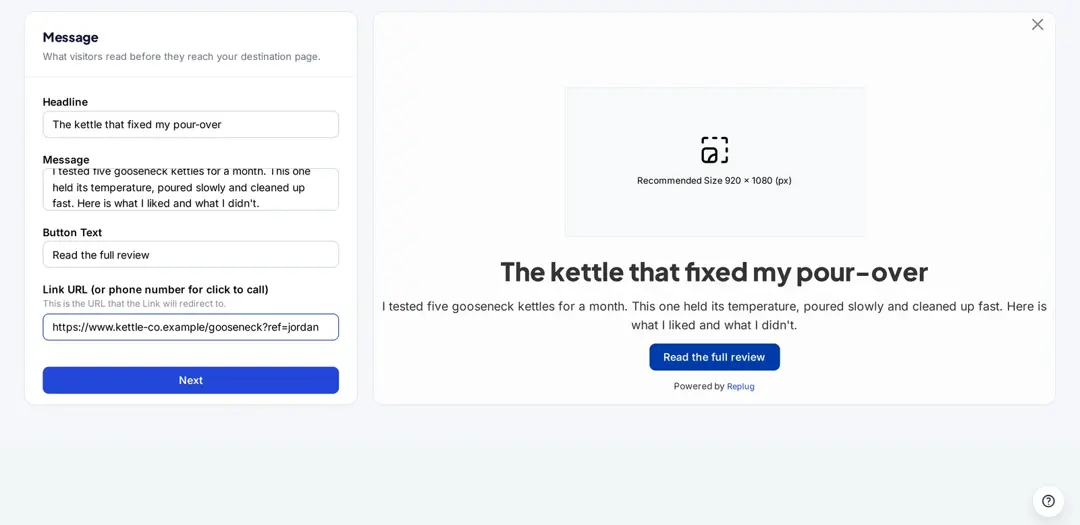
Remember: you’re not pitching the product directly; you’re helping people see why the product matters to them.
Step 4: Customize your bridge page
Make your page stand out by matching it to your brand or product vibe. Here’s what you can adjust:
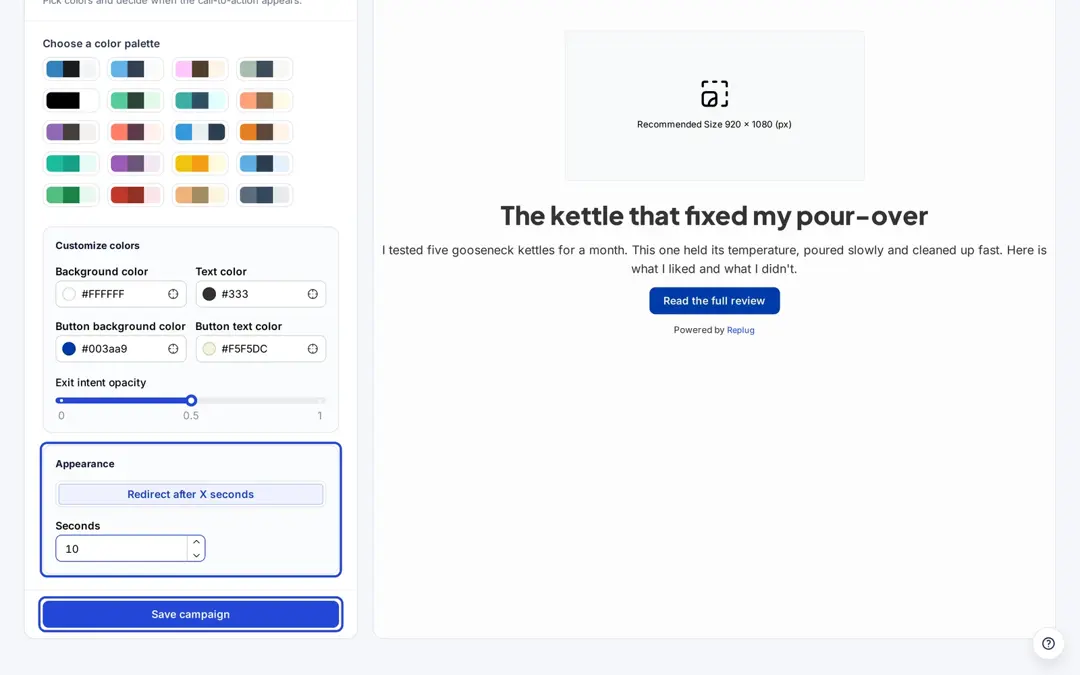
- Color palette: Choose from preset themes or set your own colors:
- Background color
- Text color
- Button background color
- Button text color
- Redirect after X seconds: Decide how long visitors stay on your bridge page before Replug forwards them to the short link’s destination. The field accepts 3 to 30 seconds; 10 gives most people time to read a short message. Visitors who click the button go to the Link URL right away.
- Exit intent opacity: Control how strongly the exit intent background image shows (0 to 1)
This small customization step helps your page look professional and keeps it consistent with your branding.
A note on the redirect timer: an automatic forward is convenient, but Meta’s spam policy treats automatic redirects to a substantially different domain as deceptive redirect behavior, and Amazon doesn’t pay on clicks that reach it without a click on your page. For paid social ads and for Amazon, make the button the way forward.
You may also like: CTA in marketing: What it means and why it matters
Step 5: Save your bridge page
Click Save campaign. Then shorten the link you want to share: paste the destination on the Home screen, click Shorten, and pick your new campaign in the Campaign field of the Your link window before you save the link.
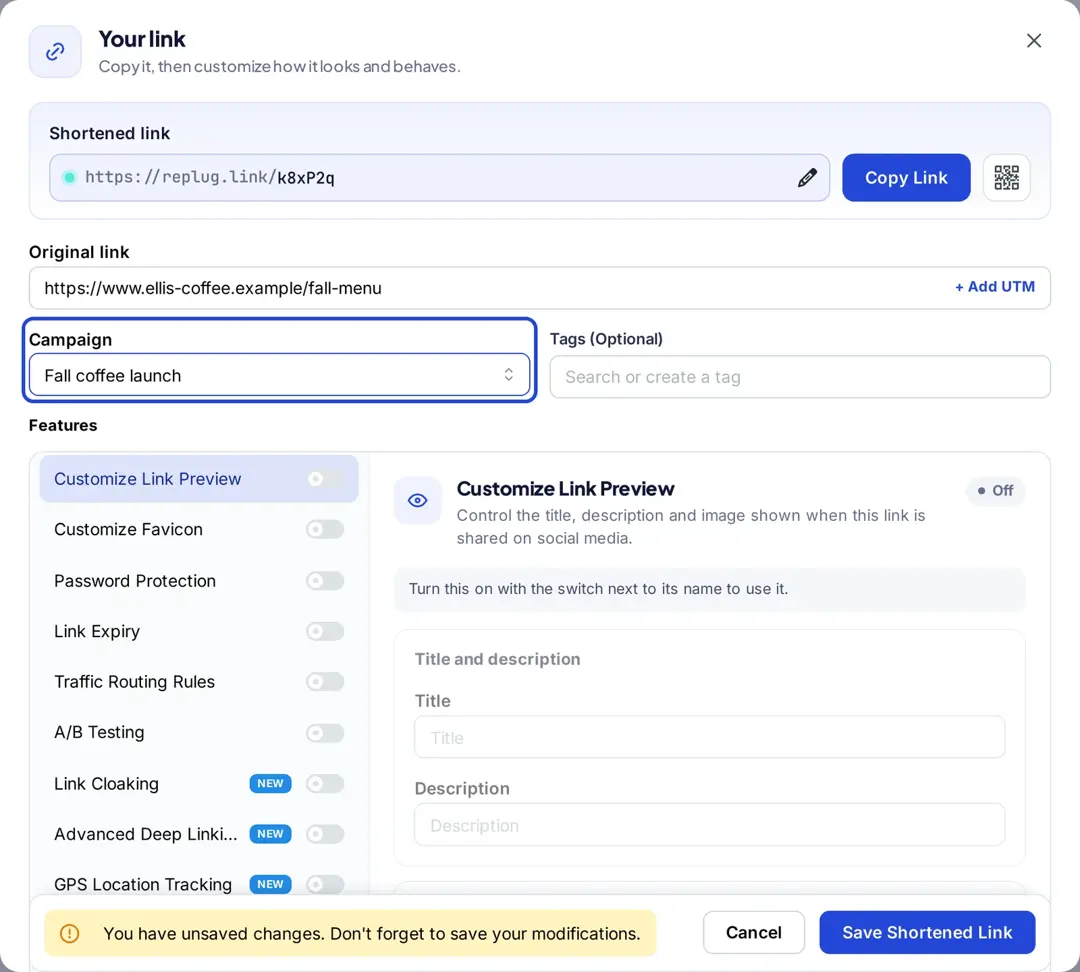
Anyone who opens that short link sees your bridge page first. Replug counts the clicks on the link, so you can compare bridge pages by click count while your affiliate dashboard shows the sales.
Also read: 13 best ways to share affiliate links
Why use Replug for your bridge pages?
If you’ve built bridge pages the “old school” way, you know how long a page, a tracking setup and a few test versions can take. Replug puts the page, the short link and the click data in one place, without code or plugins.
Why Replug makes it so easy
| Old way | With Replug |
| Hire a designer and build pages in WordPress | Set up a bridge page in a four-step campaign form (Essentials and up) |
| Connect analytics manually | Shorten a link, brand it and track clicks on every URL in one place |
| Set up complex retargeting scripts | Add retargeting pixels to your short links (1 pixel on Essentials, unlimited on Scale and Agency) |
| Share long affiliate URLs that look spammy | Use short links on your own domain so people can see whose link it is |
| Show the same link to everyone | Route visitors by country, device and other rules (traffic routing, Scale and Agency) |
| Guess what works | Run A/B tests across up to 20 destination URLs (Scale and Agency) |
| Rely on one-time sales only | Join Replug’s affiliate program and earn a 30% recurring commission |
Types of bridge pages you can build
Here are proven funnel setups (with examples):
- The classic bridge page
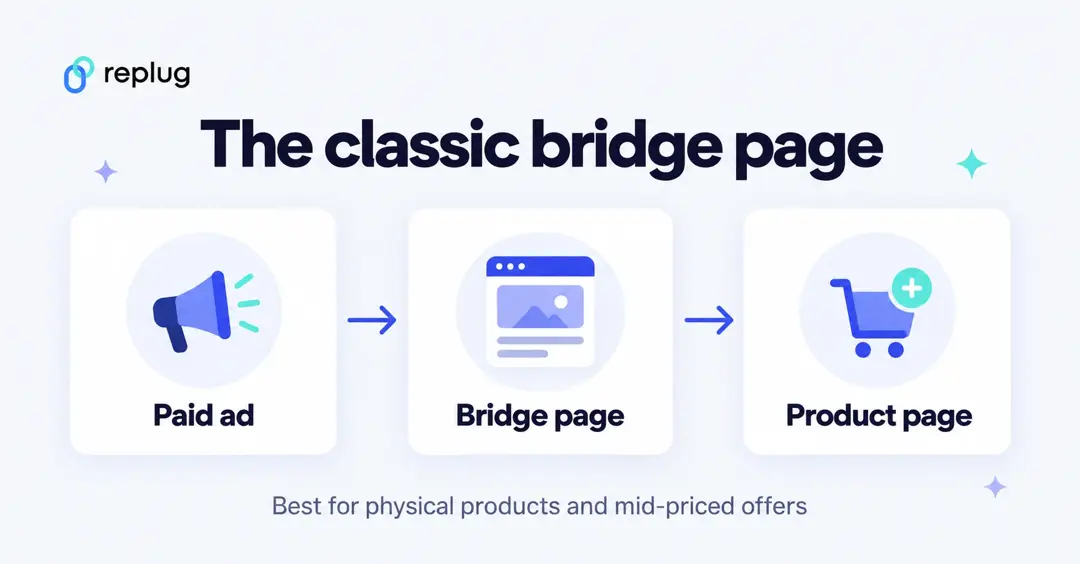
- Flow: Paid Ad → Bridge page → Affiliate product page
- Best for: Physical products, mid-ticket offers.
- Example: A Facebook ad for a new coffee maker → bridge page with video, benefits, and testimonials → product page.
- Squeeze page
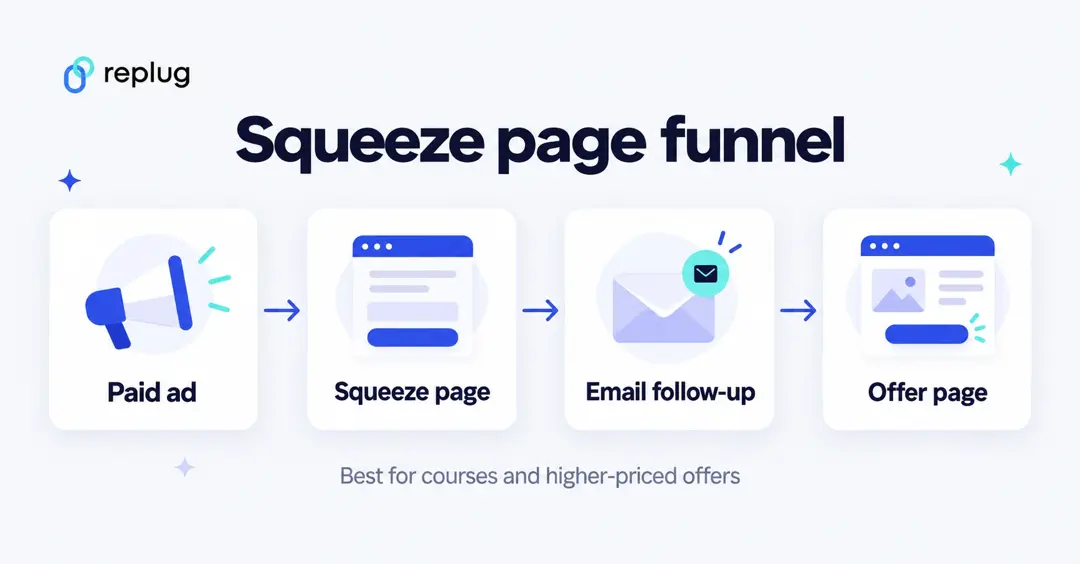
- Flow: Paid Ad → Squeeze page → Email → Bridge page → Affiliate product
- Best for: High-ticket offers, coaching, courses.
- Example: Collect emails with a lead magnet (e.g., “Free guide: 5 mistakes to avoid when buying X”) → build trust → send them to bridge page → offer page.
- Quiz bridge funnel
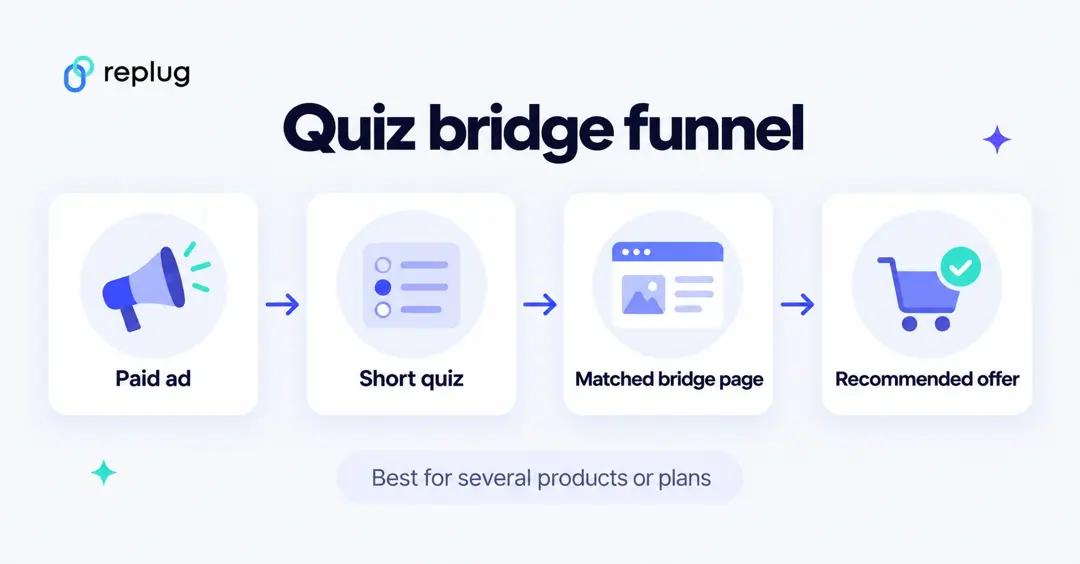
- Flow: Paid Ad → Quiz → personalized bridge page → product
- Best for: Multiple products or packages.
- Example: “Which yoga style fits you?” → quiz → personalized bridge page → recommended course.
Tips to make your bridge page sell
- Match your message to your ad (no surprises)
- Tell a real story using authentic copy
- Show proof (reviews, photos, testimonials)
- Keep it mobile-friendly (most clicks come from phones)
- Use one clear CTA
- Test different headlines & images
- Add urgency or scarcity only when it’s real
- Put your affiliate disclosure above or next to the button
- Let people continue with a click rather than an automatic redirect when you run paid social ads or promote Amazon products
Stop losing sales and start building bridges
If you’re still sending cold ad traffic directly to an affiliate product page, you’re leaving money (and trust) on the table.
A bridge page changes everything: it gives visitors context, tells your story, answers objections, and makes buying feel natural. Instead of hoping your ad clicks magically convert, you guide them to that “yes.”
If you’ve been wondering how to create a bridge page without a website, Replug gives you a Bridge Page call-to-action, branded short links, retargeting pixels and click analytics, with A/B testing on Scale and Agency, all without code.
Build the page, check it against the rules of the platforms you advertise on, and see what difference a bridge makes for your affiliate campaigns.
Ready to try? Paid plans start with a 14-day free trial.
FAQs on how to build a bridge page for affiliate marketing

Amna Yawar