QR Codes are on almost everything now; from product labels, menus, packaging, to posters, and even email signatures. They have become a normal part of how people move from something printed to something online.
But creating and placing a QR Code is just half the job.
What happens after someone scans it?
Did it lead to a sale, a website visit, or just… nothing?
That’s where QR Code tracking comes in. It helps you answer one big question: is this working?
In this guide, we’ll explain how QR code tracking works, how to use it effectively, and why Replug is one of the best tools to manage your QR codes.
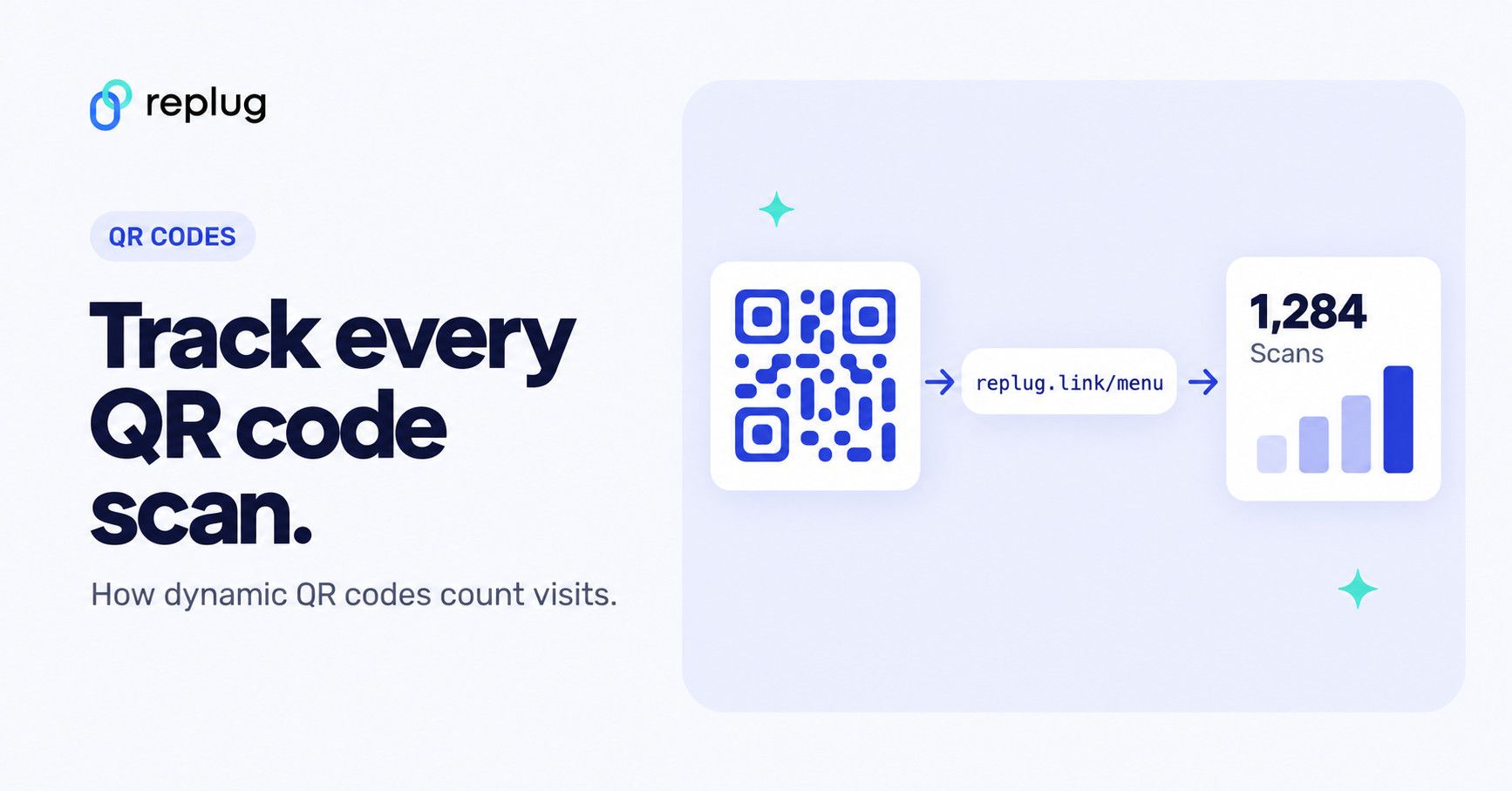
Quick answer: QR code tracking works by putting a short link inside the code instead of the final web address. Every scan opens that short link first, the tracking service records the visit (time, approximate location, device, OS and browser) and then redirects the person to your page in a split second. That is why only dynamic QR codes can be tracked; a static code sends people straight to the destination and nobody logs the scan. Add UTM parameters to the destination URL and you can follow the visit into Google Analytics too.
What is QR Code tracking?
QR Code tracking is the ability to analyze what happens after someone scans your code. It lets you collect data like how many times it’s been scanned, where those scans happened, when they happened, and what device was used.
Whether you’re running a marketing campaign, linking to a product manual, promoting an app, or sharing a digital menu; tracking helps you understand how people are interacting with your QR Codes.
Why QR Code tracking matters in modern marketing
Marketing today is all about data. You want to know what’s working, what’s not, and where your audience is actually engaging. With QR Code tracking, you get exactly that.
Example: Dunkin’ puts QR codes on its coffee cups
Dunkin’ Donuts, the popular coffee and donuts brand, has printed QR codes on its cups. The cups pictured here say “Did somebody say free?” and invite customers to earn rewards with the Dunkin’ app, so a scan takes a coffee drinker from the cup in their hand to the brand’s rewards program.

This is where QR Code tracking earns its keep. With a trackable code on a campaign like this, a brand can see how many people scan, when and where the scans happen and which phones they use, and compare that with sign-ups or orders in its own systems. Dunkin’ hasn’t published results for its cup codes, so treat this as an example of the setup, not of the outcome.
And that’s just scratching the surface. With trackable QR Codes, brands can also:
- Promote their app and increase downloads
- Grow their social media following
- Redirect customers to limited-time discounts
- Educate buyers with videos, tutorials, or product info
- Add QR codes to displays or tags for product details, reviews, or augmented reality experiences
- Analyze QR Code usage to uncover audience behavior
- Use QR Code UTM parameters to track post-scan actions
- Adjust campaigns in real-time based on scan data
And it gets better. With QR Code customization, you can design codes that match your brand, logo, colors, style, without sacrificing trackability. So whether you’re placing a QR Code on your website, a product label, or a flyer; you’re not just adding a shortcut, you’re adding a data touchpoint.
In short: Scans are good. But knowing what happens after the scan? That’s great marketing.
How QR code tracking works
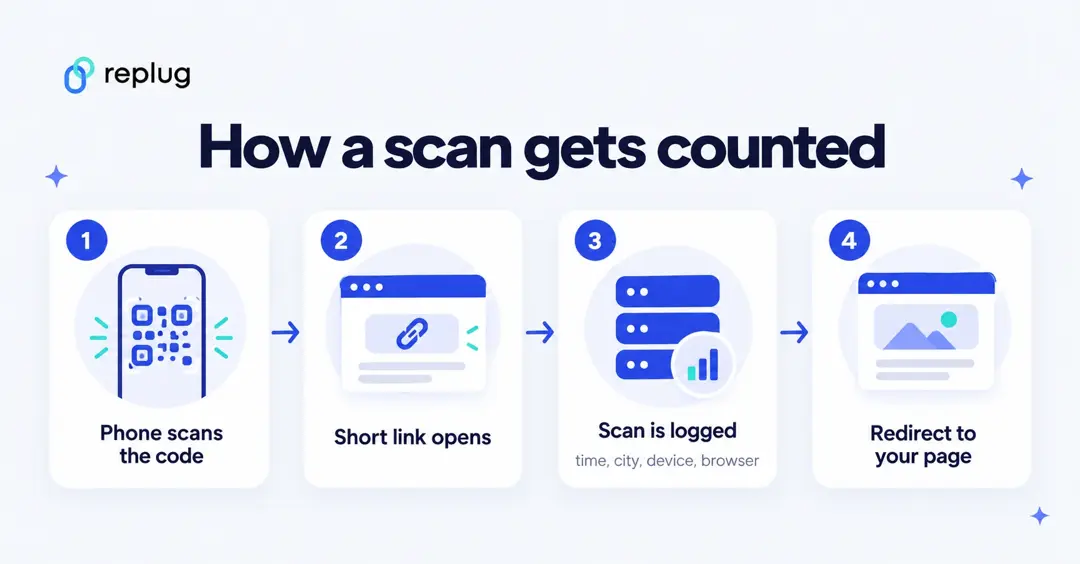
A QR code is just a picture of some text. Scanning it can’t report anything by itself. Tracking happens on the web server the code points to:
- The code holds a short link. A trackable (dynamic) QR code encodes a short URL such as
replug.link/fall-menuinstead of your full page address. - The phone opens the short link. When someone scans the code and taps the link, their browser requests that short URL.
- The service logs the visit. It records the time and reads the request: the IP address gives an approximate country and city, and the browser’s user agent tells it the device, operating system and browser.
- It redirects. The visitor lands on your real page, usually without noticing the extra hop.
- You read the report. Scans add up in a dashboard by day, place, device and browser.
Because the code only contains the short link, you can also change where it points later without reprinting it, if your plan allows edits. Our guide to dynamic QR codes explains that side in detail.
What QR code tracking can’t tell you
- Who scanned it. You see a phone, a browser and a rough location, not a name or email address.
- Scans that didn’t open the link. If someone scans the code but never taps the link that pops up, nothing reaches the server.
- What happened next on your site, unless you add UTM parameters (below) or a pixel on the page.
- Exact location. IP-based location is approximate. Replug’s optional GPS tracking (Scale and Agency) only places scans on a map when the visitor agrees to share their location, according to the Replug QR code generator page.
Static vs. Dynamic QR Codes
Not all QR Codes work the same way, especially when it comes to tracking. If you’re looking to monitor scans, gather data, or update your links without reprinting, it’s important to understand the difference between static and dynamic QR Codes.
Here’s a quick breakdown to help you choose the right type for your needs:
| Feature | Static QR Codes | Dynamic QR Codes |
| Trackable | ❌ Not trackable | ✅ Fully trackable (scans, location, device, time) |
| Editable after creation | ❌ No | ✅ Yes, you can change the destination URL anytime |
| Best for | Simple, one-time use (e.g. contact info, menus) | Marketing campaigns, app promotions, product packaging |
| QR Code analytics support | ❌ None | ✅ Supports full QR Code analytics |
| Scan data insights | ❌ Not available | ✅ Real-time scan data (location, device, timing, etc.) |
| Includes UTM parameters | ✅ But hard-coded | ✅ Easily add and update UTM parameters |
Why QR code tracking is important
You’re not just creating QR codes for the sake of it. You’re creating them to drive action; visits, signups, installs, purchases. Tracking tells you if that’s actually happening.
Let’s break down the benefits of QR Code tracking:
- Real-time insights: No need to wait until your campaign ends. With QR code tracking, you can watch scans happen as they come in. That means if something’s off, you can pivot fast.
- Data-driven marketing: Guessing is expensive. QR Code analytics give you exact numbers, such as: how many people scanned, from where, using what device, and when. This helps you make better decisions, faster.
- Tracking offline to online engagement: You can track traffic from QR codes placed on flyers, packaging, posters, or business cards and connect your offline materials to real online activity.
- Track scan behavior by time, location, and device: Want to know if people scan more at night? Or if users in a certain city are more active? QR code tracking answers that. You’ll know where a code has been scanned and on what OS, so you can tailor future campaigns accordingly.
- Improve campaign performance: If one version of a QR code ad is doing better than another, tracking lets you spot that early. Double down on what works and fix what doesn’t.
- Enhance ROI: You’re already spending time and resources. Trackable QR codes prove whether you’re getting a return on investment. By analyzing QR Code usage and scan behavior, you’re in a better position to justify your campaign spend.
- Optimize user experience: Maybe your iOS users are bouncing. Or people scanning from certain cities aren’t converting. QR code tracking gives you the clues to tweak landing pages, content, and CTAs so users have a smoother journey.
And with tools like Replug, all of this becomes seamless. You get dynamic, editable, fully trackable QR Codes along with a complete dashboard that breaks down scan data in real-time; no complicated setup, no extra plugins.
Key QR code tracking metrics to know
QR codes have become a go-to tool for connecting offline and online experiences, but their real power lies in what you can track. From location and device type to referral sources and total scans, the right tracking can give you a clear view of how your campaigns are performing.
Here’s an example of a QR code created using Replug:
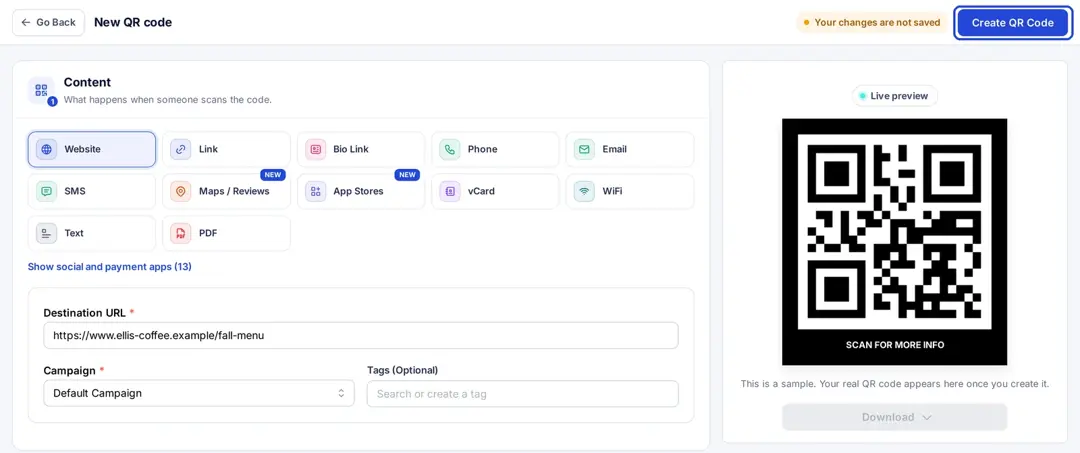
From Replug’s QR code dashboard, you can easily track the following metrics:
- Total QR scans
See how many times your QR code has been scanned. This is helpful for measuring reach.
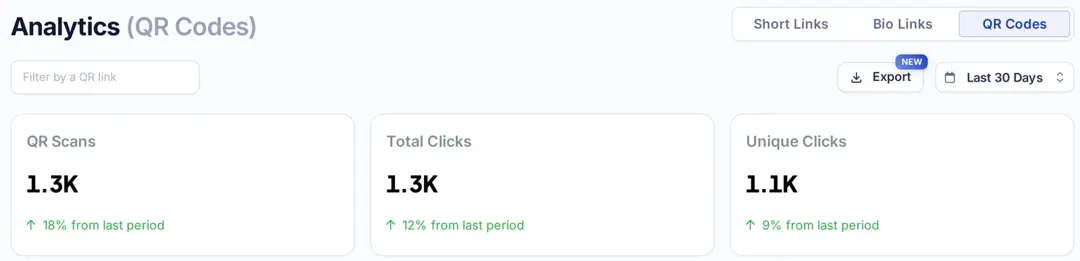
- Total Clicks
Counts every time your link is clicked, including multiple clicks from the same user.
- Unique Clicks
Tracks individual users. If someone scans your code five times, it still counts as one unique click.
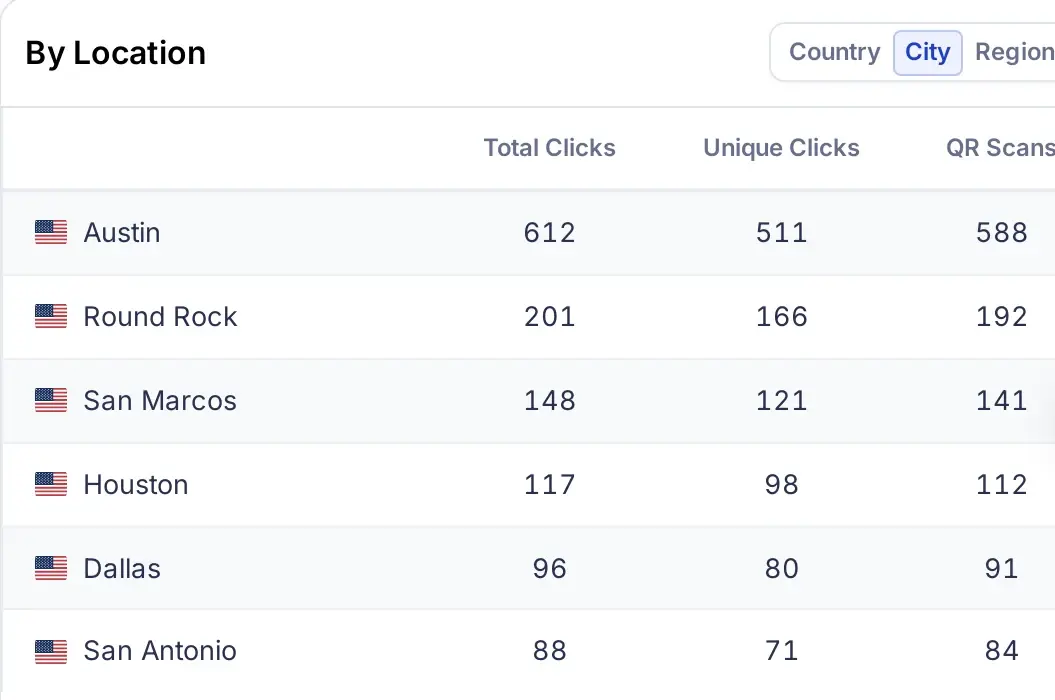
- Location (country, city, and region)
Track where a code has been scanned to fine-tune your geotargeting strategies.
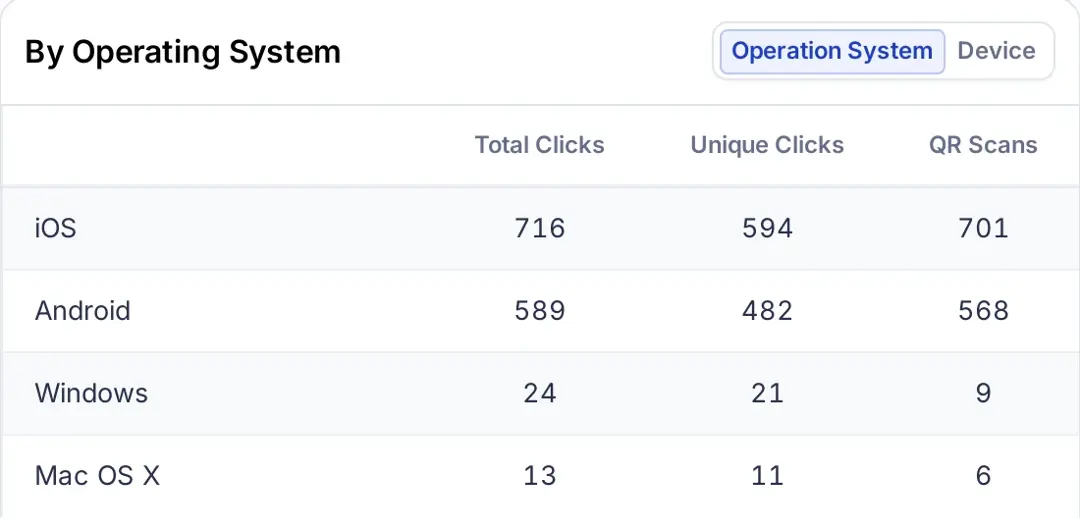
- Device/Operating system
Knowing if users scan via Android, Windows, or iOS helps you optimize the landing page or app store experience.
- Browser
Track which browser was used to open the QR code link to ensure compatibility and optimize performance.
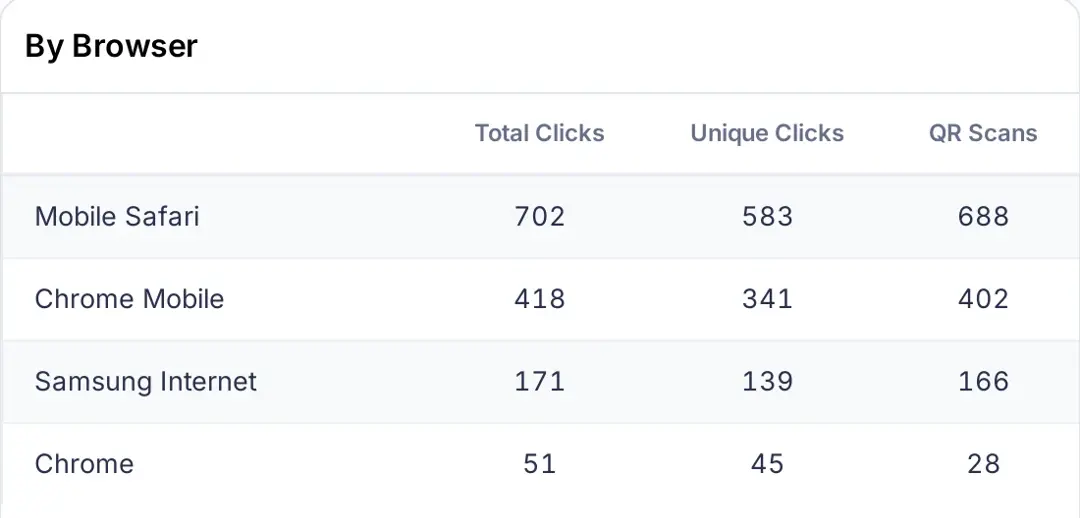
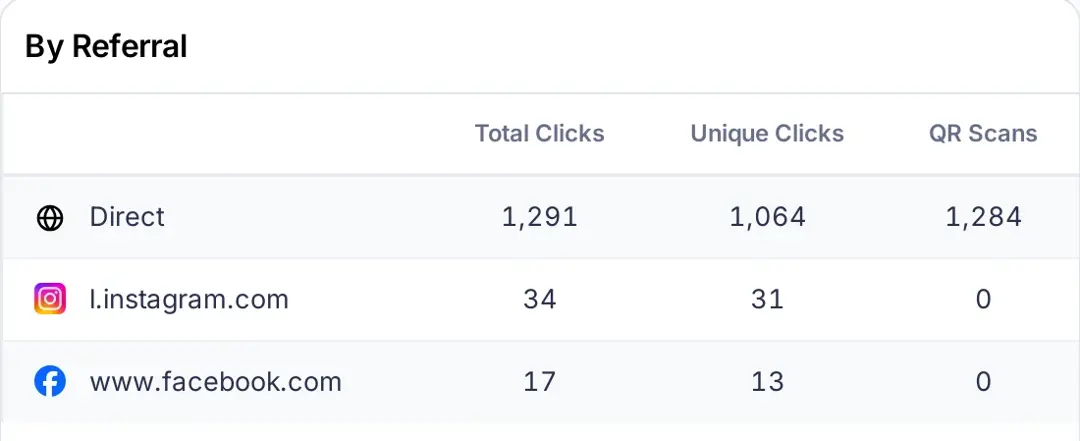
- Referral
Track where visits come from to spot your top-performing channels. Scans of a printed code usually show up as Direct, because a camera app sends no referrer; if you also share the same short link online, you’ll see sites like Instagram or Facebook next to it.
- Day and month
Track engagement trends by day and month to figure out when people are most active.
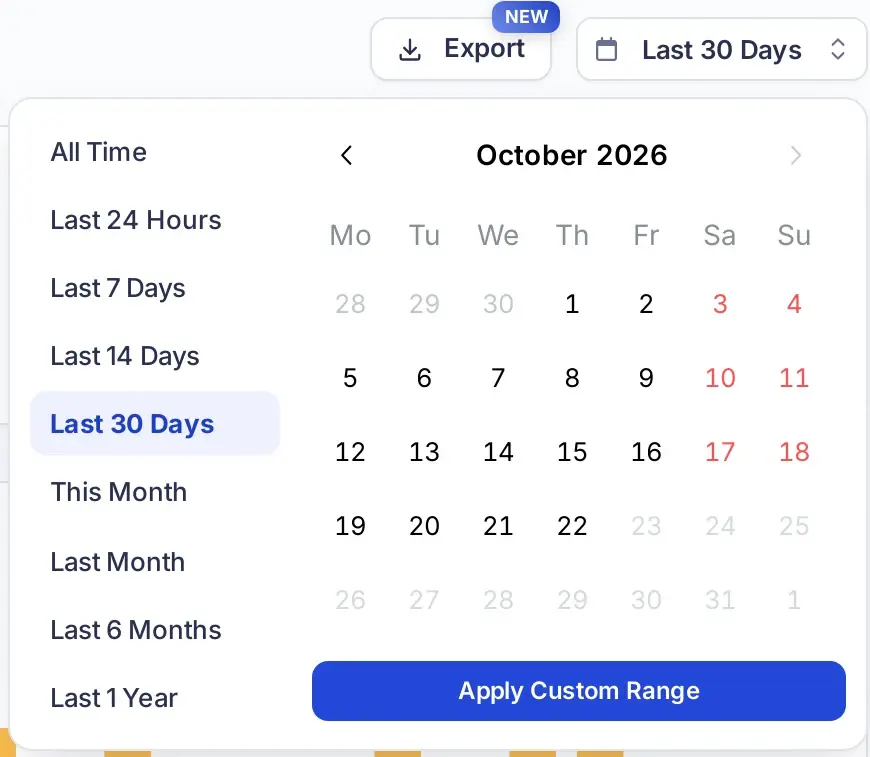
In Replug, all of these metrics are displayed inside a dedicated QR code analytics dashboard (Analytics → QR Codes), with a filter for one QR link, a date range and an Export button. How far back you can look depends on your plan: 14 days on Free, 90 days on Essentials and unlimited on Scale and Agency, according to Replug’s pricing page.
What is the best way to track QR Code scans?
The best way is to use an advanced dynamic QR code generator or a link management platform with built-in analytics. Static codes don’t offer tracking, but dynamic ones let you monitor scans by location, device, browser, and referral source.
Replug does all this and much more. With our URL shortener free, you can edit links anytime and track real-time insights from a single, clean dashboard that combines scan and click analytics.
How to track QR Codes with Replug
If you’re using a free static QR code generator, you’re not going to get scan data. Instead, consider using a dynamic QR code generator like Replug that supports full analytics.
Step 1: Log in to Replug
Start by logging into your Replug account. If you’re new, you can sign up for the Free plan, which includes 10 QR codes, or start a 14-day trial of a paid plan.
Step 2: Create your QR Code
Click QR Codes in the left menu and then “Create new.” Start blank or pick a template, choose your QR code type (Website, Link, Bio Link, vCard, PDF and more), paste your Destination URL and customize the design under Design. Click “Create QR Code” at the top right, then download it and use it across your social or print media; wherever you need it.
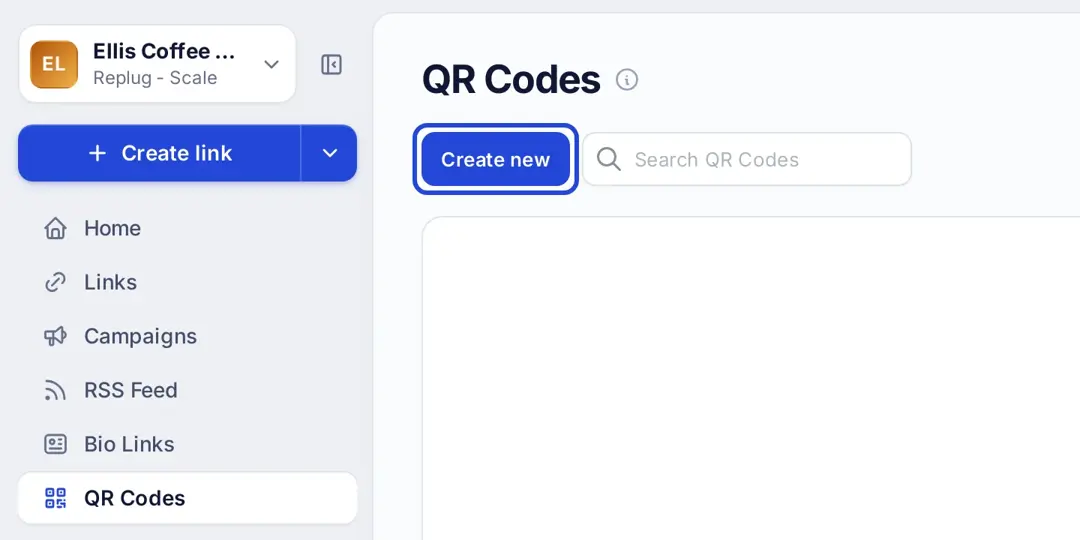
Step 3: Track your analytics
Head over to Analytics and open the QR Codes tab to monitor your QR code’s performance. Filter by a QR link and pick a date range. Replug shows you QR scans, total and unique clicks, location, operating system and device, browser and referral source.
That’s it. Your code is live, editable, and fully trackable.
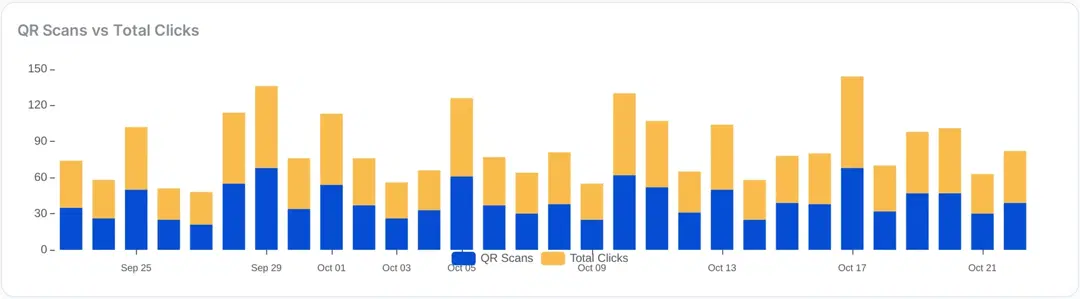
Cherry on top? Replug visualizes your data with a clear graph that distinguishes between QR scans and total link clicks so you can instantly compare visits that came from scanning the code with all clicks on the same link, including people who opened it from a post or an email.
Track what happens after the scan with UTM parameters
Scan counts tell you how many people opened the code. To see what they did on your website, add UTM parameters to the destination URL. According to Google Analytics Help, utm_source, utm_medium and utm_campaign identify the campaign that sent the visit, and the values show up in the Traffic acquisition report.
For a QR code on a printed flyer, a destination URL could look like this:
https://www.ellis-coffee.example/fall-menu?utm_source=flyer&utm_medium=qr&utm_campaign=fall_menu_2026Put that full URL behind the short link in your QR code, not in the code itself, so the pattern stays simple. Use a different utm_source for each placement (flyer, table tent, packaging) so you can compare them. Step-by-step instructions are in our guide on how to add UTM tags to your QR codes.
Is QR code tracking legal and private?
QR code tracking works like link click tracking: it counts visits and reads standard technical details that every browser sends. It does not identify people by name. If you add retargeting pixels or analytics cookies to the page behind the code, the same consent and privacy rules apply as for any other visit to your site, so mention them in your privacy policy and cookie banner where the law requires it.
Best practices for QR code tracking
1. Nail the design and placement
- Make it easy to scan
- Use a call-to-action (e.g., “Scan for 20% off”)
- Don’t hide it in a corner or put it too low
2. Route traffic smartly with one QR code
With Replug’s link rotator, you can send different users to different URLs, all from a single QR code. Set up routing rules based on device type, location or time (traffic routing is on the Scale and Agency plans). It’s ideal for running localized campaigns, showing platform-specific pages, or simply personalizing the experience without ever reprinting your code.
3. A/B test up to 20 URLs behind your QR code
Not sure which landing page will perform best? With Replug, you can A/B test up to 20 different URLs linked to your QR code (Scale and Agency plans). Rotate between variations and let the scan data reveal which headline, CTA, or offer drives the most conversions.
4. Retarget every QR code scan
Don’t let your traffic go cold. Replug lets you add retargeting pixels to the links behind your QR codes. The pixels fire on every scan, so you can add people who scan your QR code to your ad audiences on Meta, Google, LinkedIn, X, TikTok and Pinterest and reach them with ads later. Essentials includes one pixel; Scale and Agency have no limit (Replug).
5. Stick with dynamic QR codes
Static codes are a one-and-done deal. But with Replug’s editable QR codes, you can track real-time QR code analytics on every plan and update destinations anytime on Scale and Agency.
Avoid common mistakes
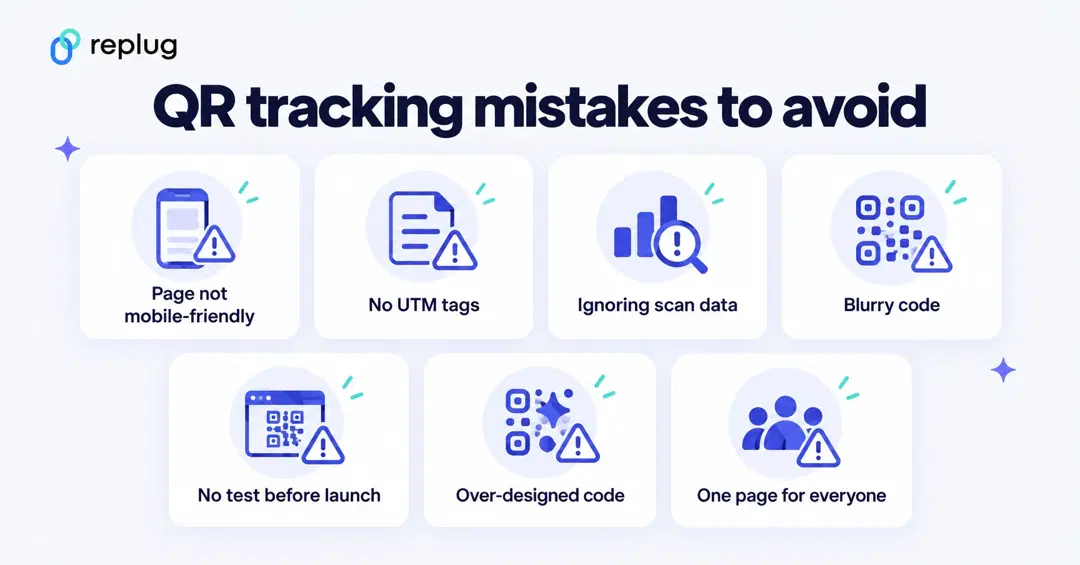
- Linking to non-mobile-friendly pages: Most scans happen on smartphones. If your landing page isn’t mobile-optimized, you’re setting yourself up for high bounce rates. Always test your landing page on different devices.
- Skipping UTM tags: Without UTM parameters, you lose the ability to track traffic accurately. Make it a habit to tag every QR code link. Tools like Replug make this easier with their UTM parameter builder.
- Ignoring scan behavior: Pay attention to when, where, and how people are scanning your QR codes. This helps you fine-tune campaigns for better performance. Look for platforms that offer detailed analytics to help spot trends.
- Using low-quality or blurry codes: Poor-quality or blurry QR codes can fail to scan, especially when printed. Replug allows you to download your QR code in JPG, PNG, SVG, and WEBP; all in high quality.
- Forgetting to test before launch: Test your QR code on multiple devices and camera apps to ensure it works under real-world conditions.
- Over-designing your QR code: It’s tempting to brand your QR code with colors and logos, but don’t compromise readability. Stick to high-contrast colors and make sure there’s enough white space around the code.
- Sending everyone to the same page: Different users may respond better to different content. With Replug, you can use traffic routing (link rotation) to send users to different URLs based on device, location, or time.
Also read: Why is My QR Code Not Working: 9 Reasons to Consider
Real-world use cases
- E-commerce campaigns: Add QR codes to product packaging that lead to tutorials, upsells, or reviews. It’s an easy way to track post-purchase engagement and boost customer retention.
- QR codes for bio links: Create a QR code that links to a branded, custom bio page with all your important links. With Replug, you can build and track it in minutes.
- Event promotions: Place unique QR codes in different event zones, booths, or flyers. Use analytics to track where your foot traffic is coming from.
- Print advertising: Add QR codes to billboards, brochures, or magazine ads. Replug’s tracking shows you exactly how your print campaigns are performing.
- App downloads: Replug’s smart, app deep links combined with QR codes route users to the correct app store directly, making downloads seamless and user-friendly.
- Social campaigns: Track QR code scans across Instagram, TikTok, YouTube, and more. See which platforms are actually driving results.
Conclusion
Creating a QR code is easy. Knowing if it worked? That’s where QR Code tracking earns its place in your marketing stack.
From measuring engagement to improving ROI, tracking lets you treat each scan like a data point—and every data point like an opportunity.
And with Replug? QR code tracking becomes more than a feature—it becomes a strategy.
Track your QR codes today!
FAQs on QR Code tracking

Amna Yawar