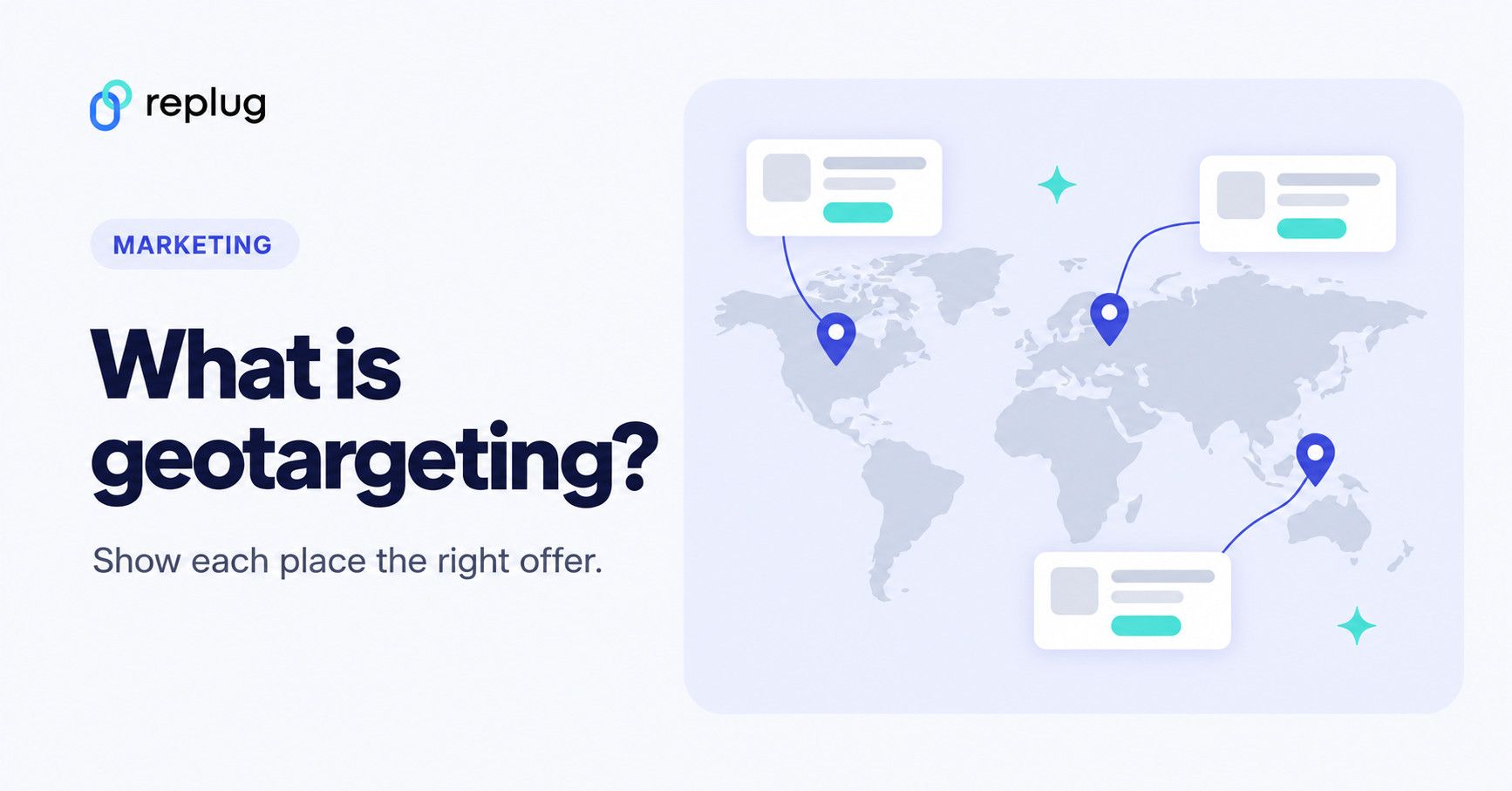
Running a global sale on your brand? Imagine this: a customer in New York sees prices in USD, a shopper in London gets prices in GBP, and someone in Paris enjoys a promo tailored just for them. Sounds like a marketer’s dream, right? That’s the power of geotargeting – and it’s easier to achieve than you think.
We know it doesn’t exactly sound “easy,” but since technology improves rapidly every day, there are tools that make this process as smooth as butter. With the right tech, you can set up automatic price and promo adjustments based on where your customers are located, no sweat.
Geotargeting isn’t just a cool feature; it’s how global brands show the right price, language and offer in each market. You’re not just offering a one-size-fits-all deal; you’re offering a localized experience that builds loyalty and makes the offer easier to act on.
In this guide, we’ll break down what geotargeting is, how it works, and why it’s a must-have for modern marketing. We’ll also show how to geotarget a link: one short link that sends each country to its own page, set up in Replug. Let’s get started!
Quick answer: Geotargeting means showing different ads, content or destinations to people based on where they are, usually their country, region, city or a radius around a place. Ad platforms such as Google Ads and Meta let you choose locations for each campaign, websites can switch language, currency and offers by country, and a geotargeted short link can send visitors from each country to a different page.
What is geotargeting?
Geotargeting is a digital marketing method that delivers different ads, content or links to people based on their geographic location.
This technique can use a person’s current location (from their IP address, device GPS or Wi-Fi) or the places they regularly visit to provide contextually relevant marketing messages. When combined with behavioral data (such as browsing habits, purchase history, or app usage) and demographic information (like age, gender, or income level), geotargeting enables businesses to craft highly personalized and effective marketing campaigns.
Geotargeting vs. geofencing
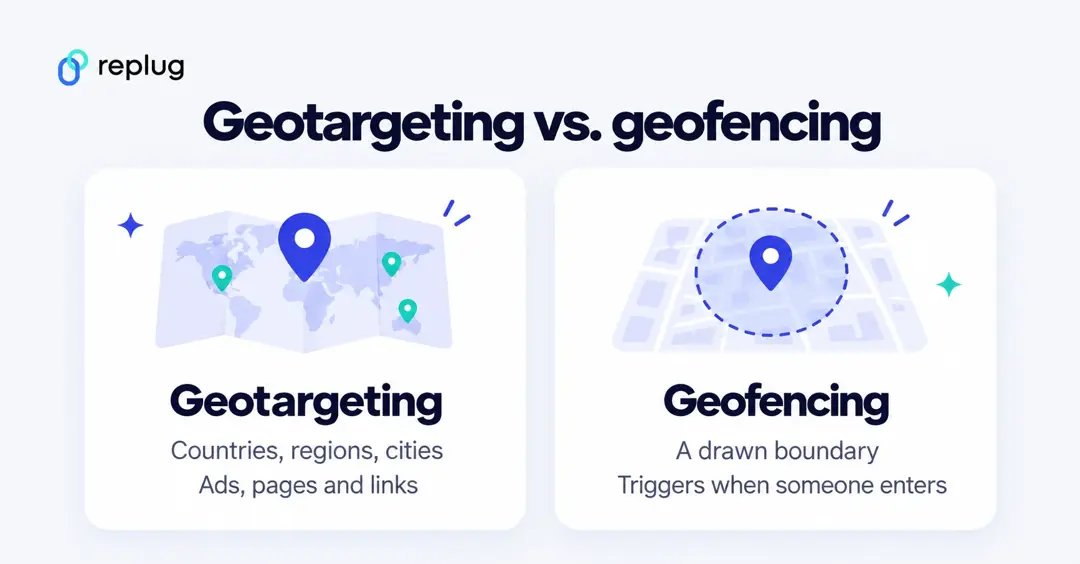
The two terms are often mixed up. Geotargeting picks an area, such as a country, state, city, ZIP code or a radius, and shows your ad, page or link destination to people in it. Geofencing draws an exact boundary around one place, like a store or a stadium, and triggers something (usually an app notification or ad) when someone’s device enters it. Geofencing needs precise device location and the person’s permission; country-level geotargeting usually works from the IP address alone.
The 5 major types of geotargeting
Geotargeting lets you reach the right audience based on their location, ensuring your ads and content are relevant. Whether you’re targeting an entire country or a specific neighborhood, this strategy helps boost engagement and conversions.
We’ve narrowed down five significant types of geotargeting:
- Country targeting: The broadest form of geotargeting, allowing brands to tailor ads by country. This is ideal for global campaigns that require different languages or localized messaging.
- Regional targeting: Targets specific areas within a country, such as states, provinces, or cities. This is useful for businesses that operate in multiple regions but want to customize messaging.
- Location radius targeting: Focuses on a defined radius around a specific location, ideal for brick-and-mortar businesses.
- Audience targeting: Combines location with demographics, interests, and past behavior, so ads reach the most relevant people in an area.
- Weather targeting: Adjusts advertising based on current weather conditions to influence purchasing decisions.
Using a combination of these geotargeting strategies helps brands reach the right audience at the right time, leading to higher engagement, better customer experiences, and increased sales.
How does geotargeting work?
Geotargeting works by using a combination of technologies and data sources to determine a user’s geographic location and deliver tailored content or advertisements based on that information. Here’s a step-by-step breakdown of how geotargeting works:
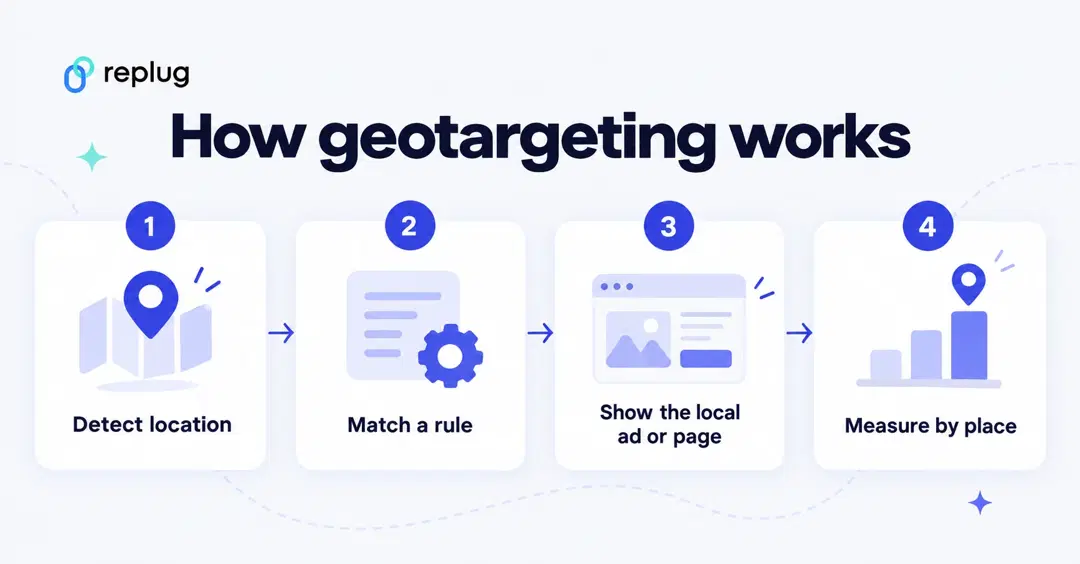
Step 1: Collect location data
Location data is gathered through GPS, IP addresses, Wi-Fi, Bluetooth, and cell tower triangulation.
Step 2: Integrate & analyze data
This data is combined with behavioral, demographic, and contextual information to create detailed user profiles for targeted marketing.
Step 3: Customize content & ads
Content and ads are tailored based on user location, promoting relevant products or offers through display ads, push notifications, and social media.
Step 4: Deliver in real- time
Geotargeting delivers content at the most relevant moment, ensuring users receive timely and useful information.
Step 5: Measure and optimize
Track campaign performance with metrics like CTR and ROI. Tools like Replug can help analyze how shortened links perform, offering insights to optimize future campaigns.
| Note: Many link management tools like Replug also allow businesses and agencies to apply geotargeting to their links, making the process of directing users to the right content effortless and efficient. |
Geotargeting in Google Ads and Meta ads
Most ad platforms build geotargeting in. In Google Ads location targeting you can target countries, areas within a country, a radius around a location, or location groups. Google’s advanced location options decide who counts: Presence or interest (the default) also reaches people who have shown interest in your locations, while Presence limits ads to people who are in, or regularly in, those places. Google also says it doesn’t allow radius targeting under 1 km, and that location targeting is a best effort, so 100% accuracy isn’t guaranteed.
In Meta Ads Manager, you choose locations at the ad set level under Audience > Locations: countries, regions or cities, people who live there or recently visited, or a radius. Special Ad Categories (housing, employment, financial products) have limited location options.
Effective ways to run a geotargeting marketing campaign
To optimize your geotargeting marketing campaigns, consider these strategies:
- Leverage a link management tool: Use an advanced link management platform to shorten, brand, track, and manage your URLs effectively. These tools also provide insights into how your links perform across regions, helping you fine-tune your approach.
- Use analytics to gain valuable insights: Powerful analytics tools help you track how your links are performing across various locations. By tracking total clicks and unique clicks by country, city or region (and adding UTM tags for your own analytics), you can adjust your content or offers to create custom campaigns and track better leads.
- Route links by location: Instead of creating multiple links, use a single link to redirect users based on their location. For example, a U.S. customer can see discounts in USD, while a UK visitor sees GBP offers, all from a single link.
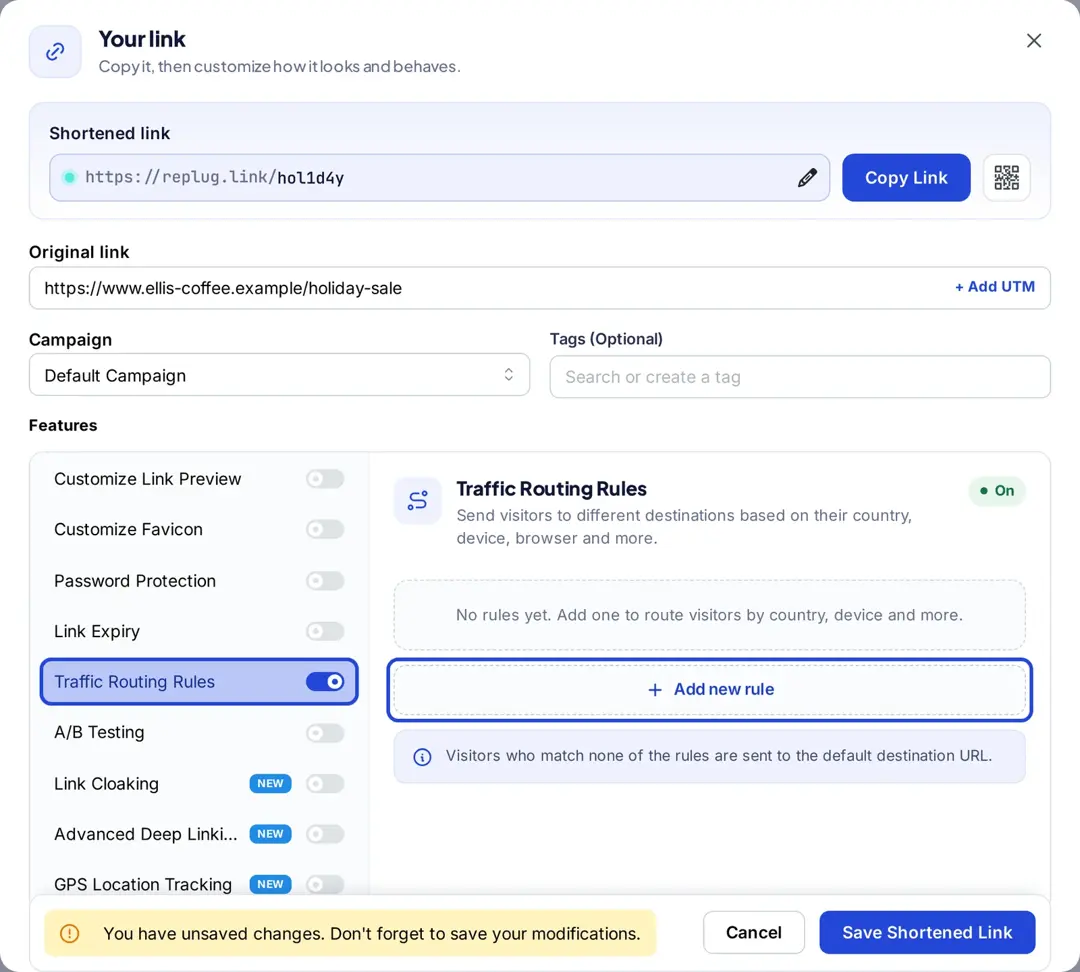
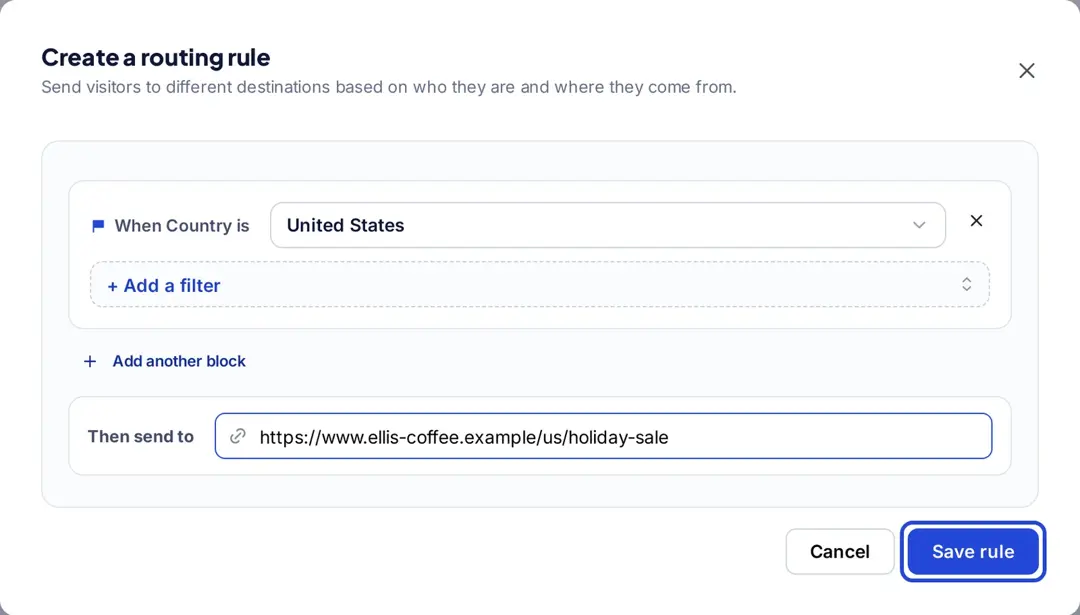
For example, suppose you have a Black Friday sale. With Replug’s traffic routing, U.S. visitors can land on your USD sale page, UK visitors on the GBP page, and everyone else on your global page, all from a single short link. Each link can have up to 10 rules, checked from top to bottom; anyone who matches no rule goes to the main URL. Traffic routing is on the Scale and Agency plans (Replug pricing). Here’s how to set it up:
- Shorten the link to your main (global) page, then open the Your link window.
- Under Features, switch on Traffic Routing Rules and click Add new rule.
- Set When Country is (for example, United States) and paste the country page under Then send to. Click Save rule. You can also match by region, city, device, browser, operating system, IP, day or date.
- Add a rule for each market, then click Save Shortened Link.
Related: 5 top link rotators: Convert more with traffic routing
- Add retargeting pixels to reduce cart abandonment: By adding retargeting pixels to your Replug links, people who click can join your ad audiences on Meta, Google and other platforms, whichever regional page they land on. Essentials includes one pixel; Scale and Agency include unlimited pixels.
- A/B test your campaigns to optimize performance: Replug allows you to A/B test up to 20 destination URLs behind one link and compare clicks for each variation (Scale and Agency). Use it to test offers within one market, and traffic routing to send each market to its own page. By continually testing and refining your campaigns, you ensure that your marketing efforts are always aligned with your audience’s preferences.
- Apply deep linking: Routing rules can also match devices, and Replug’s deep links (Scale and Agency) open supported apps instead of the browser, so mobile visitors land in the right app as well as the right market.
- Create custom CTAs for maximum conversions: With Replug (Essentials and up), you can add custom CTAs to your links. For a different offer per region, create one short link per region, each with its own CTA campaign. For example, users in one area may see a “Get 20% off now!” CTA, while another region gets a different offer.
These techniques allow you to effectively engage your audience, deliver tailored content, and maximize conversions, all while tracking your results to improve future campaigns.
Why geotargeting is important for marketers
Geotargeting helps marketers deliver hyper-relevant content based on users’ locations. Whether optimizing ads, creating content, improving local SEO, or refining user experiences, geotargeting ensures your message reaches the right people at the right time.
In the U.S., 91% of adults own a smartphone, and 97% of adults ages 18 to 49 do, according to Pew Research Center’s Mobile Fact Sheet (survey conducted January to June 2026). With so many people carrying a location-aware device, location is one of the most useful signals a marketer has.
Geotargeting helps businesses boost engagement, increase online and foot traffic, and strengthen customer relationships, because the offer matches where the customer is.
Best practices for geotargeting success
To maximize the impact of your geotargeting campaigns, consider these strategies:
- Localized landing pages: Create region-specific pages with local testimonials, cultural references, and targeted offers to resonate with your audience and drive conversions.
- Precision in SEM: Use platforms like Google Ads to target users by location, ensuring your ads reach the right people without wasting budget on irrelevant audiences.
- Hyper-relevant content: Develop content, such as blogs and webinars, that addresses location-specific pain points, helping you establish authority and build stronger connections with custom audiences.
- Social media ad targeting: Utilize platforms like Facebook, LinkedIn, and Instagram to push content to specific cities or neighborhoods, enhancing ad relevance and boosting click-through rates.
- SMS marketing: Use SMS marketing to deliver location-based offers directly to users with high open rates, ensuring your messages get seen quickly.
- Utilize geofencing: Set up virtual boundaries around key locations like competitor stores or landmarks to trigger timely promotions and location-based discounts.
- Optimize for mobile: Ensure your geotargeting strategies are mobile-friendly, as a large portion of web traffic comes from mobile devices.
- Test, analyze, and adapt: Continuously test and adapt your strategy based on real-time data to optimize targeting.
- Ensure compliance: Follow regulations like GDPR and CCPA to protect user privacy and maintain trust. Under California’s CCPA, precise geolocation is “sensitive personal information” that consumers can limit how businesses use (California Attorney General).
By incorporating these best practices into your geotargeting strategy, you can better engage your audience, increase conversions, and optimize your campaign performance.
Who benefits most from geotargeting?
Geotargeting isn’t just for big brands; it’s for anyone looking to optimize audience engagement. Here’s how different industries use it:
| Industry | How Geotargeting Helps |
| E-commerce stores | Show location-specific prices, product availability, and shipping options. |
| Affiliate marketers | Redirect users to country-specific merchant pages. |
| Content creators & influencers | Share localized landing pages for events, sign-ups, or downloads. |
| Event organizers & ticketing platforms | Adjust event details to match time zones and local languages. |
| Recruitment & job portals | Display job openings, salaries, and hiring details relevant to the user’s location. |
| SaaS companies | Provide region-specific pricing, support options, and language preferences. |
| Digital advertisers & marketers | Serve hyper-targeted ads based on a user’s region. |
| Hospitality & travel | Show region-specific hotel deals, flight options, and travel guides. |
| Healthcare & telemedicine | Direct patients to the right regional medical services, appointment booking pages, or language-specific healthcare content. |
| Education & E-learning | Promote location-based course offerings, tuition fees, or scholarship details. |
| Finance & banking | Offer location-based promotions on bank accounts, credit cards, and financial services. |
Related: Basics of e-commerce marketing, key strategies and more
4 best geotargeting examples
Here are some examples of how some brands are putting geotargeting in action. The screenshots were captured in early 2025; country sites change often, so what you see today may differ.
1. Sephora
Sephora operates in multiple locations and depending on the country that you are in, it delivers a personalized experience.
For instance, the implementation of geotargeting leads to displaying different deals on landing page if you’re in Denmark versus if you’re in Mexico:


2. Salesforce
Salesforce, one of the leading cloud-based software companies, uses geotargeting marketing.
Here’s an example of what their sign-up page looks like if you’re in the UK versus if you’re in the U.S. The description, tone, contact number, and price differ for each country.


3. Foodpanda
Foodpanda is a food and grocery delivery brand in Asia, part of Delivery Hero (as its Singapore page says).
In the example below of Foodpanda’s Singapore and Thailand landing pages, you can see that they are entirely personalized – from their pictures to descriptions, they’ve used geotargeting to cater to their custom audiences.


4. Adidas
Adidas also offers a personalized experience using geotargeting. Below are examples of Adidas’s checkout page for “SAMBA OG shoes” for women in the UK and U.S.
At first glance, you might only notice that there’s a change in the currency, but that’s not the case. In the UK, they are focusing more on “free personalisation” whereas, in the U.S., this pair of shoes is one of their best sellers.


Conclusion
Geotargeting is a powerful way to enhance marketing campaigns, improve user experience, and drive higher conversions. By using location-based targeting, brands can connect with their audience more effectively than ever. With Replug’s traffic routing (Scale and Agency), one short link can send every country to its own page.
Ready to boost engagement and conversions? Try Replug today!
FAQs about geotargeting

Amna Yawar