You open TikTok, eager to make your profile stand out, only to be hit by the 80-character bio wall. Frustrating, right?
That tiny text box feels like trying to fit a novel onto a sticky note. But you’re not alone!
Quick answer (checked October 2026): TikTok’s Help Center says TikTok bios can’t exceed 80 characters, counting letters, spaces, emoji and symbols. Some accounts see a higher limit on the bio counter in the app, but TikTok hasn’t documented it, so write a bio that works in 80 characters and use any extra space your counter allows. To share more than fits, add a link in the Links field (you need at least 1,000 followers or a Verified Business Account).
According to DataReportal’s Digital 2026 Mid-Year Global Update, TikTok’s own ad planning tools reported a potential ad reach of 2.2 billion users in April 2026. Competition for attention has never been as intense, and every character counts when you want to outshine.
It’s tempting to stuff your bio with everything about you, i.e., your niche, link, personality, and vibe, but that limit turns clarity into chaos.
So how do creators actually break free of it and craft bios that get noticed? That’s exactly what we’re stepping into next.
Ready to start at the beginning? Let’s explore what a TikTok bio really is!
What is a TikTok bio: A brief overview
Simply put, a “TikTok bio” is the short bit of text right under your profile name that tells people who you are and what your content is about.
It’s one of the first things someone sees when they land on your profile, so it acts like your digital handshake on TikTok.
Because the platform only lets you use up to 80 characters, you’ve got to be thoughtful about every word you choose. That’s where the idea of a professional bio comes in.
Even if you’re casual, you still want your bio to quickly communicate your personality, niche, or why someone should hit “Follow.”
Note: Good bios help visitors instantly understand what you do and what kind of content they can expect from you, all in a tiny space.
TikTok bio example
Travel & tips for budget explorers 🌍 | New vids weekly ✈️ | Follow for inspo!
This example tells you:
- who the creator is (travel content focused on budget tips),
- what they post (new videos weekly), and
- invites visitors to follow
all while staying concise and engaging.
Related: TikTok bio ideas & hacks to drive traffic
Importance of a TikTok bio: Why do you need it in the first place?
Your TikTok bio might seem like a tiny piece of text, but it’s actually one of the most important parts of your profile. It gives people their first real snapshot of who you are, what you post, and why they should stick around.
Clear, relevant bios can significantly boost engagement and profile visits. A strong bio helps visitors decide fast whether they’re in the right place, making it more likely they’ll follow you, watch your videos, or click your link.
It even helps TikTok’s algorithm understand your niche so the right audience finds you. In short, a good bio turns casual profile visits into real followers and engagement.
What is the character limit on TikTok bio?
The TikTok bio has a strict 80-character limit, which includes letters, spaces, emojis, and symbols. So you’ve got to make every character count when describing yourself or your niche.
Note: The bio counter in the TikTok app starts at 0/80 characters. TikTok’s Help Center (checked October 2026) says bios can’t exceed 80 characters. Some accounts see a higher limit on the counter, but TikTok hasn’t documented it, so it’s safest to write for 80 characters. See how to check yours below.
80 characters or more? How to check your own limit
- Open TikTok and tap Profile at the bottom.
- Tap Edit profile, then Bio.
- Look at the counter under the text box. It shows how many characters you’ve used out of your limit, which TikTok’s Help Center puts at 80.

If you manage several accounts, check each one; the bigger box has rolled out account by account. Either way, put the most important words first, because the profile page can cut a long bio short on smaller screens.
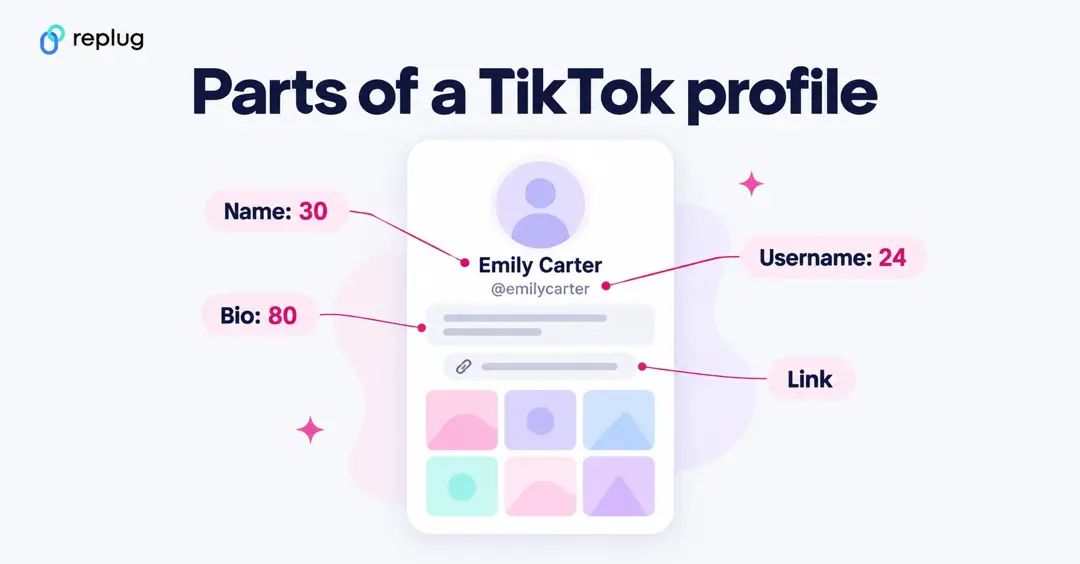
TikTok profile fields at a glance
| Field | Limit | Source |
|---|---|---|
| Bio | 80 characters (some accounts see a higher limit in the app) | TikTok Help Center, “Changing account bio” |
| Name (nickname) | 30 characters, can change once every 7 days | TikTok Help Center, “Changing your nickname” |
| Username | 2 to 24 characters: letters, numbers, underscores, periods (not at the end); can change once every 30 days | TikTok Help Center, “Changing your username” |
| Profile link | 1 website link; needs 1,000+ followers or a Verified Business Account | TikTok Help Center, “Adding a website link to your profile” |
Character limits for other significant parts of the TikTok platform
Here’s a quick look at how many characters you can use in other key parts of TikTok (all limits include spaces and count emojis as characters too):
| TikTok Section | Character Limit |
| TikTok comment character limit | Not published by TikTok; keep comments to a line or two |
| TikTok username character limit | 24 characters (TikTok Help Center) |
| TikTok profile name character limit | 30 characters (TikTok Help Center) |
| TikTok description (caption) character limit | 2,200 characters through TikTok’s posting API, which scheduling tools use (TikTok for Developers); TikTok doesn’t publish the limit in the app |
| TikTok ad caption | Up to 4 lines shown for Spark Ads, which reuse the video’s caption (TikTok Ads Manager help, June 2026) |
These limits help keep the TikTok experience snappy and mobile-friendly, so knowing them ahead of time will make your content and bio writing way easier.
Why does TikTok have a character limit?
TikTok imposes character limits in place to make the app feel fast, simple, and easy to use, especially on mobile screens.
Short limits help people scroll quickly without being dazzled by long blocks of text, keeping the focus on video content first. They also encourage creators to be clear and punchy with their words, which usually leads to better engagement and discovery.
Plus, concise text helps TikTok’s system display content uniformly across different devices and speeds up load times, making the overall experience smoother for everyone.
How to exceed the character limit on TikTok bio?
Even though TikTok limits your bio to 80 characters, there are smart ways to get around that limit to share more about yourself and your goals, without cluttering up your bio text.
Let’s walk through the best tactics people use in 2026 to extend your reach and make your profile more effective.
Use a link-in-bio tool (recommended)
Since TikTok bios are short, most creators use link-in-bio tools like Replug’s Tiktok link in bio tool, Linktree, or similar services to share multiple links from a single short URL in their profile.
These tools let you put all your important links (website, shop, newsletter, YouTube, blog) in one place and just paste the single link in your TikTok bio text.
That way, you keep your bio clean but still give followers a hub of content to explore!
Switch to a business account
Another big way to exceed the bio limit is by unlocking clickable links. TikTok allows business accounts (and sometimes creator accounts meeting criteria like 1,000+ followers) to add a website field in the profile settings (per TikTok’s help page on profile links, you need at least 1,000 followers or a Verified Business Account), so you don’t have to cram a long URL into the main bio text.
Note: Switching your personal profile to a business account not only lets you add a link but also provides access to analytics and marketing features.
Optimize your short bio
Even with limits, you can maximize impact by choosing words wisely. Focus on your main value (what you do), use emojis to express more with fewer characters, and include a clear CTA phrase like “👇 Link below” so visitors know where to click. Good optimization makes that tiny 80-character space work harder for you.
By combining these tricks, i.e., clever link tools, the right account type, and smart writing, you effectively stretch what your TikTok bio can do without breaking the platform’s standard rules.
How to change your TikTok bio
In the app:
- Tap Profile at the bottom.
- Tap Edit profile.
- Tap Bio, type your new bio and tap Save.
On the web (tiktok.com): click your profile picture, choose View profile, click Edit profile, edit the Bio field and click Save. TikTok notes that bio editing isn’t available on the mobile website.
How to add a link to your TikTok bio (and who can)
Per TikTok’s help page on profile links, you can add a website link if you have at least 1,000 followers or a Verified Business Account. To add it:

- Tap Profile, then Edit profile.
- Next to Links, tap Add.
- Follow the steps to add your website and save.
A few things TikTok points out: links open in TikTok’s in-app browser, which may ask visitors to open some pages in their phone’s browser instead; links that open or log you into other social apps are no longer supported (links to those platforms’ websites still work); and anyone can report a suspicious profile link.
Because you get one link, make it count. A bio link page holds your shop, YouTube, newsletter and anything else, and a branded short link fits neatly in the bio text if you mention it there. Both show you how many people tap through. More on this in our guide to adding a link in your TikTok bio.
Under 1,000 followers? You can still write your link as plain text in the bio (it won’t be clickable), pin a video that mentions it, or link your Instagram or YouTube in the profile so people can find the rest there.
TikTok bio examples that fit in 80 characters
Each of these is under 80 characters, so it works whichever limit your account has:
- Easy dinners in 15 minutes or less 🍝 New recipe every Tuesday
- Austin hairstylist ✂️ Before and afters daily | Book below 👇
- Teaching Spanish one meme at a time 🇲🇽 Free lessons in the link
- Small-batch candles, poured in Ohio 🕯️ Restock Fridays
- Dad jokes and DIY fails 🔨 New video most days
- Thrift flips and outfit ideas under $30 👗
- Nurse by night, baker by day 🧁 Recipes below
- Study tips that actually work 📚 Pre-med, class of 2028
How to write a great TikTok bio: 8 useful tips to follow
A great TikTok bio doesn’t need to be long; it just needs to be clear, interesting, and intentional. With only 80 characters to work with, these tips will help you make every word count and turn profile visitors into followers.

Tip #01: Pick your words wisely
Choose words that instantly explain who you are or what you post. Skip filler and focus on meaning, value, or vibe.
Tip #02: Keep it brief & concise
Short bios perform better on TikTok. Say one strong thing well instead of stuffing in everything.
Tip #03: Incorporate keywords & spaces
Use simple keywords related to your niche and add line breaks or symbols to make your bio easier to scan.
Tip #04: Highlight your skills & interests
Let people know what you’re good at or passionate about so the right audience can connect with you easily.
Tip #05: Don’t be afraid to get odd
A little weird, funny, or unexpected detail can make your profile memorable and scroll-stopping. Don’t hesitate to add it.
Tip #06: Use relevant emojis showing personality
Emojis save space and add a unique, personal tone. However, just don’t overdo it, since clarity comes first.
Tip #07: Include a call to action (CTA)
Must add a clear CTA, telling visitors what to do next, like “Follow for tips” or “👇 Check the link.”
Tip #08: Provide more with a link in bio
Since space is limited, use your bio to point people to a link where they can learn more.
Summing up
After everything we talked about, from why TikTok limits bio characters to smart ways to work around those limits and write bios that really connect with people, you should now have a clear game plan for making your profile work harder for you.
Remember, a great TikTok bio isn’t just about filling in words; it’s about being intentional, creative, and strategic so the right followers click, engage, and stick around. One of the best ways to do that is to use a link solution that goes beyond the 80-character cap.
Give Replug a try today! It’s an all-in-one link management platform that offers a custom bio links feature, letting you share way more than your bio ever could, track clicks, and grow your audience smarter.
Frequently asked questions

Muhammad Ahsan Jamal