Branded links are short links that use your own domain instead of a shortener’s shared one, for example go.harborcoffee.com/fall-menu instead of a random bit.ly code. They tell people who sent the link before they click, let you choose a readable ending, and stay under your control because you own the domain.
Updated: November 2026
This guide is for marketers, founders and social media managers who share a lot of links in email, texts, social posts and print. It covers what a branded link is, what good ones look like, how to pick a domain, how to set one up in a few minutes, and the rules that keep a team’s links consistent.
What is a branded link?
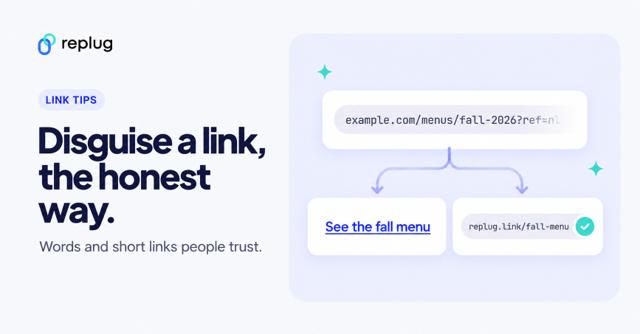
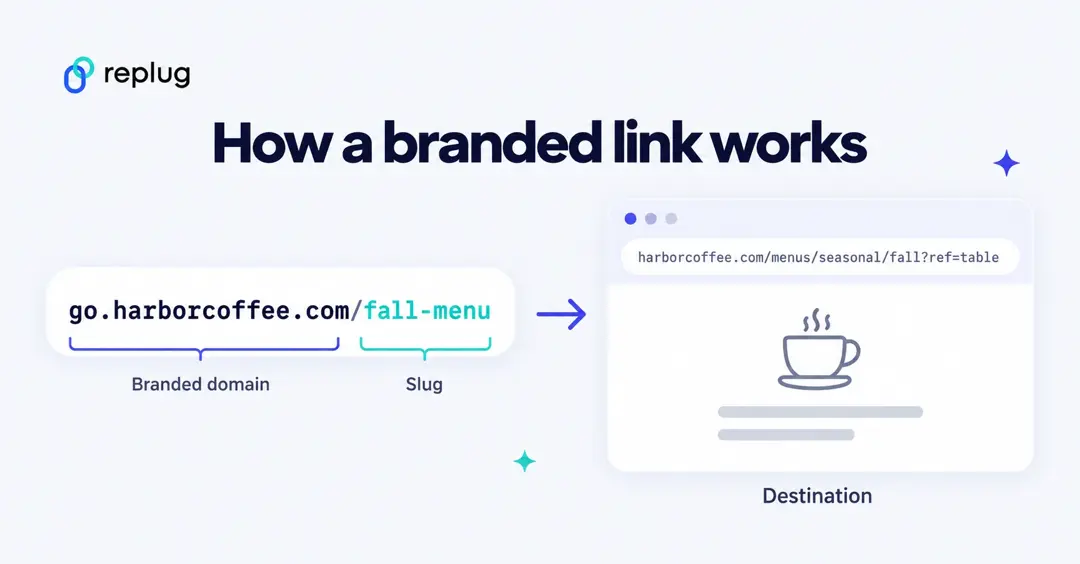
A branded link is a short URL on a domain the sender owns, made of a branded domain plus a slug, that redirects to a longer destination. The reader sees your name in the link itself, so they know where it came from before they tap it.
Two terms make up every branded link:
- Branded domain: a domain or subdomain you own and use only for short links, such as go.harborcoffee.com or harbor.link.
- Slug: the part after the slash, such as /fall-menu. It is the readable ending that tells people what the link opens.
When someone opens the link, the link service looks up the slug and sends the visitor on to the full destination URL, the long page address you would otherwise have to paste.
How is a branded link different from a generic short link?
A generic short link puts the shortener’s name in front of your content; a branded link puts yours there. The rest of the differences follow from who owns the domain.
| Generic short link | Branded link | |
|---|---|---|
| Domain shown | Shared by every user of the tool (for example bit.ly) | Your own (for example go.harborcoffee.com) |
| What it signals | Which shortener made it | Which business sent it |
| Can you pick the ending? | Often a random code; custom endings must be unique across all users | Yes, and endings only need to be unique on your domain |
| If you switch tools | Links stay tied to the vendor’s domain | You own the domain and can connect it to another service |
| Cost | Free on most tools | The domain’s cost, often free for the first year |
A generic link is still fine for a one-off share in a private chat. For anything public or repeated, see the full side-by-side comparison of branded and plain short links.
Why do branded links get more clicks?
Branded links get more clicks mainly because people can see who the link is from and roughly what it opens, which takes the guesswork out of tapping it. Three things do the work:
- Recognition. Your name shows up in places where the link itself is visible: email footers, text messages, printed flyers, slides and podcast read-outs.
- Less suspicion. Shared shortener domains are open to anyone, including spammers, so some readers and filters treat an unknown short link with caution. A domain that matches the sender looks expected.
- Clear expectations. A slug like /fall-menu or /demo tells people what they will get, so the click feels low-risk.
That caution is reasonable. According to the Federal Trade Commission (April 2025), consumers reported losing $470 million in 2024 to scams that started with text messages, and the FTC’s advice is to never click links in unexpected texts. Across all channels, the FTC told Congress in March 2026 that it received 3 million fraud reports in 2025, with $15.9 billion in reported losses. People have learned to pause before tapping an unfamiliar link, and a link that clearly comes from you gives them a reason not to.
What about the click-through numbers? Link vendors publish them: Bitly’s branded links page promises to “2.3x your click-throughs” without describing how that figure was measured. Treat numbers like that as vendor claims. Independent studies comparing branded and generic short links are scarce, so the honest test is your own: send the same campaign with both and compare clicks.
What do branded links look like? (examples)
Good branded links are short, readable out loud, and end in a word that matches the page. Here are four made-up businesses and how each one uses its link:
| Business | Branded link | Where it’s used | Why the slug works |
|---|---|---|---|
| Coffee shop in Portland, Maine | go.harborcoffee.com/fall-menu | QR code on table tents | Names the page and the season, so the scan feels safe |
| Real-estate team in Denver | homes.ridgewayrealty.com/maple-st | QR code on a yard sign | Matches the street on the sign, easy to type from a car |
| SaaS startup in Chicago | get.lumenly.io/demo | Sales email signature | One word, one action |
| Nonprofit in Austin | give.bluebonnetfund.org/gala | Text message to donors | The subdomain says what the link is for before anyone taps |
Large publishers have used their own short domains for years; The New York Times, for example, shares stories on nyti.ms. The same idea now works for a single coffee shop.
How do you write a branded link people click?
Write it for the person reading it, not for the system that makes it. These rules come from what works across email, social and print:
- Lead with your name. The domain is the first thing people read, so it should be clearly yours.
- Pick a fitting extension. A .link or industry extension can read well, as long as the name is still obviously your brand.
- Describe the destination in the slug. One to three lowercase words, joined with hyphens.
- Keep it short. Long links get cut off in social previews and are hard to read aloud.
- Match the page. If the slug says /fall-menu, the link must open the fall menu, not the home page.
- Make it memorable for offline use. If people have to type it from a poster, avoid look-alike characters such as 0/O and l/1.
What makes a good domain for branded links?
A good branded domain is short, easy to spell when said out loud, and clearly yours. Most businesses pick one of three types:
| Option | Example | Cost | Setup effort | Recognizability | Best for |
|---|---|---|---|---|---|
| Subdomain of your website | go.yourbrand.com | Free if you own the main domain | One DNS record | High: it is your main domain | Most businesses, especially if the main domain is short |
| Dedicated short domain | yrbrnd.co | Yearly registration fee | Register it, then one DNS record | Medium: people must learn the short form | Brands with long names that share links on social and SMS |
| New-extension domain | yourbrand.link | Often free for the first year with a link tool | Low when the tool registers it for you | High if the name matches your brand | Teams that want a branded domain without touching DNS |
Why a subdomain like go. or get. and not the bare main domain? Your main domain already points to your website, and a CNAME record, the DNS record that hands a name over to a link service, can’t share a name with other records. A subdomain keeps your website untouched. For a deeper look at the options, read how vanity domains work.
How do you create a branded link?
Replug is a link-management platform for marketers: branded short links on your own domain, link-in-bio pages, QR codes, retargeting pixels and CTA overlays on any link, and click analytics. Here is how to set up a branded link in it. If you don’t own a domain yet, start by claiming a free .link domain on a paid plan.
Step 1: Get a domain
You have three routes:
- Claim a free .link domain. Paid plans include one or more .link domains, free for the first year and renewable after that. Replug registers and sets it up, so there are no DNS records to edit. The step-by-step claim guide walks through it.
- Buy a domain through Replug. Replug can register a domain for you and configure its DNS records.
- Use a domain you already own. Pick a subdomain such as go.yourbrand.com and connect it in Step 2.
Step 2: Connect the domain
For a domain you own, connect it once and every link on it works from then on:
- In the Replug dashboard, open Workspace Settings → Custom Domains and click Add Domain.
- In Connect your custom domain, enter the Domain URL, for example https://go.yourbrand.com.
- Optionally fill in 404 Redirect URL (where people land if they open an ending that doesn’t exist) and Branded domain (where people land if they open the domain with no ending, usually your website).
- Copy the CNAME record from the DNS configuration table: the Hostname and the Points to value.
- Add that CNAME record at your DNS host. If you use Cloudflare, turn the proxy off for this record, as the dashboard advises.
- Click Save custom domain, then use Check connectivity. DNS changes can take up to 24 hours to spread; the domain shows Connected when it is ready.
Custom domains are on every Replug plan: 3 on Free, 5 on Essentials, 15 on Scale and 50 on Agency.
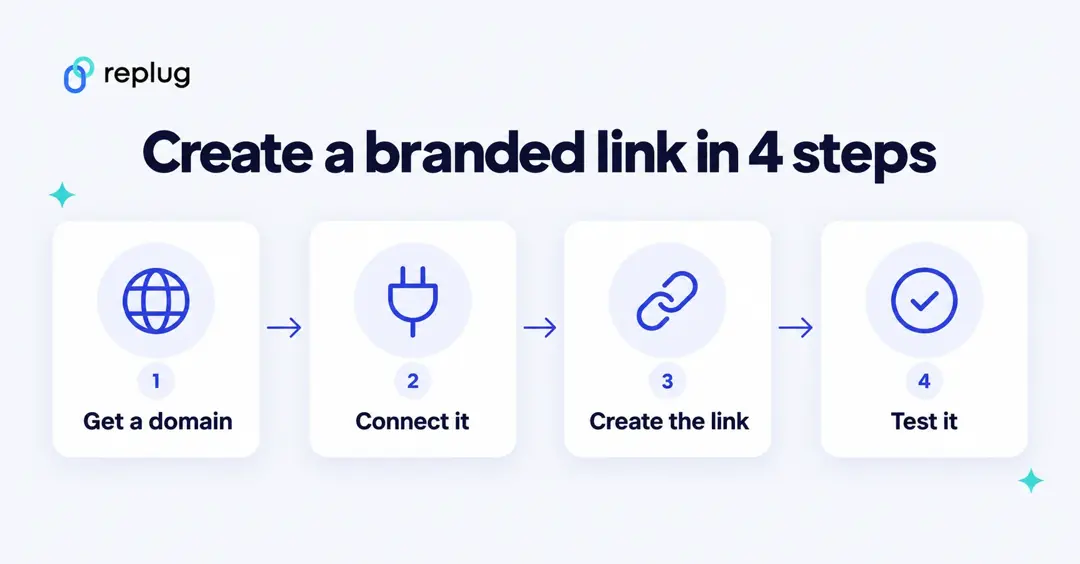
Step 3: Create the link on that domain
- Create a campaign (or edit one) and choose your domain under Custom domain. Every link in that campaign uses it.
- Create a new link in that campaign and paste the destination into Original link.
- Click Edit short link and type a readable slug, such as fall-menu. Slug editing is on paid plans from Essentials up (not during a free trial).
- Click Save Shortened Link and copy your branded link.
Step 4: Test it
- Open the link in a private browser window on a computer and on a phone.
- Check that it lands on the right page and that the address starts with https:// with no browser warning.
- If you added a 404 redirect, try a made-up ending to confirm it lands where you expect.
- Share it only after all three checks pass.
Do branded links help SEO?
Not directly. A branded short link is a redirect: Replug answers with a 307 (temporary) redirect that forwards the visitor to the destination, so the link itself isn’t a ranking factor and doesn’t replace a direct link to your page. The benefit is trust and clicks in places where people see the URL, such as email, texts, social posts and print. If someone promises that branded links will lift your Google rankings, ask for their evidence.
What can you change after you share a branded link?
You can change more than most people expect, but some edits depend on your plan, and one of them breaks the old link:
| What you change | Replug plan | What to watch out for |
|---|---|---|
| Slug (the ending) | Essentials and up | The old ending stops working, so change it before you share the link, not after. |
| Destination | Scale and up | Useful when the page itself moves to a new address; printed QR codes and old emails keep working. |
| Expiry date | Scale and up | After the date, the link stops sending people to the destination. |
| Click history you can see | 14 days on Free, 90 days on Essentials, full history on Scale and up | Export or note campaign results before older data drops out of view on lower plans. |
| The domain itself | Any plan | Renew it every year. If the domain lapses, every link on it stops working. |
How do branded links keep your brand consistent?
Branded links keep your brand consistent when everyone on the team makes them the same way. A one-page style guide is enough:
| Rule | Example | Why |
|---|---|---|
| One link domain per brand | go.harborcoffee.com for every Harbor Coffee link | People learn to recognize it |
| Slug style | Lowercase, hyphens, no dates unless the offer ends | Easy to read and type; no stale-looking links |
| Campaign naming | 2026-fall-menu, holiday-gift-cards | Anyone can find and report on a campaign’s links |
| Who creates links | Marketing owns the domain; others request links | No duplicate or off-brand endings |
| Preview text | Title and image match the page | The link looks the same wherever it is shared |
Print needs extra care because nobody can click a poster. Keep those links to one short word after the domain, and see how to make short, memorable vanity URLs for print.
FAQ
Start with one domain
Branded links are the cheapest trust signal you can add to a campaign: one domain, a readable ending, and a quick test before you share. Start with a free .link domain on any paid plan, or connect a domain you already own on the Free plan.
Frequently Asked Questions

Muhammad Ahsan Jamal