Quick answer: copy your X profile link, which is x.com/ plus your username without the @ (for example x.com/emilycarter). Then open the Instagram app, tap Edit profile, tap Links, tap Add external link, paste the URL, give it a title such as “X” and tap Done. Instagram lets you add up to 5 links this way, and links can only be added in the Instagram app, not on a computer, according to Instagram’s Help Center.
Old twitter.com/username links still work: when we checked in October 2026, twitter.com profile addresses redirected to the same profile on x.com. Use the x.com version for new links so people see the current name.
Important note: Throughout this guide, we will refer to Twitter as “X”.
Looking to expand your social media presence and connect with a wider audience? If you’re already active on Instagram, adding an X link to your bio can be a game-changer.
Not only does it allow you to cross-promote your content and reach new followers, but it also opens up a world of new possibilities for networking, sharing your thoughts and ideas, and building your personal brand.
Adding an X link to your Instagram bio is a smart move for many reasons, and this guide explores how to make the most of it. So, let’s dive in and discover how to add an X link to an Instagram bio!
Why add an X link to your Instagram bio?
Adding an X link to your Instagram bio can be a smart move for several reasons:
Cross-promotion: By linking your Instagram and X profiles, you can reach a wider audience and drive traffic to both platforms. This means more visibility for your content and potentially more followers.
Networking: X is a powerful networking tool. By linking it to your Instagram account, you can make it easier for people to find and connect with you. This can be especially useful if you’re looking to build relationships with influencers or other industry professionals.
Sharing your thoughts: While Instagram thrives on visuals, X is all about the power of words. By linking to your X account, you can share your thoughts, opinions, and ideas with your followers in a way that’s not possible on Instagram.
Building your personal brand: By maintaining an active presence on both Instagram and X, you can build a strong personal brand that resonates with your target audience. Linking the two accounts creates a cohesive online identity that helps you stand out from the crowd.
Also read: Top 29 personal branding tools to upscale your marketing efforts
How to add an X link to your Instagram bio?

On a mobile device:
Step 1: Open the X app on your mobile phone and tap the profile icon in the top left corner to open your profile.

Step 2: Tap “three dots” in the top right corner.

Step 3: Tap “share”.
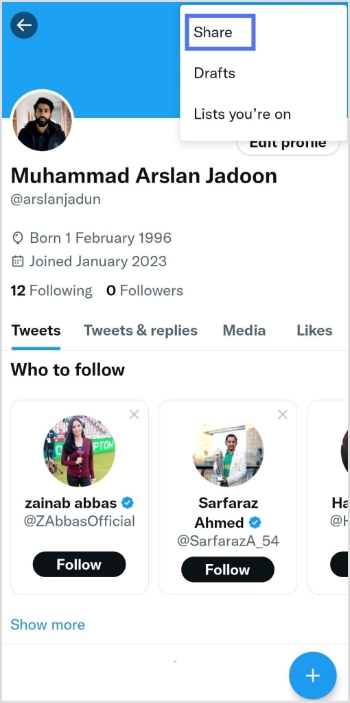
Step 4: Tap “copy URL”

Step 5: Open the Instagram app and tap your profile icon in the bottom right corner.

Step 6: Tap “edit profile”.

Step 7: Tap “Links” (older app versions showed “add link”)
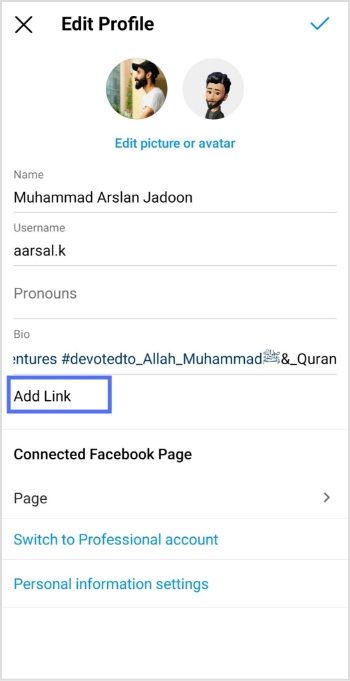
Step 8: Tap “add external link”

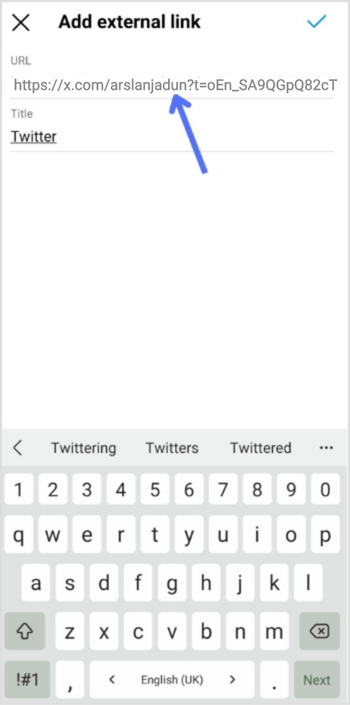
Step 9: Paste the X URL in the URL field, enter the title and tap Done. You’re done.
Also read: How to add Amazon link to Instagram bio?
Reorder, edit or remove your X link
If X isn’t the link you want people to see first, move it. According to Instagram’s Help Center:
- To reorder: tap Edit profile, then Links, tap Options (the three dots), then Reorder links, and drag the X link up or down. Tap Done.
- To remove it: open Edit profile > Links, tap the X link and tap Remove link.
- To change it (for example after you change your X username): remove the old link and add the new
x.com/address.
Anyone can see the links on your profile, on or off Instagram, so only add accounts you’re happy to share publicly.
If the link doesn’t work
- It opens the wrong profile: check the username after
x.com/. It has no @ and no spaces, and X usernames can’t be longer than 15 characters, according to X’s username rules. - It isn’t clickable: make sure you added it under Links, not typed into the Bio text.
- You can’t find Links: update the Instagram app and try again on your phone; the option isn’t on instagram.com.
On a Computer device:
Step 1: Log in to X on your computer or laptop.
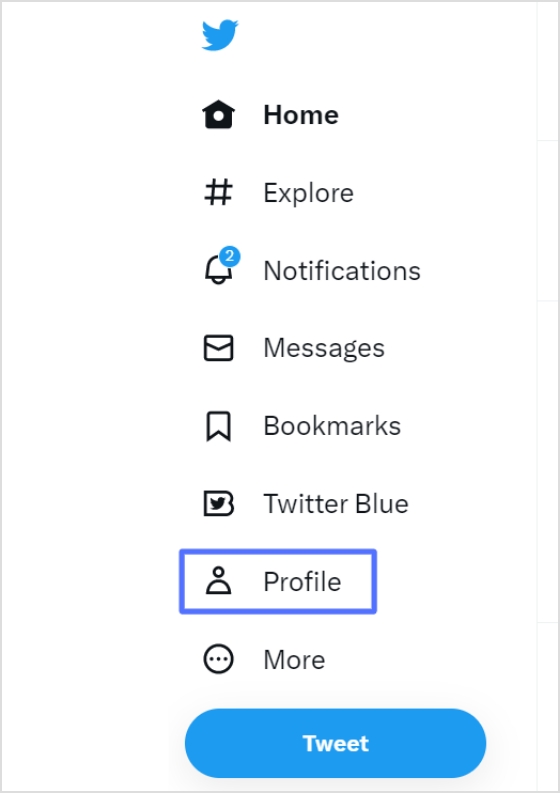
Step 2: Click “profile” on the left side of the menu.
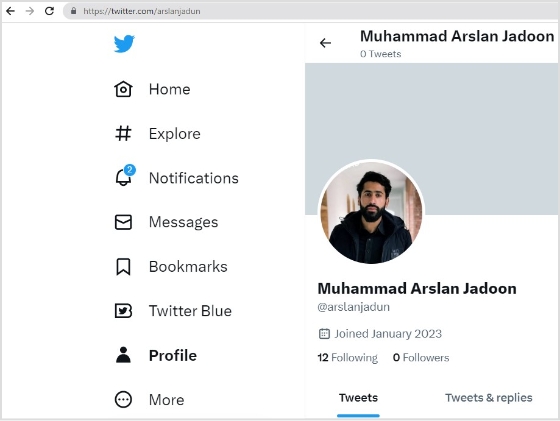
Step 3: From the URL bar, copy the URL. That’s your profile URL.
For a cleaner look in your Instagram bio, especially with character limits, a free link shortener can transform that lengthy “X” URL into something concise and branded. Tools like Replug, a powerful link optimization platform, make this effortless by not only shortening links but also adding tracking and customization options to boost your cross-platform engagement.
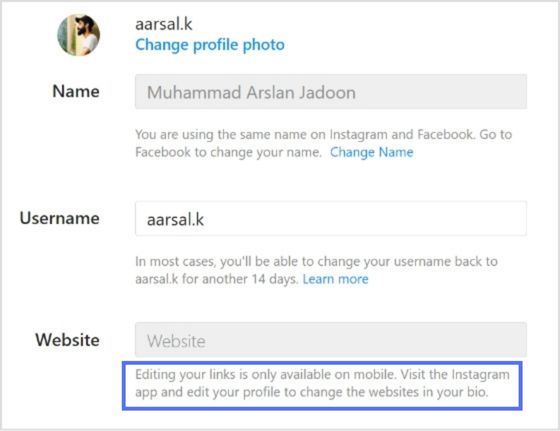
Note: You can only edit your links on mobile devices. Instagram’s Help Center says adding a website to your profile “isn’t available on computers”. Visit the Instagram app and follow the steps above to edit your bio and add the X link.
Other ways to link X and Instagram

People who search “how to link Twitter to Instagram” usually want one of four things. Here is how each works today.
1. Add your Instagram link to your X profile
This is the same idea in the other direction. On X, go to your profile, tap or click Edit profile and paste your Instagram profile URL (instagram.com/ plus your username) into the Website field, then tap Save. X’s Help Center lists Website as one of the profile fields, next to a bio of up to 160 characters, where you can also mention your @handle.
2. Share an X post to your Instagram Story
According to X’s Help Center, this works in the X app for iOS: tap the share icon on a public post, then tap the Instagram icon. Instagram opens a new Story draft with the post as a sticker you can move and resize. Protected posts can’t be shared this way.
3. Share your Instagram posts to other networks
Instagram’s Help Center still describes sharing to other social networks: tap Menu on your profile, tap Meta Account (some accounts see Accounts Center), tap Cross-profile experiences, then Sharing across profiles, and add the account you want to connect. The networks offered depend on your app version and region; if X isn’t listed, copy your Instagram post link and paste it into a post on X instead.
4. Put X next to your other links on one page
If your five Instagram links are already taken by a shop, a newsletter and a podcast, a link in bio page holds them all and gives X its own button. With Replug bio links you can build one on the Free plan (2 bio pages) and see how many people tap the X button compared with the rest.
Note that X and Threads are different apps: X is the former Twitter, while Threads is Meta’s app that connects to your Instagram account. If you meant Threads, see how to add Threads to your Instagram bio.
Also read: How to find my Twitter URL on mobile and desktop?
Trending:
How to add YouTube link to Instagram bio?
How to Rename Links Using Replug: 5 Simple Steps
FAQs about how to add a Twitter (X) link to Instagram bio?

Arslan Jadoon