Most marketers prioritize email, social, and ads when designing their digital marketing campaigns. They highly underestimate SMS marketing probably due to the advent of apps like WhatsApp, WeChat, Viber, Kik, BOTIM, and others.
However, the reality is that SMS marketing hasn’t become irrelevant at all. A text message reaches any phone number, with no app to install, which is why it is still one of the most direct ways to reach customers.
A core reason why SMS marketing, especially for text invitations, can turn things around for any brand or individual is the effective use of SMS link previews.
Find out what an SMS link preview is before your competitors take the edge over you.
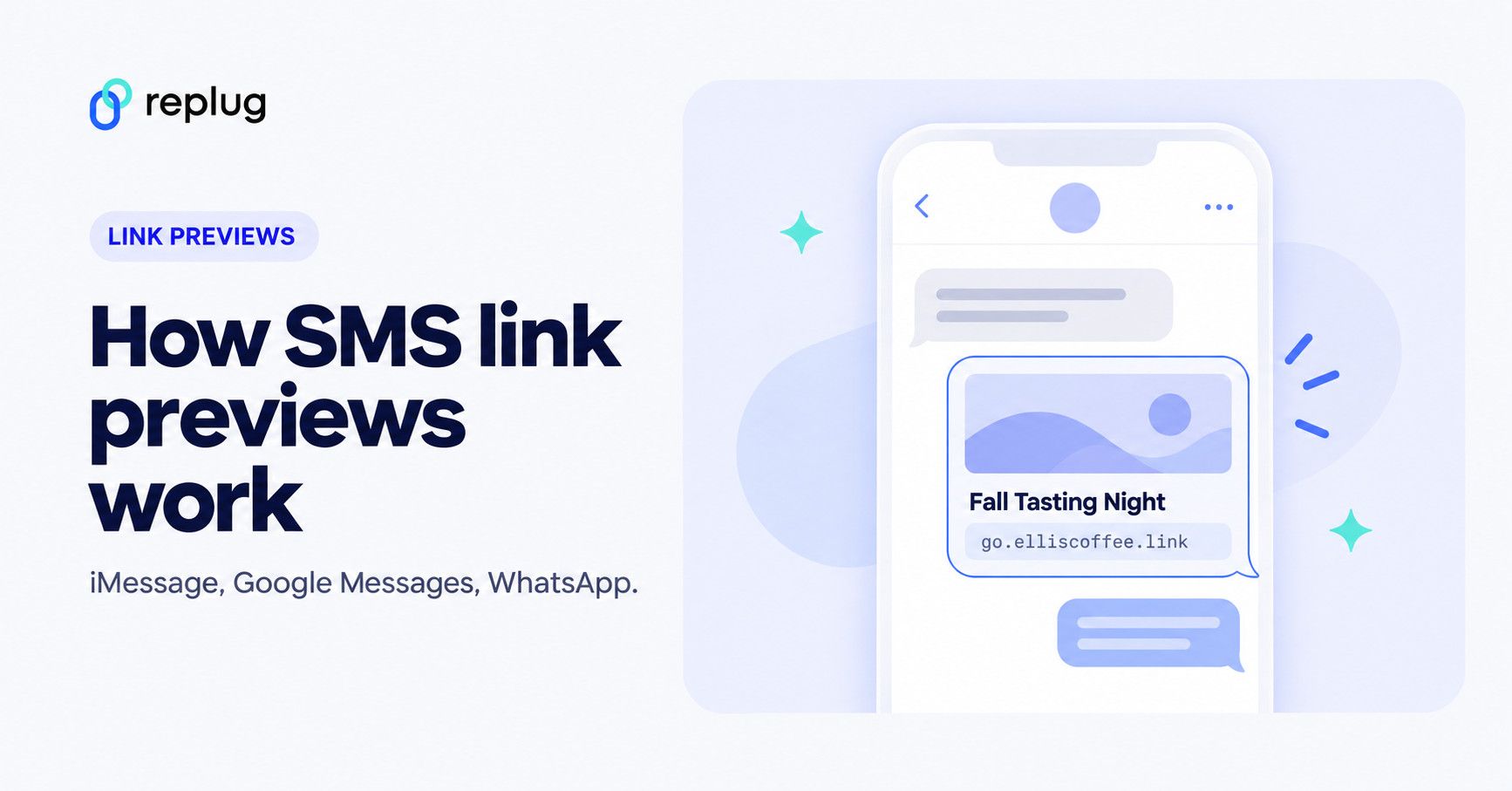
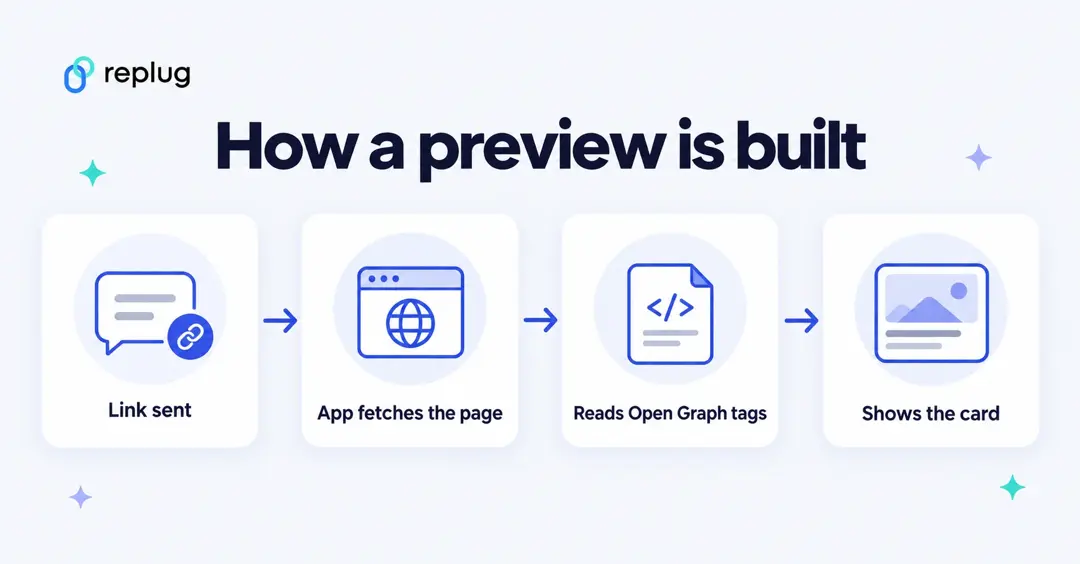
Quick answer: an SMS link preview is the card a messaging app shows under a link: usually an image, a title and the website’s domain. The app builds it, not the carrier. It fetches the page and reads the page’s Open Graph tags (og:title, og:description, og:image), which is how Apple Messages, Google Messages and WhatsApp all describe it in their own documentation. To control your preview, set those tags on the page, or set a custom title, description and image on the short link you send.
Understanding SMS link previews
An SMS link preview is a preview snippet that pops up in the text message and showcases the featured image and topic of the article or web page right in the SMS, making it more appealing and clickable.
Simply put, it’s the enhanced version of a link sent in a text message that displays the link’s title, image, and (sometimes) a short description.
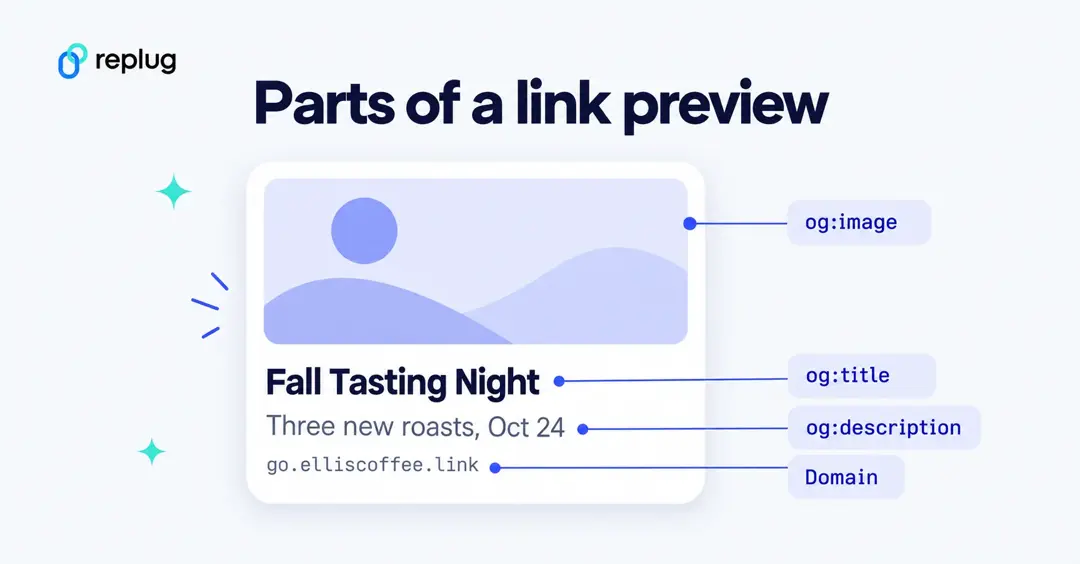
It’s called SMS link preview because it provides a preview to the receiver before this person opens the link. Not only does it provide a sneak peek into the content, but it also adds curiosity to the receiver’s mind.
What are the benefits of using SMS Link Previews?
SMS links are widely used in SMS marketing campaigns, but most marketers still take them for granted.
So, here are some benefits of using SMS link previews as a reminder to make the most of your SMS marketing campaigns:
1. Helps drive website traffic through text messages
One reason brands and marketers send out links in text messages is to drive website traffic to their sales pages, blog posts, or other URLs. SMS link previews can entice SMS receivers to click through and visit the website.
Also Read: What is deep linking? A guide to deep links and how they work
2. Makes SMS links more clickable
SMS marketing has become an integral part of digital marketing. Therefore, SMS links are crucial for the success of any SMS marketing campaign. SMS link previews make links more noticeable and clickable, enabling SMS marketing campaigns to achieve better results.
3. Gives a sneak peek into the content
A little peek into the content makes it easier for the receiver to check it out. Optimizing the website pages and blog posts to showcase SMS link previews makes a huge difference.
Also Read: Content Engagement: 9 Key Steps for Writing Engaging Content
4. Provides a clean, un-spammy look
Let’s be honest: a hyperlink with text in an SMS looks quite shady, even if a family member or friend sends it. One of the benefits of having SMS link previews is that the SMS links appear cleaner and less-spammy. Above all, the receivers can open them with some confidence.
You may also like: How to customize the LinkedIn link preview using Replug?
5. Adds credibility to the message
Indeed, sometimes short URLs don’t look trustworthy, especially if an unknown person sends them. Most marketers use short links in SMS and email marketing to track clickability, open rate, and reach. However, when an SMS link preview pops up, it adds credibility to the message.
How iMessage, Google Messages and WhatsApp build link previews
Each app has its own rules, but all three read the same Open Graph tags from the page. Here is what each one documents (checked October 2026).
Messages on iPhone, iPad and Mac (iMessage)
- By default, Messages shows a gray bubble with the page title, domain and a small icon. With Open Graph tags it shows a large image and a meaningful title, according to Apple’s technote TN3156: Create rich previews for Messages.
- Previews don’t follow meta-refresh redirects and don’t run JavaScript. Server-side redirects are followed, so a standard short link still shows the destination page’s preview.
- Apple recommends preview images at least 900 pixels wide and square icons at least 108 pixels per side; images narrower than 150 pixels may be ignored or shown as icons.
- Avoid text inside the preview image and keep the brand name out of og:title (use og:site_name for that).
Google Messages (Android)
- Google Messages creates preview cards for links with its automatic previews feature. Google says only the link itself is sent for a quick lookup, without linking it to your name or phone number.
- You can switch previews off in Messages settings → Automatic previews: turn off Show all previews, or use Show only web link previews, according to Google Messages Help.
- Because the recipient can turn previews off, never rely on the preview alone: the message text should still say what the link is.
- WhatsApp crawls the page with an HTTP GET request on behalf of the sender and reads og:title, og:description, og:url and og:image, according to Meta’s WhatsApp link preview documentation.
- The page’s head section must appear within the first 300 KB of the HTML.
- The og:image should be under 600 KB and at least 300 pixels wide, with an aspect ratio of 4:1 or narrower. The description shows on one or two lines, so about 80 characters is enough.
- To test, paste the link into a chat without sending it: if no preview appears above the text box within about 10 seconds, check the tags.
Can you curate the SMS link preview image and text?
When sharing links via SMS, having an eye-catching preview image and compelling text can significantly enhance engagement.
To make it happen, one needs to utilize a link preview tool such as Replug. This all-in-one link management platform makes it easy to customize these previews, ensuring your messages stand out.
Here’s how you can create an effective SMS link preview using Replug.
Start by signing up for a Replug account or logging into your existing one.
Step no 01
Go to Replug Home, paste the URL you want to share into the shorten box and click Shorten.

Step no 02
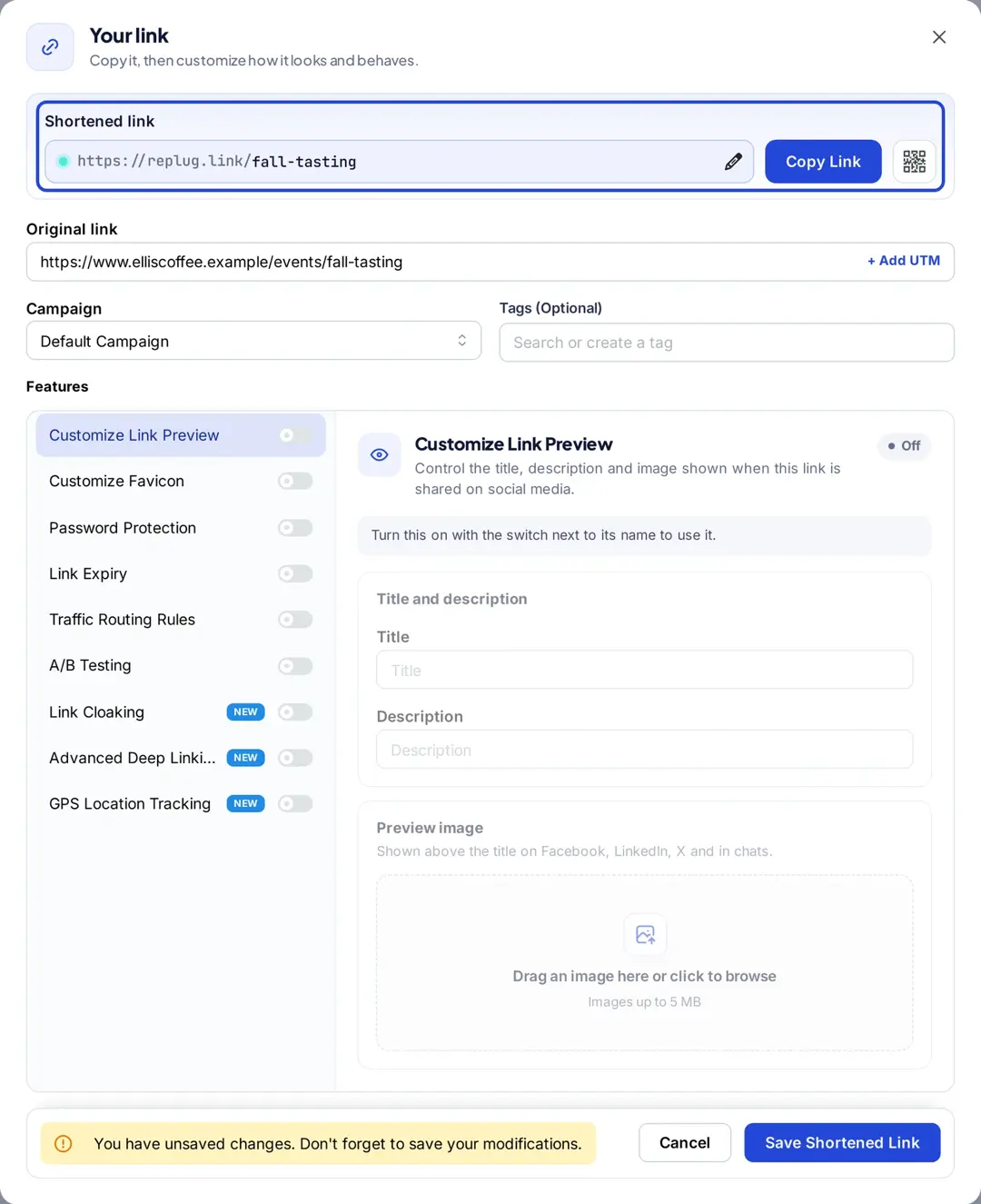
The Your link window opens with your short link on replug.link (or your own domain) and a list of features. Here you can customize the link preview and, depending on your plan, also password-protect your links, add expiry dates to them, add traffic routing rules to them, and much more.
Step no 03
Turn on Customize Link Preview (Essentials plan and up, according to Replug’s pricing page). If you leave it off, apps show the preview from the destination page’s own Open Graph tags. With it on, you can set:
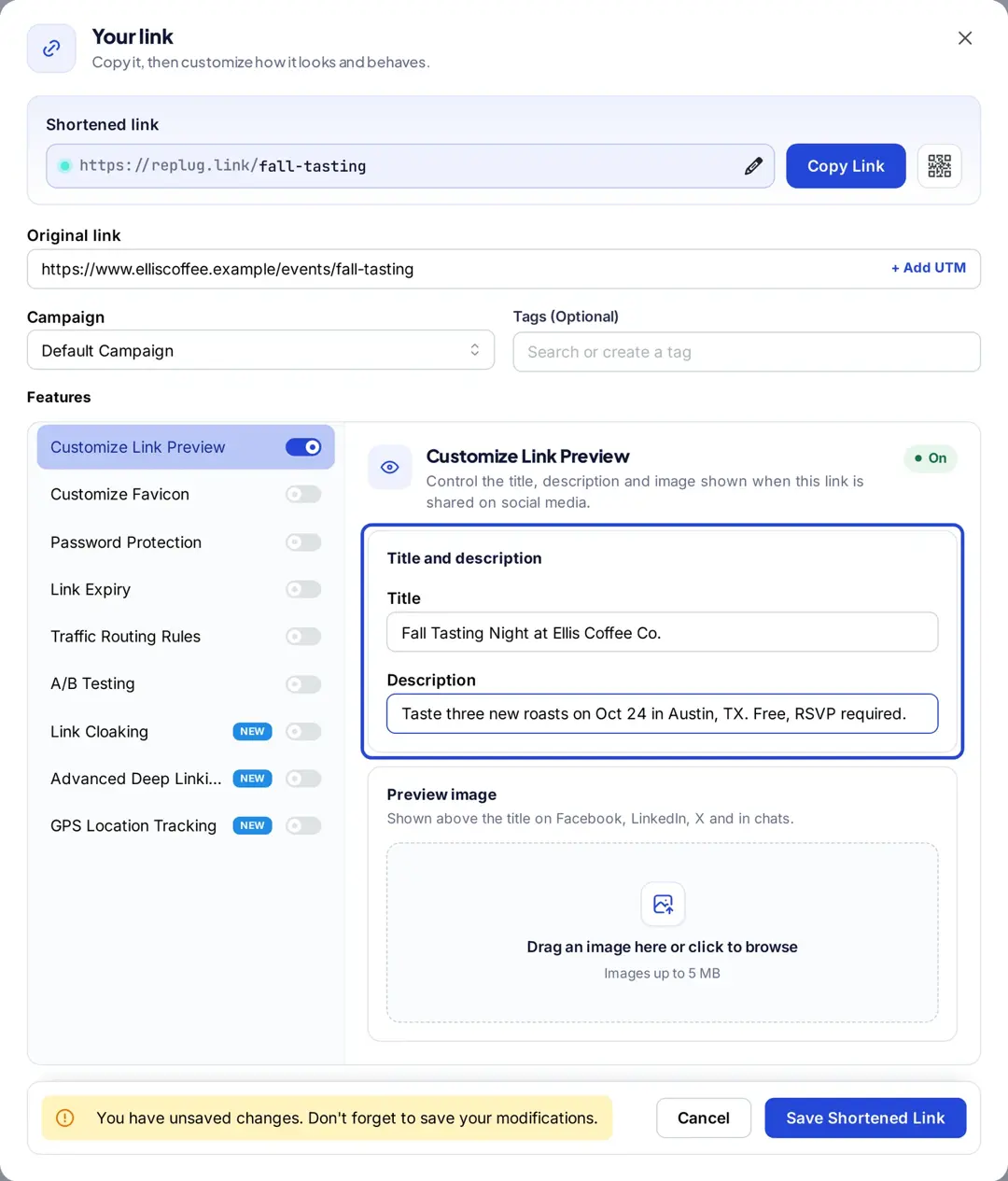
- Title: You can customize the title of your SMS link preview by simply typing in your preferred text in the “Title” field.
- Description: Adjust the description by writing a more engaging or relevant summary of your link in the “Description” field.
- Image: Upload a custom image to change the thumbnail. Make sure it’s eye-catching and relevant to your content.
You may also like: How to customize Twitter (X) link preview using Replug?
Step no 04
Replug automatically generates a shortened URL, making it SMS-friendly. Short links are easier to share and fit better in text messages.
Step no 05
Save the link, then text it to your own phone to see how the preview appears. Ensure the image and text are displaying correctly.
It’s a good idea to send yourself a test SMS to see how the link appears on different devices.
Step no 06
Once you are satisfied with the preview, click Save Shortened Link. Then, share the link through your preferred SMS platform. The enhanced preview will engage your audience and drive more clicks.
Short links, branded domains and previews
People often worry that a short link will break the preview. It doesn’t have to: Apple’s technote says server-side redirects are followed, so a short link that redirects with a normal 301 or 302 shows the destination page’s preview. Previews do break when a link tool shows its own interstitial page or redirects with JavaScript, because the app then reads the wrong page or nothing at all.
A branded short domain helps in a different way. In a plain-text SMS, or when the recipient has previews turned off, the link text is all people see. A link like go.elliscoffee.link/fall tells them who sent it before they tap, while an unfamiliar generic domain looks like every spam text. For the channel itself (opt-ins, message length, timing), see our guide to short links for SMS marketing.
Best practices when creating SMS link previews
Before you hop on your favorite online custom link maker for generating short URLs or optimizing your website URLs for SMS link previews, read the following best practices for using SMS link previews:
1. Keep it concise
SMS messages have character limits, so keep your link previews brief and to the point. Use clear, compelling language to entice users to click without overwhelming them with information.
2. Test across devices
Link previews can look different on various devices and messaging apps. Test how your previews appear on other platforms to ensure they maintain visual appeal and functionality, and adjust your metadata if necessary for optimal display.
3. Use high-quality, beautiful images in the content
Using colorful, high-resolution images in SMS link previews is essential for quickly capturing readers’ attention and creating a visually appealing experience.
Choose images that convey the essence of your message, enticing recipients to click on the link.

An attractive, eye-catching image can significantly enhance engagement, making the preview more inviting and transforming the URL snippet in the SMS into an irresistible opportunity for the recipient.
Also read: Branded links vs. short links: Which is right for your brand?
4. Keep the optimal image sizes in mind when creating images
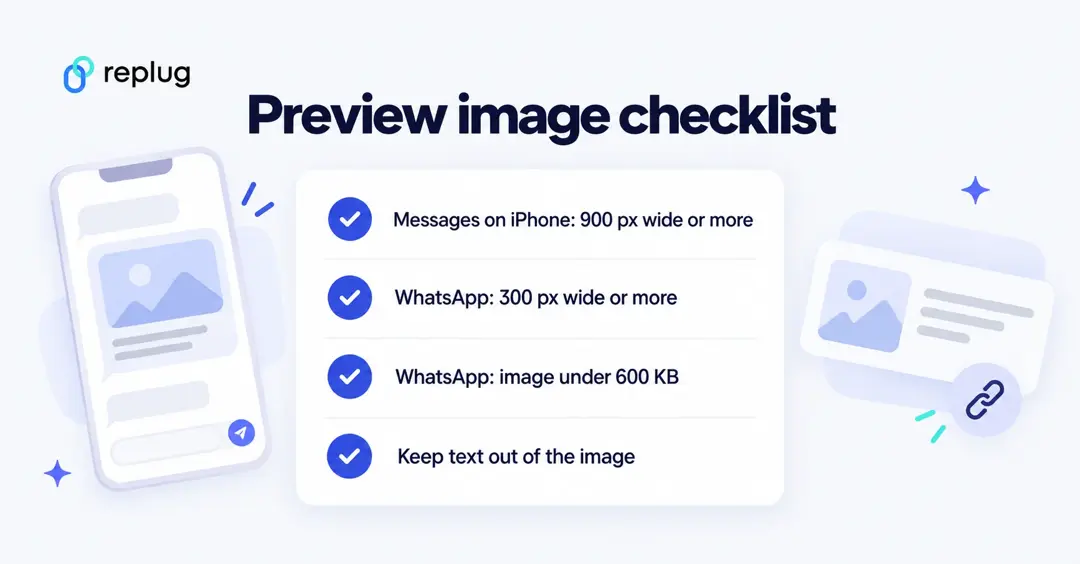
It’s essential to create images that are readable by the devices. The optimal image sizes should be considered when creating images for blog posts or landing pages.
Not only does it allow images to display correctly across various devices and platforms, but it also impacts the SMS marketing campaign. Properly sized images help maintain the visual integrity of the link preview.
Difference Between Link Previews and OG Tags
When sharing links across social media, messaging apps, or websites, you may notice that certain details like images, titles, and descriptions automatically appear. These elements come together in what we call link previews.
However, what many may not realize is that the content displayed in these previews is controlled behind the scenes by something called OG tags (Open Graph tags).
Understanding the difference between link previews and OG tags can help website owners and marketers optimize how their content is shared online. Let’s break down these two concepts.
| Feature | Link Previews | OG Tags (Open Graph Tags) |
|---|---|---|
| Definition | A visual snippet displayed when a URL is shared on social platforms or messaging apps. | HTML meta tags that control what content appears in the link preview. |
| Purpose | To give users a quick overview of the content and entice them to click the link. | To control and customize how content appears when shared on social media. |
| Visibility | Visible to users on social media and messaging platforms. | Hidden in the website’s HTML code; only visible to social platforms. |
| Customiz-ation | Generated automatically based on webpage content. Limited customization without OG tags. | Provides full control over title, image, description, and URL in the preview. |
| Control | Platforms decide what content appears in the preview based on available metadata. | Website owners can define exactly what content appears in the preview. |
| Common elements | Title, description, image (if available), URL. | Title, description, image, URL — all customizable via OG tags. |
| Role in SEO | Indirect impact, as well-crafted previews can increase click-through rates (CTR). | Can indirectly boost SEO by making links more appealing and clickable. |
| Impleme-ntation | Automatic; platforms extract information from the webpage. | Requires adding specific meta tags to the HTML of the webpage. |
| Use case | When sharing URLs on platforms like Facebook, Twitter, LinkedIn, etc. | Best for ensuring consistent branding and accurate display of content across platforms. |
Leveraging open graph (OG) tags
OG tags are essential tools for controlling how the content is displayed when sent in a text message or shared on social media platforms.
The idea is to strategically implement these tags to ensure that the links turn out to be visually appealing and attractive to the recipient. Moreover, these effects can significantly improve click-through rates and engagement.
Let’s decode open graph tags and learn more about them:
The basic OG tags:
| og:title | It specifies the title of the content. |
| og:url | It showcases the canonical URL of the page |
| og:image | It defines the image that will appear with the shared link |
| og:type | It clarifies the type of object being shared, such as website, article, etc. |
| og:description | It provides a brief description of the page |
Here is a minimal set you can copy into the <head> of your page and edit:
<meta property="og:title" content="Fall Tasting Night" />
<meta property="og:description" content="Taste three new roasts on Oct 24 in Austin, TX." />
<meta property="og:image" content="https://www.example.com/images/fall-tasting-1200x630.jpg" />
<meta property="og:url" content="https://www.example.com/events/fall-tasting" />
<meta property="og:type" content="website" />
How to leverage OG tags?
Digital marketers and conversion optimization experts strive to discover new ways to increase engagement, drive website traffic, improve click-through rates, and make more money.
It doesn’t matter whether it’s a new trick to get new eyeballs around your content on social media or make your SMS preview links look more attractive.
Here are three ways to leverage OG tags:
1. Enhancing social media optimization
Social media content is vital to modern-day digital marketing. To maximize the impact of your OG tags on social media content performance, tailor them specifically for the social media platforms where your audience is most active.
Facebook, Twitter (X) and LinkedIn are the major social media platforms that rely on OG tags for link previews. Influencers and experts pay attention to OG tags to ensure that their article links generate previews when shared across social media.
By optimizing the OG tags for these platforms, social media users make sure that the content is presented in the best manner possible, which increases the chance of attracting more shares, comments, and likes.
2. Reaping the SEO benefits
Have you ever heard of Google Discover? It’s Google’s feed of articles and videos that appears in the Google app and on Android phones. Google’s Discover documentation recommends large, high-quality images at least 1200 px wide, which you can specify with schema.org markup or the og:image tag, and advises against generic or text-heavy images.
Beyond Discover, OG tags don’t change your search rankings directly. Their value is the better preview wherever your link is shared, which can earn more clicks and visits.
It’s safe to assume that attractive and well-optimized previews are more likely to be clicked and shared, leading to increased traffic and visibility for your website.
3. Fine-tuning the SMS link previews
Last but not least, it’s the effect on the SMS link previews. One of the best ways to leverage OG tags is to carve out a strategy for fine-tuning your SMS link preview.
Open Graph Protocol massively impacts the SMS link previews of the websites and blog URLs if implemented correctly. SMS is still a powerful communication medium despite the popularity of various chat apps like WhatsApp, WeChat, Viber, Kik, and others.
Optimizing your SMS link previews can trigger new opportunities no matter what industry you belong to. So, don’t shy away from putting together a solid strategy for optimizing your websites or blogs for SMS link previews.
So, these are three ways to leverage OG tags. The purpose of this strategy is to ensure that website titles, headlines, descriptions, and URLs pop up when shared across multiple devices and platforms.
Final thoughts
SMS link previews may not be the talk of the digital marketing world, but they’re still relevant to online marketing.
Since it directly impacts click-through rate, conversion, and engagement of text messages, the concept is gaining popularity day by day.
We tried to keep it simple yet meaningful for social media influencers, brands, bloggers, entrepreneurs, and publishers who haven’t had a chance to find out about the SMS link previews before.
The next time you send or receive a URL in the SMS, you’ll notice whether or not it generated the link preview – if you do, then all the effort that went into writing, editing, and publishing this piece of content is worth it.
Here are some of the frequently asked questions about SMS link previews:
FAQs about SMS link previews

Muhammad Ahsan Jamal