Are you the one who thinks QR codes are just for restaurant menus? Think again!
QR code use keeps growing: according to eMarketer’s “QR Codes Forecast and Trends 2022” report, the number of US smartphone users who scan QR codes was forecast to rise from 83.4 million in 2022 to 99.5 million in 2025.
People aren’t just scanning them; they’re using them to discover brands, make payments, and connect with creators instantly.
If you’re a content creator or small business owner, that’s a huge opportunity sitting right in your pocket.
And when you combine the reach of Linktree (your all-in-one link hub) with the scan-and-go convenience of a QR code, you get a seriously powerful tool for driving traffic and growing your audience: both offline and online.
But how exactly does it work, and how do you set one up?
Let’s start with the basics!
Quick answer (checked October 2026): according to Linktree’s Help Center, go to My Linktree → Edit → Share → My Linktree QR code, then download it as a PNG or SVG. Downloading is free; changing the color, hiding the Linktree logo or adding your own logo needs the Pro or Premium plan, and scan counts need Starter, Pro or Premium. The code points to a unique URL, not your username, so it keeps working if you change your username.
What is a Linktree QR code?
A Linktree QR code is essentially a scannable shortcut to your Linktree profile page. Instead of asking someone to type out a URL, you give them a nice QR code they can scan with their phone camera easily. And boom, they land directly on your profile, where all your links are waiting for them.
Its whole purpose is simple: make it easier for people to find you. Whether that’s your YouTube channel, online store, Instagram, or booking page, one scan gets them there.
How does it work?
It’s pretty straightforward. Linktree generates a unique QR code that’s tied directly to your personal Linktree URL. When someone scans it, it opens your Linktree page in their device browser instantly.
You can then drop that QR code anywhere (a business card, flyer, product packaging, or even a slide in a presentation). Basically, anywhere people might see it in the real world.
It bridges the gap between the physical and digital world, making it incredibly easy for your audience to connect with you in just one scan.
How to create Linktree QR code
The whole process takes less than two to three minutes. Here’s exactly how to make a Linktree QR code, step-by-step:
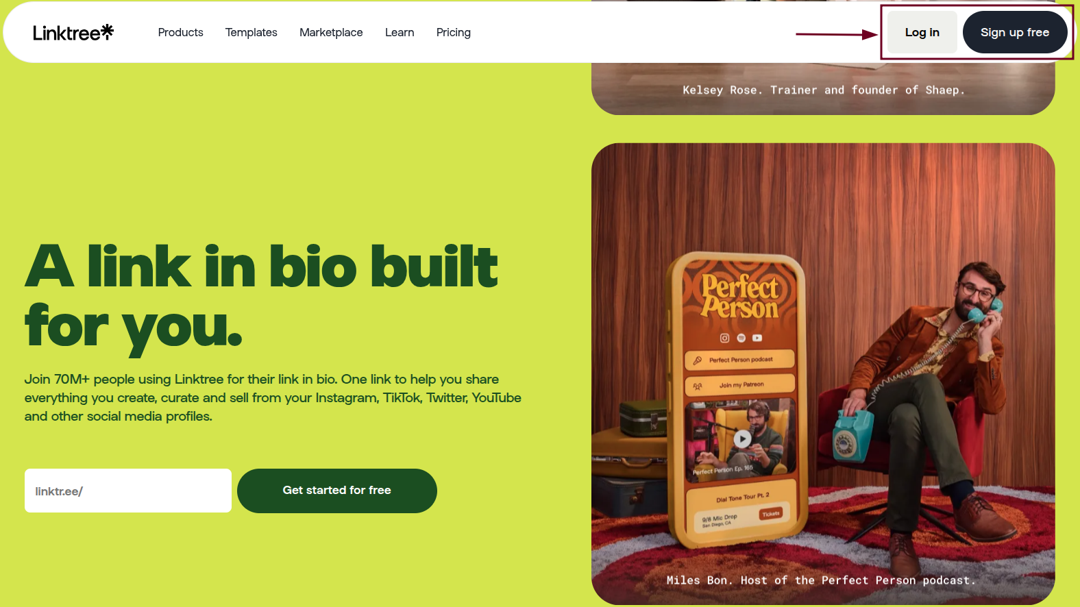
Step #01: Log in to Linktree
Head over to linktr.ee and sign in to your account. If you don’t have one yet, it’s free to sign up.
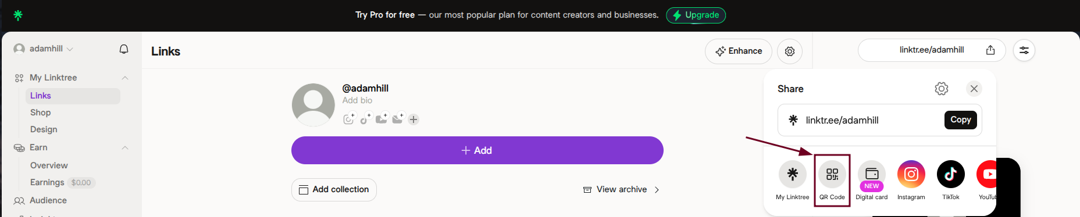
Step #02: Locate “Share”
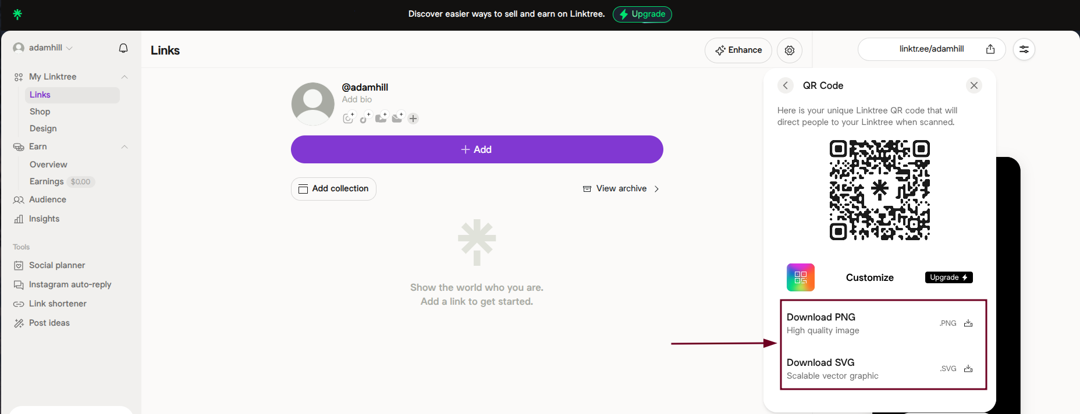
Once you’re on your dashboard, look for the “Share” icon. You’ll find it near your profile link or at the top of the page.

Step #03: Generate QR code
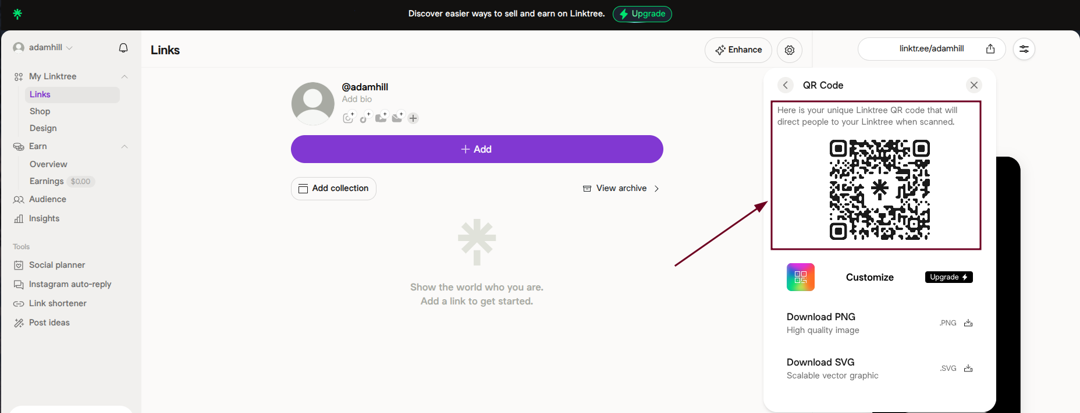
Click on the “Share” icon, and you’ll see your QR code already generated and ready to go. (In the current dashboard, per Linktree’s Help Center, select Share, then My Linktree QR code.)
Linktree automatically creates one linked to your unique Linktree URL.
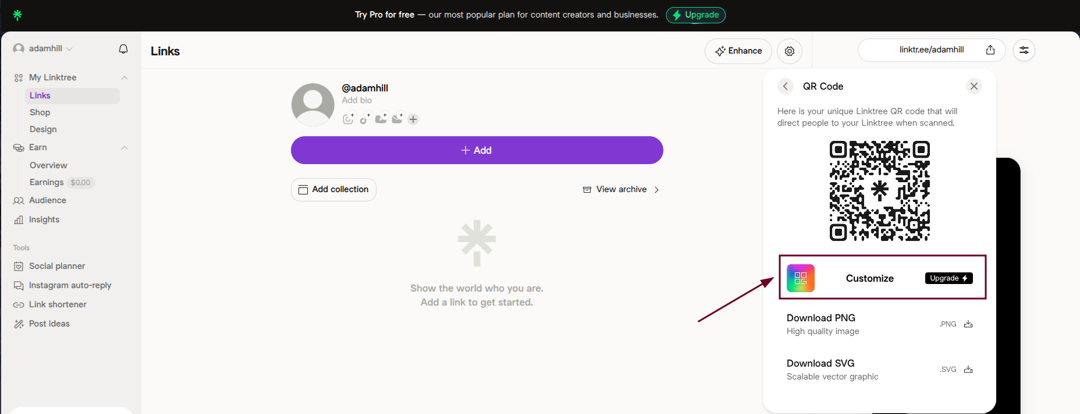
Step #04: Customize (optional)
If you’re on a paid plan, you can tweak the QR code’s colors and style to match your brand (per Linktree’s Help Center, customizing the color and logo is on the Pro and Premium plans). A nice touch if you’re using it professionally.
Step #05: Download
Hit the “Download PNG” or “Download SVG” option, save the QR code as an image file, and it’s yours to use wherever you need it.
How to create a Linktree QR code with Replug
Replug is a top-notch link management platform that also lets you create QR codes on the go. That includes a contact-card QR code, an email QR code, and a multi-URL QR code. And it comes with some extra perks like tracking and retargeting as well.
Here’s how to generate a Linktree QR code using Replug in no time:
Step #01: Log in to Replug
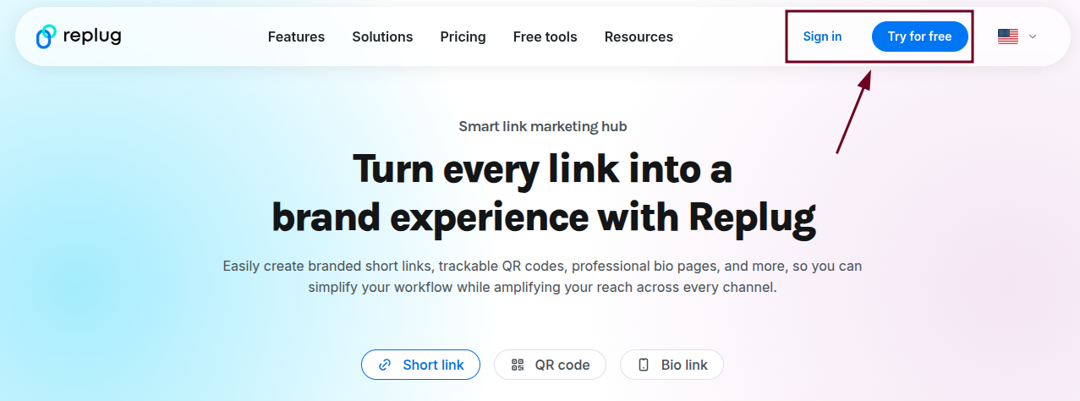
Go to replug.io and sign in to your account. If you are new here, you can quickly create an account and get started.
Step #02: Click “QR Codes”
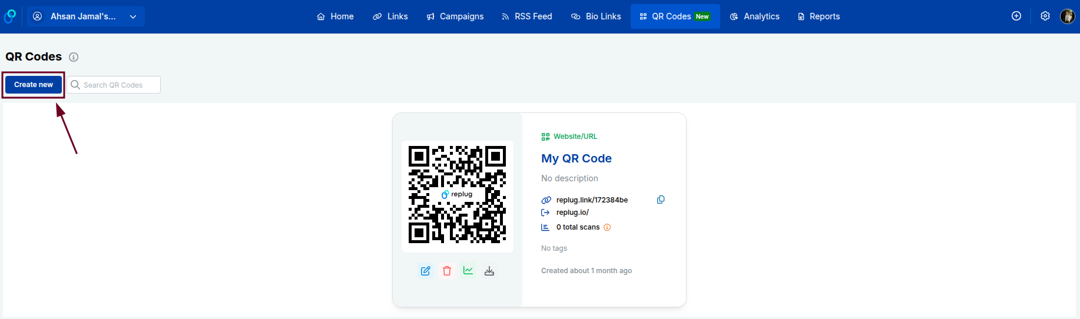
From your Replug dashboard, find and click on the “QR Codes” option. It will be available in the top list of options.

Step #03: Click the “Create new” button
You’ll see a “Create new” button on the QR Codes page. Go ahead and click it to start building your QR code.
Step #04: Enter details
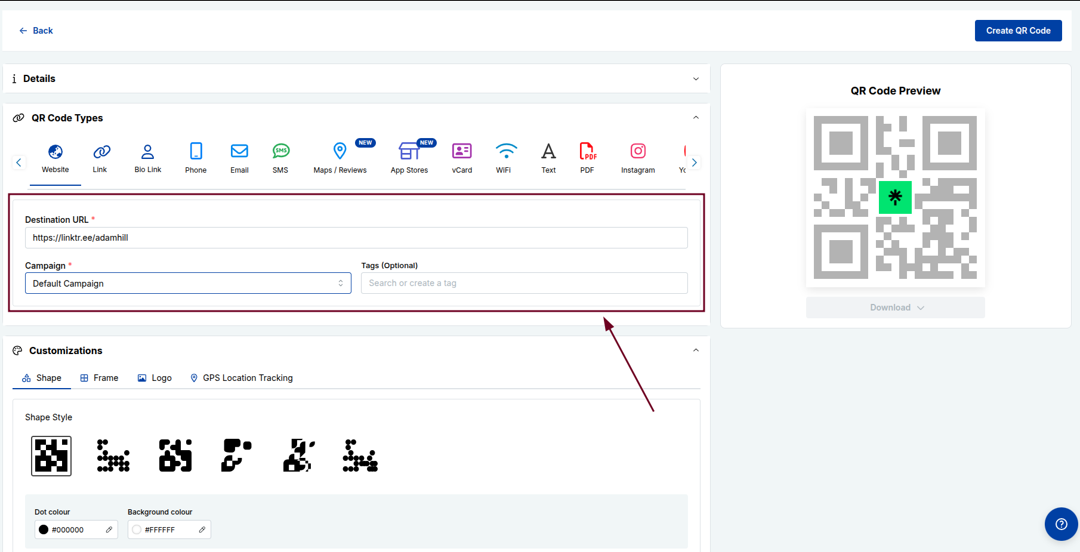
Paste your Linktree URL into the provided “Destination URL” field, and fill in any other required details. Also, customize the QR code the way you like.
Step #05: Click “Create QR Code”
Once everything looks good, hit the “Create QR Code” button.
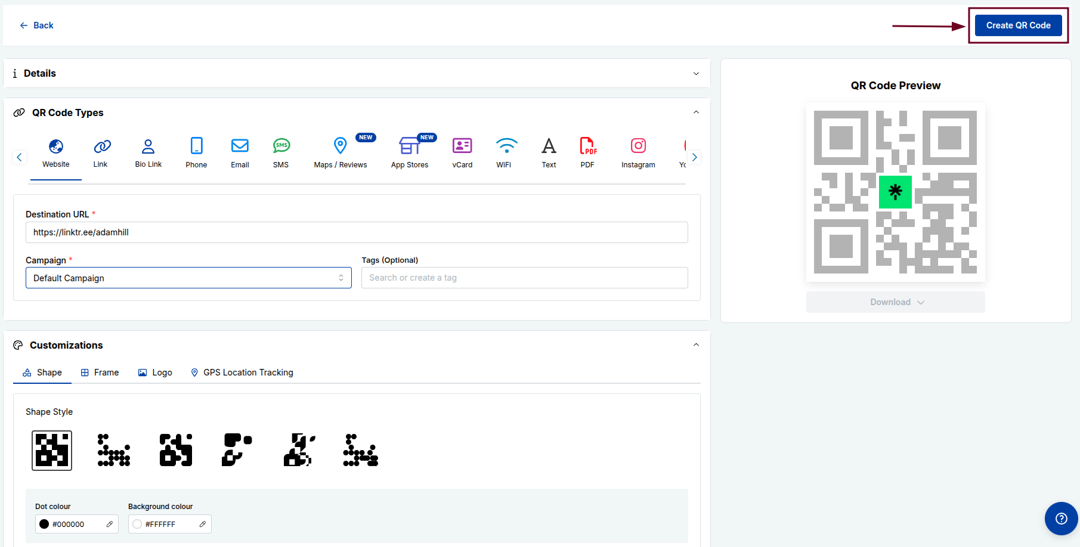
Your QR code will be generated instantly and ready to download and use. You can download in any format you like (SVG, PNG, JPEG, or WEBP). (Update: Replug’s QR code page now lists PNG, JPEG, SVG and PDF downloads.)

You may also like: How to create a QR code for a URL?
Do Linktree QR codes expire?
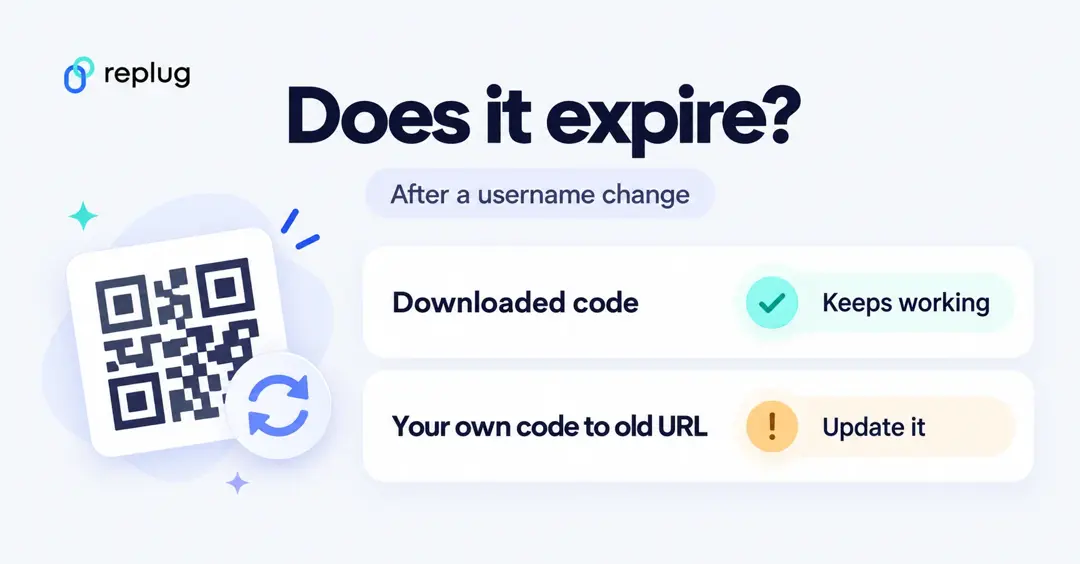
Linktree’s help pages don’t mention an expiry date for these codes. What they do say, in “How to create your QR code” and “How to change your username” (both updated in October 2026):
- The QR code you download from Linktree links to a unique URL, not your username, so it keeps working after a username change and you don’t need to download a new one.
- If you made your own QR code that points to linktr.ee/yourusername with another generator, that one does break when you change your username; update it to the new username.
- Your public link itself changes with your username (you can change it once every seven days), so update it in your social bios too.
In practice the code works as long as the Linktree page behind it is live. If people get an error, check that your page is still published before you reprint anything.
Linktree QR code vs a Replug QR code
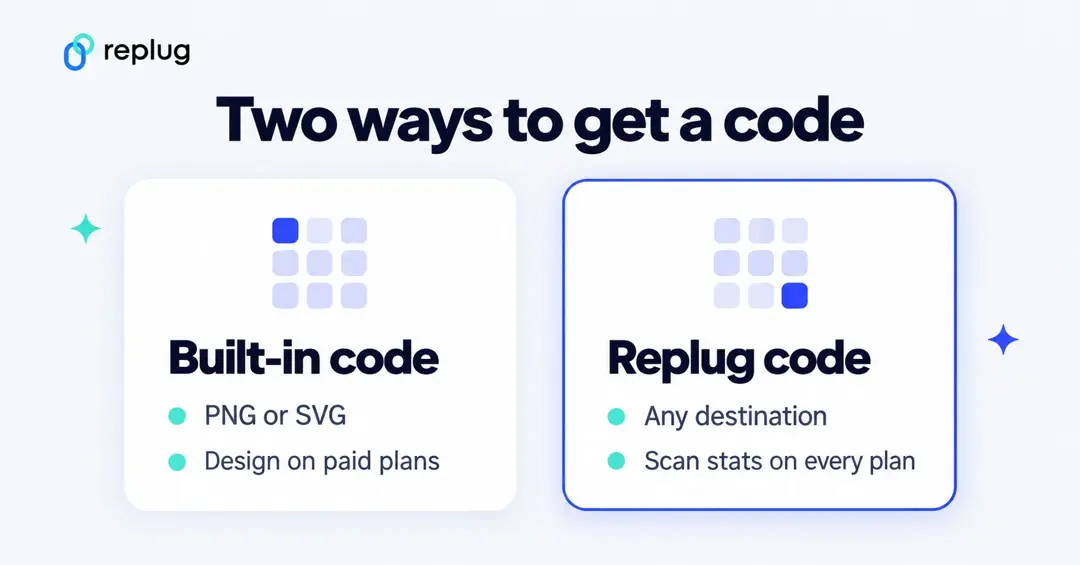
Both make a QR code for a link-in-bio page; they differ in what you can change and measure. Linktree details are from Linktree’s Help Center; Replug details are from replug.io/pricing and the QR code generator page (checked October 2026). For Linktree’s plan prices, see our Linktree pricing breakdown.
| Linktree QR code | Replug QR code | |
|---|---|---|
| Where it points | Your Linktree page | Any URL: a Replug bio page, a short link, or your Linktree |
| Free plan | Download as PNG or SVG | 10 QR codes; PNG, JPEG, SVG or PDF downloads |
| Colors and design | Color and logo on Pro and Premium | Colors, shapes and frames on Essentials and up; your logo on Scale and Agency |
| Scan counts | Starter, Pro and Premium | Every plan (14 days of history on Free, 90 on Essentials, unlimited on Scale and Agency) |
| Change the destination later | Edit your Linktree page; the code stays the same | Edit the page it points to on any plan; point the code itself somewhere new on Scale and Agency |
| Other QR types | Linktree page only | About 25 types (vCard, WiFi, PDF and more); beyond website, short link and bio page codes they start on Essentials |
If you already use Linktree and only need a code for your page, Linktree’s own download is the simplest option. A Replug code makes sense when you want to point the same printed code to a different page later, track scans with location and device detail, or keep all your QR codes, short links and bio pages in one place.
How to get your Linktree QR code on a phone
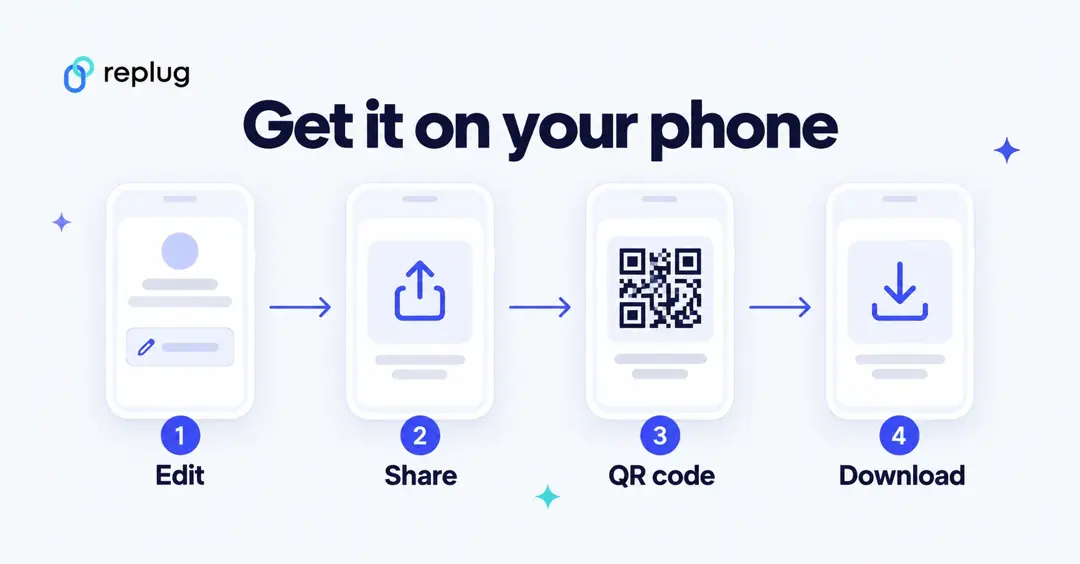
- Open the Linktree app or linktr.ee in your phone’s browser and log in.
- Go to My Linktree, tap Edit, then Share.
- Tap My Linktree QR code and choose PNG (for screens and most printing) or SVG (for designers and large prints).
- Save it to your phone, then scan it with a second phone to check it opens your page.
Key benefits of using Linktree QR codes
Linktree QR codes aren’t just a cool-looking feature; they’re genuinely useful. No matter if you’re a creator, freelancer, or business owner, here’s why adding a QR code to your Linktree strategy just makes sense:
- Instant access & convenience: No more typing out long URLs. People simply scan and land on your Linktree page within seconds, making the whole experience smoother for everyone.
- Bridge physical & digital spaces: Add your QR code on a business card, poster, or product packaging and instantly connect your offline audience to your entire online presence.
- Consolidation of multiple links: Instead of sharing five different links, one QR code scan takes people to your Linktree, where all your important links (social media, website, store, etc.) live in one place.
- Real-time updates: Update your Linktree links anytime, and your QR code automatically reflects those changes. No need to reprint or regenerate anything.
- Enhanced networking: At events, meetups, or conferences, sharing your QR code is way faster and more memorable than exchanging contact details the old-fashioned way.
- Cost-effective marketing: Creating a Linktree QR code is free, and using it across print or digital materials saves you money compared to traditional marketing tools that do far less.
Benefits of using Replug QR codes instead
Linktree’s built-in QR code gets the job done, but Replug takes things a step further. If you’re serious about tracking performance and getting more out of every scan, here’s why Replug’s QR codes give you an edge:
- Advanced retargeting: Replug lets you attach a retargeting pixel to your QR codes, so you can re-engage people who scanned your code with targeted ads on Facebook, Google, and more.
- Deep analytics & tracking: See exactly how many people scanned your code, when, and from where, giving you real data to understand what’s working and what’s not.
- Personalized branding & custom domains: With Replug, you can use your own custom domain and brand your QR codes with your colors and logo, making everything look polished and professional. (Per Replug’s pricing page: custom colors, shapes and frames start on Essentials; your own logo is on Scale and Agency.)
- Dynamic flexibility: Need to change the destination URL after printing? No problem. Replug’s dynamic QR codes let you update the link anytime without touching the QR code itself. (Editing a QR code’s destination is on the Scale and Agency plans.)
- Efficient lead generation: Replug lets you add lead capture forms to your links, turning every QR code scan into a potential new subscriber or customer (Linktree also offers contact forms on Linktree pages, per its Help Center; Replug’s call-to-action forms sit on the short link itself, so they work wherever the link points).
- Unlimited versatility: From marketing campaigns and product packaging to email signatures and event materials, Replug QR codes work seamlessly across virtually any channel or format.
Best practices & tips for using Linktree QR codes efficiently
Creating a QR code is easy, but making sure it actually works well and gets scanned is a different story. Follow these simple tips to get the most out of your Linktree QR codes:
Tip #01: High contrast
Always use dark colors on a light background. The stronger the contrast, the easier it is for phone cameras to scan your code quickly and accurately.
Tip #02: Minimalist design
Keep the design clean and simple. Overloading your QR code with too many colors or design elements can confuse scanners and cause read errors.
Tip #03: Use proper formats
Download your QR code as a high-resolution PNG or SVG file so it stays sharp and scannable, whether it’s printed small on a card or large on a banner.
Tip #04: Avoid inversion
Don’t flip your QR code to light-on-dark. Most scanners struggle with inverted codes, and it’s an easy way to kill your scan rate without realizing it.
Tip #05: Add a call to action (CTA)
Place a short CTA phrase like “Scan to see all my links” near your QR code. A slight nudge like this can significantly boost the number of people who actually scan it.
Tip #06: Size matters
Don’t print your QR code too small. The right size depends on how far away people will scan it from, so print a test copy at the final size and scan it from that distance before you print in bulk. Tiny codes get difficult to scan, especially on low-quality prints.
Tip #07: Test multiple devices
Before going live, test your QR code on both iOS and Android devices as well as PC screens and laptops to make sure it scans smoothly across different cameras and operating systems.
Tip #08: Use dynamic codes
Opt for dynamic QR codes over static ones so you can update your Linktree URL anytime without having to reprint or redistribute your materials.
Tip #09: Optimal placement
Put your QR code somewhere people can comfortably scan it (eye level works best). Also, avoid placing it on curved surfaces or in low-light areas where scanning becomes a hassle.
Turn QR codes into your smartest marketing asset using Replug!
If you want to do more than just generate a basic QR code, Replug is the tool you need in your corner.
It’s an all-in-one link manager that helps you shorten links with its reliable link converter. Besides, it assists in tracking clicks, retarget audiences, and yes, creating stunning, fully personalized QR codes in seconds.
With Replug’s custom QR code generator, you can build dynamic QR codes branded with your own colors, logo, and custom domain, no design skills needed. And since they’re dynamic, you can update the destination link anytime without reprinting a thing (destination edits are on the Scale and Agency plans).
No matter if you’re running a marketing campaign or just want smarter, trackable links, Replug turns every QR code scan into a real opportunity. It’s fast, intuitive, and built for people who mean business.
Wrapping up
QR codes have gone from a nice-to-have to a genuine marketing tool, and pairing them with your Linktree page makes them even more powerful.
Whether you’re sharing your links at an event, on a business card, or across printed materials, a Linktree QR code makes it effortless for people to find everything you offer in one tap.
And if you’re ready to take it up a notch with tracking, retargeting, and branded customization, Replug is the obvious next step.
The bottom line?
A well-designed, well-placed QR code can do a lot of the hard work for you — so why not let it?
Frequently asked questions

Muhammad Ahsan Jamal