Are you a music lover looking to share your favorite tunes on TikTok? Adding a Spotify link to your bio is a great way to let your followers know what you’re listening to and discover new tracks. However, the process of adding a Spotify link to your TikTok bio may seem confusing at first.
Don’t worry, though – in this guide, we’ll show you exactly how to do it in just a few simple steps. Whether you’re a seasoned TikTok user or just starting out, you’ll be able to share your musical taste with the world in no time!
What is a TikTok link in bio?
A TikTok link in bio is a clickable hyperlink that can be added to your TikTok profile page. This link appears in the “Bio” section of your profile and can be used to direct your followers to external websites, social media profiles, or any other online destination you want to promote
By default, TikTok only allows users to add one link to their bio. However, there are third-party tools like Replug that can be used to add multiple links to your bio section. This feature is especially useful for content creators, small business owners, and anyone else looking to promote their online presence to a wider audience.
How to add Spotify link to TikTok bio?
Adding a link to your TikTok bio is a great way to share more information with your followers and drive traffic to your website or other social media profiles. Here’s how to add a Spotify link to the TikTok bio:
Step 1: Open Spotify on your device and log in to your account.
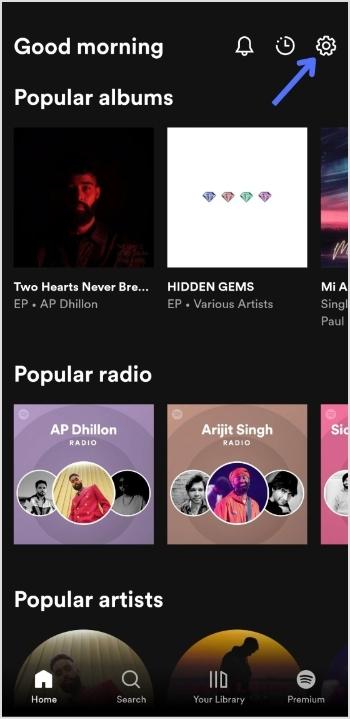
Step 2: Tap the “setting icon” in the top right of the screen.
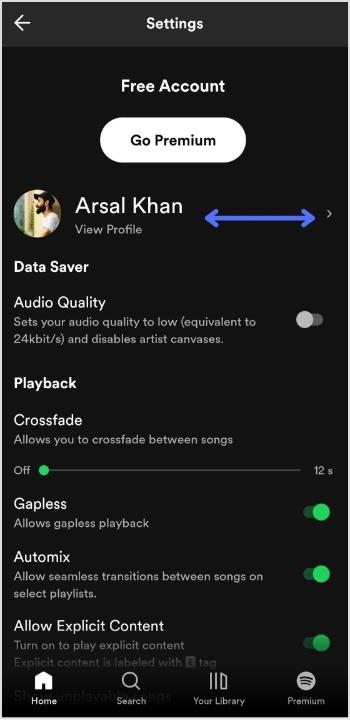
Step 3: Tap “view profile” under your profile name to open your profile.
Step 4: Tap 3 “vertical dots” on your profile page.

Step 5: Tap “share”.

Step 6: Tap “copy link”.
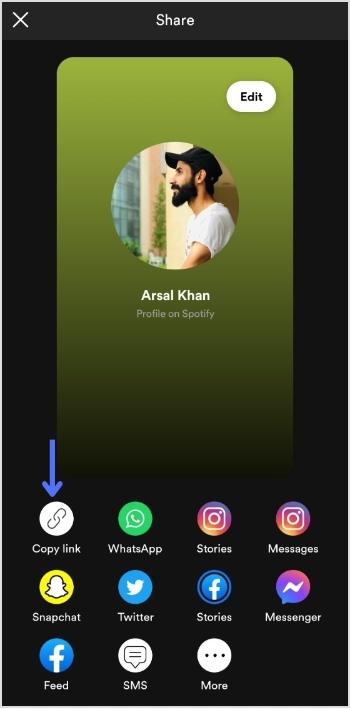
Add this link to your TikTok bio:
Step 1: Open TikTok on your mobile device and tap the “profile icon” in the bottom right corner.

Step 2: Tap “edit profile”.

Step 3: Tap “add a bio” to open the bio section.
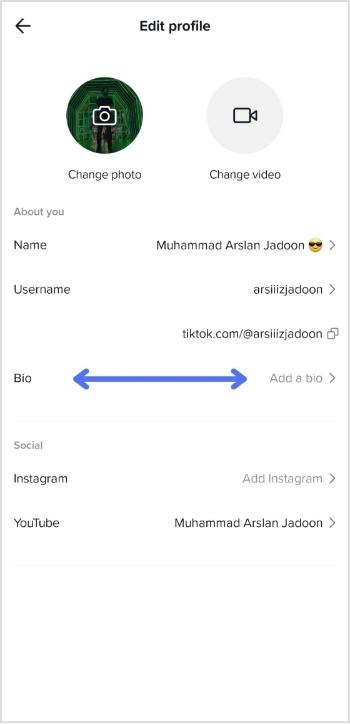
Step 4: Paste your Spotify link, tap “save” and you’re done.

Also read: How to add your Discord link to TikTok bio (2 easy ways)
How to add multiple links to your bio?
Do you have more than one link you want to add to your TikTok bio?
Perhaps you want to share your social media profiles or promote your website alongside your Spotify account. Luckily, there’s an easy solution: Replug.
It offers a top-notch, free bio link maker that allows you to add multiple links to your TikTok bio, helping you to increase your reach and engagement on the platform.
With this efficient link optimization platform, you can create a single link that directs users to a landing page containing all of your important links. This means that you can easily promote your online presence in one convenient location.
Here’s a video showing you how to add multiple links to your TikTok bio using Replug.
Trending:
How to add Amazon link to TikTok bio?
FAQs

Manahil