A follower taps the link in bio on your Instagram profile and lands on a plain gray page that could belong to anyone. That disconnect costs clicks, trust, and sales every day. Most generic bio link pages look the same and only count basic clicks, leaving marketers guessing why a campaign underperformed. The real problem isn’t the link itself, it’s what happens after someone taps it.
A link in bio is the single clickable URL in a social profile that opens a mini landing page holding every destination a brand wants to share, from a shop to a blog to a sign-up form. If you want the short answer: Replug combines branded bio link pages, custom domains, rule-based routing, and built-in analytics in one dashboard. This article covers what separates a branded, trackable bio link page from a throwaway one, how smart routing sends each visitor to the right destination, and how Replug compares with Linktree, Later, Lnk.Bio, and Canva.
Key takeaways
- Branded domains and custom URLs build more trust than generic subdomains
- Smart routing sends visitors to different pages based on device, location, or time
- Clicks alone don’t tell the full story, conversions and traffic sources matter more
- Replug, Linktree, Later, Lnk.Bio, and Canva each fit different budgets and needs
- Routing rules and consolidated analytics separate serious tools from simple link lists
What is a link in bio, and why does it need to be branded?
A link in bio is a branded landing page that replaces the single clickable link social platforms allow in a profile, functioning much like a mini-website built into a social profile. A platform like Replug pairs that page with built-in analytics and rule-based routing to several destinations at once. Instagram, TikTok, and Snapchat don’t allow clickable links inside posts and captions, so the link in bio on Instagram becomes the one spot where a brand can send followers anywhere else on the web. Instead of choosing one single destination, a bio link page holds a shop, a blog, social profiles, and more behind one URL (here’s more on what link in bio means). For content marketers running several campaigns at once, that page needs to look like it belongs to the brand, since a strange or generic address makes visitors hesitate before they click through.
Why branded domains and custom URLs outperform generic links
A link in bio with a custom domain looks intentional and safe the moment someone sees it, whether it’s in a bio, an email, or a text message. A generic string of random characters from a free tool can read as spam to a cautious visitor, and that small shift in perception often shows up directly in click-through rates. For content marketers testing campaigns across channels, a consistent branded short domain also reinforces recall every time it appears.
Setting up that branding used to require technical know-how, but modern bio link tools have removed that barrier. Replug, for example, lets marketers add a custom domain for free and issues SSL automatically, so the page loads securely without any manual certificate work. That means a small team can launch a fully branded page in minutes rather than waiting on a developer.
What makes smart routing different from a basic bio link?

Smart routing sends each visitor to a different destination based on rules such as country, device, browser, operating system, language, date, or time, instead of sending every single person to the same static page. A basic link in bio only offers one fixed set of buttons for everyone who taps it, regardless of who they are or where they are browsing from. That one-size-fits-all approach breaks down fast for brands with audiences spread across countries, languages, or device types. A shopper on an iPhone might need an App Store link, while a desktop visitor needs the full website instead. A link rotator also handles seasonal and time-sensitive campaigns, since a rule can automatically swap a holiday promotion for a regular offer once a date passes, without anyone touching the page again.
How the link rotator personalizes every click
Replug’s link rotator lets marketers build up to 10 separate rules, each containing multiple blocks with their own filters, all managed from a single dashboard. A rule might route visitors from Spain to a Spanish-language landing page while sending everyone else to the English version, and another rule might handle mobile versus desktop traffic within the same branded link. Because every rule lives in one place, a marketer can launch, pause, or edit routing logic without touching a line of code.
This kind of routing supports two practical use cases beyond basic geography:
- Global brands use location and language rules to personalize every visitor’s path through the page
- App-based businesses route mobile users straight to a download link and desktop users to a browser-based experience
The platform also supports A/B testing for bio links across up to 10 landing page variations from a single branded link, so a team can compare destinations and let the data decide which one converts best.
Which analytics actually matter for a bio link page?

Good link in bio analytics go beyond a raw click count and show what actually happened after someone tapped the link. The metrics that matter most include:
- Total clicks and unique clicks
- Conversions and conversion rate
- Traffic sources
- Geo-data showing where visitors are browsing from
Click counts alone can’t tell a marketer whether a campaign drove sign-ups or just curious taps that went nowhere. Real-time reporting lets a team watch a launch unfold as it happens, while custom date-range reports make it possible to compare campaigns and measure campaign performance. Without that level of detail, a page is just a prettier version of a static list.
Tracking clicks, QR scans, and retargeting pixels together

Juggling separate tools for link clicks, QR scans, and ad retargeting creates gaps in the data and wastes time. A consolidated link in bio dashboard can track UTM parameters for traffic attribution, QR code scans, and custom tracking scripts for every link from one screen, so a marketer never has to stitch together reports from three different logins. That single view also makes it faster to spot which channel, post, or QR placement actually drove traffic.
Tracking pixels add another layer of value once a visitor leaves without converting. Replug supports pixel integrations for networks including Facebook, TikTok, LinkedIn, Pinterest, Quora, and Google, which means a brand can quietly re-engage anyone who clicked but didn’t buy or sign up. That follow-up ad often costs less than chasing a brand-new audience, since the visitor already showed interest once. Pairing clicks, scans, and pixels in one click analytics dashboard turns a link in bio into a full attribution system.
Best branded bio link pages with analytics and smart routing
Choosing the right link in bio tool means weighing branding depth, routing rules, analytics detail, and price against each other, since no two platforms balance those factors the same way. Some tools focus almost entirely on visual design, others lean into pricing simplicity, and a smaller group build routing and tracking as a core part of the product rather than an afterthought. The five tools below cover the range content marketers and digital marketers are most likely to compare, from full-featured platforms to budget-friendly options. Each entry breaks down branding, analytics, routing, and pricing so it’s easier to match a tool to an actual campaign need.
1. Replug, best for branded bio links with smart routing and analytics
Replug lets you create a bio site out of social icons, videos, RSS feeds, text blocks, and custom cards, with full control over layout, colors, and themes. Marketers can connect a custom domain with automatic SSL, so the page carries the brand’s own address instead of a generic subdomain. Its link rotator adds up to 10 routing rules, and A/B testing can split traffic across up to 10 landing page variations from one branded link.
On the measurement side, the platform consolidates views, clicks, QR scans, and conversions, viewable at a glance from the Bio Links tab or in full depth through the main analytics view. Retargeting pixels for Facebook, Google, and other networks round out the toolkit. Replug has a free plan that includes 2 bio links and 3 custom domains. Paid plans come with a 14-day trial: Essentials costs $19 per month ($9.50 per month billed annually) with 10 bio links and 10,000 clicks a month, Scale costs $39 per month ($23.40 billed annually) with unlimited bio links, unlimited retargeting pixels, and 50,000 clicks a month, and Agency starts at $99 per month ($79.20 billed annually) for teams managing multiple clients. Routing and A/B testing are included on paid plans.
2. Linktree, the category standard
Linktree is the tool most people picture when they hear the phrase link in bio, and its free plan still offers unlimited links with basic click analytics. That recognition factor alone makes it a safe starting point for creators who want something simple without any setup time. Many marketers who start by learning how to use Linktree eventually look for deeper analytics or more design control than the free tier provides.
Paid tiers add advanced analytics, remove Linktree branding, add scheduling features, and support the Meta Pixel for retargeting. Where it falls short for growth-focused teams is rule-based personalization, since Linktree isn’t built around device, location, or time-based routing that sends different visitors to different destinations automatically. For a single static page with broad name recognition, it still gets the job done.
3. Later, best for visual feed-style pages
Later’s link in bio page can mirror a brand’s Instagram grid, giving visitors a feed-style browsing experience instead of a plain button list. A Mailchimp integration helps capture email sign-ups directly from the page, and custom affiliate links make it possible to track sales back to a specific post. Later offers a 14-day free trial according to Later’s pricing page, which suits editorial teams wanting content-level analytics alongside their social scheduling.
4. Lnk.Bio, best for one-time payment pricing
Lnk.Bio offers a free plan with unlimited links and basic analytics, plus low-cost upgrades that can be paid once or monthly, which makes it attractive for creators who want to avoid recurring fees. Password-protected links, QR codes, scheduling, and a large icon library round out the feature set, though routing and personalization stay limited compared to rule-based tools.
5. Canva, best for design-first teams already in the Canva ecosystem
Canva publishes link in bio pages to a free canva.link address and offers mobile-first templates with video backgrounds and embedded forms for drag-and-drop editing. Pro users get analytics covering clicks, unique visitors, device type, and country breakdowns directly inside the editor. It’s a strong fit for teams already building graphics in Canva, though it isn’t built for rule-based routing.
How to choose the right bio link tool for your brand
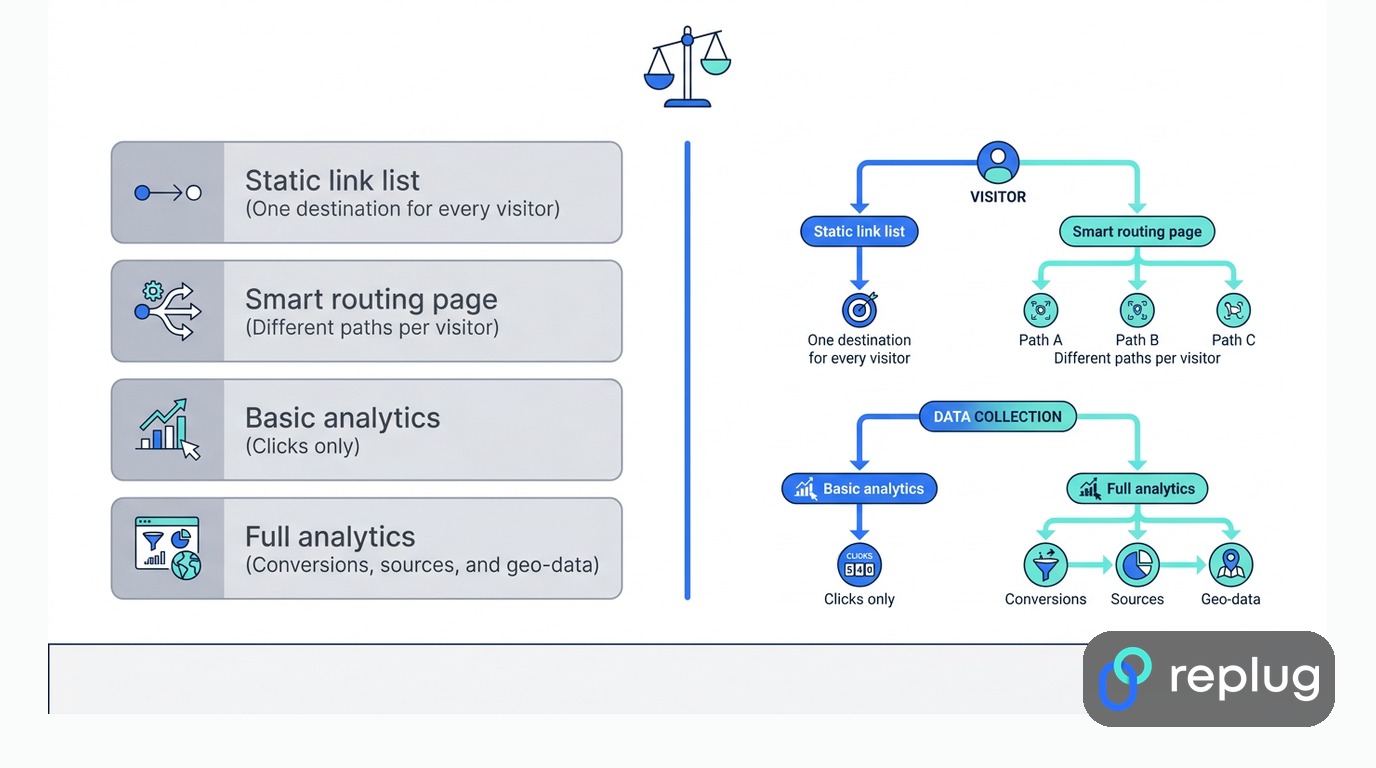
Picking the right link in bio tool starts with ranking priorities, since no single platform wins on every factor at once. A brand that lives or dies on paid retargeting should weight pixel support heavily, while a creator with one straightforward audience might care more about following bio link best practices. Budget matters too, since a tool with one-time pricing suits a creator who wants to avoid recurring fees, while a growing brand running multiple campaigns may get more value from a platform built around analytics and traffic routing. The table below lines up the core differences so it’s easier to compare options before committing to a plan.
Quick comparison table
The table below compares each tool on what it’s best for, whether it offers multi-rule visitor routing, and its starting price.
| Tool | Best for | Multi-rule routing (device, country, time) | Starting price |
|---|---|---|---|
| Replug | Branded bio pages with routing, pixels, and analytics | Yes, up to 10 rules | Free plan; paid from $19/month |
| Linktree | Simple, widely recognized pages | Not a core feature | Free; paid tiers available |
| Later | Instagram feed-style pages | Not a core feature | Paid plans with a 14-day trial |
| Lnk.Bio | One-time, low-cost pricing | Not a core feature | Free; low-cost upgrades |
| Canva | Design-first teams | Not a core feature | Free; Pro adds analytics |
A quick glance shows why routing separates tools built for performance marketing from those built mainly for design or simplicity. If you need branding, personalization, and retargeting in the same place, Replug is the option on this list that brings custom domains, rule-based routing, retargeting pixels, and analytics together in one dashboard.
The takeaway
A branded link in bio page does more than look professional, it gives marketers the routing and analytics needed to turn social traffic into measurable results. Smart routing replaces a single static page with a personalized path for every visitor, while consolidated analytics show exactly which links, QR codes, and campaigns are earning their place in the bio. Basic link lists still work for simple needs, but any brand running paid campaigns, multiple regions, or affiliate offers outgrows them fast.
Before committing to a paid plan, test how a tool handles routing and reporting with real traffic. With Replug, you can start on the free plan or a 14-day trial of a paid plan, connect a custom domain, set up a routing rule, and watch the analytics dashboard fill in before spending a dollar. That trial run is the fastest way to know whether a tool fits how your brand actually markets itself.
Frequently asked questions
Which platform offers branded bio link pages with analytics and routing to multiple destinations?
Replug offers branded bio link pages on your own custom domain, with built-in click, QR, and conversion analytics, retargeting pixels, and a link rotator that routes visitors to different destinations by device, country, language, or time. Linktree, Later, Lnk.Bio, and Canva also offer bio link pages, but rule-based routing isn’t a core feature of those tools.
Can I use smart routing to send mobile and desktop visitors to different pages?
Yes. Routing rules detect device type and send mobile visitors to an app store page or mobile-optimized site, while desktop visitors land on the full website. This keeps every visitor on the version built for their device without creating separate links for each one.
Do bio link tools with analytics slow down page load speed?
Not if the tool is built for mobile-first browsing. Modern bio link pages are lightweight, with compressed images, so tracking code runs in the background without slowing things down. A well-built page should still load quickly on most mobile connections.
Is a custom domain necessary, or is a branded subdomain enough?
A full custom domain looks more professional than a free, generic subdomain, and it supports stronger brand recall across emails, ads, and social bios (see branded links vs. short links). A branded subdomain works fine for small creators, but a growing business benefits more from a full custom domain.
How many links can I add to one bio link page?
Most link in bio tools let you add as many links and content blocks as you need on one page. Instagram itself allows only a handful of links in a profile bio, so a dedicated bio link page is the simplest way to put every product, social profile, and campaign link behind one short address.
Can retargeting pixels be added without coding knowledge?
Yes. Retargeting pixels for networks like Facebook, Google, and TikTok are added through a dashboard setting, not custom code. A marketer pastes or selects a pixel ID once, and every visitor who clicks a tracked link afterward gets added to that retargeting audience automatically.
Do I need a separate QR code generator for offline campaigns?
No. Most modern link in bio tools generate a dynamic QR code tied to the same link and analytics dashboard already in use. Scans get counted alongside clicks, so a print ad, poster, or product package can feed the same reporting as a social bio link.

Muhammad Ahsan Jamal